


DESIGN PATTERNS IN JAVA
Creational design patterns
FACTORY
DESIGN PATTERN
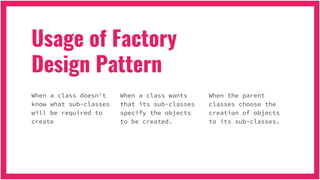
Usage of Factory
Design Pattern
When a class doesn't
know what sub-classes
will be required to
create
When a class wants
that its sub-classes
specify the objects
to be created.
When the parent
classes choose the
creation of objects
to its sub-classes.
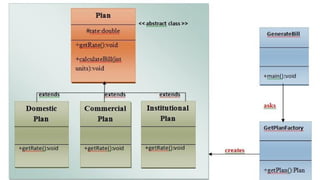
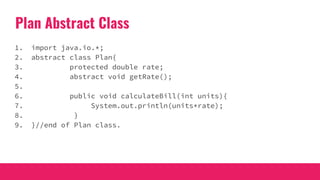
Plan Abstract Class
1. import java.io.*;
2. abstract class Plan{
3. protected double rate;
4. abstract void getRate();
5.
6. public void calculateBill(int units){
7. System.out.println(units*rate);
8. }
9. }//end of Plan class.
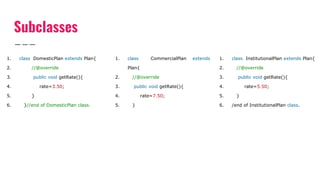
Subclasses
1. class DomesticPlan extends Plan{
2. //@override
3. public void getRate(){
4. rate=3.50;
5. }
6. }//end of DomesticPlan class.
1. class CommercialPlan extends
Plan{
2. //@override
3. public void getRate(){
4. rate=7.50;
5. }
1. class InstitutionalPlan extends Plan{
2. //@override
3. public void getRate(){
4. rate=5.50;
5. }
6. /end of InstitutionalPlan class.
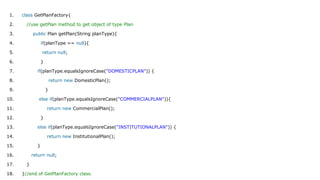
1. class GetPlanFactory{
2. //use getPlan method to get object of type Plan
3. public Plan getPlan(String planType){
4. if(planType == null){
5. return null;
6. }
7. if(planType.equalsIgnoreCase("DOMESTICPLAN")) {
8. return new DomesticPlan();
9. }
10. else if(planType.equalsIgnoreCase("COMMERCIALPLAN")){
11. return new CommercialPlan();
12. }
13. else if(planType.equalsIgnoreCase("INSTITUTIONALPLAN")) {
14. return new InstitutionalPlan();
15. }
16. return null;
17. }
18. }//end of GetPlanFactory class.
1. import java.io.*;
2. class GenerateBill{
3. public static void main(String args[])throws IOException{
4. GetPlanFactory planFactory = new GetPlanFactory();
5. System.out.print("Enter the name of plan for which the bill will be generated: ");
6. BufferedReader br=new BufferedReader(new InputStreamReader(System.in));
7.
8. String planName=br.readLine();
9. System.out.print("Enter the number of units for bill will be calculated: ");
10. int units=Integer.parseInt(br.readLine());
11.
12. Plan p = planFactory.getPlan(planName);
13. //call getRate() method and calculateBill()method of DomesticPaln.
14. System.out.print("Bill amount for "+planName+" of "+units+" units is: ");
15. p.getRate();
16. p.calculateBill(units);
17. }
18. }//end of GenerateBill class.
Best Practices
JDBC is a good example for this pattern; application code
doesn’t need to know what database it will be used with, so
it doesn’t know what database-specific driver classes it
should use. Instead, it uses factory methods to get
Connections, Statements, and other objects to work with.
This gives flexibility to change the back-end database
without changing your DAO layer.
DESIGN PATTERN
ABSTRACT FACTORY
Intent
● When a system should be independent of how its products are created,
composed, and represented.
● When a system should be configured with one of multiple families of
products.
● When a family of related product objects is designed to be used
together, and you need to enforce this constraint.
● When you want to provide a class library of products, and you want to
reveal just their interfaces, not their implementations.
Usage
Provide an interface for creating families of related or dependent
objects without specifying their concrete classes.
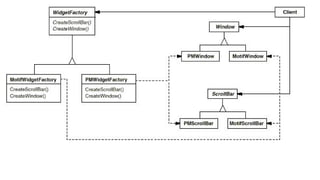
WidgetFactory abstract class
public abstract class WidgetFactory{
public abstract Window createWindow();
public abstract ScrollBar createScrollBar();
public WidgetFactory getFactory(){
...
}
}
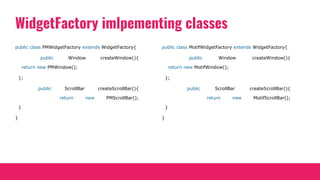
WidgetFactory imlpementing classes
public class PMWidgetFactory extends WidgetFactory{
public Window createWindow(){
return new PMWindow();
};
public ScrollBar createScrollBar(){
return new PMScrollBar();
}
}
public class MotifWidgetFactory extends WidgetFactory{
public Window createWindow(){
return new MotifWindow();
};
public ScrollBar createScrollBar(){
return new MotifScrollBar();
}
}
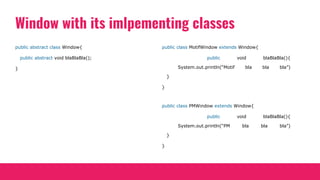
Window with its imlpementing classes
public abstract class Window{
public abstract void blaBlaBla();
}
public class MotifWindow extends Window{
public void blaBlaBla(){
System.out.println(“Motif bla bla bla”)
}
}
public class PMWindow extends Window{
public void blaBlaBla(){
System.out.println(“PM bla bla bla”)
}
}
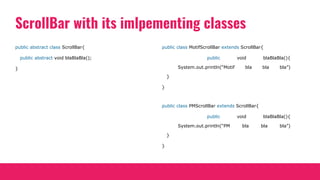
ScrollBar with its imlpementing classes
public abstract class ScrollBar{
public abstract void blaBlaBla();
}
public class MotifScrollBar extends ScrollBar{
public void blaBlaBla(){
System.out.println(“Motif bla bla bla”)
}
}
public class PMScrollBar extends ScrollBar{
public void blaBlaBla(){
System.out.println(“PM bla bla bla”)
}
}
DESIGN PATTERN
SINGLETON
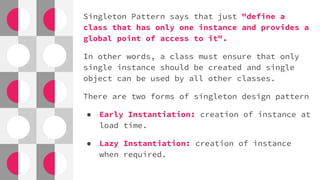
Singleton Pattern says that just "define a
class that has only one instance and provides a
global point of access to it".
In other words, a class must ensure that only
single instance should be created and single
object can be used by all other classes.
There are two forms of singleton design pattern
● Early Instantiation: creation of instance at
load time.
● Lazy Instantiation: creation of instance
when required.
Advantage of Singleton design pattern
● Saves memory because object is not created at each
request. Only single instance is reused again and
again.
Usage of Singleton design pattern
● Singleton pattern is mostly used in multi-threaded
and database applications. It is used in logging,
caching, thread pools, configuration settings etc.
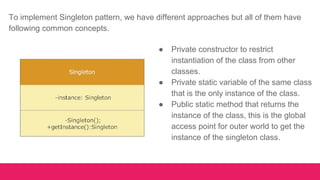
● Private constructor to restrict
instantiation of the class from other
classes.
● Private static variable of the same class
that is the only instance of the class.
● Public static method that returns the
instance of the class, this is the global
access point for outer world to get the
instance of the singleton class.
To implement Singleton pattern, we have different approaches but all of them have
following common concepts.
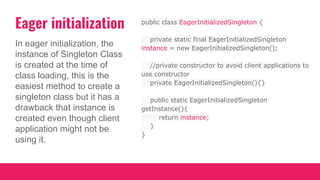
Eager initialization
In eager initialization, the
instance of Singleton Class
is created at the time of
class loading, this is the
easiest method to create a
singleton class but it has a
drawback that instance is
created even though client
application might not be
using it.
public class EagerInitializedSingleton {
private static final EagerInitializedSingleton
instance = new EagerInitializedSingleton();
//private constructor to avoid client applications to
use constructor
private EagerInitializedSingleton(){}
public static EagerInitializedSingleton
getInstance(){
return instance;
}
}
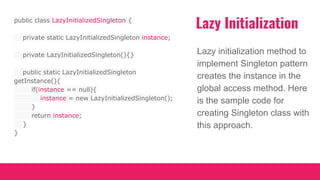
Lazy Initialization
Lazy initialization method to
implement Singleton pattern
creates the instance in the
global access method. Here
is the sample code for
creating Singleton class with
this approach.
public class LazyInitializedSingleton {
private static LazyInitializedSingleton instance;
private LazyInitializedSingleton(){}
public static LazyInitializedSingleton
getInstance(){
if(instance == null){
instance = new LazyInitializedSingleton();
}
return instance;
}
}
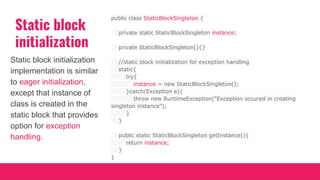
Static block
initialization
Static block initialization
implementation is similar
to eager initialization,
except that instance of
class is created in the
static block that provides
option for exception
handling.
public class StaticBlockSingleton {
private static StaticBlockSingleton instance;
private StaticBlockSingleton(){}
//static block initialization for exception handling
static{
try{
instance = new StaticBlockSingleton();
}catch(Exception e){
throw new RuntimeException("Exception occured in creating
singleton instance");
}
}
public static StaticBlockSingleton getInstance(){
return instance;
}
}
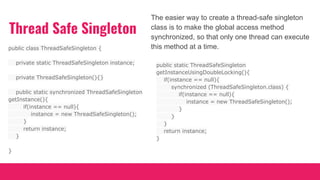
Thread Safe Singleton
The easier way to create a thread-safe singleton
class is to make the global access method
synchronized, so that only one thread can execute
this method at a time.public class ThreadSafeSingleton {
private static ThreadSafeSingleton instance;
private ThreadSafeSingleton(){}
public static synchronized ThreadSafeSingleton
getInstance(){
if(instance == null){
instance = new ThreadSafeSingleton();
}
return instance;
}
}
public static ThreadSafeSingleton
getInstanceUsingDoubleLocking(){
if(instance == null){
synchronized (ThreadSafeSingleton.class) {
if(instance == null){
instance = new ThreadSafeSingleton();
}
}
}
return instance;
}
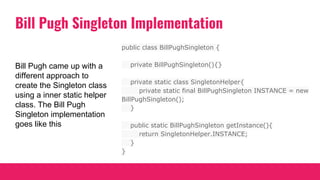
Bill Pugh Singleton Implementation
public class BillPughSingleton {
private BillPughSingleton(){}
private static class SingletonHelper{
private static final BillPughSingleton INSTANCE = new
BillPughSingleton();
}
public static BillPughSingleton getInstance(){
return SingletonHelper.INSTANCE;
}
}
Bill Pugh came up with a
different approach to
create the Singleton class
using a inner static helper
class. The Bill Pugh
Singleton implementation
goes like this
DESIGN PATTERN
PROTOTYPE
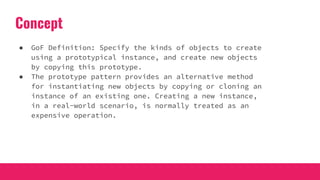
Concept
● GoF Definition: Specify the kinds of objects to create
using a prototypical instance, and create new objects
by copying this prototype.
● The prototype pattern provides an alternative method
for instantiating new objects by copying or cloning an
instance of an existing one. Creating a new instance,
in a real-world scenario, is normally treated as an
expensive operation.
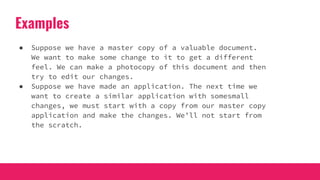
Examples
● Suppose we have a master copy of a valuable document.
We want to make some change to it to get a different
feel. We can make a photocopy of this document and then
try to edit our changes.
● Suppose we have made an application. The next time we
want to create a similar application with somesmall
changes, we must start with a copy from our master copy
application and make the changes. We’ll not start from
the scratch.
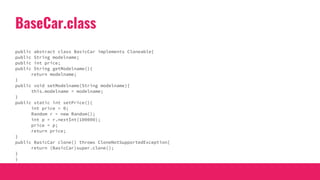
BaseCar.class
public abstract class BasicCar implements Cloneable{
public String modelname;
public int price;
public String getModelname(){
return modelname;
}
public void setModelname(String modelname){
this.modelname = modelname;
}
public static int setPrice(){
int price = 0;
Random r = new Random();
int p = r.nextInt(100000);
price = p;
return price;
}
public BasicCar clone() throws CloneNotSupportedException{
return (BasicCar)super.clone();
}
}
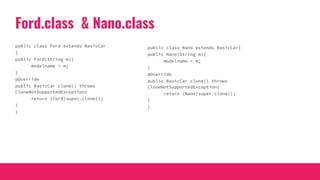
Ford.class & Nano.class
public class Ford extends BasicCar
{
public Ford(String m){
modelname = m;
}
@Override
public BasicCar clone() throws
CloneNotSupportedException{
return (Ford)super.clone();
}
}
public class Nano extends BasicCar{
public Nano(String m){
modelname = m;
}
@Override
public BasicCar clone() throws
CloneNotSupportedException{
return (Nano)super.clone();
}
}
PrototypePatternEx.class
public class PrototypePatternEx{
public static void main(String[] args) throws CloneNotSupportedException{
System.out.println("***Prototype Pattern Demo***n");
BasicCar nano_base = new Nano("Green Nano");
nano_base.price=100000;
BasicCar ford_basic = new Ford("Ford Yellow");
ford_basic.price=500000;
BasicCar bc1;
//Clone Nano Object
bc1 =nano_base.clone();
//Price will be more than 100000 for sure
bc1.price = nano_base.price+BasicCar.setPrice();
System.out.println("Car is: "+ bc1.modelname+" and it's price is Rs."+bc1.price);
//Clone Ford Object
bc1 =ford_basic.clone();
//Price will be more than 500000 for sure
bc1.price = ford_basic.price+BasicCar.setPrice();
System.out.println("Car is: "+ bc1.modelname+" and it's price is Rs."+bc1.price);
}
}
WHEN TO USE
● When the system does not care about the creational
mechanism of the products,this pattern is very helpful.
● We can use this pattern when we need to instantiate
classes at runtime.
● In our example, we have used the default clone() method
in Java, which is a shallow copy. Thus, it is
inexpensive compared to a deep copy.
What are the advantages of the prototype pattern?
● We can include or discard products at runtime.
● We can create new instances with a cheaper cost.
What are the disadvantages of the prototype pattern?
● Each subclass has to implement the cloning mechanism.
● Implementing the cloning mechanism can be challenging
if the objects under consideration do not support
copying or if there is any kind of circular reference.
DESIGN PATTERN
BUILDER
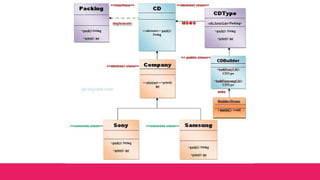
Builder Pattern says that "construct a complex object from simple objects using
step-by-step approach"
It is mostly used when object can't be created in single step like in the de-serialization of a complex object.
Advantage of Builder Design Pattern
The main advantages of Builder Pattern are as follows:
● It provides clear separation between the construction and representation of an object.
● It provides better control over construction process.
● It supports to change the internal representation of objects.
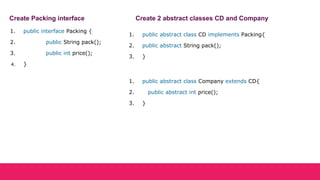
1. public interface Packing {
2. public String pack();
3. public int price();
4. }
Create Packing interface Create 2 abstract classes CD and Company
1. public abstract class CD implements Packing{
2. public abstract String pack();
3. }
1. public abstract class Company extends CD{
2. public abstract int price();
3. }
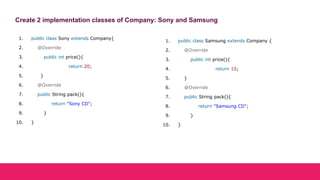
Create 2 implementation classes of Company: Sony and Samsung
1. public class Sony extends Company{
2. @Override
3. public int price(){
4. return 20;
5. }
6. @Override
7. public String pack(){
8. return "Sony CD";
9. }
10. }
1. public class Samsung extends Company {
2. @Override
3. public int price(){
4. return 15;
5. }
6. @Override
7. public String pack(){
8. return "Samsung CD";
9. }
10. }
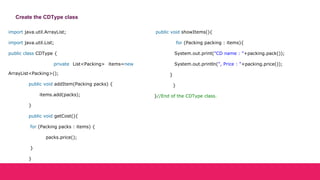
Create the CDType class
import java.util.ArrayList;
import java.util.List;
public class CDType {
private List<Packing> items=new
ArrayList<Packing>();
public void addItem(Packing packs) {
items.add(packs);
}
public void getCost(){
for (Packing packs : items) {
packs.price();
}
}
public void showItems(){
for (Packing packing : items){
System.out.print("CD name : "+packing.pack());
System.out.println(", Price : "+packing.price());
}
}
}//End of the CDType class.
Create the CDBuilder class
1. public class CDBuilder {
2. public CDType buildSonyCD(){
3. CDType cds=new CDType();
4. cds.addItem(new Sony());
5. return cds;
6. }
7. public CDType buildSamsungCD(){
8. CDType cds=new CDType();
9. cds.addItem(new Samsung());
10. return cds;
11. }
12. }
1. public class BuilderDemo{
2. public static void main(String args[]){
3. CDBuilder cdBuilder=new CDBuilder();
4. CDType cdType1=cdBuilder.buildSonyCD();
5. cdType1.showItems();
6.
7. CDType cdType2=cdBuilder.buildSamsungCD();
8. cdType2.showItems();
9. }
10. }
Create the BuilderDemo class
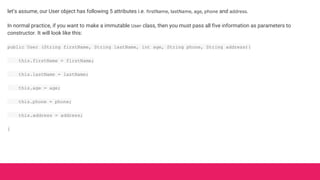
let’s assume, our User object has following 5 attributes i.e. firstName, lastName, age, phone and address.
In normal practice, if you want to make a immutable User class, then you must pass all five information as parameters to
constructor. It will look like this:
public User (String firstName, String lastName, int age, String phone, String address){
this.firstName = firstName;
this.lastName = lastName;
this.age = age;
this.phone = phone;
this.address = address;
}
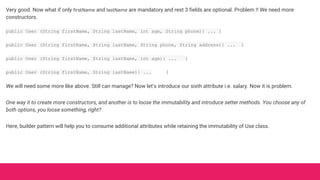
Very good. Now what if only firstName and lastName are mandatory and rest 3 fields are optional. Problem !! We need more
constructors.
public User (String firstName, String lastName, int age, String phone){ ... }
public User (String firstName, String lastName, String phone, String address){ ... }
public User (String firstName, String lastName, int age){ ... }
public User (String firstName, String lastName){ ... }
We will need some more like above. Still can manage? Now let’s introduce our sixth attribute i.e. salary. Now it is problem.
One way it to create more constructors, and another is to loose the immutability and introduce setter methods. You choose any of
both options, you loose something, right?
Here, builder pattern will help you to consume additional attributes while retaining the immutability of Use class.
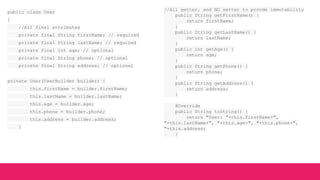
public class User
{
//All final attributes
private final String firstName; // required
private final String lastName; // required
private final int age; // optional
private final String phone; // optional
private final String address; // optional
private User(UserBuilder builder) {
this.firstName = builder.firstName;
this.lastName = builder.lastName;
this.age = builder.age;
this.phone = builder.phone;
this.address = builder.address;
}
//All getter, and NO setter to provde immutability
public String getFirstName() {
return firstName;
}
public String getLastName() {
return lastName;
}
public int getAge() {
return age;
}
public String getPhone() {
return phone;
}
public String getAddress() {
return address;
}
@Override
public String toString() {
return "User: "+this.firstName+",
"+this.lastName+", "+this.age+", "+this.phone+",
"+this.address;
}
public static class UserBuilder
{
private final String firstName;
private final String lastName;
private int age;
private String phone;
private String address;
public UserBuilder(String firstName,
String lastName) {
this.firstName = firstName;
this.lastName = lastName;
}
public UserBuilder address(String address) {
this.address = address;
return this;
}
//Return the finally consrcuted User object
public User build() {
User user = new User(this);
validateUserObject(user);
return user;
}
private void validateUserObject(User user) {
//Do some basic validations to check
//if user object does not break any
assumption of system
}
}
}
public static void main(String[] args) {
User user1 = new User.UserBuilder("Name",
"LastName")
.age(30)
.phone("1234567")
.address(" address 1234")
.build();
System.out.println(user1);
}
DESIGN PATTERN
OBJECT POOL
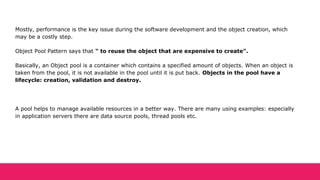
Mostly, performance is the key issue during the software development and the object creation, which
may be a costly step.
Object Pool Pattern says that " to reuse the object that are expensive to create".
Basically, an Object pool is a container which contains a specified amount of objects. When an object is
taken from the pool, it is not available in the pool until it is put back. Objects in the pool have a
lifecycle: creation, validation and destroy.
A pool helps to manage available resources in a better way. There are many using examples: especially
in application servers there are data source pools, thread pools etc.
Advantage of Object Pool design pattern
● It boosts the performance of the application significantly.
● It is most effective in a situation where the rate of initializing a class instance is high.
● It manages the connections and provides a way to reuse and share them.
● It can also provide the limit for the maximum number of objects that can be created.
Usage:
● When an application requires objects which are expensive to create. Eg: there is a need of opening too
many connections for the database then it takes too longer to create a new one and the database server
will be overloaded.
● When there are several clients who need the same resource at different times.
NOTE: Object pool design pattern is essentially used in Web Container of the server for creating thread pools and data source
pools to process the requests.
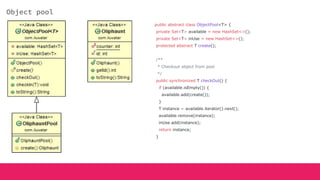
Object pool
public abstract class ObjectPool<T> {
private Set<T> available = new HashSet<>();
private Set<T> inUse = new HashSet<>();
protected abstract T create();
/**
* Checkout object from pool
*/
public synchronized T checkOut() {
if (available.isEmpty()) {
available.add(create());
}
T instance = available.iterator().next();
available.remove(instance);
inUse.add(instance);
return instance;
}
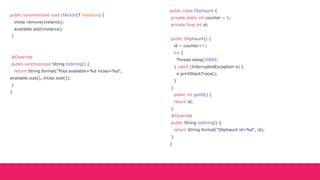
public synchronized void checkIn(T instance) {
inUse.remove(instance);
available.add(instance);
}
@Override
public synchronized String toString() {
return String.format("Pool available=%d inUse=%d",
available.size(), inUse.size());
}
}
public class Oliphaunt {
private static int counter = 1;
private final int id;
public Oliphaunt() {
id = counter++;
try {
Thread.sleep(1000);
} catch (InterruptedException e) {
e.printStackTrace();
}
}
public int getId() {
return id;
}
@Override
public String toString() {
return String.format("Oliphaunt id=%d", id);
}
}
public class OliphauntPool extends ObjectPool<Oliphaunt> {
@Override
protected Oliphaunt create() {
return new Oliphaunt();
}
}
public class App {
public static void main(String[] args) {
OliphauntPool pool = new OliphauntPool();
LOGGER.info(pool.toString());
Oliphaunt oliphaunt1 = pool.checkOut();
LOGGER.info("Checked out {}", oliphaunt1);
LOGGER.info(pool.toString());
Oliphaunt oliphaunt2 = pool.checkOut();
LOGGER.info("Checked out {}", oliphaunt2);
Oliphaunt oliphaunt3 = pool.checkOut();
LOGGER.info("Checked out {}", oliphaunt3);
LOGGER.info(pool.toString());
LOGGER.info("Checking in {}", oliphaunt1);
pool.checkIn(oliphaunt1);
LOGGER.info("Checking in {}", oliphaunt2);
pool.checkIn(oliphaunt2);
LOGGER.info(pool.toString());
Oliphaunt oliphaunt4 = pool.checkOut();
LOGGER.info("Checked out {}", oliphaunt4);
Oliphaunt oliphaunt5 = pool.checkOut();
LOGGER.info("Checked out {}", oliphaunt5);
LOGGER.info(pool.toString());
}
}
Structural design patterns
DESIGN PATTERN
ADAPTER
Adapter(Wrapper)
An Adapter Pattern says that just "converts the interface of a class into another interface that a
client wants"
Advantage of Adapter Pattern
● It allows two or more previously incompatible objects to interact.
● It allows reusability of existing functionality.
Usage of Adapter pattern
● When an object needs to utilize an existing class with an incompatible interface.
● When you want to create a reusable class that cooperates with classes which don't have compatible
interfaces
● When you want to create a reusable class that cooperates with classes which don't have compatible
interfaces.
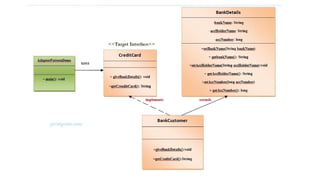
UML for Adapter pattern
● Target Interface: This is the desired interface class which will be used by the clients.
● Adapter class: This class is a wrapper class which implements the desired target interface and modifies the
specific request available from the Adaptee class.
● Adaptee class: This is the class which is used by the Adapter class to reuse the existing functionality and modify
them for desired use.
● Client: This class will interact with the Adapter class.
public class AdapterPatternDemo {
public static void main(String args[]){
CreditCard targetInterface=new BankCustomer();
targetInterface.giveBankDetails();
System.out.print(targetInterface.getCreditCard());
}
}
DESIGN PATTERN
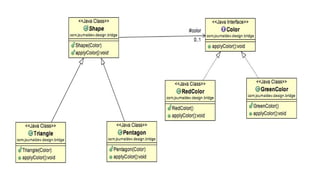
BRIDGE
Bridge
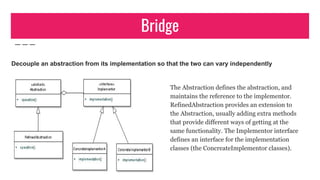
Decouple an abstraction from its implementation so that the two can vary independently
The Abstraction defines the abstraction, and
maintains the reference to the implementor.
RefinedAbstraction provides an extension to
the Abstraction, usually adding extra methods
that provide different ways of getting at the
same functionality. The Implementor interface
defines an interface for the implementation
classes (the ConcreateImplementor classes).
The Bridge Pattern is also known as Handle or Body.
Advantage of Bridge Pattern
● It enables the separation of implementation from the interface.
● It improves the extensibility.
● It allows the hiding of implementation details from the client.
Usage of Bridge Pattern
● When you don't want a permanent binding between the functional abstraction and its implementation.
● When both the functional abstraction and its implementation need to extended using sub-classes.
● It is mostly used in those places where changes are made in the implementation does not affect the clients.
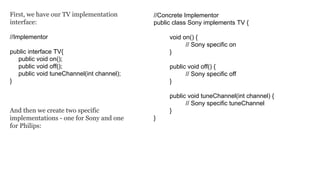
First, we have our TV implementation
interface:
//Implementor
public interface TV{
public void on();
public void off();
public void tuneChannel(int channel);
}
And then we create two specific
implementations - one for Sony and one
for Philips:
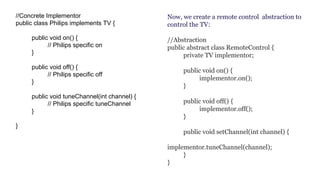
//Concrete Implementor
public class Sony implements TV {
void on() {
// Sony specific on
}
public void off() {
// Sony specific off
}
public void tuneChannel(int channel) {
// Sony specific tuneChannel
}
}
//Concrete Implementor
public class Philips implements TV {
public void on() {
// Philips specific on
}
public void off() {
// Philips specific off
}
public void tuneChannel(int channel) {
// Philips specific tuneChannel
}
}
Now, we create a remote control abstraction to
control the TV:
//Abstraction
public abstract class RemoteControl {
private TV implementor;
public void on() {
implementor.on();
}
public void off() {
implementor.off();
}
public void setChannel(int channel) {
implementor.tuneChannel(channel);
}
}
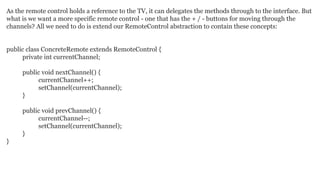
As the remote control holds a reference to the TV, it can delegates the methods through to the interface. But
what is we want a more specific remote control - one that has the + / - buttons for moving through the
channels? All we need to do is extend our RemoteControl abstraction to contain these concepts:
public class ConcreteRemote extends RemoteControl {
private int currentChannel;
public void nextChannel() {
currentChannel++;
setChannel(currentChannel);
}
public void prevChannel() {
currentChannel--;
setChannel(currentChannel);
}
}
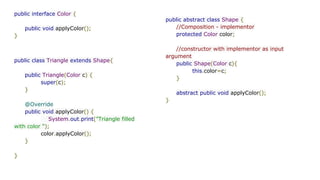
public interface Color {
public void applyColor();
}
public abstract class Shape {
//Composition - implementor
protected Color color;
//constructor with implementor as input
argument
public Shape(Color c){
this.color=c;
}
abstract public void applyColor();
}
public class Triangle extends Shape{
public Triangle(Color c) {
super(c);
}
@Override
public void applyColor() {
System.out.print("Triangle filled
with color ");
color.applyColor();
}
}
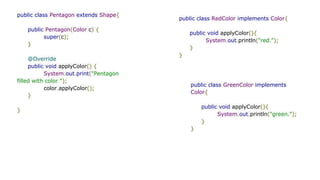
public class Pentagon extends Shape{
public Pentagon(Color c) {
super(c);
}
@Override
public void applyColor() {
System.out.print("Pentagon
filled with color ");
color.applyColor();
}
}
public class RedColor implements Color{
public void applyColor(){
System.out.println("red.");
}
}
public class GreenColor implements
Color{
public void applyColor(){
System.out.println("green.");
}
}
public class BridgePatternTest {
public static void main(String[] args) {
Shape tri = new Triangle(new RedColor());
tri.applyColor();
Shape pent = new Pentagon(new GreenColor());
pent.applyColor();
}
}
DESIGN PATTERN
COMPOSITE
Advantage of Composite Design Pattern
● It defines class hierarchies that contain primitive and complex objects.
● It makes easier to you to add new kinds of components.
● It provides flexibility of structure with manageable class or interface.
A Composite Pattern says that just "allow clients to
operate in generic manner on objects that may
or may not represent a hierarchy of objects".
Usage of Composite Pattern
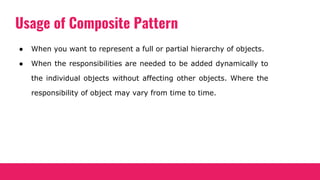
● When you want to represent a full or partial hierarchy of objects.
● When the responsibilities are needed to be added dynamically to
the individual objects without affecting other objects. Where the
responsibility of object may vary from time to time.
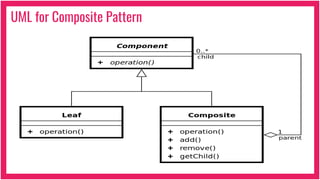
UML for Composite Pattern
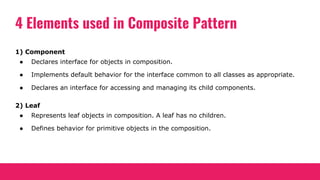
4 Elements used in Composite Pattern
1) Component
● Declares interface for objects in composition.
● Implements default behavior for the interface common to all classes as appropriate.
● Declares an interface for accessing and managing its child components.
2) Leaf
● Represents leaf objects in composition. A leaf has no children.
● Defines behavior for primitive objects in the composition.
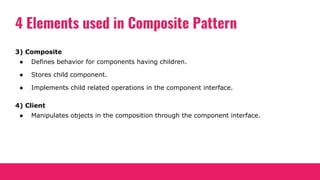
4 Elements used in Composite Pattern
3) Composite
● Defines behavior for components having children.
● Stores child component.
● Implements child related operations in the component interface.
4) Client
● Manipulates objects in the composition through the component interface.
Example
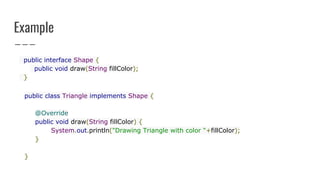
public interface Shape {
public void draw(String fillColor);
}
public class Triangle implements Shape {
@Override
public void draw(String fillColor) {
System.out.println("Drawing Triangle with color "+fillColor);
}
}
Example
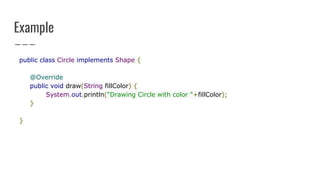
public class Circle implements Shape {
@Override
public void draw(String fillColor) {
System.out.println("Drawing Circle with color "+fillColor);
}
}
Example
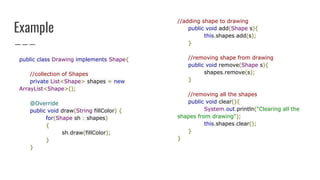
public class Drawing implements Shape{
//collection of Shapes
private List<Shape> shapes = new
ArrayList<Shape>();
@Override
public void draw(String fillColor) {
for(Shape sh : shapes)
{
sh.draw(fillColor);
}
}
//adding shape to drawing
public void add(Shape s){
this.shapes.add(s);
}
//removing shape from drawing
public void remove(Shape s){
shapes.remove(s);
}
//removing all the shapes
public void clear(){
System.out.println("Clearing all the
shapes from drawing");
this.shapes.clear();
}
}
Example
public class TestCompositePattern {
public static void main(String[] args) {
Shape tri = new Triangle();
Shape tri1 = new Triangle();
Shape cir = new Circle();
Drawing drawing = new Drawing();
drawing.add(tri1);
drawing.add(tri1);
drawing.add(cir);
drawing.draw("Red");
drawing.clear();
drawing.add(tri);
drawing.add(cir);
drawing.draw("Green");
}
}
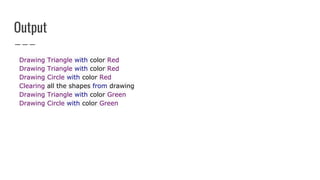
Output
Drawing Triangle with color Red
Drawing Circle with color Red
Clearing all the shapes from drawing
Drawing Triangle with color Green
Drawing Circle with color Green
Composite Pattern Important Points
● Composite pattern should be applied only when the group of objects
should behave as the single object.
● Composite design pattern can be used to create a tree like structure.
4 Elements used in Composite Pattern
3) Composite
● Defines behavior for components having children.
● Stores child component.
● Implements child related operations in the component interface.
4) Client
● Manipulates objects in the composition through the component interface.
DESIGN PATTERN
DECORATE
Concept
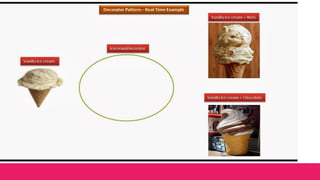
● GoF Definition: Attach additional responsibilities to an object dynamically.Decorators
provide a flexible alternative to subclassing for extending functionality.
● This main principle of this pattern says that we cannot modify existing functionalities
but we can extend them. In other words, this pattern is open for extension but closed
for modification.
● The core concept applies when we want to add some specific functionalities to some
specific object instead of to the whole class.
Real-Life Example
Suppose you already own a house. Now you have decided to
add an additional floor. Obviously, you do not want to
change the architecture of ground floor (or existing
floors). You may want to change the design of the
architecture for the newly added floor without affecting
the existing architecture for existing floor(s).
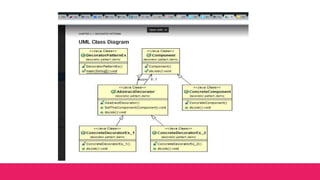
abstract class Component{
public abstract void doJob();
}
class ConcreteComponent extends Component
{
@Override
public void doJob(){
System.out.println(" I am from
Concrete Component-I am closed
for modification.");
}
}
abstract class AbstractDecorator extends Component{
protected Component com ;
public void SetTheComponent(Component c){
com = c;
}
public void doJob(){
if (com != null){
com.doJob();
}
}
}
class ConcreteDecoratorEx_2 extends AbstractDecorator{
public void doJob(){
System.out.println("");
System.out.println("***START Ex-2***");
super.doJob();
//Add additional thing if necessary
System.out.println("Explicitly From
DecoratorEx_2");
System.out.println("***END. EX-2***");
}}
class ConcreteDecoratorEx_1 extends AbstractDecorator{
public void doJob(){
super.doJob();
//Add additional thing if necessary
System.out.println("I am explicitly from Ex_1");
}}
public static void main(String[] args){
System.out.println("***Decorator pattern Demo***");
ConcreteComponent cc = new ConcreteComponent();
ConcreteDecoratorEx_1 cd_1 = new ConcreteDecoratorEx_1();
// Decorating ConcreteComponent Object //cc with
ConcreteDecoratorEx_1
cd_1.SetTheComponent(cc);
cd_1.doJob();
ConcreteDecoratorEx_2 cd_2= new ConcreteDecoratorEx_2();
cd_2.SetTheComponent(cd_1);
cd_2.doJob();
}}
Advantages
● Without disturbing existing objects in the system, we can add new
functionality to a particular object.
● Allows to modify object dynamically
● It is more flexible than inheritance
● Simplifies code, as you add new functionality using many simple classes
● We can code incrementally. Rather than rewrite old code you can extend
with new code
Different from inheritance
● We can add or remove responsibilities by simply
attaching or detaching decorators. But with the simple
inheritance technique, we need to create a new class
for new responsibilities.
● First of all, if we are careful enough, there is no
significant disadvantage. But if we create too many
decorators in the system, the system will be hard to
maintain and debug.
Usage
You would use it when you need capabilities of inheritance
with subclasses, but you need add functionality at runtime.
DESIGN PATTERN
FACADE
Concept
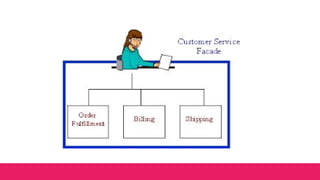
● GoF Definition: Provide a unified interface to a set of interfaces in a system. Facade
defines a higher-level interface that makes the subsystem easier to use.
● Fasade emphasize the abstraction and hide the complex details by exposing a simple
interface.
Examples
● Suppose you are going to organize a birthday party and you have invited 100 people.
Nowadays, you can go to any party organizer and let him/her know the minimum
information— (party type, date and time of the party, number of attendees, etc.). The
organizer will do the rest for you. You do not even think about how he will decorate the
party room, whether people will take food from self-help counter or will be served by a
caterer, and so on.
● We can think about a case where we use a method from a library. The user doesn’t care
how the method is implemented in the library. He/she just calls the method to serve
his/her easy purpose. The pattern can be best described by the example that follows.
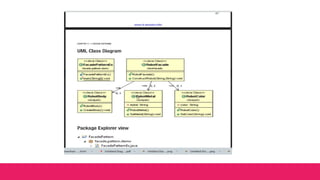
public class RobotBody{
public void CreateBody(){
System.out.println("Body
Creation done");
}}
public class RobotColor{
private String color;
public void SetColor(String color){
this.color = color;
System.out.println("Color is set to :
"+ this.color);
}
}
public class RobotMetal{
private String metal;
public void SetMetal(String metal){
this.metal=metal;
System.out.println("Metal is set to :
"+this.metal);
}
}
public class RobotFacade{
RobotColor rc;
RobotMetal rm ;
RobotBody rb;
public RobotFacade(){
rc = new RobotColor();
rm = new RobotMetal();
rb = new RobotBody();
}
public void ConstructRobot(String color,String metal){
System.out.println("nCreation of the Robot
Start");
rc.SetColor(color);
rm.SetMetal(metal);
rb.CreateBody();
System.out.println(" nRobot Creation End");
System.out.println();
}}
class FacadePatternEx{
public static void main(String[] args){
System.out.println("***Facade Pattern Demo***");
RobotFacade rf1 = new RobotFacade();
rf1.ConstructRobot("Green", "Iron");
RobotFacade rf2 = new RobotFacade();
rf2.ConstructRobot("Blue", "Steel");
}
}
Note
● We use Facade pattern to represent a simple interface instead of a complex subsystem.
● Here we promote weak coupling among subsystems—so, in this way, we are making them
portable.
● We already mentioned that we separate subsystems from clients by a simple interface.
With this model, we not only make the system easier to use but also reduce the number of
objects that the clients need to deal with.
● There is truly no major disadvantage associated with this pattern. On the other hand, it
has proven its usefulness in libraries like jQuery also.
DESIGN PATTERN
FLYWEIGHT
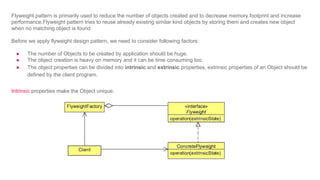
Flyweight pattern is primarily used to reduce the number of objects created and to decrease memory footprint and increase
performance.Flyweight pattern tries to reuse already existing similar kind objects by storing them and creates new object
when no matching object is found
Before we apply flyweight design pattern, we need to consider following factors:
● The number of Objects to be created by application should be huge.
● The object creation is heavy on memory and it can be time consuming too.
● The object properties can be divided into intrinsic and extrinsic properties, extrinsic properties of an Object should be
defined by the client program.
Intrinsic properties make the Object unique.
The flyweight factory will be used by client programs to instantiate the Object, so we need to keep a map
of Objects in the factory that should not be accessible by client application.
Flyweight Design Pattern Example in JDK
All the wrapper classes valueOf() method uses cached objects showing use of Flyweight design pattern.
The best example is Java String class String Pool implementation.
Flyweight Design Pattern Important Points
● Flyweight pattern introduces complexity and if number of shared objects are huge then there is a
trade of between memory and time, so we need to use it judiciously based on our requirements.
● Flyweight pattern implementation is not useful when the number of intrinsic properties of Object is
huge.
public interface Shape {
void draw();
}
public class Circle implements Shape {
private String color;
private int x;
private int y;
private int radius;
public Circle(String color){
this.color = color;
}
public void setX(int x) {
this.x = x;
}
public void setY(int y) {
this.y = y;
}
public void setRadius(int radius) {
this.radius = radius;
}
@Override
public void draw() {
System.out.println("Circle: Draw() [Color :
" + color + ", x : " + x + ", y :" + y + ", radius
:" + radius);
}
}
public class ShapeFactory {
private static final HashMap<String, Shape> circleMap =
new HashMap();
public static Shape getCircle(String color) {
Circle circle = (Circle)circleMap.get(color);
if(circle == null) {
circle = new Circle(color);
circleMap.put(color, circle);
System.out.println("Creating circle of color : " +
color);
}
return circle;
}
}
public class FlyweightPatternDemo {
private static final String colors[] = { "Red", "Green",
"Blue", "White", "Black" };
public static void main(String[] args) {
for(int i=0; i < 20; ++i) {
Circle circle =
(Circle)ShapeFactory.getCircle(getRandomColor());
circle.setX(getRandomX());
circle.setY(getRandomY());
circle.setRadius(100);
circle.draw();
} }
}
DESIGN PATTERN
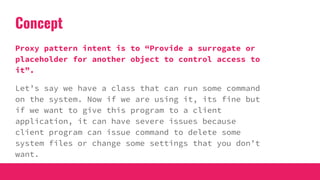
PROXY
Concept
Proxy pattern intent is to “Provide a surrogate or
placeholder for another object to control access to
it”.
Let’s say we have a class that can run some command
on the system. Now if we are using it, its fine but
if we want to give this program to a client
application, it can have severe issues because
client program can issue command to delete some
system files or change some settings that you don’t
want.
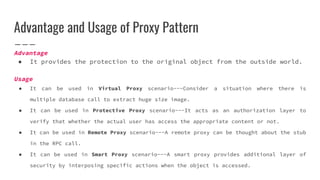
Advantage and Usage of Proxy Pattern
Advantage
● It provides the protection to the original object from the outside world.
Usage
● It can be used in Virtual Proxy scenario---Consider a situation where there is
multiple database call to extract huge size image.
● It can be used in Protective Proxy scenario---It acts as an authorization layer to
verify that whether the actual user has access the appropriate content or not.
● It can be used in Remote Proxy scenario---A remote proxy can be thought about the stub
in the RPC call.
● It can be used in Smart Proxy scenario---A smart proxy provides additional layer of
security by interposing specific actions when the object is accessed.
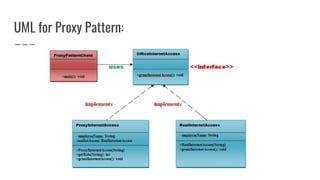
UML for Proxy Pattern:
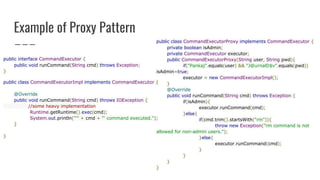
Example of Proxy Pattern
public interface CommandExecutor {
public void runCommand(String cmd) throws Exception;
}
public class CommandExecutorImpl implements CommandExecutor {
@Override
public void runCommand(String cmd) throws IOException {
//some heavy implementation
Runtime.getRuntime().exec(cmd);
System.out.println("'" + cmd + "' command executed.");
}
}
public class CommandExecutorProxy implements CommandExecutor {
private boolean isAdmin;
private CommandExecutor executor;
public CommandExecutorProxy(String user, String pwd){
if("Pankaj".equals(user) && "J@urnalD$v".equals(pwd))
isAdmin=true;
executor = new CommandExecutorImpl();
}
@Override
public void runCommand(String cmd) throws Exception {
if(isAdmin){
executor.runCommand(cmd);
}else{
if(cmd.trim().startsWith("rm")){
throw new Exception("rm command is not
allowed for non-admin users.");
}else{
executor.runCommand(cmd);
}
}
}
}
public class ProxyPatternTest {
public static void main(String[] args){
CommandExecutor executor = new CommandExecutorProxy("Pankaj",
"wrong_pwd");
try {
executor.runCommand("ls -ltr");
executor.runCommand(" rm -rf abc.pdf");
} catch (Exception e) {
System.out.println("Exception Message::"+e.getMessage());
}
}
}
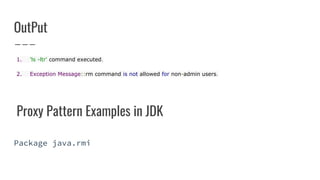
OutPut
1. 'ls -ltr' command executed.
2. Exception Message::rm command is not allowed for non-admin users.
Proxy Pattern Examples in JDK
Package java.rmi
Behavioral Design Patterns
DESIGN PATTERN
CHAIN OF RESPONSIBILITY
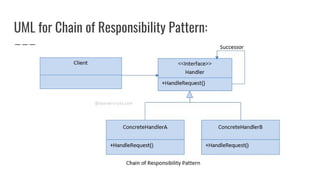
Chain Of Responsibility Pattern
In chain of responsibility, sender sends a request to a chain of objects.
The request can be handled by any object in the chain.
● A Chain of Responsibility Pattern says that just "avoid coupling
the sender of a request to its receiver by giving multiple
objects a chance to handle the request". For example, an ATM
uses the Chain of Responsibility design pattern in money giving
process.
In other words, we can say that normally each receiver contains
reference of another receiver. If one object cannot handle the request
then it passes the same to the next receiver and so on.
Advantage and Usage of Chain of Responsibility Pattern
Advantage
● It reduces the coupling.
● It adds flexibility while assigning the responsibilities to objects.
● It allows a set of classes to act as one; events produced in one class can
be sent to other handler classes with the help of composition.
Usage
● When more than one object can handle a request and the handler is unknown.
● When the group of objects that can handle the request must be specified in
dynamic way.
UML for Chain of Responsibility Pattern:
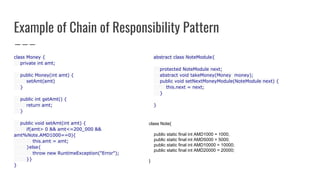
Example of Chain of Responsibility Pattern
class Money {
private int amt;
public Money(int amt) {
setAmt(amt)
}
public int getAmt() {
return amt;
}
public void setAmt(int amt) {
if(amt> 0 && amt<=200_000 &&
amt%Note.AMD1000==0){
this.amt = amt;
}else{
throw new RuntimeException("Error");
}}
}
abstract class NoteModule{
protected NoteModule next;
abstract void takeMoney(Money money);
public void setNextMoneyModule(NoteModule next) {
this.next = next;
}
}
class Note{
public static final int AMD1000 = 1000;
public static final int AMD5000 = 5000;
public static final int AMD10000 = 10000;
public static final int AMD20000 = 20000;
}
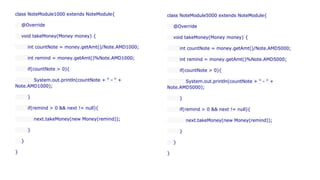
class NoteModule1000 extends NoteModule{
@Override
void takeMoney(Money money) {
int countNote = money.getAmt()/Note.AMD1000;
int remind = money.getAmt()%Note.AMD1000;
if(countNote > 0){
System.out.println(countNote + " - " +
Note.AMD1000);
}
if(remind > 0 && next != null){
next.takeMoney(new Money(remind));
}
}
}
class NoteModule5000 extends NoteModule{
@Override
void takeMoney(Money money) {
int countNote = money.getAmt()/Note.AMD5000;
int remind = money.getAmt()%Note.AMD5000;
if(countNote > 0){
System.out.println(countNote + " - " +
Note.AMD5000);
}
if(remind > 0 && next != null){
next.takeMoney(new Money(remind));
}
}
}
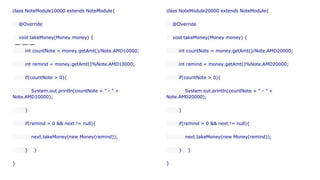
class NoteModule10000 extends NoteModule{
@Override
void takeMoney(Money money) {
int countNote = money.getAmt()/Note.AMD10000;
int remind = money.getAmt()%Note.AMD10000;
if(countNote > 0){
System.out.println(countNote + " - " +
Note.AMD10000);
}
if(remind > 0 && next != null){
next.takeMoney(new Money(remind));
} }
}
class NoteModule20000 extends NoteModule{
@Override
void takeMoney(Money money) {
int countNote = money.getAmt()/Note.AMD20000;
int remind = money.getAmt()%Note.AMD20000;
if(countNote > 0){
System.out.println(countNote + " - " +
Note.AMD20000);
}
if(remind > 0 && next != null){
next.takeMoney(new Money(remind));
} }
}
public class BankomatApp {
public static void main(String[] args) {
NoteModule note1000 = new NoteModule1000();
NoteModule note5000 = new NoteModule5000();
NoteModule note10000 = new NoteModule10000();
NoteModule note20000 = new NoteModule20000();
note20000.setNextMoneyModule(note10000);
note10000.setNextMoneyModule(note5000);
note5000.setNextMoneyModule(note1000);
note20000.takeMoney(new Money(117_000));
}
}
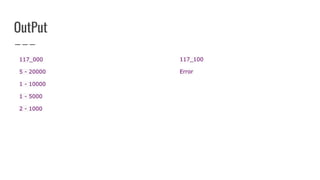
OutPut
117_000
5 - 20000
1 - 10000
1 - 5000
2 - 1000
117_100
Error
Chain of Responsibility Pattern Examples in JDK
● java.util.logging.Logger#log()
● javax.servlet.Filter#doFilter()
Pitfalls
● Handling/handler guarantee
● Runtime configuration risk
● Chain length performance issues
Chain of Responsibility Summary
● Decoupling sender and receiver
● Runtime configuration
● Hierarchical in nature
● Careful with large chain
DESIGN PATTERN
COMMAND
A Command Pattern says that "encapsulate a request under an object as a command and pass it to invoker
object. Invoker object looks for the appropriate object which can handle this command and pass the
command to the corresponding object and that object executes the command".
It is also known as Action or Transaction .
Advantage of command pattern
● It separates the object that invokes the operation from the object that actually performs the operation
● It makes easy to add new commands, because existing classes remain unchanged.
Command pattern is a data driven design pattern and falls
under behavioral pattern category.
Usage of command pattern
● A history of requests is needed.
● You need callback functionality.
● Requests need to be handled at variant times or in variant orders.
● The invoker should be decoupled from the object handling the invocation.
Command in the Real World
One example of the command pattern being executed in the real world is the idea of a table
order at a restaurant: the waiter takes the order, which is a command from the customer.
This order is then queued for the kitchen staff. The waiter tells the chef that the a new order
has come in, and the chef has enough information to cook the meal.
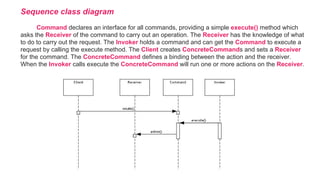
Sequence class diagram
Command declares an interface for all commands, providing a simple execute() method which
asks the Receiver of the command to carry out an operation. The Receiver has the knowledge of what
to do to carry out the request. The Invoker holds a command and can get the Command to execute a
request by calling the execute method. The Client creates ConcreteCommands and sets a Receiver
for the command. The ConcreteCommand defines a binding between the action and the receiver.
When the Invoker calls execute the ConcreteCommand will run one or more actions on the Receiver.
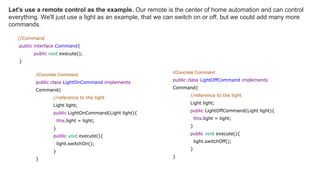
//Command
public interface Command{
public void execute();
}
Let's use a remote control as the example. Our remote is the center of home automation and can control
everything. We'll just use a light as an example, that we can switch on or off, but we could add many more
commands.
//Concrete Command
public class LightOnCommand implements
Command{
//reference to the light
Light light;
public LightOnCommand(Light light){
this.light = light;
}
public void execute(){
light.switchOn();
}
}
//Concrete Command
public class LightOffCommand implements
Command{
//reference to the light
Light light;
public LightOffCommand(Light light){
this.light = light;
}
public void execute(){
light.switchOff();
}
}
//Client
public class Client{
public static void main(String[] args) {
RemoteControl control = new RemoteControl();
Light light = new Light();
Command lightsOn = new LightsOnCommand(light);
Command lightsOff = new LightsOffCommand(light);
//switch on
control.setCommand(lightsOn);
control.pressButton();
//switch off
control.setCommand(lightsOff);
control.pressButton();
}
}
//Receiver
public class Light{
private boolean on;
public void switchOn(){
on = true;
}
public void switchOff(){
on = false;
}
}
//Invoker
public class RemoteControl{
private Command command;
public void setCommand(Command command){
this.command = command;
}
public void pressButton(){
command.execute();
}
}
Watch Out for the Downsides
This pattern ends up forcing a lot of Command classes that will make your design look cluttered -
more operations being made possible leads to more command classes. Intelligence required of
which Command to use and when leads to possible maintenance issues for the central controller.
DESIGN PATTERN
INTERPRETER
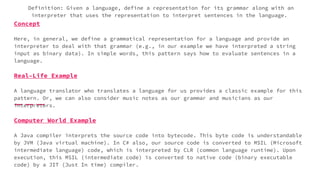
Concept
Here, in general, we define a grammatical representation for a language and provide an
interpreter to deal with that grammar (e.g., in our example we have interpreted a string
input as binary data). In simple words, this pattern says how to evaluate sentences in a
language.
Real–Life Example
A language translator who translates a language for us provides a classic example for this
pattern. Or, we can also consider music notes as our grammar and musicians as our
interpreters.
Computer World Example
A Java compiler interprets the source code into bytecode. This byte code is understandable
by JVM (Java virtual machine). In C# also, our source code is converted to MSIL (Microsoft
intermediate language) code, which is interpreted by CLR (common language runtime). Upon
execution, this MSIL (intermediate code) is converted to native code (binary executable
code) by a JIT (Just In time) compiler.
Definition: Given a language, define a representation for its grammar along with an
interpreter that uses the representation to interpret sentences in the language.
Implementation
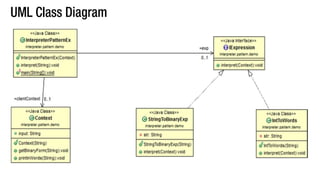
package interpreter.pattern.demo;
import java.util.Scanner;
/*Context class: interpretation is carried out based on our implementation.*/
class Context{
public String input;
public Context(String input){
this.input=input;
}
public void getBinaryForm(String input){
int i = Integer.parseInt(input);
//integer to its equivalent binary string representation
String binaryString = Integer.toBinaryString(i);
System.out.println("Binary equivalent of "+input+ " is "+ binaryString);
}
public void printInWords(String input) {
this.input = input;
System.out.println("Printing the input in words:");
char c[]=input.toCharArray();
for(int i=0;i<c.length;i++){
switch (c[i])
{
case '1':
System.out.print("One ");
Break;
...
case '0':
System.out.print("Zero ");
break;
default:
System.out.print("* ");
break;
}} }}
interface IExpression
{
void interpret(Context ic);
}
class StringToBinayExp implements IExpression {
private String str;
public StringToBinaryExp(String s) {
str = s;
}
@Override public void interpret(Context ic) {
ic.getBinaryForm(str);
}
}
class IntToWords implements IExpression {
private String str;
public IntToWords(String str) {
this.str = str;
}
@Override public void interpret(Context ic) {
ic.printInWords(str);
}
}
class InterpreterPatternEx {
public Context clientContext=null;
public IExpression exp=null;
public InterpreterPatternEx(Context c) {
clientContext = c;
}
public void interpret(String str) {
//We'll test 2 consecutive inputs at a time
for(int i=0;i<2;i++){
System.out.println("nEnter ur choice(1 or 2)");
Scanner in = new Scanner(System.in);
String c = in.nextLine();
if (c.equals("1")) {
exp = new IntToWords(str);
exp.interpret(clientContext);
}
else {
exp = new StringToBinaryExp(str);
exp.interpret(clientContext);
}
}
}
public static void main(String[] args) {
System.out.println("n***Interpreter Pattern Demo***n");
System.out.println("Enter a number :");
Scanner in = new Scanner(System.in);
String input = in.nextLine();
Context context=new Context(input);
InterpreterPatternEx client = new InterpreterPatternEx(context);
client.interpret(input);
}
}
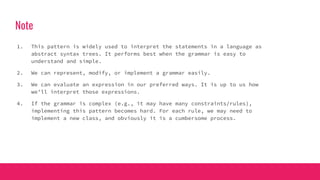
Note
1. This pattern is widely used to interpret the statements in a language as
abstract syntax trees. It performs best when the grammar is easy to
understand and simple.
2. We can represent, modify, or implement a grammar easily.
3. We can evaluate an expression in our preferred ways. It is up to us how
we’ll interpret those expressions.
4. If the grammar is complex (e.g., it may have many constraints/rules),
implementing this pattern becomes hard. For each rule, we may need to
implement a new class, and obviously it is a cumbersome process.
DESIGN PATTERN
ITERATOR
Definition
● GoF Definition: Provide a way to access the elements of an aggregate
object sequentially without exposing its underlying representation.
● Iterators are generally used to traverse a container to access its
elements.
Examples
1. Suppose there are two companies: Company Monitis and TV B. Company Monitis
stores its employee records(name, etc.) in a linked list and Company B stores
its employee data in a big array. One day the two companies decide to work
together. The iterator pattern is handy in such a situation. We need not write
codes from scratch. We’ll have a common interface through which we can access
data for both companies.We’ll simply call the same methods without rewriting the
codes.
2. in a college, the arts department may use array data structure and the science
department may use linked list data structure to store their students’ records.
The main administrative department will access those data through the common
methods—it doesn’t care which data structure is used by individual departments.
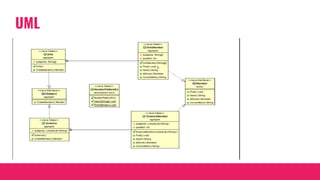
UML
public interface ISubject{
public IIterator CreateIterator();
}
public interface IIterator{
void First();//Reset to first element
String Next();//get next element
Boolean IsDone();//End of collection check
String CurrentItem();//Retrieve Current Item
}
public class Arts implements ISubject{
private String[] subjects;
public Arts(){
subjects = new String[2];
subjects[0] = "Bengali";
subjects[1] = "English" ;
}
public IIterator CreateIterator(){
return new ArtsIterator(subjects);
}
public class ArtsIterator implements IIterator{
private String[] subjects;
private int position;
public ArtsIterator(String[] subjects){
this.subjects = subjects;
position = 0;
}
public void First(){
position = 0;
}
public String Next(){
return subjects[position++];
}
public Boolean IsDone(){
return position >= subjects.length;
}
public String CurrentItem(){
return subjects[position];
}}}
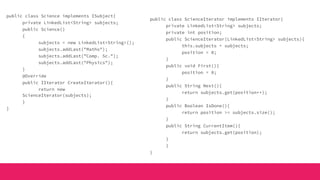
public class Science implements ISubject{
private LinkedList<String> subjects;
public Science()
{
subjects = new LinkedList<String>();
subjects.addLast("Maths");
subjects.addLast("Comp. Sc.");
subjects.addLast("Physics");
}
@Override
public IIterator CreateIterator(){
return new
ScienceIterator(subjects);
}
}
public class ScienceIterator implements IIterator{
private LinkedList<String> subjects;
private int position;
public ScienceIterator(LinkedList<String> subjects){
this.subjects = subjects;
position = 0;
}
public void First(){
position = 0;
}
public String Next(){
return subjects.get(position++);
}
public Boolean IsDone(){
return position >= subjects.size();
}
public String CurrentItem(){
return subjects.get(position);
}
}
}
class IteratorPatternEx{
public static void main(String[] args){
System.out.println("***Iterator Pattern Demo***n");
ISubject Sc_subject = new Science();
ISubject Ar_subjects = new Arts();
IIterator Sc_iterator = Sc_subject.CreateIterator();
IIterator Ar_iterator = Ar_subjects.CreateIterator();
System.out.println("nScience subjects :");
Print(Sc_iterator);
System.out.println("nArts subjects :");
Print(Ar_iterator);
}
public static void Print(IIterator iterator){
while (!iterator.IsDone()){
System.out.println(iterator.Next());
}
}
}
DESIGN PATTERN
MEDIATOR
Intent
Define an object that encapsulates how a set of objects interacts. The mediator
pattern promotes loose coupling by keeping objects from referring to each other
explicitly, and it lets you vary their interaction independently.
Problem
Object-oriented design encourages the distribution of behavior among objects.
Such distribution can result in an object structure with many connections
between objects; in the worst case, every object ends up knowing about every
other
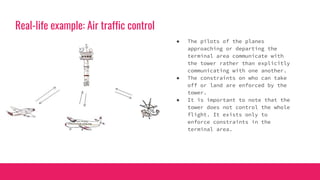
Real-life example: Air traffic control
● The pilots of the planes
approaching or departing the
terminal area communicate with
the tower rather than explicitly
communicating with one another.
● The constraints on who can take
off or land are enforced by the
tower.
● It is important to note that the
tower does not control the whole
flight. It exists only to
enforce constraints in the
terminal area.
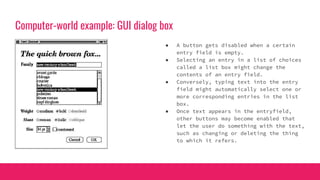
Computer-world example: GUI dialog box
● A button gets disabled when a certain
entry field is empty.
● Selecting an entry in a list of choices
called a list box might change the
contents of an entry field.
● Conversely, typing text into the entry
field might automatically select one or
more corresponding entries in the list
box.
● Once text appears in the entryfield,
other buttons may become enabled that
let the user do something with the text,
such as changing or deleting the thing
to which it refers.
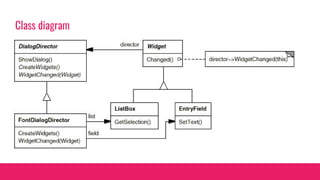
Class diagram
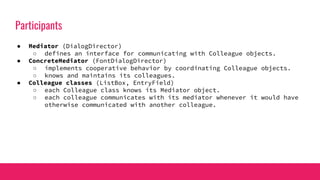
Participants
● Mediator (DialogDirector)
○ defines an interface for communicating with Colleague objects.
● ConcreteMediator (FontDialogDirector)
○ implements cooperative behavior by coordinating Colleague objects.
○ knows and maintains its colleagues.
● Colleague classes (ListBox, EntryField)
○ each Colleague class knows its Mediator object.
○ each colleague communicates with its mediator whenever it would have
otherwise communicated with another colleague.
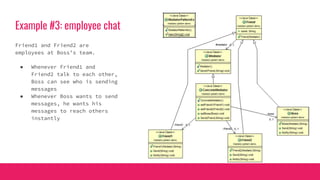
Example #3: employee chat
Friend1 and Friend2 are
employees at Boss’s team.
● Whenever Friend1 and
Friend2 talk to each other,
Boss can see who is sending
messages
● Whenever Boss wants to send
messages, he wants his
messages to reach others
instantly
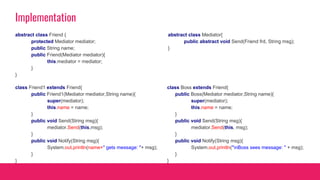
Implementation
abstract class Mediator{
public abstract void Send(Friend frd, String msg);
}
abstract class Friend {
protected Mediator mediator;
public String name;
public Friend(Mediator mediator){
this.mediator = mediator;
}
}
class Friend1 extends Friend{
public Friend1(Mediator mediator,String name){
super(mediator);
this.name = name;
}
public void Send(String msg){
mediator.Send(this,msg);
}
public void Notify(String msg){
System.out.println(name+" gets message: "+ msg);
}
}
class Boss extends Friend{
public Boss(Mediator mediator,String name){
super(mediator);
this.name = name;
}
public void Send(String msg){
mediator.Send(this, msg);
}
public void Notify(String msg){
System.out.println("nBoss sees message: " + msg);
}
}
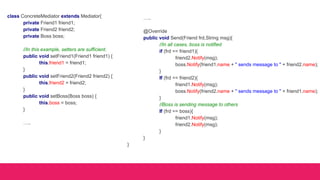
class ConcreteMediator extends Mediator{
private Friend1 friend1;
private Friend2 friend2;
private Boss boss;
//In this example, setters are sufficient.
public void setFriend1(Friend1 friend1) {
this.friend1 = friend1;
}
public void setFriend2(Friend2 friend2) {
this.friend2 = friend2;
}
public void setBoss(Boss boss) {
this.boss = boss;
}
…..
…..
@Override
public void Send(Friend frd,String msg){
//In all cases, boss is notified
if (frd == friend1){
friend2.Notify(msg);
boss.Notify(friend1.name + " sends message to " + friend2.name);
}
If (frd == friend2){
friend1.Notify(msg);
boss.Notify(friend2.name + " sends message to " + friend1.name);
}
//Boss is sending message to others
If (frd == boss){
friend1.Notify(msg);
friend2.Notify(msg);
}
}
}
class MediatorPatternEx{
public static void main(String[] args){
ConcreteMediator m = new ConcreteMediator();
Friend1 amit= new Friend1(m,"Amit");
Friend2 sohel = new Friend2(m,"Sohel");
Boss raghu = new Boss(m,"Raghu");
m.setFriend1(amit); m.setFriend2(sohel); m.setBoss(raghu);
amit.Send("[Amit here]Good Morrning. Can we discuss the mediator pattern?");
sohel.Send("[Sohel here]Good Morning.Yes, we can discuss now.");
raghu.Send("n[Raghu here]:Please get back to work quickly");
}
}
Benefits and drawbacks
● Limits subclassing. A mediator localizes behavior that otherwise would be distributed
among several objects. Changing this behavior requires subclassing Mediator only;
Colleague classes can be reused as is.
● Decouples colleagues. A mediator promotes loose coupling between colleagues. You can
vary and reuse Colleague and Mediator classes independently.
● Simplifies object protocols. A mediator replaces many-to-many interactions with
one-to-many interactions between the mediator and its colleagues. One-to-many
relationships are easier to understand, maintain, and extend.
● Abstracts how objects cooperate. Making mediation an independent concept and
encapsulating it in an object lets you focus on how objects interact apart from their
individual behavior. That can help clarify how objects interact in a system.
● Centralizes control. The Mediator pattern trades complexity of interaction for
complexity in the mediator. Because a mediator encapsulates protocols, it can become
more complex than any individual colleague. This can make the mediator itself a monolith
that's hard to maintain.
DESIGN PATTERN
MEMENTO
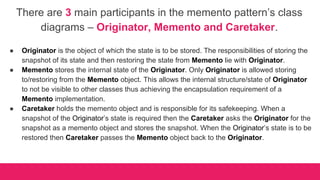
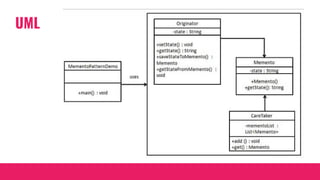
There are 3 main participants in the memento pattern’s class
diagrams – Originator, Memento and Caretaker.
● Originator is the object of which the state is to be stored. The responsibilities of storing the
snapshot of its state and then restoring the state from Memento lie with Originator.
● Memento stores the internal state of the Originator. Only Originator is allowed storing
to/restoring from the Memento object. This allows the internal structure/state of Originator
to not be visible to other classes thus achieving the encapsulation requirement of a
Memento implementation.
● Caretaker holds the memento object and is responsible for its safekeeping. When a
snapshot of the Originator’s state is required then the Caretaker asks the Originator for the
snapshot as a memento object and stores the snapshot. When the Originator’s state is to be
restored then Caretaker passes the Memento object back to the Originator.
UML
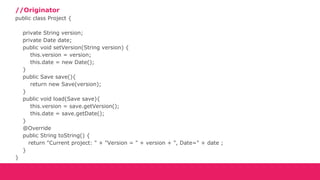
//Originator
public class Project {
private String version;
private Date date;
public void setVersion(String version) {
this.version = version;
this.date = new Date();
}
public Save save(){
return new Save(version);
}
public void load(Save save){
this.version = save.getVersion();
this.date = save.getDate();
}
@Override
public String toString() {
return "Current project: " + "Version = " + version + ", Date=" + date ;
}
}
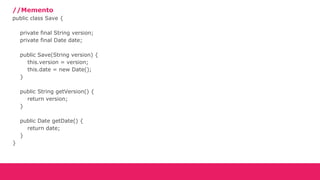
//Memento
public class Save {
private final String version;
private final Date date;
public Save(String version) {
this.version = version;
this.date = new Date();
}
public String getVersion() {
return version;
}
public Date getDate() {
return date;
}
}
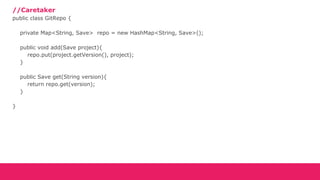
//Caretaker
public class GitRepo {
private Map<String, Save> repo = new HashMap<String, Save>();
public void add(Save project){
repo.put(project.getVersion(), project);
}
public Save get(String version){
return repo.get(version);
}
}
public class Client {
public static void main(String[] args) throws InterruptedException {
GitRepo gitRepo = new GitRepo();
Project project = new Project();
System.out.println("---- Creating new project: Version 1.0");
project.setVersion("1.0");
System.out.println(project);
System.out.println("---- Saving current version to Git...");
gitRepo.add(project.save());
System.out.println("---- Writing poor code and Updating project to version 1.1");
Thread.sleep(5000); // optional field
project.setVersion("1.1");
System.out.println(project);
System.out.println("---- Saving current version to Git...");
gitRepo.add(project.save());
System.out.println("---- Working with current version and somethings went wrong... ");
System.out.println("---- Rolling back to version 1.0");
project.load(gitRepo.get("1.0"));
System.out.println("--------------------------------");
System.out.println(project );
}}
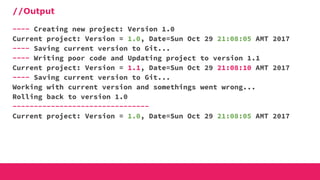
//Output
---- Creating new project: Version 1.0
Current project: Version = 1.0, Date=Sun Oct 29 21:08:05 AMT 2017
---- Saving current version to Git...
---- Writing poor code and Updating project to version 1.1
Current project: Version = 1.1, Date=Sun Oct 29 21:08:10 AMT 2017
---- Saving current version to Git...
Working with current version and somethings went wrong...
Rolling back to version 1.0
--------------------------------
Current project: Version = 1.0, Date=Sun Oct 29 21:08:05 AMT 2017
DESIGN PATTERN
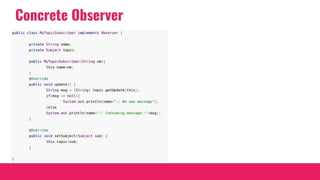
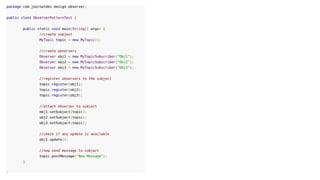
OBSERVER
Definition
Define a one-to-many dependency between objects so that when one object changes
state, all its dependents are notified and updated automatically.
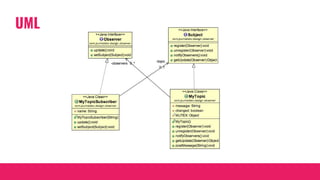
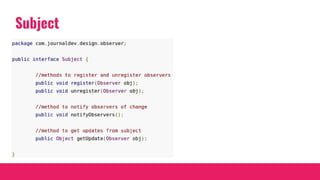
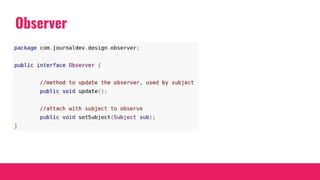
Observer - the object that watch on the state of another object
Subject - the object that is being watched
UML
Subject
Observer
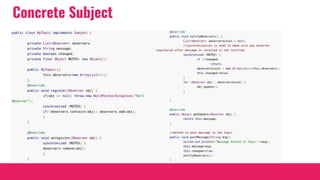
Concrete Subject
Concrete Observer
DESIGN PATTERN
STATE
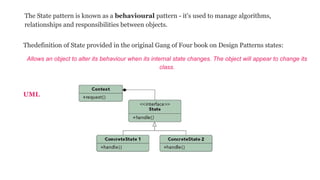
Thedefinition of State provided in the original Gang of Four book on Design Patterns states:
Allows an object to alter its behaviour when its internal state changes. The object will appear to change its
class.
UML
The State pattern is known as a behavioural pattern - it's used to manage algorithms,
relationships and responsibilities between objects.
The Context can have a number of internal States, whenever the request() method is called on the
Context, the message is delegated to the State to handle. The State interface defines a common
interface for all concrete states, encapsulating all behaviour associated with a particular state. The
ConcreteState implements it's own implementation for the request. When a Context changes state,
what really happens is that we have a different ConcreteState associated with it.
State saves you from lots of conditional code in your Context: by changing the ConcreteState object
used, you can change the behaviour of the context.
Would I Use This Pattern?
You should use the State pattern when the behaviour of an object should be influenced by it's state,
and when complex conditions tie object behaviour to it's state.
Watch Out for the Downsides
There are some potential bad uses of the state pattern. For example, some operations may not be
possible when the context is in certain states. This article proposes a nice solution to the problem.
//Context
public class Kid {
private KidState kidState
private Kid(int age) {
setState(age);
}
public void play() {
kidState .play();
}
public void eat() {
kidState .eat();
}
private void setState(int age) {
if(age==1){
kidState =new FirstKid();
}else{
kidState =new SecondKid();
}
}
private interface KidState {
public void play();
public void eat();
}
public class FirstKid implements KidState {
public void play() {
System.out.print(“Play in cradle.”);
}
public void eat() {
System.out.print(“Drink Milk.”);
}
}
public class SecondKid implements
KidState {
public void play() {
System.out.print(“Play with toys.”);
}
public void eat() {
System.out.print(“Drink Milk and eat
chocolate.”);
}
}
public class Demo {
public static void main(String[] args) {
Kid kid = new Kid(1);
kid.play();
kid.eat();
kid = new Kid(2);
kid.play();
kid.eat();
}
}
DESIGN PATTERN
STRATEGY
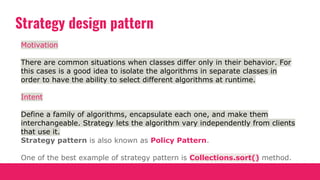
Strategy design pattern
Motivation
There are common situations when classes differ only in their behavior. For
this cases is a good idea to isolate the algorithms in separate classes in
order to have the ability to select different algorithms at runtime.
Intent
Define a family of algorithms, encapsulate each one, and make them
interchangeable. Strategy lets the algorithm vary independently from clients
that use it.
Strategy pattern is also known as Policy Pattern.
One of the best example of strategy pattern is Collections.sort() method.
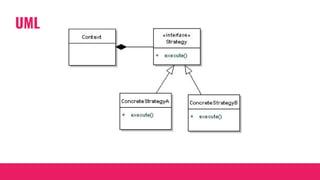
UML
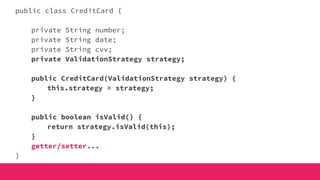
public class CreditCard {
private String number;
private String date;
private String cvv;
private ValidationStrategy strategy;
public CreditCard(ValidationStrategy strategy) {
this.strategy = strategy;
}
public boolean isValid() {
return strategy.isValid(this);
}
getter/setter...
}
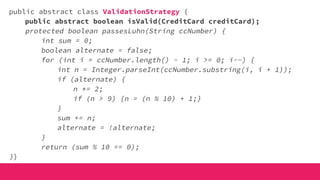
public abstract class ValidationStrategy {
public abstract boolean isValid(CreditCard creditCard);
protected boolean passesLuhn(String ccNumber) {
int sum = 0;
boolean alternate = false;
for (int i = ccNumber.length() - 1; i >= 0; i--) {
int n = Integer.parseInt(ccNumber.substring(i, i + 1));
if (alternate) {
n *= 2;
if (n > 9) {n = (n % 10) + 1;}
}
sum += n;
alternate = !alternate;
}
return (sum % 10 == 0);
}}
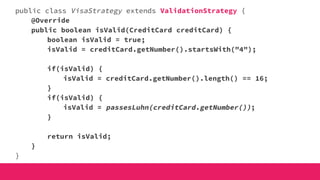
public class VisaStrategy extends ValidationStrategy {
@Override
public boolean isValid(CreditCard creditCard) {
boolean isValid = true;
isValid = creditCard.getNumber().startsWith("4");
if(isValid) {
isValid = creditCard.getNumber().length() == 16;
}
if(isValid) {
isValid = passesLuhn(creditCard.getNumber());
}
return isValid;
}
}
public class AmexStrategy extends ValidationStrategy {
@Override
public boolean isValid(CreditCard creditCard) {
boolean isValid = true;
isValid = creditCard.getNumber().startsWith("37") ||
creditCard.getNumber().startsWith("34");
if(isValid) {
isValid = creditCard.getNumber().length() == 15;
}
if(isValid) {
isValid = passesLuhn(creditCard.getNumber());
}
return isValid;
}
}
public class StrategyDemo {
public static void main(String args[]) {
CreditCard amexCard = new CreditCard(new AmexStrategy());
amexCard.setNumber("379185883464283");
amexCard.setDate("04/2020");
amexCard.setCvv("123");
System.out.println("Is Amex valid: " + amexCard.isValid());
CreditCard amexCard2 = new CreditCard(new AmexStrategy());
amexCard2.setNumber("379185883464282");
amexCard2.setDate("04/2017");
amexCard2.setCvv("234");
System.out.println("Is Amex valid: " + amexCard2.isValid());
CreditCard visaCard = new CreditCard(new VisaStrategy());
visaCard.setNumber("4539589763663402");
visaCard.setDate("05/2018");
visaCard.setCvv("324");
System.out.println("Is Visa valid: " + visaCard.isValid());
}}
OutPut
Is Amex valid: TRUE
Is Amex valid: FALSE
Is Visa valid: TRUE
DESIGN PATTERN
TEMPLATE
UML
public abstract class HouseTemplate {
public final void buildHouse(){
buildFoundation();
buildPillars();
buildWalls();
buildWindows();
System.out.println("House is built.");
}
private void buildWindows() {
System.out.println("Building Glass Windows");
}
public abstract void buildWalls();
public abstract void buildPillars();
private void buildFoundation() {
System.out.println("Building foundation with cement,iron rods and sand");
}
}
public class WoodenHouse extends HouseTemplate {
@Override
public void buildWalls() {
System.out.println("Building Wooden Walls");
}
@Override
public void buildPillars() {
System.out.println("Building Pillars with
Wood coating");
}
}
public class GlassHouse extends HouseTemplate {
@Override
public void buildWalls() {
System.out.println("Building Glass
Walls");
}
@Override
public void buildPillars() {
System.out.println("Building Pillars with
glass coating");
}
}
public class HousingClient {
public static void main(String[] args) {
HouseTemplate houseType = new
WoodenHouse();
//using template method
houseType.buildHouse();
System.out.println("************");
houseType = new GlassHouse();
houseType.buildHouse();
}
}
Building foundation with cement,iron rods and sand
Building Pillars with Wood coating
Building Wooden Walls
Building Glass Windows
House is built.
************
Building foundation with cement,iron rods and sand
Building Pillars with glass coating
Building Glass Walls
Building Glass Windows
House is built.
Output
1. Template method should consists of certain steps whose order is fixed and for some of the
methods, implementation differs from base class to subclass. Template method should be
final.
2. Most of the times, subclasses calls methods from super class but in template pattern,
superclass template method calls methods from subclasses, this is known as Hollywood
Principle – “don’t call us, we’ll call you.”.
3. Methods in base class with default implementation are referred as Hooks and they are
intended to be overridden by subclasses, if you want some of the methods to be not
overridden, you can make them final, for example in our case we can make buildFoundation()
method final because if we don’t want subclasses to override it.
Important points
Template method design pattern in JDK
● All non-abstract methods of java.io.InputStream, java.io.OutputStream, java.io.Reader and
java.io.Writer.
● All non-abstract methods of java.util.AbstractList, java.util.AbstractSet and
java.util.AbstractMap.
DESIGN PATTERN
VISITOR
The Visitor Pattern
The Visitor is known as a behavioural pattern,as it's used to manage
algorithms, relationships and responsibilities between objects. Thedefinition of
Visitor provided in the original Gang of Four book on DesignPatterns states:
Allows for one or more operation to be applied to a set of objects at runtime,
decoupling the operations from the object structure.
UML
Visitor pattern story
Suppose a first time visitor
comes to New York City. He
want to visit the city and the
city accepts his visit. Once the
visitor starts visit, it
automatically visit everything,
and he doesn't need to call a
method when he wants to go
to a museum. The travel is a
package!
interface Visitor {
public void visit(City city);
public void visit(Museum museum);
public void visit(Park park);
}
class FirstTimeVisitor implements Visitor {
@Override
public void visit(City city) {
System.out.println("I'm visiting the city!");
}
@Override
public void visit(Museum museum) {
System.out.println("I'm visiting the Museum!");
}
@Override
public void visit(Park park) {
System.out.println("I'm visiting the Park!");
}
}
interface Element {
public void accept(Visitor visitor);
}
class City implements Element {
ArrayList<Element> places = new ArrayList<Element>();
public City() {
places.add(new Museum());
places.add(new Park());
}
@Override
public void accept(Visitor visitor) {
System.out.println("City is accepting visitor.");
visitor.visit(this);
for (Element e : places) {
e.accept(visitor);
}
}
}
class Museum implements Element {
@Override
public void accept(Visitor visitor) {
System.out.println("Museum is accepting visitor.");
visitor.visit(this);
}
}
class Park implements Element {
@Override
public void accept(Visitor visitor) {
System.out.println("Park is accepting visitor.");
visitor.visit(this);
}
}
public class TestVisitor {
public static void main(String[] args) {
FirstTimeVisitor visitor = new FirstTimeVisitor();
City city = new City();
city.accept(visitor);
}
}
Output
City is accepting visitor.
I'm visiting the city!
Museum is accepting visitor.
I'm visiting the Museum!
Park is accepting visitor.
I'm visiting the Park!
public interface ProjectElement {
public void beWritten(Developer developer);
}
public class ProjectClass implements ProjectElement {
public void beWritten(Developer developer) {
developer.create(this);
}
}
public class Database implements ProjectElement{
public void beWritten(Developer developer) {
developer.create(this);
}
}
public class Test implements ProjectElement {
public void beWritten(Developer developer) {
developer.create(this);
}
}
public interface Developer {
public void create(ProjectClass projectClass);
public void create(Database database);
public void create(Test test);
}
public class JuniorDeveloper implements Developer{
public void create(ProjectClass projectClass) {
System.out.println("Writing poor class...");
}
public void create(Database database) {
System.out.println("Drop database...");
}
public void create(Test test) {
System.out.println("Creating not reliable test...");
}
}
public class SeniorDeveloper implements Developer {
public void create(ProjectClass projectClass) {
System.out.println("Rewriting class after junior...");
}
public void create(Database database) {
System.out.println("Fixing database...");
}
public void create(Test test) {
System.out.println("Creating reliable test...");
}
}
public class Project implements ProjectElement {
ProjectElement [] projectElements;
public Project() {
this.projectElements = new ProjectElement[]{
new ProjectClass(),
new Database(),
new Test()
};
}
public void beWritten(Developer developer) {
for (ProjectElement element : projectElements){
element.beWritten(developer);
}
}
}
public class ProjectRunner {
public static void main(String[] args) {
Project project = new Project();
Developer junior = new JuniorDeveloper();
Developer senior = new SeniorDeveloper();
System.out.println("Junior in action");
project.beWritten(junior);
System.out.println("n#######################n");
System.out.println("Junior in action");
project.beWritten(senior);
}
}
OutPut
Junior in action
Writing poor class...
Drop database...
Creating not reliable test...
#######################
Senior in action
Rewriting class after junior...
Fixing database...
Creating reliable test...
DESIGN PATTERN
NULL OBJECT
Intent
The intent of a Null Object is to encapsulate the absence of an object by providing a substitutable alternative that
offers suitable default do nothing behavior. In short, a design where "nothing will come of nothing".
Use the Null Object pattern when
● an object requires a collaborator. The Null Object pattern does not introduce this collaboration--it makes use
of a collaboration that already exists
● some collaborator instances should do nothing
● you want to abstract the handling of null away from the client
Problem
Given that an object reference may be optionally null, and that the result of a null check is to do nothing or use some
default value, how can the absence of an object — the presence of a null reference — be treated transparently?
UML
● Client -
○ requires a collaborator.
● AbstractObject -
○ declares the interface for Client's collaborator
○ implements default behavior for the interface common to all classes, as appropriate
● RealObject -
○ defines a concrete subclass of AbstractObject whose instances provide useful behavior that Client expects
● NullObject -
○ provides an interface identical to AbstractObject's so that a null object can be substituted for a real object
○ implements its interface to do nothing. What exactly it means to do nothing depends on what sort of behavior
Client is expecting
○ when there is more than one way to do nothing, more than one NullObject class may be required
public abstract class AbstractCustomer {
protected String name;
public abstract boolean isNil();
public abstract String getName();
}
public class RealCustomer extends AbstractCustomer {
public RealCustomer(String name) {
this.name = name;
}
@Override
public String getName() {
return name;
}
@Override
public boolean isNil() {
return false;
}
}
public class NullCustomer extends AbstractCustomer
{
@Override
public String getName() {
return "Not Available in Customer Database";
}
@Override
public boolean isNil() {
return true;
}
}
public class CustomerFactory {
public static final String[] names = {"Rob", "Joe", "Julie"};
public static AbstractCustomer getCustomer(String name){
for (int i = 0; i < names.length; i++) {
if (names[i].equalsIgnoreCase(name)){
return new RealCustomer(name);
}
}
return new NullCustomer();
}
}
public class NullPatternDemo {
public static void main(String[] args) {
AbstractCustomer customer1 = CustomerFactory.getCustomer("Rob");
AbstractCustomer customer2 = CustomerFactory.getCustomer("Bob");
AbstractCustomer customer3 = CustomerFactory.getCustomer("Julie");
AbstractCustomer customer4 = CustomerFactory.getCustomer("Laura");
System.out.println("Customers");
System.out.println(customer1.getName());
System.out.println(customer2.getName());
System.out.println(customer3.getName());
System.out.println(customer4.getName());
}
}
THE END

Design patterns in Java - Monitis 2017

  • 1.
  • 2.
  • 3.
  • 4.
    Usage of Factory DesignPattern When a class doesn't know what sub-classes will be required to create When a class wants that its sub-classes specify the objects to be created. When the parent classes choose the creation of objects to its sub-classes.
  • 6.
    Plan Abstract Class 1.import java.io.*; 2. abstract class Plan{ 3. protected double rate; 4. abstract void getRate(); 5. 6. public void calculateBill(int units){ 7. System.out.println(units*rate); 8. } 9. }//end of Plan class.
  • 7.
    Subclasses 1. class DomesticPlanextends Plan{ 2. //@override 3. public void getRate(){ 4. rate=3.50; 5. } 6. }//end of DomesticPlan class. 1. class CommercialPlan extends Plan{ 2. //@override 3. public void getRate(){ 4. rate=7.50; 5. } 1. class InstitutionalPlan extends Plan{ 2. //@override 3. public void getRate(){ 4. rate=5.50; 5. } 6. /end of InstitutionalPlan class.
  • 8.
    1. class GetPlanFactory{ 2.//use getPlan method to get object of type Plan 3. public Plan getPlan(String planType){ 4. if(planType == null){ 5. return null; 6. } 7. if(planType.equalsIgnoreCase("DOMESTICPLAN")) { 8. return new DomesticPlan(); 9. } 10. else if(planType.equalsIgnoreCase("COMMERCIALPLAN")){ 11. return new CommercialPlan(); 12. } 13. else if(planType.equalsIgnoreCase("INSTITUTIONALPLAN")) { 14. return new InstitutionalPlan(); 15. } 16. return null; 17. } 18. }//end of GetPlanFactory class.
  • 9.
    1. import java.io.*; 2.class GenerateBill{ 3. public static void main(String args[])throws IOException{ 4. GetPlanFactory planFactory = new GetPlanFactory(); 5. System.out.print("Enter the name of plan for which the bill will be generated: "); 6. BufferedReader br=new BufferedReader(new InputStreamReader(System.in)); 7. 8. String planName=br.readLine(); 9. System.out.print("Enter the number of units for bill will be calculated: "); 10. int units=Integer.parseInt(br.readLine()); 11. 12. Plan p = planFactory.getPlan(planName); 13. //call getRate() method and calculateBill()method of DomesticPaln. 14. System.out.print("Bill amount for "+planName+" of "+units+" units is: "); 15. p.getRate(); 16. p.calculateBill(units); 17. } 18. }//end of GenerateBill class.
  • 10.
    Best Practices JDBC isa good example for this pattern; application code doesn’t need to know what database it will be used with, so it doesn’t know what database-specific driver classes it should use. Instead, it uses factory methods to get Connections, Statements, and other objects to work with. This gives flexibility to change the back-end database without changing your DAO layer.
  • 11.
  • 12.
    Intent ● When asystem should be independent of how its products are created, composed, and represented. ● When a system should be configured with one of multiple families of products. ● When a family of related product objects is designed to be used together, and you need to enforce this constraint. ● When you want to provide a class library of products, and you want to reveal just their interfaces, not their implementations. Usage Provide an interface for creating families of related or dependent objects without specifying their concrete classes.
  • 14.
    WidgetFactory abstract class publicabstract class WidgetFactory{ public abstract Window createWindow(); public abstract ScrollBar createScrollBar(); public WidgetFactory getFactory(){ ... } }
  • 15.
    WidgetFactory imlpementing classes publicclass PMWidgetFactory extends WidgetFactory{ public Window createWindow(){ return new PMWindow(); }; public ScrollBar createScrollBar(){ return new PMScrollBar(); } } public class MotifWidgetFactory extends WidgetFactory{ public Window createWindow(){ return new MotifWindow(); }; public ScrollBar createScrollBar(){ return new MotifScrollBar(); } }
  • 16.
    Window with itsimlpementing classes public abstract class Window{ public abstract void blaBlaBla(); } public class MotifWindow extends Window{ public void blaBlaBla(){ System.out.println(“Motif bla bla bla”) } } public class PMWindow extends Window{ public void blaBlaBla(){ System.out.println(“PM bla bla bla”) } }
  • 17.
    ScrollBar with itsimlpementing classes public abstract class ScrollBar{ public abstract void blaBlaBla(); } public class MotifScrollBar extends ScrollBar{ public void blaBlaBla(){ System.out.println(“Motif bla bla bla”) } } public class PMScrollBar extends ScrollBar{ public void blaBlaBla(){ System.out.println(“PM bla bla bla”) } }
  • 18.
  • 19.
    Singleton Pattern saysthat just "define a class that has only one instance and provides a global point of access to it". In other words, a class must ensure that only single instance should be created and single object can be used by all other classes. There are two forms of singleton design pattern ● Early Instantiation: creation of instance at load time. ● Lazy Instantiation: creation of instance when required.
  • 20.
    Advantage of Singletondesign pattern ● Saves memory because object is not created at each request. Only single instance is reused again and again. Usage of Singleton design pattern ● Singleton pattern is mostly used in multi-threaded and database applications. It is used in logging, caching, thread pools, configuration settings etc.
  • 21.
    ● Private constructorto restrict instantiation of the class from other classes. ● Private static variable of the same class that is the only instance of the class. ● Public static method that returns the instance of the class, this is the global access point for outer world to get the instance of the singleton class. To implement Singleton pattern, we have different approaches but all of them have following common concepts.
  • 22.
    Eager initialization In eagerinitialization, the instance of Singleton Class is created at the time of class loading, this is the easiest method to create a singleton class but it has a drawback that instance is created even though client application might not be using it. public class EagerInitializedSingleton { private static final EagerInitializedSingleton instance = new EagerInitializedSingleton(); //private constructor to avoid client applications to use constructor private EagerInitializedSingleton(){} public static EagerInitializedSingleton getInstance(){ return instance; } }
  • 23.
    Lazy Initialization Lazy initializationmethod to implement Singleton pattern creates the instance in the global access method. Here is the sample code for creating Singleton class with this approach. public class LazyInitializedSingleton { private static LazyInitializedSingleton instance; private LazyInitializedSingleton(){} public static LazyInitializedSingleton getInstance(){ if(instance == null){ instance = new LazyInitializedSingleton(); } return instance; } }
  • 24.
    Static block initialization Static blockinitialization implementation is similar to eager initialization, except that instance of class is created in the static block that provides option for exception handling. public class StaticBlockSingleton { private static StaticBlockSingleton instance; private StaticBlockSingleton(){} //static block initialization for exception handling static{ try{ instance = new StaticBlockSingleton(); }catch(Exception e){ throw new RuntimeException("Exception occured in creating singleton instance"); } } public static StaticBlockSingleton getInstance(){ return instance; } }
  • 25.
    Thread Safe Singleton Theeasier way to create a thread-safe singleton class is to make the global access method synchronized, so that only one thread can execute this method at a time.public class ThreadSafeSingleton { private static ThreadSafeSingleton instance; private ThreadSafeSingleton(){} public static synchronized ThreadSafeSingleton getInstance(){ if(instance == null){ instance = new ThreadSafeSingleton(); } return instance; } } public static ThreadSafeSingleton getInstanceUsingDoubleLocking(){ if(instance == null){ synchronized (ThreadSafeSingleton.class) { if(instance == null){ instance = new ThreadSafeSingleton(); } } } return instance; }
  • 26.
    Bill Pugh SingletonImplementation public class BillPughSingleton { private BillPughSingleton(){} private static class SingletonHelper{ private static final BillPughSingleton INSTANCE = new BillPughSingleton(); } public static BillPughSingleton getInstance(){ return SingletonHelper.INSTANCE; } } Bill Pugh came up with a different approach to create the Singleton class using a inner static helper class. The Bill Pugh Singleton implementation goes like this
  • 27.
  • 28.
    Concept ● GoF Definition:Specify the kinds of objects to create using a prototypical instance, and create new objects by copying this prototype. ● The prototype pattern provides an alternative method for instantiating new objects by copying or cloning an instance of an existing one. Creating a new instance, in a real-world scenario, is normally treated as an expensive operation.
  • 29.
    Examples ● Suppose wehave a master copy of a valuable document. We want to make some change to it to get a different feel. We can make a photocopy of this document and then try to edit our changes. ● Suppose we have made an application. The next time we want to create a similar application with somesmall changes, we must start with a copy from our master copy application and make the changes. We’ll not start from the scratch.
  • 30.
    BaseCar.class public abstract classBasicCar implements Cloneable{ public String modelname; public int price; public String getModelname(){ return modelname; } public void setModelname(String modelname){ this.modelname = modelname; } public static int setPrice(){ int price = 0; Random r = new Random(); int p = r.nextInt(100000); price = p; return price; } public BasicCar clone() throws CloneNotSupportedException{ return (BasicCar)super.clone(); } }
  • 31.
    Ford.class & Nano.class publicclass Ford extends BasicCar { public Ford(String m){ modelname = m; } @Override public BasicCar clone() throws CloneNotSupportedException{ return (Ford)super.clone(); } } public class Nano extends BasicCar{ public Nano(String m){ modelname = m; } @Override public BasicCar clone() throws CloneNotSupportedException{ return (Nano)super.clone(); } }
  • 32.
    PrototypePatternEx.class public class PrototypePatternEx{ publicstatic void main(String[] args) throws CloneNotSupportedException{ System.out.println("***Prototype Pattern Demo***n"); BasicCar nano_base = new Nano("Green Nano"); nano_base.price=100000; BasicCar ford_basic = new Ford("Ford Yellow"); ford_basic.price=500000; BasicCar bc1; //Clone Nano Object bc1 =nano_base.clone(); //Price will be more than 100000 for sure bc1.price = nano_base.price+BasicCar.setPrice(); System.out.println("Car is: "+ bc1.modelname+" and it's price is Rs."+bc1.price); //Clone Ford Object bc1 =ford_basic.clone(); //Price will be more than 500000 for sure bc1.price = ford_basic.price+BasicCar.setPrice(); System.out.println("Car is: "+ bc1.modelname+" and it's price is Rs."+bc1.price); } }
  • 33.
    WHEN TO USE ●When the system does not care about the creational mechanism of the products,this pattern is very helpful. ● We can use this pattern when we need to instantiate classes at runtime. ● In our example, we have used the default clone() method in Java, which is a shallow copy. Thus, it is inexpensive compared to a deep copy.
  • 34.
    What are theadvantages of the prototype pattern? ● We can include or discard products at runtime. ● We can create new instances with a cheaper cost.
  • 35.
    What are thedisadvantages of the prototype pattern? ● Each subclass has to implement the cloning mechanism. ● Implementing the cloning mechanism can be challenging if the objects under consideration do not support copying or if there is any kind of circular reference.
  • 36.
  • 37.
    Builder Pattern saysthat "construct a complex object from simple objects using step-by-step approach" It is mostly used when object can't be created in single step like in the de-serialization of a complex object. Advantage of Builder Design Pattern The main advantages of Builder Pattern are as follows: ● It provides clear separation between the construction and representation of an object. ● It provides better control over construction process. ● It supports to change the internal representation of objects.
  • 39.
    1. public interfacePacking { 2. public String pack(); 3. public int price(); 4. } Create Packing interface Create 2 abstract classes CD and Company 1. public abstract class CD implements Packing{ 2. public abstract String pack(); 3. } 1. public abstract class Company extends CD{ 2. public abstract int price(); 3. }
  • 40.
    Create 2 implementationclasses of Company: Sony and Samsung 1. public class Sony extends Company{ 2. @Override 3. public int price(){ 4. return 20; 5. } 6. @Override 7. public String pack(){ 8. return "Sony CD"; 9. } 10. } 1. public class Samsung extends Company { 2. @Override 3. public int price(){ 4. return 15; 5. } 6. @Override 7. public String pack(){ 8. return "Samsung CD"; 9. } 10. }
  • 41.
    Create the CDTypeclass import java.util.ArrayList; import java.util.List; public class CDType { private List<Packing> items=new ArrayList<Packing>(); public void addItem(Packing packs) { items.add(packs); } public void getCost(){ for (Packing packs : items) { packs.price(); } } public void showItems(){ for (Packing packing : items){ System.out.print("CD name : "+packing.pack()); System.out.println(", Price : "+packing.price()); } } }//End of the CDType class.
  • 42.
    Create the CDBuilderclass 1. public class CDBuilder { 2. public CDType buildSonyCD(){ 3. CDType cds=new CDType(); 4. cds.addItem(new Sony()); 5. return cds; 6. } 7. public CDType buildSamsungCD(){ 8. CDType cds=new CDType(); 9. cds.addItem(new Samsung()); 10. return cds; 11. } 12. } 1. public class BuilderDemo{ 2. public static void main(String args[]){ 3. CDBuilder cdBuilder=new CDBuilder(); 4. CDType cdType1=cdBuilder.buildSonyCD(); 5. cdType1.showItems(); 6. 7. CDType cdType2=cdBuilder.buildSamsungCD(); 8. cdType2.showItems(); 9. } 10. } Create the BuilderDemo class
  • 43.
    let’s assume, ourUser object has following 5 attributes i.e. firstName, lastName, age, phone and address. In normal practice, if you want to make a immutable User class, then you must pass all five information as parameters to constructor. It will look like this: public User (String firstName, String lastName, int age, String phone, String address){ this.firstName = firstName; this.lastName = lastName; this.age = age; this.phone = phone; this.address = address; }
  • 44.
    Very good. Nowwhat if only firstName and lastName are mandatory and rest 3 fields are optional. Problem !! We need more constructors. public User (String firstName, String lastName, int age, String phone){ ... } public User (String firstName, String lastName, String phone, String address){ ... } public User (String firstName, String lastName, int age){ ... } public User (String firstName, String lastName){ ... } We will need some more like above. Still can manage? Now let’s introduce our sixth attribute i.e. salary. Now it is problem. One way it to create more constructors, and another is to loose the immutability and introduce setter methods. You choose any of both options, you loose something, right? Here, builder pattern will help you to consume additional attributes while retaining the immutability of Use class.
  • 45.
    public class User { //Allfinal attributes private final String firstName; // required private final String lastName; // required private final int age; // optional private final String phone; // optional private final String address; // optional private User(UserBuilder builder) { this.firstName = builder.firstName; this.lastName = builder.lastName; this.age = builder.age; this.phone = builder.phone; this.address = builder.address; } //All getter, and NO setter to provde immutability public String getFirstName() { return firstName; } public String getLastName() { return lastName; } public int getAge() { return age; } public String getPhone() { return phone; } public String getAddress() { return address; } @Override public String toString() { return "User: "+this.firstName+", "+this.lastName+", "+this.age+", "+this.phone+", "+this.address; }
  • 46.
    public static classUserBuilder { private final String firstName; private final String lastName; private int age; private String phone; private String address; public UserBuilder(String firstName, String lastName) { this.firstName = firstName; this.lastName = lastName; } public UserBuilder address(String address) { this.address = address; return this; } //Return the finally consrcuted User object public User build() { User user = new User(this); validateUserObject(user); return user; } private void validateUserObject(User user) { //Do some basic validations to check //if user object does not break any assumption of system } } } public static void main(String[] args) { User user1 = new User.UserBuilder("Name", "LastName") .age(30) .phone("1234567") .address(" address 1234") .build(); System.out.println(user1); }
  • 47.
  • 48.
    Mostly, performance isthe key issue during the software development and the object creation, which may be a costly step. Object Pool Pattern says that " to reuse the object that are expensive to create". Basically, an Object pool is a container which contains a specified amount of objects. When an object is taken from the pool, it is not available in the pool until it is put back. Objects in the pool have a lifecycle: creation, validation and destroy. A pool helps to manage available resources in a better way. There are many using examples: especially in application servers there are data source pools, thread pools etc.
  • 49.
    Advantage of ObjectPool design pattern ● It boosts the performance of the application significantly. ● It is most effective in a situation where the rate of initializing a class instance is high. ● It manages the connections and provides a way to reuse and share them. ● It can also provide the limit for the maximum number of objects that can be created. Usage: ● When an application requires objects which are expensive to create. Eg: there is a need of opening too many connections for the database then it takes too longer to create a new one and the database server will be overloaded. ● When there are several clients who need the same resource at different times. NOTE: Object pool design pattern is essentially used in Web Container of the server for creating thread pools and data source pools to process the requests.
  • 50.
    Object pool public abstractclass ObjectPool<T> { private Set<T> available = new HashSet<>(); private Set<T> inUse = new HashSet<>(); protected abstract T create(); /** * Checkout object from pool */ public synchronized T checkOut() { if (available.isEmpty()) { available.add(create()); } T instance = available.iterator().next(); available.remove(instance); inUse.add(instance); return instance; }
  • 51.
    public synchronized voidcheckIn(T instance) { inUse.remove(instance); available.add(instance); } @Override public synchronized String toString() { return String.format("Pool available=%d inUse=%d", available.size(), inUse.size()); } } public class Oliphaunt { private static int counter = 1; private final int id; public Oliphaunt() { id = counter++; try { Thread.sleep(1000); } catch (InterruptedException e) { e.printStackTrace(); } } public int getId() { return id; } @Override public String toString() { return String.format("Oliphaunt id=%d", id); } }
  • 52.
    public class OliphauntPoolextends ObjectPool<Oliphaunt> { @Override protected Oliphaunt create() { return new Oliphaunt(); } } public class App { public static void main(String[] args) { OliphauntPool pool = new OliphauntPool(); LOGGER.info(pool.toString()); Oliphaunt oliphaunt1 = pool.checkOut(); LOGGER.info("Checked out {}", oliphaunt1); LOGGER.info(pool.toString()); Oliphaunt oliphaunt2 = pool.checkOut(); LOGGER.info("Checked out {}", oliphaunt2); Oliphaunt oliphaunt3 = pool.checkOut(); LOGGER.info("Checked out {}", oliphaunt3); LOGGER.info(pool.toString()); LOGGER.info("Checking in {}", oliphaunt1); pool.checkIn(oliphaunt1); LOGGER.info("Checking in {}", oliphaunt2); pool.checkIn(oliphaunt2); LOGGER.info(pool.toString()); Oliphaunt oliphaunt4 = pool.checkOut(); LOGGER.info("Checked out {}", oliphaunt4); Oliphaunt oliphaunt5 = pool.checkOut(); LOGGER.info("Checked out {}", oliphaunt5); LOGGER.info(pool.toString()); } }
  • 53.
  • 54.
  • 55.
    Adapter(Wrapper) An Adapter Patternsays that just "converts the interface of a class into another interface that a client wants" Advantage of Adapter Pattern ● It allows two or more previously incompatible objects to interact. ● It allows reusability of existing functionality. Usage of Adapter pattern ● When an object needs to utilize an existing class with an incompatible interface. ● When you want to create a reusable class that cooperates with classes which don't have compatible interfaces ● When you want to create a reusable class that cooperates with classes which don't have compatible interfaces.
  • 56.
    UML for Adapterpattern ● Target Interface: This is the desired interface class which will be used by the clients. ● Adapter class: This class is a wrapper class which implements the desired target interface and modifies the specific request available from the Adaptee class. ● Adaptee class: This is the class which is used by the Adapter class to reuse the existing functionality and modify them for desired use. ● Client: This class will interact with the Adapter class. public class AdapterPatternDemo { public static void main(String args[]){ CreditCard targetInterface=new BankCustomer(); targetInterface.giveBankDetails(); System.out.print(targetInterface.getCreditCard()); } }
  • 58.
  • 59.
    Bridge Decouple an abstractionfrom its implementation so that the two can vary independently The Abstraction defines the abstraction, and maintains the reference to the implementor. RefinedAbstraction provides an extension to the Abstraction, usually adding extra methods that provide different ways of getting at the same functionality. The Implementor interface defines an interface for the implementation classes (the ConcreateImplementor classes).
  • 60.
    The Bridge Patternis also known as Handle or Body. Advantage of Bridge Pattern ● It enables the separation of implementation from the interface. ● It improves the extensibility. ● It allows the hiding of implementation details from the client. Usage of Bridge Pattern ● When you don't want a permanent binding between the functional abstraction and its implementation. ● When both the functional abstraction and its implementation need to extended using sub-classes. ● It is mostly used in those places where changes are made in the implementation does not affect the clients.
  • 61.
    First, we haveour TV implementation interface: //Implementor public interface TV{ public void on(); public void off(); public void tuneChannel(int channel); } And then we create two specific implementations - one for Sony and one for Philips: //Concrete Implementor public class Sony implements TV { void on() { // Sony specific on } public void off() { // Sony specific off } public void tuneChannel(int channel) { // Sony specific tuneChannel } }
  • 62.
    //Concrete Implementor public classPhilips implements TV { public void on() { // Philips specific on } public void off() { // Philips specific off } public void tuneChannel(int channel) { // Philips specific tuneChannel } } Now, we create a remote control abstraction to control the TV: //Abstraction public abstract class RemoteControl { private TV implementor; public void on() { implementor.on(); } public void off() { implementor.off(); } public void setChannel(int channel) { implementor.tuneChannel(channel); } }
  • 63.
    As the remotecontrol holds a reference to the TV, it can delegates the methods through to the interface. But what is we want a more specific remote control - one that has the + / - buttons for moving through the channels? All we need to do is extend our RemoteControl abstraction to contain these concepts: public class ConcreteRemote extends RemoteControl { private int currentChannel; public void nextChannel() { currentChannel++; setChannel(currentChannel); } public void prevChannel() { currentChannel--; setChannel(currentChannel); } }
  • 66.
    public interface Color{ public void applyColor(); } public abstract class Shape { //Composition - implementor protected Color color; //constructor with implementor as input argument public Shape(Color c){ this.color=c; } abstract public void applyColor(); } public class Triangle extends Shape{ public Triangle(Color c) { super(c); } @Override public void applyColor() { System.out.print("Triangle filled with color "); color.applyColor(); } }
  • 67.
    public class Pentagonextends Shape{ public Pentagon(Color c) { super(c); } @Override public void applyColor() { System.out.print("Pentagon filled with color "); color.applyColor(); } } public class RedColor implements Color{ public void applyColor(){ System.out.println("red."); } } public class GreenColor implements Color{ public void applyColor(){ System.out.println("green."); } }
  • 68.
    public class BridgePatternTest{ public static void main(String[] args) { Shape tri = new Triangle(new RedColor()); tri.applyColor(); Shape pent = new Pentagon(new GreenColor()); pent.applyColor(); } }
  • 69.
  • 70.
    Advantage of CompositeDesign Pattern ● It defines class hierarchies that contain primitive and complex objects. ● It makes easier to you to add new kinds of components. ● It provides flexibility of structure with manageable class or interface. A Composite Pattern says that just "allow clients to operate in generic manner on objects that may or may not represent a hierarchy of objects".
  • 71.
    Usage of CompositePattern ● When you want to represent a full or partial hierarchy of objects. ● When the responsibilities are needed to be added dynamically to the individual objects without affecting other objects. Where the responsibility of object may vary from time to time.
  • 72.
  • 73.
    4 Elements usedin Composite Pattern 1) Component ● Declares interface for objects in composition. ● Implements default behavior for the interface common to all classes as appropriate. ● Declares an interface for accessing and managing its child components. 2) Leaf ● Represents leaf objects in composition. A leaf has no children. ● Defines behavior for primitive objects in the composition.
  • 74.
    4 Elements usedin Composite Pattern 3) Composite ● Defines behavior for components having children. ● Stores child component. ● Implements child related operations in the component interface. 4) Client ● Manipulates objects in the composition through the component interface.
  • 75.
    Example public interface Shape{ public void draw(String fillColor); } public class Triangle implements Shape { @Override public void draw(String fillColor) { System.out.println("Drawing Triangle with color "+fillColor); } }
  • 76.
    Example public class Circleimplements Shape { @Override public void draw(String fillColor) { System.out.println("Drawing Circle with color "+fillColor); } }
  • 77.
    Example public class Drawingimplements Shape{ //collection of Shapes private List<Shape> shapes = new ArrayList<Shape>(); @Override public void draw(String fillColor) { for(Shape sh : shapes) { sh.draw(fillColor); } } //adding shape to drawing public void add(Shape s){ this.shapes.add(s); } //removing shape from drawing public void remove(Shape s){ shapes.remove(s); } //removing all the shapes public void clear(){ System.out.println("Clearing all the shapes from drawing"); this.shapes.clear(); } }
  • 78.
    Example public class TestCompositePattern{ public static void main(String[] args) { Shape tri = new Triangle(); Shape tri1 = new Triangle(); Shape cir = new Circle(); Drawing drawing = new Drawing(); drawing.add(tri1); drawing.add(tri1); drawing.add(cir); drawing.draw("Red"); drawing.clear(); drawing.add(tri); drawing.add(cir); drawing.draw("Green"); } }
  • 79.
    Output Drawing Triangle withcolor Red Drawing Triangle with color Red Drawing Circle with color Red Clearing all the shapes from drawing Drawing Triangle with color Green Drawing Circle with color Green
  • 80.
    Composite Pattern ImportantPoints ● Composite pattern should be applied only when the group of objects should behave as the single object. ● Composite design pattern can be used to create a tree like structure.
  • 81.
    4 Elements usedin Composite Pattern 3) Composite ● Defines behavior for components having children. ● Stores child component. ● Implements child related operations in the component interface. 4) Client ● Manipulates objects in the composition through the component interface.
  • 82.
  • 83.
    Concept ● GoF Definition:Attach additional responsibilities to an object dynamically.Decorators provide a flexible alternative to subclassing for extending functionality. ● This main principle of this pattern says that we cannot modify existing functionalities but we can extend them. In other words, this pattern is open for extension but closed for modification. ● The core concept applies when we want to add some specific functionalities to some specific object instead of to the whole class.
  • 84.
    Real-Life Example Suppose youalready own a house. Now you have decided to add an additional floor. Obviously, you do not want to change the architecture of ground floor (or existing floors). You may want to change the design of the architecture for the newly added floor without affecting the existing architecture for existing floor(s).
  • 87.
    abstract class Component{ publicabstract void doJob(); } class ConcreteComponent extends Component { @Override public void doJob(){ System.out.println(" I am from Concrete Component-I am closed for modification."); } } abstract class AbstractDecorator extends Component{ protected Component com ; public void SetTheComponent(Component c){ com = c; } public void doJob(){ if (com != null){ com.doJob(); } } } class ConcreteDecoratorEx_2 extends AbstractDecorator{ public void doJob(){ System.out.println(""); System.out.println("***START Ex-2***"); super.doJob(); //Add additional thing if necessary System.out.println("Explicitly From DecoratorEx_2"); System.out.println("***END. EX-2***"); }} class ConcreteDecoratorEx_1 extends AbstractDecorator{ public void doJob(){ super.doJob(); //Add additional thing if necessary System.out.println("I am explicitly from Ex_1"); }} public static void main(String[] args){ System.out.println("***Decorator pattern Demo***"); ConcreteComponent cc = new ConcreteComponent(); ConcreteDecoratorEx_1 cd_1 = new ConcreteDecoratorEx_1(); // Decorating ConcreteComponent Object //cc with ConcreteDecoratorEx_1 cd_1.SetTheComponent(cc); cd_1.doJob(); ConcreteDecoratorEx_2 cd_2= new ConcreteDecoratorEx_2(); cd_2.SetTheComponent(cd_1); cd_2.doJob(); }}
  • 88.
    Advantages ● Without disturbingexisting objects in the system, we can add new functionality to a particular object. ● Allows to modify object dynamically ● It is more flexible than inheritance ● Simplifies code, as you add new functionality using many simple classes ● We can code incrementally. Rather than rewrite old code you can extend with new code
  • 89.
    Different from inheritance ●We can add or remove responsibilities by simply attaching or detaching decorators. But with the simple inheritance technique, we need to create a new class for new responsibilities. ● First of all, if we are careful enough, there is no significant disadvantage. But if we create too many decorators in the system, the system will be hard to maintain and debug.
  • 90.
    Usage You would useit when you need capabilities of inheritance with subclasses, but you need add functionality at runtime.
  • 91.
  • 92.
    Concept ● GoF Definition:Provide a unified interface to a set of interfaces in a system. Facade defines a higher-level interface that makes the subsystem easier to use. ● Fasade emphasize the abstraction and hide the complex details by exposing a simple interface.
  • 93.
    Examples ● Suppose youare going to organize a birthday party and you have invited 100 people. Nowadays, you can go to any party organizer and let him/her know the minimum information— (party type, date and time of the party, number of attendees, etc.). The organizer will do the rest for you. You do not even think about how he will decorate the party room, whether people will take food from self-help counter or will be served by a caterer, and so on. ● We can think about a case where we use a method from a library. The user doesn’t care how the method is implemented in the library. He/she just calls the method to serve his/her easy purpose. The pattern can be best described by the example that follows.
  • 96.
    public class RobotBody{ publicvoid CreateBody(){ System.out.println("Body Creation done"); }} public class RobotColor{ private String color; public void SetColor(String color){ this.color = color; System.out.println("Color is set to : "+ this.color); } } public class RobotMetal{ private String metal; public void SetMetal(String metal){ this.metal=metal; System.out.println("Metal is set to : "+this.metal); } } public class RobotFacade{ RobotColor rc; RobotMetal rm ; RobotBody rb; public RobotFacade(){ rc = new RobotColor(); rm = new RobotMetal(); rb = new RobotBody(); } public void ConstructRobot(String color,String metal){ System.out.println("nCreation of the Robot Start"); rc.SetColor(color); rm.SetMetal(metal); rb.CreateBody(); System.out.println(" nRobot Creation End"); System.out.println(); }} class FacadePatternEx{ public static void main(String[] args){ System.out.println("***Facade Pattern Demo***"); RobotFacade rf1 = new RobotFacade(); rf1.ConstructRobot("Green", "Iron"); RobotFacade rf2 = new RobotFacade(); rf2.ConstructRobot("Blue", "Steel"); } }
  • 97.
    Note ● We useFacade pattern to represent a simple interface instead of a complex subsystem. ● Here we promote weak coupling among subsystems—so, in this way, we are making them portable. ● We already mentioned that we separate subsystems from clients by a simple interface. With this model, we not only make the system easier to use but also reduce the number of objects that the clients need to deal with. ● There is truly no major disadvantage associated with this pattern. On the other hand, it has proven its usefulness in libraries like jQuery also.
  • 98.
  • 99.
    Flyweight pattern isprimarily used to reduce the number of objects created and to decrease memory footprint and increase performance.Flyweight pattern tries to reuse already existing similar kind objects by storing them and creates new object when no matching object is found Before we apply flyweight design pattern, we need to consider following factors: ● The number of Objects to be created by application should be huge. ● The object creation is heavy on memory and it can be time consuming too. ● The object properties can be divided into intrinsic and extrinsic properties, extrinsic properties of an Object should be defined by the client program. Intrinsic properties make the Object unique.
  • 100.
    The flyweight factorywill be used by client programs to instantiate the Object, so we need to keep a map of Objects in the factory that should not be accessible by client application. Flyweight Design Pattern Example in JDK All the wrapper classes valueOf() method uses cached objects showing use of Flyweight design pattern. The best example is Java String class String Pool implementation. Flyweight Design Pattern Important Points ● Flyweight pattern introduces complexity and if number of shared objects are huge then there is a trade of between memory and time, so we need to use it judiciously based on our requirements. ● Flyweight pattern implementation is not useful when the number of intrinsic properties of Object is huge.
  • 101.
    public interface Shape{ void draw(); } public class Circle implements Shape { private String color; private int x; private int y; private int radius; public Circle(String color){ this.color = color; } public void setX(int x) { this.x = x; } public void setY(int y) { this.y = y; } public void setRadius(int radius) { this.radius = radius; } @Override public void draw() { System.out.println("Circle: Draw() [Color : " + color + ", x : " + x + ", y :" + y + ", radius :" + radius); } } public class ShapeFactory { private static final HashMap<String, Shape> circleMap = new HashMap(); public static Shape getCircle(String color) { Circle circle = (Circle)circleMap.get(color); if(circle == null) { circle = new Circle(color); circleMap.put(color, circle); System.out.println("Creating circle of color : " + color); } return circle; } } public class FlyweightPatternDemo { private static final String colors[] = { "Red", "Green", "Blue", "White", "Black" }; public static void main(String[] args) { for(int i=0; i < 20; ++i) { Circle circle = (Circle)ShapeFactory.getCircle(getRandomColor()); circle.setX(getRandomX()); circle.setY(getRandomY()); circle.setRadius(100); circle.draw(); } } }
  • 102.
  • 103.
    Concept Proxy pattern intentis to “Provide a surrogate or placeholder for another object to control access to it”. Let’s say we have a class that can run some command on the system. Now if we are using it, its fine but if we want to give this program to a client application, it can have severe issues because client program can issue command to delete some system files or change some settings that you don’t want.
  • 104.
    Advantage and Usageof Proxy Pattern Advantage ● It provides the protection to the original object from the outside world. Usage ● It can be used in Virtual Proxy scenario---Consider a situation where there is multiple database call to extract huge size image. ● It can be used in Protective Proxy scenario---It acts as an authorization layer to verify that whether the actual user has access the appropriate content or not. ● It can be used in Remote Proxy scenario---A remote proxy can be thought about the stub in the RPC call. ● It can be used in Smart Proxy scenario---A smart proxy provides additional layer of security by interposing specific actions when the object is accessed.
  • 105.
    UML for ProxyPattern:
  • 106.
    Example of ProxyPattern public interface CommandExecutor { public void runCommand(String cmd) throws Exception; } public class CommandExecutorImpl implements CommandExecutor { @Override public void runCommand(String cmd) throws IOException { //some heavy implementation Runtime.getRuntime().exec(cmd); System.out.println("'" + cmd + "' command executed."); } } public class CommandExecutorProxy implements CommandExecutor { private boolean isAdmin; private CommandExecutor executor; public CommandExecutorProxy(String user, String pwd){ if("Pankaj".equals(user) && "J@urnalD$v".equals(pwd)) isAdmin=true; executor = new CommandExecutorImpl(); } @Override public void runCommand(String cmd) throws Exception { if(isAdmin){ executor.runCommand(cmd); }else{ if(cmd.trim().startsWith("rm")){ throw new Exception("rm command is not allowed for non-admin users."); }else{ executor.runCommand(cmd); } } } }
  • 107.
    public class ProxyPatternTest{ public static void main(String[] args){ CommandExecutor executor = new CommandExecutorProxy("Pankaj", "wrong_pwd"); try { executor.runCommand("ls -ltr"); executor.runCommand(" rm -rf abc.pdf"); } catch (Exception e) { System.out.println("Exception Message::"+e.getMessage()); } } }
  • 108.
    OutPut 1. 'ls -ltr'command executed. 2. Exception Message::rm command is not allowed for non-admin users. Proxy Pattern Examples in JDK Package java.rmi
  • 109.
  • 110.
  • 111.
    Chain Of ResponsibilityPattern In chain of responsibility, sender sends a request to a chain of objects. The request can be handled by any object in the chain. ● A Chain of Responsibility Pattern says that just "avoid coupling the sender of a request to its receiver by giving multiple objects a chance to handle the request". For example, an ATM uses the Chain of Responsibility design pattern in money giving process. In other words, we can say that normally each receiver contains reference of another receiver. If one object cannot handle the request then it passes the same to the next receiver and so on.
  • 112.
    Advantage and Usageof Chain of Responsibility Pattern Advantage ● It reduces the coupling. ● It adds flexibility while assigning the responsibilities to objects. ● It allows a set of classes to act as one; events produced in one class can be sent to other handler classes with the help of composition. Usage ● When more than one object can handle a request and the handler is unknown. ● When the group of objects that can handle the request must be specified in dynamic way.
  • 113.
    UML for Chainof Responsibility Pattern:
  • 114.
    Example of Chainof Responsibility Pattern class Money { private int amt; public Money(int amt) { setAmt(amt) } public int getAmt() { return amt; } public void setAmt(int amt) { if(amt> 0 && amt<=200_000 && amt%Note.AMD1000==0){ this.amt = amt; }else{ throw new RuntimeException("Error"); }} } abstract class NoteModule{ protected NoteModule next; abstract void takeMoney(Money money); public void setNextMoneyModule(NoteModule next) { this.next = next; } } class Note{ public static final int AMD1000 = 1000; public static final int AMD5000 = 5000; public static final int AMD10000 = 10000; public static final int AMD20000 = 20000; }
  • 115.
    class NoteModule1000 extendsNoteModule{ @Override void takeMoney(Money money) { int countNote = money.getAmt()/Note.AMD1000; int remind = money.getAmt()%Note.AMD1000; if(countNote > 0){ System.out.println(countNote + " - " + Note.AMD1000); } if(remind > 0 && next != null){ next.takeMoney(new Money(remind)); } } } class NoteModule5000 extends NoteModule{ @Override void takeMoney(Money money) { int countNote = money.getAmt()/Note.AMD5000; int remind = money.getAmt()%Note.AMD5000; if(countNote > 0){ System.out.println(countNote + " - " + Note.AMD5000); } if(remind > 0 && next != null){ next.takeMoney(new Money(remind)); } } }
  • 116.
    class NoteModule10000 extendsNoteModule{ @Override void takeMoney(Money money) { int countNote = money.getAmt()/Note.AMD10000; int remind = money.getAmt()%Note.AMD10000; if(countNote > 0){ System.out.println(countNote + " - " + Note.AMD10000); } if(remind > 0 && next != null){ next.takeMoney(new Money(remind)); } } } class NoteModule20000 extends NoteModule{ @Override void takeMoney(Money money) { int countNote = money.getAmt()/Note.AMD20000; int remind = money.getAmt()%Note.AMD20000; if(countNote > 0){ System.out.println(countNote + " - " + Note.AMD20000); } if(remind > 0 && next != null){ next.takeMoney(new Money(remind)); } } }
  • 117.
    public class BankomatApp{ public static void main(String[] args) { NoteModule note1000 = new NoteModule1000(); NoteModule note5000 = new NoteModule5000(); NoteModule note10000 = new NoteModule10000(); NoteModule note20000 = new NoteModule20000(); note20000.setNextMoneyModule(note10000); note10000.setNextMoneyModule(note5000); note5000.setNextMoneyModule(note1000); note20000.takeMoney(new Money(117_000)); } }
  • 118.
    OutPut 117_000 5 - 20000 1- 10000 1 - 5000 2 - 1000 117_100 Error
  • 119.
    Chain of ResponsibilityPattern Examples in JDK ● java.util.logging.Logger#log() ● javax.servlet.Filter#doFilter()
  • 120.
    Pitfalls ● Handling/handler guarantee ●Runtime configuration risk ● Chain length performance issues
  • 121.
    Chain of ResponsibilitySummary ● Decoupling sender and receiver ● Runtime configuration ● Hierarchical in nature ● Careful with large chain
  • 122.
  • 123.
    A Command Patternsays that "encapsulate a request under an object as a command and pass it to invoker object. Invoker object looks for the appropriate object which can handle this command and pass the command to the corresponding object and that object executes the command". It is also known as Action or Transaction . Advantage of command pattern ● It separates the object that invokes the operation from the object that actually performs the operation ● It makes easy to add new commands, because existing classes remain unchanged. Command pattern is a data driven design pattern and falls under behavioral pattern category.
  • 124.
    Usage of commandpattern ● A history of requests is needed. ● You need callback functionality. ● Requests need to be handled at variant times or in variant orders. ● The invoker should be decoupled from the object handling the invocation. Command in the Real World One example of the command pattern being executed in the real world is the idea of a table order at a restaurant: the waiter takes the order, which is a command from the customer. This order is then queued for the kitchen staff. The waiter tells the chef that the a new order has come in, and the chef has enough information to cook the meal.
  • 125.
    Sequence class diagram Commanddeclares an interface for all commands, providing a simple execute() method which asks the Receiver of the command to carry out an operation. The Receiver has the knowledge of what to do to carry out the request. The Invoker holds a command and can get the Command to execute a request by calling the execute method. The Client creates ConcreteCommands and sets a Receiver for the command. The ConcreteCommand defines a binding between the action and the receiver. When the Invoker calls execute the ConcreteCommand will run one or more actions on the Receiver.
  • 126.
    //Command public interface Command{ publicvoid execute(); } Let's use a remote control as the example. Our remote is the center of home automation and can control everything. We'll just use a light as an example, that we can switch on or off, but we could add many more commands. //Concrete Command public class LightOnCommand implements Command{ //reference to the light Light light; public LightOnCommand(Light light){ this.light = light; } public void execute(){ light.switchOn(); } } //Concrete Command public class LightOffCommand implements Command{ //reference to the light Light light; public LightOffCommand(Light light){ this.light = light; } public void execute(){ light.switchOff(); } }
  • 127.
    //Client public class Client{ publicstatic void main(String[] args) { RemoteControl control = new RemoteControl(); Light light = new Light(); Command lightsOn = new LightsOnCommand(light); Command lightsOff = new LightsOffCommand(light); //switch on control.setCommand(lightsOn); control.pressButton(); //switch off control.setCommand(lightsOff); control.pressButton(); } } //Receiver public class Light{ private boolean on; public void switchOn(){ on = true; } public void switchOff(){ on = false; } } //Invoker public class RemoteControl{ private Command command; public void setCommand(Command command){ this.command = command; } public void pressButton(){ command.execute(); } }
  • 128.
    Watch Out forthe Downsides This pattern ends up forcing a lot of Command classes that will make your design look cluttered - more operations being made possible leads to more command classes. Intelligence required of which Command to use and when leads to possible maintenance issues for the central controller.
  • 129.
  • 130.
    Concept Here, in general,we define a grammatical representation for a language and provide an interpreter to deal with that grammar (e.g., in our example we have interpreted a string input as binary data). In simple words, this pattern says how to evaluate sentences in a language. Real–Life Example A language translator who translates a language for us provides a classic example for this pattern. Or, we can also consider music notes as our grammar and musicians as our interpreters. Computer World Example A Java compiler interprets the source code into bytecode. This byte code is understandable by JVM (Java virtual machine). In C# also, our source code is converted to MSIL (Microsoft intermediate language) code, which is interpreted by CLR (common language runtime). Upon execution, this MSIL (intermediate code) is converted to native code (binary executable code) by a JIT (Just In time) compiler. Definition: Given a language, define a representation for its grammar along with an interpreter that uses the representation to interpret sentences in the language.
  • 132.
    Implementation package interpreter.pattern.demo; import java.util.Scanner; /*Contextclass: interpretation is carried out based on our implementation.*/ class Context{ public String input; public Context(String input){ this.input=input; } public void getBinaryForm(String input){ int i = Integer.parseInt(input); //integer to its equivalent binary string representation String binaryString = Integer.toBinaryString(i); System.out.println("Binary equivalent of "+input+ " is "+ binaryString); } public void printInWords(String input) { this.input = input; System.out.println("Printing the input in words:"); char c[]=input.toCharArray(); for(int i=0;i<c.length;i++){ switch (c[i]) { case '1': System.out.print("One "); Break; ... case '0': System.out.print("Zero "); break; default: System.out.print("* "); break; }} }} interface IExpression { void interpret(Context ic); } class StringToBinayExp implements IExpression { private String str; public StringToBinaryExp(String s) { str = s; } @Override public void interpret(Context ic) { ic.getBinaryForm(str); } } class IntToWords implements IExpression { private String str; public IntToWords(String str) { this.str = str; } @Override public void interpret(Context ic) { ic.printInWords(str); } }
  • 133.
    class InterpreterPatternEx { publicContext clientContext=null; public IExpression exp=null; public InterpreterPatternEx(Context c) { clientContext = c; } public void interpret(String str) { //We'll test 2 consecutive inputs at a time for(int i=0;i<2;i++){ System.out.println("nEnter ur choice(1 or 2)"); Scanner in = new Scanner(System.in); String c = in.nextLine(); if (c.equals("1")) { exp = new IntToWords(str); exp.interpret(clientContext); } else { exp = new StringToBinaryExp(str); exp.interpret(clientContext); } } } public static void main(String[] args) { System.out.println("n***Interpreter Pattern Demo***n"); System.out.println("Enter a number :"); Scanner in = new Scanner(System.in); String input = in.nextLine(); Context context=new Context(input); InterpreterPatternEx client = new InterpreterPatternEx(context); client.interpret(input); } }
  • 134.
    Note 1. This patternis widely used to interpret the statements in a language as abstract syntax trees. It performs best when the grammar is easy to understand and simple. 2. We can represent, modify, or implement a grammar easily. 3. We can evaluate an expression in our preferred ways. It is up to us how we’ll interpret those expressions. 4. If the grammar is complex (e.g., it may have many constraints/rules), implementing this pattern becomes hard. For each rule, we may need to implement a new class, and obviously it is a cumbersome process.
  • 135.
  • 136.
    Definition ● GoF Definition:Provide a way to access the elements of an aggregate object sequentially without exposing its underlying representation. ● Iterators are generally used to traverse a container to access its elements.
  • 138.
    Examples 1. Suppose thereare two companies: Company Monitis and TV B. Company Monitis stores its employee records(name, etc.) in a linked list and Company B stores its employee data in a big array. One day the two companies decide to work together. The iterator pattern is handy in such a situation. We need not write codes from scratch. We’ll have a common interface through which we can access data for both companies.We’ll simply call the same methods without rewriting the codes. 2. in a college, the arts department may use array data structure and the science department may use linked list data structure to store their students’ records. The main administrative department will access those data through the common methods—it doesn’t care which data structure is used by individual departments.
  • 139.
  • 140.
    public interface ISubject{ publicIIterator CreateIterator(); } public interface IIterator{ void First();//Reset to first element String Next();//get next element Boolean IsDone();//End of collection check String CurrentItem();//Retrieve Current Item } public class Arts implements ISubject{ private String[] subjects; public Arts(){ subjects = new String[2]; subjects[0] = "Bengali"; subjects[1] = "English" ; } public IIterator CreateIterator(){ return new ArtsIterator(subjects); } public class ArtsIterator implements IIterator{ private String[] subjects; private int position; public ArtsIterator(String[] subjects){ this.subjects = subjects; position = 0; } public void First(){ position = 0; } public String Next(){ return subjects[position++]; } public Boolean IsDone(){ return position >= subjects.length; } public String CurrentItem(){ return subjects[position]; }}}
  • 141.
    public class Scienceimplements ISubject{ private LinkedList<String> subjects; public Science() { subjects = new LinkedList<String>(); subjects.addLast("Maths"); subjects.addLast("Comp. Sc."); subjects.addLast("Physics"); } @Override public IIterator CreateIterator(){ return new ScienceIterator(subjects); } } public class ScienceIterator implements IIterator{ private LinkedList<String> subjects; private int position; public ScienceIterator(LinkedList<String> subjects){ this.subjects = subjects; position = 0; } public void First(){ position = 0; } public String Next(){ return subjects.get(position++); } public Boolean IsDone(){ return position >= subjects.size(); } public String CurrentItem(){ return subjects.get(position); } } }
  • 142.
    class IteratorPatternEx{ public staticvoid main(String[] args){ System.out.println("***Iterator Pattern Demo***n"); ISubject Sc_subject = new Science(); ISubject Ar_subjects = new Arts(); IIterator Sc_iterator = Sc_subject.CreateIterator(); IIterator Ar_iterator = Ar_subjects.CreateIterator(); System.out.println("nScience subjects :"); Print(Sc_iterator); System.out.println("nArts subjects :"); Print(Ar_iterator); } public static void Print(IIterator iterator){ while (!iterator.IsDone()){ System.out.println(iterator.Next()); } } }
  • 143.
  • 144.
    Intent Define an objectthat encapsulates how a set of objects interacts. The mediator pattern promotes loose coupling by keeping objects from referring to each other explicitly, and it lets you vary their interaction independently. Problem Object-oriented design encourages the distribution of behavior among objects. Such distribution can result in an object structure with many connections between objects; in the worst case, every object ends up knowing about every other
  • 145.
    Real-life example: Airtraffic control ● The pilots of the planes approaching or departing the terminal area communicate with the tower rather than explicitly communicating with one another. ● The constraints on who can take off or land are enforced by the tower. ● It is important to note that the tower does not control the whole flight. It exists only to enforce constraints in the terminal area.
  • 146.
    Computer-world example: GUIdialog box ● A button gets disabled when a certain entry field is empty. ● Selecting an entry in a list of choices called a list box might change the contents of an entry field. ● Conversely, typing text into the entry field might automatically select one or more corresponding entries in the list box. ● Once text appears in the entryfield, other buttons may become enabled that let the user do something with the text, such as changing or deleting the thing to which it refers.
  • 147.
  • 148.
    Participants ● Mediator (DialogDirector) ○defines an interface for communicating with Colleague objects. ● ConcreteMediator (FontDialogDirector) ○ implements cooperative behavior by coordinating Colleague objects. ○ knows and maintains its colleagues. ● Colleague classes (ListBox, EntryField) ○ each Colleague class knows its Mediator object. ○ each colleague communicates with its mediator whenever it would have otherwise communicated with another colleague.
  • 149.
    Example #3: employeechat Friend1 and Friend2 are employees at Boss’s team. ● Whenever Friend1 and Friend2 talk to each other, Boss can see who is sending messages ● Whenever Boss wants to send messages, he wants his messages to reach others instantly
  • 150.
    Implementation abstract class Mediator{ publicabstract void Send(Friend frd, String msg); } abstract class Friend { protected Mediator mediator; public String name; public Friend(Mediator mediator){ this.mediator = mediator; } } class Friend1 extends Friend{ public Friend1(Mediator mediator,String name){ super(mediator); this.name = name; } public void Send(String msg){ mediator.Send(this,msg); } public void Notify(String msg){ System.out.println(name+" gets message: "+ msg); } } class Boss extends Friend{ public Boss(Mediator mediator,String name){ super(mediator); this.name = name; } public void Send(String msg){ mediator.Send(this, msg); } public void Notify(String msg){ System.out.println("nBoss sees message: " + msg); } }
  • 151.
    class ConcreteMediator extendsMediator{ private Friend1 friend1; private Friend2 friend2; private Boss boss; //In this example, setters are sufficient. public void setFriend1(Friend1 friend1) { this.friend1 = friend1; } public void setFriend2(Friend2 friend2) { this.friend2 = friend2; } public void setBoss(Boss boss) { this.boss = boss; } ….. ….. @Override public void Send(Friend frd,String msg){ //In all cases, boss is notified if (frd == friend1){ friend2.Notify(msg); boss.Notify(friend1.name + " sends message to " + friend2.name); } If (frd == friend2){ friend1.Notify(msg); boss.Notify(friend2.name + " sends message to " + friend1.name); } //Boss is sending message to others If (frd == boss){ friend1.Notify(msg); friend2.Notify(msg); } } }
  • 152.
    class MediatorPatternEx{ public staticvoid main(String[] args){ ConcreteMediator m = new ConcreteMediator(); Friend1 amit= new Friend1(m,"Amit"); Friend2 sohel = new Friend2(m,"Sohel"); Boss raghu = new Boss(m,"Raghu"); m.setFriend1(amit); m.setFriend2(sohel); m.setBoss(raghu); amit.Send("[Amit here]Good Morrning. Can we discuss the mediator pattern?"); sohel.Send("[Sohel here]Good Morning.Yes, we can discuss now."); raghu.Send("n[Raghu here]:Please get back to work quickly"); } }
  • 153.
    Benefits and drawbacks ●Limits subclassing. A mediator localizes behavior that otherwise would be distributed among several objects. Changing this behavior requires subclassing Mediator only; Colleague classes can be reused as is. ● Decouples colleagues. A mediator promotes loose coupling between colleagues. You can vary and reuse Colleague and Mediator classes independently. ● Simplifies object protocols. A mediator replaces many-to-many interactions with one-to-many interactions between the mediator and its colleagues. One-to-many relationships are easier to understand, maintain, and extend. ● Abstracts how objects cooperate. Making mediation an independent concept and encapsulating it in an object lets you focus on how objects interact apart from their individual behavior. That can help clarify how objects interact in a system. ● Centralizes control. The Mediator pattern trades complexity of interaction for complexity in the mediator. Because a mediator encapsulates protocols, it can become more complex than any individual colleague. This can make the mediator itself a monolith that's hard to maintain.
  • 154.
  • 155.
    There are 3main participants in the memento pattern’s class diagrams – Originator, Memento and Caretaker. ● Originator is the object of which the state is to be stored. The responsibilities of storing the snapshot of its state and then restoring the state from Memento lie with Originator. ● Memento stores the internal state of the Originator. Only Originator is allowed storing to/restoring from the Memento object. This allows the internal structure/state of Originator to not be visible to other classes thus achieving the encapsulation requirement of a Memento implementation. ● Caretaker holds the memento object and is responsible for its safekeeping. When a snapshot of the Originator’s state is required then the Caretaker asks the Originator for the snapshot as a memento object and stores the snapshot. When the Originator’s state is to be restored then Caretaker passes the Memento object back to the Originator.
  • 156.
  • 157.
    //Originator public class Project{ private String version; private Date date; public void setVersion(String version) { this.version = version; this.date = new Date(); } public Save save(){ return new Save(version); } public void load(Save save){ this.version = save.getVersion(); this.date = save.getDate(); } @Override public String toString() { return "Current project: " + "Version = " + version + ", Date=" + date ; } }
  • 158.
    //Memento public class Save{ private final String version; private final Date date; public Save(String version) { this.version = version; this.date = new Date(); } public String getVersion() { return version; } public Date getDate() { return date; } }
  • 159.
    //Caretaker public class GitRepo{ private Map<String, Save> repo = new HashMap<String, Save>(); public void add(Save project){ repo.put(project.getVersion(), project); } public Save get(String version){ return repo.get(version); } }
  • 160.
    public class Client{ public static void main(String[] args) throws InterruptedException { GitRepo gitRepo = new GitRepo(); Project project = new Project(); System.out.println("---- Creating new project: Version 1.0"); project.setVersion("1.0"); System.out.println(project); System.out.println("---- Saving current version to Git..."); gitRepo.add(project.save()); System.out.println("---- Writing poor code and Updating project to version 1.1"); Thread.sleep(5000); // optional field project.setVersion("1.1"); System.out.println(project); System.out.println("---- Saving current version to Git..."); gitRepo.add(project.save()); System.out.println("---- Working with current version and somethings went wrong... "); System.out.println("---- Rolling back to version 1.0"); project.load(gitRepo.get("1.0")); System.out.println("--------------------------------"); System.out.println(project ); }}
  • 161.
    //Output ---- Creating newproject: Version 1.0 Current project: Version = 1.0, Date=Sun Oct 29 21:08:05 AMT 2017 ---- Saving current version to Git... ---- Writing poor code and Updating project to version 1.1 Current project: Version = 1.1, Date=Sun Oct 29 21:08:10 AMT 2017 ---- Saving current version to Git... Working with current version and somethings went wrong... Rolling back to version 1.0 -------------------------------- Current project: Version = 1.0, Date=Sun Oct 29 21:08:05 AMT 2017
  • 162.
  • 163.
    Definition Define a one-to-manydependency between objects so that when one object changes state, all its dependents are notified and updated automatically. Observer - the object that watch on the state of another object Subject - the object that is being watched
  • 164.
  • 165.
  • 166.
  • 167.
  • 168.
  • 170.
  • 171.
    Thedefinition of Stateprovided in the original Gang of Four book on Design Patterns states: Allows an object to alter its behaviour when its internal state changes. The object will appear to change its class. UML The State pattern is known as a behavioural pattern - it's used to manage algorithms, relationships and responsibilities between objects.
  • 172.
    The Context canhave a number of internal States, whenever the request() method is called on the Context, the message is delegated to the State to handle. The State interface defines a common interface for all concrete states, encapsulating all behaviour associated with a particular state. The ConcreteState implements it's own implementation for the request. When a Context changes state, what really happens is that we have a different ConcreteState associated with it. State saves you from lots of conditional code in your Context: by changing the ConcreteState object used, you can change the behaviour of the context. Would I Use This Pattern? You should use the State pattern when the behaviour of an object should be influenced by it's state, and when complex conditions tie object behaviour to it's state. Watch Out for the Downsides There are some potential bad uses of the state pattern. For example, some operations may not be possible when the context is in certain states. This article proposes a nice solution to the problem.
  • 173.
    //Context public class Kid{ private KidState kidState private Kid(int age) { setState(age); } public void play() { kidState .play(); } public void eat() { kidState .eat(); } private void setState(int age) { if(age==1){ kidState =new FirstKid(); }else{ kidState =new SecondKid(); } } private interface KidState { public void play(); public void eat(); } public class FirstKid implements KidState { public void play() { System.out.print(“Play in cradle.”); } public void eat() { System.out.print(“Drink Milk.”); } } public class SecondKid implements KidState { public void play() { System.out.print(“Play with toys.”); } public void eat() { System.out.print(“Drink Milk and eat chocolate.”); } } public class Demo { public static void main(String[] args) { Kid kid = new Kid(1); kid.play(); kid.eat(); kid = new Kid(2); kid.play(); kid.eat(); } }
  • 174.
  • 175.
    Strategy design pattern Motivation Thereare common situations when classes differ only in their behavior. For this cases is a good idea to isolate the algorithms in separate classes in order to have the ability to select different algorithms at runtime. Intent Define a family of algorithms, encapsulate each one, and make them interchangeable. Strategy lets the algorithm vary independently from clients that use it. Strategy pattern is also known as Policy Pattern. One of the best example of strategy pattern is Collections.sort() method.
  • 176.
  • 177.
    public class CreditCard{ private String number; private String date; private String cvv; private ValidationStrategy strategy; public CreditCard(ValidationStrategy strategy) { this.strategy = strategy; } public boolean isValid() { return strategy.isValid(this); } getter/setter... }
  • 178.
    public abstract classValidationStrategy { public abstract boolean isValid(CreditCard creditCard); protected boolean passesLuhn(String ccNumber) { int sum = 0; boolean alternate = false; for (int i = ccNumber.length() - 1; i >= 0; i--) { int n = Integer.parseInt(ccNumber.substring(i, i + 1)); if (alternate) { n *= 2; if (n > 9) {n = (n % 10) + 1;} } sum += n; alternate = !alternate; } return (sum % 10 == 0); }}
  • 179.
    public class VisaStrategyextends ValidationStrategy { @Override public boolean isValid(CreditCard creditCard) { boolean isValid = true; isValid = creditCard.getNumber().startsWith("4"); if(isValid) { isValid = creditCard.getNumber().length() == 16; } if(isValid) { isValid = passesLuhn(creditCard.getNumber()); } return isValid; } }
  • 180.
    public class AmexStrategyextends ValidationStrategy { @Override public boolean isValid(CreditCard creditCard) { boolean isValid = true; isValid = creditCard.getNumber().startsWith("37") || creditCard.getNumber().startsWith("34"); if(isValid) { isValid = creditCard.getNumber().length() == 15; } if(isValid) { isValid = passesLuhn(creditCard.getNumber()); } return isValid; } }
  • 181.
    public class StrategyDemo{ public static void main(String args[]) { CreditCard amexCard = new CreditCard(new AmexStrategy()); amexCard.setNumber("379185883464283"); amexCard.setDate("04/2020"); amexCard.setCvv("123"); System.out.println("Is Amex valid: " + amexCard.isValid()); CreditCard amexCard2 = new CreditCard(new AmexStrategy()); amexCard2.setNumber("379185883464282"); amexCard2.setDate("04/2017"); amexCard2.setCvv("234"); System.out.println("Is Amex valid: " + amexCard2.isValid()); CreditCard visaCard = new CreditCard(new VisaStrategy()); visaCard.setNumber("4539589763663402"); visaCard.setDate("05/2018"); visaCard.setCvv("324"); System.out.println("Is Visa valid: " + visaCard.isValid()); }}
  • 182.
    OutPut Is Amex valid:TRUE Is Amex valid: FALSE Is Visa valid: TRUE
  • 183.
  • 184.
  • 185.
    public abstract classHouseTemplate { public final void buildHouse(){ buildFoundation(); buildPillars(); buildWalls(); buildWindows(); System.out.println("House is built."); } private void buildWindows() { System.out.println("Building Glass Windows"); } public abstract void buildWalls(); public abstract void buildPillars(); private void buildFoundation() { System.out.println("Building foundation with cement,iron rods and sand"); } }
  • 186.
    public class WoodenHouseextends HouseTemplate { @Override public void buildWalls() { System.out.println("Building Wooden Walls"); } @Override public void buildPillars() { System.out.println("Building Pillars with Wood coating"); } } public class GlassHouse extends HouseTemplate { @Override public void buildWalls() { System.out.println("Building Glass Walls"); } @Override public void buildPillars() { System.out.println("Building Pillars with glass coating"); } }
  • 187.
    public class HousingClient{ public static void main(String[] args) { HouseTemplate houseType = new WoodenHouse(); //using template method houseType.buildHouse(); System.out.println("************"); houseType = new GlassHouse(); houseType.buildHouse(); } } Building foundation with cement,iron rods and sand Building Pillars with Wood coating Building Wooden Walls Building Glass Windows House is built. ************ Building foundation with cement,iron rods and sand Building Pillars with glass coating Building Glass Walls Building Glass Windows House is built. Output
  • 188.
    1. Template methodshould consists of certain steps whose order is fixed and for some of the methods, implementation differs from base class to subclass. Template method should be final. 2. Most of the times, subclasses calls methods from super class but in template pattern, superclass template method calls methods from subclasses, this is known as Hollywood Principle – “don’t call us, we’ll call you.”. 3. Methods in base class with default implementation are referred as Hooks and they are intended to be overridden by subclasses, if you want some of the methods to be not overridden, you can make them final, for example in our case we can make buildFoundation() method final because if we don’t want subclasses to override it. Important points Template method design pattern in JDK ● All non-abstract methods of java.io.InputStream, java.io.OutputStream, java.io.Reader and java.io.Writer. ● All non-abstract methods of java.util.AbstractList, java.util.AbstractSet and java.util.AbstractMap.
  • 189.
  • 190.
    The Visitor Pattern TheVisitor is known as a behavioural pattern,as it's used to manage algorithms, relationships and responsibilities between objects. Thedefinition of Visitor provided in the original Gang of Four book on DesignPatterns states: Allows for one or more operation to be applied to a set of objects at runtime, decoupling the operations from the object structure.
  • 191.
  • 192.
    Visitor pattern story Supposea first time visitor comes to New York City. He want to visit the city and the city accepts his visit. Once the visitor starts visit, it automatically visit everything, and he doesn't need to call a method when he wants to go to a museum. The travel is a package!
  • 193.
    interface Visitor { publicvoid visit(City city); public void visit(Museum museum); public void visit(Park park); } class FirstTimeVisitor implements Visitor { @Override public void visit(City city) { System.out.println("I'm visiting the city!"); } @Override public void visit(Museum museum) { System.out.println("I'm visiting the Museum!"); } @Override public void visit(Park park) { System.out.println("I'm visiting the Park!"); } }
  • 194.
    interface Element { publicvoid accept(Visitor visitor); } class City implements Element { ArrayList<Element> places = new ArrayList<Element>(); public City() { places.add(new Museum()); places.add(new Park()); } @Override public void accept(Visitor visitor) { System.out.println("City is accepting visitor."); visitor.visit(this); for (Element e : places) { e.accept(visitor); } } }
  • 195.
    class Museum implementsElement { @Override public void accept(Visitor visitor) { System.out.println("Museum is accepting visitor."); visitor.visit(this); } } class Park implements Element { @Override public void accept(Visitor visitor) { System.out.println("Park is accepting visitor."); visitor.visit(this); } } public class TestVisitor { public static void main(String[] args) { FirstTimeVisitor visitor = new FirstTimeVisitor(); City city = new City(); city.accept(visitor); } }
  • 196.
    Output City is acceptingvisitor. I'm visiting the city! Museum is accepting visitor. I'm visiting the Museum! Park is accepting visitor. I'm visiting the Park!
  • 197.
    public interface ProjectElement{ public void beWritten(Developer developer); } public class ProjectClass implements ProjectElement { public void beWritten(Developer developer) { developer.create(this); } } public class Database implements ProjectElement{ public void beWritten(Developer developer) { developer.create(this); } } public class Test implements ProjectElement { public void beWritten(Developer developer) { developer.create(this); } }
  • 198.
    public interface Developer{ public void create(ProjectClass projectClass); public void create(Database database); public void create(Test test); } public class JuniorDeveloper implements Developer{ public void create(ProjectClass projectClass) { System.out.println("Writing poor class..."); } public void create(Database database) { System.out.println("Drop database..."); } public void create(Test test) { System.out.println("Creating not reliable test..."); } } public class SeniorDeveloper implements Developer { public void create(ProjectClass projectClass) { System.out.println("Rewriting class after junior..."); } public void create(Database database) { System.out.println("Fixing database..."); } public void create(Test test) { System.out.println("Creating reliable test..."); } }
  • 199.
    public class Projectimplements ProjectElement { ProjectElement [] projectElements; public Project() { this.projectElements = new ProjectElement[]{ new ProjectClass(), new Database(), new Test() }; } public void beWritten(Developer developer) { for (ProjectElement element : projectElements){ element.beWritten(developer); } } }
  • 200.
    public class ProjectRunner{ public static void main(String[] args) { Project project = new Project(); Developer junior = new JuniorDeveloper(); Developer senior = new SeniorDeveloper(); System.out.println("Junior in action"); project.beWritten(junior); System.out.println("n#######################n"); System.out.println("Junior in action"); project.beWritten(senior); } }
  • 201.
    OutPut Junior in action Writingpoor class... Drop database... Creating not reliable test... ####################### Senior in action Rewriting class after junior... Fixing database... Creating reliable test...
  • 202.
  • 203.
    Intent The intent ofa Null Object is to encapsulate the absence of an object by providing a substitutable alternative that offers suitable default do nothing behavior. In short, a design where "nothing will come of nothing". Use the Null Object pattern when ● an object requires a collaborator. The Null Object pattern does not introduce this collaboration--it makes use of a collaboration that already exists ● some collaborator instances should do nothing ● you want to abstract the handling of null away from the client Problem Given that an object reference may be optionally null, and that the result of a null check is to do nothing or use some default value, how can the absence of an object — the presence of a null reference — be treated transparently?
  • 204.
  • 205.
    ● Client - ○requires a collaborator. ● AbstractObject - ○ declares the interface for Client's collaborator ○ implements default behavior for the interface common to all classes, as appropriate ● RealObject - ○ defines a concrete subclass of AbstractObject whose instances provide useful behavior that Client expects ● NullObject - ○ provides an interface identical to AbstractObject's so that a null object can be substituted for a real object ○ implements its interface to do nothing. What exactly it means to do nothing depends on what sort of behavior Client is expecting ○ when there is more than one way to do nothing, more than one NullObject class may be required
  • 206.
    public abstract classAbstractCustomer { protected String name; public abstract boolean isNil(); public abstract String getName(); } public class RealCustomer extends AbstractCustomer { public RealCustomer(String name) { this.name = name; } @Override public String getName() { return name; } @Override public boolean isNil() { return false; } } public class NullCustomer extends AbstractCustomer { @Override public String getName() { return "Not Available in Customer Database"; } @Override public boolean isNil() { return true; } }
  • 207.
    public class CustomerFactory{ public static final String[] names = {"Rob", "Joe", "Julie"}; public static AbstractCustomer getCustomer(String name){ for (int i = 0; i < names.length; i++) { if (names[i].equalsIgnoreCase(name)){ return new RealCustomer(name); } } return new NullCustomer(); } } public class NullPatternDemo { public static void main(String[] args) { AbstractCustomer customer1 = CustomerFactory.getCustomer("Rob"); AbstractCustomer customer2 = CustomerFactory.getCustomer("Bob"); AbstractCustomer customer3 = CustomerFactory.getCustomer("Julie"); AbstractCustomer customer4 = CustomerFactory.getCustomer("Laura"); System.out.println("Customers"); System.out.println(customer1.getName()); System.out.println(customer2.getName()); System.out.println(customer3.getName()); System.out.println(customer4.getName()); } }
  • 208.