


Perceptual Computing Workshop
Xavier Hallade, Technical Marketing
Engineer
@ph0b
Intel Confidential
Intel®
Perceptual Computing SDK 2013
Next Generation Interactivity for Intel®
Core™ Processor-Based Applications
Intel Confidential
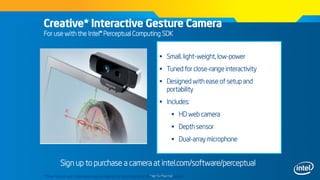
Creative* Interactive Gesture Camera
For use with the Intel® Perceptual Computing SDK
 Small, light-weight, low-power
 Tuned for close-range interactivity
 Designed with ease of setup and
portability
 Includes:
 HD web camera
 Depth sensor
 Dual-array microphone
Sign up to purchase a camera at intel.com/software/perceptual
*Other brands and trademarks may be claimed as the property of their respective owners
Intel Confidential
Key Upcoming Items
 Creative* Senz3D – Q3 2013
 Integration in Intel devices – H2 2014
*Other brands and trademarks may be claimed as the property of their respective owners
Intel Confidential
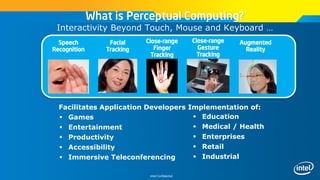
What is Perceptual Computing?
Interactivity Beyond Touch, Mouse and Keyboard …
Facial
Tracking
Speech
Recognition
Close-range
Finger
Tracking
Augmented
Reality
Close-range
Gesture
Tracking
Facilitates Application Developers Implementation of:
 Games
 Entertainment
 Productivity
 Accessibility
 Immersive Teleconferencing
 Education
 Medical / Health
 Enterprises
 Retail
 Industrial
Intel Confidential
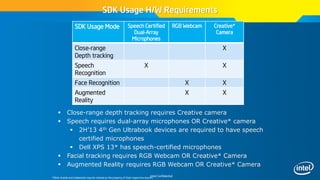
SDK Usage H/W Requirements
SDK Usage Mode Speech Certified
Dual-Array
Microphones
RGB Webcam Creative*
Camera
Close-range
Depth tracking
X
Speech
Recognition
X X
Face Recognition X X
Augmented
Reality
X X
 Close-range depth tracking requires Creative camera
 Speech requires dual-array microphones OR Creative* camera
 2H’13 4th Gen Ultrabook devices are required to have speech
certified microphones
 Dell XPS 13* has speech-certified microphones
 Facial tracking requires RGB Webcam OR Creative* Camera
 Augmented Reality requires RGB Webcam OR Creative* Camera
*Other brands and trademarks may be claimed as the property of their respective owners
Intel Confidential
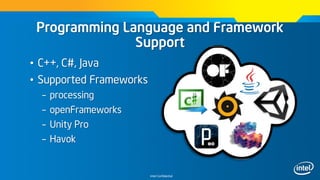
Programming Language and Framework
Support
• C++, C#, Java
• Supported Frameworks
– processing
– openFrameworks
– Unity Pro
– Havok
Intel Confidential
Programming Language and Framework
Support
• Unsupported but Verified
– Cinder
– OGRE
– XNA / Monogame
– Bullet Physics
Intel Confidential
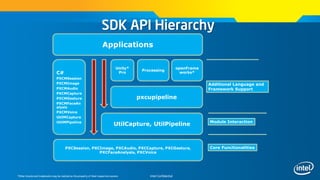
PXCSession, PXCImage, PXCAudio, PXCCapture, PXCGesture,
PXCFaceAnalysis, PXCVoice
UtilCapture, UtilPipeline
C#
PXCMSession
PXCMImage
PXCMAudio
PXCMCapture
PXCMGesture
PXCMFaceAn
alysis
PXCMVoice
UtilMCapture
UtilMPipeline
pxcupipeline
Unity*
Pro
Processing
openFrame
works*
Applications
Core Functionalities
Module Interaction
Additional Language and
Framework Support
SDK API Hierarchy
*Other brands and trademarks may be claimed as the property of their respective owners
Intel Confidential
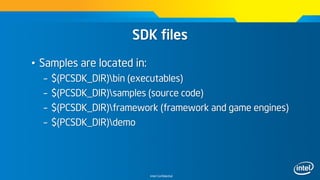
SDK files
• Samples are located in:
– $(PCSDK_DIR)bin (executables)
– $(PCSDK_DIR)samples (source code)
– $(PCSDK_DIR)framework (framework and game engines)
– $(PCSDK_DIR)demo
Intel Confidential
Resources
• Perceptual Computing Forums
– http://software.intel.com/en-us/forums/intel-
perceptual-computing-sdk
• Perceptual Computing IDZ Portal
– http://intel.com/software/perceptual
• Github
– http://github.com/IntelPerceptual
Intel Confidential
User Experience considerations
• Reality inspired, not cloning
– Wrapping fingers around objects
• Literal, not abstract
– Universal visual cues – switches and nobs
• Consistency!!!
• Extensible – prepare for future improvements
• Manage persistence
– Sometimes the hand will go out of the view
Intel Confidential
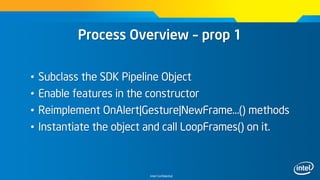
Process Overview – prop 1
• Subclass the SDK Pipeline Object
• Enable features in the constructor
• Reimplement OnAlert|Gesture|NewFrame…() methods
• Instantiate the object and call LoopFrames() on it.
Intel Confidential
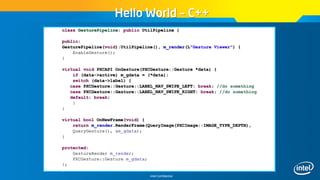
Hello World – C++
class GesturePipeline: public UtilPipeline {
public:
GesturePipeline(void):UtilPipeline(), m_render(L"Gesture Viewer") {
EnableGesture();
}
virtual void PXCAPI OnGesture(PXCGesture::Gesture *data) {
if (data->active) m_gdata = (*data);
switch (data->label) {
case PXCGesture::Gesture::LABEL_NAV_SWIPE_LEFT: break; //do something
case PXCGesture::Gesture::LABEL_NAV_SWIPE_RIGHT: break; //do something
default: break;
}
}
virtual bool OnNewFrame(void) {
return m_render.RenderFrame(QueryImage(PXCImage::IMAGE_TYPE_DEPTH),
QueryGesture(), &m_gdata);
}
protected:
GestureRender m_render;
PXCGesture::Gesture m_gdata;
};
Intel Confidential
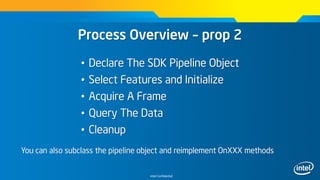
Process Overview – prop 2
• Declare The SDK Pipeline Object
• Select Features and Initialize
• Acquire A Frame
• Query The Data
• Cleanup
You can also subclass the pipeline object and reimplement OnXXX methods
Intel Confidential
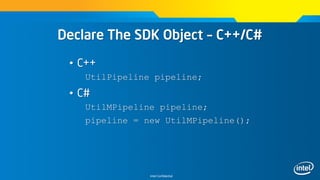
Declare The SDK Object – C++/C#
• C++
UtilPipeline pipeline;
• C#
UtilMPipeline pipeline;
pipeline = new UtilMPipeline();
Intel Confidential
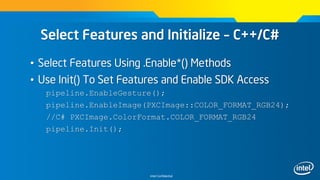
Select Features and Initialize – C++/C#
• Select Features Using .Enable*() Methods
• Use Init() To Set Features and Enable SDK Access
pipeline.EnableGesture();
pipeline.EnableImage(PXCImage::COLOR_FORMAT_RGB24);
//C# PXCImage.ColorFormat.COLOR_FORMAT_RGB24
pipeline.Init();
Intel Confidential
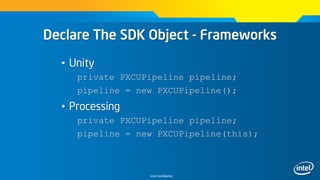
Declare The SDK Object - Frameworks
• Unity
private PXCUPipeline pipeline;
pipeline = new PXCUPipeline();
• Processing
private PXCUPipeline pipeline;
pipeline = new PXCUPipeline(this);
Intel Confidential
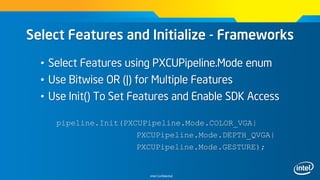
Select Features and Initialize - Frameworks
• Select Features using PXCUPipeline.Mode enum
• Use Bitwise OR (|) for Multiple Features
• Use Init() To Set Features and Enable SDK Access
pipeline.Init(PXCUPipeline.Mode.COLOR_VGA|
PXCUPipeline.Mode.DEPTH_QVGA|
PXCUPipeline.Mode.GESTURE);
Intel Confidential
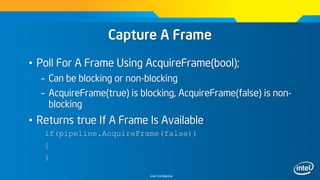
Capture A Frame
• Poll For A Frame Using AcquireFrame(bool);
– Can be blocking or non-blocking
– AcquireFrame(true) is blocking, AcquireFrame(false) is non-
blocking
• Returns true If A Frame Is Available
if(pipeline.AcquireFrame(false))
{
}
Intel Confidential
Retrieve The Data
• Data Is Retrieved via Query*(<T>)
– QueryRGB(), QueryLabelMapAsImage(), etc…
• Unity
Texture2D rgbTexture = new
Texture2D(640,480,TextureFormat.ARGB32, false);
Pipeline.QueryRGB(rgbTexture);
• processing
PImage rgbTexture = createImage(640,480,RGB);
pipeline.QueryRGB(rgbTexture);
Intel Confidential
Clean Up
• Use ReleaseFrame() To “Free Up The Pipeline”
pipeline.ReleaseFrame();
Intel Confidential
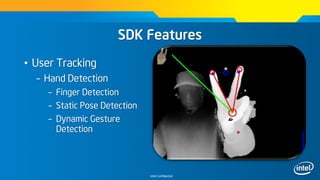
SDK Features
• User Tracking
– Hand Detection
– Finger Detection
– Static Pose Detection
– Dynamic Gesture
Detection
Intel Confidential
User experience on Gestures
• Innate vs. learned gestures
– Aim for lower cognitive load
• Actionable gestures
– What if the user turns the head, drinks coffee…
• Prevent Occlusion!!!
• Left-right gestures easier than up-down
• Grabbed objects
– Make it obvious where objects can be dropped
Intel Confidential
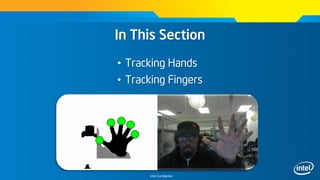
In This Section
• Tracking Hands
• Tracking Fingers
Intel Confidential
Key Concepts
• PXCGesture
– Gesture and node tracking interface
• PXCGesture::GeoNode
– Geometric Node, struct for tracking data
• PXCGesture::GeoNode::Label
– Enum indicating tracked node
Intel Confidential
X
Z
Y
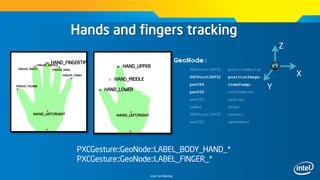
Hands and fingers tracking
GeoNode:
– PXCPoint3DF32 positionWorld;
– PXCPoint3DF32 positionImage;
– pxcU64 timeStamp;
– pxcU32 confidence;
– pxcF32 radius;
– Label body;
– PXCPoint3DF32 normal;
– pxcU32 openness;
o HAND_FINGERTIP
PXCGesture::GeoNode::LABEL_BODY_HAND_*
PXCGesture::GeoNode::LABEL_FINGER_*
o HAND_UPPER
o HAND_MIDDLE
o HAND_LOWER
Intel Confidential
Retrieve The Geonodes data – C++
PXCGesture gesture = pipeline->QueryGesture();
if(gesture)
{
PXCGesture::GeoNode node;
gesture->QueryNodeData(0,
PXCGesture::GeoNode::LABEL_BODY_HAND_PRIMARY,
&node);
}
Intel Confidential
Retrieve The Geonodes data - C#
PXCMGesture gesture = pipeline.QueryGesture();
if(gesture)
{
PXCMGesture.GeoNode node;
gesture.QueryNodeData(0,
PXCMGesture.GeoNode.Label.LABEL_BODY_HAND_PRIMARY,
out node);
}
Intel Confidential
Retrieve The Geonodes Data - Frameworks
• Unity
PXCMGesture.GeoNode node;
pipeline.QueryGeoNode(PXCMGesture.GeoNode.LABEL_BODY
_HAND_PRIMARY, out node);
• processing
PXCMGesture.GeoNode node = new
PXCMGesture.GeoNode();
pipeline.QueryGeoNode(PXCMGesture.GeoNode.LABEL_BODY
_HAND_PRIMARY, node);
Intel Confidential
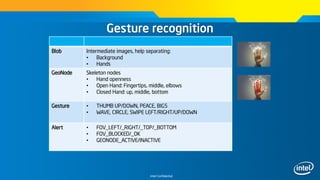
Gesture recognition
~30cm
Blob Intermediate images, help separating:
• Background
• Hands
GeoNode Skeleton nodes
• Hand openness
• Open Hand: Fingertips, middle, elbows
• Closed Hand: up, middle, bottom
Gesture • THUMB UP/DOWN, PEACE, BIG5
• WAVE, CIRCLE, SWIPE LEFT/RIGHT/UP/DOWN
Alert • FOV_LEFT/_RIGHT/_TOP/_BOTTOM
• FOV_BLOCKED/_OK
• GEONODE_ACTIVE/INACTIVE
Intel Confidential
Select Features and Initialize – C++
• Only Need To Enable Gestures, Images Optional for
Feedback or Visualization
pipeline.EnableGesture();
pipeline.Init();
Intel Confidential
Select Features and Initialize - Frameworks
• Only Need ‘GESTURE’, Images Optional for Feedback or
Visualization
pipeline.Init(PXCUPipeline.Mode.GESTURE);
Intel Confidential
Key Concepts
• PXCGesture
– Gesture and node tracking interface
• PXCGesture::Gesture
– Gesture, struct for detected gestures
• PXCGesture::Gesture::Label
– Enum indicating detected gesture
Intel Confidential
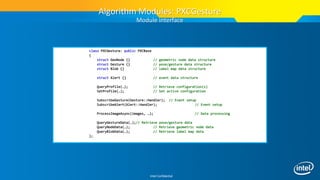
class PXCGesture: public PXCBase
{
struct GeoNode {} // geometric node data structure
struct Gesture {} // pose/gesture data structure
struct Blob {} // label map data structure
struct Alert {} // event data structure
QueryProfile(…); // Retrieve configuration(s)
SetProfile(…); // Set active configuration
SubscribeGesture(Gesture::Handler); // Event setup
SubscribeAlert(Alert::Handler); // Event setup
ProcessImageAsync(images, …); // Data processing
QueryGestureData(…);// Retrieve pose/gesture data
QueryNodeData(…); // Retrieve geometric node data
QueryBlobData(…); // Retrieve label map data
};
Algorithm Modules: PXCGesture
Module interface
Intel Confidential
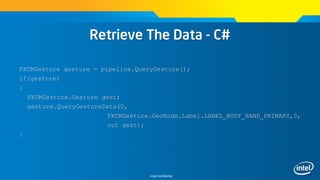
Retrieve The Data - C#
PXCMGesture gesture = pipeline.QueryGesture();
if(gesture)
{
PXCMGesture.Gesture gest;
gesture.QueryGestureData(0,
PXCMGesture.GeoNode.Label.LABEL_BODY_HAND_PRIMARY,0,
out gest);
}
Intel Confidential
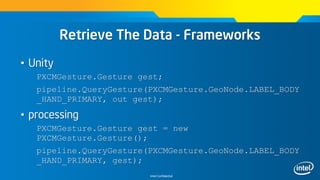
Retrieve The Data - Frameworks
• Unity
PXCMGesture.Gesture gest;
pipeline.QueryGesture(PXCMGesture.GeoNode.LABEL_BODY
_HAND_PRIMARY, out gest);
• processing
PXCMGesture.Gesture gest = new
PXCMGesture.Gesture();
pipeline.QueryGesture(PXCMGesture.GeoNode.LABEL_BODY
_HAND_PRIMARY, gest);
Intel Confidential
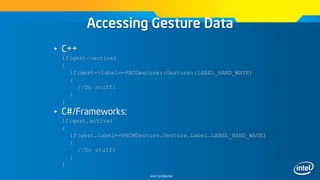
Accessing Gesture Data
• C++
if(gest->active)
{
if(gest->label==PXCGesture::Gesture::LABEL_HAND_WAVE)
{
//Do stuff!
}
}
• C#/Frameworks:
if(gest.active)
{
if(gest.label==PXCMGesture.Gesture.Label.LABEL_HAND_WAVE)
{
//Do stuff!
}
}
Intel Confidential
Other Resources
http://bit.ly/11PquG1 - sources Fly
http://intel.ly/ZK14uR - Hand skeletal tracking
Intel Confidential
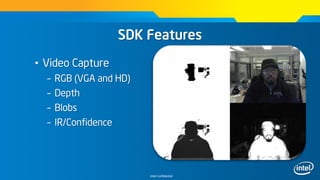
SDK Features
• Video Capture
– RGB (VGA and HD)
– Depth
– Blobs
– IR/Confidence
Intel Confidential
Available Video Streams
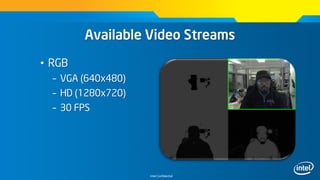
• RGB
– VGA (640x480)
– HD (1280x720)
– 30 FPS
Intel Confidential
Available Video Streams
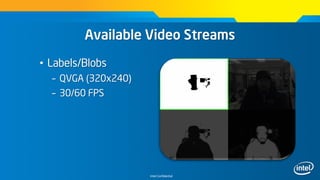
• Labels/Blobs
– QVGA (320x240)
– 30/60 FPS
Intel Confidential
Available Video Streams
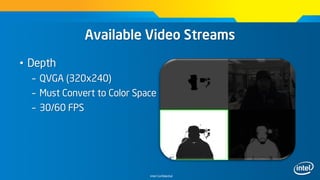
• Depth
– QVGA (320x240)
– Must Convert to Color Space
– 30/60 FPS
Intel Confidential
Available Video Streams
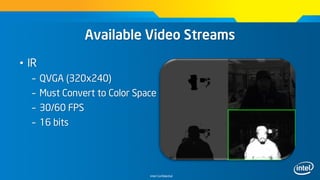
• IR
– QVGA (320x240)
– Must Convert to Color Space
– 30/60 FPS
– 16 bits
Intel Confidential
Retrieve The Data (C++)
• Data Is Retrieved via QueryImage() And Accessing The
Data Buffers
• Image Is Retrieved as PXCImage, Data Is Accessed Via
PXCImage::ImageData.planes
PXCImage rgb = pipeline.QueryImage(PXCImage::IMAGE_TYPE_COLOR);
PXCImage::ImageData rgbData;
rgb->AcquireAccess(PXCImage::ACCESS_READ, &rgbData);
//Data can be loaded from rgbData.planes[0]
rgb->ReleaseAccess(&rgbData);
Intel Confidential
Retrieve The Data (C#)
• Image Data Can Be Retrieved Via QueryBitmap()
System.Drawing.Bitmap rgb;
PXCMImage rgbImage =
pipeline.QueryImage(PXCMImage.ImageType.IMAGE_TYPE_COLOR);
rgbImage.QueryBitmap(pipeline.QuerySession(), out rgb);
Intel Confidential
Retrieve The Data - Frameworks
• Image Data Can Be Retrieved Via QueryBitmap()
System.Drawing.Bitmap rgb;
PXCMImage rgbImage =
pipeline.QueryImage(PXCMImage.ImageType.IMAGE_TYPE_COLOR);
rgbImage.QueryBitmap(pipeline.QuerySession(), out rgb);
Intel Confidential
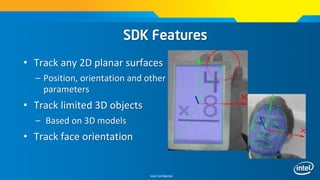
• Track any 2D planar surfaces
– Position, orientation and other
parameters
• Track limited 3D objects
– Based on 3D models
• Track face orientation
SDK Features
Intel Confidential
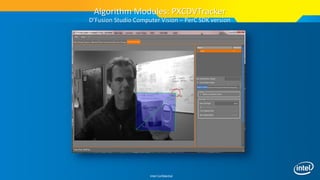
Algorithm Modules: PXCDVTracker
D’Fusion Studio Computer Vision – PerC SDK version
Intel Confidential
Algorithm Modules: PXCDVTracker
D’Fusion Studio Computer Vision – PerC SDK version
Intel Confidential
class PXCDVTracker: public PXCBase
{
enum TargetType
{
TARGET_UNDEFINED,
TARGET_PLANE,
TARGET_OBJECT3D,
TARGET_FACE,
TARGET_PLANEBLACKBOX,
TARGET_MARKER
};
typedef struct
{
TrackingStatus status; // (-1) not initialized, 0 not tracking (recognition in process), 1 tracking
pxcF64 position[3]; // Resulting pose (X,Y, Z)
pxcF64 orientation[4]; // Quaternion to express the orientation
int index; // Recognized keyFrame index (-1 none)
} TargetData;
QueryProfile(…); // Retrieve configuration(s)
SetProfile(…); // Set active configuration
GetTargetCount(…); //
ActivateTarget(…); // Retrieve object tracking data
GetTargetData(…); //
ProcessImageAsync(…); // Data processing
};
Algorithm Modules: PXCDVTracker
Module Interface
Intel Confidential
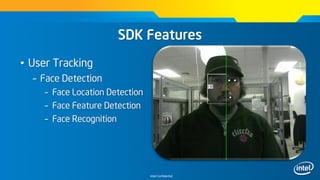
SDK Features
• User Tracking
– Face Detection
– Face Location Detection
– Face Feature Detection
– Face Recognition
Intel Confidential
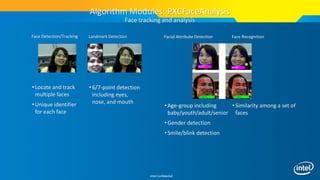
Face Detection/Tracking
•Locate and track
multiple faces
•Unique identifier
for each face
Algorithm Modules: PXCFaceAnalysis
Face tracking and analysis
Landmark Detection
•6/7-point detection
including eyes,
nose, and mouth
Facial Attribute Detection
•Age-group including
baby/youth/adult/senior
•Gender detection
•Smile/blink detection
Face Recognition
•Similarity among a set of
faces
Intel Confidential
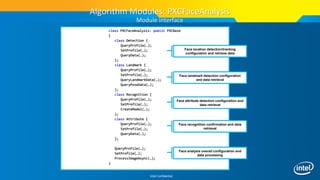
class PXCFaceAnalysis: public PXCBase
{
class Detection {
QueryProfile(…);
SetProfile(…);
QueryData(…);
};
class Landmark {
QueryProfile(…);
SetProfile(…);
QueryLandmarkData(…);
QueryPoseData(…);
};
class Recognition {
QueryProfile(…);
SetProfile(…);
CreateModel(…);
};
class Attribute {
QueryProfile(…);
SetProfile(…);
QueryData(…);
};
QueryProfile(…);
SetProfile(…);
ProcessImageAsync(…);
}
Algorithm Modules: PXCFaceAnalysis
Module interface
Face location detection/tracking
configuration and retrieve data
Face landmark detection configuration
and data retrieval
Face attribute detection configuration and
data retrieval
Face recognition confirmation and data
retrieval
Face analysis overall configuration and
data processing
Intel Confidential
• Nuance* Voice Command and Control
– Recognize from a list of predefined commands
• Nuance Voice Dictation
– Recognize short sentences (<30 seconds)
• Nuance Voice Synthesis
– Text to speech for short sentences
SDK Features
Intel Confidential
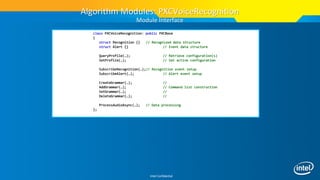
class PXCVoiceRecognition: public PXCBase
{
struct Recognition {} // Recognized data structure
struct Alert {} // Event data structure
QueryProfile(…); // Retrieve configuration(s)
SetProfile(…); // Set active configuration
SubscribeRecognition(…);// Recognition event setup
SubscribeAlert(…); // Alert event setup
CreateGrammar(…); //
AddGrammar(…); // Command list construction
SetGrammar(…); //
DeleteGrammar(…); //
ProcessAudioAsync(…); // Data processing
};
Algorithm Modules: PXCVoiceRecognition
Module Interface
Intel Confidential
class MyHandler: public PXCVoiceRecognition::Recognition::Handler, public PXCVoiceRecognition::Alert::Handler
{
public:
MyHandler(std::vector<pxcCHAR*> &commands) { this->commands = commands; }
virtual void PXCAPI OnRecognized(PXCVoiceRecognition::Recognition *cmd)
{
wprintf_s(L"nRecognized: <%s>n", (cmd->label>=0)?commands[cmd->label]:cmd->dictation);
}
virtual void PXCAPI OnAlert(PXCVoiceRecognition::Alert *alert)
{
switch (alert->label)
{
case PXCVoiceRecognition::Alert::LABEL_SNR_LOW:
wprintf_s(L"nAlert: <Low SNR>n");
break;
case PXCVoiceRecognition::Alert::LABEL_VOLUME_LOW:
wprintf_s(L"nAlert: <Low Volume>n");
break;
case PXCVoiceRecognition::Alert::LABEL_VOLUME_HIGH:
wprintf_s(L"nAlert: <High Volume>n");
break;
default:
wprintf_s(L"nAlert: <0x%x>n",alert->label);
break;
}
Algorithm Modules: PXCVoiceSynthesis
Voice recognition example – callback handlers
Intel Confidential
class PXCVoiceSynthesis: public PXCBase
{
public:
PXC_CUID_OVERWRITE(PXC_UID('V','I','T','S'));
struct ProfileInfo {
enum Language {
LANGUAGE_US_ENGLISH=1,
};
enum Voice {
VOICE_MALE,
VOICE_FEMALE,
};
PXCCapture::AudioStream::DataDesc outputs; // output format, need bufferSize to limit the latency.
Language language;
Voice voice;
pxcU32 reserved[6];
};
virtual pxcStatus PXCAPI QueryProfile(pxcU32 pidx, ProfileInfo *pinfo)=0;
pxcStatus __inline QueryProfile(ProfileInfo *pinfo) { return QueryProfile(WORKING_PROFILE,pinfo); }
virtual pxcStatus PXCAPI SetProfile(ProfileInfo *pinfo)=0;
virtual pxcStatus PXCAPI QueueSentense(pxcCHAR *sentence, pxcU32 nchars, pxcUID *id)=0;
virtual pxcStatus PXCAPI ProcessAudioAsync(pxcUID id, PXCAudio **audio, PXCScheduler::SyncPoint **sp)=0;
};
Algorithm Modules: PXCVoiceSynthesis
Module Interface
Intel Confidential
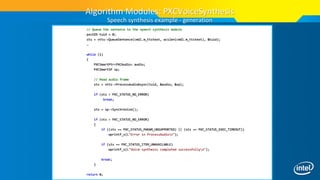
// Queue the sentence to the speech synthesis module
pxcUID tuid = 0;
sts = vtts->QueueSentence(cmdl.m_ttstext, wcslen(cmdl.m_ttstext), &tuid);
…
while (1)
{
PXCSmartPtr<PXCAudio> audio;
PXCSmartSP sp;
// Read audio frame
sts = vtts->ProcessAudioAsync(tuid, &audio, &sp);
if (sts < PXC_STATUS_NO_ERROR)
break;
sts = sp->Synchronize();
if (sts < PXC_STATUS_NO_ERROR)
{
if ((sts == PXC_STATUS_PARAM_UNSUPPORTED) || (sts == PXC_STATUS_EXEC_TIMEOUT))
wprintf_s(L"Error in ProcessAudion");
if (sts == PXC_STATUS_ITEM_UNAVAILABLE)
wprintf_s(L"Voice synthesis completed successfullyn");
break;
}
return 0;
Algorithm Modules: PXCVoiceSynthesis
Speech synthesis example - generation
Intel Confidential
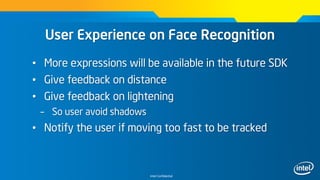
User Experience on Face Recognition
• More expressions will be available in the future SDK
• Give feedback on distance
• Give feedback on lightening
– So user avoid shadows
• Notify the user if moving too fast to be tracked
Intel Confidential
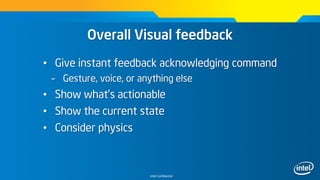
Overall Visual feedback
• Give instant feedback acknowledging command
– Gesture, voice, or anything else
• Show what’s actionable
• Show the current state
• Consider physics
Intel Confidential
https://perceptualchallenge.intel.com
Backup
Intel Confidential
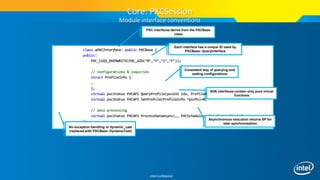
class aPXCInterface: public PXCBase {
public:
PXC_CUID_OVERWRITE(PXC_UID(‘M’,’Y’,’I’,’F’));
// configurations & inquiries
struct ProfileInfo {
…
};
virtual pxcStatus PXCAPI QueryProfile(pxcU32 idx, ProfileInfo *pinfo)=0;
virtual pxcStatus PXCAPI SetProfile(ProfileInfo *pinfo)=0;
// data processing
virtual pxcStatus PXCAPI ProcessDataAsync(…, PXCScheduler::SyncPoint **sp)=0;
};
Each interface has a unique ID used by
PXCBase::QueryInterface
Consistent way of querying and
setting configurations
Asynchronous execution returns SP for
later synchronization
Core: PXCSession
Module interface conventions
PXC interfaces derive from the PXCBase
class
SDK interfaces contain only pure virtual
functions
No exception handling or dynamic_cast
(replaced with PXCBase::DynamicCast)
Intel Confidential
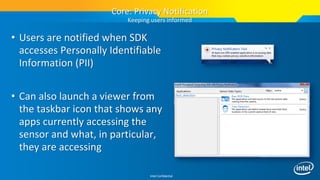
• Users are notified when SDK
accesses Personally Identifiable
Information (PII)
• Can also launch a viewer from
the taskbar icon that shows any
apps currently accessing the
sensor and what, in particular,
they are accessing
Core: Privacy Notification
Keeping users informed
Intel Confidential
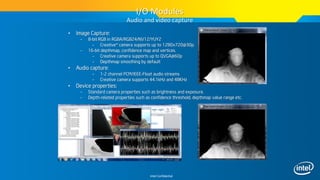
• Image Capture:
– 8-bit RGB in RGBA/RGB24/NV12/YUY2
– Creative* camera supports up to 1280x720@30p.
– 16-bit depthmap, confidence map and vertices.
– Creative camera supports up to QVGA@60p
– Depthmap smoothing by default
• Audio capture:
– 1-2 channel PCM/IEEE-Float audio streams
– Creative camera supports 44.1kHz and 48KHz
• Device properties:
– Standard camera properties such as brightness and exposure.
– Depth-related properties such as confidence threshold, depthmap value range etc.
I/O Modules
Audio and video capture
Intel Confidential
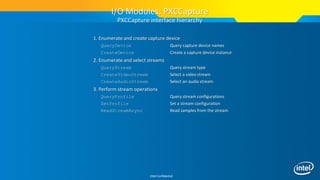
1. Enumerate and create capture device
QueryDevice Query capture device names
CreateDevice Create a capture device instance
2. Enumerate and select streams
QueryStream Query stream type
CreateVideoStream Select a video stream
CreateAudioStream Select an audio stream
3. Perform stream operations
QueryProfile Query stream configurations
SetProfile Set a stream configuration
ReadStreamAsync Read samples from the stream
I/O Modules: PXCCapture
PXCCapture interface hierarchy
Intel Confidential
SetDeviceProperty/QueryDevice
Property
• Color stream properties
– CONTRAST, BRIGHTNESS, HUE, SATURATION …
• Depth stream properties
– DEPTH_SMOOTHING, SATURATION_VALUE, …
• Audio stream properties
– MIX_LEVEL
• Misc. properties
– ACCELEROMETER_READING
I/O Modules: PXCCapture
Device properties
Intel Confidential
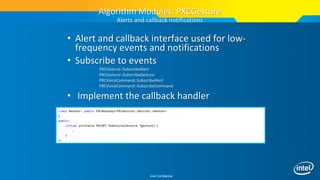
• Alert and callback interface used for low-
frequency events and notifications
• Subscribe to events
PXCGesture::SubscribeAlert
PXCGesture::SubscribeGesture
PXCVoiceCommand::SubscribeAlert
PXCVoiceCommand::SubscribeCommand
• Implement the callback handler
Algorithm Modules: PXCGesture
Alerts and callback notifications
class Handler: public PXCBaseImpl<PXCGesture::Gesture::Handler>
{
public:
virtual pxcStatus PXCAPI OnGesture(Gesture *gesture) {
…
}
};
Intel Confidential
class MyPipeline: public UtilPipeline {
public:
MyPipeline(void):UtilPipeline() {
EnableGesture();
}
virtual void PXCAPI OnGesture
(PXCGesture::Gesture *data) {
printf_s(“%dn”,data->label);
}
};
int wmain(int argc, WCHAR* argv[]) {
MyPipeline pipeline;
pipeline.LoopFrames();
return 0;
}
class MyPipeline: UtilMPipeline {
public MyPipeline():base() {
EnableGesture();
}
public override void OnGesture
(ref PXCMGesture.Gesture data) {
Console.WriteLn(data.label);
}
};
class Program {
static void Main(string[] args) {
MyPipeline pipeline=new MyPipeline();
pipeline.LoopFrames();
pipeline.Dispose();
}
}
C++ C#
Enable Finger Tracking
Gesture Callback
Data Flow Loops
UtilPipeline Class
Gesture Recognition “Hello World”
Intel Confidential
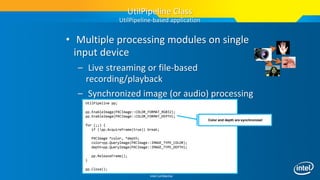
• Multiple processing modules on single
input device
– Live streaming or file-based
recording/playback
– Synchronized image (or audio) processing
UtilPipeline pp;
pp.EnableImage(PXCImage::COLOR_FORMAT_RGB32);
pp.EnableImage(PXCImage::COLOR_FORMAT_DEPTH);
for (;;) {
if (!pp.AcquireFrame(true)) break;
PXCImage *color, *depth;
color=pp.QueryImage(PXCImage::IMAGE_TYPE_COLOR);
depth=pp.QueryImage(PXCImage::IMAGE_TYPE_DEPTH);
pp.ReleaseFrame();
}
pp.Close();
UtilPipeline Class
UtilPipeline-based application
Color and depth are synchronized
Intel Confidential
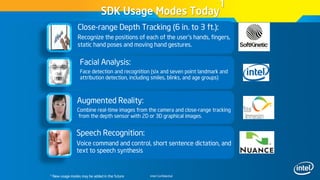
Speech Recognition:
Voice command and control, short sentence dictation, and
text to speech synthesis
SDK Usage Modes Today
1
1 New usage modes may be added in the future
Close-range Depth Tracking (6 in. to 3 ft.):
Recognize the positions of each of the user’s hands, fingers,
static hand poses and moving hand gestures.
Facial Analysis:
Face detection and recognition (six and seven point landmark and
attribution detection, including smiles, blinks, and age groups)
Augmented Reality:
Combine real-time images from the camera and close-range tracking
from the depth sensor with 2D or 3D graphical images.
Intel Confidential
Your SDK ‘One-Stop-Shop”
intel.com/software/perceptual
@PerceptualSDK (Twitter)
CHALLENGE INFO
DOWNLOAD SDK
ORDER CAMERA
DOCUMENTS
DEMO APPS
SUPPORT
Intel Confidential
Intel® Perceptual Computing Challenge
The $1Million 2013 Application Development Contest*
Enter Phase 2: perceptualchallenge.intel.com/
 Focus: Games, Productivity, Creative UI
& Multi-modal
 Process: Developers submit working
prototypes, panel judged
 Two Phases:
 Phase 1 (CLOSED): See Winner
Showcase at http://goo.gl/EnNHv
 Phase 2: March (GDC) to September -
$800,000+ in prizes
 Categories: Perceptual Gaming,
Productivity, Creative User Interface
and Open Innovation
 Available in 16 countries
*Terms and Conditions Apply
Intel Confidential
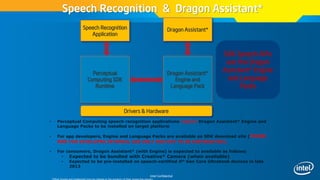
Speech Recognition & Dragon Assistant*
Perceptual
Computing SDK
Runtime
Speech Recognition
Application
Drivers & Hardware
Dragon Assistant*
Dragon Assistant*
Engine and
Language Pack
• Perceptual Computing speech recognition applications require Dragon Assistant* Engine and
Language Packs to be installed on target platform
• For app developers, Engine and Language Packs are available on SDK download site (THESE
ARE FOR DEVELOPER INTERNAL USE ONLY AND NOT TO BE DISTRIBUTED).
• For consumers, Dragon Assistant* (with Engine) is expected to available as follows:
• Expected to be bundled with Creative* Camera (when available)
• Expected to be pre-installed on speech-certified 4th Gen Core Ultrabook devices in late
2013
SDK Speech APIs
use the Dragon
Assistant* Engine
and Language
Packs
Intel Confidential
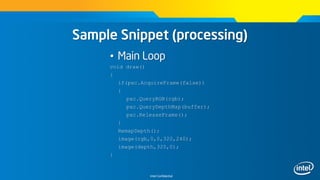
Sample Snippet (processing)
• Declarations
import intel.pcsdk.*;
PXCUPipeline pxc;
int[] cm = new int[2]; //color map dimensions
int[] dm = new int[2]; //depth map dimensions
short[] buffer;
Pimage rgb, depth;
Intel Confidential
Sample Snippet (processing)
• Initialization
void setup()
{
pxc = new PXCUPipeline(this);
if(!pxc.Init(PXCUPipeline.Mode.COLOR_VGA|PXCUPipeline.Mode.GESTURE))
println(“Error initializing PerC SDK”);
if(pxc.QueryRGBSize(cm))
rgb = createImate(cm[0], cm[1], RGB);
if(pxc.QueryDepthMapSize(dm))
{
buffer = new short[dm[0]*dm[1]];
depth = createImage(dm[0], dm[1], RGB);
}
size(640,480);
}
Intel Confidential
Sample Snippet (processing)
• Main Loop
void draw()
{
if(pxc.AcquireFrame(false))
{
pxc.QueryRGB(rgb);
pxc.QueryDepthMap(buffer);
pxc.ReleaseFrame();
}
RemapDepth();
image(rgb,0,0,320,240);
image(depth,320,0);
}
Intel Confidential
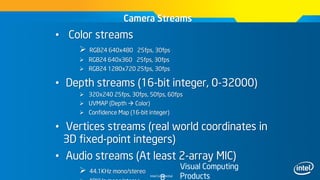
• Color streams
 RGB24 640x480 25fps, 30fps
 RGB24 640x360 25fps, 30fps
 RGB24 1280x720 25fps, 30fps
• Depth streams (16-bit integer, 0-32000)
 320x240 25fps, 30fps, 50fps, 60fps
 UVMAP (Depth  Color)
 Confidence Map (16-bit integer)
• Vertices streams (real world coordinates in
3D fixed-point integers)
• Audio streams (At least 2-array MIC)
 44.1KHz mono/stereo
Camera Streams
Visual Computing
Products
Intel Confidential
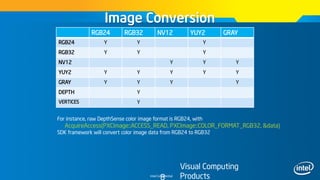
Image Conversion
Visual Computing
Products
RGB24 RGB32 NV12 YUY2 GRAY
RGB24 Y Y Y
RGB32 Y Y Y
NV12 Y Y Y
YUY2 Y Y Y Y Y
GRAY Y Y Y Y
DEPTH Y
VERTICES Y
For instance, raw DepthSense color image format is RGB24, with
AcquireAccess(PXCImage::ACCESS_READ, PXCImage::COLOR_FORMAT_RGB32, &data)
SDK framework will convert color image data from RGB24 to RGB32

Perceptual Computing Workshop à Paris

  • 1.
    Perceptual Computing Workshop XavierHallade, Technical Marketing Engineer @ph0b
  • 2.
    Intel Confidential Intel® Perceptual ComputingSDK 2013 Next Generation Interactivity for Intel® Core™ Processor-Based Applications
  • 3.
    Intel Confidential Creative* InteractiveGesture Camera For use with the Intel® Perceptual Computing SDK  Small, light-weight, low-power  Tuned for close-range interactivity  Designed with ease of setup and portability  Includes:  HD web camera  Depth sensor  Dual-array microphone Sign up to purchase a camera at intel.com/software/perceptual *Other brands and trademarks may be claimed as the property of their respective owners
  • 4.
    Intel Confidential Key UpcomingItems  Creative* Senz3D – Q3 2013  Integration in Intel devices – H2 2014 *Other brands and trademarks may be claimed as the property of their respective owners
  • 5.
    Intel Confidential What isPerceptual Computing? Interactivity Beyond Touch, Mouse and Keyboard … Facial Tracking Speech Recognition Close-range Finger Tracking Augmented Reality Close-range Gesture Tracking Facilitates Application Developers Implementation of:  Games  Entertainment  Productivity  Accessibility  Immersive Teleconferencing  Education  Medical / Health  Enterprises  Retail  Industrial
  • 6.
    Intel Confidential SDK UsageH/W Requirements SDK Usage Mode Speech Certified Dual-Array Microphones RGB Webcam Creative* Camera Close-range Depth tracking X Speech Recognition X X Face Recognition X X Augmented Reality X X  Close-range depth tracking requires Creative camera  Speech requires dual-array microphones OR Creative* camera  2H’13 4th Gen Ultrabook devices are required to have speech certified microphones  Dell XPS 13* has speech-certified microphones  Facial tracking requires RGB Webcam OR Creative* Camera  Augmented Reality requires RGB Webcam OR Creative* Camera *Other brands and trademarks may be claimed as the property of their respective owners
  • 7.
    Intel Confidential Programming Languageand Framework Support • C++, C#, Java • Supported Frameworks – processing – openFrameworks – Unity Pro – Havok
  • 8.
    Intel Confidential Programming Languageand Framework Support • Unsupported but Verified – Cinder – OGRE – XNA / Monogame – Bullet Physics
  • 9.
    Intel Confidential PXCSession, PXCImage,PXCAudio, PXCCapture, PXCGesture, PXCFaceAnalysis, PXCVoice UtilCapture, UtilPipeline C# PXCMSession PXCMImage PXCMAudio PXCMCapture PXCMGesture PXCMFaceAn alysis PXCMVoice UtilMCapture UtilMPipeline pxcupipeline Unity* Pro Processing openFrame works* Applications Core Functionalities Module Interaction Additional Language and Framework Support SDK API Hierarchy *Other brands and trademarks may be claimed as the property of their respective owners
  • 10.
    Intel Confidential SDK files •Samples are located in: – $(PCSDK_DIR)bin (executables) – $(PCSDK_DIR)samples (source code) – $(PCSDK_DIR)framework (framework and game engines) – $(PCSDK_DIR)demo
  • 11.
    Intel Confidential Resources • PerceptualComputing Forums – http://software.intel.com/en-us/forums/intel- perceptual-computing-sdk • Perceptual Computing IDZ Portal – http://intel.com/software/perceptual • Github – http://github.com/IntelPerceptual
  • 12.
    Intel Confidential User Experienceconsiderations • Reality inspired, not cloning – Wrapping fingers around objects • Literal, not abstract – Universal visual cues – switches and nobs • Consistency!!! • Extensible – prepare for future improvements • Manage persistence – Sometimes the hand will go out of the view
  • 13.
    Intel Confidential Process Overview– prop 1 • Subclass the SDK Pipeline Object • Enable features in the constructor • Reimplement OnAlert|Gesture|NewFrame…() methods • Instantiate the object and call LoopFrames() on it.
  • 14.
    Intel Confidential Hello World– C++ class GesturePipeline: public UtilPipeline { public: GesturePipeline(void):UtilPipeline(), m_render(L"Gesture Viewer") { EnableGesture(); } virtual void PXCAPI OnGesture(PXCGesture::Gesture *data) { if (data->active) m_gdata = (*data); switch (data->label) { case PXCGesture::Gesture::LABEL_NAV_SWIPE_LEFT: break; //do something case PXCGesture::Gesture::LABEL_NAV_SWIPE_RIGHT: break; //do something default: break; } } virtual bool OnNewFrame(void) { return m_render.RenderFrame(QueryImage(PXCImage::IMAGE_TYPE_DEPTH), QueryGesture(), &m_gdata); } protected: GestureRender m_render; PXCGesture::Gesture m_gdata; };
  • 15.
    Intel Confidential Process Overview– prop 2 • Declare The SDK Pipeline Object • Select Features and Initialize • Acquire A Frame • Query The Data • Cleanup You can also subclass the pipeline object and reimplement OnXXX methods
  • 16.
    Intel Confidential Declare TheSDK Object – C++/C# • C++ UtilPipeline pipeline; • C# UtilMPipeline pipeline; pipeline = new UtilMPipeline();
  • 17.
    Intel Confidential Select Featuresand Initialize – C++/C# • Select Features Using .Enable*() Methods • Use Init() To Set Features and Enable SDK Access pipeline.EnableGesture(); pipeline.EnableImage(PXCImage::COLOR_FORMAT_RGB24); //C# PXCImage.ColorFormat.COLOR_FORMAT_RGB24 pipeline.Init();
  • 18.
    Intel Confidential Declare TheSDK Object - Frameworks • Unity private PXCUPipeline pipeline; pipeline = new PXCUPipeline(); • Processing private PXCUPipeline pipeline; pipeline = new PXCUPipeline(this);
  • 19.
    Intel Confidential Select Featuresand Initialize - Frameworks • Select Features using PXCUPipeline.Mode enum • Use Bitwise OR (|) for Multiple Features • Use Init() To Set Features and Enable SDK Access pipeline.Init(PXCUPipeline.Mode.COLOR_VGA| PXCUPipeline.Mode.DEPTH_QVGA| PXCUPipeline.Mode.GESTURE);
  • 20.
    Intel Confidential Capture AFrame • Poll For A Frame Using AcquireFrame(bool); – Can be blocking or non-blocking – AcquireFrame(true) is blocking, AcquireFrame(false) is non- blocking • Returns true If A Frame Is Available if(pipeline.AcquireFrame(false)) { }
  • 21.
    Intel Confidential Retrieve TheData • Data Is Retrieved via Query*(<T>) – QueryRGB(), QueryLabelMapAsImage(), etc… • Unity Texture2D rgbTexture = new Texture2D(640,480,TextureFormat.ARGB32, false); Pipeline.QueryRGB(rgbTexture); • processing PImage rgbTexture = createImage(640,480,RGB); pipeline.QueryRGB(rgbTexture);
  • 22.
    Intel Confidential Clean Up •Use ReleaseFrame() To “Free Up The Pipeline” pipeline.ReleaseFrame();
  • 23.
    Intel Confidential SDK Features •User Tracking – Hand Detection – Finger Detection – Static Pose Detection – Dynamic Gesture Detection
  • 24.
    Intel Confidential User experienceon Gestures • Innate vs. learned gestures – Aim for lower cognitive load • Actionable gestures – What if the user turns the head, drinks coffee… • Prevent Occlusion!!! • Left-right gestures easier than up-down • Grabbed objects – Make it obvious where objects can be dropped
  • 25.
    Intel Confidential In ThisSection • Tracking Hands • Tracking Fingers
  • 26.
    Intel Confidential Key Concepts •PXCGesture – Gesture and node tracking interface • PXCGesture::GeoNode – Geometric Node, struct for tracking data • PXCGesture::GeoNode::Label – Enum indicating tracked node
  • 27.
    Intel Confidential X Z Y Hands andfingers tracking GeoNode: – PXCPoint3DF32 positionWorld; – PXCPoint3DF32 positionImage; – pxcU64 timeStamp; – pxcU32 confidence; – pxcF32 radius; – Label body; – PXCPoint3DF32 normal; – pxcU32 openness; o HAND_FINGERTIP PXCGesture::GeoNode::LABEL_BODY_HAND_* PXCGesture::GeoNode::LABEL_FINGER_* o HAND_UPPER o HAND_MIDDLE o HAND_LOWER
  • 28.
    Intel Confidential Retrieve TheGeonodes data – C++ PXCGesture gesture = pipeline->QueryGesture(); if(gesture) { PXCGesture::GeoNode node; gesture->QueryNodeData(0, PXCGesture::GeoNode::LABEL_BODY_HAND_PRIMARY, &node); }
  • 29.
    Intel Confidential Retrieve TheGeonodes data - C# PXCMGesture gesture = pipeline.QueryGesture(); if(gesture) { PXCMGesture.GeoNode node; gesture.QueryNodeData(0, PXCMGesture.GeoNode.Label.LABEL_BODY_HAND_PRIMARY, out node); }
  • 30.
    Intel Confidential Retrieve TheGeonodes Data - Frameworks • Unity PXCMGesture.GeoNode node; pipeline.QueryGeoNode(PXCMGesture.GeoNode.LABEL_BODY _HAND_PRIMARY, out node); • processing PXCMGesture.GeoNode node = new PXCMGesture.GeoNode(); pipeline.QueryGeoNode(PXCMGesture.GeoNode.LABEL_BODY _HAND_PRIMARY, node);
  • 31.
    Intel Confidential Gesture recognition ~30cm BlobIntermediate images, help separating: • Background • Hands GeoNode Skeleton nodes • Hand openness • Open Hand: Fingertips, middle, elbows • Closed Hand: up, middle, bottom Gesture • THUMB UP/DOWN, PEACE, BIG5 • WAVE, CIRCLE, SWIPE LEFT/RIGHT/UP/DOWN Alert • FOV_LEFT/_RIGHT/_TOP/_BOTTOM • FOV_BLOCKED/_OK • GEONODE_ACTIVE/INACTIVE
  • 32.
    Intel Confidential Select Featuresand Initialize – C++ • Only Need To Enable Gestures, Images Optional for Feedback or Visualization pipeline.EnableGesture(); pipeline.Init();
  • 33.
    Intel Confidential Select Featuresand Initialize - Frameworks • Only Need ‘GESTURE’, Images Optional for Feedback or Visualization pipeline.Init(PXCUPipeline.Mode.GESTURE);
  • 34.
    Intel Confidential Key Concepts •PXCGesture – Gesture and node tracking interface • PXCGesture::Gesture – Gesture, struct for detected gestures • PXCGesture::Gesture::Label – Enum indicating detected gesture
  • 35.
    Intel Confidential class PXCGesture:public PXCBase { struct GeoNode {} // geometric node data structure struct Gesture {} // pose/gesture data structure struct Blob {} // label map data structure struct Alert {} // event data structure QueryProfile(…); // Retrieve configuration(s) SetProfile(…); // Set active configuration SubscribeGesture(Gesture::Handler); // Event setup SubscribeAlert(Alert::Handler); // Event setup ProcessImageAsync(images, …); // Data processing QueryGestureData(…);// Retrieve pose/gesture data QueryNodeData(…); // Retrieve geometric node data QueryBlobData(…); // Retrieve label map data }; Algorithm Modules: PXCGesture Module interface
  • 36.
    Intel Confidential Retrieve TheData - C# PXCMGesture gesture = pipeline.QueryGesture(); if(gesture) { PXCMGesture.Gesture gest; gesture.QueryGestureData(0, PXCMGesture.GeoNode.Label.LABEL_BODY_HAND_PRIMARY,0, out gest); }
  • 37.
    Intel Confidential Retrieve TheData - Frameworks • Unity PXCMGesture.Gesture gest; pipeline.QueryGesture(PXCMGesture.GeoNode.LABEL_BODY _HAND_PRIMARY, out gest); • processing PXCMGesture.Gesture gest = new PXCMGesture.Gesture(); pipeline.QueryGesture(PXCMGesture.GeoNode.LABEL_BODY _HAND_PRIMARY, gest);
  • 38.
    Intel Confidential Accessing GestureData • C++ if(gest->active) { if(gest->label==PXCGesture::Gesture::LABEL_HAND_WAVE) { //Do stuff! } } • C#/Frameworks: if(gest.active) { if(gest.label==PXCMGesture.Gesture.Label.LABEL_HAND_WAVE) { //Do stuff! } }
  • 39.
    Intel Confidential Other Resources http://bit.ly/11PquG1- sources Fly http://intel.ly/ZK14uR - Hand skeletal tracking
  • 40.
    Intel Confidential SDK Features •Video Capture – RGB (VGA and HD) – Depth – Blobs – IR/Confidence
  • 41.
    Intel Confidential Available VideoStreams • RGB – VGA (640x480) – HD (1280x720) – 30 FPS
  • 42.
    Intel Confidential Available VideoStreams • Labels/Blobs – QVGA (320x240) – 30/60 FPS
  • 43.
    Intel Confidential Available VideoStreams • Depth – QVGA (320x240) – Must Convert to Color Space – 30/60 FPS
  • 44.
    Intel Confidential Available VideoStreams • IR – QVGA (320x240) – Must Convert to Color Space – 30/60 FPS – 16 bits
  • 45.
    Intel Confidential Retrieve TheData (C++) • Data Is Retrieved via QueryImage() And Accessing The Data Buffers • Image Is Retrieved as PXCImage, Data Is Accessed Via PXCImage::ImageData.planes PXCImage rgb = pipeline.QueryImage(PXCImage::IMAGE_TYPE_COLOR); PXCImage::ImageData rgbData; rgb->AcquireAccess(PXCImage::ACCESS_READ, &rgbData); //Data can be loaded from rgbData.planes[0] rgb->ReleaseAccess(&rgbData);
  • 46.
    Intel Confidential Retrieve TheData (C#) • Image Data Can Be Retrieved Via QueryBitmap() System.Drawing.Bitmap rgb; PXCMImage rgbImage = pipeline.QueryImage(PXCMImage.ImageType.IMAGE_TYPE_COLOR); rgbImage.QueryBitmap(pipeline.QuerySession(), out rgb);
  • 47.
    Intel Confidential Retrieve TheData - Frameworks • Image Data Can Be Retrieved Via QueryBitmap() System.Drawing.Bitmap rgb; PXCMImage rgbImage = pipeline.QueryImage(PXCMImage.ImageType.IMAGE_TYPE_COLOR); rgbImage.QueryBitmap(pipeline.QuerySession(), out rgb);
  • 48.
    Intel Confidential • Trackany 2D planar surfaces – Position, orientation and other parameters • Track limited 3D objects – Based on 3D models • Track face orientation SDK Features
  • 49.
    Intel Confidential Algorithm Modules:PXCDVTracker D’Fusion Studio Computer Vision – PerC SDK version
  • 50.
    Intel Confidential Algorithm Modules:PXCDVTracker D’Fusion Studio Computer Vision – PerC SDK version
  • 51.
    Intel Confidential class PXCDVTracker:public PXCBase { enum TargetType { TARGET_UNDEFINED, TARGET_PLANE, TARGET_OBJECT3D, TARGET_FACE, TARGET_PLANEBLACKBOX, TARGET_MARKER }; typedef struct { TrackingStatus status; // (-1) not initialized, 0 not tracking (recognition in process), 1 tracking pxcF64 position[3]; // Resulting pose (X,Y, Z) pxcF64 orientation[4]; // Quaternion to express the orientation int index; // Recognized keyFrame index (-1 none) } TargetData; QueryProfile(…); // Retrieve configuration(s) SetProfile(…); // Set active configuration GetTargetCount(…); // ActivateTarget(…); // Retrieve object tracking data GetTargetData(…); // ProcessImageAsync(…); // Data processing }; Algorithm Modules: PXCDVTracker Module Interface
  • 52.
    Intel Confidential SDK Features •User Tracking – Face Detection – Face Location Detection – Face Feature Detection – Face Recognition
  • 53.
    Intel Confidential Face Detection/Tracking •Locateand track multiple faces •Unique identifier for each face Algorithm Modules: PXCFaceAnalysis Face tracking and analysis Landmark Detection •6/7-point detection including eyes, nose, and mouth Facial Attribute Detection •Age-group including baby/youth/adult/senior •Gender detection •Smile/blink detection Face Recognition •Similarity among a set of faces
  • 54.
    Intel Confidential class PXCFaceAnalysis:public PXCBase { class Detection { QueryProfile(…); SetProfile(…); QueryData(…); }; class Landmark { QueryProfile(…); SetProfile(…); QueryLandmarkData(…); QueryPoseData(…); }; class Recognition { QueryProfile(…); SetProfile(…); CreateModel(…); }; class Attribute { QueryProfile(…); SetProfile(…); QueryData(…); }; QueryProfile(…); SetProfile(…); ProcessImageAsync(…); } Algorithm Modules: PXCFaceAnalysis Module interface Face location detection/tracking configuration and retrieve data Face landmark detection configuration and data retrieval Face attribute detection configuration and data retrieval Face recognition confirmation and data retrieval Face analysis overall configuration and data processing
  • 55.
    Intel Confidential • Nuance*Voice Command and Control – Recognize from a list of predefined commands • Nuance Voice Dictation – Recognize short sentences (<30 seconds) • Nuance Voice Synthesis – Text to speech for short sentences SDK Features
  • 56.
    Intel Confidential class PXCVoiceRecognition:public PXCBase { struct Recognition {} // Recognized data structure struct Alert {} // Event data structure QueryProfile(…); // Retrieve configuration(s) SetProfile(…); // Set active configuration SubscribeRecognition(…);// Recognition event setup SubscribeAlert(…); // Alert event setup CreateGrammar(…); // AddGrammar(…); // Command list construction SetGrammar(…); // DeleteGrammar(…); // ProcessAudioAsync(…); // Data processing }; Algorithm Modules: PXCVoiceRecognition Module Interface
  • 57.
    Intel Confidential class MyHandler:public PXCVoiceRecognition::Recognition::Handler, public PXCVoiceRecognition::Alert::Handler { public: MyHandler(std::vector<pxcCHAR*> &commands) { this->commands = commands; } virtual void PXCAPI OnRecognized(PXCVoiceRecognition::Recognition *cmd) { wprintf_s(L"nRecognized: <%s>n", (cmd->label>=0)?commands[cmd->label]:cmd->dictation); } virtual void PXCAPI OnAlert(PXCVoiceRecognition::Alert *alert) { switch (alert->label) { case PXCVoiceRecognition::Alert::LABEL_SNR_LOW: wprintf_s(L"nAlert: <Low SNR>n"); break; case PXCVoiceRecognition::Alert::LABEL_VOLUME_LOW: wprintf_s(L"nAlert: <Low Volume>n"); break; case PXCVoiceRecognition::Alert::LABEL_VOLUME_HIGH: wprintf_s(L"nAlert: <High Volume>n"); break; default: wprintf_s(L"nAlert: <0x%x>n",alert->label); break; } Algorithm Modules: PXCVoiceSynthesis Voice recognition example – callback handlers
  • 58.
    Intel Confidential class PXCVoiceSynthesis:public PXCBase { public: PXC_CUID_OVERWRITE(PXC_UID('V','I','T','S')); struct ProfileInfo { enum Language { LANGUAGE_US_ENGLISH=1, }; enum Voice { VOICE_MALE, VOICE_FEMALE, }; PXCCapture::AudioStream::DataDesc outputs; // output format, need bufferSize to limit the latency. Language language; Voice voice; pxcU32 reserved[6]; }; virtual pxcStatus PXCAPI QueryProfile(pxcU32 pidx, ProfileInfo *pinfo)=0; pxcStatus __inline QueryProfile(ProfileInfo *pinfo) { return QueryProfile(WORKING_PROFILE,pinfo); } virtual pxcStatus PXCAPI SetProfile(ProfileInfo *pinfo)=0; virtual pxcStatus PXCAPI QueueSentense(pxcCHAR *sentence, pxcU32 nchars, pxcUID *id)=0; virtual pxcStatus PXCAPI ProcessAudioAsync(pxcUID id, PXCAudio **audio, PXCScheduler::SyncPoint **sp)=0; }; Algorithm Modules: PXCVoiceSynthesis Module Interface
  • 59.
    Intel Confidential // Queuethe sentence to the speech synthesis module pxcUID tuid = 0; sts = vtts->QueueSentence(cmdl.m_ttstext, wcslen(cmdl.m_ttstext), &tuid); … while (1) { PXCSmartPtr<PXCAudio> audio; PXCSmartSP sp; // Read audio frame sts = vtts->ProcessAudioAsync(tuid, &audio, &sp); if (sts < PXC_STATUS_NO_ERROR) break; sts = sp->Synchronize(); if (sts < PXC_STATUS_NO_ERROR) { if ((sts == PXC_STATUS_PARAM_UNSUPPORTED) || (sts == PXC_STATUS_EXEC_TIMEOUT)) wprintf_s(L"Error in ProcessAudion"); if (sts == PXC_STATUS_ITEM_UNAVAILABLE) wprintf_s(L"Voice synthesis completed successfullyn"); break; } return 0; Algorithm Modules: PXCVoiceSynthesis Speech synthesis example - generation
  • 60.
    Intel Confidential User Experienceon Face Recognition • More expressions will be available in the future SDK • Give feedback on distance • Give feedback on lightening – So user avoid shadows • Notify the user if moving too fast to be tracked
  • 61.
    Intel Confidential Overall Visualfeedback • Give instant feedback acknowledging command – Gesture, voice, or anything else • Show what’s actionable • Show the current state • Consider physics
  • 62.
  • 63.
  • 64.
    Intel Confidential class aPXCInterface:public PXCBase { public: PXC_CUID_OVERWRITE(PXC_UID(‘M’,’Y’,’I’,’F’)); // configurations & inquiries struct ProfileInfo { … }; virtual pxcStatus PXCAPI QueryProfile(pxcU32 idx, ProfileInfo *pinfo)=0; virtual pxcStatus PXCAPI SetProfile(ProfileInfo *pinfo)=0; // data processing virtual pxcStatus PXCAPI ProcessDataAsync(…, PXCScheduler::SyncPoint **sp)=0; }; Each interface has a unique ID used by PXCBase::QueryInterface Consistent way of querying and setting configurations Asynchronous execution returns SP for later synchronization Core: PXCSession Module interface conventions PXC interfaces derive from the PXCBase class SDK interfaces contain only pure virtual functions No exception handling or dynamic_cast (replaced with PXCBase::DynamicCast)
  • 65.
    Intel Confidential • Usersare notified when SDK accesses Personally Identifiable Information (PII) • Can also launch a viewer from the taskbar icon that shows any apps currently accessing the sensor and what, in particular, they are accessing Core: Privacy Notification Keeping users informed
  • 66.
    Intel Confidential • ImageCapture: – 8-bit RGB in RGBA/RGB24/NV12/YUY2 – Creative* camera supports up to 1280x720@30p. – 16-bit depthmap, confidence map and vertices. – Creative camera supports up to QVGA@60p – Depthmap smoothing by default • Audio capture: – 1-2 channel PCM/IEEE-Float audio streams – Creative camera supports 44.1kHz and 48KHz • Device properties: – Standard camera properties such as brightness and exposure. – Depth-related properties such as confidence threshold, depthmap value range etc. I/O Modules Audio and video capture
  • 67.
    Intel Confidential 1. Enumerateand create capture device QueryDevice Query capture device names CreateDevice Create a capture device instance 2. Enumerate and select streams QueryStream Query stream type CreateVideoStream Select a video stream CreateAudioStream Select an audio stream 3. Perform stream operations QueryProfile Query stream configurations SetProfile Set a stream configuration ReadStreamAsync Read samples from the stream I/O Modules: PXCCapture PXCCapture interface hierarchy
  • 68.
    Intel Confidential SetDeviceProperty/QueryDevice Property • Colorstream properties – CONTRAST, BRIGHTNESS, HUE, SATURATION … • Depth stream properties – DEPTH_SMOOTHING, SATURATION_VALUE, … • Audio stream properties – MIX_LEVEL • Misc. properties – ACCELEROMETER_READING I/O Modules: PXCCapture Device properties
  • 69.
    Intel Confidential • Alertand callback interface used for low- frequency events and notifications • Subscribe to events PXCGesture::SubscribeAlert PXCGesture::SubscribeGesture PXCVoiceCommand::SubscribeAlert PXCVoiceCommand::SubscribeCommand • Implement the callback handler Algorithm Modules: PXCGesture Alerts and callback notifications class Handler: public PXCBaseImpl<PXCGesture::Gesture::Handler> { public: virtual pxcStatus PXCAPI OnGesture(Gesture *gesture) { … } };
  • 70.
    Intel Confidential class MyPipeline:public UtilPipeline { public: MyPipeline(void):UtilPipeline() { EnableGesture(); } virtual void PXCAPI OnGesture (PXCGesture::Gesture *data) { printf_s(“%dn”,data->label); } }; int wmain(int argc, WCHAR* argv[]) { MyPipeline pipeline; pipeline.LoopFrames(); return 0; } class MyPipeline: UtilMPipeline { public MyPipeline():base() { EnableGesture(); } public override void OnGesture (ref PXCMGesture.Gesture data) { Console.WriteLn(data.label); } }; class Program { static void Main(string[] args) { MyPipeline pipeline=new MyPipeline(); pipeline.LoopFrames(); pipeline.Dispose(); } } C++ C# Enable Finger Tracking Gesture Callback Data Flow Loops UtilPipeline Class Gesture Recognition “Hello World”
  • 71.
    Intel Confidential • Multipleprocessing modules on single input device – Live streaming or file-based recording/playback – Synchronized image (or audio) processing UtilPipeline pp; pp.EnableImage(PXCImage::COLOR_FORMAT_RGB32); pp.EnableImage(PXCImage::COLOR_FORMAT_DEPTH); for (;;) { if (!pp.AcquireFrame(true)) break; PXCImage *color, *depth; color=pp.QueryImage(PXCImage::IMAGE_TYPE_COLOR); depth=pp.QueryImage(PXCImage::IMAGE_TYPE_DEPTH); pp.ReleaseFrame(); } pp.Close(); UtilPipeline Class UtilPipeline-based application Color and depth are synchronized
  • 72.
    Intel Confidential Speech Recognition: Voicecommand and control, short sentence dictation, and text to speech synthesis SDK Usage Modes Today 1 1 New usage modes may be added in the future Close-range Depth Tracking (6 in. to 3 ft.): Recognize the positions of each of the user’s hands, fingers, static hand poses and moving hand gestures. Facial Analysis: Face detection and recognition (six and seven point landmark and attribution detection, including smiles, blinks, and age groups) Augmented Reality: Combine real-time images from the camera and close-range tracking from the depth sensor with 2D or 3D graphical images.
  • 73.
    Intel Confidential Your SDK‘One-Stop-Shop” intel.com/software/perceptual @PerceptualSDK (Twitter) CHALLENGE INFO DOWNLOAD SDK ORDER CAMERA DOCUMENTS DEMO APPS SUPPORT
  • 74.
    Intel Confidential Intel® PerceptualComputing Challenge The $1Million 2013 Application Development Contest* Enter Phase 2: perceptualchallenge.intel.com/  Focus: Games, Productivity, Creative UI & Multi-modal  Process: Developers submit working prototypes, panel judged  Two Phases:  Phase 1 (CLOSED): See Winner Showcase at http://goo.gl/EnNHv  Phase 2: March (GDC) to September - $800,000+ in prizes  Categories: Perceptual Gaming, Productivity, Creative User Interface and Open Innovation  Available in 16 countries *Terms and Conditions Apply
  • 75.
    Intel Confidential Speech Recognition& Dragon Assistant* Perceptual Computing SDK Runtime Speech Recognition Application Drivers & Hardware Dragon Assistant* Dragon Assistant* Engine and Language Pack • Perceptual Computing speech recognition applications require Dragon Assistant* Engine and Language Packs to be installed on target platform • For app developers, Engine and Language Packs are available on SDK download site (THESE ARE FOR DEVELOPER INTERNAL USE ONLY AND NOT TO BE DISTRIBUTED). • For consumers, Dragon Assistant* (with Engine) is expected to available as follows: • Expected to be bundled with Creative* Camera (when available) • Expected to be pre-installed on speech-certified 4th Gen Core Ultrabook devices in late 2013 SDK Speech APIs use the Dragon Assistant* Engine and Language Packs
  • 76.
    Intel Confidential Sample Snippet(processing) • Declarations import intel.pcsdk.*; PXCUPipeline pxc; int[] cm = new int[2]; //color map dimensions int[] dm = new int[2]; //depth map dimensions short[] buffer; Pimage rgb, depth;
  • 77.
    Intel Confidential Sample Snippet(processing) • Initialization void setup() { pxc = new PXCUPipeline(this); if(!pxc.Init(PXCUPipeline.Mode.COLOR_VGA|PXCUPipeline.Mode.GESTURE)) println(“Error initializing PerC SDK”); if(pxc.QueryRGBSize(cm)) rgb = createImate(cm[0], cm[1], RGB); if(pxc.QueryDepthMapSize(dm)) { buffer = new short[dm[0]*dm[1]]; depth = createImage(dm[0], dm[1], RGB); } size(640,480); }
  • 78.
    Intel Confidential Sample Snippet(processing) • Main Loop void draw() { if(pxc.AcquireFrame(false)) { pxc.QueryRGB(rgb); pxc.QueryDepthMap(buffer); pxc.ReleaseFrame(); } RemapDepth(); image(rgb,0,0,320,240); image(depth,320,0); }
  • 79.
    Intel Confidential • Colorstreams  RGB24 640x480 25fps, 30fps  RGB24 640x360 25fps, 30fps  RGB24 1280x720 25fps, 30fps • Depth streams (16-bit integer, 0-32000)  320x240 25fps, 30fps, 50fps, 60fps  UVMAP (Depth  Color)  Confidence Map (16-bit integer) • Vertices streams (real world coordinates in 3D fixed-point integers) • Audio streams (At least 2-array MIC)  44.1KHz mono/stereo Camera Streams Visual Computing Products
  • 80.
    Intel Confidential Image Conversion VisualComputing Products RGB24 RGB32 NV12 YUY2 GRAY RGB24 Y Y Y RGB32 Y Y Y NV12 Y Y Y YUY2 Y Y Y Y Y GRAY Y Y Y Y DEPTH Y VERTICES Y For instance, raw DepthSense color image format is RGB24, with AcquireAccess(PXCImage::ACCESS_READ, PXCImage::COLOR_FORMAT_RGB32, &data) SDK framework will convert color image data from RGB24 to RGB32