Java Control Statements
Kadarkarai Selvam
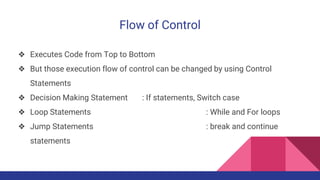
Flow of Control
❖ Executes Code from Top to Bottom
❖ But those execution flow of control can be changed by using Control
Statements
❖ Decision Making Statement : If statements, Switch case
❖ Loop Statements : While and For loops
❖ Jump Statements : break and continue
statements
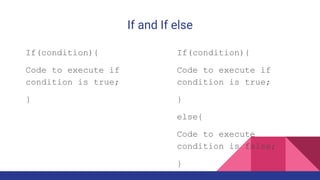
If and If else
If(condition){
Code to execute if
condition is true;
}
If(condition){
Code to execute if
condition is true;
}
else{
Code to execute
condition is false;
}
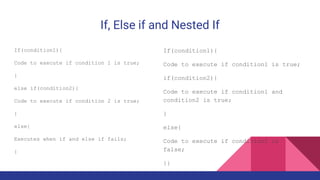
If, Else if and Nested If
If(condition1){
Code to execute if condition 1 is true;
}
else if(condition2){
Code to execute if condition 2 is true;
}
else{
Executes when if and else if fails;
}
If(condition1){
Code to execute if condition1 is true;
if(condition2){
Code to execute if condition1 and
condition2 is true;
}
else{
Code to execute if condition2 is
false;
}}
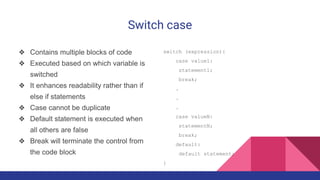
Switch case
❖ Contains multiple blocks of code
❖ Executed based on which variable is
switched
❖ It enhances readability rather than if
else if statements
❖ Case cannot be duplicate
❖ Default statement is executed when
all others are false
❖ Break will terminate the control from
the code block
switch (expression){
case value1:
statement1;
break;
.
.
.
case valueN:
statementN;
break;
default:
default statement;
}
While Loop
❖ Used to iterate over the code
block multiple times
❖ Entry controlled loop
while(condition){
//Code to execute
}
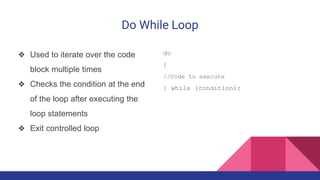
Do While Loop
❖ Used to iterate over the code
block multiple times
❖ Checks the condition at the end
of the loop after executing the
loop statements
❖ Exit controlled loop
do
{
//Code to execute
} while (condition);
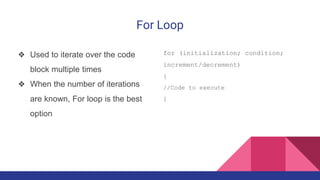
For Loop
❖ Used to iterate over the code
block multiple times
❖ When the number of iterations
are known, For loop is the best
option
for (initialization; condition;
increment/decrement)
{
//Code to execute
}
For Each Loop
❖ Used to iterate and get the
elements from an array.
❖ No increment is needed
int a[] = {18,25,28,29,30};
for (int eachvalueina : a) {
//Code to execute
}
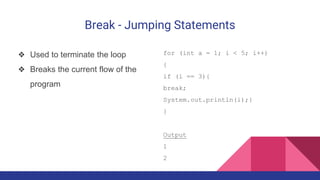
Break - Jumping Statements
❖ Used to terminate the loop
❖ Breaks the current flow of the
program
for (int a = 1; i < 5; i++)
{
if (i == 3){
break;
System.out.println(i);}
}
Output
1
2
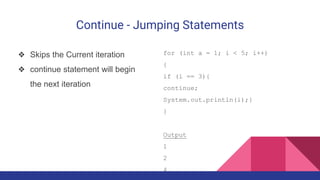
Continue - Jumping Statements
❖ Skips the Current iteration
❖ continue statement will begin
the next iteration
for (int a = 1; i < 5; i++)
{
if (i == 3){
continue;
System.out.println(i);}
}
Output
1
2
4

Java Control Statements

  • 1.
  • 2.
    Flow of Control ❖Executes Code from Top to Bottom ❖ But those execution flow of control can be changed by using Control Statements ❖ Decision Making Statement : If statements, Switch case ❖ Loop Statements : While and For loops ❖ Jump Statements : break and continue statements
  • 3.
    If and Ifelse If(condition){ Code to execute if condition is true; } If(condition){ Code to execute if condition is true; } else{ Code to execute condition is false; }
  • 4.
    If, Else ifand Nested If If(condition1){ Code to execute if condition 1 is true; } else if(condition2){ Code to execute if condition 2 is true; } else{ Executes when if and else if fails; } If(condition1){ Code to execute if condition1 is true; if(condition2){ Code to execute if condition1 and condition2 is true; } else{ Code to execute if condition2 is false; }}
  • 5.
    Switch case ❖ Containsmultiple blocks of code ❖ Executed based on which variable is switched ❖ It enhances readability rather than if else if statements ❖ Case cannot be duplicate ❖ Default statement is executed when all others are false ❖ Break will terminate the control from the code block switch (expression){ case value1: statement1; break; . . . case valueN: statementN; break; default: default statement; }
  • 6.
    While Loop ❖ Usedto iterate over the code block multiple times ❖ Entry controlled loop while(condition){ //Code to execute }
  • 7.
    Do While Loop ❖Used to iterate over the code block multiple times ❖ Checks the condition at the end of the loop after executing the loop statements ❖ Exit controlled loop do { //Code to execute } while (condition);
  • 8.
    For Loop ❖ Usedto iterate over the code block multiple times ❖ When the number of iterations are known, For loop is the best option for (initialization; condition; increment/decrement) { //Code to execute }
  • 9.
    For Each Loop ❖Used to iterate and get the elements from an array. ❖ No increment is needed int a[] = {18,25,28,29,30}; for (int eachvalueina : a) { //Code to execute }
  • 10.
    Break - JumpingStatements ❖ Used to terminate the loop ❖ Breaks the current flow of the program for (int a = 1; i < 5; i++) { if (i == 3){ break; System.out.println(i);} } Output 1 2
  • 11.
    Continue - JumpingStatements ❖ Skips the Current iteration ❖ continue statement will begin the next iteration for (int a = 1; i < 5; i++) { if (i == 3){ continue; System.out.println(i);} } Output 1 2 4