Control
structures
University of
Human Development
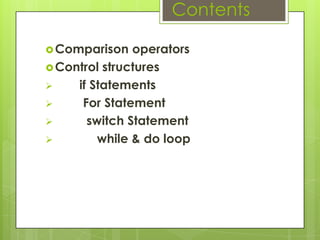
Contents
Comparison operators
Control structures
 if Statements
 For Statement
 switch Statement
 while & do loop
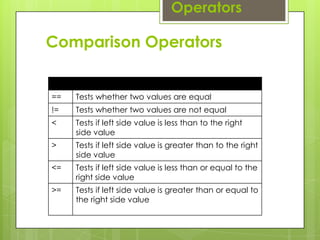
Comparison Operators
== Tests whether two values are equal
!= Tests whether two values are not equal
< Tests if left side value is less than to the right
side value
> Tests if left side value is greater than to the right
side value
<= Tests if left side value is less than or equal to the
right side value
>= Tests if left side value is greater than or equal to
the right side value
Operators
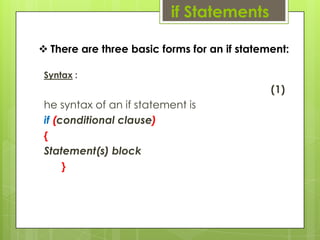
if Statements
Syntax :
(1)
he syntax of an if statement is
if (conditional clause)
{
Statement(s) block
}
 There are three basic forms for an if statement:
public class IT
{
public static void main(String args[])
{
int x = 10;
if ( x < 20 )
{
System.out.print("This is if statement");
}
}
}
Example
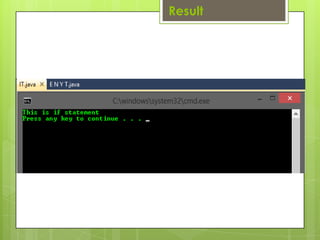
Result
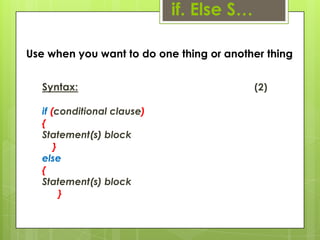
Use when you want to do one thing or another thing
Syntax: (2)
if (conditional clause)
{
Statement(s) block
}
else
{
Statement(s) block
}
if. Else S…
public class IT
{
public static void main(String args[])
{
int x = 30;
if( x < 20 )
{
System.out.print("This is if statement");
}
else{
System.out.print("This is else statement");
}
}
}
Example
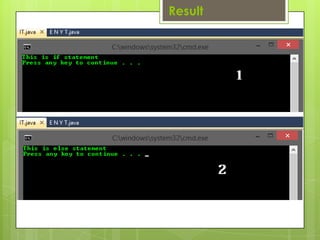
Result
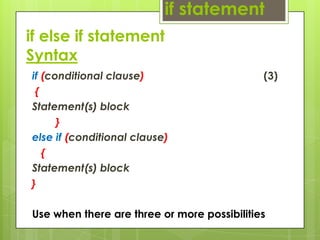
if else if statement
Syntax
if (conditional clause) (3)
{
Statement(s) block
}
else if (conditional clause)
{
Statement(s) block
}
Use when there are three or more possibilities
if statement
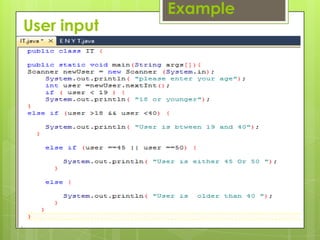
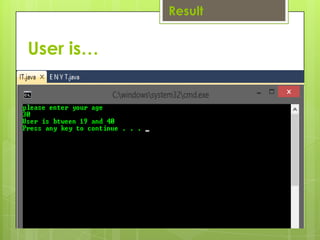
User input
Example
Result
User is…
The for Loop :
A for loop is a repetition control
structure that allows you to efficiently
write a loop that needs to execute a
specific number of times.
A for loop is useful when you know how
many times a task is to be repeated.
Syntax :
The syntax of a for loop is:
for (initialization; Boolean_expression; update)
{
//Statements
}
The for Loop
Here is the flow of control in a for loop:
The initialization step is executed first, and
only once. This step allows you to
declare and initialize any loop control
variables. You are not required to put a
statement here, as long as a semicolon
appears.
Next, the Boolean expression is evaluated
The for Loop
If it is true, the body of the loop is
executed. If it is false, the body of the loop
does not execute and flow of control
jumps to the next statement past the for
loop.
After the body of the for loop executes, the
flow of control jumps back up to the
update statement
The for Loop
This statement allows you to update any
loop control
variables. This statement can be left blank,
as long as a semicolon appears after
the Boolean expression.
The Boolean expression is now evaluated
again. If it is true, the loop executes
and the process repeats itself (body of loop,
then update step, then Boolean
expression). After the Boolean expression is
false, the for loop terminates.
The for Loop
Example
public class IT
{
public static void main( String args[])
{
For ( int x = 10; x < 20; x = x+1)
{
System.out.print("value of x : " + x );
System.out.print("n");
}
}
}
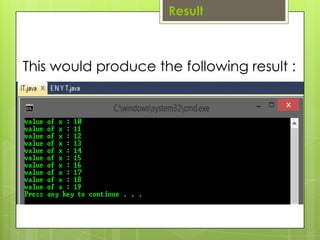
This would produce the following result :
Result
Switch Statement
A switch statement allows a variable to be
tested for equality against a list of values.
Each value is called a case, and the
variable being switched on is checked for
each case.
Syntax :
The syntax of enhanced for loop is:
Switch (expression) {
case value :
//Statements
break; //optional
case value :
//Statements
break; //optional
//You can have any number of case statements.
default : //Optional
//Statements }
Switch Statement
 The following rules apply to a switch statement:
 The variable used in a switch statement can
only be a byte, short, int, or char.
 You can have any number of case statements
within a switch. Each case is followed by the
value to be compared to and a colon.
 The value for a case must be the same data
type as the variable in the switch and it must be
a constant or a literal.
Switch Statement
 When the variable being switched on is equal to a case, the
statements following that case will execute until a break
statement is reached.
 When a break statement is reached, the switch terminates,
and the flow of control jumps to the next line following the
switch statement.
 Not every case needs to contain a break. If no break
appears, the flow of control will fall through to subsequent
cases until a break is reached.
 A switch statement can have an optional default case,
which must appear at the end of the switch. The default
case can be used for performing a task when none of the
cases is true. No break is needed in the default case.
Switch Statement
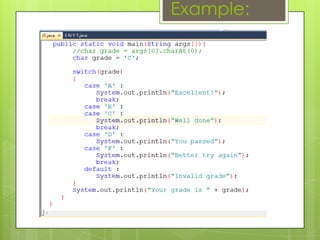
Example:
Result
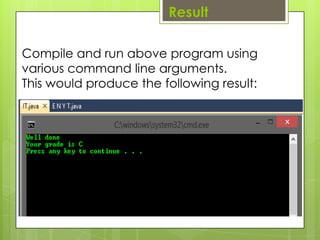
Compile and run above program using
various command line arguments.
This would produce the following result:
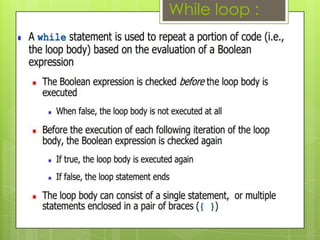
While loop :
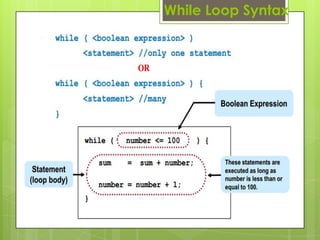
While Loop Syntax
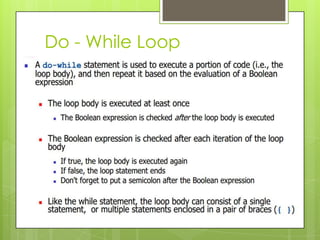
Do - While Loop
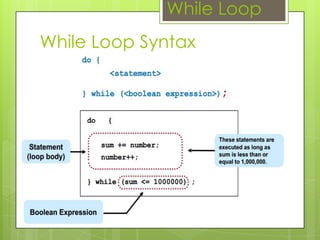
While Loop Syntax
While Loop
REFERENCES :
http://www.homeandlearn.co.uk/java/jav
a_if_else_statements.html
http://www.tutorialspoint.com/java/java_
decision_making.htm
file:///C:/Users/DotNet/Downloads/files-
2._Lectures_8-Do_While_Loop.pdf
End

Control structures

  • 1.
  • 2.
    Contents Comparison operators Control structures if Statements  For Statement  switch Statement  while & do loop
  • 3.
    Comparison Operators == Testswhether two values are equal != Tests whether two values are not equal < Tests if left side value is less than to the right side value > Tests if left side value is greater than to the right side value <= Tests if left side value is less than or equal to the right side value >= Tests if left side value is greater than or equal to the right side value Operators
  • 4.
    if Statements Syntax : (1) hesyntax of an if statement is if (conditional clause) { Statement(s) block }  There are three basic forms for an if statement:
  • 5.
    public class IT { publicstatic void main(String args[]) { int x = 10; if ( x < 20 ) { System.out.print("This is if statement"); } } } Example
  • 6.
  • 7.
    Use when youwant to do one thing or another thing Syntax: (2) if (conditional clause) { Statement(s) block } else { Statement(s) block } if. Else S…
  • 8.
    public class IT { publicstatic void main(String args[]) { int x = 30; if( x < 20 ) { System.out.print("This is if statement"); } else{ System.out.print("This is else statement"); } } } Example
  • 9.
  • 10.
    if else ifstatement Syntax if (conditional clause) (3) { Statement(s) block } else if (conditional clause) { Statement(s) block } Use when there are three or more possibilities if statement
  • 11.
  • 12.
  • 13.
    The for Loop: A for loop is a repetition control structure that allows you to efficiently write a loop that needs to execute a specific number of times. A for loop is useful when you know how many times a task is to be repeated.
  • 14.
    Syntax : The syntaxof a for loop is: for (initialization; Boolean_expression; update) { //Statements } The for Loop
  • 15.
    Here is theflow of control in a for loop: The initialization step is executed first, and only once. This step allows you to declare and initialize any loop control variables. You are not required to put a statement here, as long as a semicolon appears. Next, the Boolean expression is evaluated The for Loop
  • 16.
    If it istrue, the body of the loop is executed. If it is false, the body of the loop does not execute and flow of control jumps to the next statement past the for loop. After the body of the for loop executes, the flow of control jumps back up to the update statement The for Loop
  • 17.
    This statement allowsyou to update any loop control variables. This statement can be left blank, as long as a semicolon appears after the Boolean expression. The Boolean expression is now evaluated again. If it is true, the loop executes and the process repeats itself (body of loop, then update step, then Boolean expression). After the Boolean expression is false, the for loop terminates. The for Loop
  • 18.
    Example public class IT { publicstatic void main( String args[]) { For ( int x = 10; x < 20; x = x+1) { System.out.print("value of x : " + x ); System.out.print("n"); } } }
  • 19.
    This would producethe following result : Result
  • 20.
    Switch Statement A switchstatement allows a variable to be tested for equality against a list of values. Each value is called a case, and the variable being switched on is checked for each case.
  • 21.
    Syntax : The syntaxof enhanced for loop is: Switch (expression) { case value : //Statements break; //optional case value : //Statements break; //optional //You can have any number of case statements. default : //Optional //Statements } Switch Statement
  • 22.
     The followingrules apply to a switch statement:  The variable used in a switch statement can only be a byte, short, int, or char.  You can have any number of case statements within a switch. Each case is followed by the value to be compared to and a colon.  The value for a case must be the same data type as the variable in the switch and it must be a constant or a literal. Switch Statement
  • 23.
     When thevariable being switched on is equal to a case, the statements following that case will execute until a break statement is reached.  When a break statement is reached, the switch terminates, and the flow of control jumps to the next line following the switch statement.  Not every case needs to contain a break. If no break appears, the flow of control will fall through to subsequent cases until a break is reached.  A switch statement can have an optional default case, which must appear at the end of the switch. The default case can be used for performing a task when none of the cases is true. No break is needed in the default case. Switch Statement
  • 24.
  • 25.
    Result Compile and runabove program using various command line arguments. This would produce the following result:
  • 26.
  • 27.
  • 28.
  • 29.
  • 30.
  • 31.