Control Statements
Control Flow: A control flow Statement regulates the order in which
statements get executed.
 Flow-order in which the computer executes the lines of code in our
program
 Control flow blocks are basically blocks of code that control the way
data flows, or else which statements are executed when. This can be
useful if you only want certain areas of your code to be executed under
a given condition.
 The default flow of control in a program is TOP to BOTTOM, i.e. all
the statements of a program are executed one by one in the sequence
from top to Bottom.
This execution order can be altered with the help of control
instructions.
 Java supports three types of control instructions -
1. Sequence Statement
2.Decision Making / Conditional / Selection Statements
3..Looping / Iterative Statements
Program Structure
public class MyProgram
{
}
// comments about the class
public static void main (String[] args)
{
}
// comments about the method
method header
method body
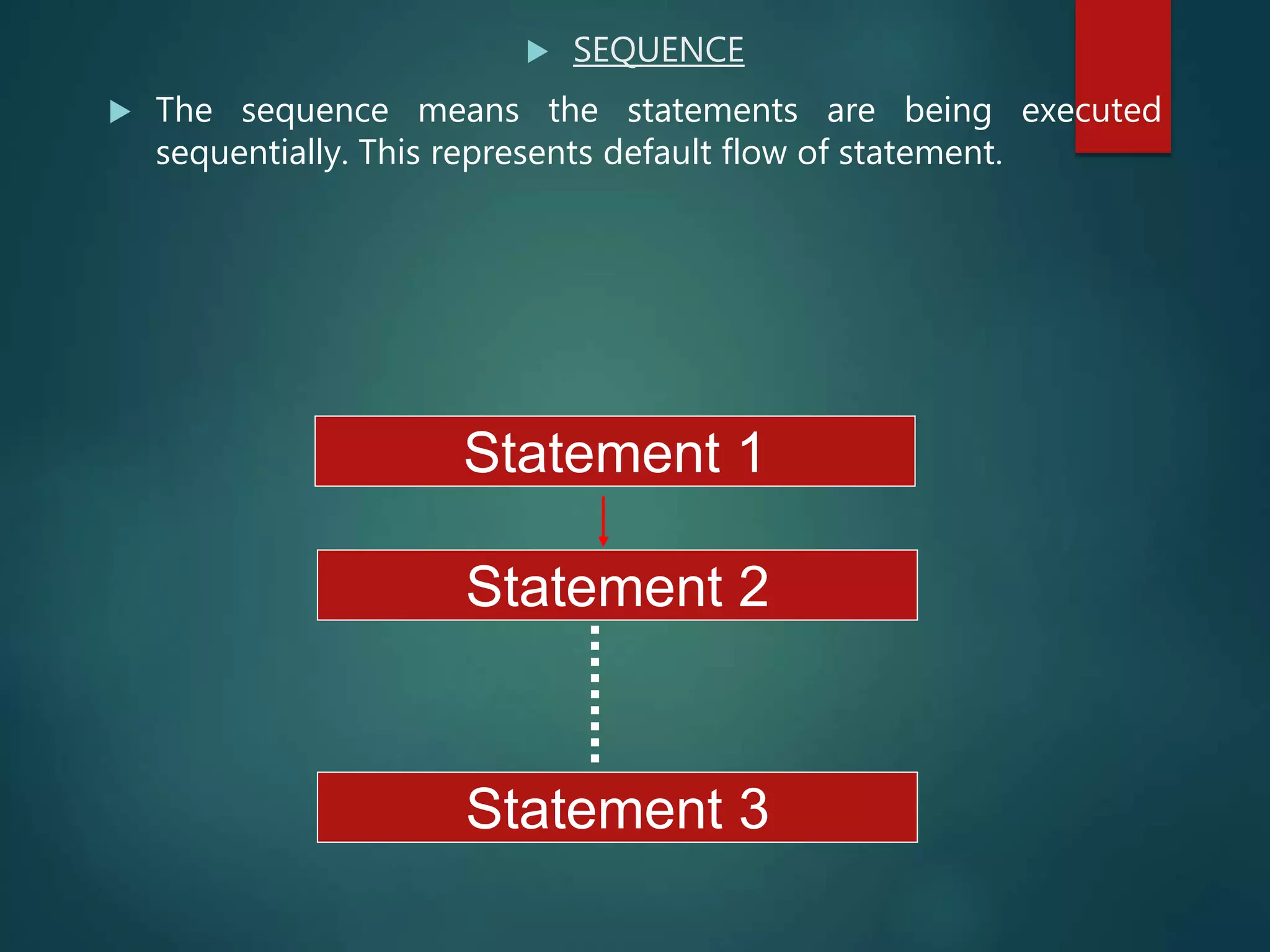
 SEQUENCE
 The sequence means the statements are being executed
sequentially. This represents default flow of statement.
Statement 1
Statement 3
Statement 2
Statement 1
Statement 2
SELECTION
THE SEQUENCE STATEMENTS MEANS THE EXECUTION OF
STATEMENT(S) DEPENDING UPON A GIVEN CONDITION.
Statement 1
Statement 2
Condition
?
true false
Condition
?
Statement 1
Condition
?
Statement 2
Statement 1
Condition
?
Statement 1
Statement 2
Statement 1
Condition
?
Statement 2
Statement 1
Statement 2
Statement 1
Condition
?
Statement 1
Statement 2
Statement 1
Condition
?
Statement 1
Statement 2
Statement 1
Condition
?
Statement 2
Statement 1
Condition
?
Statement 2
Statement 1
Condition
?
Statement 2
Statement 1
Condition
?
Statement 2
Statement 1
Condition
?
true
Statement 2
Statement 1
Condition
?
true
Statement 2
Body of iF
Condition
?
false
Statement 1
Statement 1
false
Statement 1
false
Statement 1
false
Statement 1
false
Body of else
false
Condition?
Statement 2
Statement 1
Statement 2
 Conditional Statement - if Statement
 First Form of if Statement
if ( <conditional expression> ) {
execute statements -for-the-true-case;
}
=>Second form
if ( < conditional expression > ) {
execute statement1 -for-the-true-case
}
else {
execute statement2 -for-the-false-case
}
Result of conditional expression : Logical Type(true or false)
 There are certain points worth
remembering about the if statement as
outlined below:
The conditional expression is always
enclosed in parenthesis.
The conditional expression may be a
simple expression or a compound
expression.
Each statement block may have a single
or multiple statements to be executed.
In case there is a single statement to
be executed then it is not mandatory
to enclose it in curly braces ({}) but if
there are multiple statements then
they must be enclosed in curly braces
({})
The else clause is optional and needs
to be included only when some action
is to be taken if the test condition
evaluates to false.
 Example
 if ( j<5 ) { // This is recommended
System.out.println(“j is less than 5”):
}
Else
{
System.out.println(“j is no less than 5”):
}
OR
if ( j<5 )
System.out.println(“j is less than 5”): //single statement
if ( testScore < 70 )
JOptionPane.showMessageDialog(null,
"You did not pass" );
else
JOptionPane.showMessageDialog(null,
"You did pass " );
Syntax for the if Statement
if ( <boolean expression> )
<then block>
else
<else block>
Then Block
Else Block
Boolean Expression
Indentation is important!
Can be visualized as a flowchart
Nested if statement
if (<cond. expr.>)
if (<cond. expr.>)
// . . .
<statement>
if (<cond. expr.1>) <statement 1>
else if (<cond. expr.2>) < statement 2>
…
else if (<cond. expr. n>) < statement n>
else < statement>
Syntax for the switch Statement
switch ( gradeLevel ) {
case 1: System.out.print("Go to the Gymnasium");
break;
case 2: System.out.print("Go to the Science Auditorium");
break;
case 3: System.out.print("Go to Harris Hall Rm A3");
break;
case 4: System.out.print("Go to Bolt Hall Rm 101");
break;
}
switch ( <arithmetic expression> ) {
<case label 1> : <case body 1>
…
<case label n> : <case body n>
}
Case
Body
Arithmetic Expression
Case
Label
This is the general syntax rule for a switch statement.
The case body may contain …??????…. statements.
Example
switch(x)
{
case 1:
System.out.println(“go to 1”);
break; // what happened if break is not here?
case 2:
case 3:
System.out.println(“go to 2 or 3”);
break;
default :
System.out.println(“not 1, 2 or 3”);
}
=>The expression of switch must not be long,
float, double, or Boolean, it must be either byte,
short, char, or int. (assignment compatible with
int)
=>Can not use a variable or expression involving
variables.
=>Default clause can be placed ??? in, the block.
=> The fall of control to the following cases of
matching case is called Fall through.
Switch
 There are times in which you wish to check for a
number of conditions, and to execute different code
depending on the condition. One way to do this is
with if/else logic, such as the example below:
 int x = 1; int y = 2;
 if (SOME_INT == x)
 { //DO SOMETHING }
 else if (SOME_INT == y)
 { //DO SOMETHING ELSE }
 else
 { //DEFAULT CONDITION }
 This works, however another structure exists which allows us to do
the same thing. Switch statements allow the programmer to
execute certain blocks of code depending on exclusive conditions.
The example below shows how a switch statement can be used:
 int x = 1; int y = 2;
 switch (SOME_INT)
 {
 case x:
 method1(SOME_INT);
 break;
 case y:
 method2(SOME_INT);
 break;
 default:
 method3();
 break;
 }
 Switch takes a single parameter, which can be either
an integer or a char. In this case the switch statement
is evaluating SOME_INT, which is presumably an
integer. When the switch statement is encountered
SOME_INT is evaluated, and when it is equal to x or y,
method1 and method2 are executed, respectively. The
default case executes if SOME_INT does not equal x or
y, in this case method3 is executed. You may have as
many case statements as you wish within a switch
statement.
 Notice in the example above that "break" is listed after
each case. This keyword ensures that execution of the
switch statement stops immediately, rather than
continuing to the next case. Were the break statement
were not included "fall-through" would occur and the
next case would be evaluated (and possibly executed if
it meets the conditions).
 Differences between the If-else and Switch ST:
 Switch can only test for equality whereas if can evaluate a
relational or logical expression that is multiple condition.
 The switch statement select its branches by testing the
value of same variable whereas the
if-else construction allow you use a series of expression that
may involve unrelated variables and complex expressions.
 The if-else is more versatile of the two statements.
 The switch case label value must be a constant. so if two or
more variables are to be compared ,use if-else.
Repetitions
 for Loops
 while Loops
 do while Loop
 break and continue
Looping / Repetitive Statement
Some time some portion of the program (one or more
statement) needs to be executed repeatedly for fixed no. of
time or till a particular condition is being satisfied. This
repetitive operation is done through a looping statement.
A loop is repetition of one or more instructions, which
continues till certain condition is met.
Definition
Statement 1
Statement 2
Statement n
ITERATION / LOOP
LOOPING STRUCTURES ARE THE STATEMENTS THAT
EXECUTE INSTRUCTIONS REPEATEDLY UNTIL A CERTAIN
CONDITION IS FULFILLED(TRUE).
Condition
?
false
True
 In an Entry-Controlled loop/Top-Tested/Pre-
Tested loop the test expression is evaluated
before entering into a loop.
 for Examples: For loop and While loop.
 In an Exit-Controlled loop/Bottom-Tested/Post-
Tested loop the test expression is evaluated
before exiting from the loop.
 for Examples: do-While loop.
for Loops
for (initialization; Test-condition; update-statement)
{
//loop body;
}
Example:
int i;
for (i = 0; i<100; i++)
{
System.out.println("Welcome to Java! ” + i);
}
 In for loop contains three parts separated by semicolons(;)
 Initialization Before entering in a loop, its variables
must be initialized. The initialization expression is
only once in the beginning of the loop.
 Test Expression It decides whether the loop-body will be
executed or not. if the test expression evaluates to true
loop-body gets executed, otherwise the loop is
Test expression gets checked every time before entering
the body of the loop.
 Update Expression(s) The update expressions change
the values of loop variables. The update expression is
executed every time after executing the loop-body .
 The body of the loop The statements that are executed
repeatedly (as long as the test-expression is nonzero)
the body of the loop.
for Loop Flow Chart
Initializatin
expression
false
true
Update
expression
Statement(s)
(loop-body)
Next
Statement(Exit)
Continue
condition?
for
// print 1 2 3 4 5 6 7 8 9 10
public class ClassXI
{
public static void main(String args[])
{
int n;
for(n=1; n<=10; n++)
{
System.out.println(“ ” + n);
}// end for loop
}// end main
} // end class
 INFINITE LOOP: An infinite loop can be created by omitting
the test expression as shown below:
1. for( int j=25; ; --j)
{
System.out.println(“ An infinite for Loop”);
}
2. for ( ; ; ) // infinite loop
{
System.out.println(“ An infinite for Loop”);
}
3.Empty Loop: If a loop does not contain
any statement in its loop-body, it is said
to be an empty loop.
For(int j=20;j>=0;--j);
4. Declaration of variable inside the
loops and if: A variable declared within
an if or for/while/do-while statement
cannot be accessed after the statement is
over, because its scope becomes the
body of the statement(if/for/while/ do-
while). It cannot be accessed outside the
statement body.
while Loops
while (condition)
{
// loop-body;
}
Note: A while loop is pre-test loop. It first tests a specified
conditional expression and as long as the conditional
expression is evaluated to non zero (true), action taken
(i.e. statements or block after the loop is executed).
while Loop Flow Chart
false
true
Statement(s)
Continue
condition?
Continue
condition?
Stop
START
while
// Demonstrate the while loop.
public class While {
public static void main(String args[]) {
int n = 1;
while(n<=1 0) {
System.out.println(“ " + n);
n++;
} //end while
} // end main
} // end class
do Loops
do
{
// Loop body;
} while (continue-condition);
The Do-while loop is an POST-TEST or
bottom test loop.that is, it executes
its body at least once without testing
specified conditional expression and
then makes test. the do-while loop
terminates when the text expression is
evaluated to be False(0).
do while Loop Flow Chart
false
true
Statement(s)
Next
Statement
Continue
condition?
do-while
// Demonstrate the do-while loop.
public class DoWhile {
public static void main(String args[]) {
int n =1;
do {
System.out.println(" " + n);
n++;
} while(n <= 0);
} // main
} // class
Jump
Java supports three jump
statements:
break,
continue, and
return.
These statements transfer control
to another part of your program.
break
First, as you have seen, it terminates a
statement sequence in a switch
statement.
Second, it can be used to exit a loop.
The break Keyword
false
true
Statement(s)
Next
Statement
Continue
condition?
Statement(s)
break
break
// Using break to exit from for loop.
class BreakLoop {
public static void main(String args[]) {
for(int i=0; i<100; i++)
{
if(i = = 10)
break; // terminate loop if i is 10
System.out.println(“ i: " + i);
}
System.out.println("Loop complete.");
}
}
break
// Using break to exit from while loop.
class BreakLoop2 {
public static void main(String args[]) {
int i = 0;
while(i < 100) {
if(i == 10) break; // terminate loop if i is 10
System.out.println("i: " + i);
i++;
}
System.out.println("Loop complete.");
}
}
break
// Using break to exit from do while loop.
class BreakLoop2 {
public static void main(String args[]) {
int i = 0;
do
{
if(i == 10)
break; // terminate loop if i is 10
System.out.println("i: " + i);
i++;
} while(i < 100);
}
System.out.println("Loop complete.");
}
continue
 you might want to continue running the loop, but stop processing the
remainder of the code in its body for particular iteration. This is, in
effect, a goto just past the body of the loop, to the loop's end.
 In while and do-while loops, a continue statement causes control to
be transferred directly to the conditional expression that controls the
loop.
 In a for loop, control goes first to the iteration portion of the for
statement and then to the conditional expression.
The continue Keyword
false
true
Statement(s)
Next
Statement
Continue
condition?
Statement(s)
continue
// Demonstrate continue.
class Continue {
public static void main(String args[]) {
for(int i=0; i<10; i++) {
System.out.print(i + " ");
if (i%2 == 0)
continue;
System.out.println("");
}
}
}
return
The return statement is used to
explicitly return from a method. That
is, it causes program control to
transfer back to the caller of the
method.
The following example illustrates this
point. Here, return causes execution
to return to the Java run-time system,
since it is the run-time system that
calls main( ).
Branch Statement – return
Statement
 To terminate the execution of method, then pass the method of
caller that control
 Forms of return statement
 return;
 return <expr.>;
return
// Demonstrate return.
class Return {
public static void main(String args[]) {
boolean t = true;
System.out.println("Before the return.");
if(t) return; // return to caller
System.out.println("This won't execute.");
}
}
Real life examples
1. if-else statement :- ATM machine
2. Switch statement :-Calender
3. For loop:-youtube playlist
4. Infinite for loop:-Normal
playlist,breakfail,Switch of a fan becomes
non functional
5. While Loop:-Alarm
6. Do While Loop : print Menu atleast once
7. Break and continue :-we get 2 calls at same
time (in case of current call cut off and new
call received)
Assignment
 Java Program to find maximum and minimum
occurring character in a string.
 ALGORITHM
 STEP 1: START
 STEP 2: DEFINE String str = "grass is greener on the other
side"
 STEP 3: INITIALIZE minChar, maxChar.
 STEP 4: DEFINE i, j, min, max.
 STEP 5: CONVERT str into char string[].
 STEP 6: SET i =0. REPEAT STEP 7 to STEP 11.
 STEP 7: SET array freq[i] =1
 STEP 8: SET j =i+1. REPEAT STEP 9 to STEP 10 UNTIL j<string.length<
li=""></string.length<>
 STEP 9: IF (string[i] == string[ j] && string[i] != ' ' && string[i] != '0')
then
freq[i] = freq[i] + 1
SET string[ j] = 0
 STEP 10: j = j +1
 STEP 11: i = i + 1
 STEP 12: SET min = max = freq[0]
 STEP 13: SET i =0. REPEAT STEP 14 to STEP 16 UNTIL i<freq.length<
li=""></freq.length<>
 STEP 14: IF(min>freq[i] && freq[i]!=0) then
min = freq[i]
minChar[] = string[i]
 STEP 15: IF max is lesser than freq[i]then
max = freq[i]
maxChar[] = string[i]
 STEP 16: i =i +1
 STEP 17: PRINT minChar
 STEP 18: PRINT maxChar
 STEP 19: END
 END

Control statements

  • 1.
    Control Statements Control Flow:A control flow Statement regulates the order in which statements get executed.  Flow-order in which the computer executes the lines of code in our program  Control flow blocks are basically blocks of code that control the way data flows, or else which statements are executed when. This can be useful if you only want certain areas of your code to be executed under a given condition.
  • 2.
     The defaultflow of control in a program is TOP to BOTTOM, i.e. all the statements of a program are executed one by one in the sequence from top to Bottom. This execution order can be altered with the help of control instructions.  Java supports three types of control instructions - 1. Sequence Statement 2.Decision Making / Conditional / Selection Statements 3..Looping / Iterative Statements
  • 3.
    Program Structure public classMyProgram { } // comments about the class public static void main (String[] args) { } // comments about the method method header method body
  • 4.
     SEQUENCE  Thesequence means the statements are being executed sequentially. This represents default flow of statement. Statement 1 Statement 3 Statement 2
  • 5.
    Statement 1 Statement 2 SELECTION THESEQUENCE STATEMENTS MEANS THE EXECUTION OF STATEMENT(S) DEPENDING UPON A GIVEN CONDITION. Statement 1 Statement 2 Condition ? true false Condition ? Statement 1 Condition ? Statement 2 Statement 1 Condition ? Statement 1 Statement 2 Statement 1 Condition ? Statement 2 Statement 1 Statement 2 Statement 1 Condition ? Statement 1 Statement 2 Statement 1 Condition ? Statement 1 Statement 2 Statement 1 Condition ? Statement 2 Statement 1 Condition ? Statement 2 Statement 1 Condition ? Statement 2 Statement 1 Condition ? Statement 2 Statement 1 Condition ? true Statement 2 Statement 1 Condition ? true Statement 2 Body of iF Condition ? false Statement 1 Statement 1 false Statement 1 false Statement 1 false Statement 1 false Body of else false Condition? Statement 2 Statement 1 Statement 2
  • 6.
     Conditional Statement- if Statement  First Form of if Statement if ( <conditional expression> ) { execute statements -for-the-true-case; } =>Second form if ( < conditional expression > ) { execute statement1 -for-the-true-case } else { execute statement2 -for-the-false-case } Result of conditional expression : Logical Type(true or false)
  • 7.
     There arecertain points worth remembering about the if statement as outlined below: The conditional expression is always enclosed in parenthesis. The conditional expression may be a simple expression or a compound expression. Each statement block may have a single or multiple statements to be executed.
  • 8.
    In case thereis a single statement to be executed then it is not mandatory to enclose it in curly braces ({}) but if there are multiple statements then they must be enclosed in curly braces ({}) The else clause is optional and needs to be included only when some action is to be taken if the test condition evaluates to false.
  • 9.
     Example  if( j<5 ) { // This is recommended System.out.println(“j is less than 5”): } Else { System.out.println(“j is no less than 5”): } OR if ( j<5 ) System.out.println(“j is less than 5”): //single statement
  • 10.
    if ( testScore< 70 ) JOptionPane.showMessageDialog(null, "You did not pass" ); else JOptionPane.showMessageDialog(null, "You did pass " ); Syntax for the if Statement if ( <boolean expression> ) <then block> else <else block> Then Block Else Block Boolean Expression Indentation is important! Can be visualized as a flowchart
  • 11.
    Nested if statement if(<cond. expr.>) if (<cond. expr.>) // . . . <statement> if (<cond. expr.1>) <statement 1> else if (<cond. expr.2>) < statement 2> … else if (<cond. expr. n>) < statement n> else < statement>
  • 13.
    Syntax for theswitch Statement switch ( gradeLevel ) { case 1: System.out.print("Go to the Gymnasium"); break; case 2: System.out.print("Go to the Science Auditorium"); break; case 3: System.out.print("Go to Harris Hall Rm A3"); break; case 4: System.out.print("Go to Bolt Hall Rm 101"); break; } switch ( <arithmetic expression> ) { <case label 1> : <case body 1> … <case label n> : <case body n> } Case Body Arithmetic Expression Case Label This is the general syntax rule for a switch statement. The case body may contain …??????…. statements.
  • 14.
    Example switch(x) { case 1: System.out.println(“go to1”); break; // what happened if break is not here? case 2: case 3: System.out.println(“go to 2 or 3”); break; default : System.out.println(“not 1, 2 or 3”); }
  • 15.
    =>The expression ofswitch must not be long, float, double, or Boolean, it must be either byte, short, char, or int. (assignment compatible with int) =>Can not use a variable or expression involving variables. =>Default clause can be placed ??? in, the block. => The fall of control to the following cases of matching case is called Fall through.
  • 16.
    Switch  There aretimes in which you wish to check for a number of conditions, and to execute different code depending on the condition. One way to do this is with if/else logic, such as the example below:  int x = 1; int y = 2;  if (SOME_INT == x)  { //DO SOMETHING }  else if (SOME_INT == y)  { //DO SOMETHING ELSE }  else  { //DEFAULT CONDITION }
  • 17.
     This works,however another structure exists which allows us to do the same thing. Switch statements allow the programmer to execute certain blocks of code depending on exclusive conditions. The example below shows how a switch statement can be used:  int x = 1; int y = 2;  switch (SOME_INT)  {  case x:  method1(SOME_INT);  break;  case y:  method2(SOME_INT);  break;  default:  method3();  break;  }
  • 18.
     Switch takesa single parameter, which can be either an integer or a char. In this case the switch statement is evaluating SOME_INT, which is presumably an integer. When the switch statement is encountered SOME_INT is evaluated, and when it is equal to x or y, method1 and method2 are executed, respectively. The default case executes if SOME_INT does not equal x or y, in this case method3 is executed. You may have as many case statements as you wish within a switch statement.  Notice in the example above that "break" is listed after each case. This keyword ensures that execution of the switch statement stops immediately, rather than continuing to the next case. Were the break statement were not included "fall-through" would occur and the next case would be evaluated (and possibly executed if it meets the conditions).
  • 19.
     Differences betweenthe If-else and Switch ST:  Switch can only test for equality whereas if can evaluate a relational or logical expression that is multiple condition.  The switch statement select its branches by testing the value of same variable whereas the if-else construction allow you use a series of expression that may involve unrelated variables and complex expressions.  The if-else is more versatile of the two statements.  The switch case label value must be a constant. so if two or more variables are to be compared ,use if-else.
  • 20.
    Repetitions  for Loops while Loops  do while Loop  break and continue
  • 21.
    Looping / RepetitiveStatement Some time some portion of the program (one or more statement) needs to be executed repeatedly for fixed no. of time or till a particular condition is being satisfied. This repetitive operation is done through a looping statement. A loop is repetition of one or more instructions, which continues till certain condition is met. Definition
  • 22.
    Statement 1 Statement 2 Statementn ITERATION / LOOP LOOPING STRUCTURES ARE THE STATEMENTS THAT EXECUTE INSTRUCTIONS REPEATEDLY UNTIL A CERTAIN CONDITION IS FULFILLED(TRUE). Condition ? false True
  • 23.
     In anEntry-Controlled loop/Top-Tested/Pre- Tested loop the test expression is evaluated before entering into a loop.  for Examples: For loop and While loop.  In an Exit-Controlled loop/Bottom-Tested/Post- Tested loop the test expression is evaluated before exiting from the loop.  for Examples: do-While loop.
  • 24.
    for Loops for (initialization;Test-condition; update-statement) { //loop body; } Example: int i; for (i = 0; i<100; i++) { System.out.println("Welcome to Java! ” + i); }
  • 25.
     In forloop contains three parts separated by semicolons(;)  Initialization Before entering in a loop, its variables must be initialized. The initialization expression is only once in the beginning of the loop.  Test Expression It decides whether the loop-body will be executed or not. if the test expression evaluates to true loop-body gets executed, otherwise the loop is Test expression gets checked every time before entering the body of the loop.  Update Expression(s) The update expressions change the values of loop variables. The update expression is executed every time after executing the loop-body .  The body of the loop The statements that are executed repeatedly (as long as the test-expression is nonzero) the body of the loop.
  • 26.
    for Loop FlowChart Initializatin expression false true Update expression Statement(s) (loop-body) Next Statement(Exit) Continue condition?
  • 27.
    for // print 12 3 4 5 6 7 8 9 10 public class ClassXI { public static void main(String args[]) { int n; for(n=1; n<=10; n++) { System.out.println(“ ” + n); }// end for loop }// end main } // end class
  • 28.
     INFINITE LOOP:An infinite loop can be created by omitting the test expression as shown below: 1. for( int j=25; ; --j) { System.out.println(“ An infinite for Loop”); } 2. for ( ; ; ) // infinite loop { System.out.println(“ An infinite for Loop”); }
  • 29.
    3.Empty Loop: Ifa loop does not contain any statement in its loop-body, it is said to be an empty loop. For(int j=20;j>=0;--j); 4. Declaration of variable inside the loops and if: A variable declared within an if or for/while/do-while statement cannot be accessed after the statement is over, because its scope becomes the body of the statement(if/for/while/ do- while). It cannot be accessed outside the statement body.
  • 30.
    while Loops while (condition) { //loop-body; } Note: A while loop is pre-test loop. It first tests a specified conditional expression and as long as the conditional expression is evaluated to non zero (true), action taken (i.e. statements or block after the loop is executed).
  • 31.
    while Loop FlowChart false true Statement(s) Continue condition? Continue condition? Stop START
  • 32.
    while // Demonstrate thewhile loop. public class While { public static void main(String args[]) { int n = 1; while(n<=1 0) { System.out.println(“ " + n); n++; } //end while } // end main } // end class
  • 33.
    do Loops do { // Loopbody; } while (continue-condition); The Do-while loop is an POST-TEST or bottom test loop.that is, it executes its body at least once without testing specified conditional expression and then makes test. the do-while loop terminates when the text expression is evaluated to be False(0).
  • 34.
    do while LoopFlow Chart false true Statement(s) Next Statement Continue condition?
  • 35.
    do-while // Demonstrate thedo-while loop. public class DoWhile { public static void main(String args[]) { int n =1; do { System.out.println(" " + n); n++; } while(n <= 0); } // main } // class
  • 36.
    Jump Java supports threejump statements: break, continue, and return. These statements transfer control to another part of your program.
  • 37.
    break First, as youhave seen, it terminates a statement sequence in a switch statement. Second, it can be used to exit a loop.
  • 38.
  • 39.
    break // Using breakto exit from for loop. class BreakLoop { public static void main(String args[]) { for(int i=0; i<100; i++) { if(i = = 10) break; // terminate loop if i is 10 System.out.println(“ i: " + i); } System.out.println("Loop complete."); } }
  • 40.
    break // Using breakto exit from while loop. class BreakLoop2 { public static void main(String args[]) { int i = 0; while(i < 100) { if(i == 10) break; // terminate loop if i is 10 System.out.println("i: " + i); i++; } System.out.println("Loop complete."); } }
  • 41.
    break // Using breakto exit from do while loop. class BreakLoop2 { public static void main(String args[]) { int i = 0; do { if(i == 10) break; // terminate loop if i is 10 System.out.println("i: " + i); i++; } while(i < 100); } System.out.println("Loop complete."); }
  • 42.
    continue  you mightwant to continue running the loop, but stop processing the remainder of the code in its body for particular iteration. This is, in effect, a goto just past the body of the loop, to the loop's end.  In while and do-while loops, a continue statement causes control to be transferred directly to the conditional expression that controls the loop.  In a for loop, control goes first to the iteration portion of the for statement and then to the conditional expression.
  • 43.
  • 44.
    // Demonstrate continue. classContinue { public static void main(String args[]) { for(int i=0; i<10; i++) { System.out.print(i + " "); if (i%2 == 0) continue; System.out.println(""); } } }
  • 45.
    return The return statementis used to explicitly return from a method. That is, it causes program control to transfer back to the caller of the method. The following example illustrates this point. Here, return causes execution to return to the Java run-time system, since it is the run-time system that calls main( ).
  • 46.
    Branch Statement –return Statement  To terminate the execution of method, then pass the method of caller that control  Forms of return statement  return;  return <expr.>;
  • 47.
    return // Demonstrate return. classReturn { public static void main(String args[]) { boolean t = true; System.out.println("Before the return."); if(t) return; // return to caller System.out.println("This won't execute."); } }
  • 48.
    Real life examples 1.if-else statement :- ATM machine 2. Switch statement :-Calender 3. For loop:-youtube playlist 4. Infinite for loop:-Normal playlist,breakfail,Switch of a fan becomes non functional 5. While Loop:-Alarm 6. Do While Loop : print Menu atleast once 7. Break and continue :-we get 2 calls at same time (in case of current call cut off and new call received)
  • 49.
    Assignment  Java Programto find maximum and minimum occurring character in a string.  ALGORITHM  STEP 1: START  STEP 2: DEFINE String str = "grass is greener on the other side"  STEP 3: INITIALIZE minChar, maxChar.  STEP 4: DEFINE i, j, min, max.  STEP 5: CONVERT str into char string[].  STEP 6: SET i =0. REPEAT STEP 7 to STEP 11.
  • 50.
     STEP 7:SET array freq[i] =1  STEP 8: SET j =i+1. REPEAT STEP 9 to STEP 10 UNTIL j<string.length< li=""></string.length<>  STEP 9: IF (string[i] == string[ j] && string[i] != ' ' && string[i] != '0') then freq[i] = freq[i] + 1 SET string[ j] = 0  STEP 10: j = j +1  STEP 11: i = i + 1  STEP 12: SET min = max = freq[0]  STEP 13: SET i =0. REPEAT STEP 14 to STEP 16 UNTIL i<freq.length< li=""></freq.length<>  STEP 14: IF(min>freq[i] && freq[i]!=0) then min = freq[i] minChar[] = string[i]  STEP 15: IF max is lesser than freq[i]then max = freq[i] maxChar[] = string[i]  STEP 16: i =i +1  STEP 17: PRINT minChar  STEP 18: PRINT maxChar  STEP 19: END
  • 51.