FLOWCHART
FLOWCHART
- A Flowchart is a diagram that uses graphic symbols to
depict the nature and flow the steps in a process.
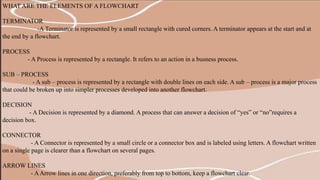
WHAT ARE THE ELEMENTS OF A FLOWCHART
TERMINATOR
-A Terminator is represented by a small rectangle with cured corners. A terminator appears at the start and at
the end by a flowchart.
PROCESS
- A Process is represented by a rectangle. It refers to an action in a busness process.
SUB – PROCESS
- A sub – process is represented by a rectangle with double lines on each side. A sub – process is a major process
that could be broken up into simpler processes developed into another flowchart.
DECISION
- A Decision is represented by a diamond. A process that can answer a decision of “yes” or “no”requires a
decision box.
CONNECTOR
- A Connector is represented by a small circle or a connector box and is labeled using letters. A flowchart written
on a single page is clearer than a flowchart on several pages.
ARROW LINES
- AArrow lines in one direction, preferably from top to bottom, keep a flowchart clear.
BENEFITS OF USING FLOWCHARTS.
1. People may have differing ideas about how a process works. A
flowchart can help you agin agreement about the sequence of steps.
2.PROVIDE A TOOL FOR TRAINING EMPLOYEES
Because of the way they visually lay out the sequence of
process steps, flowchart can be very helpful in training employees to
perform the process according to standardized procedures.
3. IDENTIFY PROBLEM AREAS AND OPPORTUNITIES FOR
PROCESS IMPROVEMENT. It is easy to spot apportunities for
simplifying and refining your process by analyzing decision points,
redundant steps, and rework loops.
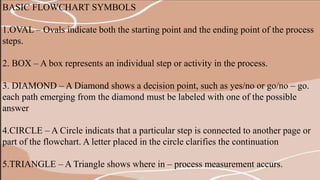
BASIC FLOWCHART SYMBOLS
1.OVAL – Ovals indicate both the starting point and the ending point of the process
steps.
2. BOX – A box represents an individual step or activity in the process.
3. DIAMOND – A Diamond shows a decision point, such as yes/no or go/no – go.
each path emerging from the diamond must be labeled with one of the possible
answer
4.CIRCLE – A Circle indicats that a particular step is connected to another page or
part of the flowchart. A letter placed in the circle clarifies the continuation
5.TRIANGLE – A Triangle shows where in – process measurement accurs.
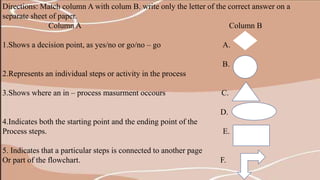
Directions: Match column A with colum B. write only the letter of the correct answer on a
separate sheet of paper.
Column A Column B
1.Shows a decision point, as yes/no or go/no – go A.
B.
2.Represents an individual steps or activity in the process
3.Shows where an in – process masurment occours C.
D.
4.Indicates both the starting point and the ending point of the
Process steps. E.
5. Indicates that a particular steps is connected to another page
Or part of the flowchart. F.

jamaica - FLOWCHART.pptx

  • 1.
  • 2.
    FLOWCHART - A Flowchartis a diagram that uses graphic symbols to depict the nature and flow the steps in a process.
  • 3.
    WHAT ARE THEELEMENTS OF A FLOWCHART TERMINATOR -A Terminator is represented by a small rectangle with cured corners. A terminator appears at the start and at the end by a flowchart. PROCESS - A Process is represented by a rectangle. It refers to an action in a busness process. SUB – PROCESS - A sub – process is represented by a rectangle with double lines on each side. A sub – process is a major process that could be broken up into simpler processes developed into another flowchart. DECISION - A Decision is represented by a diamond. A process that can answer a decision of “yes” or “no”requires a decision box. CONNECTOR - A Connector is represented by a small circle or a connector box and is labeled using letters. A flowchart written on a single page is clearer than a flowchart on several pages. ARROW LINES - AArrow lines in one direction, preferably from top to bottom, keep a flowchart clear.
  • 4.
    BENEFITS OF USINGFLOWCHARTS. 1. People may have differing ideas about how a process works. A flowchart can help you agin agreement about the sequence of steps. 2.PROVIDE A TOOL FOR TRAINING EMPLOYEES Because of the way they visually lay out the sequence of process steps, flowchart can be very helpful in training employees to perform the process according to standardized procedures. 3. IDENTIFY PROBLEM AREAS AND OPPORTUNITIES FOR PROCESS IMPROVEMENT. It is easy to spot apportunities for simplifying and refining your process by analyzing decision points, redundant steps, and rework loops.
  • 5.
    BASIC FLOWCHART SYMBOLS 1.OVAL– Ovals indicate both the starting point and the ending point of the process steps. 2. BOX – A box represents an individual step or activity in the process. 3. DIAMOND – A Diamond shows a decision point, such as yes/no or go/no – go. each path emerging from the diamond must be labeled with one of the possible answer 4.CIRCLE – A Circle indicats that a particular step is connected to another page or part of the flowchart. A letter placed in the circle clarifies the continuation 5.TRIANGLE – A Triangle shows where in – process measurement accurs.
  • 6.
    Directions: Match columnA with colum B. write only the letter of the correct answer on a separate sheet of paper. Column A Column B 1.Shows a decision point, as yes/no or go/no – go A. B. 2.Represents an individual steps or activity in the process 3.Shows where an in – process masurment occours C. D. 4.Indicates both the starting point and the ending point of the Process steps. E. 5. Indicates that a particular steps is connected to another page Or part of the flowchart. F.