GOOD AFTERNOON
EVERYONE!
COPY THIS IN YOUR
NOTEBOOK!
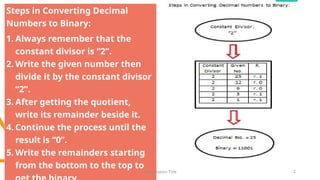
Steps in Converting Decimal
Numbers to Binary:
1. Always remember that the
constant divisor is “2”.
2. Write the given number then
divide it by the constant divisor
“2”.
3. After getting the quotient,
write its remainder beside it.
4. Continue the process until the
result is “0”.
5. Write the remainders starting
from the bottom to the top to
9/3/20XX Presentation Title 2
What have you
observed?
Which is easier to
understand?
9/3/20XX Presentation Title 3
What do you think is
our topic for today’s
discussion?
What do you mean
by flowchart?
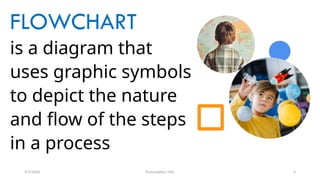
FLOWCHART
is a diagram that
uses graphic symbols
to depict the nature
and flow of the steps
in a process
9/3/20XX Presentation Title 4
CREATE me!
CPUnderstanding (Group 1) – How to
post a status on Facebook.
USBenevolent (Group 2) – How to
create an account on Google.
MOUSEketeer (Group 3) – How to
install an application on your phone.
ICTalented (Group 4) – How to
manage security settings of your
phone.
9/3/20XX Presentation Title 5
What should
we learn?
Topic 1: Elements of a Flowchart
Topic 2: Benefits of Using Flowchart
Topic 3: Basic Flowchart Symbol
Topic 4: Types of Flowchart
9/3/2023 FLOWCHART 6
Topic 1
Elements of a
Flowchart
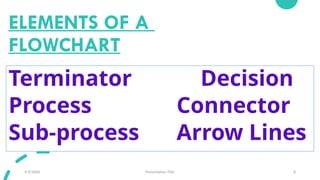
ELEMENTS OF A
FLOWCHART
9/3/20XX Presentation Title 8
Terminator Decision
Process Connector
Sub-process Arrow Lines
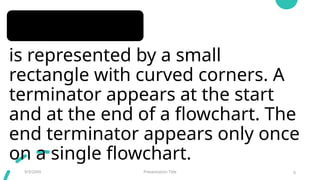
TERMINATOR
is represented by a small
rectangle with curved corners. A
terminator appears at the start
and at the end of a flowchart. The
end terminator appears only once
on a single flowchart.
9/3/20XX Presentation Title 9
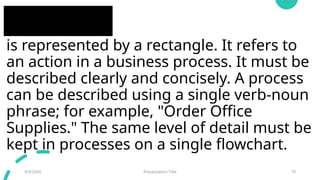
PROCESS
is represented by a rectangle. It refers to
an action in a business process. It must be
described clearly and concisely. A process
can be described using a single verb-noun
phrase; for example, "Order Office
Supplies." The same level of detail must be
kept in processes on a single flowchart.
9/3/20XX Presentation Title 10
SUB-PROCESS
is represented by a rectangle
with double lines on each side.
A subprocess is a major process
that could be broken up into
simpler processes developed
into another flowchart.
9/3/20XX Presentation Title 11
DECISION
is represented by a
diamond. A process that
can answer a decision of
"yes" or "no" requires a
decision box.
9/3/20XX Presentation Title 12
CONNECTOR
is represented by a small circle or a
connector box and is labeled using
letters. A flowchart written on a single
page is clearer than a flowchart on
several pages. A connector ensures that
the processes are connected logically
and correctly on several pages.
9/3/20XX Presentation Title 13
ARROW LINES
drawn in one direction, preferably
from top to bottom, keep a
flowchart clear. Avoid arrow lines
that loop because this could
indicate redundancy in the
business process.
9/3/20XX Presentation Title 14
Topic 2
Benefits of Using
Flowchart
Benefits of Using Flowchart
9/3/20XX Presentation Title 16
1. Promote understanding of a
process.
2. Provide a tool for training
employees.
3. Identify problem areas and
opportunities for process
improvement.
Topic 3
Basic Flowchart
Symbol
9/3/20XX Presentation Title 17
Basic Flowchart Symbol
9/3/20XX Presentation Title 18
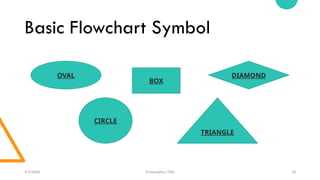
OVAL
BOX
DIAMOND
CIRCLE
TRIANGLE
9/3/20XX Presentation Title 19
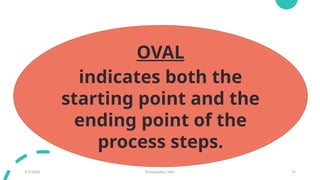
OVAL
indicates both the
starting point and the
ending point of the
process steps.
9/3/20XX Presentation Title 20
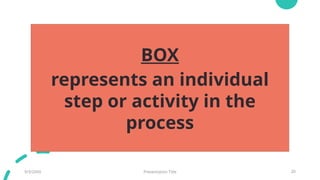
BOX
represents an individual
step or activity in the
process
9/3/20XX Presentation Title 21
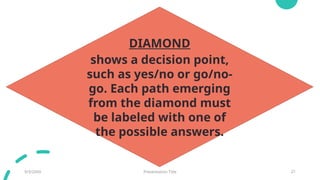
DIAMOND
shows a decision point,
such as yes/no or go/no-
go. Each path emerging
from the diamond must
be labeled with one of
the possible answers.
9/3/20XX Presentation Title 22
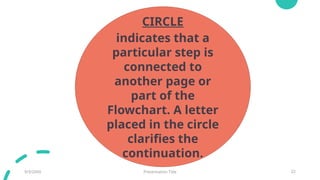
CIRCLE
indicates that a
particular step is
connected to
another page or
part of the
Flowchart. A letter
placed in the circle
clarifies the
continuation.
9/3/20XX Presentation Title 23
TRIANGLE
shows where
an in-process
measurement
occurs
Topic 4
Types
of
Flowchart
9/3/20XX Presentation Title 24
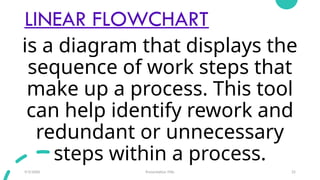
LINEAR FLOWCHART
9/3/20XX Presentation Title 25
is a diagram that displays the
sequence of work steps that
make up a process. This tool
can help identify rework and
redundant or unnecessary
steps within a process.
DEPLOYMENT FLOWCHART
shows the actual process flow and
identifies the people or groups involved
at each step. Horizontal lines define
customer-supplier relationships. This type
of chart shows where the people or
groups fit into the process sequence, and
how they relate to one another
throughout the process.
9/3/20XX Presentation Title 26
COLLABORATE and PERFORM
CPUnderstanding – Create a 4 – stanza rap in connection with
the Elements of a flowchart.
USBenevolent – Have a song parody depicting the Benefits
of Using Flowchart.
MOUSEketeer – Present “hugot” lines relating to each Basic
Flowchart Symbols.
ICTalented – Compose a poem regarding the Kinds of
Flowchart.
9/3/20XX Presentation Title 27
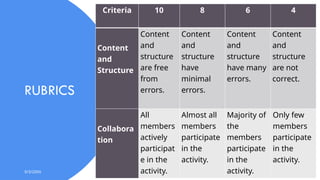
RUBRICS
9/3/20XX Presentation Title 28
Criteria 10 8 6 4
Content
and
Structure
Content
and
structure
are free
from
errors.
Content
and
structure
have
minimal
errors.
Content
and
structure
have many
errors.
Content
and
structure
are not
correct.
Collabora
tion
All
members
actively
participat
e in the
activity.
Almost all
members
participate
in the
activity.
Majority of
the
members
participate
in the
activity.
Only few
members
participate
in the
activity.
REFLECT and POST!
In a short bond paper, create a flowchart
regarding the proper maintenance of
computer in Computer Hardware Servicing
and in line with the Disaster Risk Reduction
(DRR) guidelines. Format: Arial, 24
(minimum font size), landscape orientation.
9/3/20XX Presentation Title 29
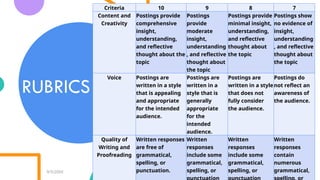
RUBRICS
9/3/20XX Presentation Title 30
Criteria 10 9 8 7
Content and
Creativity
Postings provide
comprehensive
insight,
understanding,
and reflective
thought about the
topic
Postings
provide
moderate
insight,
understanding
, and reflective
thought about
the topic
Postings provide
minimal insight,
understanding,
and reflective
thought about
the topic
Postings show
no evidence of
insight,
understanding
, and reflective
thought about
the topic
Voice Postings are
written in a style
that is appealing
and appropriate
for the intended
audience.
Postings are
written in a
style that is
generally
appropriate
for the
intended
audience.
Postings are
written in a style
that does not
fully consider
the audience.
Postings do
not reflect an
awareness of
the audience.
Quality of
Writing and
Proofreading
Written responses
are free of
grammatical,
spelling, or
punctuation.
Written
responses
include some
grammatical,
spelling, or
Written
responses
include some
grammatical,
spelling, or
Written
responses
contain
numerous
grammatical,
Thank you!
9/3/20XX Presentation Title 31
NERIESSA N. ENGLIS
TLE – 8 Teacher

FLOWCHART Discussion and Activities.pptx

  • 1.
  • 2.
    Steps in ConvertingDecimal Numbers to Binary: 1. Always remember that the constant divisor is “2”. 2. Write the given number then divide it by the constant divisor “2”. 3. After getting the quotient, write its remainder beside it. 4. Continue the process until the result is “0”. 5. Write the remainders starting from the bottom to the top to 9/3/20XX Presentation Title 2
  • 3.
    What have you observed? Whichis easier to understand? 9/3/20XX Presentation Title 3 What do you think is our topic for today’s discussion? What do you mean by flowchart?
  • 4.
    FLOWCHART is a diagramthat uses graphic symbols to depict the nature and flow of the steps in a process 9/3/20XX Presentation Title 4
  • 5.
    CREATE me! CPUnderstanding (Group1) – How to post a status on Facebook. USBenevolent (Group 2) – How to create an account on Google. MOUSEketeer (Group 3) – How to install an application on your phone. ICTalented (Group 4) – How to manage security settings of your phone. 9/3/20XX Presentation Title 5
  • 6.
    What should we learn? Topic1: Elements of a Flowchart Topic 2: Benefits of Using Flowchart Topic 3: Basic Flowchart Symbol Topic 4: Types of Flowchart 9/3/2023 FLOWCHART 6
  • 7.
  • 8.
    ELEMENTS OF A FLOWCHART 9/3/20XXPresentation Title 8 Terminator Decision Process Connector Sub-process Arrow Lines
  • 9.
    TERMINATOR is represented bya small rectangle with curved corners. A terminator appears at the start and at the end of a flowchart. The end terminator appears only once on a single flowchart. 9/3/20XX Presentation Title 9
  • 10.
    PROCESS is represented bya rectangle. It refers to an action in a business process. It must be described clearly and concisely. A process can be described using a single verb-noun phrase; for example, "Order Office Supplies." The same level of detail must be kept in processes on a single flowchart. 9/3/20XX Presentation Title 10
  • 11.
    SUB-PROCESS is represented bya rectangle with double lines on each side. A subprocess is a major process that could be broken up into simpler processes developed into another flowchart. 9/3/20XX Presentation Title 11
  • 12.
    DECISION is represented bya diamond. A process that can answer a decision of "yes" or "no" requires a decision box. 9/3/20XX Presentation Title 12
  • 13.
    CONNECTOR is represented bya small circle or a connector box and is labeled using letters. A flowchart written on a single page is clearer than a flowchart on several pages. A connector ensures that the processes are connected logically and correctly on several pages. 9/3/20XX Presentation Title 13
  • 14.
    ARROW LINES drawn inone direction, preferably from top to bottom, keep a flowchart clear. Avoid arrow lines that loop because this could indicate redundancy in the business process. 9/3/20XX Presentation Title 14
  • 15.
    Topic 2 Benefits ofUsing Flowchart
  • 16.
    Benefits of UsingFlowchart 9/3/20XX Presentation Title 16 1. Promote understanding of a process. 2. Provide a tool for training employees. 3. Identify problem areas and opportunities for process improvement.
  • 17.
  • 18.
    Basic Flowchart Symbol 9/3/20XXPresentation Title 18 OVAL BOX DIAMOND CIRCLE TRIANGLE
  • 19.
    9/3/20XX Presentation Title19 OVAL indicates both the starting point and the ending point of the process steps.
  • 20.
    9/3/20XX Presentation Title20 BOX represents an individual step or activity in the process
  • 21.
    9/3/20XX Presentation Title21 DIAMOND shows a decision point, such as yes/no or go/no- go. Each path emerging from the diamond must be labeled with one of the possible answers.
  • 22.
    9/3/20XX Presentation Title22 CIRCLE indicates that a particular step is connected to another page or part of the Flowchart. A letter placed in the circle clarifies the continuation.
  • 23.
    9/3/20XX Presentation Title23 TRIANGLE shows where an in-process measurement occurs
  • 24.
  • 25.
    LINEAR FLOWCHART 9/3/20XX PresentationTitle 25 is a diagram that displays the sequence of work steps that make up a process. This tool can help identify rework and redundant or unnecessary steps within a process.
  • 26.
    DEPLOYMENT FLOWCHART shows theactual process flow and identifies the people or groups involved at each step. Horizontal lines define customer-supplier relationships. This type of chart shows where the people or groups fit into the process sequence, and how they relate to one another throughout the process. 9/3/20XX Presentation Title 26
  • 27.
    COLLABORATE and PERFORM CPUnderstanding– Create a 4 – stanza rap in connection with the Elements of a flowchart. USBenevolent – Have a song parody depicting the Benefits of Using Flowchart. MOUSEketeer – Present “hugot” lines relating to each Basic Flowchart Symbols. ICTalented – Compose a poem regarding the Kinds of Flowchart. 9/3/20XX Presentation Title 27
  • 28.
    RUBRICS 9/3/20XX Presentation Title28 Criteria 10 8 6 4 Content and Structure Content and structure are free from errors. Content and structure have minimal errors. Content and structure have many errors. Content and structure are not correct. Collabora tion All members actively participat e in the activity. Almost all members participate in the activity. Majority of the members participate in the activity. Only few members participate in the activity.
  • 29.
    REFLECT and POST! Ina short bond paper, create a flowchart regarding the proper maintenance of computer in Computer Hardware Servicing and in line with the Disaster Risk Reduction (DRR) guidelines. Format: Arial, 24 (minimum font size), landscape orientation. 9/3/20XX Presentation Title 29
  • 30.
    RUBRICS 9/3/20XX Presentation Title30 Criteria 10 9 8 7 Content and Creativity Postings provide comprehensive insight, understanding, and reflective thought about the topic Postings provide moderate insight, understanding , and reflective thought about the topic Postings provide minimal insight, understanding, and reflective thought about the topic Postings show no evidence of insight, understanding , and reflective thought about the topic Voice Postings are written in a style that is appealing and appropriate for the intended audience. Postings are written in a style that is generally appropriate for the intended audience. Postings are written in a style that does not fully consider the audience. Postings do not reflect an awareness of the audience. Quality of Writing and Proofreading Written responses are free of grammatical, spelling, or punctuation. Written responses include some grammatical, spelling, or Written responses include some grammatical, spelling, or Written responses contain numerous grammatical,
  • 31.
    Thank you! 9/3/20XX PresentationTitle 31 NERIESSA N. ENGLIS TLE – 8 Teacher