Learning outcomes
At the endof thislesson,youare expectedtodothe following:
LO 1. Identifydifferentkindsof technical drawingand
LO2. Interprettechnical drawing
Flowchart
A flowchartisa diagramthat usesgraphicsymbolstodepictthe nature and flow of the stepsina
process.Anothername forthistool isā€œflow diagramā€.
What are the elementsof flowchart?
A flowchartiscommonlyusedbysystemsanalyststovisualizethe seriesof processesina
businesssystem.A flowchartisauseful tool todesignanefficientbusinesssystemandtotroubleshoot
or improve anexistingsystem.A flowchartconsistsof elements,suchasthe terminator,process,sub
process,arrowlinesandconnectors.
1. Terminator
A terminatorisrepresentedbyasmall rectangle witcurvedcorners.A terminatorappearsatthe
start and at the endof the flowchart.The endterminatorappearsonlyonce ona single
flowchart.
2. Process
A processisrepresentedbyarectangle.Itreferstoan actionin a businessprocess.It mustbe
describedclearlyandconcisely.A processcanbe describedusingasingle verb-nounphrase;for
example,OrderOffice Supplies.ā€The same level of detail mustbe keptinprocessesonasingle
flowchart.
3. Sub-process
A sub-processisrepresentedbyarectangle withdouble linesoneachside.A sub-processisa
majorprocessthat couldevenbe brokenupintosimplerprocessesdevelopedintoanother
flowchart.
4. Decision
A decisionisrepresentedbyadiamond.A processthat can answera decisionof ā€œyesā€or ā€œnoā€
requiresadecisionbox
5. Connector
A connectoris representedbyasmall circle ora connectorbox and islabeledusingletters.A
flowchartwrittenona single page isclearerthana flowchartonseveral pages.A connector
ensuresthatthe processesare connectedlogicallyandcorrectlyonseveral pages.
6. Arrow Lines
Arrowlinesdrawninone direction,preferablyfromtoptobottom, keepa flowchartclear.Avoid
arrow linesthatloopbecause thiscouldindicate redundancyinthe businessprocess.
Whenshouldteams use flowcharts?
At the beginningof yourprocessimprovementefforts,anas-isflowcharthelpsyourteamand
othersinvolvedinthe processtounderstandhow itcurrentlyworks.The teammayfindithelpful to
compare thisas-isflowchartwithadiagram of the way the processissupposedtowork.Later, the team
will developaflowchartof the modifiedprocessagain,torecordow it actuallyfunctions.Atsome point,
your teammay wantto create an ideal flowcharttoshow how you wouldultimatelylikethe processot
performed.
BenefitsofUsingFlowcharts
1. Promote understandingofa process
People mayhave differingideasabouthow aprocessworks.A flowchartcanhelpyougainagreement
aboutthe sequence of steps.Flowchartspromote understandinginawaythat writtenprocedures
cannot do.One foodflowchartcan replace pagesof words.
2. Provide a toll for training employees.
Because of the way theyvisuallylayoutthe sequenceof processsteps,flowchartscanbe veryhelpful in
trainingemployeestoperformthe processaccordingtostandardizedprocedures.
3. Identifyproblemareas and opportunitiesfor processimprovement
Once you breakdownthe processstepsanddiagram them, problemareasbecome more visible.Itis
easyto spotopportunitiesforsimplifyingandrefiningandprocessbyanalyzingdecisionpoints,
redundantstepsandreworkloops.
Basic Flowchart Symbols
The symbols that are commonlyusedinflowcharts(Viewgraph3) are specificmeaningsandare
connectedby arrows indicatingthe flowfromone stepto another:
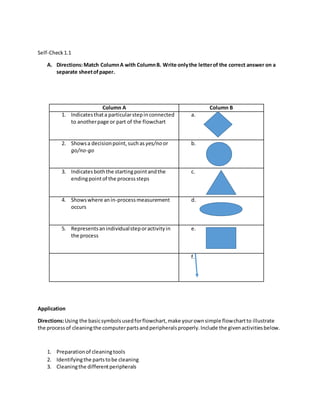
1. Oval. Ovalsindicate boththe startingpointandthe endingpointof the processsteps.
2. Box. A box representsanindividual steporactivityinthe process.
3. Diamond. A diamondshowsadecisionpoint,suchas yes/no orgo/no-go. Eachpathemerging
fromthe diamondmustbe labeledwithone of the possibleanswers.
4. Circle.A circle indicatesthata particularstepinconnectedtoanotherpage or part of the
Flowchart.A letterplacedinthe circle clarifiesthe continuation.
5. Triangle.A triangle showswhere anin-processmeasurementoccurs
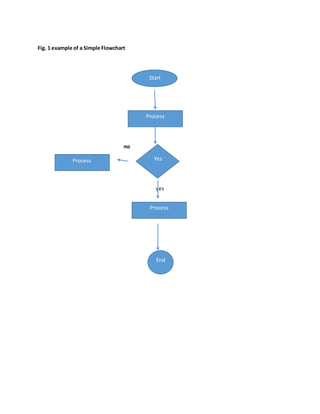
Fig. 1 example of a Simple Flowchart
no
yes
Start
Process
End
YesProcess
Process
Self-Check1.1
A. Directions:Match ColumnA with ColumnB. Write onlythe letterof the correct answer on a
separate sheetofpaper.
Column A Column B
1. Indicatesthata particularstepinconnected
to anotherpage or part of the flowchart
a.
2. Showsa decisionpoint,suchas yes/no or
go/no-go
b.
3. Indicatesboththe startingpointandthe
endingpointof the processsteps
c.
4. Showswhere anin-processmeasurement
occurs
d.
5. Representsanindividualsteporactivityin
the process
e.
f.
Application
Directions:Using the basicsymbolsusedforflowchart,make yourownsimple flowchartto illustrate
the processof cleaningthe computerpartsandperipheralsproperly.Include the givenactivitiesbelow.
1. Preparationof cleaningtools
2. Identifyingthe partstobe cleaning
3. Cleaningthe differentperipherals
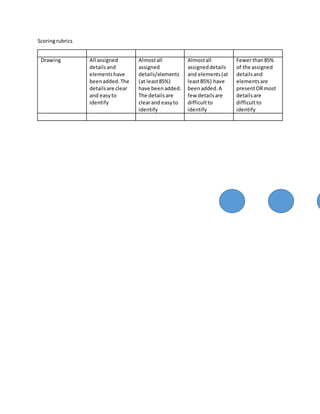
Scoringrubrics
Drawing All assigned
detailsand
elementshave
beenadded.The
detailsare clear
and easyto
identify
Almostall
assigned
details/elements
(at least85%)
have beenadded.
The detailsare
clearand easyto
identify
Almostall
assigneddetails
and elements(at
least85%) have
beenadded.A
few detailsare
difficultto
identify
Fewerthan85%
of the assigned
detailsand
elementsare
presentORmost
detailsare
difficultto
identify
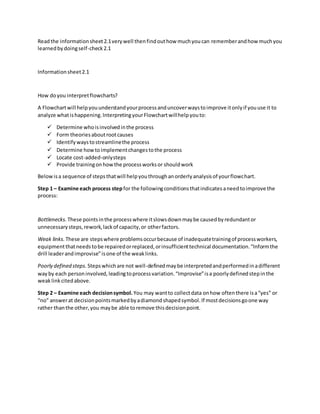
Readthe informationsheet2.1verywell thenfindouthow muchyoucan rememberandhow muchyou
learnedbydoingself-check2.1
Informationsheet2.1
How doyou interpretflowcharts?
A Flowchartwill helpyouunderstandyourprocessanduncoverwaystoimprove itonlyif youuse it to
analyze whatishappening.InterpretingyourFlowchartwillhelpyouto:
 Determine whoisinvolvedinthe process
 Form theoriesaboutrootcauses
 Identify waystostreamlinethe process
 Determine howtoimplementchangestothe process
 Locate cost-added-onlysteps
 Provide trainingonhowthe processworksor shouldwork
Belowisa sequence of stepsthatwill helpyouthroughanorderlyanalysisof yourflowchart.
Step 1 – Examine each process step for the followingconditionsthatindicatesaneedtoimprove the
process:
Bottlenecks. These pointsinthe processwhere itslowsdownmaybe causedbyredundantor
unnecessarysteps,rework,lackof capacity,or otherfactors.
Weak links. These are stepswhere problemsoccurbecause of inadequatetrainingof processworkers,
equipmentthatneedstobe repairedorreplaced,orinsufficienttechnical documentation.ā€œInformthe
drill leaderandimproviseā€isone of the weaklinks.
Poorly defined steps. Stepswhichare not well-definedmaybe interpretedandperformedinadifferent
wayby each personinvolved,leadingtoprocessvariation.ā€œImproviseā€isa poorlydefinedstepinthe
weaklinkcitedabove.
Step 2 – Examine each decisionsymbol. You may wantto collectdata onhow oftenthere isaā€œyesā€ or
ā€œnoā€ answerat decisionpointsmarkedbyadiamondshapedsymbol.If mostdecisionsgoone way
rather thanthe other,you maybe able toremove thisdecisionpoint.

Flowchart

  • 1.
    Learning outcomes At theendof thislesson,youare expectedtodothe following: LO 1. Identifydifferentkindsof technical drawingand LO2. Interprettechnical drawing Flowchart A flowchartisa diagramthat usesgraphicsymbolstodepictthe nature and flow of the stepsina process.Anothername forthistool isā€œflow diagramā€. What are the elementsof flowchart? A flowchartiscommonlyusedbysystemsanalyststovisualizethe seriesof processesina businesssystem.A flowchartisauseful tool todesignanefficientbusinesssystemandtotroubleshoot or improve anexistingsystem.A flowchartconsistsof elements,suchasthe terminator,process,sub process,arrowlinesandconnectors. 1. Terminator A terminatorisrepresentedbyasmall rectangle witcurvedcorners.A terminatorappearsatthe start and at the endof the flowchart.The endterminatorappearsonlyonce ona single flowchart. 2. Process A processisrepresentedbyarectangle.Itreferstoan actionin a businessprocess.It mustbe describedclearlyandconcisely.A processcanbe describedusingasingle verb-nounphrase;for example,OrderOffice Supplies.ā€The same level of detail mustbe keptinprocessesonasingle flowchart. 3. Sub-process A sub-processisrepresentedbyarectangle withdouble linesoneachside.A sub-processisa majorprocessthat couldevenbe brokenupintosimplerprocessesdevelopedintoanother flowchart. 4. Decision A decisionisrepresentedbyadiamond.A processthat can answera decisionof ā€œyesā€or ā€œnoā€ requiresadecisionbox 5. Connector A connectoris representedbyasmall circle ora connectorbox and islabeledusingletters.A flowchartwrittenona single page isclearerthana flowchartonseveral pages.A connector ensuresthatthe processesare connectedlogicallyandcorrectlyonseveral pages. 6. Arrow Lines Arrowlinesdrawninone direction,preferablyfromtoptobottom, keepa flowchartclear.Avoid arrow linesthatloopbecause thiscouldindicate redundancyinthe businessprocess.
  • 2.
    Whenshouldteams use flowcharts? Atthe beginningof yourprocessimprovementefforts,anas-isflowcharthelpsyourteamand othersinvolvedinthe processtounderstandhow itcurrentlyworks.The teammayfindithelpful to compare thisas-isflowchartwithadiagram of the way the processissupposedtowork.Later, the team will developaflowchartof the modifiedprocessagain,torecordow it actuallyfunctions.Atsome point, your teammay wantto create an ideal flowcharttoshow how you wouldultimatelylikethe processot performed. BenefitsofUsingFlowcharts 1. Promote understandingofa process People mayhave differingideasabouthow aprocessworks.A flowchartcanhelpyougainagreement aboutthe sequence of steps.Flowchartspromote understandinginawaythat writtenprocedures cannot do.One foodflowchartcan replace pagesof words. 2. Provide a toll for training employees. Because of the way theyvisuallylayoutthe sequenceof processsteps,flowchartscanbe veryhelpful in trainingemployeestoperformthe processaccordingtostandardizedprocedures. 3. Identifyproblemareas and opportunitiesfor processimprovement Once you breakdownthe processstepsanddiagram them, problemareasbecome more visible.Itis easyto spotopportunitiesforsimplifyingandrefiningandprocessbyanalyzingdecisionpoints, redundantstepsandreworkloops. Basic Flowchart Symbols The symbols that are commonlyusedinflowcharts(Viewgraph3) are specificmeaningsandare connectedby arrows indicatingthe flowfromone stepto another: 1. Oval. Ovalsindicate boththe startingpointandthe endingpointof the processsteps. 2. Box. A box representsanindividual steporactivityinthe process. 3. Diamond. A diamondshowsadecisionpoint,suchas yes/no orgo/no-go. Eachpathemerging fromthe diamondmustbe labeledwithone of the possibleanswers. 4. Circle.A circle indicatesthata particularstepinconnectedtoanotherpage or part of the Flowchart.A letterplacedinthe circle clarifiesthe continuation. 5. Triangle.A triangle showswhere anin-processmeasurementoccurs
  • 3.
    Fig. 1 exampleof a Simple Flowchart no yes Start Process End YesProcess Process
  • 4.
    Self-Check1.1 A. Directions:Match ColumnAwith ColumnB. Write onlythe letterof the correct answer on a separate sheetofpaper. Column A Column B 1. Indicatesthata particularstepinconnected to anotherpage or part of the flowchart a. 2. Showsa decisionpoint,suchas yes/no or go/no-go b. 3. Indicatesboththe startingpointandthe endingpointof the processsteps c. 4. Showswhere anin-processmeasurement occurs d. 5. Representsanindividualsteporactivityin the process e. f. Application Directions:Using the basicsymbolsusedforflowchart,make yourownsimple flowchartto illustrate the processof cleaningthe computerpartsandperipheralsproperly.Include the givenactivitiesbelow. 1. Preparationof cleaningtools 2. Identifyingthe partstobe cleaning 3. Cleaningthe differentperipherals
  • 5.
    Scoringrubrics Drawing All assigned detailsand elementshave beenadded.The detailsareclear and easyto identify Almostall assigned details/elements (at least85%) have beenadded. The detailsare clearand easyto identify Almostall assigneddetails and elements(at least85%) have beenadded.A few detailsare difficultto identify Fewerthan85% of the assigned detailsand elementsare presentORmost detailsare difficultto identify
  • 6.
    Readthe informationsheet2.1verywell thenfindouthowmuchyoucan rememberandhow muchyou learnedbydoingself-check2.1 Informationsheet2.1 How doyou interpretflowcharts? A Flowchartwill helpyouunderstandyourprocessanduncoverwaystoimprove itonlyif youuse it to analyze whatishappening.InterpretingyourFlowchartwillhelpyouto:  Determine whoisinvolvedinthe process  Form theoriesaboutrootcauses  Identify waystostreamlinethe process  Determine howtoimplementchangestothe process  Locate cost-added-onlysteps  Provide trainingonhowthe processworksor shouldwork Belowisa sequence of stepsthatwill helpyouthroughanorderlyanalysisof yourflowchart. Step 1 – Examine each process step for the followingconditionsthatindicatesaneedtoimprove the process: Bottlenecks. These pointsinthe processwhere itslowsdownmaybe causedbyredundantor unnecessarysteps,rework,lackof capacity,or otherfactors. Weak links. These are stepswhere problemsoccurbecause of inadequatetrainingof processworkers, equipmentthatneedstobe repairedorreplaced,orinsufficienttechnical documentation.ā€œInformthe drill leaderandimproviseā€isone of the weaklinks. Poorly defined steps. Stepswhichare not well-definedmaybe interpretedandperformedinadifferent wayby each personinvolved,leadingtoprocessvariation.ā€œImproviseā€isa poorlydefinedstepinthe weaklinkcitedabove. Step 2 – Examine each decisionsymbol. You may wantto collectdata onhow oftenthere isaā€œyesā€ or ā€œnoā€ answerat decisionpointsmarkedbyadiamondshapedsymbol.If mostdecisionsgoone way rather thanthe other,you maybe able toremove thisdecisionpoint.