January 15,
2017
Schedule
•Pizza. Please bring it into the meeting room.
•Introductions
•Demo: Merel Kennedy, MK Design
•Demo: Rocky Butani, Private Lender Link
•Main Presentation: Is Your Website Ready for
2017?
EastBayWP.com
Our Meetup.com Page
http://www.meetup.com/Eastbay-WordPress-Meetup/
A Word from Our Sponsors
Ongoing Sponsor: Pagely
https://pagely.com/plans-pricing/managed-wordpress/
Ongoing Sponsor: O’Reilly Media
Use discount code PCBW for 40% off print & 50% off ebooks and videos on
http://shop.oreilly.com.
Today’s Pizza Sponsor: Lisa LaMagna
http://lisalamagna.com
Introductions
Tell us your name and something about yourself, e.g.
“I’m Sallie and I’m the organizer of this Meetup. I
started working with WordPress in 2005.”
Demo: MK Design
http://merelkennedy.com/
MK Design: WP Image Zoom Pro
• Zooms automatically when
you mouse over the image.
• Requires large image uploads
to work (2x or 3x).
• Add class=“zoooom” to images
or use visual editor button.
• Free plugin (1 zoom per page)
• Pro version ($48.90 for one
site)
Demo: Private Lender Link
https://privatelenderlink.com/
Private Lender Link: FacetWP
• Premium Plugin from
https://facetwp.com/buy/
($79 basic, $199 pro)
• Filter search results by
anything you can query.
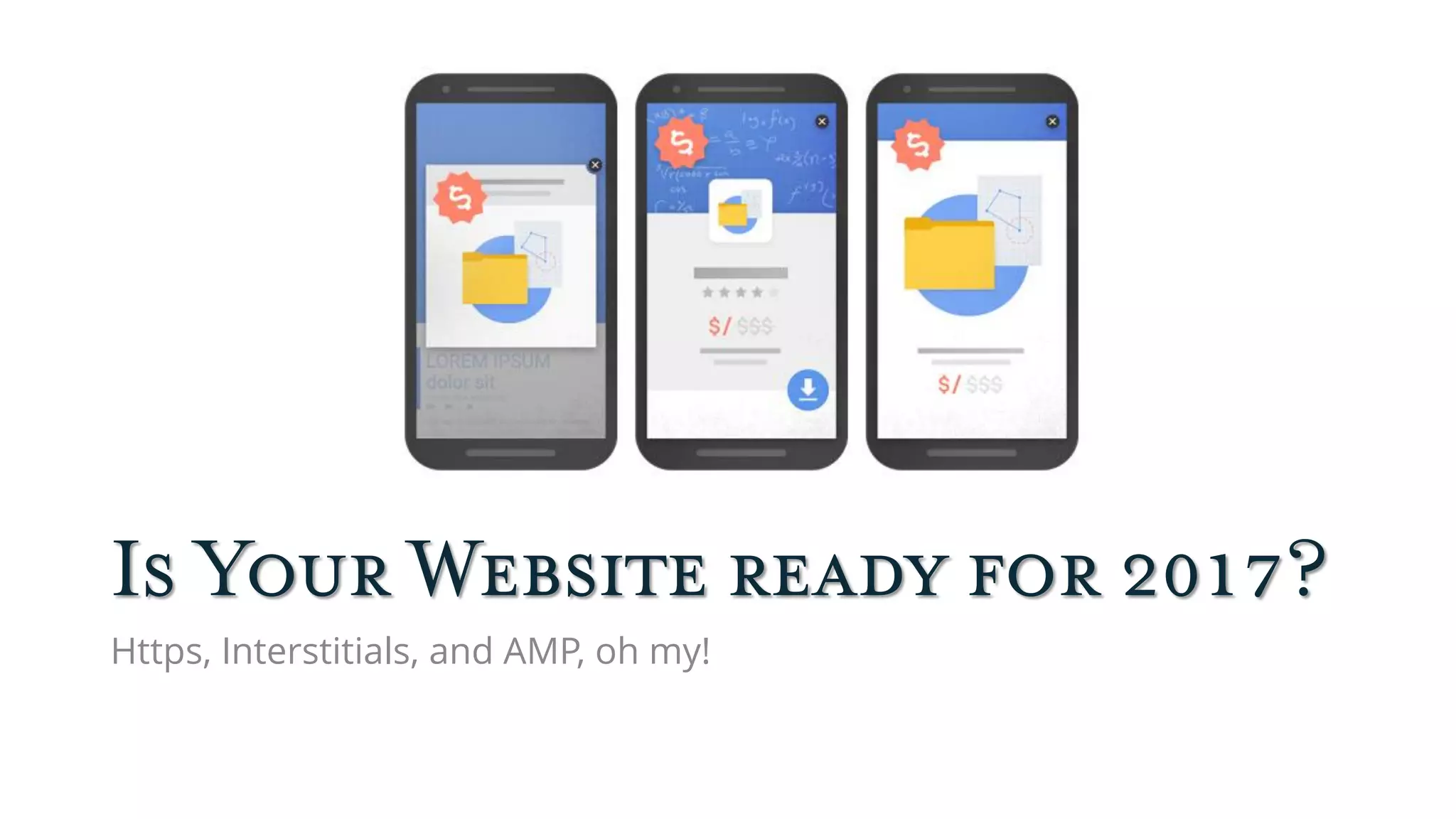
Is Your Website ready for 2017?
Https, Interstitials, and AMP, oh my!
HTTPS: Securing Your Site
What Is HTTPS?
“Hyper Text Transfer Protocol Secure (HTTPS)
is the secure version of HTTP. The 'S' at the
end of HTTPS stands for 'Secure'. It means all
communications between your browser and
the website are encrypted.”
https://www.instantssl.com/ssl-certificate-products/https.html
HTTPS Requires an SSL Certificate
“SSL” is really TLS (Transportation Layer Security)
“An SSL Certificate (Secure Sockets Layer), also called a
Digital Certificate, creates a secure link between a website
and a visitor's browser. By ensuring that all data passed
between the two remains private and secure, SSL
encryption prevents hackers from stealing private
information such as credit card numbers, names and
addresses.”
http://www.networksolutions.com/education/what-is-an-ssl-certificate/
You need HTTPS…
•If you conduct financial transactions on your
site—even with PayPal Standard (since 2016).
•If anyone logs into your site, including you.
•Because Google says so (since 2014).
•Because WordPress says so (starting 2017).
•Because you need it for HTTP/2.
Good News: Free SSL Certificates
Can You Use Free SSL?
Yes, unless you need:
Organization Validation (OV) SSL Certificates: where
the CA checks the right of the applicant to use a
specific domain name PLUS it conducts some
vetting of the organization.
Extended Validation (EV) SSL Certificates: where
the Certificate Authority (CA) checks the right of the
applicant to use a specific domain name PLUS it
conducts a THOROUGH vetting of the organization.
https://www.globalsign.com/en/ssl-information-center/types-of-ssl-certificate/
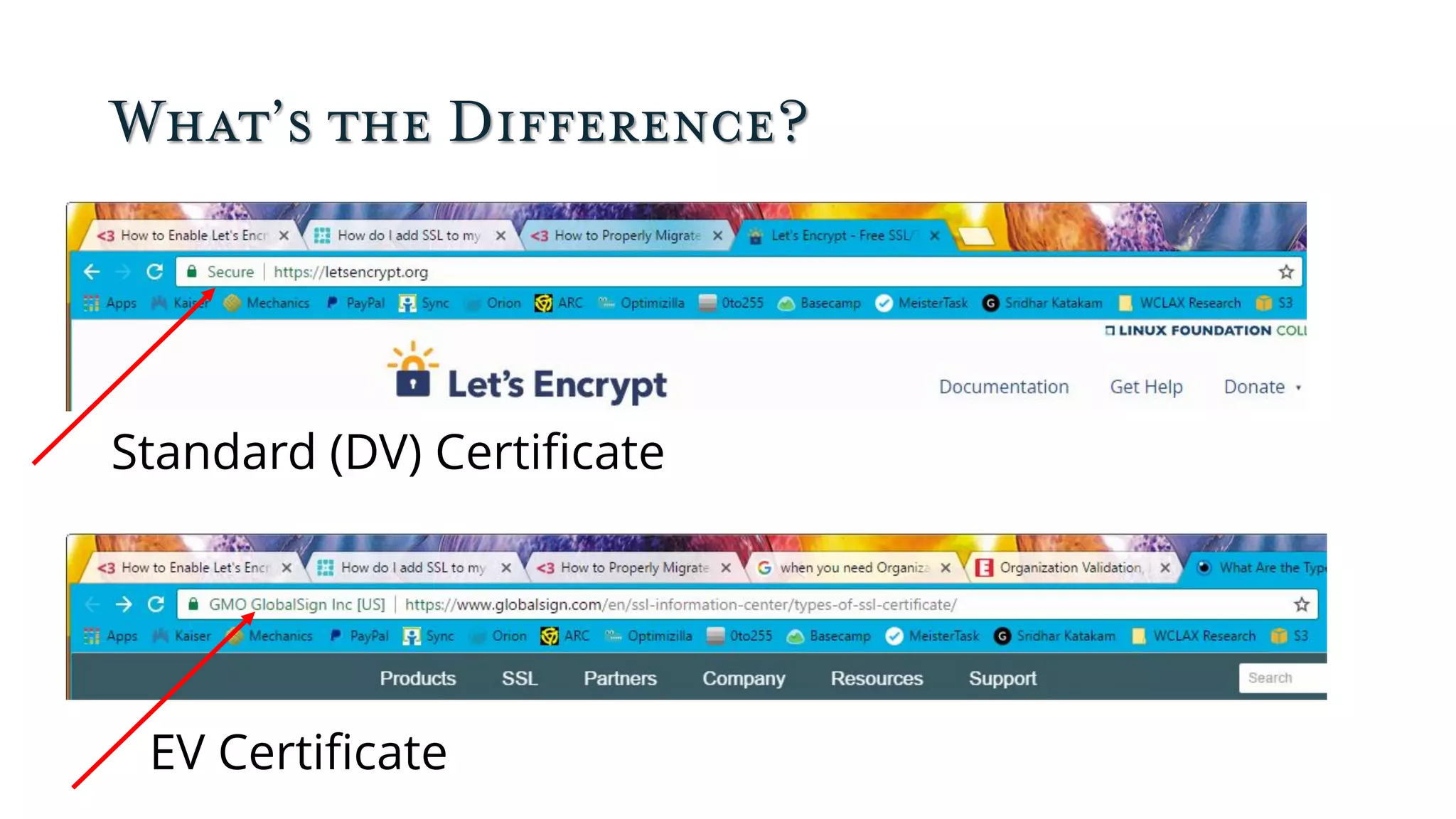
What’s the Difference?
Standard (DV) Certificate
EV Certificate
When Would You Need OV or EV?
If you’re PayPal, eBay, a bank, or someone else whose
site hackers are likely to spoof in order to conduct
phishing attacks, you want one of these certificates.
Before you can get one, you have to be able to
demonstrate that you’re a legitimate business. For
most purposes, including e-commerce, a DV certificate
is fine.
Chrome Warnings on Non-HTTPS Sites
Get Let’s Encrypt
• A2 Hosting
• BlueHost (WP Only)
• Cloudways
• DreamHost
• Flywheel
• Pressable
• Pressjitsu
• SiteGround
• WordPress.com
• WP Engine
Don’t see your
hosting
company? I
might just have
left it out, so
contact support.
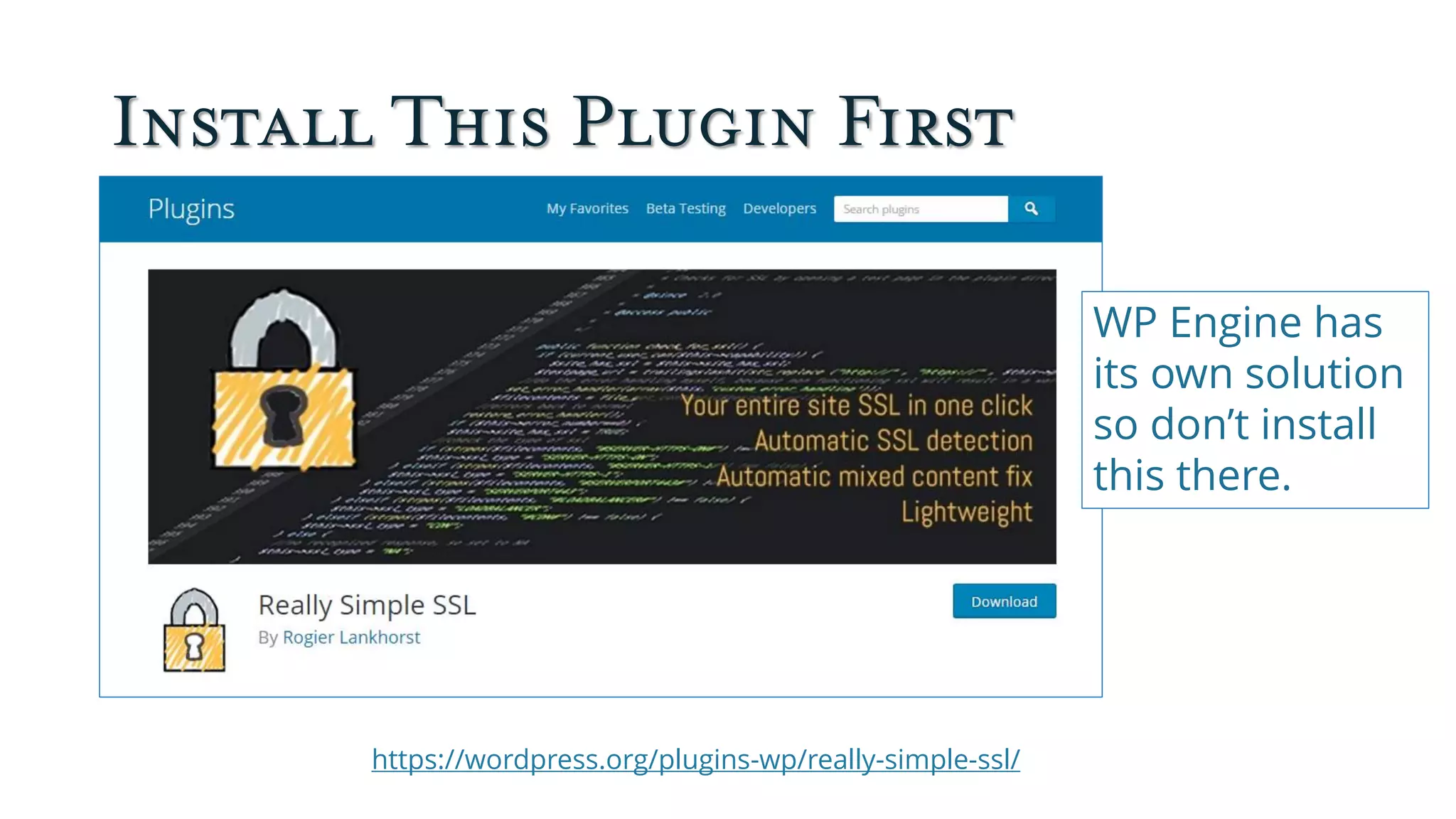
Install This Plugin First
https://wordpress.org/plugins-wp/really-simple-ssl/
WP Engine has
its own solution
so don’t install
this there.
Set Up Let’s Encrypt on SiteGround
Set Up Let’s Encrypt on DreamHost
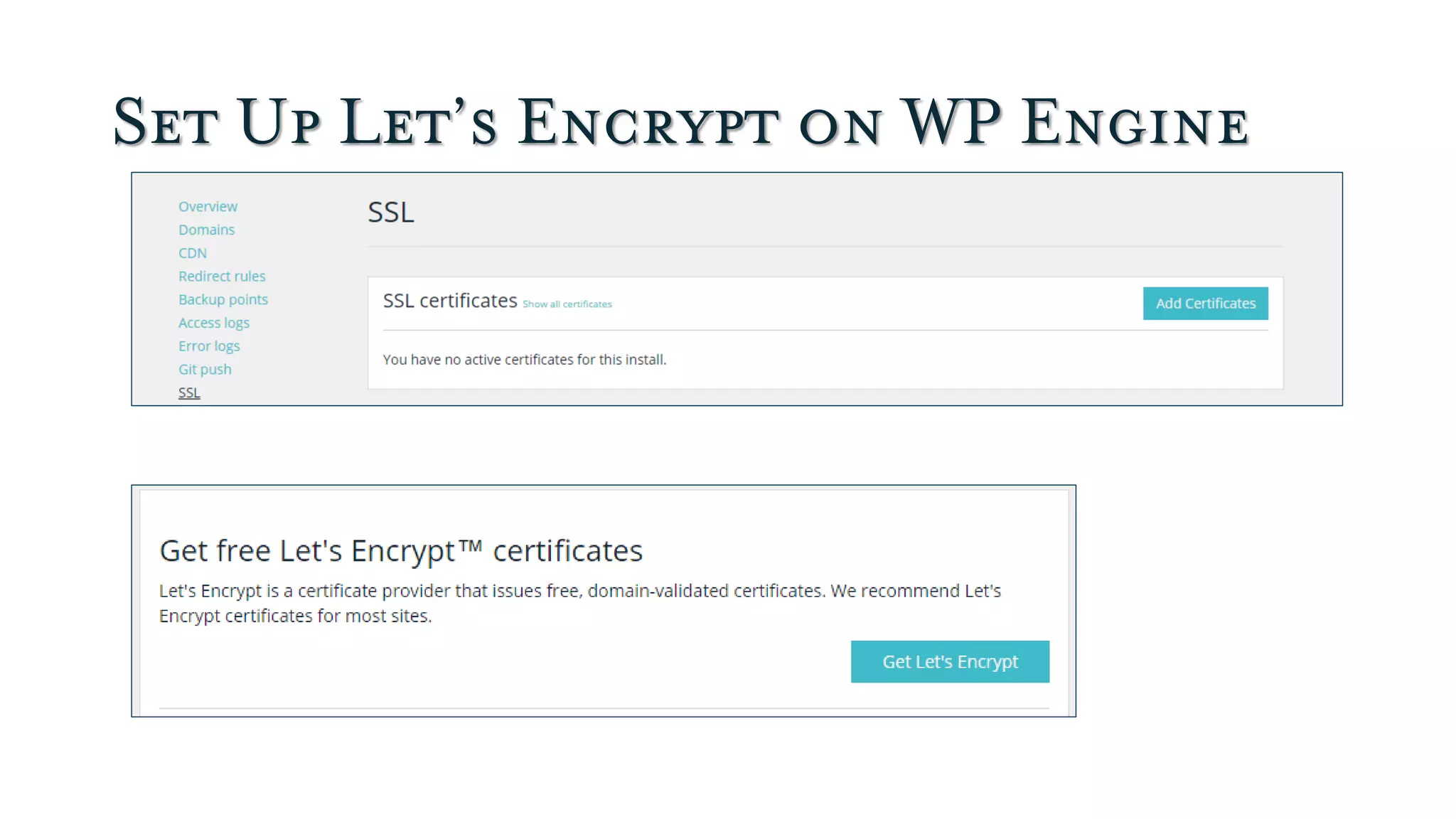
Set Up Let’s Encrypt on WP Engine
Set Up Let’s Encrypt on Pressable
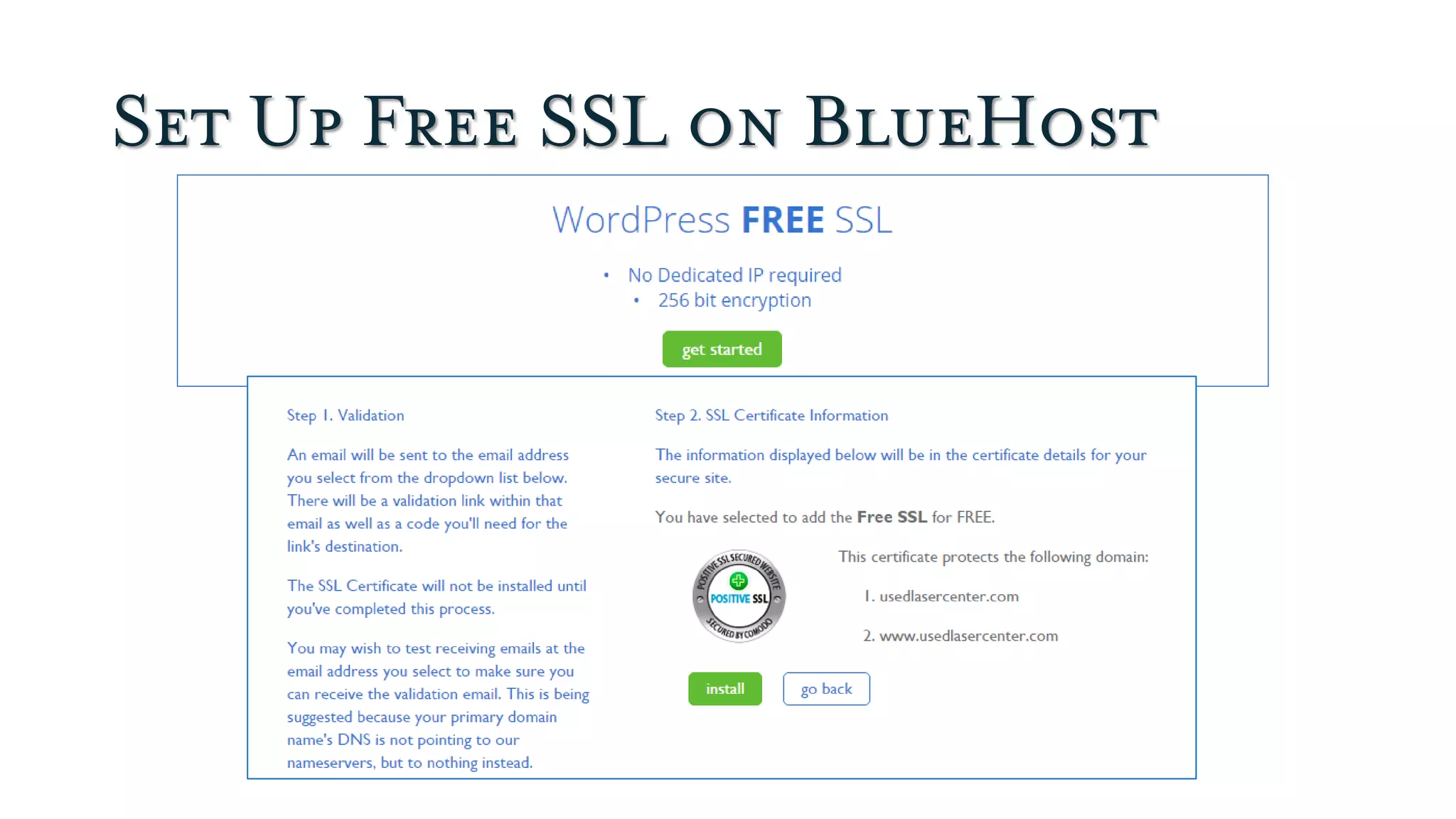
Set Up Free SSL on BlueHost
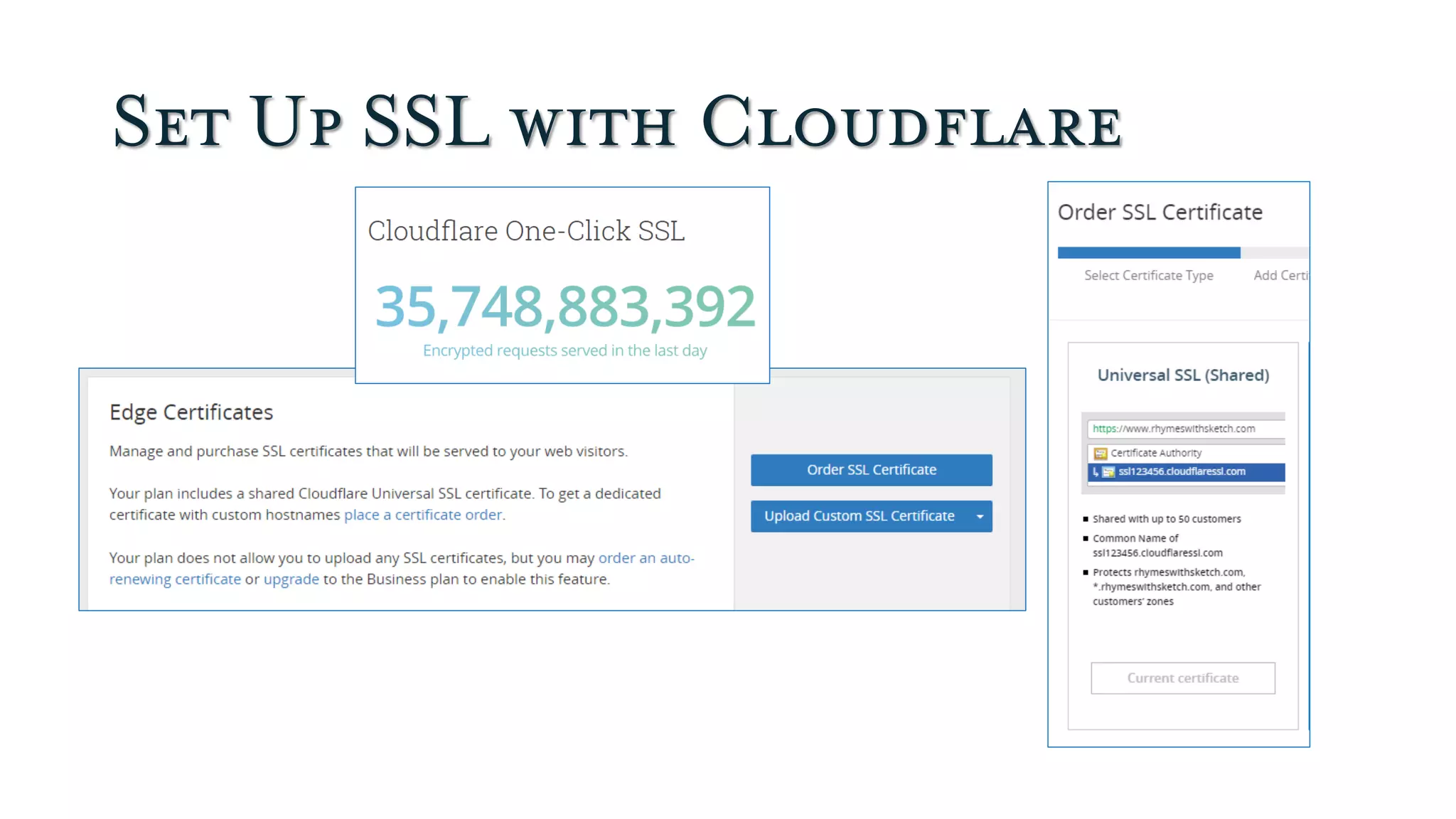
Set Up SSL with Cloudflare
Making It All Work Automatically sets
up a page rule so
your admin is not
cached. Use
additional page rules
to avoid caching
your store.
https://wordpress.org/plugins/cloudflare/
HTTPS Rewrites with Cloudflare
Too many levels of rewrites can
cause redirect loops. If enabling
this causes problems, disable it.
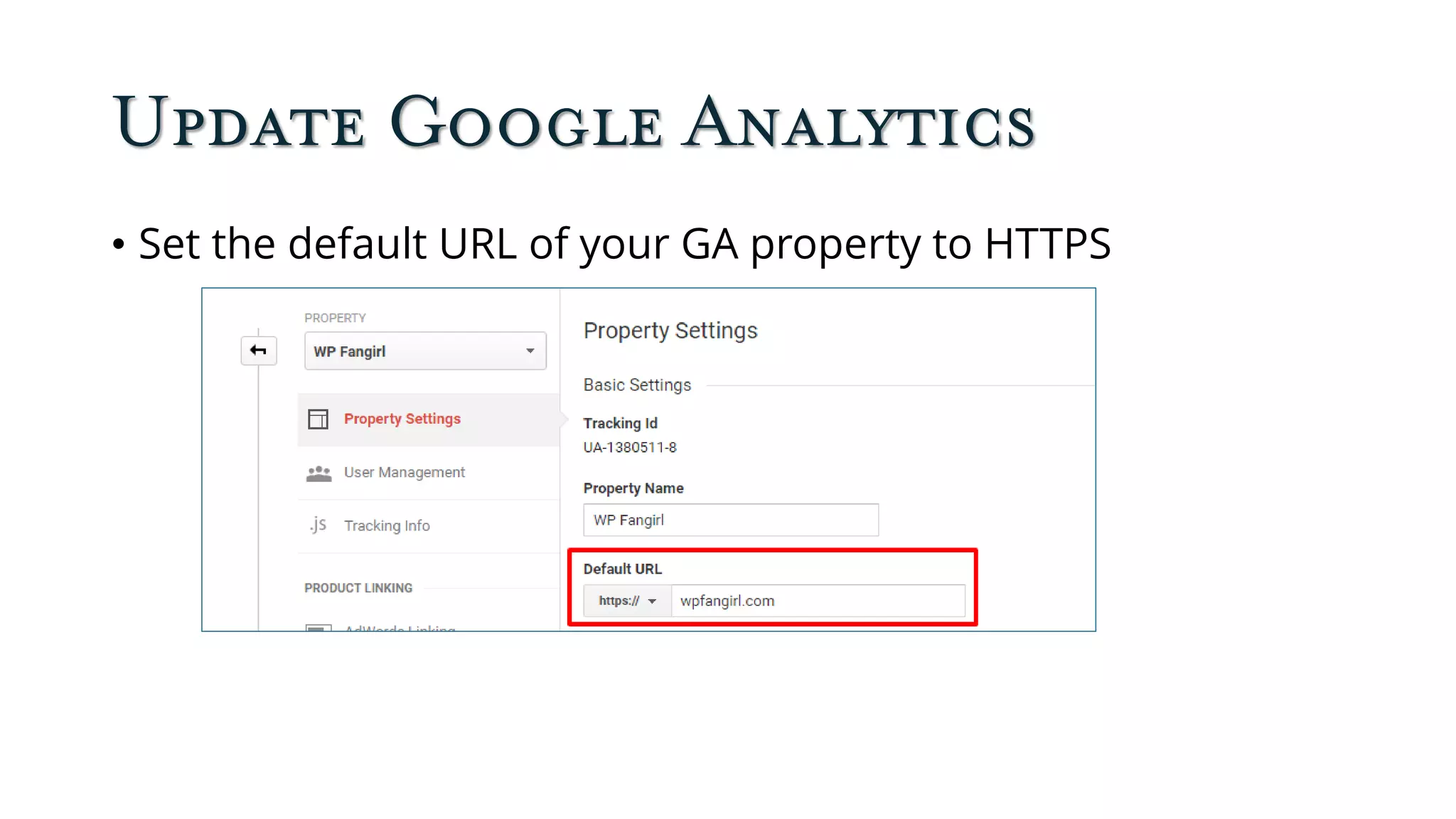
Update Google Analytics
• Set the default URL of your GA property to HTTPS
Update Google Search Console
Add all your website versions
Make sure you add separate Search Console properties for all
URL variations that your site supports, including https, http,
www, and non-www.
Select your preferred version
Choose whether you want your site to appear with or without
"www" in Google Search.
Note: if you have verified ownership of the http version of your
website, you won’t (usually) have to do it again.
Update Other Links
Check your email signature and links from your social
profile, and update them to HTTPs.
What to Do Next
Set this up for yourself, then offer it as a
service to clients (or invite the DIY types to
do it themselves).
Tutorial: How to Properly Migrate a WordPress Site to
HTTPS
Intrusive Interstitials
Otherwise Known as Popups
These Are Bad
They cover the
whole screen and
are hard to dismiss
on mobile. They
interfere with
accessibility. And
they’re just a PITA.
https://webmasters.googleblog.com/2016/08/helping-users-easily-access-content-on.html
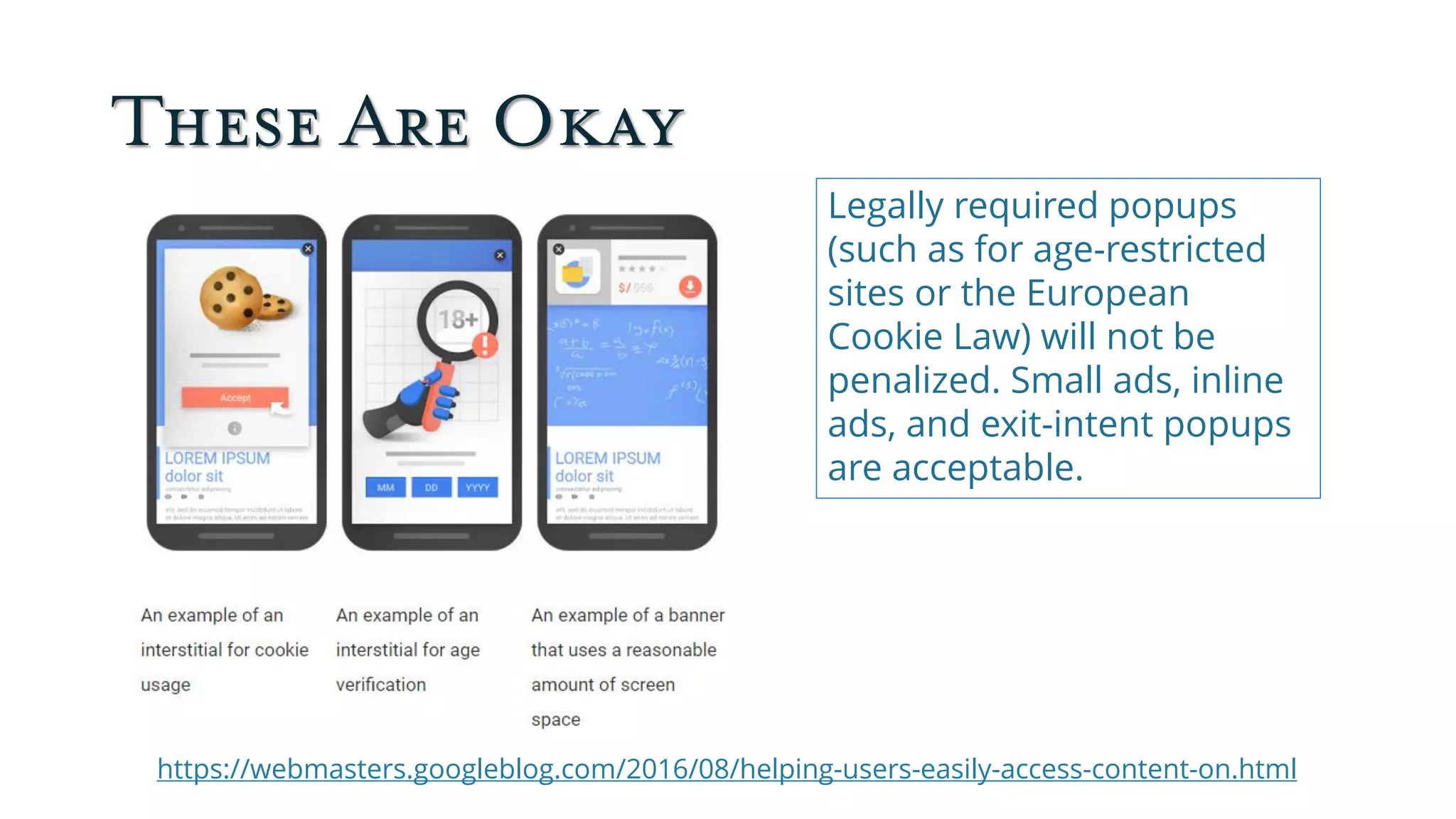
These Are Okay
https://webmasters.googleblog.com/2016/08/helping-users-easily-access-content-on.html
Legally required popups
(such as for age-restricted
sites or the European
Cookie Law) will not be
penalized. Small ads, inline
ads, and exit-intent popups
are acceptable.
More About Interstitials
• This only applies to mobile: we’re going to keep
seeing obnoxious intersitials on our
desktops/laptops.
• Your email signup form and other offers for your
own products are included.
• The “interstitial” doesn’t have to be an actual popup:
anything that covers the first screen visitors land on
from a mobile search link counts.
To Avoid Penalties, Make Sure…
1. Popups are desktop only by Default
2. Device Specific Display Rules
3. Floating Bars are Mobile Optimized
4. Use Smart Display Rule Triggers
(Guidelines from OptinMonster)
http://optinmonster.com/the-new-google-mobile-friendly-rules-for-popups/
What to Do Next
First check your own site. Then contact
your clients to see whether they need
help with their interstitials.
Google AMP
It’s all about Mobile Speed
What Is AMP?
Automattic’s AMP Plugin
https://wordpress.org/plugins-wp/amp/
More AMP Plugins
• Glue for Yoast SEO & AMP (Supplement to
Automattic plugin)
• AMP for WP (Alternative to Automattic plugin)
• AMP Supremacy (Alternative to Automattic Plugin)
• Custom AMP (Alternative to Automattic plugin)
• Facebook Instant Articles & Google AMP Pages by PageFrog
(Alternative to Automattic Plugin)
AMP Support on Cloudflare
What Does AMP Look Like?
Regular WP Post WP Post on AMP
No subtitle
Duplicate
featured
image
Different
fonts
No background
image
No header or menu
Do You Need AMP?
Maybe. But you can have a fast mobile site
without it.
• Three reasons you might not need Google AMP after all
• Do I Need AMP?
• How to Set Up Google Amp for WordPress (And Why You
Should)
• Diving Into Google Accelerated Mobile Pages (AMP)
What Next?
Seems to me it’s best to wait on this one and
see how things develop, unless you’re a news
organization publishing to other platforms.
About Your Presenter
@salliegoetsch on Twitter
sallie@wpfangirl.com
(510) 969-9947
Sallie Goetsch (rhymes with ‘sketch’) built her first HTML
website in 1994. Since discovering WordPress in 2005, she
hasn’t looked back. Sallie became the organizer of the
East Bay WordPress Meetup in Oakland, California, in
2009.
Sallie has produced WordPress videos for Peachpit Press,
taught introductory WordPress classes for Mediabistro,
and acted as Technical Reviewer for O’Reilly’s WordPress:
The Missing Manual. She runs her WP Fangirl consulting
and development business from her home and appears
regularly on the WP-Tonic Live panel.

Is Your (Client's) Website Ready for 2017?

  • 1.
  • 2.
    Schedule •Pizza. Please bringit into the meeting room. •Introductions •Demo: Merel Kennedy, MK Design •Demo: Rocky Butani, Private Lender Link •Main Presentation: Is Your Website Ready for 2017?
  • 3.
  • 4.
  • 5.
    A Word fromOur Sponsors
  • 6.
  • 7.
    Ongoing Sponsor: O’ReillyMedia Use discount code PCBW for 40% off print & 50% off ebooks and videos on http://shop.oreilly.com.
  • 8.
    Today’s Pizza Sponsor:Lisa LaMagna http://lisalamagna.com
  • 9.
    Introductions Tell us yourname and something about yourself, e.g. “I’m Sallie and I’m the organizer of this Meetup. I started working with WordPress in 2005.”
  • 10.
  • 11.
    MK Design: WPImage Zoom Pro • Zooms automatically when you mouse over the image. • Requires large image uploads to work (2x or 3x). • Add class=“zoooom” to images or use visual editor button. • Free plugin (1 zoom per page) • Pro version ($48.90 for one site)
  • 12.
    Demo: Private LenderLink https://privatelenderlink.com/
  • 13.
    Private Lender Link:FacetWP • Premium Plugin from https://facetwp.com/buy/ ($79 basic, $199 pro) • Filter search results by anything you can query.
  • 14.
    Is Your Websiteready for 2017? Https, Interstitials, and AMP, oh my!
  • 15.
  • 16.
    What Is HTTPS? “HyperText Transfer Protocol Secure (HTTPS) is the secure version of HTTP. The 'S' at the end of HTTPS stands for 'Secure'. It means all communications between your browser and the website are encrypted.” https://www.instantssl.com/ssl-certificate-products/https.html
  • 17.
    HTTPS Requires anSSL Certificate “SSL” is really TLS (Transportation Layer Security) “An SSL Certificate (Secure Sockets Layer), also called a Digital Certificate, creates a secure link between a website and a visitor's browser. By ensuring that all data passed between the two remains private and secure, SSL encryption prevents hackers from stealing private information such as credit card numbers, names and addresses.” http://www.networksolutions.com/education/what-is-an-ssl-certificate/
  • 18.
    You need HTTPS… •Ifyou conduct financial transactions on your site—even with PayPal Standard (since 2016). •If anyone logs into your site, including you. •Because Google says so (since 2014). •Because WordPress says so (starting 2017). •Because you need it for HTTP/2.
  • 19.
    Good News: FreeSSL Certificates
  • 20.
    Can You UseFree SSL? Yes, unless you need: Organization Validation (OV) SSL Certificates: where the CA checks the right of the applicant to use a specific domain name PLUS it conducts some vetting of the organization. Extended Validation (EV) SSL Certificates: where the Certificate Authority (CA) checks the right of the applicant to use a specific domain name PLUS it conducts a THOROUGH vetting of the organization. https://www.globalsign.com/en/ssl-information-center/types-of-ssl-certificate/
  • 21.
    What’s the Difference? Standard(DV) Certificate EV Certificate
  • 22.
    When Would YouNeed OV or EV? If you’re PayPal, eBay, a bank, or someone else whose site hackers are likely to spoof in order to conduct phishing attacks, you want one of these certificates. Before you can get one, you have to be able to demonstrate that you’re a legitimate business. For most purposes, including e-commerce, a DV certificate is fine.
  • 23.
    Chrome Warnings onNon-HTTPS Sites
  • 24.
    Get Let’s Encrypt •A2 Hosting • BlueHost (WP Only) • Cloudways • DreamHost • Flywheel • Pressable • Pressjitsu • SiteGround • WordPress.com • WP Engine Don’t see your hosting company? I might just have left it out, so contact support.
  • 25.
    Install This PluginFirst https://wordpress.org/plugins-wp/really-simple-ssl/ WP Engine has its own solution so don’t install this there.
  • 26.
    Set Up Let’sEncrypt on SiteGround
  • 27.
    Set Up Let’sEncrypt on DreamHost
  • 28.
    Set Up Let’sEncrypt on WP Engine
  • 29.
    Set Up Let’sEncrypt on Pressable
  • 30.
    Set Up FreeSSL on BlueHost
  • 31.
    Set Up SSLwith Cloudflare
  • 32.
    Making It AllWork Automatically sets up a page rule so your admin is not cached. Use additional page rules to avoid caching your store. https://wordpress.org/plugins/cloudflare/
  • 33.
    HTTPS Rewrites withCloudflare Too many levels of rewrites can cause redirect loops. If enabling this causes problems, disable it.
  • 34.
    Update Google Analytics •Set the default URL of your GA property to HTTPS
  • 35.
    Update Google SearchConsole Add all your website versions Make sure you add separate Search Console properties for all URL variations that your site supports, including https, http, www, and non-www. Select your preferred version Choose whether you want your site to appear with or without "www" in Google Search. Note: if you have verified ownership of the http version of your website, you won’t (usually) have to do it again.
  • 36.
    Update Other Links Checkyour email signature and links from your social profile, and update them to HTTPs.
  • 37.
    What to DoNext Set this up for yourself, then offer it as a service to clients (or invite the DIY types to do it themselves). Tutorial: How to Properly Migrate a WordPress Site to HTTPS
  • 38.
  • 39.
    These Are Bad Theycover the whole screen and are hard to dismiss on mobile. They interfere with accessibility. And they’re just a PITA. https://webmasters.googleblog.com/2016/08/helping-users-easily-access-content-on.html
  • 40.
    These Are Okay https://webmasters.googleblog.com/2016/08/helping-users-easily-access-content-on.html Legallyrequired popups (such as for age-restricted sites or the European Cookie Law) will not be penalized. Small ads, inline ads, and exit-intent popups are acceptable.
  • 41.
    More About Interstitials •This only applies to mobile: we’re going to keep seeing obnoxious intersitials on our desktops/laptops. • Your email signup form and other offers for your own products are included. • The “interstitial” doesn’t have to be an actual popup: anything that covers the first screen visitors land on from a mobile search link counts.
  • 42.
    To Avoid Penalties,Make Sure… 1. Popups are desktop only by Default 2. Device Specific Display Rules 3. Floating Bars are Mobile Optimized 4. Use Smart Display Rule Triggers (Guidelines from OptinMonster) http://optinmonster.com/the-new-google-mobile-friendly-rules-for-popups/
  • 43.
    What to DoNext First check your own site. Then contact your clients to see whether they need help with their interstitials.
  • 44.
    Google AMP It’s allabout Mobile Speed
  • 45.
  • 46.
  • 47.
    More AMP Plugins •Glue for Yoast SEO & AMP (Supplement to Automattic plugin) • AMP for WP (Alternative to Automattic plugin) • AMP Supremacy (Alternative to Automattic Plugin) • Custom AMP (Alternative to Automattic plugin) • Facebook Instant Articles & Google AMP Pages by PageFrog (Alternative to Automattic Plugin)
  • 48.
    AMP Support onCloudflare
  • 49.
    What Does AMPLook Like? Regular WP Post WP Post on AMP No subtitle Duplicate featured image Different fonts No background image No header or menu
  • 50.
    Do You NeedAMP? Maybe. But you can have a fast mobile site without it. • Three reasons you might not need Google AMP after all • Do I Need AMP? • How to Set Up Google Amp for WordPress (And Why You Should) • Diving Into Google Accelerated Mobile Pages (AMP)
  • 51.
    What Next? Seems tome it’s best to wait on this one and see how things develop, unless you’re a news organization publishing to other platforms.
  • 52.
    About Your Presenter @salliegoetschon Twitter sallie@wpfangirl.com (510) 969-9947 Sallie Goetsch (rhymes with ‘sketch’) built her first HTML website in 1994. Since discovering WordPress in 2005, she hasn’t looked back. Sallie became the organizer of the East Bay WordPress Meetup in Oakland, California, in 2009. Sallie has produced WordPress videos for Peachpit Press, taught introductory WordPress classes for Mediabistro, and acted as Technical Reviewer for O’Reilly’s WordPress: The Missing Manual. She runs her WP Fangirl consulting and development business from her home and appears regularly on the WP-Tonic Live panel.