
Stand #55
Overview 
iPads have emerged as a powerful tool for engaging students in curriculum-related 
tasks. The aim of this workshop is to demonstrate the practical application of the Apple 
iPad in an educational setting. An emphasis will be given on hands-on activities and the 
sharing of relevant strategies in using iPad for personal productivity and for producing 
teaching resources. Participants will be guided through the use of a range of 
applications considered essential for educators. In addition, participants will gain 
experience using iPads, evaluating applications (apps) for educational use and exploring 
strategies for teaching with this technology. Strategies that focus upon enhancing 
personal productivity, creativity, writing, mind-mapping, virtual whiteboards, image and 
video editing, audio recording and editing, online publishing, social media, and resource 
management will be explored. Participants will have to bring their own iPad with 3G for 
this training. Note that some of the apps are free but some are not. Participants have to 
download the apps from the Apps Store if they do not have the apps installed on their 
iPad. 
Stand #55
Biography 
Syamsul Nor Azlan was a creative designer in line with advertising and corporate image 
before he changed his carrier path as a lecturer in Department of Art and Design 
Education, Faculty of Education, Universiti Teknologi MARA (UiTM), Malaysia. Holding a 
M.Ed in Educational Technology from Universiti Teknologi Malaysia. He actually was 
focusing in multimedia and technology in promoting learning in interactive and 
informative mode. His research explored the potential of intelligent tutoring system 
blended with learning. In addition, he was actively involved in photography through 
artwork exhibitions. Hence, with the combination of experience in creative line, 
multimedia and technology in education, he believes that can transform learning into 
different strategies and approach in future. Now, he doing PHD in mobile learning at 
UKM . 
Stand #55
Stand #55 
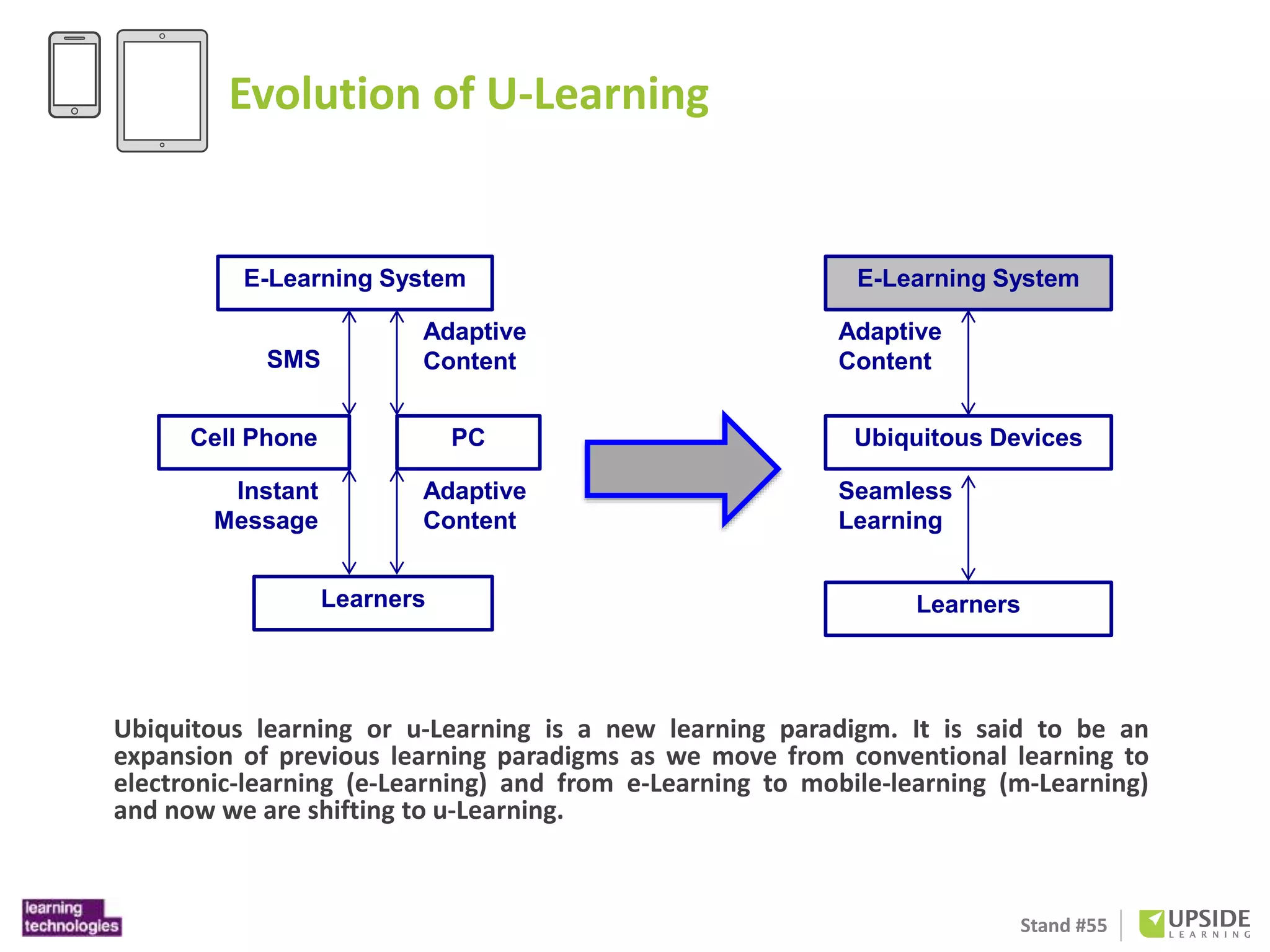
Evolution of U-Learning 
E-Learning System 
SMS 
Adaptive 
Content 
Cell Phone PC 
Adaptive 
Content 
Instant 
Message 
Learners 
A. Isolated u-Learning 
E-Learning System 
Adaptive 
Content 
Ubiquitous Devices 
Seamless 
Learning 
Learners 
B. Unified u-Learning 
Ubiquitous learning or u-Learning is a new learning paradigm. It is said to be an 
expansion of previous learning paradigms as we move from conventional learning to 
electronic-learning (e-Learning) and from e-Learning to mobile-learning (m-Learning) 
and now we are shifting to u-Learning.
Stand #55 
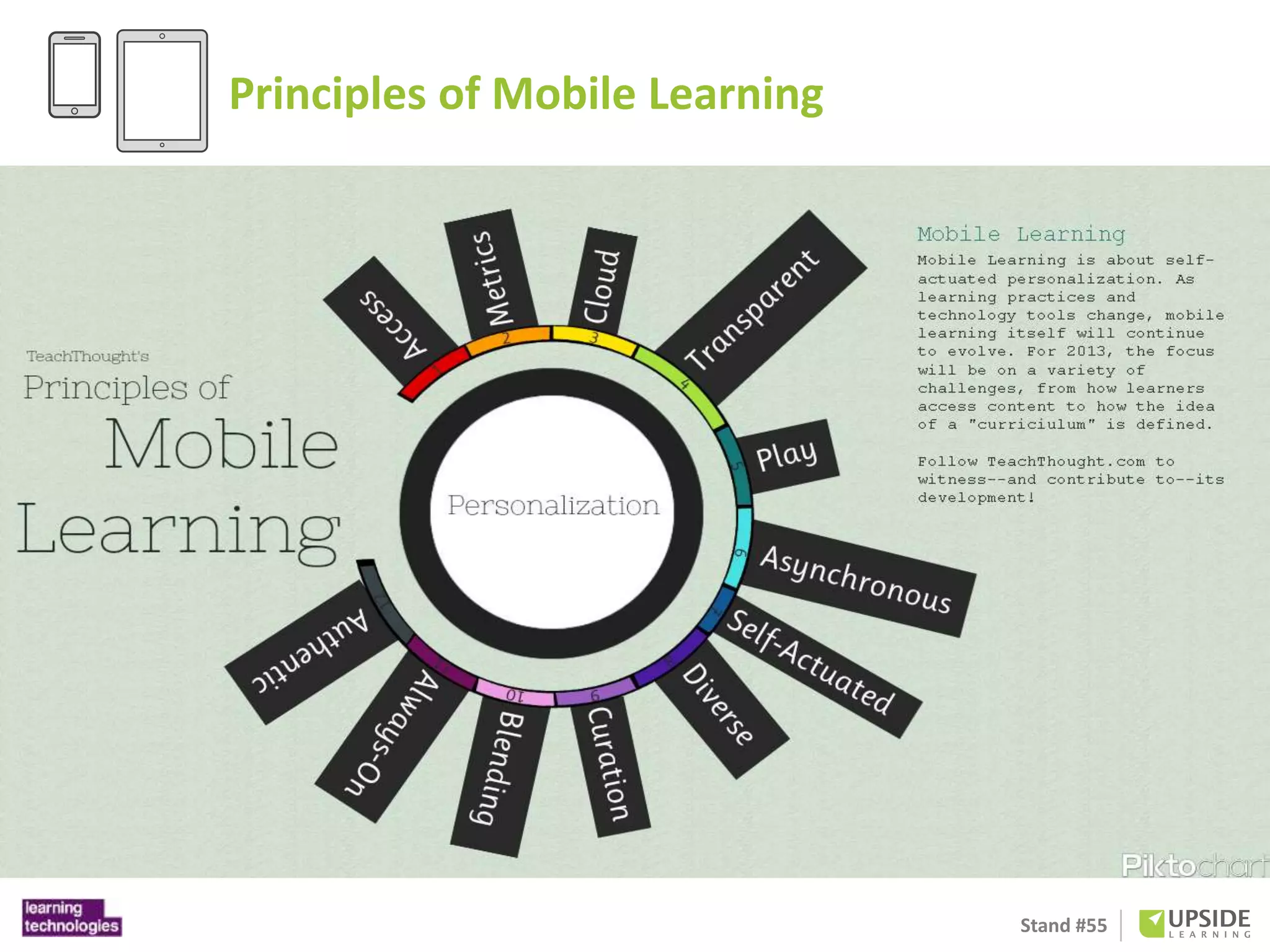
Principles of Mobile Learning
Stand #55
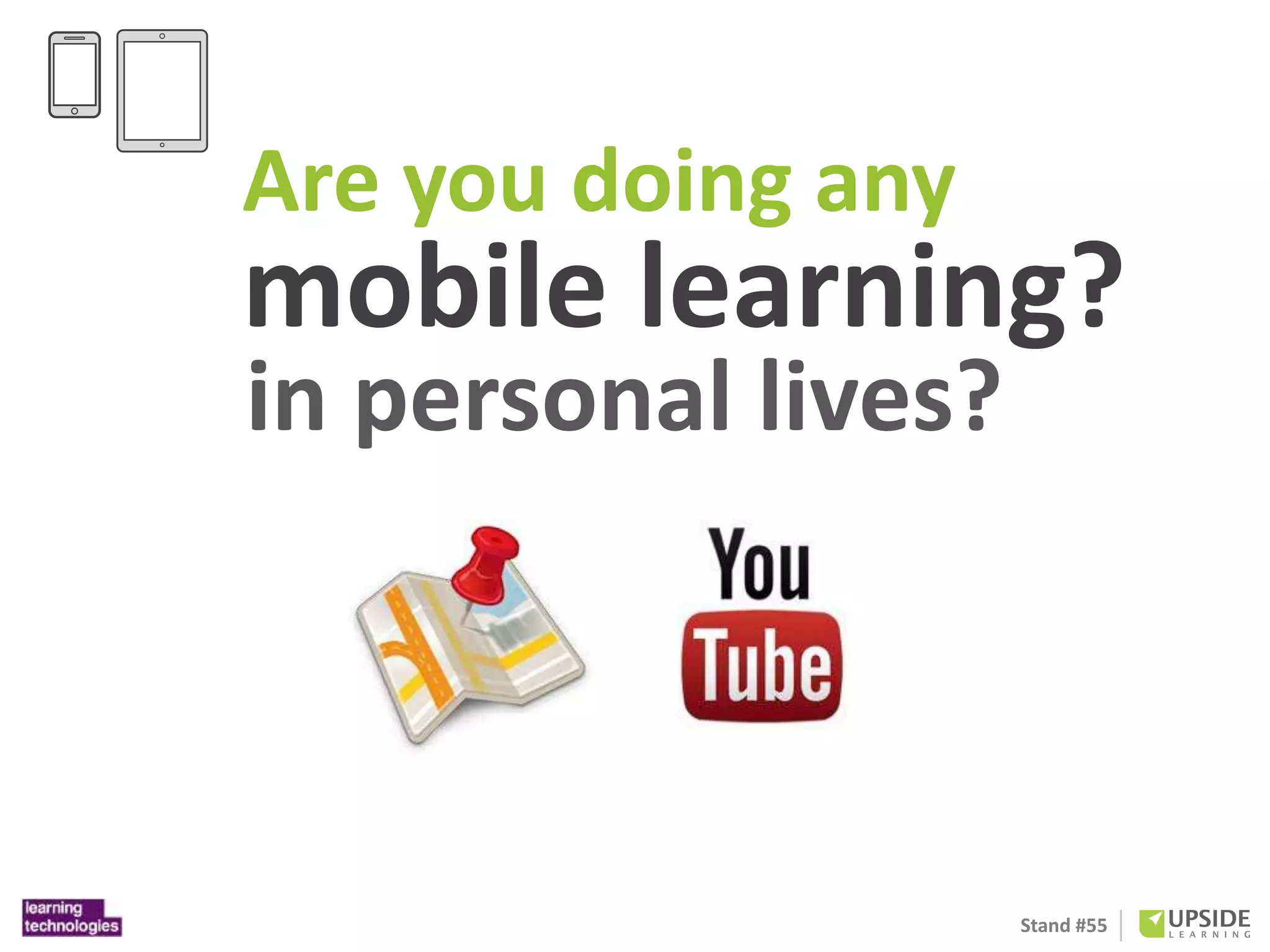
Are you doing any 
mobile learning? 
in personal lives? 
Stand #55
mLearning 
is the future of 
workplace learning 
Stand #55 
http://www.upsidelearning.com/uk/
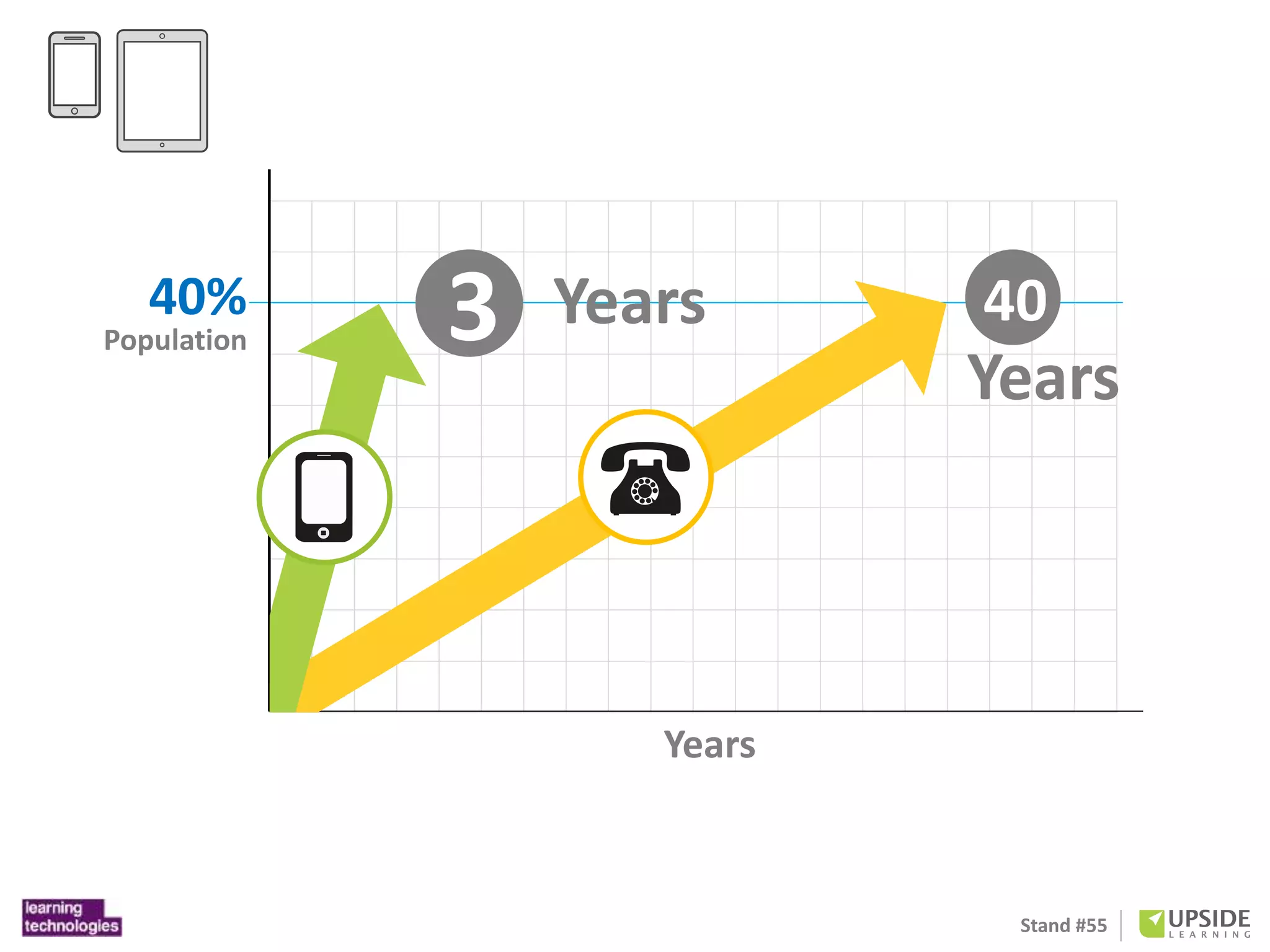
3 Years 40 
Stand #55 
Years 
40% 
Population 
Years
OK. 
So why tablets? 
Stand #55
Stand #55 
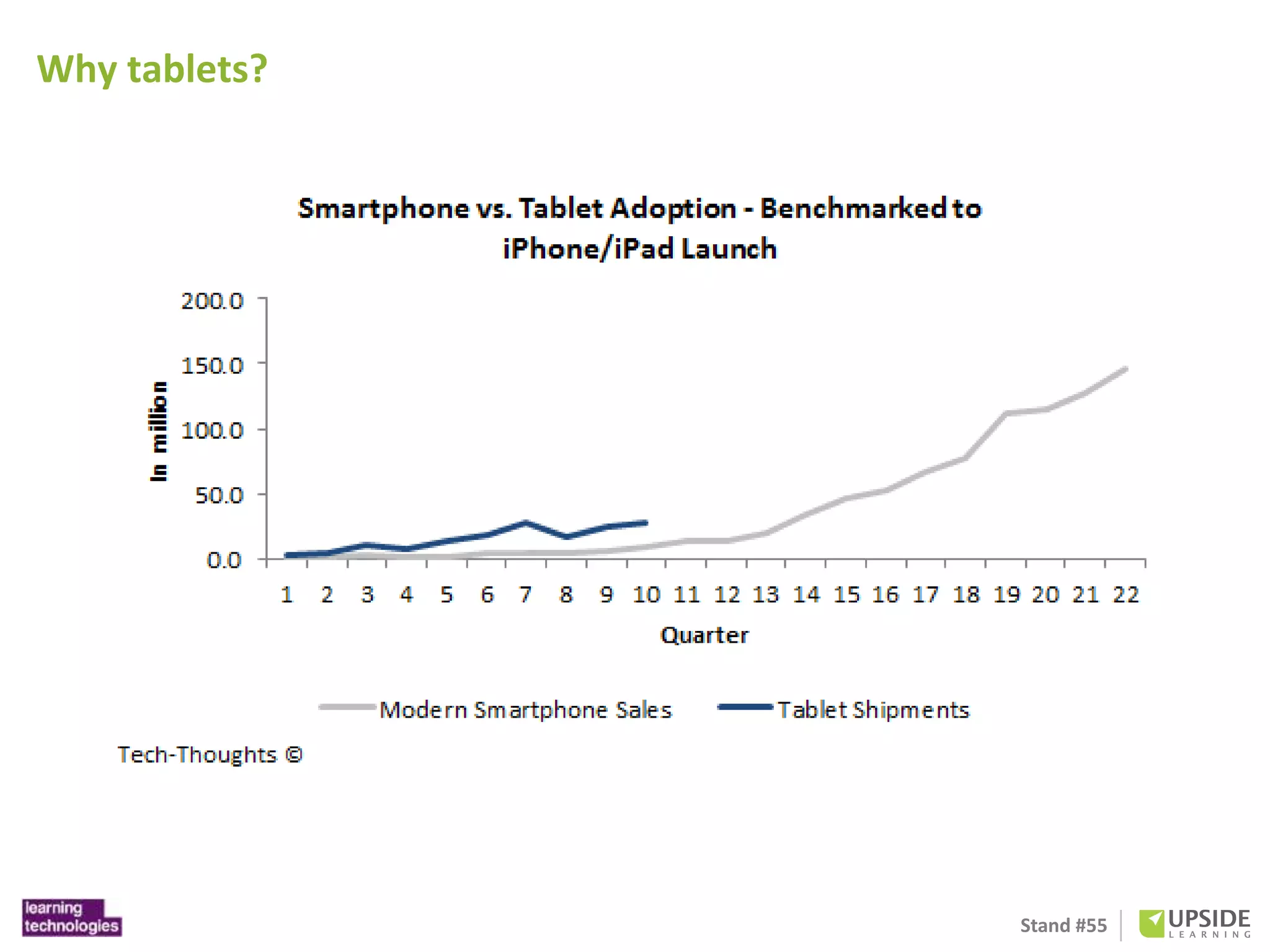
Why tablets?
Stand #55 
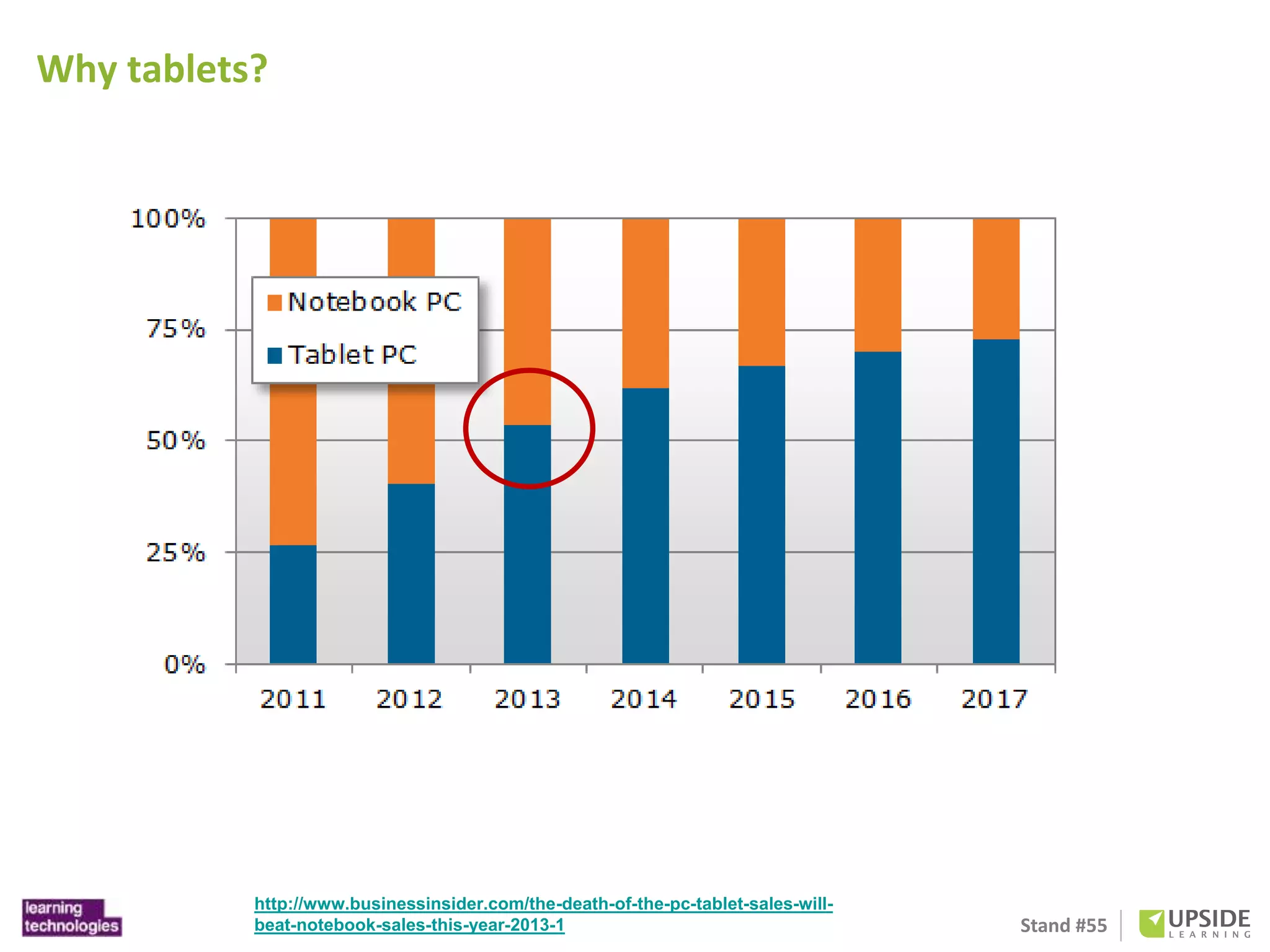
Why tablets? 
http://www.businessinsider.com/the-death-of-the-pc-tablet-sales-will-beat- 
notebook-sales-this-year-2013-1
Stand #55 
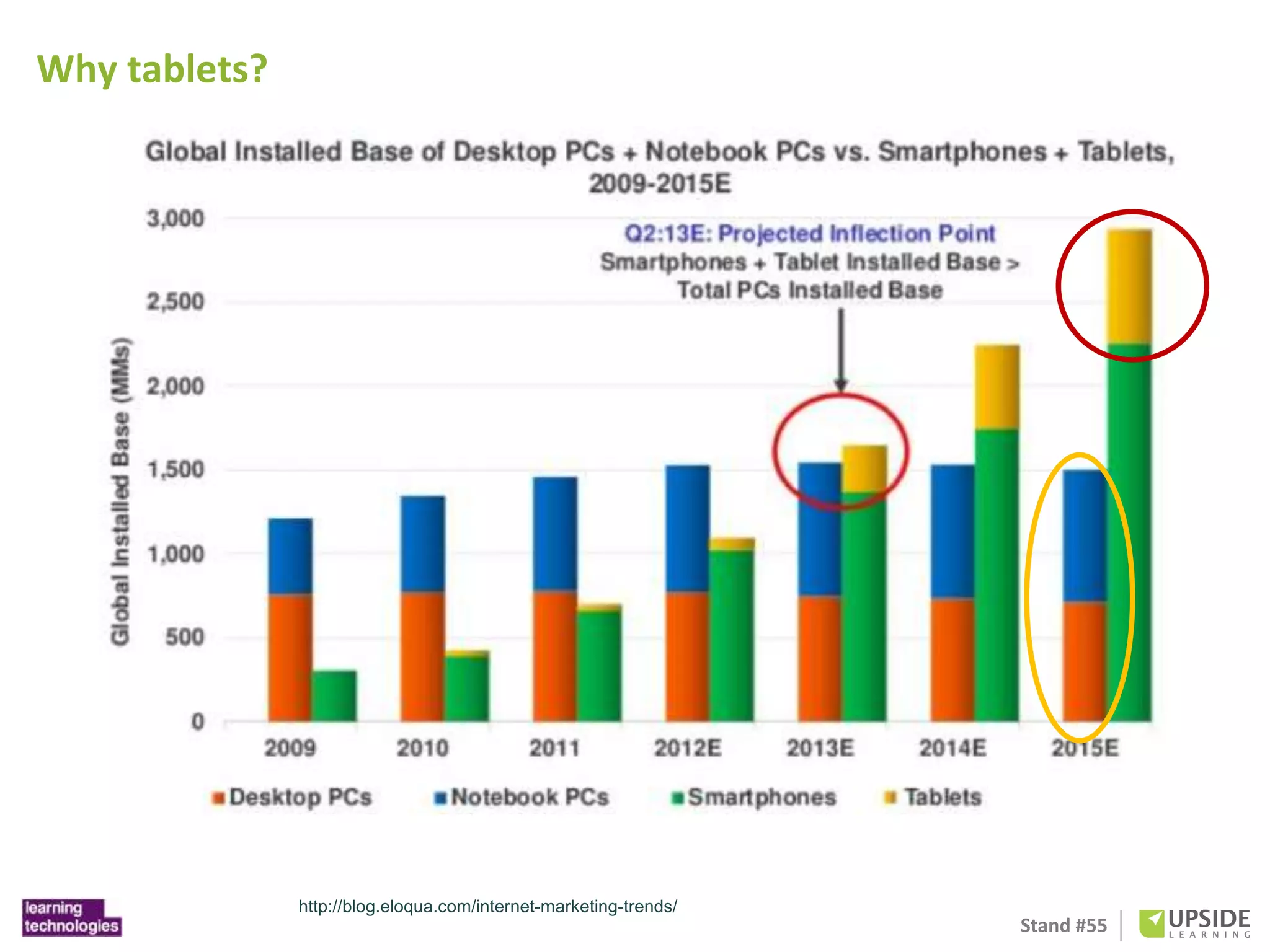
Why tablets? 
http://blog.eloqua.com/internet-marketing-trends/
Stand #55 
Why tablets? 
http://www.computing.co.uk/ctg/analysis/2198142/the-rise-and-rise-of-touchscreens- 
in-the-workplace
Stand #55 
Understanding 
tablets
Stand #55 
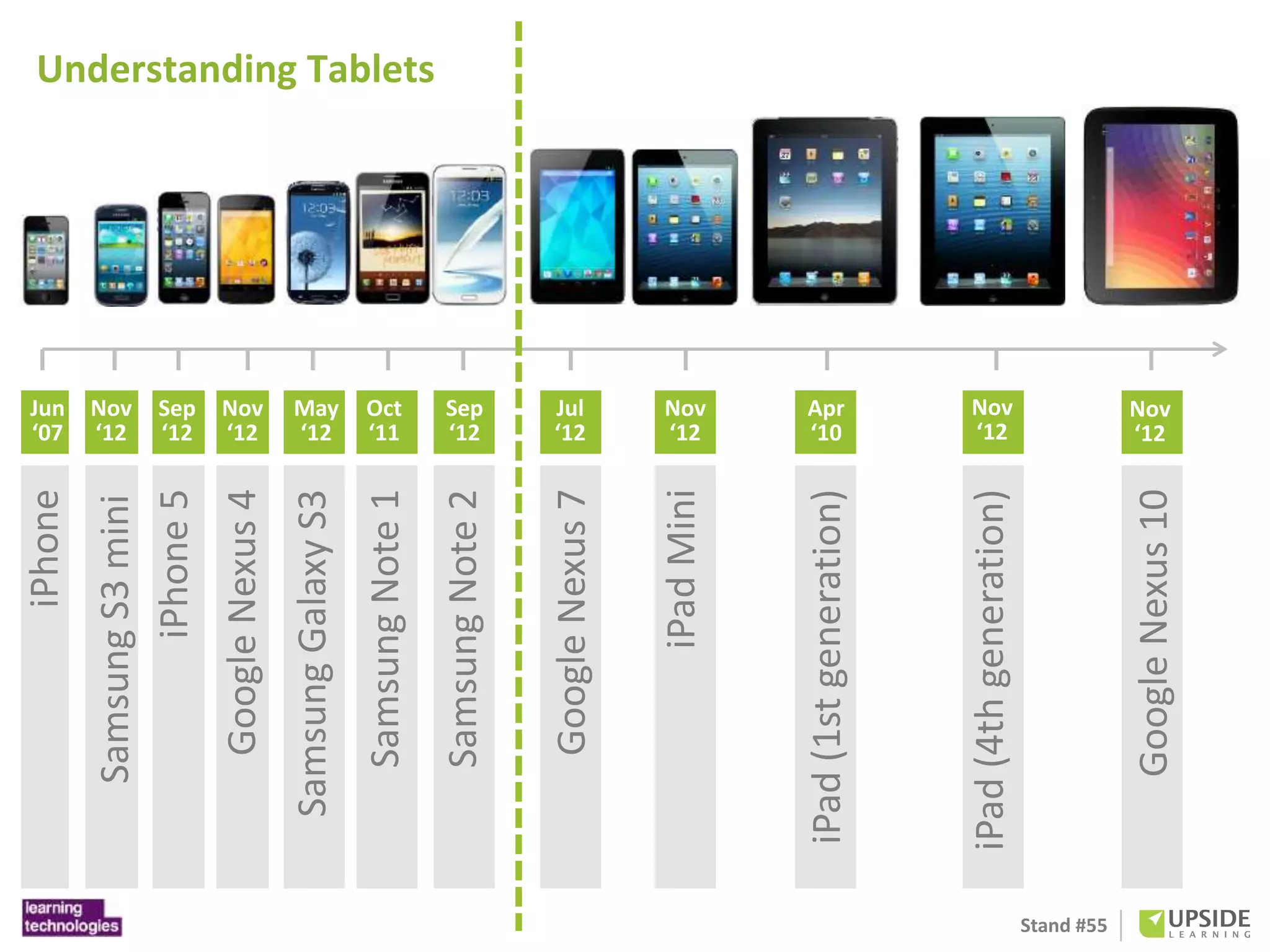
Nov 
‘12 
Samsung S3 mini 
Jun 
‘07 
iPhone 
Sep 
‘12 
iPhone 5 
Nov 
‘12 
Google Nexus 4 
Oct 
‘11 
Samsung Note 1 
May 
‘12 
Samsung Galaxy S3 
Sep 
‘12 
Samsung Note 2 
Jul 
‘12 
Google Nexus 7 
Nov 
‘12 
iPad Mini 
Apr 
‘10 
iPad (1st generation) 
Nov 
‘12 
iPad (4th generation) 
Nov 
‘12 
Google Nexus 10 
Understanding Tablets
Stand #55 http://www.e-architect.co.uk/london/london_underground_stations.htm
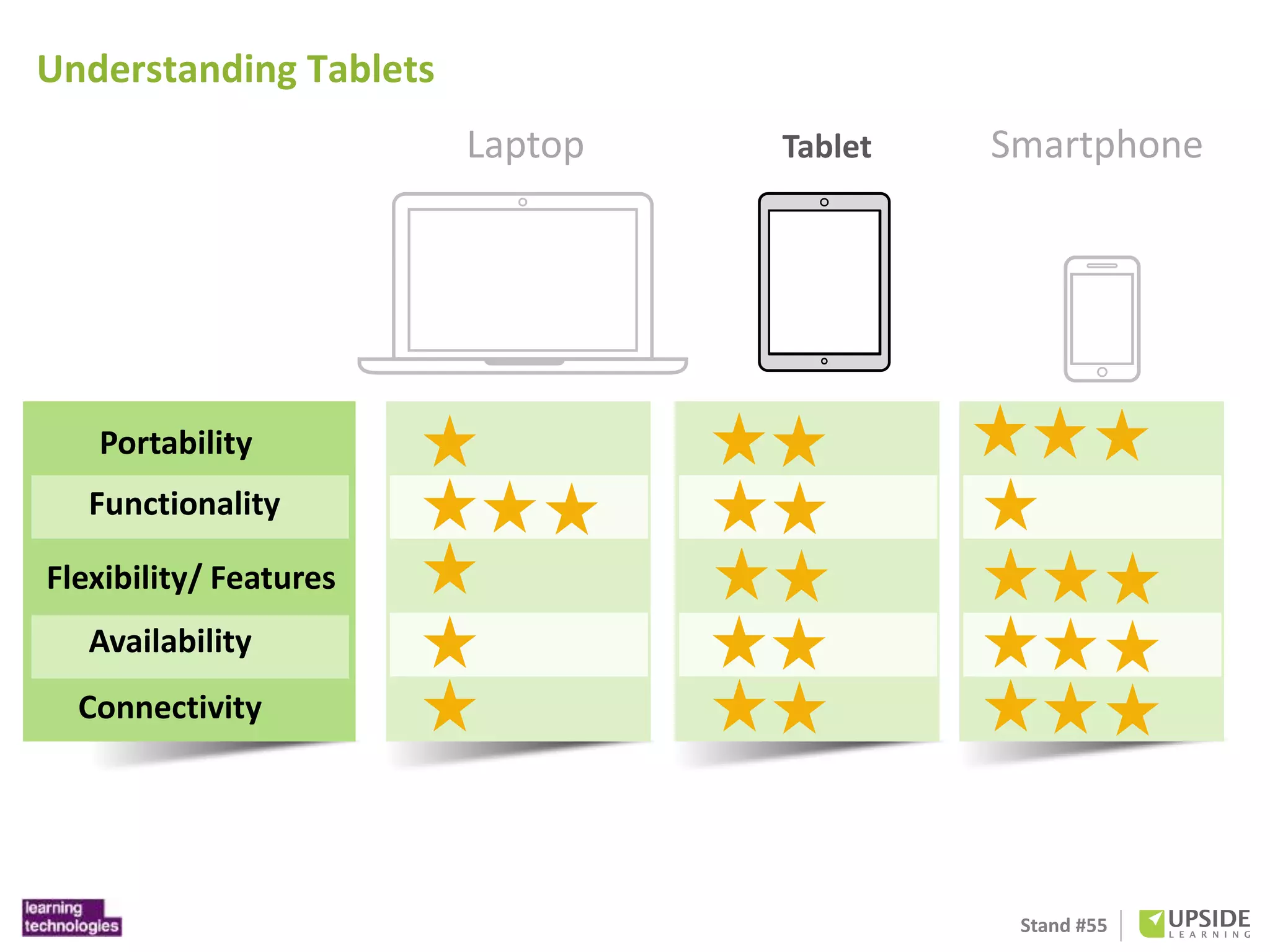
Laptop Tablet Smartphone 
Stand #55 
Understanding Tablets 
Portability 
Functionality 
Flexibility/ Features 
Availability 
Connectivity
Stand #55 
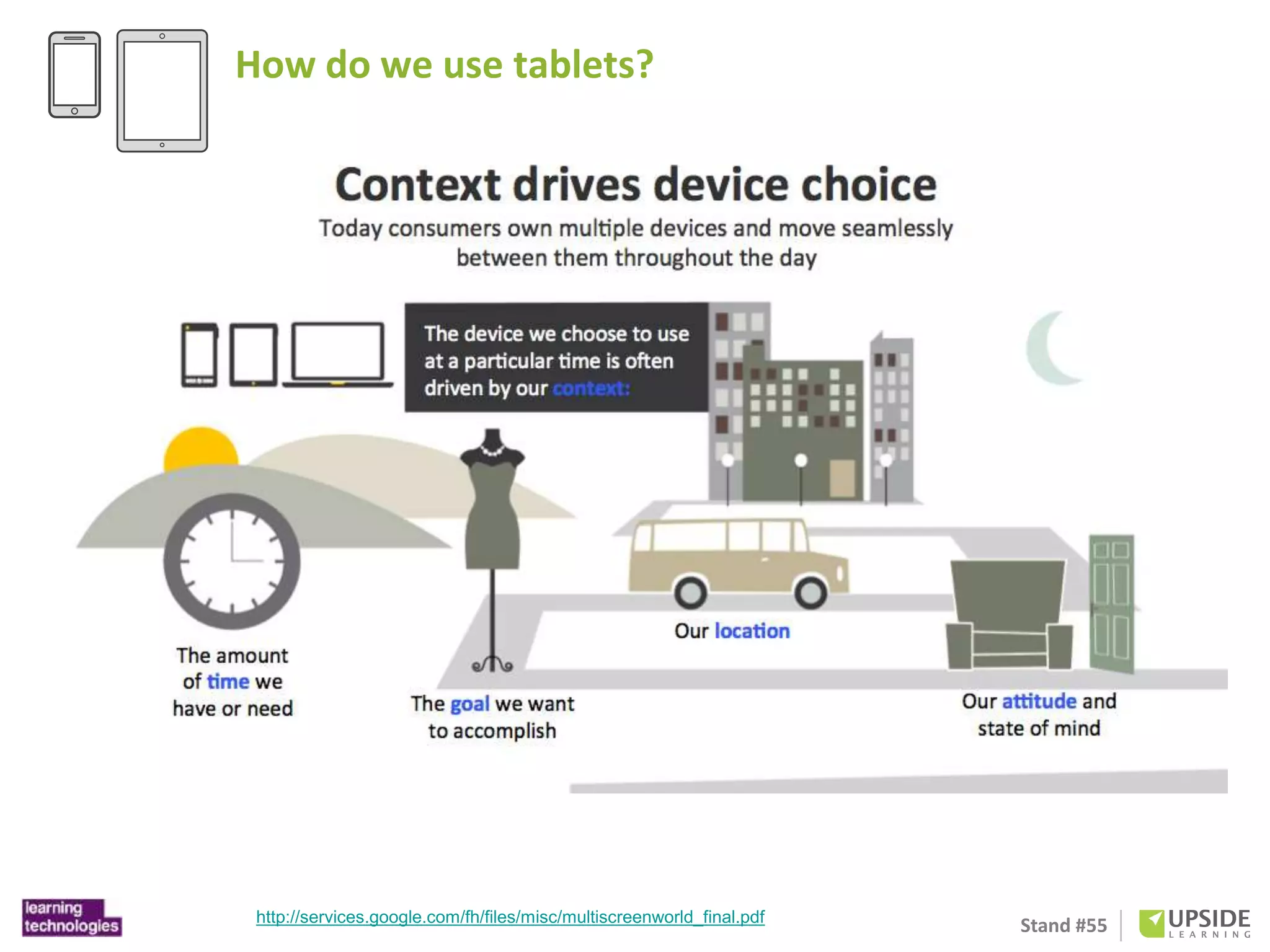
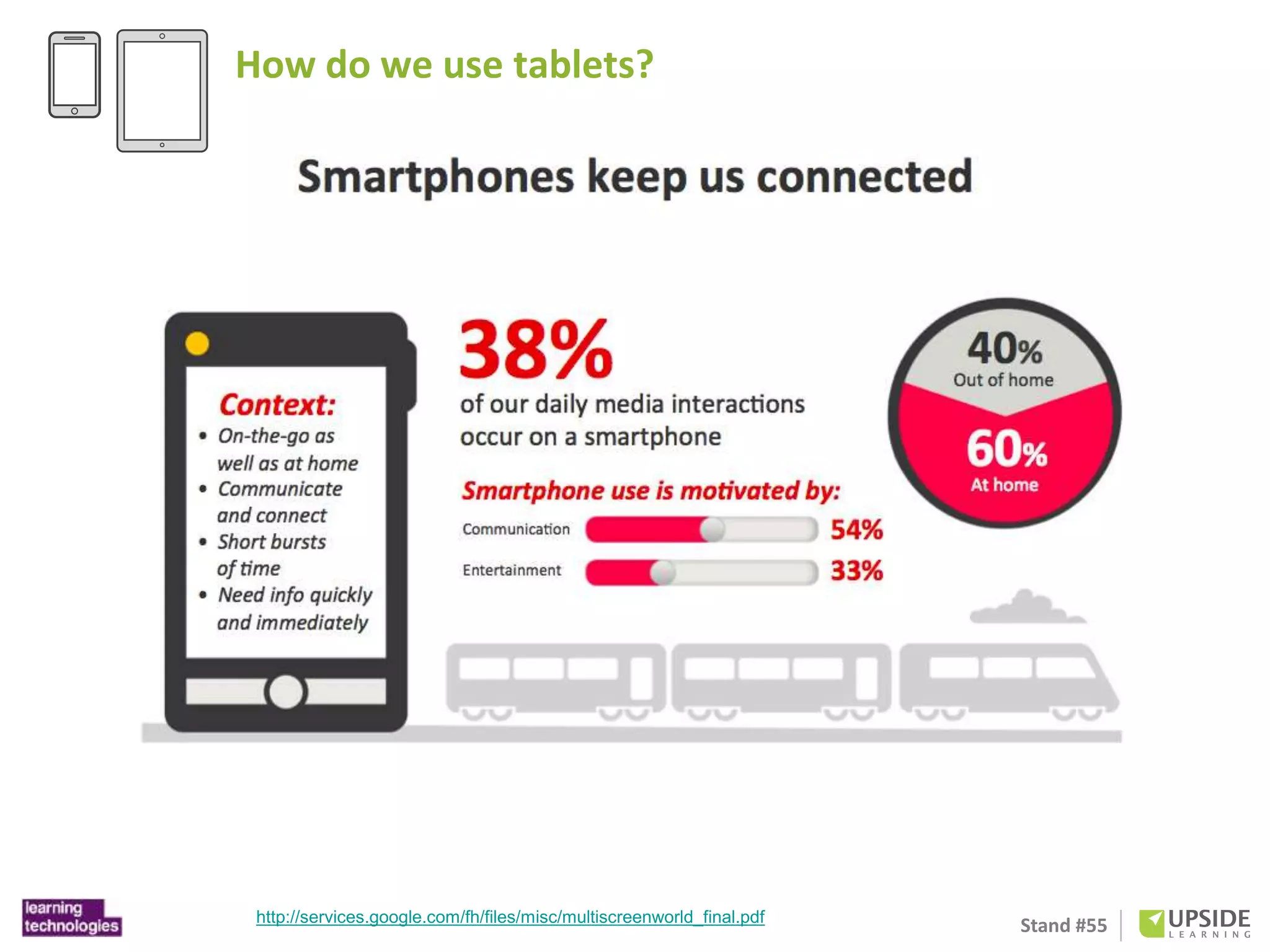
How do we use tablets? 
http://services.google.com/fh/files/misc/multiscreenworld_final.pdf
Stand #55 
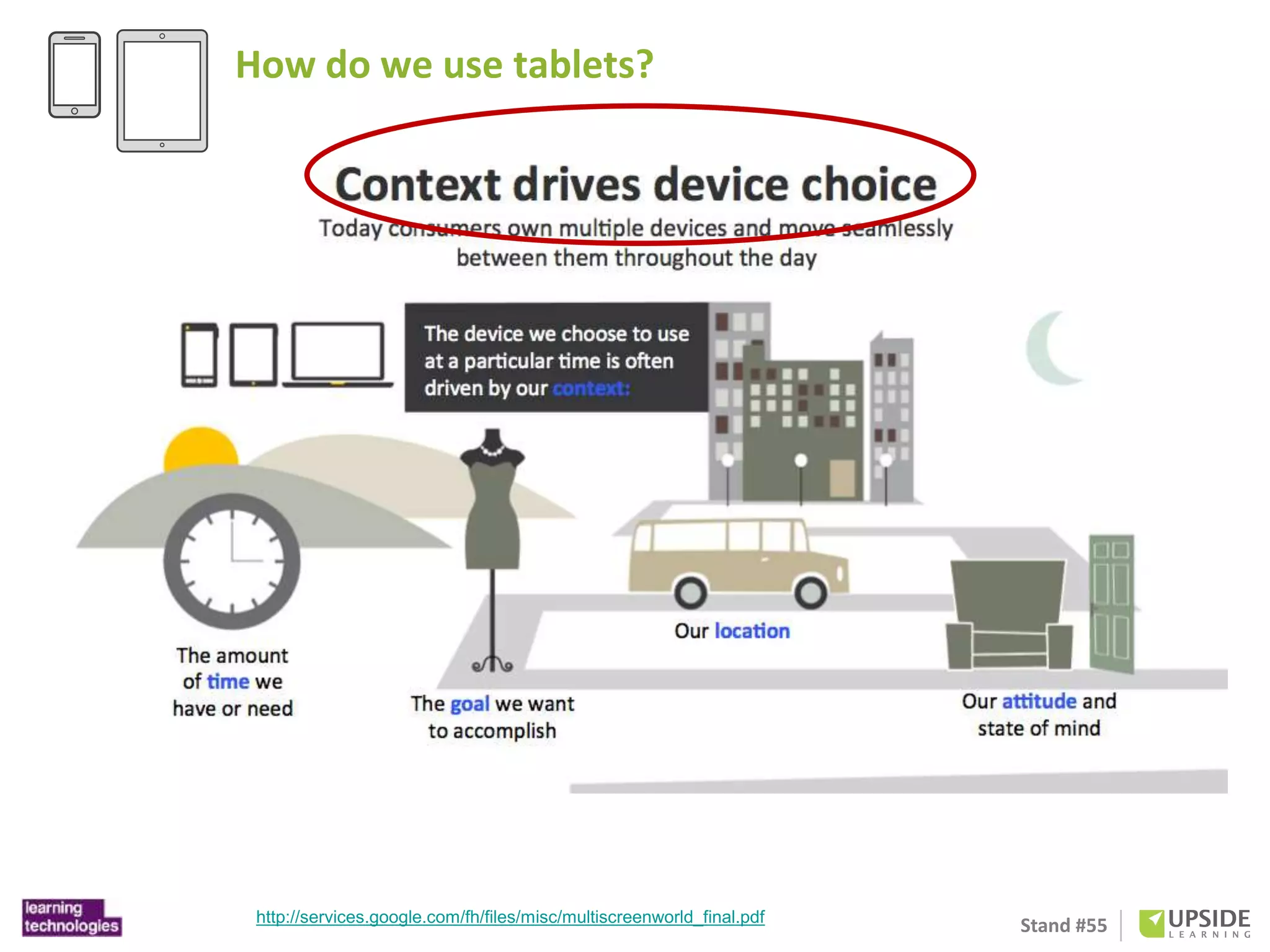
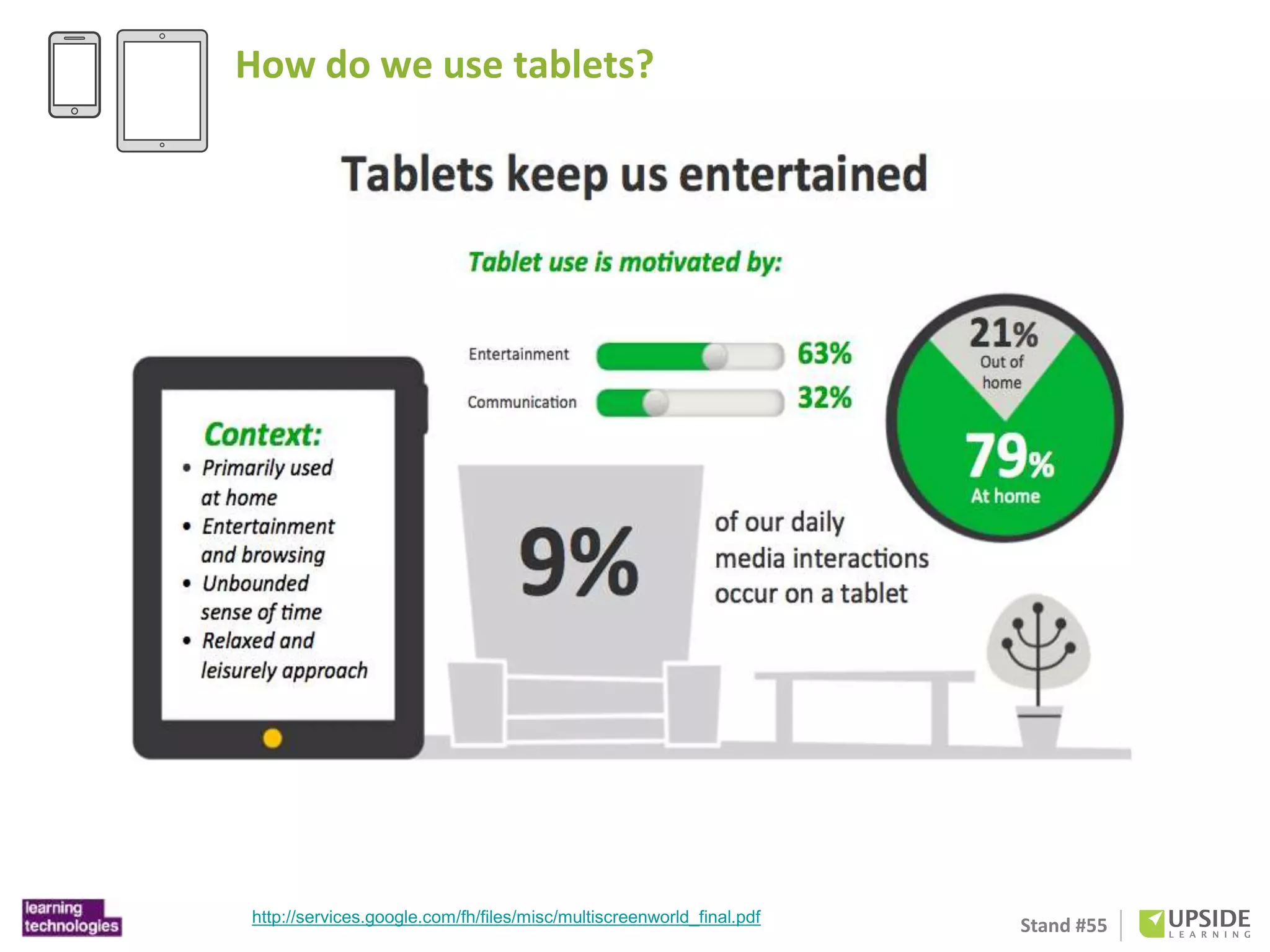
How do we use tablets? 
http://services.google.com/fh/files/misc/multiscreenworld_final.pdf
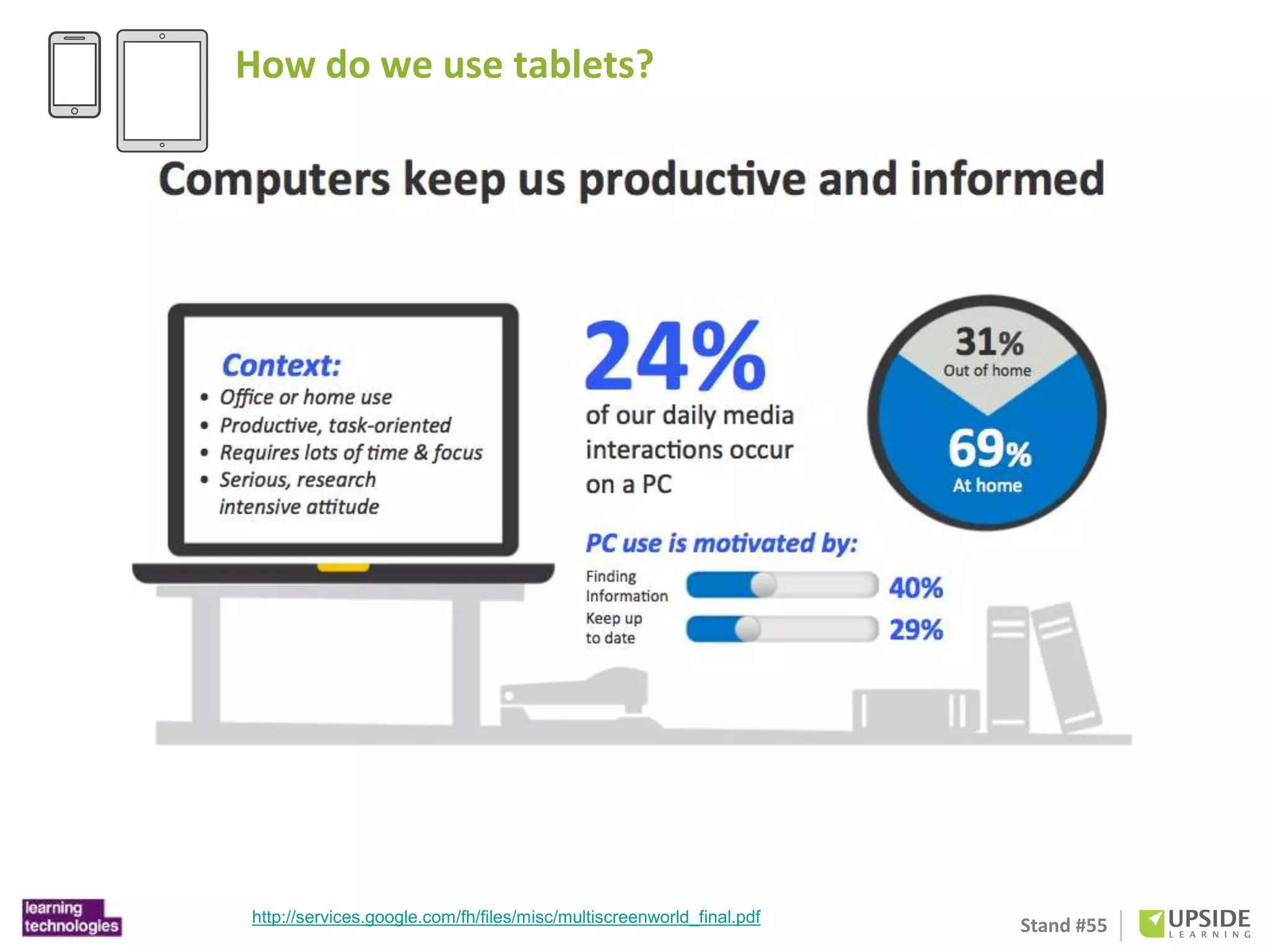
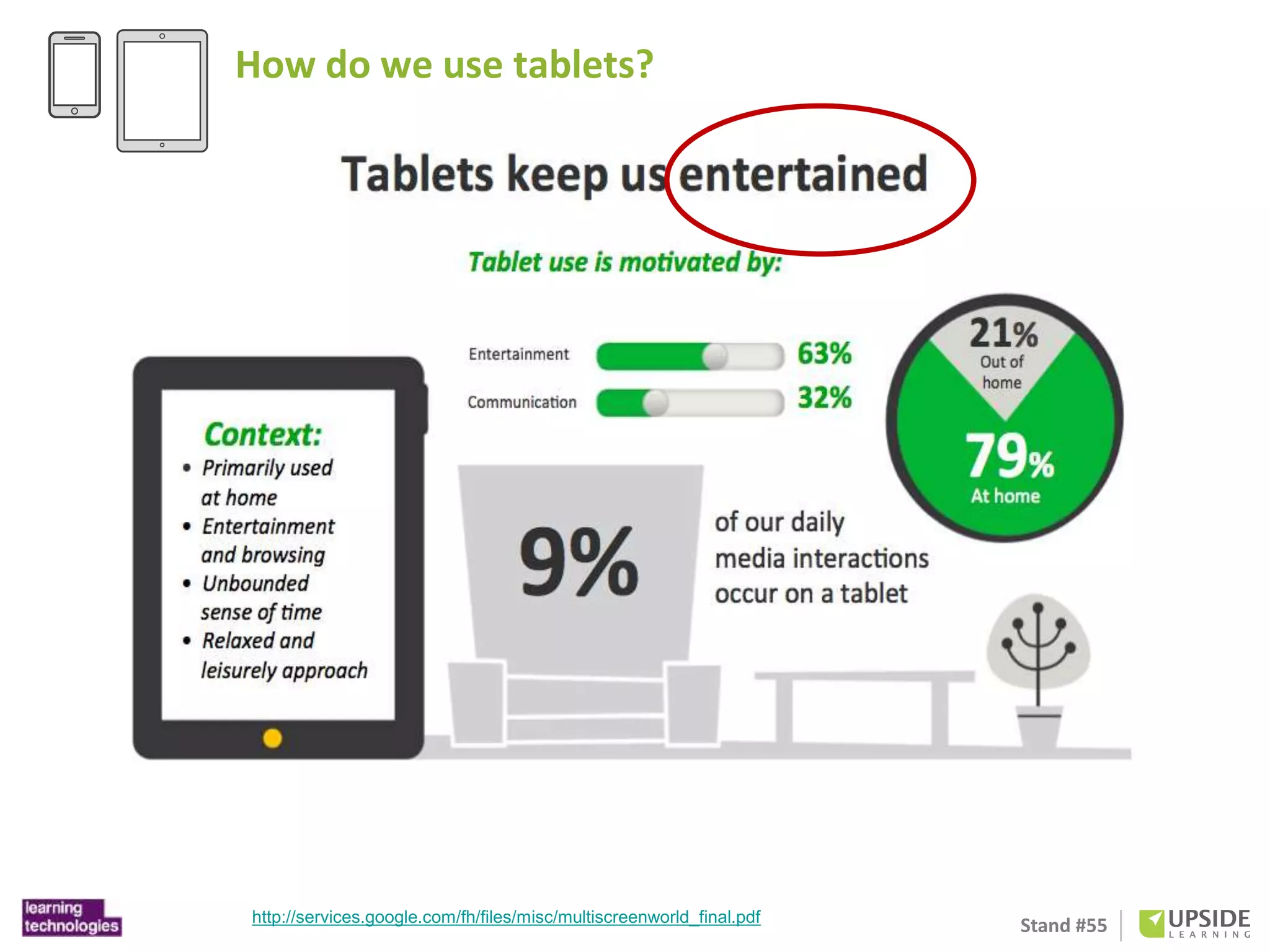
How do we use tablets? 
Stand #55 http://services.google.com/fh/files/misc/multiscreenworld_final.pdf
How do we use tablets? 
Stand #55 http://services.google.com/fh/files/misc/multiscreenworld_final.pdf
How do we use tablets? 
Stand #55 http://services.google.com/fh/files/misc/multiscreenworld_final.pdf
How do we use tablets? 
Stand #55 http://services.google.com/fh/files/misc/multiscreenworld_final.pdf
How do we use tablets? 
http://www.businessinsider.com/chart-of-the-day-tablet-vs-desktop-2012-10 Stand #55
Stand #55 
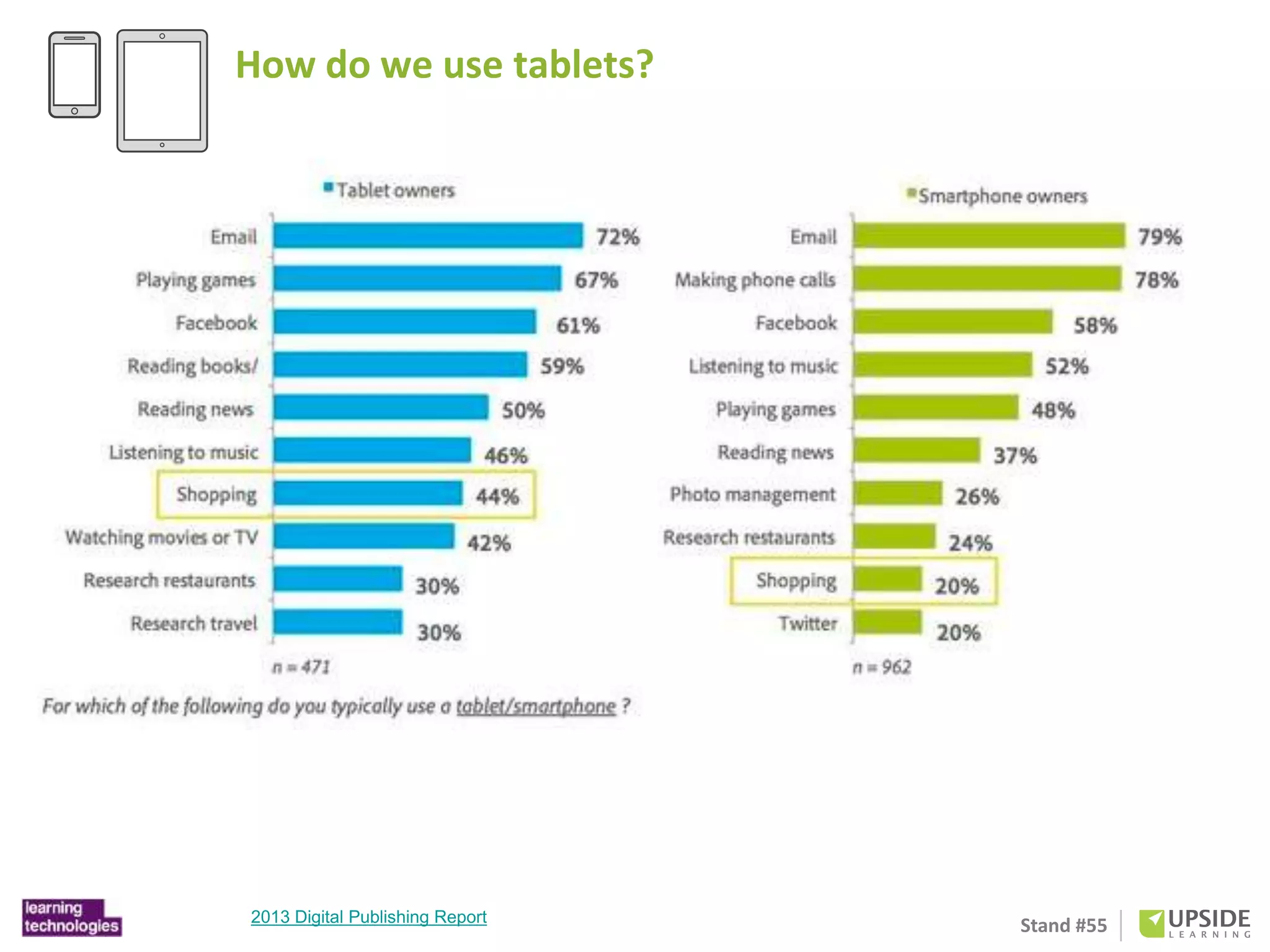
How do we use tablets? 
Adobe: 2013 Digital Publishing Report
Stand #55 
How do we use tablets? 
Adobe: 2013 Digital Publishing Report
Stand #55 
Why 
eLearning 
on 
iPads(tablets)
Stand #55 
Define your purpose 
• Making eLearning accessible to mobile workforce. 
• Carrying learning with then will help in supporting just-in-time 
Supplementing e-learning with support material or 
social/collaborative elements 
• Providing it on tablets will improve uptake in employees 
personal time.
Stand #55 
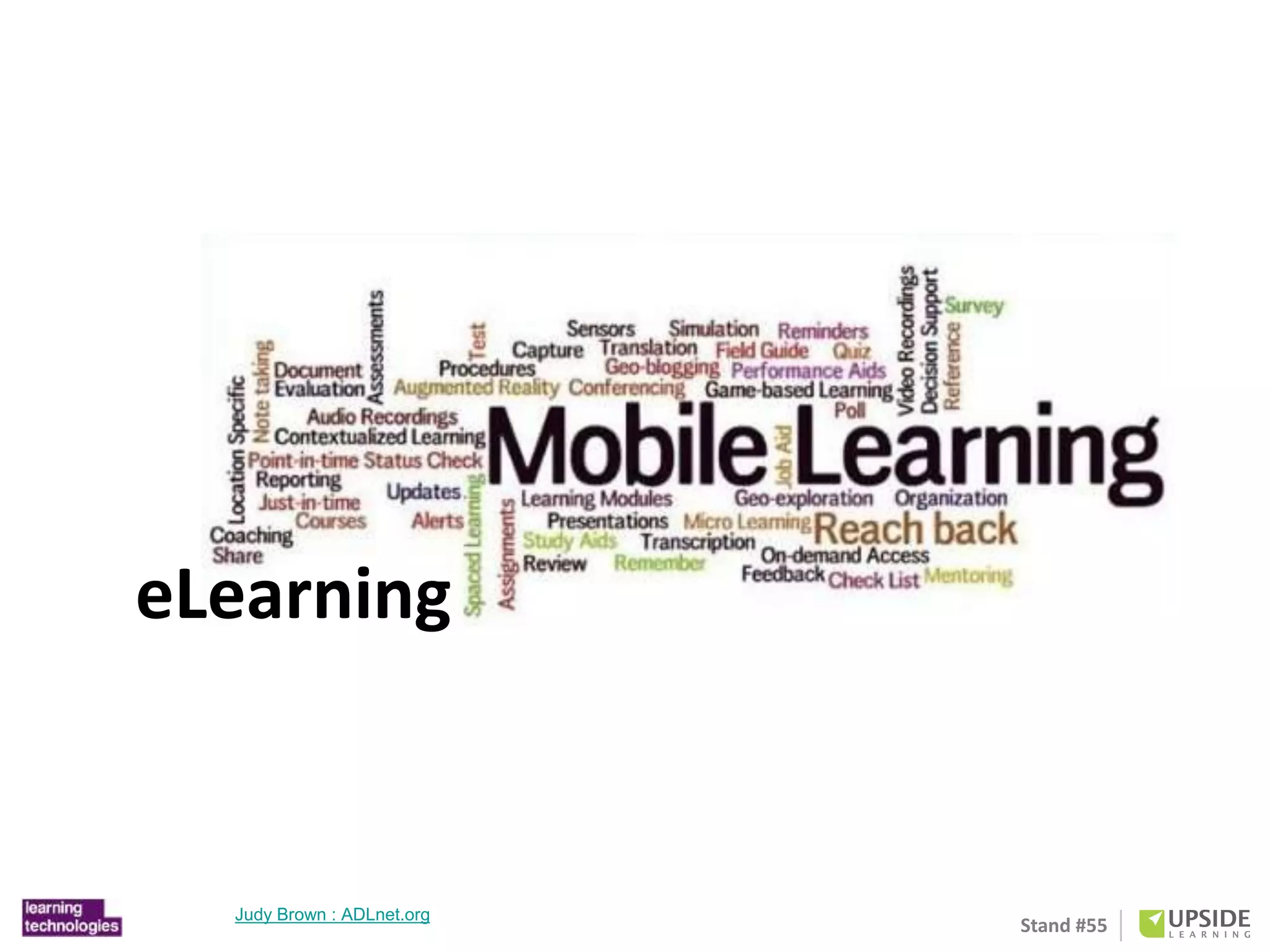
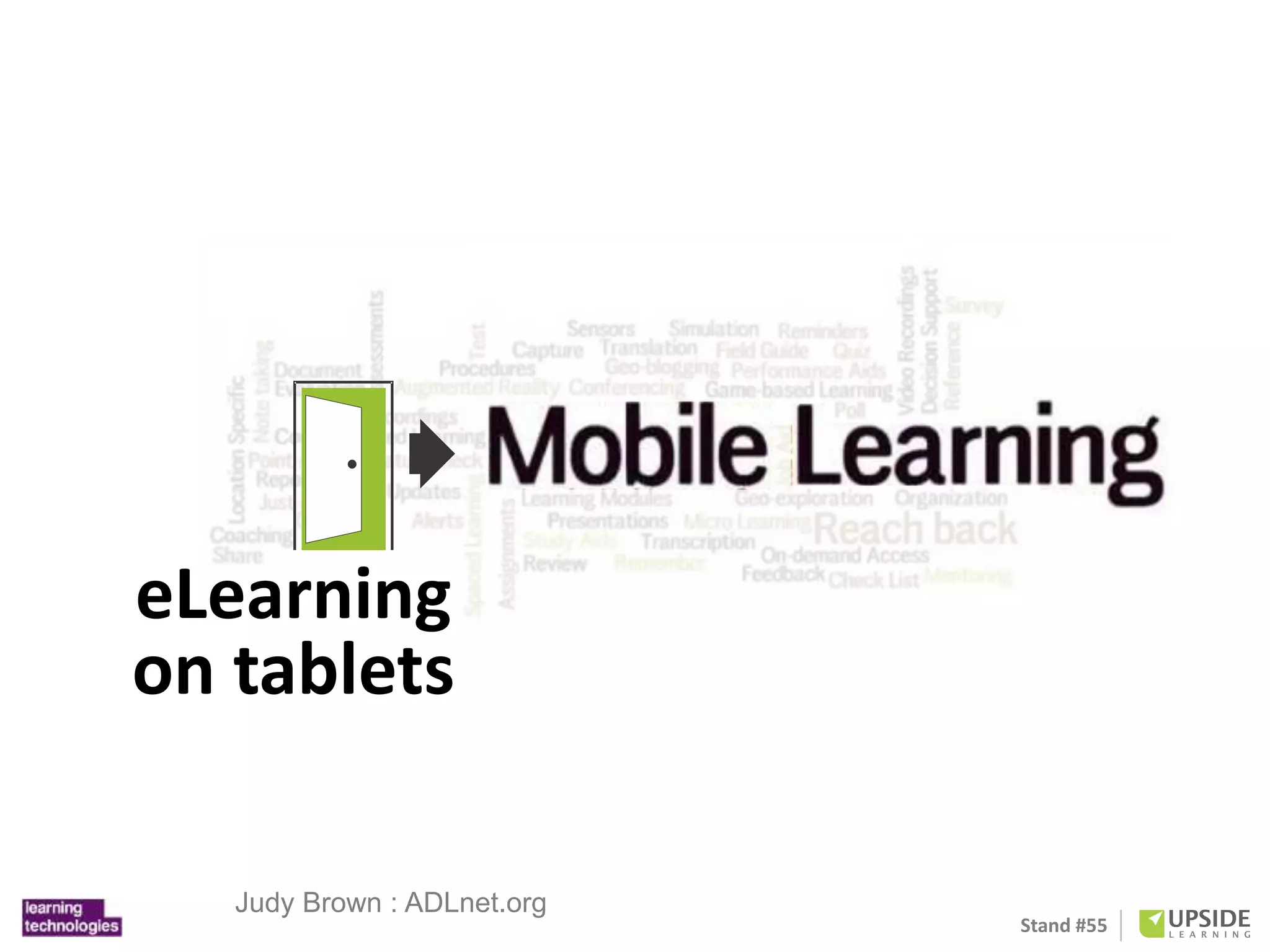
eLearning 
Judy Brown : ADLnet.org
Stand #55 
eLearning 
on tablets 
Judy Brown : ADLnet.org
Stand #55 
Designing 
eLearning 
for 
iPads(tablets)
Stand #55 
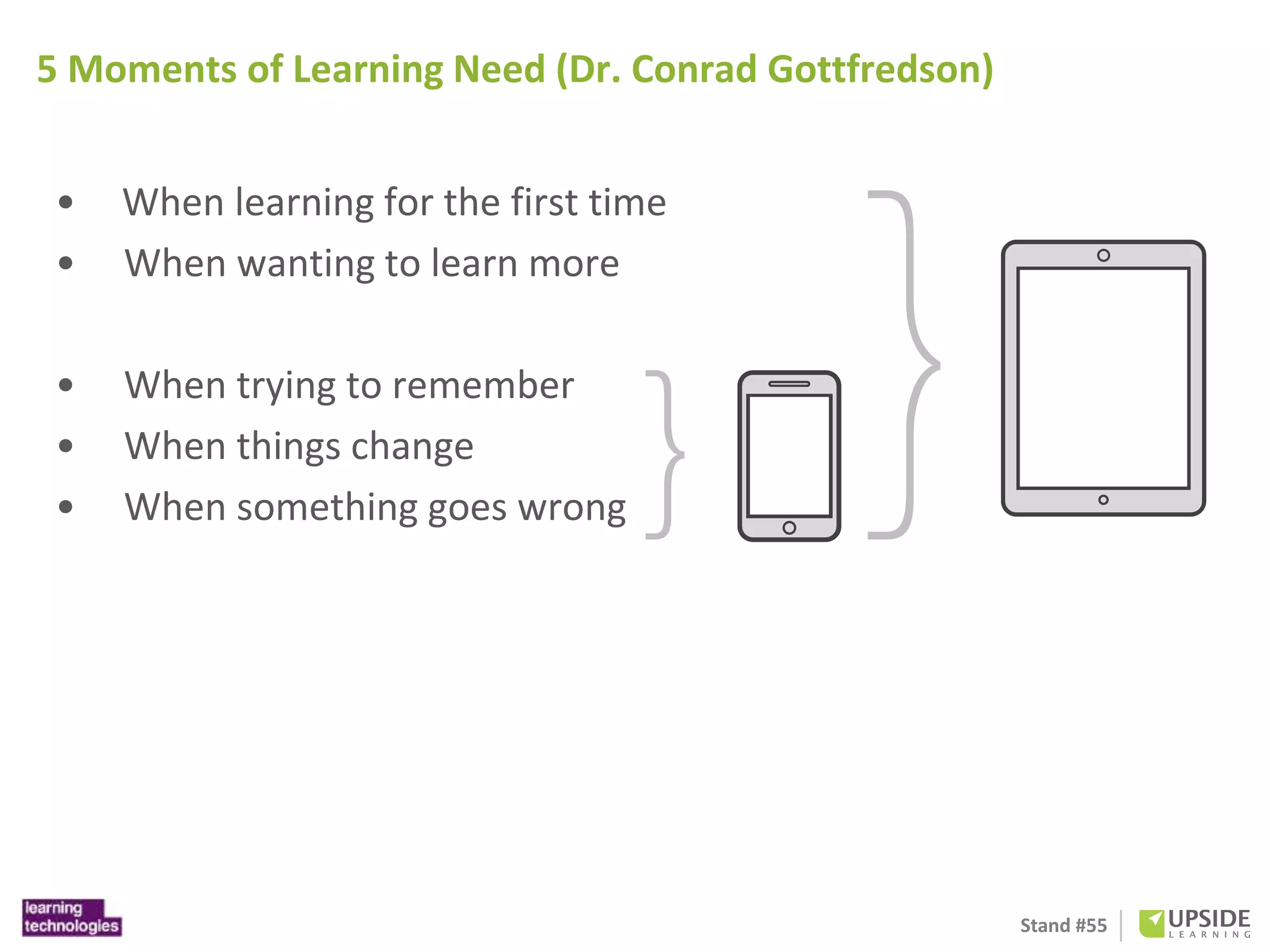
5 Moments of Learning Need (Dr. Conrad Gottfredson) 
• When learning for the first time 
• When wanting to learn more 
• When trying to remember 
• When things change 
• When something goes wrong
Stand #55 
4 Types of Mobile Content (Chad Udell) 
• Converted content 
• Business processes 
• Social and user generated 
• Uniquely mobile
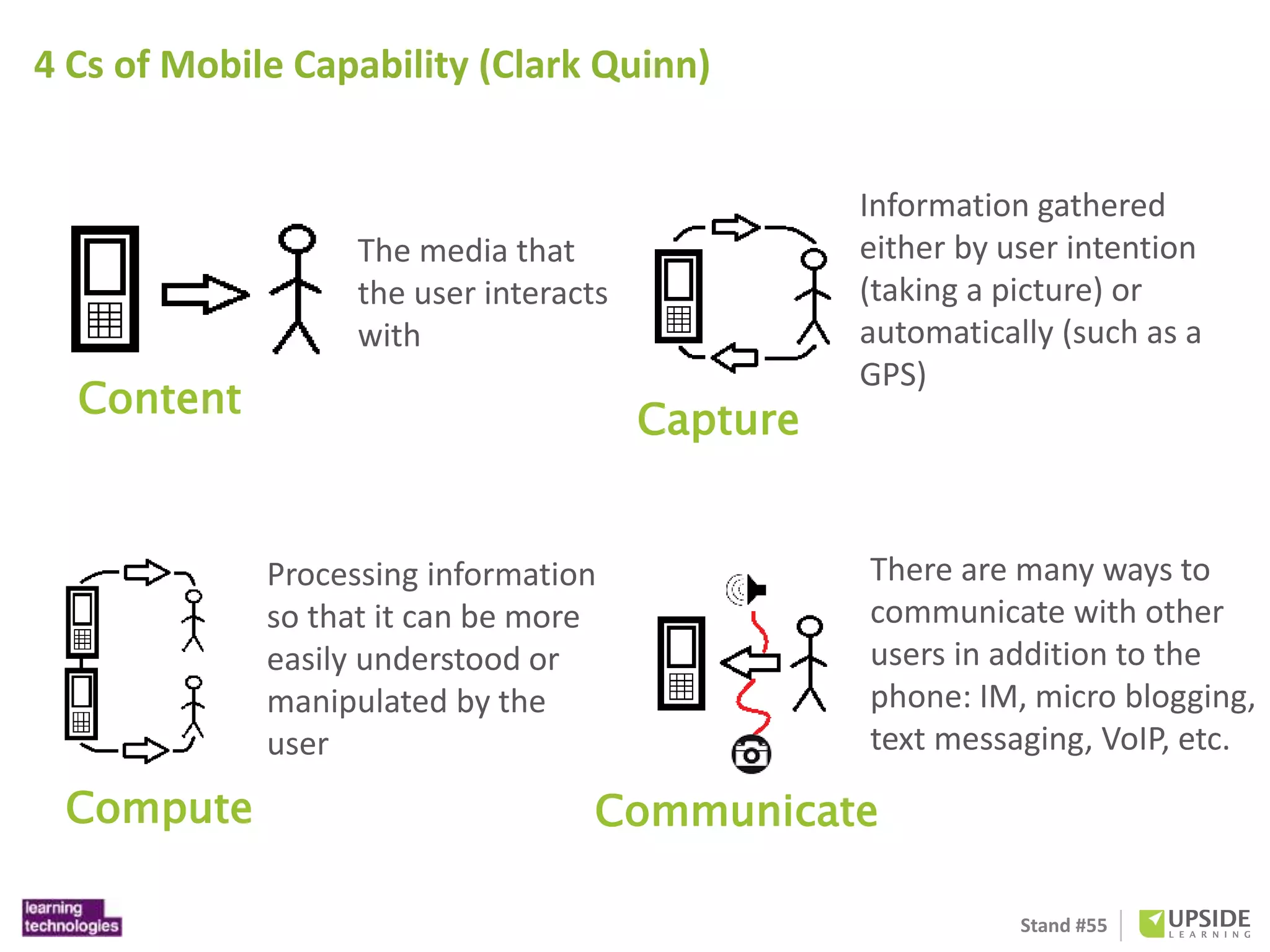
There are many ways to 
communicate with other 
users in addition to the 
phone: IM, micro blogging, 
text messaging, VoIP, etc. 
Stand #55 
4 Cs of Mobile Capability (Clark Quinn) 
Content 
The media that 
the user interacts 
with 
Capture 
Information gathered 
either by user intention 
(taking a picture) or 
automatically (such as a 
GPS) 
Compute 
Processing information 
so that it can be more 
easily understood or 
manipulated by the 
user 
Communicate

iPad for Education

  • 1.
  • 2.
    Overview iPads haveemerged as a powerful tool for engaging students in curriculum-related tasks. The aim of this workshop is to demonstrate the practical application of the Apple iPad in an educational setting. An emphasis will be given on hands-on activities and the sharing of relevant strategies in using iPad for personal productivity and for producing teaching resources. Participants will be guided through the use of a range of applications considered essential for educators. In addition, participants will gain experience using iPads, evaluating applications (apps) for educational use and exploring strategies for teaching with this technology. Strategies that focus upon enhancing personal productivity, creativity, writing, mind-mapping, virtual whiteboards, image and video editing, audio recording and editing, online publishing, social media, and resource management will be explored. Participants will have to bring their own iPad with 3G for this training. Note that some of the apps are free but some are not. Participants have to download the apps from the Apps Store if they do not have the apps installed on their iPad. Stand #55
  • 3.
    Biography Syamsul NorAzlan was a creative designer in line with advertising and corporate image before he changed his carrier path as a lecturer in Department of Art and Design Education, Faculty of Education, Universiti Teknologi MARA (UiTM), Malaysia. Holding a M.Ed in Educational Technology from Universiti Teknologi Malaysia. He actually was focusing in multimedia and technology in promoting learning in interactive and informative mode. His research explored the potential of intelligent tutoring system blended with learning. In addition, he was actively involved in photography through artwork exhibitions. Hence, with the combination of experience in creative line, multimedia and technology in education, he believes that can transform learning into different strategies and approach in future. Now, he doing PHD in mobile learning at UKM . Stand #55
  • 4.
    Stand #55 Evolutionof U-Learning E-Learning System SMS Adaptive Content Cell Phone PC Adaptive Content Instant Message Learners A. Isolated u-Learning E-Learning System Adaptive Content Ubiquitous Devices Seamless Learning Learners B. Unified u-Learning Ubiquitous learning or u-Learning is a new learning paradigm. It is said to be an expansion of previous learning paradigms as we move from conventional learning to electronic-learning (e-Learning) and from e-Learning to mobile-learning (m-Learning) and now we are shifting to u-Learning.
  • 5.
    Stand #55 Principlesof Mobile Learning
  • 6.
  • 7.
    Are you doingany mobile learning? in personal lives? Stand #55
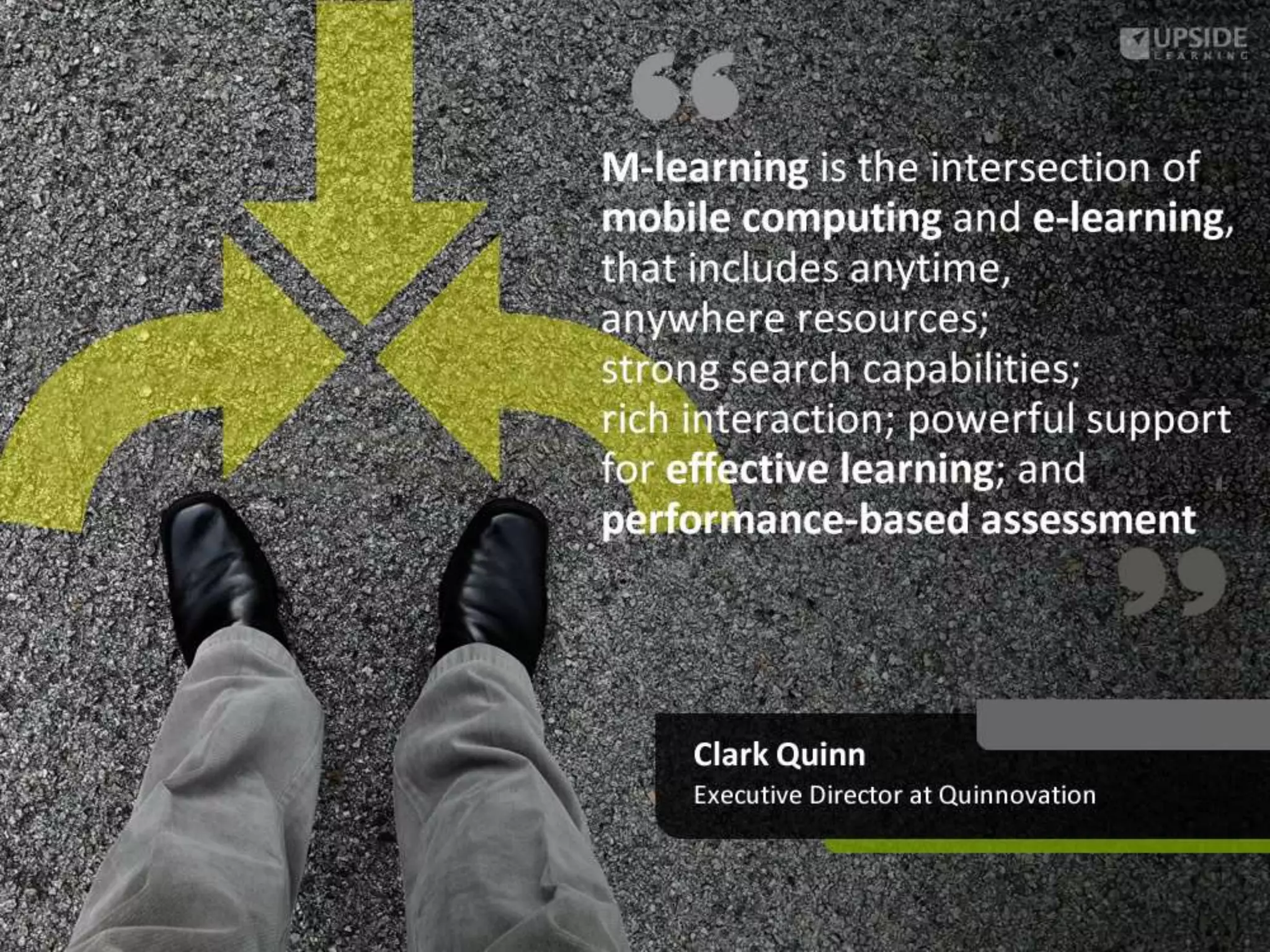
  • 8.
    mLearning is thefuture of workplace learning Stand #55 http://www.upsidelearning.com/uk/
  • 9.
    3 Years 40 Stand #55 Years 40% Population Years
  • 10.
    OK. So whytablets? Stand #55
  • 11.
    Stand #55 Whytablets?
  • 12.
    Stand #55 Whytablets? http://www.businessinsider.com/the-death-of-the-pc-tablet-sales-will-beat- notebook-sales-this-year-2013-1
  • 13.
    Stand #55 Whytablets? http://blog.eloqua.com/internet-marketing-trends/
  • 14.
    Stand #55 Whytablets? http://www.computing.co.uk/ctg/analysis/2198142/the-rise-and-rise-of-touchscreens- in-the-workplace
  • 15.
  • 16.
    Stand #55 Nov ‘12 Samsung S3 mini Jun ‘07 iPhone Sep ‘12 iPhone 5 Nov ‘12 Google Nexus 4 Oct ‘11 Samsung Note 1 May ‘12 Samsung Galaxy S3 Sep ‘12 Samsung Note 2 Jul ‘12 Google Nexus 7 Nov ‘12 iPad Mini Apr ‘10 iPad (1st generation) Nov ‘12 iPad (4th generation) Nov ‘12 Google Nexus 10 Understanding Tablets
  • 17.
  • 18.
    Laptop Tablet Smartphone Stand #55 Understanding Tablets Portability Functionality Flexibility/ Features Availability Connectivity
  • 19.
    Stand #55 Howdo we use tablets? http://services.google.com/fh/files/misc/multiscreenworld_final.pdf
  • 20.
    Stand #55 Howdo we use tablets? http://services.google.com/fh/files/misc/multiscreenworld_final.pdf
  • 21.
    How do weuse tablets? Stand #55 http://services.google.com/fh/files/misc/multiscreenworld_final.pdf
  • 22.
    How do weuse tablets? Stand #55 http://services.google.com/fh/files/misc/multiscreenworld_final.pdf
  • 23.
    How do weuse tablets? Stand #55 http://services.google.com/fh/files/misc/multiscreenworld_final.pdf
  • 24.
    How do weuse tablets? Stand #55 http://services.google.com/fh/files/misc/multiscreenworld_final.pdf
  • 25.
    How do weuse tablets? http://www.businessinsider.com/chart-of-the-day-tablet-vs-desktop-2012-10 Stand #55
  • 26.
    Stand #55 Howdo we use tablets? Adobe: 2013 Digital Publishing Report
  • 27.
    Stand #55 Howdo we use tablets? Adobe: 2013 Digital Publishing Report
  • 28.
    Stand #55 Why eLearning on iPads(tablets)
  • 29.
    Stand #55 Defineyour purpose • Making eLearning accessible to mobile workforce. • Carrying learning with then will help in supporting just-in-time Supplementing e-learning with support material or social/collaborative elements • Providing it on tablets will improve uptake in employees personal time.
  • 30.
    Stand #55 eLearning Judy Brown : ADLnet.org
  • 31.
    Stand #55 eLearning on tablets Judy Brown : ADLnet.org
  • 32.
    Stand #55 Designing eLearning for iPads(tablets)
  • 33.
    Stand #55 5Moments of Learning Need (Dr. Conrad Gottfredson) • When learning for the first time • When wanting to learn more • When trying to remember • When things change • When something goes wrong
  • 34.
    Stand #55 4Types of Mobile Content (Chad Udell) • Converted content • Business processes • Social and user generated • Uniquely mobile
  • 35.
    There are manyways to communicate with other users in addition to the phone: IM, micro blogging, text messaging, VoIP, etc. Stand #55 4 Cs of Mobile Capability (Clark Quinn) Content The media that the user interacts with Capture Information gathered either by user intention (taking a picture) or automatically (such as a GPS) Compute Processing information so that it can be more easily understood or manipulated by the user Communicate