App Security and Securing Apps
Andreas Schranzhofer
CTO Scalable Capital
@Schranzhofer
Scalable Capital
● FinTech Start-Up (Robo Advisor)
○ risk managed individual ETF portfolios
○ automatic rebalancing according to risk measure
○ regulated financial institution in Germany (BaFin) and the UK (FCA)
○ Real Institutional Class Wealth Management
● Security is of highest priority
○ losing trust is easy, gaining it back
■ almost impossible
○ financial data is always sensitive
● Security is a function of
○ actual
○ perceived
○ all parts of the system (backend, frontend, apps, processes)
Overview
● Secure? What does that mean?
● Secure Communication
● Data Safety
● Is my App secure
● How to get there
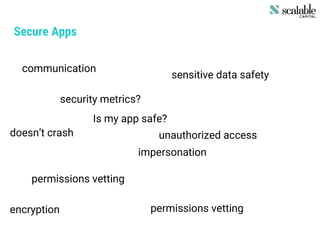
Secure Apps
security metrics?
sensitive data safety
unauthorized access
impersonation
doesn’t crash
permissions vetting
permissions vettingencryption
communication
Is my app safe?
Secure Apps contd.
● all of them …
○ and many more
● combination of vulnerabilities
○ single vulnerability considered uncritical
Security is not a feature one can add, it is a process, executed relentlessly
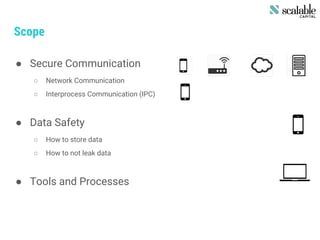
Scope
● Secure Communication
○ Network Communication
○ Interprocess Communication (IPC)
● Data Safety
○ How to store data
○ How to not leak data
● Tools and Processes
Scope
● Secure Communication
○ Network Communication
○ Interprocess Communication (IPC)
● Data Safety
○ How to store data
○ How to not leak data
● Tools and Processes
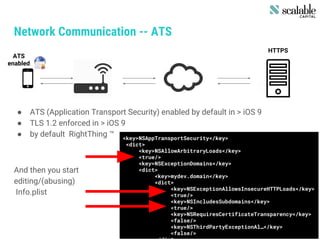
Network Communication -- ATS
● ATS (Application Transport Security) enabled by default in > iOS 9
● TLS 1.2 enforced in > iOS 9
● by default RightThing ™
And then you start
editing/(abusing)
Info.plist
HTTPS
ATS
enabled
<key>NSAppTransportSecurity</key>
<dict>
<key>NSAllowArbitraryLoads</key>
<true/>
<key>NSExceptionDomains</key>
<dict>
<key>mydev.domain</key>
<dict>
<key>NSExceptionAllowsInsecureHTTPLoads</key>
<true/>
<key>NSIncludesSubdomains</key>
<true/>
<key>NSRequiresCertificateTransparency</key>
<false/>
<key>NSThirdPartyExceptionAl…</key>
<false/>
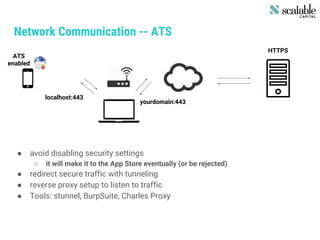
Network Communication -- ATS
HTTPS
ATS
enabled
localhost:443
yourdomain:443
● avoid disabling security settings
○ it will make it to the App Store eventually (or be rejected)
● redirect secure traffic with tunneling
● reverse proxy setup to listen to traffic
● Tools: stunnel, BurpSuite, Charles Proxy
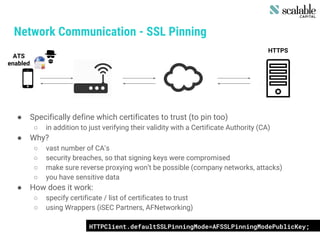
Network Communication - SSL Pinning
● Specifically define which certificates to trust (to pin too)
○ in addition to just verifying their validity with a Certificate Authority (CA)
● Why?
○ vast number of CA’s
○ security breaches, so that signing keys were compromised
○ make sure reverse proxying won’t be possible (company networks, attacks)
○ you have sensitive data
● How does it work:
○ specify certificate / list of certificates to trust
○ using Wrappers (iSEC Partners, AFNetworking)
HTTPS
ATS
enabled
HTTPClient.defaultSSLPinningMode=AFSSLPinningModePublicKey;
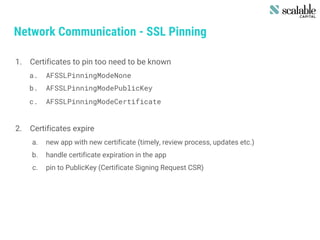
Network Communication - SSL Pinning
1. Certificates to pin too need to be known
a. AFSSLPinningModeNone
b. AFSSLPinningModePublicKey
c. AFSSLPinningModeCertificate
2. Certificates expire
a. new app with new certificate (timely, review process, updates etc.)
b. handle certificate expiration in the app
c. pin to PublicKey (Certificate Signing Request CSR)
Network Communication - HTTP Basic Auth
● Where to store the credentials?
○ Certainly not: in source, in shared preferences
○ Keychain: yes
● NSURLCredentialStorage (NSURLSession & NSURLConnection)
● Automatically stored in keychain and useable for challenges
NSURLCredential credential = [NSURLCredential
credentialWithUser:username
password:password
persistence:NSURLCredentialPersistenceForSession];
NSURLProtectionSpace *protectionSpace = [[NSURLProtectionSpace alloc] initWit…];
[[NSURLCredentialStorage sharedCredentialStorage] setCredential:credential …];
[[challenge sender] useCredential:cred forAuthenticationChallenge:challenge];
Other Topics
● CFStream
● NSStream
● Multipeer Connectivity
● various Networking APIs (AFNetworking, etc.)
Interprocess Communication - URL Scheme
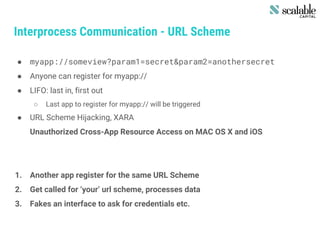
● myapp://someview?param1=secret&param2=anothersecret
● Anyone can register for myapp://
● LIFO: last in, first out
○ Last app to register for myapp:// will be triggered
● URL Scheme Hijacking, XARA
Unauthorized Cross-App Resource Access on MAC OS X and iOS
1. Another app register for the same URL Scheme
2. Get called for ‘your’ url scheme, processes data
3. Fakes an interface to ask for credentials etc.
Interprocess Communication - Universal Links
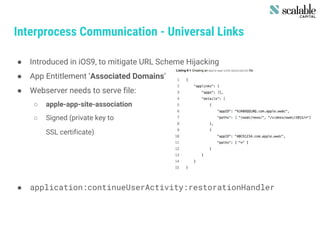
● Introduced in iOS9, to mitigate URL Scheme Hijacking
● App Entitlement ‘Associated Domains’
● Webserver needs to serve file:
○ apple-app-site-association
○ Signed (private key to
SSL certificate)
● application:continueUserActivity:restorationHandler
Other Topics
● Shared Credentials
● UIActivity
● Extensions
● Webapps
● Pasteboards
Scope
● Secure Communication
○ Network Communication
○ Interprocess Communication (IPC)
● Data Safety
○ How to store data
○ How to not leak data
● Tools and Processes
Data Safety
● Keychain
○ Small snippets of data
● Data Protection API
○ Files
○ Passcode used for protection
● Database (CoreData, Realm.io, others)
Keychain
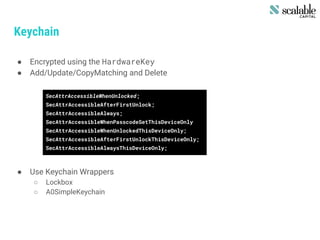
● Encrypted using the HardwareKey
● Add/Update/CopyMatching and Delete
● Use Keychain Wrappers
○ Lockbox
○ A0SimpleKeychain
SecAttrAccessibleWhenUnlocked;
SecAttrAccessibleAfterFirstUnlock;
SecAttrAccessibleAlways;
SecAttrAccessibleWhenPasscodeSetThisDeviceOnly
SecAttrAccessibleWhenUnlockedThisDeviceOnly;
SecAttrAccessibleAfterFirstUnlockThisDeviceOnly;
SecAttrAccessibleAlwaysThisDeviceOnly;
Encryption Key Hierarchy
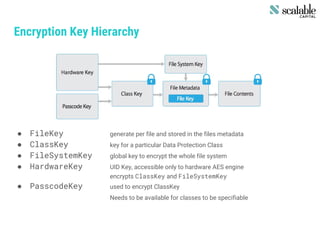
● FileKey generate per file and stored in the files metadata
● ClassKey key for a particular Data Protection Class
● FileSystemKey global key to encrypt the whole file system
● HardwareKey UID Key, accessible only to hardware AES engine
encrypts ClassKey and FileSystemKey
● PasscodeKey used to encrypt ClassKey
Needs to be available for classes to be specifiable
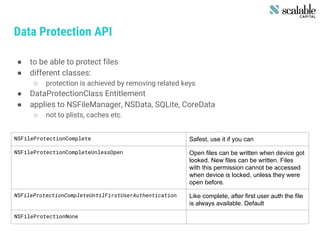
Data Protection API
● to be able to protect files
● different classes:
○ protection is achieved by removing related keys
● DataProtectionClass Entitlement
● applies to NSFileManager, NSData, SQLite, CoreData
○ not to plists, caches etc.
NSFileProtectionComplete Safest, use it if you can
NSFileProtectionCompleteUnlessOpen Open files can be written when device got
looked. New files can be written. Files
with this permission cannot be accessed
when device is locked, unless they were
open before.
NSFileProtectionCompleteUntilFirstUserAuthentication Like complete, after first user auth the file
is always available. Default
NSFileProtectionNone
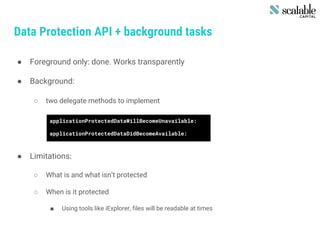
Data Protection API + background tasks
● Foreground only: done. Works transparently
● Background:
○ two delegate methods to implement
● Limitations:
○ What is and what isn’t protected
○ When is it protected
■ Using tools like iExplorer, files will be readable at times
applicationProtectedDataWillBecomeUnavailable:
applicationProtectedDataDidBecomeAvailable:
Data Leakage
● Logging
○ Using NSLog results in logs being stored in a data store
○ Disable NSLog in release builds
○ Log with breakpoint actions instead
● HTTP Caches
○ Stored in <appID>/Library/Caches/mydomain.com/Cache.db
○ removeAllCachedResponses → only from memory, not disk
○ Going thermonuclear
NSString *cacheDir = [NSSearchPathForDirectoriesInDomain(NSCacheDirectory,
NSUserDomainMask, YES) objectAtIndex:0];
[[NSFileManager defaultManager] removeItemAtPath:cacheDir error:nil];
Data Leakage contd.
● Snapshots
○ applicationWillEnterBackground
○ Screen Sanitation:
[self.splash setImage:[UIImage imageNamed:@”myimage.png”]];
[[application keyWindow] addSubview:splash];
Other Topics
● Pasteboards
● User Preferences
● Key logging / Auto Correction
● State Preservation
● Encrypted SQL Store (SQLCipher, Realm.io)
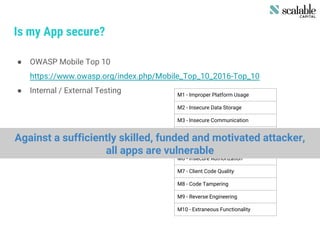
Is my App secure?
● OWASP Mobile Top 10
https://www.owasp.org/index.php/Mobile_Top_10_2016-Top_10
● Internal / External Testing M1 - Improper Platform Usage
M2 - Insecure Data Storage
M3 - Insecure Communication
M4 - Insecure Authentication
M5 - Insufficient Cryptography
M6 - Insecure Authorization
M7 - Client Code Quality
M8 - Code Tampering
M9 - Reverse Engineering
M10 - Extraneous Functionality
Against a sufficiently skilled, funded and motivated attacker,
all apps are vulnerable
Design a secure organization
1. Adhere to publicly available design guidelines
a. NIST Computer Security Resource Center
b. Open Web Application Security Project (OWASP)
c. Payment Card Industry Data Security Standard (PCI DSS)
2. Stay informed and inform others
a. Subscribe to security mailing lists,follow security researchers on Twitter
b. Establish guidelines for secure coding
c. Regularly train all employees on information security
3. Test your systems regularly
a. Hack yourself or pay someone else to hack you
b. unit testing security features is really worth it
c. Improve your own response by running drills
4. Software Development Process
a. Peer Reviews (pull requests)
b. Education / Training on new features, platforms, attacks
Resources
● Tools
○ iExplorer, iOS Console
○ CharlesProxy, BurpSuite
○ sTunnel, oTool, FileJuicer
● Sources / further reading
○ Apple iOS Security Guide:
https://www.apple.com/business/docs/iOS_Security_Guide.pdf
○ OWASP Mobile Apps Checklist
https://drive.google.com/open?id=0BxOPagp1jPHWYmg3Y3BfLVhMcmc
○ iSEC Partners Github Repo
https://github.com/iSECPartners
○ iOS Application Security -- David Thiel, no starch press
○ Internet-Security aus Software-Sicht -- Walter Kriha and Roland Schmitz, Springer
Questions ?
Andreas Schranzhofer

App Security and Securing App

  • 1.
    App Security andSecuring Apps Andreas Schranzhofer CTO Scalable Capital @Schranzhofer
  • 2.
    Scalable Capital ● FinTechStart-Up (Robo Advisor) ○ risk managed individual ETF portfolios ○ automatic rebalancing according to risk measure ○ regulated financial institution in Germany (BaFin) and the UK (FCA) ○ Real Institutional Class Wealth Management ● Security is of highest priority ○ losing trust is easy, gaining it back ■ almost impossible ○ financial data is always sensitive ● Security is a function of ○ actual ○ perceived ○ all parts of the system (backend, frontend, apps, processes)
  • 3.
    Overview ● Secure? Whatdoes that mean? ● Secure Communication ● Data Safety ● Is my App secure ● How to get there
  • 4.
    Secure Apps security metrics? sensitivedata safety unauthorized access impersonation doesn’t crash permissions vetting permissions vettingencryption communication Is my app safe?
  • 5.
    Secure Apps contd. ●all of them … ○ and many more ● combination of vulnerabilities ○ single vulnerability considered uncritical Security is not a feature one can add, it is a process, executed relentlessly
  • 6.
    Scope ● Secure Communication ○Network Communication ○ Interprocess Communication (IPC) ● Data Safety ○ How to store data ○ How to not leak data ● Tools and Processes
  • 7.
    Scope ● Secure Communication ○Network Communication ○ Interprocess Communication (IPC) ● Data Safety ○ How to store data ○ How to not leak data ● Tools and Processes
  • 8.
    Network Communication --ATS ● ATS (Application Transport Security) enabled by default in > iOS 9 ● TLS 1.2 enforced in > iOS 9 ● by default RightThing ™ And then you start editing/(abusing) Info.plist HTTPS ATS enabled <key>NSAppTransportSecurity</key> <dict> <key>NSAllowArbitraryLoads</key> <true/> <key>NSExceptionDomains</key> <dict> <key>mydev.domain</key> <dict> <key>NSExceptionAllowsInsecureHTTPLoads</key> <true/> <key>NSIncludesSubdomains</key> <true/> <key>NSRequiresCertificateTransparency</key> <false/> <key>NSThirdPartyExceptionAl…</key> <false/>
  • 9.
    Network Communication --ATS HTTPS ATS enabled localhost:443 yourdomain:443 ● avoid disabling security settings ○ it will make it to the App Store eventually (or be rejected) ● redirect secure traffic with tunneling ● reverse proxy setup to listen to traffic ● Tools: stunnel, BurpSuite, Charles Proxy
  • 10.
    Network Communication -SSL Pinning ● Specifically define which certificates to trust (to pin too) ○ in addition to just verifying their validity with a Certificate Authority (CA) ● Why? ○ vast number of CA’s ○ security breaches, so that signing keys were compromised ○ make sure reverse proxying won’t be possible (company networks, attacks) ○ you have sensitive data ● How does it work: ○ specify certificate / list of certificates to trust ○ using Wrappers (iSEC Partners, AFNetworking) HTTPS ATS enabled HTTPClient.defaultSSLPinningMode=AFSSLPinningModePublicKey;
  • 11.
    Network Communication -SSL Pinning 1. Certificates to pin too need to be known a. AFSSLPinningModeNone b. AFSSLPinningModePublicKey c. AFSSLPinningModeCertificate 2. Certificates expire a. new app with new certificate (timely, review process, updates etc.) b. handle certificate expiration in the app c. pin to PublicKey (Certificate Signing Request CSR)
  • 12.
    Network Communication -HTTP Basic Auth ● Where to store the credentials? ○ Certainly not: in source, in shared preferences ○ Keychain: yes ● NSURLCredentialStorage (NSURLSession & NSURLConnection) ● Automatically stored in keychain and useable for challenges NSURLCredential credential = [NSURLCredential credentialWithUser:username password:password persistence:NSURLCredentialPersistenceForSession]; NSURLProtectionSpace *protectionSpace = [[NSURLProtectionSpace alloc] initWit…]; [[NSURLCredentialStorage sharedCredentialStorage] setCredential:credential …]; [[challenge sender] useCredential:cred forAuthenticationChallenge:challenge];
  • 13.
    Other Topics ● CFStream ●NSStream ● Multipeer Connectivity ● various Networking APIs (AFNetworking, etc.)
  • 14.
    Interprocess Communication -URL Scheme ● myapp://someview?param1=secret&param2=anothersecret ● Anyone can register for myapp:// ● LIFO: last in, first out ○ Last app to register for myapp:// will be triggered ● URL Scheme Hijacking, XARA Unauthorized Cross-App Resource Access on MAC OS X and iOS 1. Another app register for the same URL Scheme 2. Get called for ‘your’ url scheme, processes data 3. Fakes an interface to ask for credentials etc.
  • 15.
    Interprocess Communication -Universal Links ● Introduced in iOS9, to mitigate URL Scheme Hijacking ● App Entitlement ‘Associated Domains’ ● Webserver needs to serve file: ○ apple-app-site-association ○ Signed (private key to SSL certificate) ● application:continueUserActivity:restorationHandler
  • 16.
    Other Topics ● SharedCredentials ● UIActivity ● Extensions ● Webapps ● Pasteboards
  • 17.
    Scope ● Secure Communication ○Network Communication ○ Interprocess Communication (IPC) ● Data Safety ○ How to store data ○ How to not leak data ● Tools and Processes
  • 18.
    Data Safety ● Keychain ○Small snippets of data ● Data Protection API ○ Files ○ Passcode used for protection ● Database (CoreData, Realm.io, others)
  • 19.
    Keychain ● Encrypted usingthe HardwareKey ● Add/Update/CopyMatching and Delete ● Use Keychain Wrappers ○ Lockbox ○ A0SimpleKeychain SecAttrAccessibleWhenUnlocked; SecAttrAccessibleAfterFirstUnlock; SecAttrAccessibleAlways; SecAttrAccessibleWhenPasscodeSetThisDeviceOnly SecAttrAccessibleWhenUnlockedThisDeviceOnly; SecAttrAccessibleAfterFirstUnlockThisDeviceOnly; SecAttrAccessibleAlwaysThisDeviceOnly;
  • 20.
    Encryption Key Hierarchy ●FileKey generate per file and stored in the files metadata ● ClassKey key for a particular Data Protection Class ● FileSystemKey global key to encrypt the whole file system ● HardwareKey UID Key, accessible only to hardware AES engine encrypts ClassKey and FileSystemKey ● PasscodeKey used to encrypt ClassKey Needs to be available for classes to be specifiable
  • 21.
    Data Protection API ●to be able to protect files ● different classes: ○ protection is achieved by removing related keys ● DataProtectionClass Entitlement ● applies to NSFileManager, NSData, SQLite, CoreData ○ not to plists, caches etc. NSFileProtectionComplete Safest, use it if you can NSFileProtectionCompleteUnlessOpen Open files can be written when device got looked. New files can be written. Files with this permission cannot be accessed when device is locked, unless they were open before. NSFileProtectionCompleteUntilFirstUserAuthentication Like complete, after first user auth the file is always available. Default NSFileProtectionNone
  • 22.
    Data Protection API+ background tasks ● Foreground only: done. Works transparently ● Background: ○ two delegate methods to implement ● Limitations: ○ What is and what isn’t protected ○ When is it protected ■ Using tools like iExplorer, files will be readable at times applicationProtectedDataWillBecomeUnavailable: applicationProtectedDataDidBecomeAvailable:
  • 23.
    Data Leakage ● Logging ○Using NSLog results in logs being stored in a data store ○ Disable NSLog in release builds ○ Log with breakpoint actions instead ● HTTP Caches ○ Stored in <appID>/Library/Caches/mydomain.com/Cache.db ○ removeAllCachedResponses → only from memory, not disk ○ Going thermonuclear NSString *cacheDir = [NSSearchPathForDirectoriesInDomain(NSCacheDirectory, NSUserDomainMask, YES) objectAtIndex:0]; [[NSFileManager defaultManager] removeItemAtPath:cacheDir error:nil];
  • 24.
    Data Leakage contd. ●Snapshots ○ applicationWillEnterBackground ○ Screen Sanitation: [self.splash setImage:[UIImage imageNamed:@”myimage.png”]]; [[application keyWindow] addSubview:splash];
  • 25.
    Other Topics ● Pasteboards ●User Preferences ● Key logging / Auto Correction ● State Preservation ● Encrypted SQL Store (SQLCipher, Realm.io)
  • 26.
    Is my Appsecure? ● OWASP Mobile Top 10 https://www.owasp.org/index.php/Mobile_Top_10_2016-Top_10 ● Internal / External Testing M1 - Improper Platform Usage M2 - Insecure Data Storage M3 - Insecure Communication M4 - Insecure Authentication M5 - Insufficient Cryptography M6 - Insecure Authorization M7 - Client Code Quality M8 - Code Tampering M9 - Reverse Engineering M10 - Extraneous Functionality Against a sufficiently skilled, funded and motivated attacker, all apps are vulnerable
  • 27.
    Design a secureorganization 1. Adhere to publicly available design guidelines a. NIST Computer Security Resource Center b. Open Web Application Security Project (OWASP) c. Payment Card Industry Data Security Standard (PCI DSS) 2. Stay informed and inform others a. Subscribe to security mailing lists,follow security researchers on Twitter b. Establish guidelines for secure coding c. Regularly train all employees on information security 3. Test your systems regularly a. Hack yourself or pay someone else to hack you b. unit testing security features is really worth it c. Improve your own response by running drills 4. Software Development Process a. Peer Reviews (pull requests) b. Education / Training on new features, platforms, attacks
  • 28.
    Resources ● Tools ○ iExplorer,iOS Console ○ CharlesProxy, BurpSuite ○ sTunnel, oTool, FileJuicer ● Sources / further reading ○ Apple iOS Security Guide: https://www.apple.com/business/docs/iOS_Security_Guide.pdf ○ OWASP Mobile Apps Checklist https://drive.google.com/open?id=0BxOPagp1jPHWYmg3Y3BfLVhMcmc ○ iSEC Partners Github Repo https://github.com/iSECPartners ○ iOS Application Security -- David Thiel, no starch press ○ Internet-Security aus Software-Sicht -- Walter Kriha and Roland Schmitz, Springer
  • 29.