I/O


2012   8   24     @
VM
     VM   OS


– 

– 
               2
I/O
•  I/O
     – 
          •  DB    HPC
     – 
          • 
• 
     –  I/O                    PCI
        SR-IOV …
• 
     – 
     –                   I/O
                                     3
PCI pass-
VM    virtio, vhost                    SR-IOV
                      through


VMM
      Open vSwitch


         VT-d


                         VM: Virtual Machine
                         VMM: Virtual Machine Monitor
                         SR-IOV: Single Root-I/O Virtualization
                                                              4
•  I/O
   –           virtio vhost
   –  PCI
   –  SR-IOV
•  QEMU/KVM
• 
   – 


                              5
6
•                 CPU        I/O

             OS
     –  OS
        • 


                        OS


                                   7
•               VM
     –  VM                 I/F OS
•  VM                 1960
     –  1972      IBM VM/370
     –  1973 ACM workshop on virtual computer systems

               OS            OS         OS

               VM            VM         VM

                                  VMM


                                                        8
Intel
• 
     –                              VMWare 1999
          • 
                                           Popek Goldberg
     –             Xen 2003               VMM
          •               OS


• 
     –  Intel VT AMD-V (2006)
     –                       !
     – 
          •  KVM (2006) BitVisor (2009) BHyVe (2011)

                                                            9
Intel VT (Virtualization Technology)
•  CPU
   –  IA32 Intel 64    VT-x
   –  Itanium     VT-i
•  I/O
   –  VT-d (Virtualization Technology for Directed I/O)
   –  VT-c (Virtualization Technology for Connectivity)
         •  VMDq IOAT SR-IOV


•  AMD
                                     VMDq: Virtual Machine Device Queues
                                     IOAT: IO Acceleration Technology
                                                                      10
KVM: Kernel-based Virtual Machine
  • 
         –  Xen             ring aliasing
  •  CPU                                       QEMU
         –                                   BIOS
                VMX root mode       OS                 VMX non-root mode    OS

              proc.


                            QEMU
Ring 3
                 device           memory                  VM Entry
                emulation       management      VMCS
                                                          VM Exit


                                     KVM
Ring 0                                                         Guest OS Kernel
                        Linux Kernel
                                                                                 11
CPU
              Xen                             KVM
VM       VM (Xen DomU)          VM (QEMU process)
(Dom0)           Guest OS                         Guest OS
         Process                          Process


         VCPU                           VCPU
                                        threads


Xen Hypervisor                  Linux

                                        KVM
                    Domain                           Process
                    scheduler                        scheduler


   Physical                        Physical
   CPU                             CPU


                                                                 12
OS                   Guest
                       OS
         VA     PA             GVA    GPA
                                            GVA


                       VMM                  GPA


                                            HPA


 MMU#
                     MMU#
 (CR3)
                     (CR3)
         page                  page
H/W
                                                  13
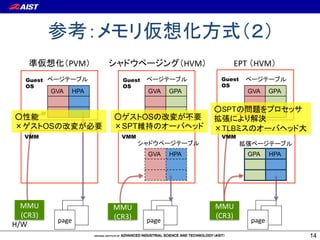
PVM                              HVM       EPT# HVM
   Guest                       Guest                       Guest
   OS                          OS                          OS
            GVA        HPA              GVA   GPA                  GVA    GPA


                                       OS
           OS                  SPT
   VMM                         VMM                         VMM


                                        GVA   HPA                  GPA    HPA


  MMU#                       MMU#                         MMU#
  (CR3)                      (CR3)                        (CR3)
                page                   page                        page
H/W
                                                                                14
Intel Extended Page Table
               GVA

                                               TLB
         OS
                                                       page walk

CR3     GVA   GPA
                                                TLB
                                         GVA         HPA


       VMM


EPTP    GPA   HPA

                     3   Intel x64   4


               HPA                              TLB: Translation Look-aside Buffer
                                                                                 15
I/O


      16
I/O
•               IO (PIO)
• 
•  DMA (Direct Memory Access)

              I/O                          DMA
     CPU                        CPU

                                  4.EOI
                      1.DMA
IN/OUT                                3.
                                                 2.DMA
              I/O

                                                 EOI: End Of Interrupt
                                                                   17
PCI
• 
     –            INTx
           •  4
     –  MSI/MSI-x (Message Signaled Interrupt)
           •                    DMA write
•  IDT (Interrupt Description Table)                   OS
• 

                          VMM

                  MSI
     PCI          INT A                     INTx       CPU
                                IOAPIC
                                                   (Local APIC)
                                            EOI

                                                                  18
PCI
   •  PCI                       BDF                                                      .

        –  PCI
             •                                   1
             •  NIC                    1
             •  SR-IOV                             VF
$ lspci –tv	
... snip ...	                                                                 2       GbE
 -[0000:00]-+-00.0  Intel Corporation 5500 I/O Hub to ESI Port	
             +-01.0-[01]--+-00.0  Broadcom Corporation NetXtreme II BCM5716 Gigabit Ethernet	
             |            -00.1  Broadcom Corporation NetXtreme II BCM5716 Gigabit Ethernet	
             +-03.0-[05]--	
             +-07.0-[06]----00.0  Intel Corporation 82599EB 10-Gigabit SFI/SFP+ Network Connect	
             +-09.0-[03]--	
... snip ...	
                                           .

                                                                                              19
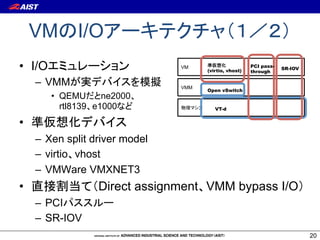
VM        I/O
•  I/O                           VM
                                       (virtio, vhost)
                                                         PCI pass-
                                                         through
                                                                     SR-IOV


     –  VMM                      VMM
                                       Open vSwitch
         •  QEMU      ne2000
            rtl8139 e1000                 VT-d


• 
     –  Xen split driver model
     –  virtio vhost
     –  VMWare VMXNET3
•                   Direct assignment VMM bypass I/O
     –  PCI
     –  SR-IOV
                                                                              20
VM               I/O
I/O
                                     PCI                               SR-IOV
VM1              VM2              VM1             VM2            VM1            VM2
 Guest OS                           Guest OS                      Guest OS
                        …                                …                             …
  Guest                             Physical                      Physical
  driver                             driver                        driver


VMM                               VMM                            VMM
            vSwitch

            Physical
             driver

NIC                                NIC                           NIC

                                                                        Switch (VEB)
                            I/O emulation      PCI passthrough     SR-IOV
      VM

                                                                                       21
Edge Virtual Bridging
                  (IEEE 802.1Qbg)
•  VM
• 

 (a) Software VEB               (b) Hardware VEB                (c) VEPA, VN-Tag
VM1        VM2                 VM1            VM2             VM1            VM2
 VNIC       VNIC                 VNIC           VNIC            VNIC            VNIC

 VMM    vSwitch                VMM                            VMM

 NIC                            NIC         switch             NIC


                                                                       switch

                    VEB: Virtual Ethernet Bridging     VEPA: Virtual Ethernet Port Aggregator
                                                                                                22
I/O
  •               OS
         – 
  •                                        VM Exits
                       VMX root mode                         VMX non-root mode
                              QEMU
Ring 3
                                   e1000              copy


              Linux Kernel/          tap                              Guest OS Kernel
              KVM
                                  vSwitch               buffer
Ring 0
                               Physical driver               e1000

                                                                                        23
virtio
  •                               VM Exits
  •                            virtio_ring
         –                    I/O

                      VMX root mode                      VMX non-root mode
                              QEMU
Ring 3
                                 virtio_net      copy


              Linux Kernel/           tap                            Guest OS Kernel
              KVM
                                    vSwitch        buffer
Ring 0
                               Physical driver          virtio_net

                                                                                       24
vhost
  •  tap                                       QEMU

  •  macvlan/macvtap
                   VMX root mode                VMX non-root mode
                         QEMU
Ring 3


         Linux Kernel/
                                vhost_net
         KVM
                                                           Guest OS Kernel
                                macvtap
                                            buffer
Ring 0
           physical driver      macvlan       virtio_net

                                                                             25
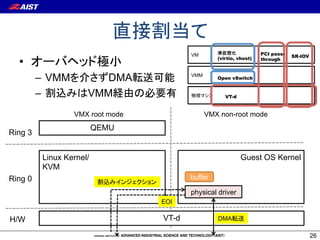
VM                         PCI pass-
                                                                                SR-IOV
  •                                               (virtio, vhost)   through


         –  VMM          DMA             VMM
                                                  Open vSwitch


         –            VMM                            VT-d


                  VMX root mode                VMX non-root mode
                          QEMU
Ring 3


          Linux Kernel/                                     Guest OS Kernel
          KVM
Ring 0                                   buffer

                                         physical driver
                                  EOI

H/W                               VT-d            DMA

                                                                                         26
VM1                 VM2
                   :         Guest OS
       VMM                                          …
VM Exit
   VMCS

                       VMM
  OS    VM Entry

                                           DMA


                              IOMMU
                       NIC


                               VMCS: Virtual Machine Control Structure
                                                                    27
Intel VT-d: I/O
•             VMM               OS

     –  I/O
     –         OS
        •  VMM

        • 
•  VT-d
     –  DMA remapping (IOMMU)
     –  Interrupt remapping
                                     VT-d
                                        Interrupt remapping
                                                              28
VT-d: DMA remapping
• 
     –      OS
     –  DMA                         NG
•  VM      DMA
     – 


                  IOMMU   MMU+EPT

           DMA


                 I/O        CPU
                                         29
ource-id” in this document. The remapping hardware may determine the source-id of a
 in implementation-specific ways. For example, some I/O bus protocols may provide the
device identity as part of each I/O transaction. In other cases (for Root-Complex
devices, for example), the source-id may be derived based on the Root-Complex internal
 tion.


                               DMA remapping page walk
ress devices, the source-id is the requester identifier in the PCI Express transaction layer
 requester identifier of a device, which is composed of its PCI Bus/Device/Function
assigned by configuration software and uniquely identifies the hardware function that
 request. Figure 3-6 illustrates the requester-id1 as defined by the PCI Express
n.

       1
                            ID
    DMA Remapping—Intel® Virtualization Technology for Directed I/O

                                                                                  •                 BDF                               ID
       5                      87              3 2         0
                                                                                              DMA Remapping—Intel® Virtualization Technology for Directed I/O
                       Bus #                 Device #         Function #

                                                                                  •          ID DMA
         Figure 3-6. Requester Identifier Format
                                                                                  •  IOTLB hardware encounters a page-table entry with either Read or Write fieldisClear
                                                                                         — If
                                                                                           address translating a Atomic Operation (AtomicOp) request, the request   bloc
                                     (Dev 31, Func 7) Context entry 255

 g sections describe the data structures for mapping I/O devices to domains.
                                                                        Figure 3-8 shows a multi-level (3-level) page-table structure with 4KB page mappings
                                                                        tables. Figure 3-9 shows a 2-level page-table structure with 2MB super pages.
   Root-Entry
                                     (Dev 0, Func 1)                                                              DMA
 try functions as the top level (Dev 0, Func 0) to map devices on a specific PCI bus to6 their
       (Bus 255) Root entry 255  structure Context entry 0                                                        3 3              3 2              22                11
domains. Each root-entry structure contains the following fields: Translation
                                               Context-entry Table  Address
                                                                                       3                          9 8              0 9              10                21                      0
                                                          for Bus N        Structures for Domain A                                                                                                 DMA with address bits
        (Bus N)    Root entry N
t flag: The present field is used by software to indicate to hardware whether the                         root-
                                                                                                            0s                                                                                    63:39 validated to be 0s
 present and initialized. Software may Clear the present field for root entries


                                                                                                                                                                             12-bits
                                                                                                                   9-bits


                                                                                                                                           9-bits


                                                                                                                                                         9-bits
onding to bus numbers that are either not present in the platform, or don’t have any
eam devices attached. If the present field of a root-entry used to process a DMA request
        (Bus 0) Root entry 0                                                                                                                                                                                       +
 the DMA request is blocked, resulting in a translation fault.                                                                                                                         << 3
                  Root-entry Table
t-entry table pointer: The context-entry table 255
                                         Context entry pointer references the context-entry
r devices on the bus identified by the root-entry. Section 3.3.3 describes context entries in
detail.                                                                                                                                             << 3
                                                                                                                                                                                        +           SP = 0

 illustrates the root-entry format. The root entries are programmed Translation the root-entry
                                                                Address through                                                                                                                                              4KB page
ocation of the root-entry table in system memory is programmed through the Root-entry
                                                              Structures for Domain B
ss register. The root-entry table is 4KB in sizeentry 0 accommodates 256 root entries to
                                           Context and
                                                                                                                        << 3                         +              SP = 0
CI bus number space (0-255). In the case of a PCI device, the bus number (upper 8-bits)
                                         Context-entry Table
a DMA transaction’s source-id field is used for Bus 0 into the root-entry structure.
                                              to index                                1
                                                                                                                                                                                                  4KB page table
                                                                                      2 6     1
llustrates how these tables are used to map devices to domains.                       7 3     2 0
                   Figure 3-7. Device to Domain Mapping Structures                        ASR                               +     SP = 0
                                                                                                     Context
                                                                                                      Entry                                                       4KB page table
                                                                                                                                                                             ,
    3.3.3               Context-Entry                                                                                                      ,
                                                                                                                                4KB page table

   A context-entry maps a specific I/O device on a bus to the domain to which it is assigned, and, 3-8. Example Multi-level Page Table
                                                                                              Figure in
   turn, to the address translation structures for the domain. The context entries are programmed
          Intel Virtualization Technology for Directed I/O
   through the memory-resident context-entry tables. Each root-entry in the root-entry table contains
   the pointer to the context-entry table for the corresponding bus number. Each context-entry table
 Express devices entries, with each entryRouting-ID Interpretation (ARI), bits traditionally bus. For a PCI
   contains 256 supporting Alternative representing a unique PCI device function on the                                                                                                                                                 30
VT-d: Interrupt remapping
•  MSI            VM

•  MSI/MSI-x
•  Interrupt remapping table (IRT)             MSI write
   request
  –      VT-d            CPU
       •  DMA write request   destination ID
  –  VT-d VMM                 IRT


                                                           31
mance for I/O Virtualization                                Exit-Less Interrupt
 mit2         Nadav Har’El1
 1
          •  “ELI: Bare-Metal Performance
          Assaf Schuster2   Dan Tsafrir2                                                          for I/O Virtualization”, A.
                   Gordon, et al., ASPLOS 2012
     2 Technion—Israel  Institute of Technology
 namit,muli,assaf,dan}@cs.technion.ac.il
                     –        OS              VM Exits                                                                     ELI (Exit-Less
                        Interrupt)
                     –  netperf Apache memcached BMM                                                         97-100%
              guest/host context switch (exits and entries) interrupt to the host
                     CPU forces an exit and delivers the                            through the
              handling costIDT.
                     host (handling physical interrupts and their completions)                                        guest          interrupt
                           Guests receive virtual interrupts, which are not necessarily related                        IDT            handler
                       to physical interrupts. The host may decide to inject guest
                                                                              the guest with a
        (a)   baseline                                                                                                   assigned
                       virtual interrupt because the host received a corresponding physical
                                physical      interrupt   interrupt                                                      interrupt
                                                                              host
                       interrupt, or the host injection completion
                               interrupt       may decide to inject the guest with a virtual
                       interrupt manufactured by the host. The host injects virtual interrupts                       shadow
                                                                              guest
              ELI      through the guest IDT. When the processor enters guest mode after      shadow                   IDT
        (b)   delivery an injection, the guest receives and handles the virtual interrupt.
                                               interrupt                      host              IDT                            VM                non-assigned
                           During interrupt completion the guest will access its LAPIC. Just
                                             handling,                                                                                           interrupt
                       like the IDT, full access to a core’s physical LAPIC implies total                   ELI                                  (exit)
              ELI                                                             guest
                       control of the core, so the host cannot easily give untrusted guests
              delivery &
                                                                                                       delivery           hypervisor
        (c)            access to the physical LAPIC. For guests using the first LAPIC          x2APIC
              completion                                                      host                                                                 Non present
                       generation, the processor forces an exit when the guest accesses
        (d)   bare-metal LAPIC memory area. For guests using x2APIC, the host traps
                       the                                                                                                 physical
                       LAPIC accesses through an MSR bitmap. When running a guest,                                         interrupt
                       the host provides the CPU with a bitmap specifying whichtime    benign
                       MSRs the guest is allowed to access directly and which sensitive
                          Figure 1. Exits during interrupt handling
                       MSRs must not be accessed by the guest directly. When the guest                            Figure 2. ELI interrupt delivery flow
                       accesses sensitive MSRs, execution exits back to the host. In general,                                                                    32
PCI-SIG IO Virtualization
•  I/O                       PCIe Gen2
     –  SR-IOV (Single Root-I/O Virtualization)
         •                   VM
         •  NIC
     –  MR-IOV (Multi Root-I/O Virtualization)
         • 
         • 
         •  NEC   ExpEther
•            VMM      SR-IOV
     –  KVM Xen VMWare Hyper-V
     – 
        Linux VFIO
                                                  33
SR-IOV NIC
 •  1                  NIC                          NIC vNIC
           VM
     –  vNIC = VF (Virtual Function)

                VM1                 VM2              VM3
                vNIC                 vNIC             vNIC

                                     VMM

           RX          TX
Virtual
Function

                             L2 Classified Sorter

                                  MAC/PHY


                                                               34
SR-IOV NIC
•  Physical Function (PF)
   –  VMM
•  Virtual Function (VF)
   –  VM                             OS       VF
   –  PF                                            PF
   –                                                82576 8                   256
            VM
                  Guest OS           VM Device                System Device
                                    Config Space               Config Space
                   VF driver
                                       VFn0                       PFn0
                  Virtual NIC
                                                                  VFn0
            VMM                         PF driver
                                                                  VFn1
                               Physical NIC                       VFn2
                                                                    :
                                                                                    35
1.                              + tap                     VM
                                                                      (virtio, vhost)
                                                                                         PCI pass-
                                                                                         through
                                                                                                     SR-IOV


      – 
                                                          VMM
                                                                      Open vSwitch
      – 
                •                                                           VT-d
                •  Open vSwitch

2.  MAC                     tap                : macvlan/macvtap
      – 

                   VM1              VM2                        VM1                 VM2
           1.                                        2.
                         eth0           eth0                         eth0               eth0

                   VMM                                     VMM
                         tap0           tap1                         tap0               tap1


                                                                macvlan0              macvlan1
                                 eth0                                          eth0

                                                                                                              36
Open vSwitch
• 
     –  Linux

          • 
          •  OvS
     –          OpenFlow

     – 
          •  Linux kernel 3.3
          • 
                Pica8 Pronto

                                     http://openvswitch.org/
                                                               37
VM

   VM1               VM2
                                VM                  VLAN
                                •         OS     VLAN
      eth0               eth0
                                •  1 VM               VLAN ID
   VMM

         tap0           tap1     #   ovs-vsctl   add-br br0	
                                 #   ovs-vsctl   add-port br0 tap0 tag=101	
                                 #   ovs-vsctl   add-port br0 tap1 tag=102	
             vSwitch (br0)
                                 #   ovs-vsctl   add-port br0 eth0	

VLAN ID 101
                 eth0
VLAN ID 102                                                 VLAN

                                      tap0 <-> br0_101 <-> eth0.101

                                                                              38
QoS
•           Linux          Qdisc
•  ingress policing egress shaping
  VM1              VM2
                              ingress policing
                               # ovs-vsctl set Interface tap0 
     eth0              eth0    ingress_policing_rate=10000	
                               # ovs-vsctl set Interface tap0 
 VMM
                               ingress_policing_burst=1000	

        tap0          tap1                           : 10Mbps
ingress policing                                                : 10MB
           vSwitch (br0)
egress shaping


               eth0

                                                                         39
QoS
•           Linux          Qdisc
•  ingress policing egress shaping
  VM1              VM2
                              egress shaping

                              # ovs-vsctl -- set port eth0 qos=@newqos 	
     eth0              eth0
                                -- --id=@newqos create qos type=linux-htb
                              other-config:max-rate=40000000
                              queues=0=@q0,1=@q1 	
 VMM
                                -- --id=@q0 create queue other-config:min-
        tap0          tap1    rate=10000000 other-config:max-rate=10000000 	
                                -- --id=@q1 create queue other-config:min-
ingress policing              rate=20000000 other-config:max-rate=20000000	
           vSwitch (br0)      	
egress shaping                # ovs-ofctl add-flow br0 “in_port=3
                              idle_timeout=0 actions=enqueue1:1	

               eth0
                                                       HTB HFSC
                                                                           40
QEMU/KVM


           41
•  Linux
•  QEMU/KVM
  –  QEMU          PCI
  –  libvirt Virt-manager
     →
•  Open vSwitch 1.6.1
•  PCI          & SR-IOV
  " Intel Gigabit ET dual port server adapter [SR-IOV ]
  " Intel Ethernet Converged Network Adapter X520-LR1 [SR-IOV   ]
  " Mellanox ConnectX-2 QDR Infiniband HCA
     Broadcom on board GbE NIC (BMC5709)
     Brocade BR1741M-k 10 Gigabit Converged HCA
                                                                42
QEMU/KVM
                                                VM
                                      CPU      2 (CPU model host)
#!/bin/sh	
                                       Memory   2GB
sudo /usr/bin/kvm 	
                                       Network  virtio_net
   	-cpu host 	
   	-smp 2 	                          Storage  virtio_blk
   	-m 2000 	
   	-net nic,model=virtio,macaddr=00:16:3e:1d:ff:01 	
   	-net tap,ifname=tap0,script=/etc/ovs-ifup,downscript=/etc/ovs-
ifdown 	
   	-monitor telnet::5963,server,nowait 	
   	-serial telnet::5964,server,nowait 	
   	-daemonize 	
   	-nographic 	
   	-drive file=/work/kvm/vm01.img,if=virtio 	
   	$@	


                                                                     43
QEMU/KVM
$ cat /etc/ovs-ifup	
#!/bin/sh	
switch='br0'	
/sbin/ip link set mtu 9000 dev $1 up	
/opt/bin/ovs-vsctl add-port ${switch} $1	
	
$ cat /etc/ovs-ifdown	
#!/bin/sh	
switch='br0'	
/sbin/ip link set $1 down	
/opt/bin/ovs-vsctl del-port ${switch} $1	


    QEMU/KVM                              tap

                              ovs-vsctl         brctl

                                                        44
PCI
1.  BIOS Intel VT      VT-d
2.  Linux         VT-d
   –                             intel_iommu=on
3.  PCI
4.      OS
5.      OS


                        “How to assign devices with VT-d in KVM,”
http://www.linux-kvm.org/page/How_to_assign_devices_with_VT-
d_in_KVM

                                                                    45
PCI
•        PCI               BDF                  ID              ID
•         OS
               pci_stub
     # echo "8086 10fb" > /sys/bus/pci/drivers/pci-stub/new_id	
     # echo "0000:06:00.0" > /sys/bus/pci/devices/0000:06:00.0/driver/unbind
     # echo "0000:06:00.0" > /sys/bus/pci/drivers/pci-stub/bind	


•                                  QEMU
     –  -device pci-assign,host=06:00.0	
•                                  QEMU
     –  device_add pci-assign,host=06:00.0,id=vf0	
     –  device_del vf0


                                                                               46
SR-IOV VF
                                                •  VF
     # modprobe –r ixgbe	                                            max_vfs VF
     # modprobe ixgbe max_vfs=8	                •  OS                VF       PCI

$ lspci –tv	
... snip ...	
 -[0000:00]-+-00.0  Intel Corporation 5500 I/O Hub to ESI Port	
             +-01.0-[01]--+-00.0  Broadcom Corporation NetXtreme II BCM5716 Gigabit Ethernet	
                                        Physical Function (PF)
             |            -00.1  Broadcom Corporation NetXtreme II BCM5716 Gigabit Ethernet	
             +-03.0-[05]--	
             +-07.0-[06]----00.0  Intel Corporation 82599EB 10-Gigabit SFI/SFP+ Network Connect	
             |            +-10.0  Intel Corporation 82599 Ethernet Controller Virtual Function	
             |            +-10.2  Intel Corporation 82599 Ethernet Controller Virtual Function	
             |            +-10.4  Intel Corporation 82599 Ethernet Controller Virtual Function	
                                          Virtual Function (VF)
             |            +-10.6  Intel Corporation 82599 Ethernet Controller Virtual Function	
             |            +-11.0  Intel Corporation 82599 Ethernet Controller Virtual Function	
             |            +-11.2  Intel Corporation 82599 Ethernet Controller Virtual Function	
             |            +-11.4  Intel Corporation 82599 Ethernet Controller Virtual Function	
             |            -11.6  Intel Corporation 82599 Ethernet Controller Virtual Function	
             +-09.0-[03]--	
... snip ...

                                                                                              47
SR-IOV
•  PCI
•      OS
                          pci_stub
     # echo "8086 10fb" > /sys/bus/pci/drivers/pci-stub/new_id	
     # echo "0000:06:10.0" > /sys/bus/pci/devices/0000:06:10.0/driver/unbind
     # echo "0000:06:10.0" > /sys/bus/pci/drivers/pci-stub/bind	


•                                       QEMU
     –  -device pci-assign,host=06:10.0	
•                                       QEMU
     –  device_add pci-assign,host=06:10.0,id=vf0	
     –  device_del vf0
                                                                               48
SR-IOV                            OS
•         OS         VF                                            PCI

                 $ cat /proc/interrupts 	
                             CPU0      CPU1       	
                 ...snip...	
                  29:     114941     114133   PCI-MSI-edge      eth1-rx-0	
$ lspci	
                  30:      77616      78385   PCI-MSI-edge      eth1-tx-0	
00:00.0 Host bridge: Intel Corporation 440FX - 82441FX PMC [Natoma] (rev 02)	
                  31:           5         5   PCI-MSI-edge      eth1:mbx	
00:01.0 ISA bridge: Intel Corporation 82371SB PIIX3 ISA [Natoma/Triton II]	
00:01.1 IDE interface: Intel Corporation 82371SB PIIX3 IDE [Natoma/Triton II]	
00:01.3 Bridge: Intel Corporation 82371AB/EB/MB PIIX4 ACPI (rev 03)	
00:02.0 VGA compatible controller: Cirrus Logic GD 5446	
00:03.0 Ethernet controller: Red Hat, Inc Virtio network device	
00:04.0 SCSI storage controller: Red Hat, Inc Virtio block device	
00:05.0 Ethernet controller: Intel Corporation 82599 Ethernet Controller
Virtual Function (rev 01)	


                                                                             49
SR-IOV
•  VF                                  NIC
•  VF                                        OS
 # ip link set dev eth5 vf 0 rate 200	
 # ip link set dev eth5 vf 1 rate 400	
 # ip link show dev eth5	
 42: eth5: <BROADCAST,MULTICAST,UP,LOWER_UP> mtu 1500 qdisc mq
 state UP mode DEFAULT qlen 1000	
     link/ether 00:1b:21:81:55:3e brd ff:ff:ff:ff:ff:ff	
     vf 0 MAC 00:16:3e:1d:ee:01, tx rate 200 (Mbps), spoof
 checking on	
     vf 1 MAC 00:16:3e:1d:ee:02, tx rate 400 (Mbps), spoof
 checking on	
 	
                               OS          2010-OS-117 13
                         OS
                                                                 50
SR-IOV                              TIPS
•  VF MAC
   # ip link set dev eth5 vf 0 00:16:3e:1d:ee:01 	


•  VF VLAN ID
   # ip link set dev eth5 vf 0 vlan 101	


•  Intel 82576 GbE      82599 X540 10GbE
                       NIC
  – 
  –  http://www.intel.com/content/www/us/en/ethernet-
     controllers/ethernet-controllers.html
                                                        51
VM
•      VM                            NG
•  PCI                     Bonding
  –                          PCI              NIC

  –                                    NIC
              virtio               NIC active-standby
       bonding
  –                                               S

•  SR-IOV NIC               VF                    virio   PV
                       1     NIC
                                                               52
SR-IOV:
 GesutOS

          bond0
   eth0       eth1
  (virtio)   (igbvf)


   tap0           Host OS           Host OS
                            tap0

    br0                     br0
   eth0                     eth0
   (igb)                    (igb)

    SR-IOV NIC               SR-IOV NIC


                                              53
SR-IOV:
 GesutOS
                       (qemu) device_del vf0
          bond0
   eth0       eth1
  (virtio)   (igbvf)


   tap0           Host OS                         Host OS
                                          tap0

    br0                                   br0
   eth0                                   eth0
   (igb)                                  (igb)

    SR-IOV NIC                             SR-IOV NIC


                                                            54
SR-IOV:
                    (qemu) migrate -d tcp:x.x.x.x:y
 GesutOS                               GesutOS

          bond0
   eth0
  (virtio)
                   $ qemu -incoming tcp:0:y ...

   tap0           Host OS                         Host OS
                                          tap0

    br0                                   br0
   eth0                                   eth0
   (igb)                                  (igb)

    SR-IOV NIC                             SR-IOV NIC


                                                            55
SR-IOV
(qemu) device_add pci-assign,
host=05:10.0,id=vf0             GesutOS

                                         bond0
                                  eth0        eth1
                                 (virtio)    (igbvf)


   tap0    Host OS                               Host OS
                                  tap0

    br0                            br0
   eth0                           eth0
   (igb)                          (igb)

    SR-IOV NIC                     SR-IOV NIC


                                                           56
MPI
Guest OS
              rank 1
                             →
         bond0
   eth0        eth1
  (virtio)    (igbvf)


   tap0      192.168.0.1   tap0    192.168.0.2             192.168.0.3

   br0                                           rank 0
                           br0
   eth0                    eth0
   (igb)                   (igb)

    SR-IOV NIC              SR-IOV NIC                    NIC

                                                     192.168.0.0/24
                                                                         57
SymVirt
•         VM


     –     Infiniband
•               OS VMM                                               SymVirt
     (Symbiotic Virtualization)
     –  PCI
                                  Cloud scheduler                          Cloud scheduler
     –  VM                             allocation                               re-allocation

•                                                Failu
                                                       re!!
                                                               Failure
                                                              prediction
     –  SymCR:
                                                                           VM migration
     –  SymPFT:
                                    global storage                           global storage
                                     (VM images)                              (VM images)


                                                                                                58
SymVirt
•  SymVirt coordinator
   –           OS      MPI
        •                        global consistency
                           !VM

•  SymVirt controller/agent
   – 

             Application
                                    confirm                          confirm linkup
                                               SymVirt coordinator
                 SymVirt    SymVirt
                  wait       signal                                         Guest OS mode
                                                                                VMM mode
                           detach             migration        re-attach

                           SymVirt controller/agent

                 R. Takano, et al., “Cooperative VM Migration for a Virtualized HPC Cluster
                 with VMM-Bypass I/O devices”, 8th IEEE e-Science 2012 (             )
                                                                                              59
HPC


      60
•  AIST Super Cluster 2004    TOP500 #19


•  AIST Green Cloud 2010       AIST Super Cloud 2011

                       1/10
                 1~2
   –  HPCI EC2
      !
•  IT


                                                       61
• 

• 
           ←
• 
                          DB     HPC


               TOP3 IDC   2011
     1. 
     2. 
     3. 
                                       62
e.g., ASC


            63
AIST Green Cloud
 AGC                   1                          16
 HPC
   Compute node Dell PowerEdge M610                     Host machine environment
CPU       Intel quad-core Xeon E5540/2.53GHz x2        OS             Debian 6.0.1

Chipset   Intel 5520                                   Linux kernel   2.6.32-5-amd64

Memory    48 GB DDR3                                   KVM            0.12.50

InfiniBand Mellanox ConnectX (MT26428)                 Compiler       gcc/gfortran 4.4.5
                                                       MPI            Open MPI 1.4.2
                Blade switch                                    VM environment
InfiniBand Mellanox M3601Q (QDR 16 ports)              VCPU       8
                                                       Memory     45 GB
                               1                   1 VM
                                                                                       64
MPI Point-to-Point
                     10000
                                 (higher is better)                       2.4 GB/s           qperf
                                                                                             3.2 GB/s
                      1000
Bandwidth [MB/sec]


                       100


                                            PCI                                KVM
                        10
                                                                       Bare Metal
                                                                  Bare Metal
                                                                       KVM
                         1
                             1     10    100    1k  10k 100k 1M         10M 100M     1G
                                                 Message size [byte]           Bare Metal:
                                                                                                        65
NPB BT-MZ:
                                                                             (higher is better)
                                300                                                               100
    Performance [Gop/s total]


                                250     Degradation of PE:                                        80


                                                                                                       Parallel efficiency [%]
                                          KVM: 2%, EC2 CCI: 14%
                                200
                                       Bare Metal                                                 60
                                150    KVM
                                       Amazon EC2
                                                                                                  40
                                100    Bare Metal (PE)
                                       KVM (PE)
                                                                                                  20
                                 50    Amazon EC2 (PE)


                                  0                                                               0
                                        1           2          4         8            16
  EC2 Cluster compute                                    Number of nodes
instances (CCI)
                                                                                                                                 66
Bloss:
                                                                               Rank 0                   Rank 0    N
                                    MPI       OpenMP                           Bcast
                                                                                          760 MB
                                                                                                        Liner Solver
                                                                                                     (require 10GB mem.
                                                                               Reduce
                                                                                            1 GB
                                                                                    coarse-grained MPI comm.
                                            Parallel Efficiency                             1 GB
                          120                                                  Bcast                Eigenvector calc.
                                    (higher is better)                         Gather
                          100                                                               350 MB
Parallel Efficiency [%]


                           80


                           60

                                    Degradation of PE:
                           40
                                      KVM: 8%, EC2 CCI: 22%
                           20                                     Bare Metal
                                                                       KVM
                                                                 Amazon EC2
                                                                       Ideal
                            0
                                1            2           4            8        16
                                                   Number of nodes                                                        67
VMWare ESXi
•  Dell PowerEdge T410
     –  CPU Intel Hexa-core Xeon X5650, single socket
     –       6GB DDR3-1333
     –  HBA: QLogic QLE2460 (single-port 4Gbps Fibre Channel)
•  IBM DS3400 FC SAN
•  VMM: VMWare ESXi 5.0                         T410    Fibre DS3400
                                                       Channel
•  OS Windows server 2008 R2
• 
                                                       Ethernet
     –  8 vCPU                                         (out-of-band   )
     –  3840 MB
• 
     –  IOMeter 2006.07.27 (http://www.iometer.org/)
Bare Metal Machine        Raw Device Mapping         VMDirectPath I/O
      (BMM)                    (RDM)                      (FPT)
                           VM                        VM

 Windows                    Windows                   Windows

        NTFS                         NTFS                      NTFS
   Volume manager            Volume manager               Volume manager
   Disk class driver            Disk class driver         Disk class driver
 Storport/FC HBA driver    Storport/SCSI driver       Storport/FC HBA driver


                          VMKernel                  VMKernel

                                 FC HBA driver


         LUN                         LUN                         LUN
12   OS
ESXi
•  FC SAN                PCI
        RDM
  –  VMM     SCSI                  FC

  –  RDM            PCI                         HBA

       •    OS   Linux         Windows   Linux ESXi


•  BMM
  – 
•  PCI
   HPC
     –         "InfiniBand PCI                    HPC
          ", SACSIS2011, pp.109-116, 2011 5   .
     –         “HPC                                     ”,
                   ACS37 , 2012 5 .

•                           PCI
•              VM          SR-IOV
     – 
• 

     –  VM
          •                             VM
                                                             72
•  HPC
  – 


         73
Yabusame
•  QEMU/KVM

  – 

  –  http://grivon.apgrid.org/quick-kvm-migration


                                                    74
•  I/O
•  I/O

   –  I/O
   –                       virtio vhost
   –               : PCI             SR-IOV
•  VMM

  !
   –        SymVirt BitVisor

                                              75

I/O仮想化最前線〜ネットワークI/Oを中心に〜

  • 1.
    I/O 2012 8 24 @
  • 2.
    VM VM OS –  –  2
  • 3.
    I/O •  I/O –  •  DB HPC –  •  •  –  I/O PCI SR-IOV … •  –  –  I/O 3
  • 4.
    PCI pass- VM virtio, vhost SR-IOV through VMM Open vSwitch VT-d VM: Virtual Machine VMM: Virtual Machine Monitor SR-IOV: Single Root-I/O Virtualization 4
  • 5.
    •  I/O –  virtio vhost –  PCI –  SR-IOV •  QEMU/KVM •  –  5
  • 6.
  • 7.
    •  CPU I/O OS –  OS •  OS 7
  • 8.
    •  VM –  VM I/F OS •  VM 1960 –  1972 IBM VM/370 –  1973 ACM workshop on virtual computer systems OS OS OS VM VM VM VMM 8
  • 9.
    Intel •  –  VMWare 1999 •  Popek Goldberg –  Xen 2003 VMM •  OS •  –  Intel VT AMD-V (2006) –  ! –  •  KVM (2006) BitVisor (2009) BHyVe (2011) 9
  • 10.
    Intel VT (VirtualizationTechnology) •  CPU –  IA32 Intel 64 VT-x –  Itanium VT-i •  I/O –  VT-d (Virtualization Technology for Directed I/O) –  VT-c (Virtualization Technology for Connectivity) •  VMDq IOAT SR-IOV •  AMD VMDq: Virtual Machine Device Queues IOAT: IO Acceleration Technology 10
  • 11.
    KVM: Kernel-based VirtualMachine •  –  Xen ring aliasing •  CPU QEMU –  BIOS VMX root mode OS VMX non-root mode OS proc. QEMU Ring 3 device memory VM Entry emulation management VMCS VM Exit KVM Ring 0 Guest OS Kernel Linux Kernel 11
  • 12.
    CPU Xen KVM VM VM (Xen DomU) VM (QEMU process) (Dom0) Guest OS Guest OS Process Process VCPU VCPU threads Xen Hypervisor Linux KVM Domain Process scheduler scheduler Physical Physical CPU CPU 12
  • 13.
    OS Guest OS VA PA GVA GPA GVA VMM GPA HPA MMU# MMU# (CR3) (CR3) page page H/W 13
  • 14.
    PVM HVM EPT# HVM Guest Guest Guest OS OS OS GVA HPA GVA GPA GVA GPA OS OS SPT VMM VMM VMM GVA HPA GPA HPA MMU# MMU# MMU# (CR3) (CR3) (CR3) page page page H/W 14
  • 15.
    Intel Extended PageTable GVA TLB OS page walk CR3 GVA GPA TLB GVA HPA VMM EPTP GPA HPA 3 Intel x64 4 HPA TLB: Translation Look-aside Buffer 15
  • 16.
    I/O 16
  • 17.
    I/O •  IO (PIO) •  •  DMA (Direct Memory Access) I/O DMA CPU CPU 4.EOI 1.DMA IN/OUT 3. 2.DMA I/O EOI: End Of Interrupt 17
  • 18.
    PCI •  –  INTx •  4 –  MSI/MSI-x (Message Signaled Interrupt) •  DMA write •  IDT (Interrupt Description Table) OS •  VMM MSI PCI INT A INTx CPU IOAPIC (Local APIC) EOI 18
  • 19.
    PCI •  PCI BDF . –  PCI •  1 •  NIC 1 •  SR-IOV VF $ lspci –tv ... snip ... 2 GbE  -[0000:00]-+-00.0  Intel Corporation 5500 I/O Hub to ESI Port              +-01.0-[01]--+-00.0  Broadcom Corporation NetXtreme II BCM5716 Gigabit Ethernet              |            -00.1  Broadcom Corporation NetXtreme II BCM5716 Gigabit Ethernet              +-03.0-[05]--              +-07.0-[06]----00.0  Intel Corporation 82599EB 10-Gigabit SFI/SFP+ Network Connect              +-09.0-[03]-- ... snip ... . 19
  • 20.
    VM I/O •  I/O VM (virtio, vhost) PCI pass- through SR-IOV –  VMM VMM Open vSwitch •  QEMU ne2000 rtl8139 e1000 VT-d •  –  Xen split driver model –  virtio vhost –  VMWare VMXNET3 •  Direct assignment VMM bypass I/O –  PCI –  SR-IOV 20
  • 21.
    VM I/O I/O PCI SR-IOV VM1 VM2 VM1 VM2 VM1 VM2 Guest OS Guest OS Guest OS … … … Guest Physical Physical driver driver driver VMM VMM VMM vSwitch Physical driver NIC NIC NIC Switch (VEB) I/O emulation PCI passthrough SR-IOV VM 21
  • 22.
    Edge Virtual Bridging (IEEE 802.1Qbg) •  VM •  (a) Software VEB (b) Hardware VEB (c) VEPA, VN-Tag VM1 VM2 VM1 VM2 VM1 VM2 VNIC VNIC VNIC VNIC VNIC VNIC VMM vSwitch VMM VMM NIC NIC switch NIC switch VEB: Virtual Ethernet Bridging VEPA: Virtual Ethernet Port Aggregator 22
  • 23.
    I/O •  OS –  •  VM Exits VMX root mode VMX non-root mode QEMU Ring 3 e1000 copy Linux Kernel/ tap Guest OS Kernel KVM vSwitch buffer Ring 0 Physical driver e1000 23
  • 24.
    virtio •  VM Exits •  virtio_ring –  I/O VMX root mode VMX non-root mode QEMU Ring 3 virtio_net copy Linux Kernel/ tap Guest OS Kernel KVM vSwitch buffer Ring 0 Physical driver virtio_net 24
  • 25.
    vhost • tap QEMU •  macvlan/macvtap VMX root mode VMX non-root mode QEMU Ring 3 Linux Kernel/ vhost_net KVM Guest OS Kernel macvtap buffer Ring 0 physical driver macvlan virtio_net 25
  • 26.
    VM PCI pass- SR-IOV •  (virtio, vhost) through –  VMM DMA VMM Open vSwitch –  VMM VT-d VMX root mode VMX non-root mode QEMU Ring 3 Linux Kernel/ Guest OS Kernel KVM Ring 0 buffer physical driver EOI H/W VT-d DMA 26
  • 27.
    VM1 VM2 : Guest OS VMM … VM Exit VMCS VMM OS VM Entry DMA IOMMU NIC VMCS: Virtual Machine Control Structure 27
  • 28.
    Intel VT-d: I/O •  VMM OS –  I/O –  OS •  VMM •  •  VT-d –  DMA remapping (IOMMU) –  Interrupt remapping VT-d Interrupt remapping 28
  • 29.
    VT-d: DMA remapping •  –  OS –  DMA NG •  VM DMA –  IOMMU MMU+EPT DMA I/O CPU 29
  • 30.
    ource-id” in thisdocument. The remapping hardware may determine the source-id of a in implementation-specific ways. For example, some I/O bus protocols may provide the device identity as part of each I/O transaction. In other cases (for Root-Complex devices, for example), the source-id may be derived based on the Root-Complex internal tion. DMA remapping page walk ress devices, the source-id is the requester identifier in the PCI Express transaction layer requester identifier of a device, which is composed of its PCI Bus/Device/Function assigned by configuration software and uniquely identifies the hardware function that request. Figure 3-6 illustrates the requester-id1 as defined by the PCI Express n. 1 ID DMA Remapping—Intel® Virtualization Technology for Directed I/O •  BDF ID 5 87 3 2 0 DMA Remapping—Intel® Virtualization Technology for Directed I/O Bus # Device # Function # •  ID DMA Figure 3-6. Requester Identifier Format •  IOTLB hardware encounters a page-table entry with either Read or Write fieldisClear — If address translating a Atomic Operation (AtomicOp) request, the request bloc (Dev 31, Func 7) Context entry 255 g sections describe the data structures for mapping I/O devices to domains. Figure 3-8 shows a multi-level (3-level) page-table structure with 4KB page mappings tables. Figure 3-9 shows a 2-level page-table structure with 2MB super pages. Root-Entry (Dev 0, Func 1) DMA try functions as the top level (Dev 0, Func 0) to map devices on a specific PCI bus to6 their (Bus 255) Root entry 255 structure Context entry 0 3 3 3 2 22 11 domains. Each root-entry structure contains the following fields: Translation Context-entry Table Address 3 9 8 0 9 10 21 0 for Bus N Structures for Domain A DMA with address bits (Bus N) Root entry N t flag: The present field is used by software to indicate to hardware whether the root- 0s 63:39 validated to be 0s present and initialized. Software may Clear the present field for root entries 12-bits 9-bits 9-bits 9-bits onding to bus numbers that are either not present in the platform, or don’t have any eam devices attached. If the present field of a root-entry used to process a DMA request (Bus 0) Root entry 0 + the DMA request is blocked, resulting in a translation fault. << 3 Root-entry Table t-entry table pointer: The context-entry table 255 Context entry pointer references the context-entry r devices on the bus identified by the root-entry. Section 3.3.3 describes context entries in detail. << 3 + SP = 0 illustrates the root-entry format. The root entries are programmed Translation the root-entry Address through 4KB page ocation of the root-entry table in system memory is programmed through the Root-entry Structures for Domain B ss register. The root-entry table is 4KB in sizeentry 0 accommodates 256 root entries to Context and << 3 + SP = 0 CI bus number space (0-255). In the case of a PCI device, the bus number (upper 8-bits) Context-entry Table a DMA transaction’s source-id field is used for Bus 0 into the root-entry structure. to index 1 4KB page table 2 6 1 llustrates how these tables are used to map devices to domains. 7 3 2 0 Figure 3-7. Device to Domain Mapping Structures ASR + SP = 0 Context Entry 4KB page table , 3.3.3 Context-Entry , 4KB page table A context-entry maps a specific I/O device on a bus to the domain to which it is assigned, and, 3-8. Example Multi-level Page Table Figure in turn, to the address translation structures for the domain. The context entries are programmed Intel Virtualization Technology for Directed I/O through the memory-resident context-entry tables. Each root-entry in the root-entry table contains the pointer to the context-entry table for the corresponding bus number. Each context-entry table Express devices entries, with each entryRouting-ID Interpretation (ARI), bits traditionally bus. For a PCI contains 256 supporting Alternative representing a unique PCI device function on the 30
  • 31.
    VT-d: Interrupt remapping • MSI VM •  MSI/MSI-x •  Interrupt remapping table (IRT) MSI write request –  VT-d CPU •  DMA write request destination ID –  VT-d VMM IRT 31
  • 32.
    mance for I/OVirtualization Exit-Less Interrupt mit2 Nadav Har’El1 1 •  “ELI: Bare-Metal Performance Assaf Schuster2 Dan Tsafrir2 for I/O Virtualization”, A. Gordon, et al., ASPLOS 2012 2 Technion—Israel Institute of Technology namit,muli,assaf,dan}@cs.technion.ac.il –  OS VM Exits ELI (Exit-Less Interrupt) –  netperf Apache memcached BMM 97-100% guest/host context switch (exits and entries) interrupt to the host CPU forces an exit and delivers the through the handling costIDT. host (handling physical interrupts and their completions) guest interrupt Guests receive virtual interrupts, which are not necessarily related IDT handler to physical interrupts. The host may decide to inject guest the guest with a (a) baseline assigned virtual interrupt because the host received a corresponding physical physical interrupt interrupt interrupt host interrupt, or the host injection completion interrupt may decide to inject the guest with a virtual interrupt manufactured by the host. The host injects virtual interrupts shadow guest ELI through the guest IDT. When the processor enters guest mode after shadow IDT (b) delivery an injection, the guest receives and handles the virtual interrupt. interrupt host IDT VM non-assigned During interrupt completion the guest will access its LAPIC. Just handling, interrupt like the IDT, full access to a core’s physical LAPIC implies total ELI (exit) ELI guest control of the core, so the host cannot easily give untrusted guests delivery & delivery hypervisor (c) access to the physical LAPIC. For guests using the first LAPIC x2APIC completion host Non present generation, the processor forces an exit when the guest accesses (d) bare-metal LAPIC memory area. For guests using x2APIC, the host traps the physical LAPIC accesses through an MSR bitmap. When running a guest, interrupt the host provides the CPU with a bitmap specifying whichtime benign MSRs the guest is allowed to access directly and which sensitive Figure 1. Exits during interrupt handling MSRs must not be accessed by the guest directly. When the guest Figure 2. ELI interrupt delivery flow accesses sensitive MSRs, execution exits back to the host. In general, 32
  • 33.
    PCI-SIG IO Virtualization • I/O PCIe Gen2 –  SR-IOV (Single Root-I/O Virtualization) •  VM •  NIC –  MR-IOV (Multi Root-I/O Virtualization) •  •  •  NEC ExpEther •  VMM SR-IOV –  KVM Xen VMWare Hyper-V –  Linux VFIO 33
  • 34.
    SR-IOV NIC • 1 NIC NIC vNIC VM –  vNIC = VF (Virtual Function) VM1 VM2 VM3 vNIC vNIC vNIC VMM RX TX Virtual Function L2 Classified Sorter MAC/PHY 34
  • 35.
    SR-IOV NIC •  PhysicalFunction (PF) –  VMM •  Virtual Function (VF) –  VM OS VF –  PF PF –  82576 8 256 VM Guest OS VM Device System Device Config Space Config Space VF driver VFn0 PFn0 Virtual NIC VFn0 VMM PF driver VFn1 Physical NIC VFn2 : 35
  • 36.
    1.  + tap VM (virtio, vhost) PCI pass- through SR-IOV –  VMM Open vSwitch –  •  VT-d •  Open vSwitch 2.  MAC tap : macvlan/macvtap –  VM1 VM2 VM1 VM2 1. 2. eth0 eth0 eth0 eth0 VMM VMM tap0 tap1 tap0 tap1 macvlan0 macvlan1 eth0 eth0 36
  • 37.
    Open vSwitch •  –  Linux •  •  OvS –  OpenFlow –  •  Linux kernel 3.3 •  Pica8 Pronto http://openvswitch.org/ 37
  • 38.
    VM VM1 VM2 VM VLAN •  OS VLAN eth0 eth0 •  1 VM VLAN ID VMM tap0 tap1 # ovs-vsctl add-br br0 # ovs-vsctl add-port br0 tap0 tag=101 # ovs-vsctl add-port br0 tap1 tag=102 vSwitch (br0) # ovs-vsctl add-port br0 eth0 VLAN ID 101 eth0 VLAN ID 102 VLAN tap0 <-> br0_101 <-> eth0.101 38
  • 39.
    QoS •  Linux Qdisc •  ingress policing egress shaping VM1 VM2 ingress policing # ovs-vsctl set Interface tap0 eth0 eth0 ingress_policing_rate=10000 # ovs-vsctl set Interface tap0 VMM ingress_policing_burst=1000 tap0 tap1 : 10Mbps ingress policing : 10MB vSwitch (br0) egress shaping eth0 39
  • 40.
    QoS •  Linux Qdisc •  ingress policing egress shaping VM1 VM2 egress shaping # ovs-vsctl -- set port eth0 qos=@newqos eth0 eth0 -- --id=@newqos create qos type=linux-htb other-config:max-rate=40000000 queues=0=@q0,1=@q1 VMM -- --id=@q0 create queue other-config:min- tap0 tap1 rate=10000000 other-config:max-rate=10000000 -- --id=@q1 create queue other-config:min- ingress policing rate=20000000 other-config:max-rate=20000000 vSwitch (br0) egress shaping # ovs-ofctl add-flow br0 “in_port=3 idle_timeout=0 actions=enqueue1:1 eth0 HTB HFSC 40
  • 41.
  • 42.
    •  Linux •  QEMU/KVM –  QEMU PCI –  libvirt Virt-manager → •  Open vSwitch 1.6.1 •  PCI & SR-IOV " Intel Gigabit ET dual port server adapter [SR-IOV ] " Intel Ethernet Converged Network Adapter X520-LR1 [SR-IOV ] " Mellanox ConnectX-2 QDR Infiniband HCA   Broadcom on board GbE NIC (BMC5709)   Brocade BR1741M-k 10 Gigabit Converged HCA 42
  • 43.
    QEMU/KVM VM CPU 2 (CPU model host) #!/bin/sh Memory 2GB sudo /usr/bin/kvm Network virtio_net -cpu host -smp 2 Storage virtio_blk -m 2000 -net nic,model=virtio,macaddr=00:16:3e:1d:ff:01 -net tap,ifname=tap0,script=/etc/ovs-ifup,downscript=/etc/ovs- ifdown -monitor telnet::5963,server,nowait -serial telnet::5964,server,nowait -daemonize -nographic -drive file=/work/kvm/vm01.img,if=virtio $@ 43
  • 44.
    QEMU/KVM $ cat /etc/ovs-ifup #!/bin/sh switch='br0' /sbin/iplink set mtu 9000 dev $1 up /opt/bin/ovs-vsctl add-port ${switch} $1 $ cat /etc/ovs-ifdown #!/bin/sh switch='br0' /sbin/ip link set $1 down /opt/bin/ovs-vsctl del-port ${switch} $1 QEMU/KVM tap ovs-vsctl brctl 44
  • 45.
    PCI 1.  BIOS IntelVT VT-d 2.  Linux VT-d –  intel_iommu=on 3.  PCI 4.  OS 5.  OS “How to assign devices with VT-d in KVM,” http://www.linux-kvm.org/page/How_to_assign_devices_with_VT- d_in_KVM 45
  • 46.
    PCI •  PCI BDF ID ID •  OS pci_stub # echo "8086 10fb" > /sys/bus/pci/drivers/pci-stub/new_id # echo "0000:06:00.0" > /sys/bus/pci/devices/0000:06:00.0/driver/unbind # echo "0000:06:00.0" > /sys/bus/pci/drivers/pci-stub/bind •  QEMU –  -device pci-assign,host=06:00.0 •  QEMU –  device_add pci-assign,host=06:00.0,id=vf0 –  device_del vf0 46
  • 47.
    SR-IOV VF •  VF # modprobe –r ixgbe max_vfs VF # modprobe ixgbe max_vfs=8 •  OS VF PCI $ lspci –tv ... snip ...  -[0000:00]-+-00.0  Intel Corporation 5500 I/O Hub to ESI Port              +-01.0-[01]--+-00.0  Broadcom Corporation NetXtreme II BCM5716 Gigabit Ethernet Physical Function (PF)              |            -00.1  Broadcom Corporation NetXtreme II BCM5716 Gigabit Ethernet              +-03.0-[05]--              +-07.0-[06]----00.0  Intel Corporation 82599EB 10-Gigabit SFI/SFP+ Network Connect              |            +-10.0  Intel Corporation 82599 Ethernet Controller Virtual Function              |            +-10.2  Intel Corporation 82599 Ethernet Controller Virtual Function              |            +-10.4  Intel Corporation 82599 Ethernet Controller Virtual Function Virtual Function (VF)              |            +-10.6  Intel Corporation 82599 Ethernet Controller Virtual Function              |            +-11.0  Intel Corporation 82599 Ethernet Controller Virtual Function              |            +-11.2  Intel Corporation 82599 Ethernet Controller Virtual Function              |            +-11.4  Intel Corporation 82599 Ethernet Controller Virtual Function              |            -11.6  Intel Corporation 82599 Ethernet Controller Virtual Function              +-09.0-[03]-- ... snip ... 47
  • 48.
    SR-IOV •  PCI •  OS pci_stub # echo "8086 10fb" > /sys/bus/pci/drivers/pci-stub/new_id # echo "0000:06:10.0" > /sys/bus/pci/devices/0000:06:10.0/driver/unbind # echo "0000:06:10.0" > /sys/bus/pci/drivers/pci-stub/bind •  QEMU –  -device pci-assign,host=06:10.0 •  QEMU –  device_add pci-assign,host=06:10.0,id=vf0 –  device_del vf0 48
  • 49.
    SR-IOV OS •  OS VF PCI $ cat /proc/interrupts CPU0 CPU1 ...snip... 29: 114941 114133 PCI-MSI-edge eth1-rx-0 $ lspci 30: 77616 78385 PCI-MSI-edge eth1-tx-0 00:00.0 Host bridge: Intel Corporation 440FX - 82441FX PMC [Natoma] (rev 02) 31: 5 5 PCI-MSI-edge eth1:mbx 00:01.0 ISA bridge: Intel Corporation 82371SB PIIX3 ISA [Natoma/Triton II] 00:01.1 IDE interface: Intel Corporation 82371SB PIIX3 IDE [Natoma/Triton II] 00:01.3 Bridge: Intel Corporation 82371AB/EB/MB PIIX4 ACPI (rev 03) 00:02.0 VGA compatible controller: Cirrus Logic GD 5446 00:03.0 Ethernet controller: Red Hat, Inc Virtio network device 00:04.0 SCSI storage controller: Red Hat, Inc Virtio block device 00:05.0 Ethernet controller: Intel Corporation 82599 Ethernet Controller Virtual Function (rev 01) 49
  • 50.
    SR-IOV •  VF NIC •  VF OS # ip link set dev eth5 vf 0 rate 200 # ip link set dev eth5 vf 1 rate 400 # ip link show dev eth5 42: eth5: <BROADCAST,MULTICAST,UP,LOWER_UP> mtu 1500 qdisc mq state UP mode DEFAULT qlen 1000 link/ether 00:1b:21:81:55:3e brd ff:ff:ff:ff:ff:ff vf 0 MAC 00:16:3e:1d:ee:01, tx rate 200 (Mbps), spoof checking on vf 1 MAC 00:16:3e:1d:ee:02, tx rate 400 (Mbps), spoof checking on OS 2010-OS-117 13 OS 50
  • 51.
    SR-IOV TIPS •  VF MAC # ip link set dev eth5 vf 0 00:16:3e:1d:ee:01 •  VF VLAN ID # ip link set dev eth5 vf 0 vlan 101 •  Intel 82576 GbE 82599 X540 10GbE NIC –  –  http://www.intel.com/content/www/us/en/ethernet- controllers/ethernet-controllers.html 51
  • 52.
    VM •  VM NG •  PCI Bonding –  PCI NIC –  NIC virtio NIC active-standby bonding –  S •  SR-IOV NIC VF virio PV 1 NIC 52
  • 53.
    SR-IOV: GesutOS bond0 eth0 eth1 (virtio) (igbvf) tap0 Host OS Host OS tap0 br0 br0 eth0 eth0 (igb) (igb) SR-IOV NIC SR-IOV NIC 53
  • 54.
    SR-IOV: GesutOS (qemu) device_del vf0 bond0 eth0 eth1 (virtio) (igbvf) tap0 Host OS Host OS tap0 br0 br0 eth0 eth0 (igb) (igb) SR-IOV NIC SR-IOV NIC 54
  • 55.
    SR-IOV: (qemu) migrate -d tcp:x.x.x.x:y GesutOS GesutOS bond0 eth0 (virtio) $ qemu -incoming tcp:0:y ... tap0 Host OS Host OS tap0 br0 br0 eth0 eth0 (igb) (igb) SR-IOV NIC SR-IOV NIC 55
  • 56.
    SR-IOV (qemu) device_add pci-assign, host=05:10.0,id=vf0 GesutOS bond0 eth0 eth1 (virtio) (igbvf) tap0 Host OS Host OS tap0 br0 br0 eth0 eth0 (igb) (igb) SR-IOV NIC SR-IOV NIC 56
  • 57.
    MPI Guest OS rank 1 → bond0 eth0 eth1 (virtio) (igbvf) tap0 192.168.0.1 tap0 192.168.0.2 192.168.0.3 br0 rank 0 br0 eth0 eth0 (igb) (igb) SR-IOV NIC SR-IOV NIC NIC 192.168.0.0/24 57
  • 58.
    SymVirt •  VM –  Infiniband •  OS VMM SymVirt (Symbiotic Virtualization) –  PCI Cloud scheduler Cloud scheduler –  VM allocation re-allocation •  Failu re!! Failure prediction –  SymCR: VM migration –  SymPFT: global storage global storage (VM images) (VM images) 58
  • 59.
    SymVirt •  SymVirt coordinator –  OS MPI •  global consistency !VM •  SymVirt controller/agent –  Application confirm confirm linkup SymVirt coordinator SymVirt SymVirt wait signal Guest OS mode VMM mode detach migration re-attach SymVirt controller/agent R. Takano, et al., “Cooperative VM Migration for a Virtualized HPC Cluster with VMM-Bypass I/O devices”, 8th IEEE e-Science 2012 ( ) 59
  • 60.
    HPC 60
  • 61.
    •  AIST SuperCluster 2004 TOP500 #19 •  AIST Green Cloud 2010 AIST Super Cloud 2011 1/10 1~2 –  HPCI EC2 ! •  IT 61
  • 62.
    •  •  ← •  DB HPC TOP3 IDC 2011 1.  2.  3.  62
  • 63.
  • 64.
    AIST Green Cloud AGC 1 16 HPC Compute node Dell PowerEdge M610 Host machine environment CPU Intel quad-core Xeon E5540/2.53GHz x2 OS Debian 6.0.1 Chipset Intel 5520 Linux kernel 2.6.32-5-amd64 Memory 48 GB DDR3 KVM 0.12.50 InfiniBand Mellanox ConnectX (MT26428) Compiler gcc/gfortran 4.4.5 MPI Open MPI 1.4.2 Blade switch VM environment InfiniBand Mellanox M3601Q (QDR 16 ports) VCPU 8 Memory 45 GB 1 1 VM 64
  • 65.
    MPI Point-to-Point 10000 (higher is better) 2.4 GB/s qperf 3.2 GB/s 1000 Bandwidth [MB/sec] 100 PCI KVM 10 Bare Metal Bare Metal KVM 1 1 10 100 1k 10k 100k 1M 10M 100M 1G Message size [byte] Bare Metal: 65
  • 66.
    NPB BT-MZ: (higher is better) 300 100 Performance [Gop/s total] 250 Degradation of PE: 80 Parallel efficiency [%] KVM: 2%, EC2 CCI: 14% 200 Bare Metal 60 150 KVM Amazon EC2 40 100 Bare Metal (PE) KVM (PE) 20 50 Amazon EC2 (PE) 0 0 1 2 4 8 16 EC2 Cluster compute Number of nodes instances (CCI) 66
  • 67.
    Bloss: Rank 0 Rank 0 N MPI OpenMP Bcast 760 MB Liner Solver (require 10GB mem. Reduce 1 GB coarse-grained MPI comm. Parallel Efficiency 1 GB 120 Bcast Eigenvector calc. (higher is better) Gather 100 350 MB Parallel Efficiency [%] 80 60 Degradation of PE: 40 KVM: 8%, EC2 CCI: 22% 20 Bare Metal KVM Amazon EC2 Ideal 0 1 2 4 8 16 Number of nodes 67
  • 68.
    VMWare ESXi •  DellPowerEdge T410 –  CPU Intel Hexa-core Xeon X5650, single socket –  6GB DDR3-1333 –  HBA: QLogic QLE2460 (single-port 4Gbps Fibre Channel) •  IBM DS3400 FC SAN •  VMM: VMWare ESXi 5.0 T410 Fibre DS3400 Channel •  OS Windows server 2008 R2 •  Ethernet –  8 vCPU (out-of-band ) –  3840 MB •  –  IOMeter 2006.07.27 (http://www.iometer.org/)
  • 69.
    Bare Metal Machine Raw Device Mapping VMDirectPath I/O (BMM) (RDM) (FPT) VM VM Windows Windows Windows NTFS NTFS NTFS Volume manager Volume manager Volume manager Disk class driver Disk class driver Disk class driver Storport/FC HBA driver Storport/SCSI driver Storport/FC HBA driver VMKernel VMKernel FC HBA driver LUN LUN LUN
  • 70.
    12 OS
  • 71.
    ESXi •  FC SAN PCI RDM –  VMM SCSI FC –  RDM PCI HBA •  OS Linux Windows Linux ESXi •  BMM – 
  • 72.
    •  PCI HPC –  "InfiniBand PCI HPC ", SACSIS2011, pp.109-116, 2011 5 . –  “HPC ”, ACS37 , 2012 5 . •  PCI •  VM SR-IOV –  •  –  VM •  VM 72
  • 73.
    •  HPC –  73
  • 74.
    Yabusame •  QEMU/KVM –  –  http://grivon.apgrid.org/quick-kvm-migration 74
  • 75.
    •  I/O •  I/O –  I/O –  virtio vhost –  : PCI SR-IOV •  VMM ! –  SymVirt BitVisor 75