Recommended
PDF
ACPI Debugging from Linux Kernel
PDF
Linuxのプロセススケジューラ(Reading the Linux process scheduler)
PDF
New Ways to Find Latency in Linux Using Tracing
PPTX
Understanding eBPF in a Hurry!
PDF
PDF
PPTX
ARM Architecture in Details
PDF
イルカさんチームからゾウさんチームに教えたいMySQLレプリケーション
PDF
Csw2017 bazhaniuk exploring_yoursystemdeeper_updated
PPTX
Adapting and adopting spm v04
PPTX
PDF
PDF
Vmlinux: anatomy of bzimage and how x86 64 processor is booted
PDF
UM2019 Extended BPF: A New Type of Software
PDF
PDF
分解のススメ 第14回 ローエンド中BT Audio SoC華BT Audio SoCLowEndChineseBTAudioSoC.pdf
ODP
Signature verification of kernel module and kexec
PPTX
Linux Kernel MMC Storage driver Overview
PDF
Memory Mapping Implementation (mmap) in Linux Kernel
PDF
ProxySQL and the Tricks Up Its Sleeve - Percona Live 2022.pdf
PDF
PDF
Kernel Recipes 2019 - ftrace: Where modifying a running kernel all started
PDF
PDF
PPTX
ASTERIA WARP開発前に知っておくべき10の鉄則(AUG関西支部編)
PDF
DPDK in Containers Hands-on Lab
PDF
PDF
Project ACRN hypervisor introduction
PDF
πολλαπλασιασμοι ενοτητα 11
PDF
More Related Content
PDF
ACPI Debugging from Linux Kernel
PDF
Linuxのプロセススケジューラ(Reading the Linux process scheduler)
PDF
New Ways to Find Latency in Linux Using Tracing
PPTX
Understanding eBPF in a Hurry!
PDF
PDF
PPTX
ARM Architecture in Details
PDF
イルカさんチームからゾウさんチームに教えたいMySQLレプリケーション
What's hot
PDF
Csw2017 bazhaniuk exploring_yoursystemdeeper_updated
PPTX
Adapting and adopting spm v04
PPTX
PDF
PDF
Vmlinux: anatomy of bzimage and how x86 64 processor is booted
PDF
UM2019 Extended BPF: A New Type of Software
PDF
PDF
分解のススメ 第14回 ローエンド中BT Audio SoC華BT Audio SoCLowEndChineseBTAudioSoC.pdf
ODP
Signature verification of kernel module and kexec
PPTX
Linux Kernel MMC Storage driver Overview
PDF
Memory Mapping Implementation (mmap) in Linux Kernel
PDF
ProxySQL and the Tricks Up Its Sleeve - Percona Live 2022.pdf
PDF
PDF
Kernel Recipes 2019 - ftrace: Where modifying a running kernel all started
PDF
PDF
PPTX
ASTERIA WARP開発前に知っておくべき10の鉄則(AUG関西支部編)
PDF
DPDK in Containers Hands-on Lab
PDF
PDF
Project ACRN hypervisor introduction
Viewers also liked
PDF
πολλαπλασιασμοι ενοτητα 11
PDF
PPTX
PDF
PDF
100Gbpsソフトウェアルータの実現可能性に関する論文
PDF
User-space Network Processing
PDF
PDF
PDF
PDF
Disruptive IP Networking with Intel DPDK on Linux
PDF
クラウド環境におけるキャッシュメモリQoS制御の評価
PDF
クラウドの垣根を超えた高性能計算に向けて~AIST Super Green Cloudでの試み~
PDF
PDF
PDF
Xeon dとlagopusと、pktgen dpdk
PDF
PDF
PDF
OSvのご紹介 in
Java 8 HotSpot meeting
PDF
OSvのご紹介 in OSC2014 Tokyo/Fall
PDF
Similar to デバドラを書いてみよう!
PDF
PDF
PDF
PDF
PDF
PPTX
あなたのAppleにもEFIモンスターはいませんか? by Pedro Vilaça - CODE BLUE 2015
PDF
PDF
【学習メモ#3rd】12ステップで作る組込みOS自作入門
PDF
2011.06.11 v7から始めるunix まとめ
PDF
Altera SDK for OpenCL解体新書 : ホストとデバイスの関係
PDF
PDF
PPTX
PDF
[Basic 7] OS の基本 / 割り込み / システム コール / メモリ管理
KEY
DE0でラジコンカー作ってみた 関西de0 fpga勉強会20120519
PDF
PF部第19回資料 poor man's JTAG
PDF
BHyVeでOSvを起動したい
〜BIOSがなくてもこの先生きのこるには〜
PPTX
Androidとfpgaを高速fifo通信させちゃう
PDF
2011.09.18 v7から始めるunix まとめ
PDF
More from Masami Ichikawa
PPTX
PDF
PDF
PDF
PDF
PDF
PDF
PDF
デバドラを書いてみよう! 1. 2. 3. ドライバ作成の準備
●
資料を揃える
– メジャーなデバイスだと、 TECH I が便利
●
ドライバを書きたい OS の作法を調べる
– Linux, OpenBSD, Plan 9 and so forth
●
ユーザランドで実装できる場合もある
– USB デバイスなら libusb が使える
●
実装方法を考える
4. 5. PCI デバイスの検索
●
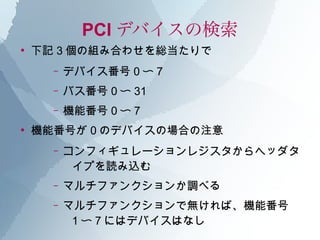
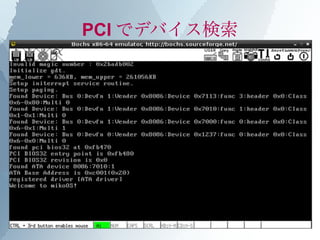
下記 3 個の組み合わせを総当たりで
– デバイス番号 0 〜 7
– バス番号 0 〜 31
– 機能番号 0 〜 7
●
機能番号が 0 のデバイスの場合の注意
– コンフィギュレーションレジスタからヘッダタ
イプを読み込む
– マルチファンクションか調べる
– マルチファンクションで無ければ、機能番号
1 〜 7 にはデバイスはなし
6. PCI デバイスの検索
●
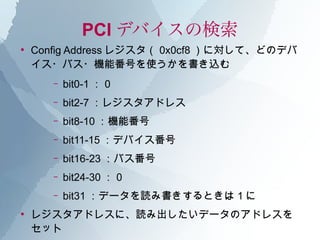
Config Address レジスタ( 0x0cf8 )に対して、どのデバ
イス・バス・機能番号を使うかを書き込む
– bit0-1 : 0
– bit2-7 :レジスタアドレス
– bit8-10 :機能番号
– bit11-15 :デバイス番号
– bit16-23 :バス番号
– bit24-30 : 0
– bit31 :データを読み書きするときは 1 に
●
レジスタアドレスに、読み出したいデータのアドレスを
セット
7. PCI デバイスの検索
●
Configuration レジスタからデータを読む
– レジスタの範囲は 0x0cfc 〜 0x0cff
– I/O ポートに 0x0cfc を指定して 32bit アクセスすれば
OK
●
主なデータ
– 16 進数は Config Address で指定するレジスタアドレス
– ベンダ ID : 0x00 : bit0-15
– デバイス ID : 0x00:bit16-31
– クラスコード: 0x08 : bit8-31
– ヘッダタイプ :0x0c:bit16-23
●
bit23 :マルチファンクションデバイス
8. 9. HDD の初期化
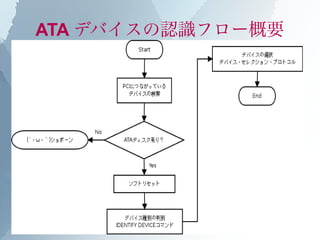
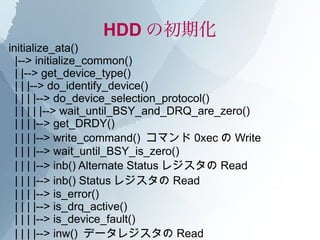
initialize_ata()
|--> initialize_common()
| |--> get_device_type()
| | |--> do_identify_device()
| | | |--> do_device_selection_protocol()
| | | | |--> wait_until_BSY_and_DRQ_are_zero()
| | | |--> get_DRDY()
| | | |--> write_command() コマンド 0xec の Write
| | | |--> wait_until_BSY_is_zero()
| | | |--> inb() Alternate Status レジスタの Read
| | | |--> inb() Status レジスタの Read
| | | |--> is_error()
| | | |--> is_drq_active()
| | | |--> is_device_fault()
| | | |--> inw() データレジスタの Read
10. HDD の R/W 共通部前半
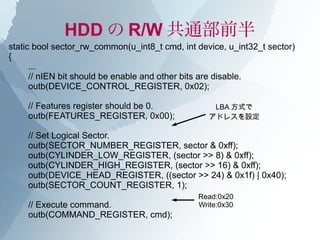
static bool sector_rw_common(u_int8_t cmd, int device, u_int32_t sector)
{
...
// nIEN bit should be enable and other bits are disable.
outb(DEVICE_CONTROL_REGISTER, 0x02);
// Features register should be 0. LBA 方式で
outb(FEATURES_REGISTER, 0x00); アドレスを設定
// Set Logical Sector.
outb(SECTOR_NUMBER_REGISTER, sector & 0xff);
outb(CYLINDER_LOW_REGISTER, (sector >> 8) & 0xff);
outb(CYLINDER_HIGH_REGISTER, (sector >> 16) & 0xff);
outb(DEVICE_HEAD_REGISTER, ((sector >> 24) & 0x1f) | 0x40);
outb(SECTOR_COUNT_REGISTER, 1);
Read:0x20
// Execute command. Write:0x30
outb(COMMAND_REGISTER, cmd);
11. HDD の R/W 共通部後半
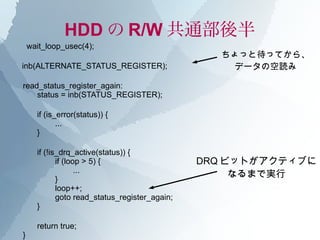
wait_loop_usec(4);
ちょっと待ってから、
inb(ALTERNATE_STATUS_REGISTER); データの空読み
read_status_register_again:
status = inb(STATUS_REGISTER);
if (is_error(status)) {
...
}
if (!is_drq_active(status)) {
if (loop > 5) { DRQ ビットがアクティブに
...
}
なるまで実行
loop++;
goto read_status_register_again;
}
return true;
}
12. HDD の Read 処理
int read_sector(int device, u_int32_t sector,
sector_t *buf, size_t buf_size)
{
...
ret = sector_rw_common(PIO_SECTOR_READ_CMD, device, sector);
if (!ret)
return -1;
for (i = 0; i < buf_size; i++)
buf[i] = inw(DATA_REGISTER);
finish_sector_rw(); 読み込みが終わったら
終了処理
return 0;
}
static inline void finish_sector_rw(void)
{
inb(ALTERNATE_STATUS_REGISTER);
inb(STATUS_REGISTER);
}
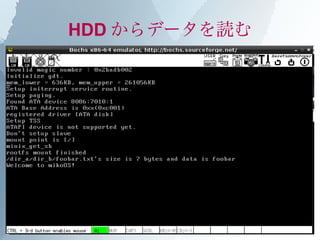
13. HDD からデータを読む
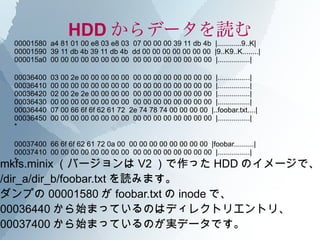
00001580 a4 81 01 00 e8 03 e8 03 07 00 00 00 39 11 db 4b |............9..K|
00001590 39 11 db 4b 39 11 db 4b dd 00 00 00 00 00 00 00 |9..K9..K........|
000015a0 00 00 00 00 00 00 00 00 00 00 00 00 00 00 00 00 |................|
00036400 03 00 2e 00 00 00 00 00 00 00 00 00 00 00 00 00 |................|
00036410 00 00 00 00 00 00 00 00 00 00 00 00 00 00 00 00 |................|
00036420 02 00 2e 2e 00 00 00 00 00 00 00 00 00 00 00 00 |................|
00036430 00 00 00 00 00 00 00 00 00 00 00 00 00 00 00 00 |................|
00036440 07 00 66 6f 6f 62 61 72 2e 74 78 74 00 00 00 00 |..foobar.txt....|
00036450 00 00 00 00 00 00 00 00 00 00 00 00 00 00 00 00 |................|
*
00037400 66 6f 6f 62 61 72 0a 00 00 00 00 00 00 00 00 00 |foobar..........|
00037410 00 00 00 00 00 00 00 00 00 00 00 00 00 00 00 00 |................|
mkfs.minix (バージョンは V2 )で作った HDD のイメージで、
*
/dir_a/dir_b/foobar.txt を読みます。
ダンプの 00001580 が foobar.txt の inode で、
00036440 から始まっているのはディレクトリエントリ、
00037400 から始まっているのが実データです。
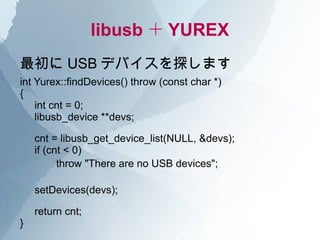
14. 15. libusb + YUREX
最初に USB デバイスを探します
int Yurex::findDevices() throw (const char *)
{
int cnt = 0;
libusb_device **devs;
cnt = libusb_get_device_list(NULL, &devs);
if (cnt < 0)
throw "There are no USB devices";
setDevices(devs);
return cnt;
}
16. libusb + YUREX
bool Yurex::checkYurexDevice() throw (const char *)
{
libusb_device *dev;
libusb_device **devs = getDevices();
int i = 0;
bool ret = false;
while ((dev = devs[i++]) != NULL) {
struct libusb_device_descriptor desc;
int r = libusb_get_device_descriptor(dev, &desc);
if (r < 0)
throw ("failed to get device descriptor");
if (desc.idVendor == YUREX_VENDOR_ID &&
desc.idProduct == YUREX_PRODUCT_ID) {
setDescriptor(desc);
setDevice(dev);
ret = true;
break;
}
} 見つかったデバイスから、
return ret; YUREX があるかをチェック
}
17. libusb + YUREX
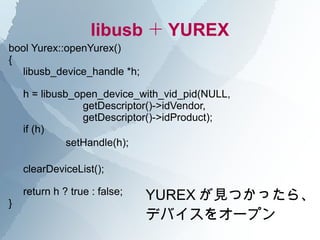
bool Yurex::openYurex()
{
libusb_device_handle *h;
h = libusb_open_device_with_vid_pid(NULL,
getDescriptor()->idVendor,
getDescriptor()->idProduct);
if (h)
setHandle(h);
clearDeviceList();
}
return h ? true : false; YUREX が見つかったら、
デバイスをオープン
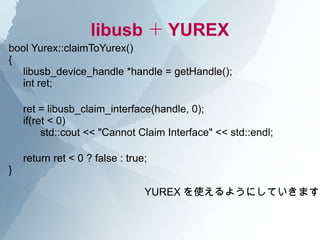
18. libusb + YUREX
bool Yurex::claimToYurex()
{
libusb_device_handle *handle = getHandle();
int ret;
ret = libusb_claim_interface(handle, 0);
if(ret < 0)
std::cout << "Cannot Claim Interface" << std::endl;
return ret < 0 ? false : true;
}
YUREX を使えるようにしていきます
19. libusb + YUREX
void Yurex::findEndPoint()
{
libusb_config_descriptor *config = getConfig();
const libusb_interface_descriptor *interdesc;
const libusb_endpoint_descriptor *epdesc;
const libusb_interface *inter;
libusb_get_config_descriptor(getDevice(), 0, &config);
// Actually, yulex may only have one endpoint.
for(int i = 0; i < (int) config->bNumInterfaces; i++) {
inter = &config->interface[i];
for(int j = 0; j < inter->num_altsetting; j++) {
interdesc = &inter->altsetting[j];
for(int k = 0; k < (int) interdesc->bNumEndpoints; k++) {
epdesc = &interdesc->endpoint[k];
setEndPoint(epdesc);
}
} YUREX の設定はこれで終わりです
}
}
20. libusb + YUREX
bool Yurex::readDataSync()
{
unsigned char data[8] = { CMD_PADDING };
int ret;
int actual = 0;
data[0] = CMD_READ;
data[1] = CMD_EOF;
ret = libusb_bulk_transfer(getHandle(), getEndPoint()->bEndpointAddress, data, sizeof(data), &actual,
2000);
if(ret < 0) {
std::cout << "Reading Error" << std::endl;
} else {
std::cout << "Reading Successful!" << std::endl;
for (int i = 0; i < sizeof(data); i++)
std::cout << std::hex << std::showbase << (int) data[i] << ":";
std::cout << std::endl;
}
return true;
}
YUREX からデータの読み込み
21. libusb + YUREX
[masami@moonlight:~/experiment/yurex]% sudo ./yurex
Yurex info
Vendor: 0xc45
Product: 0x1010
Open Yurex device is success
Kernel Driver Active
Kernel Driver Detached!
Claim to Yurex device
ret is 0
Start search endpoint
find endpoint
Number of alternate settings: 0x1 | Interface Number: 0 |
Number of endpoints: 0x1 | Descriptor Type: 0x5 | EP Address: 0x81 |
ret is 0 : actual is 0x8
Writing Successful!
ret is 0 : actual is 0x8
Reading Successful!
0x43:0:0:0:0:0x94:0xd:0:
Done.
22. ご清聴ありがとうございました
@yojiro さんのプレゼン資料「 OPENBSD
MEETS "YUREX" 」
http://groups.google.com/group/kernelvm
↑ の「第三回 カーネル/ VM 探検隊まとめ」
資料で使用したソースコード
http://github.com/masami256/miko
http://github.com/masami256/yurex
はてなダイアリー
http://d.hatena.ne.jp/masami256/


![HDD の Read 処理
int read_sector(int device, u_int32_t sector,
sector_t *buf, size_t buf_size)
{
...
ret = sector_rw_common(PIO_SECTOR_READ_CMD, device, sector);
if (!ret)
return -1;
for (i = 0; i < buf_size; i++)
buf[i] = inw(DATA_REGISTER);
finish_sector_rw(); 読み込みが終わったら
終了処理
return 0;
}
static inline void finish_sector_rw(void)
{
inb(ALTERNATE_STATUS_REGISTER);
inb(STATUS_REGISTER);
}](https://image.slidesharecdn.com/20100508kernelvmmasami256-120526204717-phpapp01/85/slide-12-320.jpg)
![libusb + YUREX
bool Yurex::checkYurexDevice() throw (const char *)
{
libusb_device *dev;
libusb_device **devs = getDevices();
int i = 0;
bool ret = false;
while ((dev = devs[i++]) != NULL) {
struct libusb_device_descriptor desc;
int r = libusb_get_device_descriptor(dev, &desc);
if (r < 0)
throw ("failed to get device descriptor");
if (desc.idVendor == YUREX_VENDOR_ID &&
desc.idProduct == YUREX_PRODUCT_ID) {
setDescriptor(desc);
setDevice(dev);
ret = true;
break;
}
} 見つかったデバイスから、
return ret; YUREX があるかをチェック
}](https://image.slidesharecdn.com/20100508kernelvmmasami256-120526204717-phpapp01/85/slide-16-320.jpg)
![libusb + YUREX
void Yurex::findEndPoint()
{
libusb_config_descriptor *config = getConfig();
const libusb_interface_descriptor *interdesc;
const libusb_endpoint_descriptor *epdesc;
const libusb_interface *inter;
libusb_get_config_descriptor(getDevice(), 0, &config);
// Actually, yulex may only have one endpoint.
for(int i = 0; i < (int) config->bNumInterfaces; i++) {
inter = &config->interface[i];
for(int j = 0; j < inter->num_altsetting; j++) {
interdesc = &inter->altsetting[j];
for(int k = 0; k < (int) interdesc->bNumEndpoints; k++) {
epdesc = &interdesc->endpoint[k];
setEndPoint(epdesc);
}
} YUREX の設定はこれで終わりです
}
}](https://image.slidesharecdn.com/20100508kernelvmmasami256-120526204717-phpapp01/85/slide-19-320.jpg)
![libusb + YUREX
bool Yurex::readDataSync()
{
unsigned char data[8] = { CMD_PADDING };
int ret;
int actual = 0;
data[0] = CMD_READ;
data[1] = CMD_EOF;
ret = libusb_bulk_transfer(getHandle(), getEndPoint()->bEndpointAddress, data, sizeof(data), &actual,
2000);
if(ret < 0) {
std::cout << "Reading Error" << std::endl;
} else {
std::cout << "Reading Successful!" << std::endl;
for (int i = 0; i < sizeof(data); i++)
std::cout << std::hex << std::showbase << (int) data[i] << ":";
std::cout << std::endl;
}
return true;
}
YUREX からデータの読み込み](https://image.slidesharecdn.com/20100508kernelvmmasami256-120526204717-phpapp01/85/slide-20-320.jpg)
![libusb + YUREX
[masami@moonlight:~/experiment/yurex]% sudo ./yurex
Yurex info
Vendor: 0xc45
Product: 0x1010
Open Yurex device is success
Kernel Driver Active
Kernel Driver Detached!
Claim to Yurex device
ret is 0
Start search endpoint
find endpoint
Number of alternate settings: 0x1 | Interface Number: 0 |
Number of endpoints: 0x1 | Descriptor Type: 0x5 | EP Address: 0x81 |
ret is 0 : actual is 0x8
Writing Successful!
ret is 0 : actual is 0x8
Reading Successful!
0x43:0:0:0:0:0x94:0xd:0:
Done.](https://image.slidesharecdn.com/20100508kernelvmmasami256-120526204717-phpapp01/85/slide-21-320.jpg)



![[Basic 7] OS の基本 / 割り込み / システム コール / メモリ管理](https://cdn.slidesharecdn.com/ss_thumbnails/basic-07-180228134341-thumbnail.jpg?width=640&height=640&fit=bounds)


