Ryousei Takano, Yusuke Tanimura, Akihiko Oota,!
Hiroki Oohashi, Keiichi Yusa, Yoshio Tanaka
National Institute of Advanced Industrial Science and Technology, Japan
ISGC 2015@Taipei, 20 March. 2015
AIST Super Green Cloud: !
Lessons Learned from the Operation and !
the Performance Evaluation of HPC Cloud
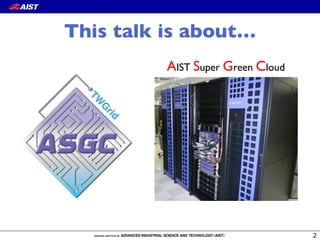
AIST Super Green Cloud
This talk is about…
Introduction
•  HPC Cloud is promising HPC platform.
•  Virtualization is a key technology.
–  Pro: a customized software environment, elasticity, etc
–  Con: a large overhead, spoiling I/O performance.
•  VMM-bypass I/O technologies, e.g., PCI passthrough and !
SR-IOV, can significantly mitigate the overhead.
•  “99% of HPC jobs running on US NSF computing
centers fit into one rack.” -- M. Norman, UCSD
•  Current virtualization technologies are feasible
enough for supporting such a scale.
LINPACK on ASGC
4
0
10
20
30
40
50
60
0 32 64 96 128
Performance(TFLOPS)
Number of Nodes
Physical Cluster
Virtual Cluster
Performance degradation:!
5.4 - 6.6%
Efficiency* on 128 nodes
Physical cluster: 90%
Virtual cluster: 84%
*) Rmax / Rpeak
IEEE CloudCom 2014
Introduction (cont’d)
•  HPC Clouds are heading for hybrid-cloud and multi-
cloud systems, where the user can execute their
application anytime and anywhere he/she wants.
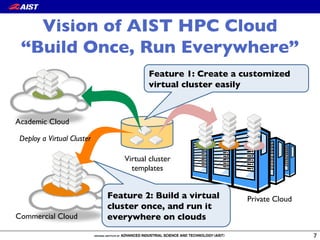
•  Vision of AIST HPC Cloud:
“Build once, run everywhere”
•  AIST Super Green Cloud (ASGC): !
a fully virtualized HPC system
Outline
•  AIST Super Green Cloud (ASGC) and!
HPC Cloud service
•  Lessons learned from the first six months of operation
•  Experiments
•  Conclusion
6
Vision of AIST HPC Cloud!
“Build Once, Run Everywhere”
7
Academic Cloud
Private Cloud
Commercial Cloud
Virtual cluster!
templates
Deploy a Virtual Cluster
Feature 1: Create a customized
virtual cluster easily
Feature 2: Build a virtual
cluster once, and run it
everywhere on clouds
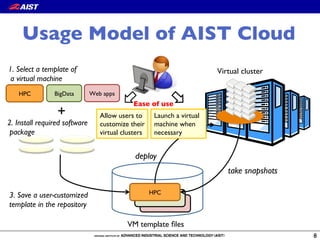
Usage Model of AIST Cloud
8
Allow users to
customize their
virtual clusters
0 21
Web appsBigDataHPC
1. Select a template of!
a virtual machine
2. Install required software!
package
VM template files
HPC
+
Ease of use
Virtual cluster
deploy
take snapshots
Launch a virtual
machine when
necessary
3. Save a user-customized!
template in the repository
9
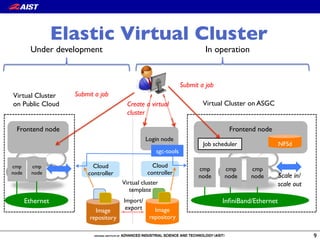
Elastic Virtual Cluster
Cloud
controller
Login node
sgc-tools
Image
repository
Virtual cluster!
template
Cloud
controller
Frontend node
cmp!
node
cmp
node
cmp
node Scale in/!
scale out
NFSdJob scheduler
Virtual Cluster on ASGC
InfiniBand/Ethernet
Image
repository
Import/
export
Create a virtual
cluster
Virtual Cluster!
on Public Cloud
Frontend node
cmp!
node
cmp!
node
Ethernet
Submit a job
Submit a job
In operationUnder development
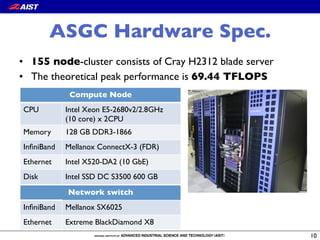
ASGC Hardware Spec.
10
Compute Node
CPU Intel Xeon E5-2680v2/2.8GHz !
(10 core) x 2CPU
Memory 128 GB DDR3-1866
InfiniBand Mellanox ConnectX-3 (FDR)
Ethernet Intel X520-DA2 (10 GbE)
Disk Intel SSD DC S3500 600 GB
•  155 node-cluster consists of Cray H2312 blade server
•  The theoretical peak performance is 69.44 TFLOPS
Network switch
InfiniBand Mellanox SX6025
Ethernet Extreme BlackDiamond X8
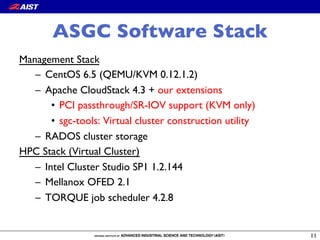
ASGC Software Stack
Management Stack
–  CentOS 6.5 (QEMU/KVM 0.12.1.2)
–  Apache CloudStack 4.3 + our extensions
•  PCI passthrough/SR-IOV support (KVM only)
•  sgc-tools: Virtual cluster construction utility
–  RADOS cluster storage
HPC Stack (Virtual Cluster)
–  Intel Cluster Studio SP1 1.2.144
–  Mellanox OFED 2.1
–  TORQUE job scheduler 4.2.8
11
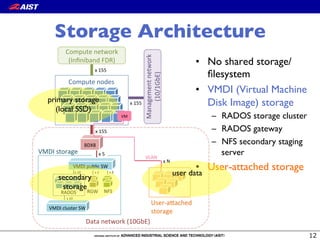
Storage Architecture
User%a'ached+
storage
x+N
VLAN
Compute+nodes
Compute+network+
(Infiniband+FDR)
Management+network+
(10/1GbE)
x+155
x+155
BDX8
x+155
x+5
VMDI+public+SW
RGWRADOS
VMDI+cluster+SW
x+10
x+10
VMDI+storage
Data+network+(10GbE)
NFS
x+2 x+2
VM
•  No shared storage/!
filesystem
•  VMDI (Virtual Machine
Disk Image) storage
–  RADOS storage cluster
–  RADOS gateway
–  NFS secondary staging
server
•  User-attached storage
primary storage!
(local SSD)
secondary
storage
user data
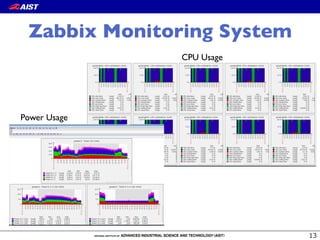
Zabbix Monitoring System
CPU Usage
Power Usage
Outline
•  AIST Super Green Cloud (ASGC) and!
HPC Cloud service
•  Lessons learned from the first six months of operation
–  CloudStack on a Supercomputer
–  Cloud Service for HPC users
–  Utilization
•  Experiments
•  Conclusion
14
Overview of ASGC Operation
•  The operation started from July 2014.
•  Accounts: 30+
–  Main users are material scientists and genome scientists.
•  Utilization: < 70%
•  95% of the total usage time is consumed for running
HPC VM instances.
•  Hardware failures: 19 (memory, M/B, power supply)
CloudStack on Supercomputer
•  Supercomputer is not designed for cloud computing.
–  Cluster management software is troublesome.
•  We can launch a highly productive system in a short
development time by leveraging open source system
software.
•  Software maturity of CloudStack
–  Our storage architecture is slightly uncommon, that is we
use local SSD disk as primary storage, and S3-compatible
object store as secondary storage.
–  We discovered and resolved several serious bugs.
Software Maturily
CloudStack Issue Our action Status
cloudstack-agent jsvc gets too large virtual memory space Patch Fixed
listUsageRecords generates NullPointerExceptions for
expunging instances
Patch Fixed
Duplicate usage records when listing large number of records /
Small page sizes return duplicate results
Backporting Fixed
Public key content is overridden by template's meta data when
you create a instance
Bug report Fixed
Migration of aVM with volumes in local storage to another
host in the same cluster is failing
Backporting Fixed
Negative ref_cnt of template(snapshot/volume)_store_ref
results in out-of-range error in MySQL
Patch (not merged) Fixed
[S3] Parallel deployment makes reference count of a cache in
NFS secondary staging store negative(-1)
Patch (not merged) Unresolved
Can't create proper template fromVM on S3 secondary
storage environment
Patch Fixed
Fails to attach a volume (is made from a snapshot) to aVM
with using local storage as primary storage
Bug report Unresolved
Cloud service for HPC users
•  SaaS is the best if the target application is clear.
•  IaaS is quite flexible. However, it is difficult to
manage an HPC environment from scratch for
application users.
•  To bridge this gap, sgc-tools is introduced on top of
an IaaS service.
•  We believe it works well, although some minor
problems are remained.
•  To improve the ability to maintain VM template, the
idea of “Infrastructure as code” can help.
Utilization
•  Efficient use of limited resources is required.
•  A virtual cluster dedicates resources whether the
user fully utilizes them or not.
•  sgc-tools do not support queuing at system wide,
therefore, the users need to check the availability.
•  Introducing a global scheduler, e.g., Condor VM
universe, can be a solution for this problem.
Outline
•  AIST Super Green Cloud (ASGC) and!
HPC Cloud service
•  Lessons learned from the first six months of operation
•  Experiments
–  Deployment time
–  Performance evaluation of SR-IOV
•  Conclusion
20
0 5 10 15 20 25 30 35
0
200
400
600
800
1000
Number of nodes
Deploytime[second]
●
●
●
●
●
● no cache
cache on NFS/SS
cache on local node
Virtual Cluster Deployment
Breakdown (second)
Device attach!
(before OS boot)
90
OS boot 90
FS creation (mkfs) 90
transfer from !
RADOS to SS
transfer from SS to !
local node
VM
VM
RADOS
NFS/SS
Compute!
node
VM
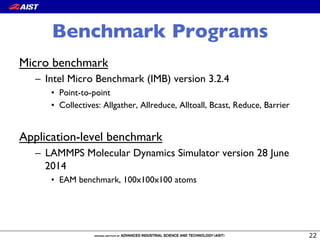
Benchmark Programs
Micro benchmark
–  Intel Micro Benchmark (IMB) version 3.2.4
•  Point-to-point
•  Collectives: Allgather, Allreduce, Alltoall, Bcast, Reduce, Barrier
Application-level benchmark
–  LAMMPS Molecular Dynamics Simulator version 28 June
2014
•  EAM benchmark, 100x100x100 atoms
MPI Point-to-point
communication
23
6.00GB/s
5.72GB/s
5.73GB/s
IMB
Message size [Byte]
Bandwidth[MB/sec]
101
102
103
104
105
10610−1
101
102
103
104
BM
PCI passthrough
SR−IOV
The overhead is less than 5% with large message,
though it is up to 30% with small message.
Message size [Byte]
Executiontime[microsecond]
101
102
103
104
105
106101
102
103
104
105
BM
PCI passthrough
SR−IOV
MPI Collectives
Time [microsecond]
BM 6.87 (1.00)
PCI passthrough 8.07 (1.17)
SR-IOV 9.36 (1.36)
Message size [Byte]
Executiontime[microsecond]
101
102
103
104
105
106101
102
103
104
105
BM
PCI passthrough
SR−IOV
Message size [Byte]
Executiontime[microsecond]
101
102
103
104
105
106101
102
103
104
105
BM
PCI passthrough
SR−IOV
Message size [Byte]
Executiontime[microsecond]
101
102
103
104
105
106101
102
103
104
BM
PCI passthrough
SR−IOV
Message size [Byte]
Executiontime[microsecond]
101
102
103
104
105
106101
102
103
104
BM
PCI passthrough
SR−IOV
ReuceBcast
AllreduceAllgather Alltoall
The performance of SR-IOV is comparable to
that of PCI passthrough while unexpected
performance degradation is often observed
Barrier
LAMMPS: MD simulator
•  EAM benchmark:
–  Fixed problem size (1M
atoms)
–  #proc: 20 - 160
•  VCPU pinning reduces
performance fluctuation.
•  Performance overhead
of PCI passthrough and
SR-IOV is about 13 %.
20 40 60 80 100 120 140 160
0
10
20
30
40
50
60
Number of processes
Executiontime[second]
●
●
●
●
●
● BM
PCI passthrough
PCI passthrough w/ vCPU pin
SR−IOV
SR−IOV w/ vCPU pin
Findings
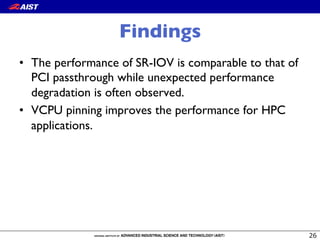
•  The performance of SR-IOV is comparable to that of
PCI passthrough while unexpected performance
degradation is often observed.
•  VCPU pinning improves the performance for HPC
applications.
Outline
•  AIST Super Green Cloud (ASGC) and!
HPC Cloud service
•  Lessons learned from the first six months of operation
•  Experiments
•  Conclusion
27
Conclusion and Future work
•  ASGC is a fully virtualized HPC system.
•  We can launch a highly productive system in a short
development time by leveraging start-of-the-art open
source system software.
–  Extension: PCI passthrough/SR-IOV support, sgc-tools
–  Bug fixes…
•  Future research direction: data movement is key.
–  Efficient data management and transfer methods
–  Federated identity management
28
Question?
Thank you for your attention!
29
Acknowledgments:
This work was partly supported by JSPS KAKENHI Grant Number 24700040.

AIST Super Green Cloud: lessons learned from the operation and the performance evaluation of HPC cloud

  • 1.
    Ryousei Takano, YusukeTanimura, Akihiko Oota,! Hiroki Oohashi, Keiichi Yusa, Yoshio Tanaka National Institute of Advanced Industrial Science and Technology, Japan ISGC 2015@Taipei, 20 March. 2015 AIST Super Green Cloud: ! Lessons Learned from the Operation and ! the Performance Evaluation of HPC Cloud
  • 2.
    AIST Super GreenCloud This talk is about…
  • 3.
    Introduction •  HPC Cloudis promising HPC platform. •  Virtualization is a key technology. –  Pro: a customized software environment, elasticity, etc –  Con: a large overhead, spoiling I/O performance. •  VMM-bypass I/O technologies, e.g., PCI passthrough and ! SR-IOV, can significantly mitigate the overhead. •  “99% of HPC jobs running on US NSF computing centers fit into one rack.” -- M. Norman, UCSD •  Current virtualization technologies are feasible enough for supporting such a scale.
  • 4.
    LINPACK on ASGC 4 0 10 20 30 40 50 60 032 64 96 128 Performance(TFLOPS) Number of Nodes Physical Cluster Virtual Cluster Performance degradation:! 5.4 - 6.6% Efficiency* on 128 nodes Physical cluster: 90% Virtual cluster: 84% *) Rmax / Rpeak IEEE CloudCom 2014
  • 5.
    Introduction (cont’d) •  HPCClouds are heading for hybrid-cloud and multi- cloud systems, where the user can execute their application anytime and anywhere he/she wants. •  Vision of AIST HPC Cloud: “Build once, run everywhere” •  AIST Super Green Cloud (ASGC): ! a fully virtualized HPC system
  • 6.
    Outline •  AIST SuperGreen Cloud (ASGC) and! HPC Cloud service •  Lessons learned from the first six months of operation •  Experiments •  Conclusion 6
  • 7.
    Vision of AISTHPC Cloud! “Build Once, Run Everywhere” 7 Academic Cloud Private Cloud Commercial Cloud Virtual cluster! templates Deploy a Virtual Cluster Feature 1: Create a customized virtual cluster easily Feature 2: Build a virtual cluster once, and run it everywhere on clouds
  • 8.
    Usage Model ofAIST Cloud 8 Allow users to customize their virtual clusters 0 21 Web appsBigDataHPC 1. Select a template of! a virtual machine 2. Install required software! package VM template files HPC + Ease of use Virtual cluster deploy take snapshots Launch a virtual machine when necessary 3. Save a user-customized! template in the repository
  • 9.
    9 Elastic Virtual Cluster Cloud controller Loginnode sgc-tools Image repository Virtual cluster! template Cloud controller Frontend node cmp! node cmp node cmp node Scale in/! scale out NFSdJob scheduler Virtual Cluster on ASGC InfiniBand/Ethernet Image repository Import/ export Create a virtual cluster Virtual Cluster! on Public Cloud Frontend node cmp! node cmp! node Ethernet Submit a job Submit a job In operationUnder development
  • 10.
    ASGC Hardware Spec. 10 ComputeNode CPU Intel Xeon E5-2680v2/2.8GHz ! (10 core) x 2CPU Memory 128 GB DDR3-1866 InfiniBand Mellanox ConnectX-3 (FDR) Ethernet Intel X520-DA2 (10 GbE) Disk Intel SSD DC S3500 600 GB •  155 node-cluster consists of Cray H2312 blade server •  The theoretical peak performance is 69.44 TFLOPS Network switch InfiniBand Mellanox SX6025 Ethernet Extreme BlackDiamond X8
  • 11.
    ASGC Software Stack ManagementStack –  CentOS 6.5 (QEMU/KVM 0.12.1.2) –  Apache CloudStack 4.3 + our extensions •  PCI passthrough/SR-IOV support (KVM only) •  sgc-tools: Virtual cluster construction utility –  RADOS cluster storage HPC Stack (Virtual Cluster) –  Intel Cluster Studio SP1 1.2.144 –  Mellanox OFED 2.1 –  TORQUE job scheduler 4.2.8 11
  • 12.
    Storage Architecture User%a'ached+ storage x+N VLAN Compute+nodes Compute+network+ (Infiniband+FDR) Management+network+ (10/1GbE) x+155 x+155 BDX8 x+155 x+5 VMDI+public+SW RGWRADOS VMDI+cluster+SW x+10 x+10 VMDI+storage Data+network+(10GbE) NFS x+2 x+2 VM • No shared storage/! filesystem •  VMDI (Virtual Machine Disk Image) storage –  RADOS storage cluster –  RADOS gateway –  NFS secondary staging server •  User-attached storage primary storage! (local SSD) secondary storage user data
  • 13.
  • 14.
    Outline •  AIST SuperGreen Cloud (ASGC) and! HPC Cloud service •  Lessons learned from the first six months of operation –  CloudStack on a Supercomputer –  Cloud Service for HPC users –  Utilization •  Experiments •  Conclusion 14
  • 15.
    Overview of ASGCOperation •  The operation started from July 2014. •  Accounts: 30+ –  Main users are material scientists and genome scientists. •  Utilization: < 70% •  95% of the total usage time is consumed for running HPC VM instances. •  Hardware failures: 19 (memory, M/B, power supply)
  • 16.
    CloudStack on Supercomputer • Supercomputer is not designed for cloud computing. –  Cluster management software is troublesome. •  We can launch a highly productive system in a short development time by leveraging open source system software. •  Software maturity of CloudStack –  Our storage architecture is slightly uncommon, that is we use local SSD disk as primary storage, and S3-compatible object store as secondary storage. –  We discovered and resolved several serious bugs.
  • 17.
    Software Maturily CloudStack IssueOur action Status cloudstack-agent jsvc gets too large virtual memory space Patch Fixed listUsageRecords generates NullPointerExceptions for expunging instances Patch Fixed Duplicate usage records when listing large number of records / Small page sizes return duplicate results Backporting Fixed Public key content is overridden by template's meta data when you create a instance Bug report Fixed Migration of aVM with volumes in local storage to another host in the same cluster is failing Backporting Fixed Negative ref_cnt of template(snapshot/volume)_store_ref results in out-of-range error in MySQL Patch (not merged) Fixed [S3] Parallel deployment makes reference count of a cache in NFS secondary staging store negative(-1) Patch (not merged) Unresolved Can't create proper template fromVM on S3 secondary storage environment Patch Fixed Fails to attach a volume (is made from a snapshot) to aVM with using local storage as primary storage Bug report Unresolved
  • 18.
    Cloud service forHPC users •  SaaS is the best if the target application is clear. •  IaaS is quite flexible. However, it is difficult to manage an HPC environment from scratch for application users. •  To bridge this gap, sgc-tools is introduced on top of an IaaS service. •  We believe it works well, although some minor problems are remained. •  To improve the ability to maintain VM template, the idea of “Infrastructure as code” can help.
  • 19.
    Utilization •  Efficient useof limited resources is required. •  A virtual cluster dedicates resources whether the user fully utilizes them or not. •  sgc-tools do not support queuing at system wide, therefore, the users need to check the availability. •  Introducing a global scheduler, e.g., Condor VM universe, can be a solution for this problem.
  • 20.
    Outline •  AIST SuperGreen Cloud (ASGC) and! HPC Cloud service •  Lessons learned from the first six months of operation •  Experiments –  Deployment time –  Performance evaluation of SR-IOV •  Conclusion 20
  • 21.
    0 5 1015 20 25 30 35 0 200 400 600 800 1000 Number of nodes Deploytime[second] ● ● ● ● ● ● no cache cache on NFS/SS cache on local node Virtual Cluster Deployment Breakdown (second) Device attach! (before OS boot) 90 OS boot 90 FS creation (mkfs) 90 transfer from ! RADOS to SS transfer from SS to ! local node VM VM RADOS NFS/SS Compute! node VM
  • 22.
    Benchmark Programs Micro benchmark – Intel Micro Benchmark (IMB) version 3.2.4 •  Point-to-point •  Collectives: Allgather, Allreduce, Alltoall, Bcast, Reduce, Barrier Application-level benchmark –  LAMMPS Molecular Dynamics Simulator version 28 June 2014 •  EAM benchmark, 100x100x100 atoms
  • 23.
    MPI Point-to-point communication 23 6.00GB/s 5.72GB/s 5.73GB/s IMB Message size[Byte] Bandwidth[MB/sec] 101 102 103 104 105 10610−1 101 102 103 104 BM PCI passthrough SR−IOV The overhead is less than 5% with large message, though it is up to 30% with small message.
  • 24.
    Message size [Byte] Executiontime[microsecond] 101 102 103 104 105 106101 102 103 104 105 BM PCIpassthrough SR−IOV MPI Collectives Time [microsecond] BM 6.87 (1.00) PCI passthrough 8.07 (1.17) SR-IOV 9.36 (1.36) Message size [Byte] Executiontime[microsecond] 101 102 103 104 105 106101 102 103 104 105 BM PCI passthrough SR−IOV Message size [Byte] Executiontime[microsecond] 101 102 103 104 105 106101 102 103 104 105 BM PCI passthrough SR−IOV Message size [Byte] Executiontime[microsecond] 101 102 103 104 105 106101 102 103 104 BM PCI passthrough SR−IOV Message size [Byte] Executiontime[microsecond] 101 102 103 104 105 106101 102 103 104 BM PCI passthrough SR−IOV ReuceBcast AllreduceAllgather Alltoall The performance of SR-IOV is comparable to that of PCI passthrough while unexpected performance degradation is often observed Barrier
  • 25.
    LAMMPS: MD simulator • EAM benchmark: –  Fixed problem size (1M atoms) –  #proc: 20 - 160 •  VCPU pinning reduces performance fluctuation. •  Performance overhead of PCI passthrough and SR-IOV is about 13 %. 20 40 60 80 100 120 140 160 0 10 20 30 40 50 60 Number of processes Executiontime[second] ● ● ● ● ● ● BM PCI passthrough PCI passthrough w/ vCPU pin SR−IOV SR−IOV w/ vCPU pin
  • 26.
    Findings •  The performanceof SR-IOV is comparable to that of PCI passthrough while unexpected performance degradation is often observed. •  VCPU pinning improves the performance for HPC applications.
  • 27.
    Outline •  AIST SuperGreen Cloud (ASGC) and! HPC Cloud service •  Lessons learned from the first six months of operation •  Experiments •  Conclusion 27
  • 28.
    Conclusion and Futurework •  ASGC is a fully virtualized HPC system. •  We can launch a highly productive system in a short development time by leveraging start-of-the-art open source system software. –  Extension: PCI passthrough/SR-IOV support, sgc-tools –  Bug fixes… •  Future research direction: data movement is key. –  Efficient data management and transfer methods –  Federated identity management 28
  • 29.
    Question? Thank you foryour attention! 29 Acknowledgments: This work was partly supported by JSPS KAKENHI Grant Number 24700040.