Investor Relations Podcasts Using Buzzsprout

How does the modern IRO reach their
audience of investors?
Buzzsprout for Podcasting
 Buzzsprout bills themselves as the best
way to publish your podcast. That
doesn‟t necessarily mean it‟s the best
for public companies, but it‟s certainly
an option.
 We particularly suggest using
Buzzsprout if you have NOT hosted
your earning calls and other interviews
in another location, like on an inhouse server.
Create a Buzzsprout Account
 Go to buzzsprout.com and create a new podcasting account.
 Use the email address and password you use for your investor relations
communication.
Optimize Your Buzzsprout Profile
 Use the name of your primary IR contact at your
company as the name on your Buzzsprout account when
signing up.
 You can change the title to anything, like “Company
Name Podcast.”
Podcast Description
 It‟s usually best to use your website‟s „About‟ text. Most people
searching for your podcast will do so using keywords relating to the
name of the company.
Also Include
 Include something about why your company has decided to
create a podcast in the description, which will help people who
arrive on your page by telling them what to expect after
subscribing.
Podcast Artwork
 Use your company branding to create a design for your podcast.
Ideally this should be a large image, and in most cases you can
manage with a screenshot from your website or by overlaying your logo
on a website background image.
 With IR Smartt, we created a new brand #IRchat as part of our media
family.
Select a Theme
 Your theme will rarely be seen because users won‟t be on your
podcast URL, but your theme should try and match your
branding color palate.
Your Background Image
 Use something from your company branding, like images you
used for your Twitter or YouTube backgrounds. Try to use a .jpg
as these images are smaller file sizes and likely won‟t need
cropping.
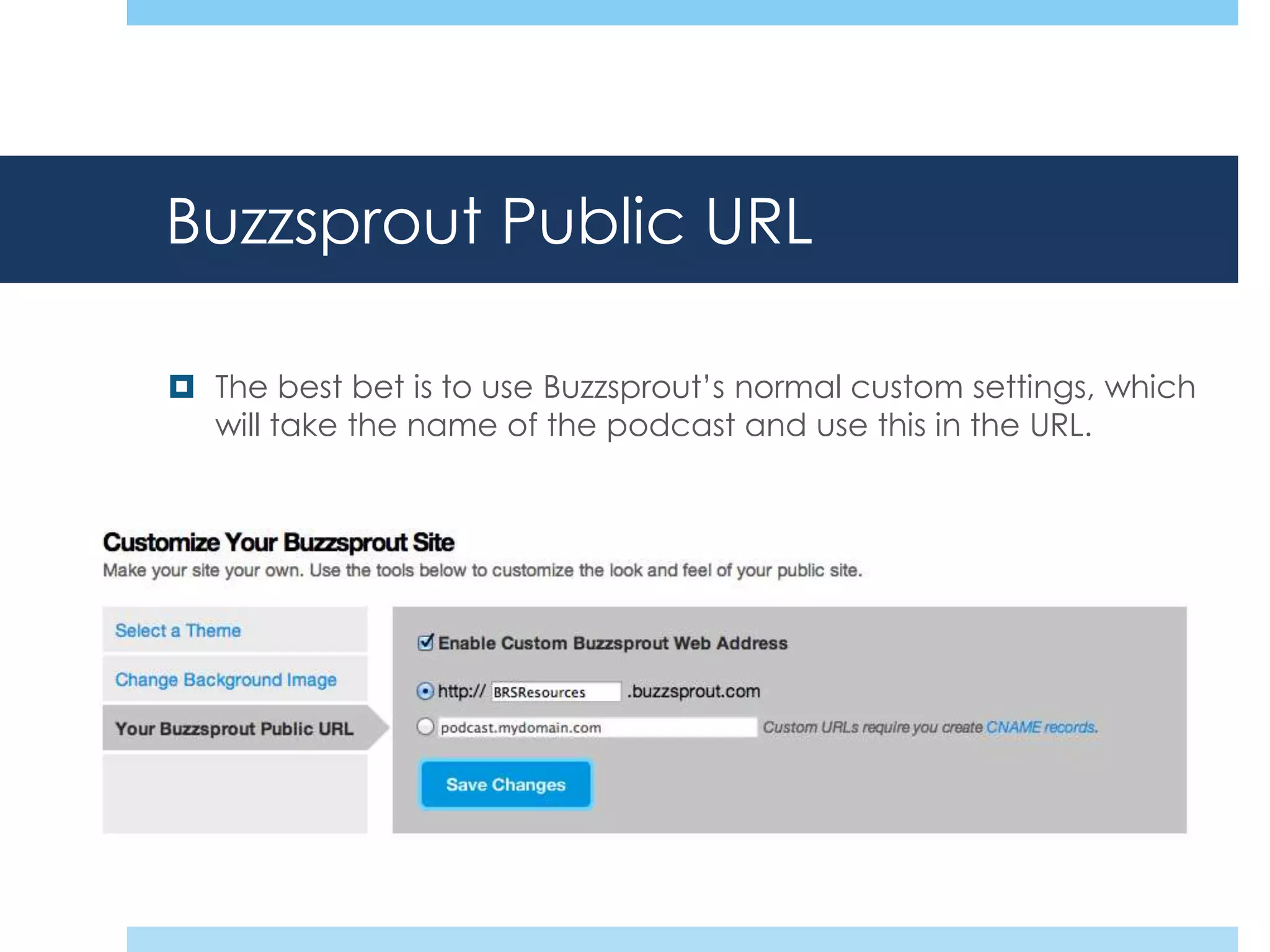
Buzzsprout Public URL
 The best bet is to use Buzzsprout‟s normal custom settings, which
will take the name of the podcast and use this in the URL.
Get the Podcast Listed in iTunes
 Buzzsprout has an excellent resource for submitting your
podcast to iTunes. ITunes has the largest group of
podcasts on the web, but you‟ll also want to submit it to
other directories, particularly Stitcher, which is common
amongst Android users.
 For some advanced features and metrics you can use
Feedburner and submit your podcast RSS feed to iTunes
directly by going to their “Submit Podcasts to the iTunes
Directory” page.
Create a Feedburner Account
 Go to feedburner.com
 Sign up for an account using a gmail account. Like
almost all Google products, you need a gmail address,
which hopefully you already have for your Google+ and
Google Places pages.
Burn a RSS Feed
 Setting up the RSS correctly is the most critical part of the
process. Take your Buzzsprout page URL and enter it into
Feedburner to create a RSS feed.
 We suggest making some minor adjustments within Feedburner
to optimize your podcast in iTunes and Google Play. For a full
rundown, check out Investor Relations Using Feedburner
Slideshare.
*Optional* podcast.company.com
 This step is only necessary if there is a large amount of traffic to
your website, like 10K+ unique visitors a month. This will allow
your podcast to be displayed as part of the company website
and requires a new CNAME record in your hosting account and
cPanel.

And there you have it! If you need clarification or have any
questions, feel free to email us at get@irsmartt.com and we‟ll be
happy to help.
More from IR Smartt?
 Visit our website @ Social Media for Investor Relations
 Checkout more powerpoints @ slideshare.net/IRSmartt
 Contact Us On:
 Email: get@irsmartt.com
 Phone: +1.512.487.7990
 Fax: +1.512.681.9498

Investor Relations Podcasts Using Buzzsprout

  • 1.
    Investor Relations PodcastsUsing Buzzsprout How does the modern IRO reach their audience of investors?
  • 2.
    Buzzsprout for Podcasting Buzzsprout bills themselves as the best way to publish your podcast. That doesn‟t necessarily mean it‟s the best for public companies, but it‟s certainly an option.  We particularly suggest using Buzzsprout if you have NOT hosted your earning calls and other interviews in another location, like on an inhouse server.
  • 3.
    Create a BuzzsproutAccount  Go to buzzsprout.com and create a new podcasting account.  Use the email address and password you use for your investor relations communication.
  • 4.
    Optimize Your BuzzsproutProfile  Use the name of your primary IR contact at your company as the name on your Buzzsprout account when signing up.  You can change the title to anything, like “Company Name Podcast.”
  • 5.
    Podcast Description  It‟susually best to use your website‟s „About‟ text. Most people searching for your podcast will do so using keywords relating to the name of the company.
  • 6.
    Also Include  Includesomething about why your company has decided to create a podcast in the description, which will help people who arrive on your page by telling them what to expect after subscribing.
  • 7.
    Podcast Artwork  Useyour company branding to create a design for your podcast. Ideally this should be a large image, and in most cases you can manage with a screenshot from your website or by overlaying your logo on a website background image.  With IR Smartt, we created a new brand #IRchat as part of our media family.
  • 8.
    Select a Theme Your theme will rarely be seen because users won‟t be on your podcast URL, but your theme should try and match your branding color palate.
  • 9.
    Your Background Image Use something from your company branding, like images you used for your Twitter or YouTube backgrounds. Try to use a .jpg as these images are smaller file sizes and likely won‟t need cropping.
  • 10.
    Buzzsprout Public URL The best bet is to use Buzzsprout‟s normal custom settings, which will take the name of the podcast and use this in the URL.
  • 11.
    Get the PodcastListed in iTunes  Buzzsprout has an excellent resource for submitting your podcast to iTunes. ITunes has the largest group of podcasts on the web, but you‟ll also want to submit it to other directories, particularly Stitcher, which is common amongst Android users.  For some advanced features and metrics you can use Feedburner and submit your podcast RSS feed to iTunes directly by going to their “Submit Podcasts to the iTunes Directory” page.
  • 12.
    Create a FeedburnerAccount  Go to feedburner.com  Sign up for an account using a gmail account. Like almost all Google products, you need a gmail address, which hopefully you already have for your Google+ and Google Places pages.
  • 13.
    Burn a RSSFeed  Setting up the RSS correctly is the most critical part of the process. Take your Buzzsprout page URL and enter it into Feedburner to create a RSS feed.  We suggest making some minor adjustments within Feedburner to optimize your podcast in iTunes and Google Play. For a full rundown, check out Investor Relations Using Feedburner Slideshare.
  • 14.
    *Optional* podcast.company.com  Thisstep is only necessary if there is a large amount of traffic to your website, like 10K+ unique visitors a month. This will allow your podcast to be displayed as part of the company website and requires a new CNAME record in your hosting account and cPanel. And there you have it! If you need clarification or have any questions, feel free to email us at get@irsmartt.com and we‟ll be happy to help.
  • 15.
    More from IRSmartt?  Visit our website @ Social Media for Investor Relations  Checkout more powerpoints @ slideshare.net/IRSmartt  Contact Us On:  Email: get@irsmartt.com  Phone: +1.512.487.7990  Fax: +1.512.681.9498