




Leveraging Social MediaLeveraging Social Media
Presented by:Presented by:
Kirk deViereKirk deViere
219 Group219 Group
• Your Web Site
• Social Networking, Microblogging and
Blogging Sites
• Reaching an Audience
• Site Management
• Social Bookmarking
• Reputation Monitoring
Agenda
Some Stats
• More than half of the world’s population is under 30.
• Facebook tops Google for weekly U.S. Internet traffic.
• Ashton Kutcher and Britney Spears have more Twitter
followers than the populations of Sweden, Israel,
Switzerland, Ireland, Norway and Panama.
• 50% of mobile Internet traffic in the UK is on Facebook.
• Amazon sold more electronic books for the Kindle than
physical books at Christmas.
• If you were paid $1 for each posted Wikipedia article,
you’d make $1,712.32 per hour.
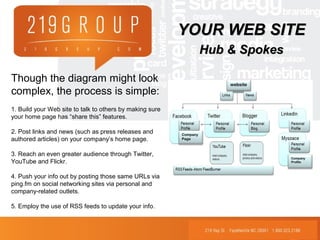
Though the diagram might look
complex, the process is simple:
1. Build your Web site to talk to others by making sure
your home page has “share this” features.
2. Post links and news (such as press releases and
authored articles) on your company’s home page.
3. Reach an even greater audience through Twitter,
YouTube and Flickr.
4. Push your info out by posting those same URLs via
ping.fm on social networking sites via personal and
company-related outlets.
5. Employ the use of RSS feeds to update your info.
website
Company
Page
Company
Profile
YOUR WEB SITEYOUR WEB SITE
Hub & SpokesHub & Spokes
Social Networking,Social Networking,
Microblogging, & BloggingMicroblogging, & Blogging
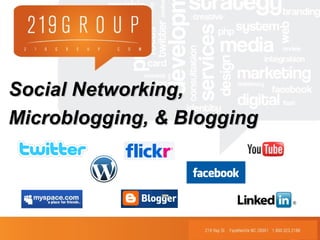
First, create profiles on the following top
social networking, microblogging and
blogging sites:
Social Networking: Microblogging:
1. MySpace 6. Twitter
2. Facebook
3. LinkedIn Blogging:
4. You Tube 7. Blogger/ Wordpress
5. Flickr
REACHING ANREACHING AN
AUDIENCEAUDIENCE
MySpace: do not disregard this site – you may not see it as
your target audience, but with over 68 million people visiting a
month, can you afford to ignore it?
• This site has heavy traffic in terms of music and visual arts -- interactivity is a
huge part of its success. If you have videos or graphic design work, this is the
perfect place to display it.
• Make sure your profile contains a link to your company site.
• Find friends by searching by name, e-mail address or display name.
• Expand your network by searching profiles for people with similar interests, and
perusing groups applicable to your business.
• Maintain a personality on the site by updating your material often (at least twice
a week), joining groups and conversing with people who take an interest in your
posts.
SOCIALSOCIAL
NETWORKINGNETWORKING
Facebook: this site is perfect for grabbing the attention of
educated professionals.
• To reach out, you can import your contacts from Outlook or other contact lists, or
search via a specific school or company. The site will also recommend new
connections based on your own network and information.
• Make sure your profile contains a link to your company site.
• Post new material at least twice a week, and join and participate in groups. Use
the events, photos and notes features whenever possible to keep your page
current.
• Create a business page in addition to your personal page by simply clicking on
“Advertising” at the bottom of any Facebook page, then “pages,” and “create a
page.”
• Have your creative topic be the name of the page, and your company’s name
the secondary title.
SOCIALSOCIAL
NETWORKINGNETWORKING
LinkedIn: This is the go-to site for when you want to reach a
skilled audience, as it allows networking among professionals.
• Find connections by importing your e-mail/address book connections. Also, once
you enter your company information, the site will recommend new contacts.
• Make sure your profile contains a link to your company site.
• Maintain a presence by joining relative groups and participating in the questions
and answers section. Pose thoughtful questions, and only answer when you truly
have something helpful to provide. Browse this section regularly.
• Other apps allow you to upload and share presentations, collect data for polls
and more.
SOCIALSOCIAL
NETWORKINGNETWORKING
You Tube: use this site for viral marketing.
• Post videos your company has created to an audience of
millions.
• Be sure to link back to your website or embed it in your site or
blog – this directs viewers back to your company.
SOCIALSOCIAL
NETWORKINGNETWORKING
Flickr: Share visual content in a way that engages viewers.
• Upload pictures and videos to share with your audience.
• You can organize and tag them, which makes them easier for
others to find.
• Join groups and create new contacts as you become more
involved in the site.
SOCIALSOCIAL
NETWORKINGNETWORKING
What are microblogging and blogging
sites all about?
Microblogging sites (i.e. Twitter) allow you to post short versions
(around 140 characters) of what you are up to. You can post a
new article, blog entry, or article as a “tweet,” status update, etc,
which others can then view.
Blogging sites allow for more room and greater versatility. Write
relatively short posts that will engage the reader; create an
angle and write engaging pieces that make the reader want to
return.
REACHING ANREACHING AN
AUDIENCEAUDIENCE
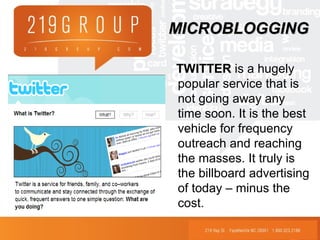
TWITTER is a hugely
popular service that is
not going away any
time soon. It is the best
vehicle for frequency
outreach and reaching
the masses. It truly is
the billboard advertising
of today – minus the
cost.
MICROBLOGGINGMICROBLOGGING
Blogger: there are many blogging sites out there
(WordPress, Blogdrive, LiveJournal), but Blogger is most used
• Use your blog to create personal brands, which can then in turn add value and
credibility to the corporate brand.
• Make the content useful and entertaining. Do not simply blog about company
achievements – make the copy personable, and give readers a reason to return.
• Make your blog title catchy and your headlines creative.
• Keep is short and sweet.
• Include links and keywords.
BLOGGINGBLOGGING
SITE MANAGEMENTSITE MANAGEMENT
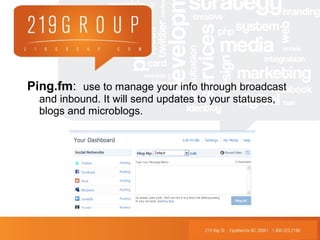
Ping.fm: use to manage your info through broadcast
and inbound. It will send updates to your statuses,
blogs and microblogs.
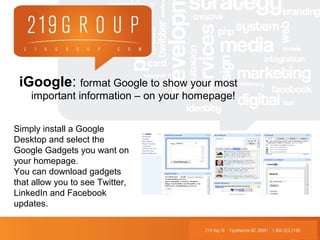
iGoogle: format Google to show your most
important information – on your homepage!
Simply install a Google
Desktop and select the
Google Gadgets you want on
your homepage.
You can download gadgets
that allow you to see Twitter,
LinkedIn and Facebook
updates.
SOCIAL BOOKMARKINGSOCIAL BOOKMARKING
Del.icio.us: 325,464 people per month (as of 12/31/08)
• Save all your bookmarks online, share them with others, and see what others are
bookmarking
• You can access the sites from anywhere using your login info, and there is an
ability to set some as private (i.e. work- or client-related sites).
• This site would be great for organizing websites.
SOCIALSOCIAL
BOOKMARKINGBOOKMARKING
StumbleUpon: 500,000 total users (as of 10/31/10)
• Users choose their interests (cooking, business, advertising, etc.) from a list,
install the StumbleUpon toolbar and then a click of the “stumble” button takes
them to a site they might like.
• Users also click a button to say whether they like the site or not, and
StumbleUpon keeps track of the sites you like.
• Others can access your favorite sites by viewing your profile.
• This is more of a promotional vehicle. Add images and short articles and expand
your network so others see the sites you have in your arsenal.
SOCIALSOCIAL
BOOKMARKINGBOOKMARKING
Digg: 40 million unique visitors per month (at peak in 2009)
• All news articles, videos, images, etc. are submitted by the community.
• Once something is submitted, other people see it and digg what they like best.
If your submission receives enough diggs, it is promoted to the home page of its
category — or the front page for millions of viewers to see.
• Users can customize their home page and see only stories they would be interested in.
• Use this for promotion by adding some new media to the mix. Submissions will be
posted under “upcoming stories,” where viewers look and either “digg” them or don’t.
• People see what you digg, so be active on the site and others will want to see your
favorites. Add all forms of media to this site.
SOCIALSOCIAL
BOOKMARKINGBOOKMARKING
Reddit: Over 2M people per month and increasing
• The site aims to have what’s new and popular on the web. Users customize what
they’re interested in. Votes train a filter, so the site only shows users things they
might like.
• You determine what shows on your front page by saying if things are “hot” or
“cold.”
• Use this as another promotional vehicle by uploading new sites — submission
titles are key to gaining recognition.
• Best for posting short articles and blogs.
SOCIALSOCIAL
BOOKMARKINGBOOKMARKING
Use the following sites to monitor your online
reputation.
•Google.com/alerts. Subscribe for this service via e-mail or RSS, and updates about
you or your company can be sent directly to your inbox.
•Search.twitter.com. The URL says it all: Use this to search for any tweets related to
your business.
•Technorati.com. This site, according to Schawbel, is the “largest blog search engine in
the world.” It can track any blog that links up to yours and send you RSS updates when
someone is talking about your company.
•Backtype.com. If searching for your company amidst blog comments is your concern,
this is your site.
REPUTATIONREPUTATION
MONITORINGMONITORING
Questions?Questions?
Kirk deViere
President, 219 Group
e: kirk@219group.com
p: 910.483-4749 ext 101
c: 910-273-8388
Website: www.219group.com
Facebook: http://www.facebook.com/219group
Twitter: http://www.twitter.com/219group
LinkedIn: http://www.linkedin.com/company/219-group

FYP Lunch & Learn Presentation

  • 2.
    Leveraging Social MediaLeveragingSocial Media Presented by:Presented by: Kirk deViereKirk deViere 219 Group219 Group
  • 3.
    • Your WebSite • Social Networking, Microblogging and Blogging Sites • Reaching an Audience • Site Management • Social Bookmarking • Reputation Monitoring Agenda
  • 4.
    Some Stats • Morethan half of the world’s population is under 30. • Facebook tops Google for weekly U.S. Internet traffic. • Ashton Kutcher and Britney Spears have more Twitter followers than the populations of Sweden, Israel, Switzerland, Ireland, Norway and Panama. • 50% of mobile Internet traffic in the UK is on Facebook. • Amazon sold more electronic books for the Kindle than physical books at Christmas. • If you were paid $1 for each posted Wikipedia article, you’d make $1,712.32 per hour.
  • 5.
    Though the diagrammight look complex, the process is simple: 1. Build your Web site to talk to others by making sure your home page has “share this” features. 2. Post links and news (such as press releases and authored articles) on your company’s home page. 3. Reach an even greater audience through Twitter, YouTube and Flickr. 4. Push your info out by posting those same URLs via ping.fm on social networking sites via personal and company-related outlets. 5. Employ the use of RSS feeds to update your info. website Company Page Company Profile YOUR WEB SITEYOUR WEB SITE Hub & SpokesHub & Spokes
  • 6.
    Social Networking,Social Networking, Microblogging,& BloggingMicroblogging, & Blogging
  • 7.
    First, create profileson the following top social networking, microblogging and blogging sites: Social Networking: Microblogging: 1. MySpace 6. Twitter 2. Facebook 3. LinkedIn Blogging: 4. You Tube 7. Blogger/ Wordpress 5. Flickr REACHING ANREACHING AN AUDIENCEAUDIENCE
  • 8.
    MySpace: do notdisregard this site – you may not see it as your target audience, but with over 68 million people visiting a month, can you afford to ignore it? • This site has heavy traffic in terms of music and visual arts -- interactivity is a huge part of its success. If you have videos or graphic design work, this is the perfect place to display it. • Make sure your profile contains a link to your company site. • Find friends by searching by name, e-mail address or display name. • Expand your network by searching profiles for people with similar interests, and perusing groups applicable to your business. • Maintain a personality on the site by updating your material often (at least twice a week), joining groups and conversing with people who take an interest in your posts. SOCIALSOCIAL NETWORKINGNETWORKING
  • 9.
    Facebook: this siteis perfect for grabbing the attention of educated professionals. • To reach out, you can import your contacts from Outlook or other contact lists, or search via a specific school or company. The site will also recommend new connections based on your own network and information. • Make sure your profile contains a link to your company site. • Post new material at least twice a week, and join and participate in groups. Use the events, photos and notes features whenever possible to keep your page current. • Create a business page in addition to your personal page by simply clicking on “Advertising” at the bottom of any Facebook page, then “pages,” and “create a page.” • Have your creative topic be the name of the page, and your company’s name the secondary title. SOCIALSOCIAL NETWORKINGNETWORKING
  • 10.
    LinkedIn: This isthe go-to site for when you want to reach a skilled audience, as it allows networking among professionals. • Find connections by importing your e-mail/address book connections. Also, once you enter your company information, the site will recommend new contacts. • Make sure your profile contains a link to your company site. • Maintain a presence by joining relative groups and participating in the questions and answers section. Pose thoughtful questions, and only answer when you truly have something helpful to provide. Browse this section regularly. • Other apps allow you to upload and share presentations, collect data for polls and more. SOCIALSOCIAL NETWORKINGNETWORKING
  • 11.
    You Tube: usethis site for viral marketing. • Post videos your company has created to an audience of millions. • Be sure to link back to your website or embed it in your site or blog – this directs viewers back to your company. SOCIALSOCIAL NETWORKINGNETWORKING
  • 12.
    Flickr: Share visualcontent in a way that engages viewers. • Upload pictures and videos to share with your audience. • You can organize and tag them, which makes them easier for others to find. • Join groups and create new contacts as you become more involved in the site. SOCIALSOCIAL NETWORKINGNETWORKING
  • 13.
    What are microbloggingand blogging sites all about? Microblogging sites (i.e. Twitter) allow you to post short versions (around 140 characters) of what you are up to. You can post a new article, blog entry, or article as a “tweet,” status update, etc, which others can then view. Blogging sites allow for more room and greater versatility. Write relatively short posts that will engage the reader; create an angle and write engaging pieces that make the reader want to return. REACHING ANREACHING AN AUDIENCEAUDIENCE
  • 14.
    TWITTER is ahugely popular service that is not going away any time soon. It is the best vehicle for frequency outreach and reaching the masses. It truly is the billboard advertising of today – minus the cost. MICROBLOGGINGMICROBLOGGING
  • 15.
    Blogger: there aremany blogging sites out there (WordPress, Blogdrive, LiveJournal), but Blogger is most used • Use your blog to create personal brands, which can then in turn add value and credibility to the corporate brand. • Make the content useful and entertaining. Do not simply blog about company achievements – make the copy personable, and give readers a reason to return. • Make your blog title catchy and your headlines creative. • Keep is short and sweet. • Include links and keywords. BLOGGINGBLOGGING
  • 16.
  • 17.
    Ping.fm: use tomanage your info through broadcast and inbound. It will send updates to your statuses, blogs and microblogs.
  • 18.
    iGoogle: format Googleto show your most important information – on your homepage! Simply install a Google Desktop and select the Google Gadgets you want on your homepage. You can download gadgets that allow you to see Twitter, LinkedIn and Facebook updates.
  • 19.
  • 20.
    Del.icio.us: 325,464 peopleper month (as of 12/31/08) • Save all your bookmarks online, share them with others, and see what others are bookmarking • You can access the sites from anywhere using your login info, and there is an ability to set some as private (i.e. work- or client-related sites). • This site would be great for organizing websites. SOCIALSOCIAL BOOKMARKINGBOOKMARKING
  • 21.
    StumbleUpon: 500,000 totalusers (as of 10/31/10) • Users choose their interests (cooking, business, advertising, etc.) from a list, install the StumbleUpon toolbar and then a click of the “stumble” button takes them to a site they might like. • Users also click a button to say whether they like the site or not, and StumbleUpon keeps track of the sites you like. • Others can access your favorite sites by viewing your profile. • This is more of a promotional vehicle. Add images and short articles and expand your network so others see the sites you have in your arsenal. SOCIALSOCIAL BOOKMARKINGBOOKMARKING
  • 22.
    Digg: 40 millionunique visitors per month (at peak in 2009) • All news articles, videos, images, etc. are submitted by the community. • Once something is submitted, other people see it and digg what they like best. If your submission receives enough diggs, it is promoted to the home page of its category — or the front page for millions of viewers to see. • Users can customize their home page and see only stories they would be interested in. • Use this for promotion by adding some new media to the mix. Submissions will be posted under “upcoming stories,” where viewers look and either “digg” them or don’t. • People see what you digg, so be active on the site and others will want to see your favorites. Add all forms of media to this site. SOCIALSOCIAL BOOKMARKINGBOOKMARKING
  • 23.
    Reddit: Over 2Mpeople per month and increasing • The site aims to have what’s new and popular on the web. Users customize what they’re interested in. Votes train a filter, so the site only shows users things they might like. • You determine what shows on your front page by saying if things are “hot” or “cold.” • Use this as another promotional vehicle by uploading new sites — submission titles are key to gaining recognition. • Best for posting short articles and blogs. SOCIALSOCIAL BOOKMARKINGBOOKMARKING
  • 24.
    Use the followingsites to monitor your online reputation. •Google.com/alerts. Subscribe for this service via e-mail or RSS, and updates about you or your company can be sent directly to your inbox. •Search.twitter.com. The URL says it all: Use this to search for any tweets related to your business. •Technorati.com. This site, according to Schawbel, is the “largest blog search engine in the world.” It can track any blog that links up to yours and send you RSS updates when someone is talking about your company. •Backtype.com. If searching for your company amidst blog comments is your concern, this is your site. REPUTATIONREPUTATION MONITORINGMONITORING
  • 25.
    Questions?Questions? Kirk deViere President, 219Group e: kirk@219group.com p: 910.483-4749 ext 101 c: 910-273-8388 Website: www.219group.com Facebook: http://www.facebook.com/219group Twitter: http://www.twitter.com/219group LinkedIn: http://www.linkedin.com/company/219-group

Editor's Notes

  • #3 Nothing is a silver bullet You have to determine the best strategy for your business and what to use.
  • #17 Note: When signing up for social networking sites that allow you to connect or link with others – don’t! Ping.fm will do this for you, and choosing to connect will only double post – a big “no no” in the social media world.
  • #20 Telling you to add the “share this” bookmarking feature had a reason – to get you some face time on social bookmarking sites. Once an article/press release/etc. is created, adding it to bookmarking sites like Del.icio.us and Digg could potentially get your information out to thousands of viewers (if not more!). These sites are great because your material is shown to people who are interested in the things your company is interested in. Traffic can be directed back to your site, relationships can be forged and your information can be shared with an educated, captivated community. It’s free advertising, placed in front of people who actually want to see your stuff. So basically, it’s a no brainer. The following are just a few of the top social bookmarking and sharing sites. Noted are their strengths, weaknesses and potential business drivers.