Introduction to the Command Line
Interface (CLI)
Greg Nawrocki
greg@globus.org
nawrocki@uchicago.edu
nawrocki@anl.gov
Washington University in St. Louis
September 20 & 21, 2022
Case Western Reserve University
October 23 – 24, 2023
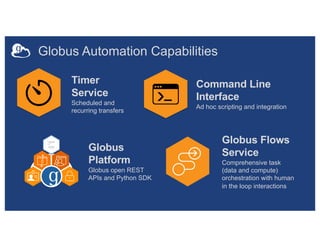
Globus Automation Capabilities
Timer
Service
Scheduled and
recurring transfers
Command Line
Interface
Ad hoc scripting and integration
Globus Flows
Service
Comprehensive task
(data and compute)
orchestration with human
in the loop interactions
Globus
Platform
Globus open REST
APIs and Python SDK
Globus Command Line
Interface (CLI)
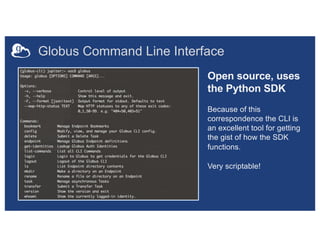
Globus Command Line Interface
Open source, uses
the Python SDK
Because of this
correspondence the CLI is
an excellent tool for getting
the gist of how the SDK
functions.
Very scriptable!
Globus CLI
• It’s a stand-alone application distributed by Globus
– https://docs.globus.org/cli/
– https://github.com/globus/globus-cli
• Easy install and updates
• Command “globus login” gets access tokens
• All interactions with the service use the tokens
– The CLI is acting as you (your identity)
• Command “globus logout” deletes those
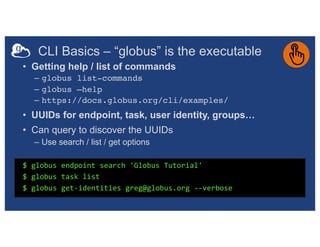
CLI Basics – “globus” is the executable
$ globus endpoint search 'Globus Tutorial'
$ globus task list
$ globus get-identities greg@globus.org --verbose
• Getting help / list of commands
– globus list-commands
– globus –help
– https://docs.globus.org/cli/examples/
• UUIDs for endpoint, task, user identity, groups…
• Can query to discover the UUIDs
– Use search / list / get options
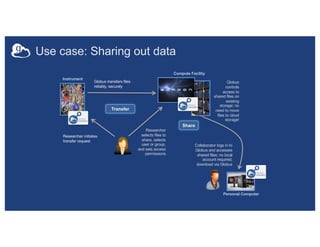
Use case: Sharing out data
Researcher initiates
transfer request
Instrument
Globus
controls
access to
shared files on
existing
storage; no
need to move
files to cloud
storage!
Researcher
selects files to
share, selects
user or group,
and sets access
permissions
Collaborator logs in to
Globus and accesses
shared files; no local
account required;
download via Globus
Personal Computer
Transfer
Share
Compute Facility
Globus transfers files
reliably, securely
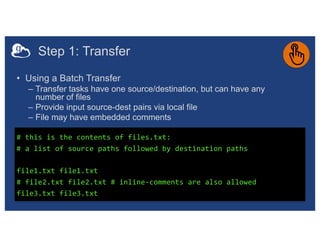
Step 1: Transfer
• Using a Batch Transfer
– Transfer tasks have one source/destination, but can have any
number of files
– Provide input source-dest pairs via local file
– File may have embedded comments
$ export ep1=ddb59aef-6d04-11e5-ba46-22000b92c6ec
$ export ep2=af7bda53-6d04-11e5-ba46-22000b92c6ec
$ globus transfer $ep1:/share/godata/ $ep2:/~/automation-example-
data-share/outbound/Hadrian --label "Files to share" --batch
/Users/gregnawrocki/Greg/Globus/Demos/cwru20231024/files.txt
# this is the contents of files.txt:
# a list of source paths followed by destination paths
file1.txt file1.txt
# file2.txt file2.txt # inline-comments are also allowed
file3.txt file3.txt
Step 2: Share - Set permissions
• Set and manage permissions on guest collection
• Requires access manager role
$ globus endpoint search ‘Gregs Automation Example Data Share’
$ export share=cd505c5a-5627-11ed-b805-855d8beae885
$ globus endpoint permission create --permissions r --identity
hxd58@case.edu $share:/outbound/Hadrian/
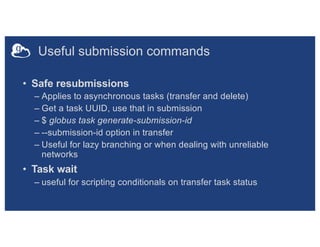
Useful submission commands
• Safe resubmissions
– Applies to asynchronous tasks (transfer and delete)
– Get a task UUID, use that in submission
– $ globus task generate-submission-id
– --submission-id option in transfer
– Useful for lazy branching or when dealing with unreliable
networks
• Task wait
– useful for scripting conditionals on transfer task status
Parsing CLI output
$ globus endpoint search --filter-scope recently-used
$ globus endpoint search --filter-scope recently-used --format json
$ globus endpoint search --filter-scope recently-used --jmespath
'DATA[].[id, display_name]'
• Default output is text; for JSON output use --format
json
• Extract specific attributes using --jmespath
<expression>
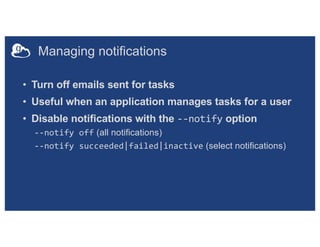
Managing notifications
• Turn off emails sent for tasks
• Useful when an application manages tasks for a user
• Disable notifications with the --notify option
--notify off (all notifications)
--notify succeeded|failed|inactive (select notifications)

Introduction to the Command Line Interface (CLI)

  • 1.
    Introduction to theCommand Line Interface (CLI) Greg Nawrocki greg@globus.org nawrocki@uchicago.edu nawrocki@anl.gov Washington University in St. Louis September 20 & 21, 2022 Case Western Reserve University October 23 – 24, 2023
  • 2.
    Globus Automation Capabilities Timer Service Scheduledand recurring transfers Command Line Interface Ad hoc scripting and integration Globus Flows Service Comprehensive task (data and compute) orchestration with human in the loop interactions Globus Platform Globus open REST APIs and Python SDK
  • 3.
  • 4.
    Globus Command LineInterface Open source, uses the Python SDK Because of this correspondence the CLI is an excellent tool for getting the gist of how the SDK functions. Very scriptable!
  • 5.
    Globus CLI • It’sa stand-alone application distributed by Globus – https://docs.globus.org/cli/ – https://github.com/globus/globus-cli • Easy install and updates • Command “globus login” gets access tokens • All interactions with the service use the tokens – The CLI is acting as you (your identity) • Command “globus logout” deletes those
  • 6.
    CLI Basics –“globus” is the executable $ globus endpoint search 'Globus Tutorial' $ globus task list $ globus get-identities greg@globus.org --verbose • Getting help / list of commands – globus list-commands – globus –help – https://docs.globus.org/cli/examples/ • UUIDs for endpoint, task, user identity, groups… • Can query to discover the UUIDs – Use search / list / get options
  • 7.
    Use case: Sharingout data Researcher initiates transfer request Instrument Globus controls access to shared files on existing storage; no need to move files to cloud storage! Researcher selects files to share, selects user or group, and sets access permissions Collaborator logs in to Globus and accesses shared files; no local account required; download via Globus Personal Computer Transfer Share Compute Facility Globus transfers files reliably, securely
  • 8.
    Step 1: Transfer •Using a Batch Transfer – Transfer tasks have one source/destination, but can have any number of files – Provide input source-dest pairs via local file – File may have embedded comments $ export ep1=ddb59aef-6d04-11e5-ba46-22000b92c6ec $ export ep2=af7bda53-6d04-11e5-ba46-22000b92c6ec $ globus transfer $ep1:/share/godata/ $ep2:/~/automation-example- data-share/outbound/Hadrian --label "Files to share" --batch /Users/gregnawrocki/Greg/Globus/Demos/cwru20231024/files.txt # this is the contents of files.txt: # a list of source paths followed by destination paths file1.txt file1.txt # file2.txt file2.txt # inline-comments are also allowed file3.txt file3.txt
  • 9.
    Step 2: Share- Set permissions • Set and manage permissions on guest collection • Requires access manager role $ globus endpoint search ‘Gregs Automation Example Data Share’ $ export share=cd505c5a-5627-11ed-b805-855d8beae885 $ globus endpoint permission create --permissions r --identity hxd58@case.edu $share:/outbound/Hadrian/
  • 10.
    Useful submission commands •Safe resubmissions – Applies to asynchronous tasks (transfer and delete) – Get a task UUID, use that in submission – $ globus task generate-submission-id – --submission-id option in transfer – Useful for lazy branching or when dealing with unreliable networks • Task wait – useful for scripting conditionals on transfer task status
  • 11.
    Parsing CLI output $globus endpoint search --filter-scope recently-used $ globus endpoint search --filter-scope recently-used --format json $ globus endpoint search --filter-scope recently-used --jmespath 'DATA[].[id, display_name]' • Default output is text; for JSON output use --format json • Extract specific attributes using --jmespath <expression>
  • 12.
    Managing notifications • Turnoff emails sent for tasks • Useful when an application manages tasks for a user • Disable notifications with the --notify option --notify off (all notifications) --notify succeeded|failed|inactive (select notifications)