Globus Automation
Rachana Ananthakrishnan
ranantha@uchicago.edu
September 8, 2022
Sponsored by
Globus Automation Capabilities
Timer Service
Scheduled and recurring transfers
(a.k.a. Globus cron)
Command Line Interface
Ad hoc scripting and integration
Globus Flows service
Comprehensive task (data and
compute) orchestration with human in
the loop interactions
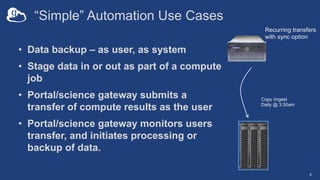
“Simple” Automation Use Cases
• Data backup – as user, as system
• Stage data in or out as part of a compute
job
• Portal/science gateway submits a
transfer of compute results as the user
• Portal/science gateway monitors users
transfer, and initiates processing or
backup of data.
4
Recurring transfers
with sync option
Copy /ingest
Daily @ 3:30am
Globus Timer Service
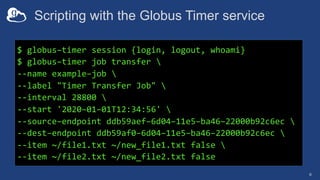
Scripting with the Globus Timer service
6
$ globus–timer session {login, logout, whoami}
$ globus–timer job transfer 
--name example–job 
--label "Timer Transfer Job" 
--interval 28800 
--start '2020–01–01T12:34:56' 
--source–endpoint ddb59aef–6d04–11e5–ba46–22000b92c6ec 
--dest–endpoint ddb59af0–6d04–11e5–ba46–22000b92c6ec 
--item ~/file1.txt ~/new_file1.txt false 
--item ~/file2.txt ~/new_file2.txt false
Globus Command Line
Interface (CLI)
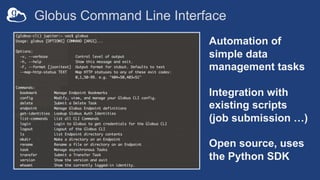
Globus Command Line Interface
Automation of
simple data
management tasks
Integration with
existing scripts
(job submission …)
Open source, uses
the Python SDK
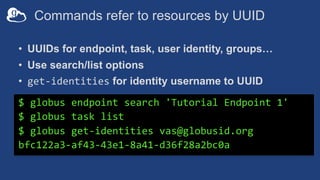
Commands refer to resources by UUID
• UUIDs for endpoint, task, user identity, groups…
• Use search/list options
• get-identities for identity username to UUID
$ globus endpoint search 'Tutorial Endpoint 1'
$ globus task list
$ globus get-identities vas@globusid.org
bfc122a3-af43-43e1-8a41-d36f28a2bc0a
Parsing CLI output
• Default output is text; for JSON output use --format json
$ globus endpoint search --filter-scope my-endpoints
$ globus endpoint search --filter-scope my-endpoints --
format json
• Extract specific attributes using --jmespath <expression>
$ globus endpoint search --filter-scope my-endpoints --
jmespath 'DATA[].[id, display_name]'
Using CLI
11
https://docs.globus.org/cli/examples/
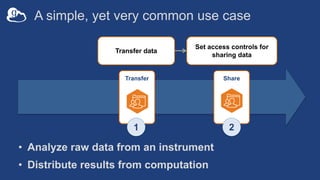
A simple, yet very common use case
Transfer data
Transfer
Set access controls for
sharing data
Share
1 2
• Analyze raw data from an instrument
• Distribute results from computation
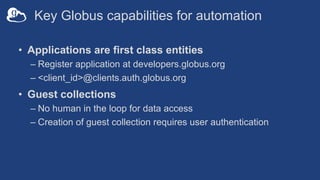
Key Globus capabilities for automation
• Applications are first class entities
– Register application at developers.globus.org
– <client_id>@clients.auth.globus.org
• Guest collections
– No human in the loop for data access
– Creation of guest collection requires user authentication
Key Globus capabilities for automation
• Permissions management can be delegated
– Applications can be access managers
• Applications can renew tokens
– Refresh tokens along with Access tokens
– Refresh tokens can be used to get Access tokens
– Refresh token good for 6 months after last use
– Consent rescindment revokes refresh token
14
Examples: automation using CLI
github.com/globus/automation-examples
• ./share_data.sh
– Transfer a folder, and set permission for a users
• ./cli-sync.sh
– Sync one folder with the other
• See README for installation
• Python scripts that use SDK
15
Globus Flows Service
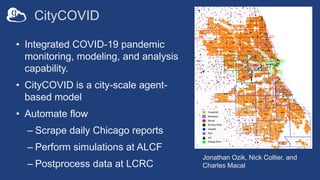
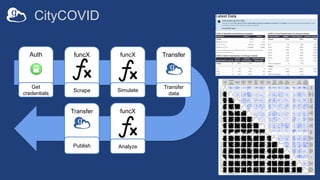
CityCOVID
• Integrated COVID-19 pandemic
monitoring, modeling, and analysis
capability.
• CityCOVID is a city-scale agent-
based model
• Automate flow
– Scrape daily Chicago reports
– Perform simulations at ALCF
– Postprocess data at LCRC
Jonathan Ozik, Nick Collier, and
Charles Macal
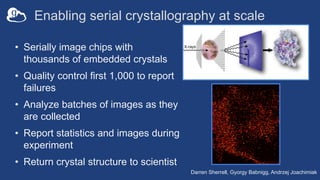
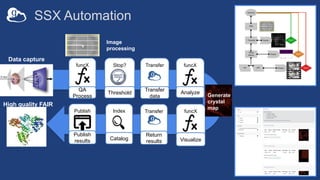
Enabling serial crystallography at scale
• Serially image chips with
thousands of embedded crystals
• Quality control first 1,000 to report
failures
• Analyze batches of images as they
are collected
• Report statistics and images during
experiment
• Return crystal structure to scientist
Darren Sherrell, Gyorgy Babnigg, Andrzej Joachimiak
19
Automation using the Globus platform
Managed, secure, reliable task
orchestration across heterogenous
resources, using a declarative language
for composition and an event driven
execution model, extensible via
custom actions, for automation at scale
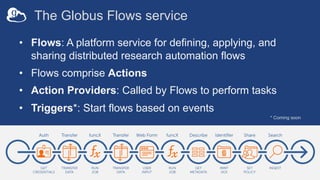
The Globus Flows service
• Flows: A platform service for defining, applying, and
sharing distributed research automation flows
• Flows comprise Actions
• Action Providers: Called by Flows to perform tasks
• Triggers*: Start flows based on events
* Coming soon
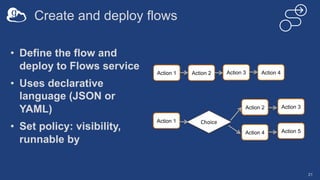
Create and deploy flows
21
• Define the flow and
deploy to Flows service
• Uses declarative
language (JSON or
YAML)
• Set policy: visibility,
runnable by
Action 1 Action 2 Action 3 Action 4
Action 1
Action 2
Choice
Action 4 Action 5
Action 3
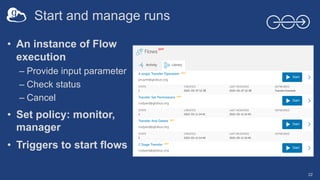
Start and manage runs
22
• An instance of Flow
execution
– Provide input parameter
– Check status
– Cancel
• Set policy: monitor,
manager
• Triggers to start flows
Start and Manage runs from webapp
23
Create and deploy new flows
24
Flow 1: transfer and set permissions
25
• Notebook at jupyter.demo.globus.org
• Choose “Automation Using Globus
Flows”
• Define and deploy flow using notebook
(Section A and B)
• Use Globus webapp to run the flow and
manage the run
Programmatic start of flows
26
• API to start and manage runs
• Globus Automate CLI and SDK
• Event driven start of flows: Triggers
- When a file of specific type is created
- Every 12 hours
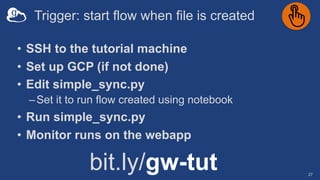
Trigger: start flow when file is created
27
• SSH to the tutorial machine
• Set up GCP (if not done)
• Edit simple_sync.py
–Set it to run flow created using notebook
• Run simple_sync.py
• Monitor runs on the webapp
bit.ly/gw-tut
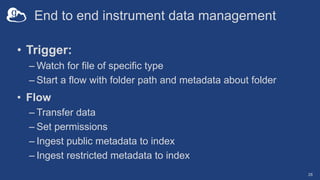
End to end instrument data management
28
• Trigger:
– Watch for file of specific type
– Start a flow with folder path and metadata about folder
• Flow
– Transfer data
– Set permissions
– Ingest public metadata to index
– Ingest restricted metadata to index
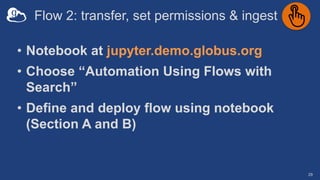
Flow 2: transfer, set permissions & ingest
29
• Notebook at jupyter.demo.globus.org
• Choose “Automation Using Flows with
Search”
• Define and deploy flow using notebook
(Section A and B)
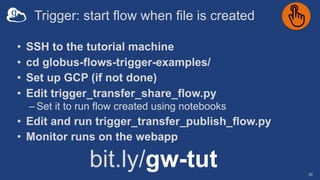
Trigger: start flow when file is created
30
• SSH to the tutorial machine
• cd globus-flows-trigger-examples/
• Set up GCP (if not done)
• Edit trigger_transfer_share_flow.py
– Set it to run flow created using notebooks
• Edit and run trigger_transfer_publish_flow.py
• Monitor runs on the webapp
bit.ly/gw-tut
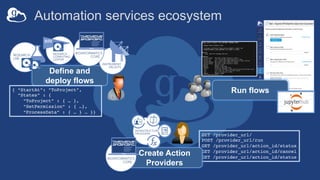
Automation services ecosystem
GET /provider_url/
POST /provider_url/run
GET /provider_url/action_id/status
GET /provider_url/action_id/cancel
GET /provider_url/action_id/status
Create Action
Providers
Define and
deploy flows
{ “StartAt”: ”ToProject”,
”States” : {
”ToProject” : { … },
”SetPermission” : { …},
“ProcessData” : { … } … }}
Run flows
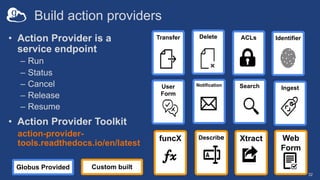
Build action providers
32
• Action Provider is a
service endpoint
– Run
– Status
– Cancel
– Release
– Resume
• Action Provider Toolkit
action-provider-
tools.readthedocs.io/en/latest
Search
Transfer
Notification
ACLs Identifier
Delete
Ingest
User
Form
Describe Xtract
funcX Web
Form
Custom built
Globus Provided
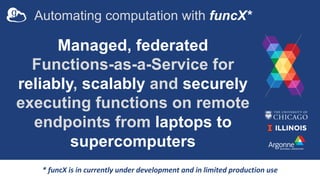
Automating computation with funcX*
Managed, federated
Functions-as-a-Service for
reliably, scalably and securely
executing functions on remote
endpoints from laptops to
supercomputers
* funcX is in currently under development and in limited production use
CityCOVID
funcX
Analyze
Transfer
Publish
Auth
Get
credentials
funcX
Scrape
funcX
Simulate
Transfer
Transfer
data
SSX Automation
Index funcX
Visualize
Transfer
Return
results
funcX
QA
Process
Stop?
Threshold
Transfer
Transfer
data
Publish
Publish
results
funcX
Analyze
Catalog
Generate
crystal
map
Image
processing
Data capture
High quality FAIR
data
Thank you, funders...
U . S . D E P A R T M E N T O F
ENERGY
Support resources
• Globus documentation: docs.globus.org
• YouTube channel: youtube.com/user/GlobusOnline
• Helpdesk and issue escalation: support@globus.org
• Mailing Lists
– globus.org/mailing-lists
• Customer engagement team
– Office Hours
• Professional services team

Globus Automation

  • 1.
  • 2.
    Globus Automation Capabilities TimerService Scheduled and recurring transfers (a.k.a. Globus cron) Command Line Interface Ad hoc scripting and integration Globus Flows service Comprehensive task (data and compute) orchestration with human in the loop interactions
  • 3.
    “Simple” Automation UseCases • Data backup – as user, as system • Stage data in or out as part of a compute job • Portal/science gateway submits a transfer of compute results as the user • Portal/science gateway monitors users transfer, and initiates processing or backup of data. 4 Recurring transfers with sync option Copy /ingest Daily @ 3:30am
  • 4.
  • 5.
    Scripting with theGlobus Timer service 6 $ globus–timer session {login, logout, whoami} $ globus–timer job transfer --name example–job --label "Timer Transfer Job" --interval 28800 --start '2020–01–01T12:34:56' --source–endpoint ddb59aef–6d04–11e5–ba46–22000b92c6ec --dest–endpoint ddb59af0–6d04–11e5–ba46–22000b92c6ec --item ~/file1.txt ~/new_file1.txt false --item ~/file2.txt ~/new_file2.txt false
  • 6.
  • 7.
    Globus Command LineInterface Automation of simple data management tasks Integration with existing scripts (job submission …) Open source, uses the Python SDK
  • 8.
    Commands refer toresources by UUID • UUIDs for endpoint, task, user identity, groups… • Use search/list options • get-identities for identity username to UUID $ globus endpoint search 'Tutorial Endpoint 1' $ globus task list $ globus get-identities vas@globusid.org bfc122a3-af43-43e1-8a41-d36f28a2bc0a
  • 9.
    Parsing CLI output •Default output is text; for JSON output use --format json $ globus endpoint search --filter-scope my-endpoints $ globus endpoint search --filter-scope my-endpoints -- format json • Extract specific attributes using --jmespath <expression> $ globus endpoint search --filter-scope my-endpoints -- jmespath 'DATA[].[id, display_name]'
  • 10.
  • 11.
    A simple, yetvery common use case Transfer data Transfer Set access controls for sharing data Share 1 2 • Analyze raw data from an instrument • Distribute results from computation
  • 12.
    Key Globus capabilitiesfor automation • Applications are first class entities – Register application at developers.globus.org – <client_id>@clients.auth.globus.org • Guest collections – No human in the loop for data access – Creation of guest collection requires user authentication
  • 13.
    Key Globus capabilitiesfor automation • Permissions management can be delegated – Applications can be access managers • Applications can renew tokens – Refresh tokens along with Access tokens – Refresh tokens can be used to get Access tokens – Refresh token good for 6 months after last use – Consent rescindment revokes refresh token 14
  • 14.
    Examples: automation usingCLI github.com/globus/automation-examples • ./share_data.sh – Transfer a folder, and set permission for a users • ./cli-sync.sh – Sync one folder with the other • See README for installation • Python scripts that use SDK 15
  • 15.
  • 16.
    CityCOVID • Integrated COVID-19pandemic monitoring, modeling, and analysis capability. • CityCOVID is a city-scale agent- based model • Automate flow – Scrape daily Chicago reports – Perform simulations at ALCF – Postprocess data at LCRC Jonathan Ozik, Nick Collier, and Charles Macal
  • 17.
    Enabling serial crystallographyat scale • Serially image chips with thousands of embedded crystals • Quality control first 1,000 to report failures • Analyze batches of images as they are collected • Report statistics and images during experiment • Return crystal structure to scientist Darren Sherrell, Gyorgy Babnigg, Andrzej Joachimiak
  • 18.
    19 Automation using theGlobus platform Managed, secure, reliable task orchestration across heterogenous resources, using a declarative language for composition and an event driven execution model, extensible via custom actions, for automation at scale
  • 19.
    The Globus Flowsservice • Flows: A platform service for defining, applying, and sharing distributed research automation flows • Flows comprise Actions • Action Providers: Called by Flows to perform tasks • Triggers*: Start flows based on events * Coming soon
  • 20.
    Create and deployflows 21 • Define the flow and deploy to Flows service • Uses declarative language (JSON or YAML) • Set policy: visibility, runnable by Action 1 Action 2 Action 3 Action 4 Action 1 Action 2 Choice Action 4 Action 5 Action 3
  • 21.
    Start and manageruns 22 • An instance of Flow execution – Provide input parameter – Check status – Cancel • Set policy: monitor, manager • Triggers to start flows
  • 22.
    Start and Manageruns from webapp 23
  • 23.
    Create and deploynew flows 24
  • 24.
    Flow 1: transferand set permissions 25 • Notebook at jupyter.demo.globus.org • Choose “Automation Using Globus Flows” • Define and deploy flow using notebook (Section A and B) • Use Globus webapp to run the flow and manage the run
  • 25.
    Programmatic start offlows 26 • API to start and manage runs • Globus Automate CLI and SDK • Event driven start of flows: Triggers - When a file of specific type is created - Every 12 hours
  • 26.
    Trigger: start flowwhen file is created 27 • SSH to the tutorial machine • Set up GCP (if not done) • Edit simple_sync.py –Set it to run flow created using notebook • Run simple_sync.py • Monitor runs on the webapp bit.ly/gw-tut
  • 27.
    End to endinstrument data management 28 • Trigger: – Watch for file of specific type – Start a flow with folder path and metadata about folder • Flow – Transfer data – Set permissions – Ingest public metadata to index – Ingest restricted metadata to index
  • 28.
    Flow 2: transfer,set permissions & ingest 29 • Notebook at jupyter.demo.globus.org • Choose “Automation Using Flows with Search” • Define and deploy flow using notebook (Section A and B)
  • 29.
    Trigger: start flowwhen file is created 30 • SSH to the tutorial machine • cd globus-flows-trigger-examples/ • Set up GCP (if not done) • Edit trigger_transfer_share_flow.py – Set it to run flow created using notebooks • Edit and run trigger_transfer_publish_flow.py • Monitor runs on the webapp bit.ly/gw-tut
  • 30.
    Automation services ecosystem GET/provider_url/ POST /provider_url/run GET /provider_url/action_id/status GET /provider_url/action_id/cancel GET /provider_url/action_id/status Create Action Providers Define and deploy flows { “StartAt”: ”ToProject”, ”States” : { ”ToProject” : { … }, ”SetPermission” : { …}, “ProcessData” : { … } … }} Run flows
  • 31.
    Build action providers 32 •Action Provider is a service endpoint – Run – Status – Cancel – Release – Resume • Action Provider Toolkit action-provider- tools.readthedocs.io/en/latest Search Transfer Notification ACLs Identifier Delete Ingest User Form Describe Xtract funcX Web Form Custom built Globus Provided
  • 32.
    Automating computation withfuncX* Managed, federated Functions-as-a-Service for reliably, scalably and securely executing functions on remote endpoints from laptops to supercomputers * funcX is in currently under development and in limited production use
  • 33.
  • 34.
  • 35.
    Thank you, funders... U. S . D E P A R T M E N T O F ENERGY
  • 36.
    Support resources • Globusdocumentation: docs.globus.org • YouTube channel: youtube.com/user/GlobusOnline • Helpdesk and issue escalation: support@globus.org • Mailing Lists – globus.org/mailing-lists • Customer engagement team – Office Hours • Professional services team