

CHAPTER 15
LISTS
Unit 2:
Computational Thinking and Programming
XI
Computer Science (083)
Board : CBSE
Courtesy CBSE
Unit II
Computational Thinking and Programming
(60 Theory periods + 45 Practical Periods)
DCSc & Engg, PGDCA,ADCA,MCA.MSc(IT),Mtech(IT),MPhil (Comp. Sci)
Department of Computer Science, Sainik School Amaravathinagar
Cell No: 9431453730
Praveen M Jigajinni
Prepared by
Courtesy CBSE
LEARNING OUTCOMES
After studying this lesson, students
will be able to:
Understand the concept of mutable sequence
types in Python.
Appreciate the use of list to conveniently store
a large amount of data in memory.
Create, access & manipulate list objects
Use various functions & methods to work with
list
Appreciate the use of index for accessing an
element from a sequence.
LEARNING OUTCOMES
INTRODUCTION
Like a String, list also is
sequence data type. It is an ordered set of
values enclosed in square brackets [].
Values in the list can be modified, i.e. it is
mutable. As it is set of values, we can use
index in square brackets [] to identify a
value belonging to it. The values that make
up a list are called its elements, and they
can be of any type.
INTRODUCTION
We can also say that list data type is
a container that holds a number of
elements in a given order. For accessing an
element of the list, indexing is used.
Syntax is :
Variable name [index]
It will provide the value at „index+1‟
in the list. Index here, has to be an integer
value which can be positive or negative.
INTRODUCTION
Positive value of index means
counting forward from beginning of the
list and negative value means counting
backward from end of the list.
Remember the result of indexing a list is
the value of type accessed from the list.
INTRODUCTION
NOTE: LISTS ARE MUTABLE IN NATURE
CREATING LIST
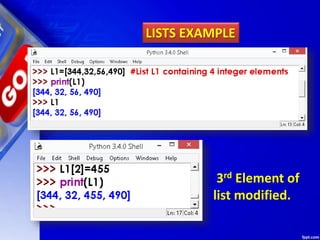
LISTS EXAMPLE
3rd Element of
list modified.
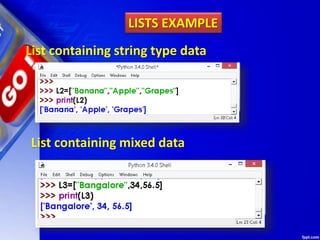
LISTS EXAMPLE
List containing string type data
List containing mixed data
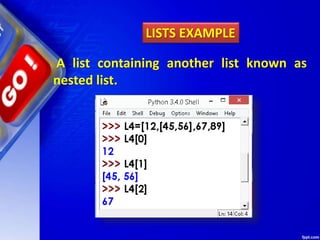
A list containing another list known as
nested list.
LISTS EXAMPLE
Use double subscript to fetch the sub
list in a given list.
LISTS EXAMPLE
Similarly, L2[2][0] will fetch you 4 value
L2[2][2] will fetch you 7 value.
REPRESENTATION OF LIST OR
STATE DIAGRAM OF LIST
>>> L1 = [45,56,67,20]
State Diagram would be:
Forward Indexing
Backward Indexing
0
1
2
3
-4
-3
-2
-1
45
56
67
20
LIST INDEX
LIST elements
STATE DIAGRAM OF LIST
>>> L2 = [“Mouse”,Pendrive”,”RAM”]
State Diagram would be:
Forward Indexing
Backward Indexing
0
1
2
-3
-2
-1
Mouse
Pendrive
RAM
LIST INDEX
LIST elements
STATE DIAGRAM OF LIST
>>> L3= []
State Diagram would be:
WORKING WITH LIST INDEX
List index works the same way as
String index, which is:
An integer value/expression can be used
as index.
An Index Error appears, if you try and
access element that does not exist in the
list.
An index can have a negative value, in
that case counting happens from the end
of the list.
SOME MORE EXAMPLE
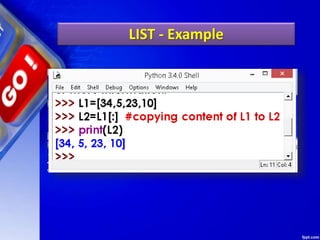
LIST - Example
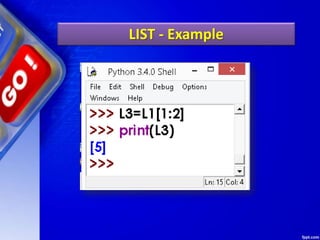
LIST - Example
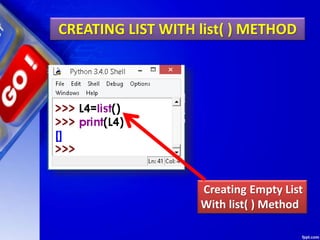
CREATING LIST WITH list( ) METHOD
Creating Empty List
With list( ) Method
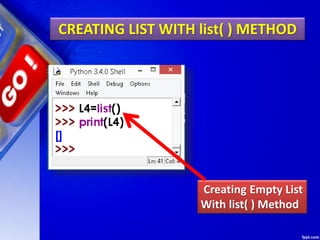
CREATING LIST WITH list( ) METHOD
Creating Empty List
With list( ) Method
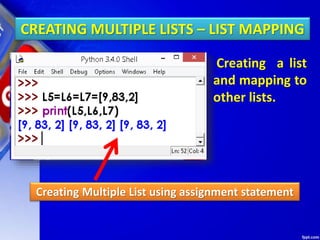
CREATING MULTIPLE LISTS – LIST MAPPING
Creating Multiple List using assignment statement
Creating a list
and mapping to
other lists.
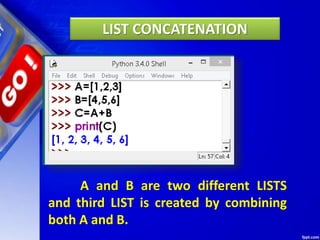
LIST CONCATENATION
LIST CONCATENATION
A and B are two different LISTS
and third LIST is created by combining
both A and B.
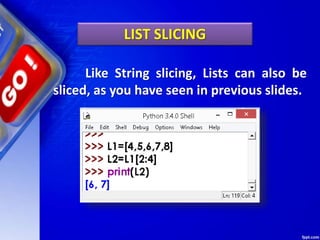
LIST SLICING
Like String slicing, Lists can also be
sliced, as you have seen in previous slides.
LIST SLICING
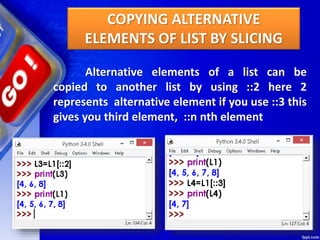
COPYING ALTERNATIVE
ELEMENTS OF LIST BY SLICING
Alternative elements of a list can be
copied to another list by using ::2 here 2
represents alternative element if you use ::3 this
gives you third element, ::n nth element
COPYING ALTERNATIVE
ELEMENTS OF LIST BY SLICING
READING LIST THROUGH KEYBOARD
USE OF append ( ) Method
READING LIST THROUGH KEYBOARD
USE OF append ( ) Method
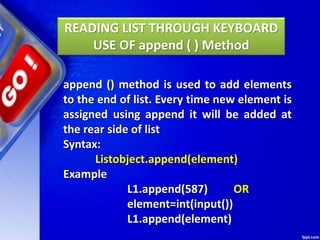
append () method is used to add elements
to the end of list. Every time new element is
assigned using append it will be added at
the rear side of list
Syntax:
Listobject.append(element)
Example
L1.append(587) OR
element=int(input())
L1.append(element)
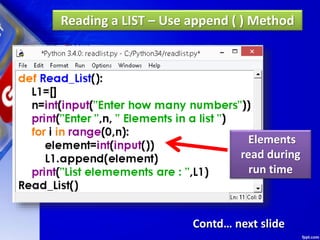
Reading a LIST – Use append ( ) Method
Elements
read during
run time
Contd… next slide
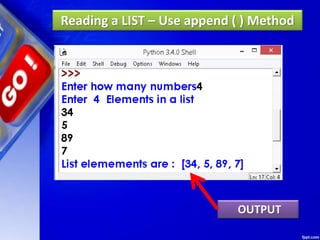
Reading a LIST – Use append ( ) Method
OUTPUT
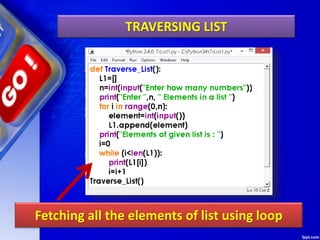
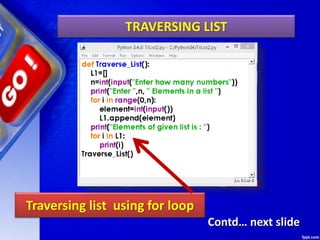
TRAVERSING LIST
TRAVERSING LIST
Fetching all the elements of list using loop
TRAVERSING LIST
Traversing list using for loop
Contd… next slide
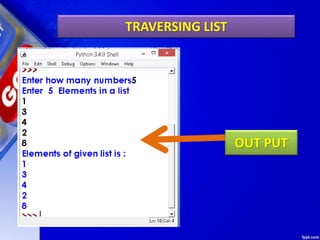
TRAVERSING LIST
OUT PUT
Deleting Elements of LIST
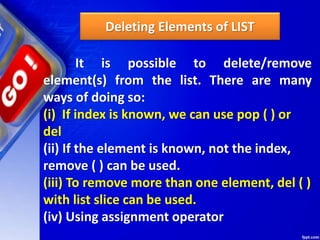
It is possible to delete/remove
element(s) from the list. There are many
ways of doing so:
(i) If index is known, we can use pop ( ) or
del
(ii) If the element is known, not the index,
remove ( ) can be used.
(iii) To remove more than one element, del ( )
with list slice can be used.
(iv) Using assignment operator
Deleting Elements of LIST
1. pop ( ) Method
2. del Method
3. remove ( ) Method
Deleting Elements of LIST
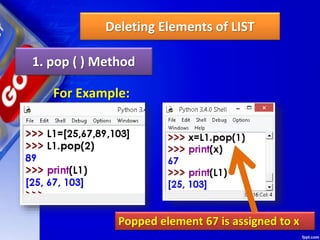
1. pop ( ) Method
It removes the element from the
specified index, and also return the element
which was removed.
Its syntax is:
List.pop ([index])
Deleting Elements of LIST
1. pop ( ) Method
For Example:
Popped element 67 is assigned to x
Deleting Elements of LIST
2. del Method
del removes the specified element from
the list, but does not return the deleted value.
Syntax :
del Listobject[index]
del method example
Deleting Elements of LIST
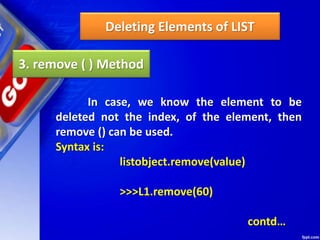
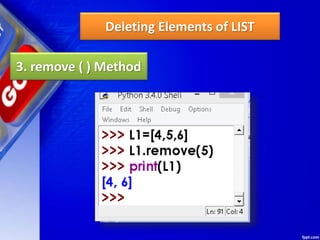
3. remove ( ) Method
In case, we know the element to be
deleted not the index, of the element, then
remove () can be used.
Syntax is:
listobject.remove(value)
>>>L1.remove(60)
contd…
Deleting Elements of LIST
3. remove ( ) Method
SOME MORE METHODS
SOME MORE METHODS
1. insert () Method 2. reverse ( ) Method
3. sort ( ) Method 4. clear ( ) Method
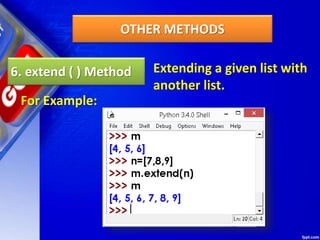
5. index ( ) Method 6. extend ( ) Method
OTHER METHODS
1. insert () Method
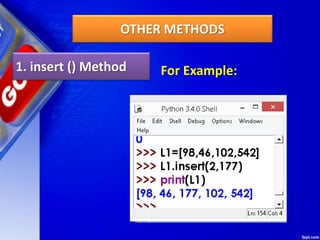
This method allows us to insert an
element, at the given position specified by its
index, and the remaining elements are shifted
to accommodate the new element. insert ()
requires two arguments-index value and item
value.
Its syntax is
list. insert (index, item)
OTHER METHODS
1. insert () Method For Example:
OTHER METHODS
2. reverse ( ) Method
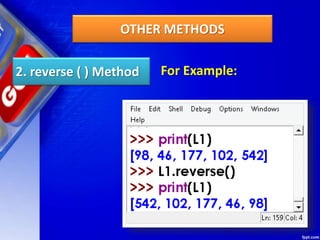
This method can be used to reverse the
elements of the list in place
Its syntax is:
list.reverse ( )
Method does not return anything as the
reversed list is stored in the same variable.
OTHER METHODS
2. reverse ( ) Method For Example:
OTHER METHODS
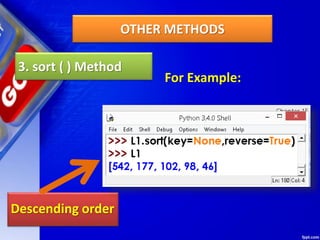
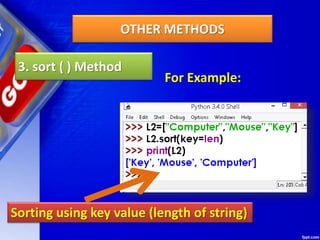
3. sort ( ) Method
For arranging elements in an order
Python provides a method sort ( ) and a
function sorted ( ). sort ( ) modifies the list
in place and sorted ( ) returns a new sorted
list.
OTHER METHODS
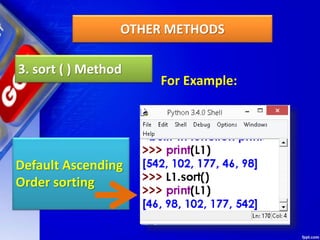
3. sort ( ) Method
For Example:
Default Ascending
Order sorting
OTHER METHODS
3. sort ( ) Method
For Example:
Descending order
OTHER METHODS
3. sort ( ) Method
For Example:
Sorting using key value (length of string)
OTHER METHODS
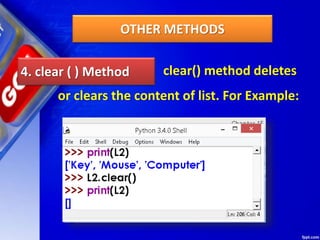
4. clear ( ) Method clear() method deletes
or clears the content of list. For Example:
OTHER METHODS
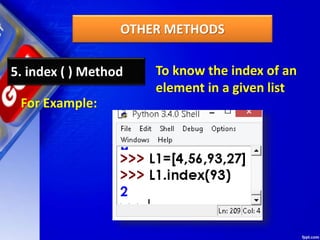
5. index ( ) Method To know the index of an
element in a given list
For Example:
OTHER METHODS
6. extend ( ) Method Extending a given list with
another list.
For Example:
PROGRAMS ON LISTS
BELLOW AVERAGE PROGRAMS ON LISTS
PROGRAMS ON LISTS
BELLOW AVERAGE PROGRAMS ON LISTS
1.Write a Python program to sum all the items
in a list.
def sum_list(items):
sum_numbers = 0
for x in items:
sum_numbers += x
return sum_numbers
print(sum_list([1,2,-8]))
PROGRAMS ON LISTS
BELLOW AVERAGE PROGRAMS ON LISTS
2. Write a Python program to get the largest
number from a list.
def max_num_in_list( list ):
max = list[ 0 ]
for a in list:
if a > max:
max = a
return max
print(max_num_in_list([1, 2, -8, 0]))
PROGRAMS ON LISTS
BELLOW AVERAGE PROGRAMS ON LISTS
3. Write a Python program to check a list is
empty or not.
def check_list():
l = []
if not l:
print("List is empty")
PROGRAMS ON LISTS
BELLOW AVERAGE PROGRAMS ON LISTS
4. Write a Python program to clone or copy a
list.
def clone_list():
original_list = [10, 22, 44, 23, 4]
new_list = list(original_list)
print(original_list)
print(new_list)
PROGRAMS ON LISTS
AVERAGE PROGRAMS ON LISTS
5. Write a Python function that takes two lists and
returns True if they have at least one common
member.
def common_data(list1, list2):
result = False
for x in list1:
for y in list2:
if x == y:
result = True
return result
print(common_data([1,2,3,4,5], [5,6,7,8,9]))
print(common_data([1,2,3,4,5], [6,7,8,9]))
AVERAGE PROGRAMS ON LISTS
5. Write a Python function that takes two lists and
returns True if they have at least one common
member.
def common_data(list1, list2):
result = False
for x in list1:
for y in list2:
if x == y:
result = True
return result
print(common_data([1,2,3,4,5], [5,6,7,8,9]))
print(common_data([1,2,3,4,5], [6,7,8,9]))
AVERAGE PROGRAMS ON LISTS
6. Write a Python program to generate and print a
list of first and last 5 elements where the values
are square of numbers between 1 and 30 (both
included).
def printValues():
l = list()
for i in range(1,21):
l.append(i**2)
print(l[:5])
print(l[-5:])
printValues()
ABOVE AVERAGE PROGRAMS ON LISTS
7 Write a Python program to generate and print a
list except for the first 5 elements, where the
values are square of numbers between 1 and 30
(both included).
def printValues():
l = list()
for i in range(1,21):
l.append(i**2)
print(l[5:])
printValues()
ABOVE AVERAGE PROGRAMS ON LISTS
8. Write a Python program to print the numbers of
a specified list after removing even numbers from
it.
def num_prn():
num = [7,8, 120, 25, 44, 20, 27]
num = [x for x in num if x%2!=0]
print(num)
ABOVE AVERAGE PROGRAMS ON LISTS
9. Write a Python program to print a specified list
after removing the 0th, 4th and 5th elements.
Sample List : ['Red', 'Green', 'White', 'Black', 'Pink',
'Yellow']
Expected Output : ['Green', 'White', 'Black']
def prn_list()
color = ['Red', 'Green', 'White', 'Black', 'Pink',
'Yellow']
color = [x for (i,x) in enumerate(color) if i not in
(0,4,5)]
print(color)
CLASS WORK/HOME WORK
1. Write a Python program to generate a 3*4*6
3D array whose each element is *.
2.Write a Python program to shuffle and print a
specified list.
3. Write a Python program to get the difference
between the two lists.
4. Write a Python program access the index of a
list.
5. Write a Python program to convert a list of
characters into a string.
6. Write a Python program to find the index of an
item in a specified list
Class Test
Class Test
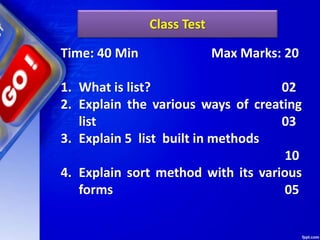
Time: 40 Min Max Marks: 20
1. What is list? 02
2. Explain the various ways of creating
list 03
3. Explain 5 list built in methods
10
4. Explain sort method with its various
forms 05
Thank You

Chapter 15 Lists

  • 1.
  • 2.
    Unit 2: Computational Thinkingand Programming XI Computer Science (083) Board : CBSE Courtesy CBSE
  • 3.
    Unit II Computational Thinkingand Programming (60 Theory periods + 45 Practical Periods) DCSc & Engg, PGDCA,ADCA,MCA.MSc(IT),Mtech(IT),MPhil (Comp. Sci) Department of Computer Science, Sainik School Amaravathinagar Cell No: 9431453730 Praveen M Jigajinni Prepared by Courtesy CBSE
  • 4.
  • 5.
    After studying thislesson, students will be able to: Understand the concept of mutable sequence types in Python. Appreciate the use of list to conveniently store a large amount of data in memory. Create, access & manipulate list objects Use various functions & methods to work with list Appreciate the use of index for accessing an element from a sequence. LEARNING OUTCOMES
  • 6.
  • 7.
    Like a String,list also is sequence data type. It is an ordered set of values enclosed in square brackets []. Values in the list can be modified, i.e. it is mutable. As it is set of values, we can use index in square brackets [] to identify a value belonging to it. The values that make up a list are called its elements, and they can be of any type. INTRODUCTION
  • 8.
    We can alsosay that list data type is a container that holds a number of elements in a given order. For accessing an element of the list, indexing is used. Syntax is : Variable name [index] It will provide the value at „index+1‟ in the list. Index here, has to be an integer value which can be positive or negative. INTRODUCTION
  • 9.
    Positive value ofindex means counting forward from beginning of the list and negative value means counting backward from end of the list. Remember the result of indexing a list is the value of type accessed from the list. INTRODUCTION NOTE: LISTS ARE MUTABLE IN NATURE
  • 10.
  • 11.
    LISTS EXAMPLE 3rd Elementof list modified.
  • 12.
    LISTS EXAMPLE List containingstring type data List containing mixed data
  • 13.
    A list containinganother list known as nested list. LISTS EXAMPLE
  • 14.
    Use double subscriptto fetch the sub list in a given list. LISTS EXAMPLE Similarly, L2[2][0] will fetch you 4 value L2[2][2] will fetch you 7 value.
  • 15.
    REPRESENTATION OF LISTOR STATE DIAGRAM OF LIST
  • 16.
    STATE DIAGRAM OFLIST >>> L1 = [45,56,67,20] State Diagram would be: Forward Indexing Backward Indexing 0 1 2 3 -4 -3 -2 -1 45 56 67 20 LIST INDEX LIST elements
  • 17.
    STATE DIAGRAM OFLIST >>> L2 = [“Mouse”,Pendrive”,”RAM”] State Diagram would be: Forward Indexing Backward Indexing 0 1 2 -3 -2 -1 Mouse Pendrive RAM LIST INDEX LIST elements
  • 18.
    STATE DIAGRAM OFLIST >>> L3= [] State Diagram would be:
  • 19.
  • 20.
    WORKING WITH LISTINDEX List index works the same way as String index, which is: An integer value/expression can be used as index. An Index Error appears, if you try and access element that does not exist in the list. An index can have a negative value, in that case counting happens from the end of the list.
  • 21.
  • 22.
  • 23.
  • 24.
    CREATING LIST WITHlist( ) METHOD
  • 25.
    CREATING LIST WITHlist( ) METHOD Creating Empty List With list( ) Method
  • 26.
    CREATING LIST WITHlist( ) METHOD Creating Empty List With list( ) Method
  • 27.
    CREATING MULTIPLE LISTS– LIST MAPPING
  • 28.
    CREATING MULTIPLE LISTS– LIST MAPPING Creating Multiple List using assignment statement Creating a list and mapping to other lists.
  • 29.
  • 30.
    LIST CONCATENATION A andB are two different LISTS and third LIST is created by combining both A and B.
  • 31.
  • 32.
    Like String slicing,Lists can also be sliced, as you have seen in previous slides. LIST SLICING
  • 33.
  • 34.
    Alternative elements ofa list can be copied to another list by using ::2 here 2 represents alternative element if you use ::3 this gives you third element, ::n nth element COPYING ALTERNATIVE ELEMENTS OF LIST BY SLICING
  • 35.
    READING LIST THROUGHKEYBOARD USE OF append ( ) Method
  • 36.
    READING LIST THROUGHKEYBOARD USE OF append ( ) Method append () method is used to add elements to the end of list. Every time new element is assigned using append it will be added at the rear side of list Syntax: Listobject.append(element) Example L1.append(587) OR element=int(input()) L1.append(element)
  • 37.
    Reading a LIST– Use append ( ) Method Elements read during run time Contd… next slide
  • 38.
    Reading a LIST– Use append ( ) Method OUTPUT
  • 39.
  • 40.
    TRAVERSING LIST Fetching allthe elements of list using loop
  • 41.
    TRAVERSING LIST Traversing listusing for loop Contd… next slide
  • 42.
  • 43.
  • 44.
    Deleting Elements ofLIST It is possible to delete/remove element(s) from the list. There are many ways of doing so: (i) If index is known, we can use pop ( ) or del (ii) If the element is known, not the index, remove ( ) can be used. (iii) To remove more than one element, del ( ) with list slice can be used. (iv) Using assignment operator
  • 45.
    Deleting Elements ofLIST 1. pop ( ) Method 2. del Method 3. remove ( ) Method
  • 46.
    Deleting Elements ofLIST 1. pop ( ) Method It removes the element from the specified index, and also return the element which was removed. Its syntax is: List.pop ([index])
  • 47.
    Deleting Elements ofLIST 1. pop ( ) Method For Example: Popped element 67 is assigned to x
  • 48.
    Deleting Elements ofLIST 2. del Method del removes the specified element from the list, but does not return the deleted value. Syntax : del Listobject[index] del method example
  • 49.
    Deleting Elements ofLIST 3. remove ( ) Method In case, we know the element to be deleted not the index, of the element, then remove () can be used. Syntax is: listobject.remove(value) >>>L1.remove(60) contd…
  • 50.
    Deleting Elements ofLIST 3. remove ( ) Method
  • 51.
  • 52.
    SOME MORE METHODS 1.insert () Method 2. reverse ( ) Method 3. sort ( ) Method 4. clear ( ) Method 5. index ( ) Method 6. extend ( ) Method
  • 53.
    OTHER METHODS 1. insert() Method This method allows us to insert an element, at the given position specified by its index, and the remaining elements are shifted to accommodate the new element. insert () requires two arguments-index value and item value. Its syntax is list. insert (index, item)
  • 54.
    OTHER METHODS 1. insert() Method For Example:
  • 55.
    OTHER METHODS 2. reverse( ) Method This method can be used to reverse the elements of the list in place Its syntax is: list.reverse ( ) Method does not return anything as the reversed list is stored in the same variable.
  • 56.
    OTHER METHODS 2. reverse( ) Method For Example:
  • 57.
    OTHER METHODS 3. sort( ) Method For arranging elements in an order Python provides a method sort ( ) and a function sorted ( ). sort ( ) modifies the list in place and sorted ( ) returns a new sorted list.
  • 58.
    OTHER METHODS 3. sort( ) Method For Example: Default Ascending Order sorting
  • 59.
    OTHER METHODS 3. sort( ) Method For Example: Descending order
  • 60.
    OTHER METHODS 3. sort( ) Method For Example: Sorting using key value (length of string)
  • 61.
    OTHER METHODS 4. clear( ) Method clear() method deletes or clears the content of list. For Example:
  • 62.
    OTHER METHODS 5. index( ) Method To know the index of an element in a given list For Example:
  • 63.
    OTHER METHODS 6. extend( ) Method Extending a given list with another list. For Example:
  • 64.
    PROGRAMS ON LISTS BELLOWAVERAGE PROGRAMS ON LISTS
  • 65.
    PROGRAMS ON LISTS BELLOWAVERAGE PROGRAMS ON LISTS 1.Write a Python program to sum all the items in a list. def sum_list(items): sum_numbers = 0 for x in items: sum_numbers += x return sum_numbers print(sum_list([1,2,-8]))
  • 66.
    PROGRAMS ON LISTS BELLOWAVERAGE PROGRAMS ON LISTS 2. Write a Python program to get the largest number from a list. def max_num_in_list( list ): max = list[ 0 ] for a in list: if a > max: max = a return max print(max_num_in_list([1, 2, -8, 0]))
  • 67.
    PROGRAMS ON LISTS BELLOWAVERAGE PROGRAMS ON LISTS 3. Write a Python program to check a list is empty or not. def check_list(): l = [] if not l: print("List is empty")
  • 68.
    PROGRAMS ON LISTS BELLOWAVERAGE PROGRAMS ON LISTS 4. Write a Python program to clone or copy a list. def clone_list(): original_list = [10, 22, 44, 23, 4] new_list = list(original_list) print(original_list) print(new_list)
  • 69.
    PROGRAMS ON LISTS AVERAGEPROGRAMS ON LISTS
  • 70.
    AVERAGE PROGRAMS ONLISTS 5. Write a Python function that takes two lists and returns True if they have at least one common member. def common_data(list1, list2): result = False for x in list1: for y in list2: if x == y: result = True return result print(common_data([1,2,3,4,5], [5,6,7,8,9])) print(common_data([1,2,3,4,5], [6,7,8,9]))
  • 71.
    AVERAGE PROGRAMS ONLISTS 5. Write a Python function that takes two lists and returns True if they have at least one common member. def common_data(list1, list2): result = False for x in list1: for y in list2: if x == y: result = True return result print(common_data([1,2,3,4,5], [5,6,7,8,9])) print(common_data([1,2,3,4,5], [6,7,8,9]))
  • 72.
    AVERAGE PROGRAMS ONLISTS 6. Write a Python program to generate and print a list of first and last 5 elements where the values are square of numbers between 1 and 30 (both included). def printValues(): l = list() for i in range(1,21): l.append(i**2) print(l[:5]) print(l[-5:]) printValues()
  • 73.
  • 74.
    ABOVE AVERAGE PROGRAMSON LISTS 7 Write a Python program to generate and print a list except for the first 5 elements, where the values are square of numbers between 1 and 30 (both included). def printValues(): l = list() for i in range(1,21): l.append(i**2) print(l[5:]) printValues()
  • 75.
    ABOVE AVERAGE PROGRAMSON LISTS 8. Write a Python program to print the numbers of a specified list after removing even numbers from it. def num_prn(): num = [7,8, 120, 25, 44, 20, 27] num = [x for x in num if x%2!=0] print(num)
  • 76.
    ABOVE AVERAGE PROGRAMSON LISTS 9. Write a Python program to print a specified list after removing the 0th, 4th and 5th elements. Sample List : ['Red', 'Green', 'White', 'Black', 'Pink', 'Yellow'] Expected Output : ['Green', 'White', 'Black'] def prn_list() color = ['Red', 'Green', 'White', 'Black', 'Pink', 'Yellow'] color = [x for (i,x) in enumerate(color) if i not in (0,4,5)] print(color)
  • 77.
  • 78.
    CLASS WORK/HOME WORK 1.Write a Python program to generate a 3*4*6 3D array whose each element is *. 2.Write a Python program to shuffle and print a specified list. 3. Write a Python program to get the difference between the two lists. 4. Write a Python program access the index of a list. 5. Write a Python program to convert a list of characters into a string. 6. Write a Python program to find the index of an item in a specified list
  • 79.
  • 80.
    Class Test Time: 40Min Max Marks: 20 1. What is list? 02 2. Explain the various ways of creating list 03 3. Explain 5 list built in methods 10 4. Explain sort method with its various forms 05
  • 81.