Introduction to Software
Engineering
Planning and Managing
the Project
Instructor : Asma Khatoon
Tracking Progress
• Do you understand customer’s problems and
needs?
• Can you design a system to solve customer’s
problems or satisfy customer’s needs?
• How long will it take you to develop the
system?
• How much will it cost to develop the system?
Tracking Progress
Project Schedule
• Describes the software-development cycle for
a particular project by
– enumerating the phases or stages of the project
– breaking each phase into discrete tasks or
activities to be completed
• Portrays the interactions among the activities
and estimates the times that each task or
activity will take
Tracking Progress
Project Schedule: Approach
• Understanding customer’s needs by listing all
project deliverables
– Documents
– Demonstrations of function
– Demonstrations of subsystems
– Demonstrations of accuracy
– Demonstrations of reliability, performance or security
• Determining milestones and activities to produce
the deliverables
Tracking Progress
Milestones and activities
• Activity: takes place over a period of time
• Milestone: completion of an activity -- a
particular point in time
• Precursor: event or set of events that must
occur in order for an activity to start
• Duration: length of time needed to complete
an activity
• Due date: date by which an activity must be
completed
Tracking Progress
Project Schedule (continued)
• Project development can be separated into a
succession of phases which are composed of
steps, which are composed of activities
Tracking Progress
Phases, Steps, and Activities in
Building a House
Phase 1: Landscaping the lot Phase 2: Building the house
Step 1.1:
Clearing
and
grubbing
Step 2.1:
Prepare
the site
Activity 1.1.1: Remove trees Activity 2.1.1: Survey the land
Activity 1.1.2: Remove stumps Activity 2.1.2: Request permits
Step 1.2:
Seeding
the turf
Activity 2.1.3: Excavate for the
foundation
Activity 1.2.1: Aerate the soil Activity 2.1.4: Buy materials
Activity 1.2.2: Disperse the seeds Step 2.2:
Building
the
exterior
Activity 1.2.3: Water and weed Activity 2.2.1: Lay the foundation
Step 1.3:
Planting
shrubs and
trees
Activity 2.2.2: Build the outside walls
Activity 1.3.1: Obtain shrubs and
trees
Activity 2.2.3: Install exterior
plumbing
Activity 1.3.2: Dig holes Activity 2.2.4: Exterior electrical
work
Activity 1.3.3: Plant shrubs and trees Activity 2.2.5: Exterior siding
Activity 1.3.4: Anchor the trees and
mulch around them
Activity 2.2.6: Paint the exterior
Activity 2.2.7: Install doors and
fixtures
Activity 2.2.8: Install roof
Step 2.3:
Finishing
the interior
Activity 2.3.1: Install the interior
plumbing
Activity 2.3.2: Install interior
electrical work
Activity 2.3.3: Install wallboard
Activity 2.3.4: Paint the interior
Activity 2.3.5: Install floor covering
Activity 2.3.6: Install doors and
fixtures
Tracking Progress
Milestones in Building a House
1.1. Survey complete
1.2. Permits issued
1.3. Excavation complete
1.4. Materials on hand
2.1. Foundation laid
2.2. Outside walls complete
2.3. Exterior plumbing complete
2.4. Exterior electrical work complete
2.5. Exterior siding complete
2.6. Exterior painting complete
2.7. Doors and fixtures mounted
2.8. Roof complete
3.1. Interior plumbing complete
3.2. Interior electrical work complete
3.3. Wallboard in place
3.4. Interior painting complete
3.5. Floor covering laid
3.6. Doors and fixtures mounted
Tracking Progress
Work Breakdown and Activity Graphs
• Work breakdown structure depicts the project
as a set of discrete pieces of work
A WBS diagram expresses the project
scope in simple graphic terms
• Activity graphs depict the dependencies
among activities
– Nodes: project milestones
– Lines: activities involved
Work Breakdown Structure
• Work Breakdown Structure: The aggregation
of all the work to be performed in a project.
Often called WBS
Approaches to Develop Work
Breakdown
Structures
• Result-oriented approach
Structure the work based on the work products
• Activity-oriented approach
Structure the work based on development activities
and project functions
• Geographical area approach
Structure the work based on geographical location
• Organizational approach
Structure the work based on organizational structure
When to use what Approach
• • The teams are distributed over the continent:
• • Geographical area approach
• • The teams consist of experienced developers:
• • Result-oriented approach
• • The project has mostly beginners or an
• inexperienced project manager:
• • Activity-oriented approach
• • The project is a continuation of a previously
• successful project, no changes
• • Organizational approach
• Whatever approach you choose, stick with it to
• prevent possible overlap in categories.
How do you develop a good WBS?
• Top down approach:
Start at the highest, top level activities and systematically
develop increasing levels of detail for all activities
• Bottom up approach (“Brainstorming”):
Generate all activities you can think of that will have to be
done and then group them into categories
• Which one you use depends on
• how familiar you and your team are with the project,
• whether similar projects have successfully been
performed in the past, and
• how many new methods and technologies will be used.
First Step: Identify the Work to be
done
• Surveying
• Excavation
• Request Permits
• Buy Material
• Lay foundation
• Build Outside Wall
• Install Exterior Plumbing
• Install Exterior Electrical
• Install Interior Plumbing
• Install Interior Electrical
• Install Wallboard
• Paint Interior
• Install Interior Doors
• Install Floor
• Install Roof
• Install Exterior Doors
• Paint Exterior
• Install Exterior Siding
• Buy Pizza
• Initially finding these tasks is a brainstorming activity
• Similar to activities used during requirements engineering and analysis.
Second Step: Hierarchically organize
the Tasks
• Building the house consists of
• Prepare the building site
• Building the Exterior
• Building the Interior
• Preparing the building site consists of
• Surveying
• Excavation
• Buying of material
• Laying of the foundation
• Requesting permits
• Finding this organization involves categorization
and refinement
• Good after brainstorming, not during brainstorming.
Work breakdown Structure to build a
House
Third Step: Identify dependencies
between tasks
• The work breakdown structure does not show
any dependence among the activities/tasks
• Can we excavate before getting the permit?
• How much time does the whole project need if I know
the individual times?
• What can be done in parallel?
• Are there any critical activities, that can slow down
the project significantly?
• Dependencies like these are shown in the
dependency graph
• Nodes are activities
• Lines represent temporal dependencies
WBS Example
Provide
Banquet
Plan and
Supervise
Dinner
Room and
Equipment
Guests Staff Speakers
1.1.1 Create
Plan
1.1.2 Make
Budget
1.1.4
Coordinate
Activities
1.1.3 Prepare
Disbursements/
Reconciliation
1.2.1 Make
Menu
1.2.2
Create
Shopping
List
1.2.4 Cook
1.2.3 Shop
1.4.1 Make
Guest List
1.4.2
Receive
RSVPs
1.4.4 Review
Special Needs
1.4.3 Create
Name Tags
1.2.5 Serve
Dinner
1.3.1
Identify Site/
Room
1.3.2 Set up
Tables/Chairs
1.3.4 Decorate
1.3.3 Lay out
Settings/Utensils
1.3.5 Prepare
Equipment, Pots,
Etc.
1.6.1 Invite
1.6.2
Transport
1.6.4 Backup
for No-shows
1.6.3
Coordinate
Topics
1.6.5 Send
Thank Yous
1.5.1 Hire
Shoppers
1.5.2 Hire
Cooks
1.5.4 Hire
Hosts
1.5.3 Hire
Servers
1.5.5 Hire
Cleanup
1.0
1.1 1.2 1.3 1.4 1.5 1.6
Level 2
Level 3
Level 1
WBS Example - Banquet
Tracking Progress
Activity Graphs
• Activity graph for building a house
Tracking Progress
Estimating Completion
• Adding estimated time in activity graph of
each activity to be completed tells us more
about the project's schedule
Building a House (Dependency/
Activity Graph)
Fourth step: Map tasks onto time
• Estimate starting times and durations for each
of the activities in the dependency graph
• Compute the longest path through the graph
• This is the estimated duration of your project
Tracking Progress
Critical Path Method (CPM)
• Minimum amount of time it will take to complete
a project
– Reveals those activities that are most critical to
completing the project on time
• Real time (actual time): estimated amount of
time required for the activity to be completed
• Available time: amount of time available in the
schedule for the activity's completion
• Slack time: the difference between the available
time and the real time for that activity
Tracking Progress
Critical Path Method (CPM)
• Critical path: the slack at every node is zero
– can be more than one in a project schedule
• Slack time = available time – real time
= latest start time – earliest start
time
Slack Time for Activities of Building a
House
Activity Earliest start
time
Latest start
time
Slack
1.1 1 13 12
1.2 1 1 0
1.3 16 16 0
1.4 26 26 0
2.1 36 36 0
2.2 51 51 0
2.3 71 83 12
2.4 81 93 12
2.5 91 103 12
2.6 99 111 12
2.7 104 119 15
2.8 104 116 12
3.1 71 71 0
3.2 83 83 0
3.3 98 98 0
3.4 107 107 0
3.5 107 107 0
3.6 118 118 0
Finish 124 124 0
Tracking Progress
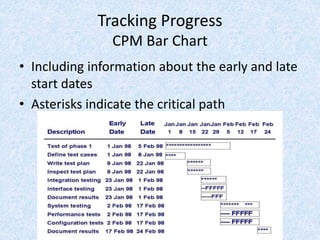
CPM Bar Chart
• Including information about the early and late
start dates
• Asterisks indicate the critical path
Tracking Progress
Tools to Track Progress: Gantt Chart
• Activities shown in parallel
– helps understand which activities can be
performed concurrently

Introduction to Software Engineering

  • 1.
    Introduction to Software Engineering Planningand Managing the Project Instructor : Asma Khatoon
  • 2.
    Tracking Progress • Doyou understand customer’s problems and needs? • Can you design a system to solve customer’s problems or satisfy customer’s needs? • How long will it take you to develop the system? • How much will it cost to develop the system?
  • 3.
    Tracking Progress Project Schedule •Describes the software-development cycle for a particular project by – enumerating the phases or stages of the project – breaking each phase into discrete tasks or activities to be completed • Portrays the interactions among the activities and estimates the times that each task or activity will take
  • 4.
    Tracking Progress Project Schedule:Approach • Understanding customer’s needs by listing all project deliverables – Documents – Demonstrations of function – Demonstrations of subsystems – Demonstrations of accuracy – Demonstrations of reliability, performance or security • Determining milestones and activities to produce the deliverables
  • 5.
    Tracking Progress Milestones andactivities • Activity: takes place over a period of time • Milestone: completion of an activity -- a particular point in time • Precursor: event or set of events that must occur in order for an activity to start • Duration: length of time needed to complete an activity • Due date: date by which an activity must be completed
  • 6.
    Tracking Progress Project Schedule(continued) • Project development can be separated into a succession of phases which are composed of steps, which are composed of activities
  • 7.
    Tracking Progress Phases, Steps,and Activities in Building a House Phase 1: Landscaping the lot Phase 2: Building the house Step 1.1: Clearing and grubbing Step 2.1: Prepare the site Activity 1.1.1: Remove trees Activity 2.1.1: Survey the land Activity 1.1.2: Remove stumps Activity 2.1.2: Request permits Step 1.2: Seeding the turf Activity 2.1.3: Excavate for the foundation Activity 1.2.1: Aerate the soil Activity 2.1.4: Buy materials Activity 1.2.2: Disperse the seeds Step 2.2: Building the exterior Activity 1.2.3: Water and weed Activity 2.2.1: Lay the foundation Step 1.3: Planting shrubs and trees Activity 2.2.2: Build the outside walls Activity 1.3.1: Obtain shrubs and trees Activity 2.2.3: Install exterior plumbing Activity 1.3.2: Dig holes Activity 2.2.4: Exterior electrical work Activity 1.3.3: Plant shrubs and trees Activity 2.2.5: Exterior siding Activity 1.3.4: Anchor the trees and mulch around them Activity 2.2.6: Paint the exterior Activity 2.2.7: Install doors and fixtures Activity 2.2.8: Install roof Step 2.3: Finishing the interior Activity 2.3.1: Install the interior plumbing Activity 2.3.2: Install interior electrical work Activity 2.3.3: Install wallboard Activity 2.3.4: Paint the interior Activity 2.3.5: Install floor covering Activity 2.3.6: Install doors and fixtures
  • 8.
    Tracking Progress Milestones inBuilding a House 1.1. Survey complete 1.2. Permits issued 1.3. Excavation complete 1.4. Materials on hand 2.1. Foundation laid 2.2. Outside walls complete 2.3. Exterior plumbing complete 2.4. Exterior electrical work complete 2.5. Exterior siding complete 2.6. Exterior painting complete 2.7. Doors and fixtures mounted 2.8. Roof complete 3.1. Interior plumbing complete 3.2. Interior electrical work complete 3.3. Wallboard in place 3.4. Interior painting complete 3.5. Floor covering laid 3.6. Doors and fixtures mounted
  • 9.
    Tracking Progress Work Breakdownand Activity Graphs • Work breakdown structure depicts the project as a set of discrete pieces of work A WBS diagram expresses the project scope in simple graphic terms • Activity graphs depict the dependencies among activities – Nodes: project milestones – Lines: activities involved
  • 10.
    Work Breakdown Structure •Work Breakdown Structure: The aggregation of all the work to be performed in a project. Often called WBS
  • 11.
    Approaches to DevelopWork Breakdown Structures • Result-oriented approach Structure the work based on the work products • Activity-oriented approach Structure the work based on development activities and project functions • Geographical area approach Structure the work based on geographical location • Organizational approach Structure the work based on organizational structure
  • 12.
    When to usewhat Approach • • The teams are distributed over the continent: • • Geographical area approach • • The teams consist of experienced developers: • • Result-oriented approach • • The project has mostly beginners or an • inexperienced project manager: • • Activity-oriented approach • • The project is a continuation of a previously • successful project, no changes • • Organizational approach • Whatever approach you choose, stick with it to • prevent possible overlap in categories.
  • 13.
    How do youdevelop a good WBS? • Top down approach: Start at the highest, top level activities and systematically develop increasing levels of detail for all activities • Bottom up approach (“Brainstorming”): Generate all activities you can think of that will have to be done and then group them into categories • Which one you use depends on • how familiar you and your team are with the project, • whether similar projects have successfully been performed in the past, and • how many new methods and technologies will be used.
  • 14.
    First Step: Identifythe Work to be done • Surveying • Excavation • Request Permits • Buy Material • Lay foundation • Build Outside Wall • Install Exterior Plumbing • Install Exterior Electrical • Install Interior Plumbing • Install Interior Electrical • Install Wallboard • Paint Interior • Install Interior Doors • Install Floor • Install Roof • Install Exterior Doors • Paint Exterior • Install Exterior Siding • Buy Pizza • Initially finding these tasks is a brainstorming activity • Similar to activities used during requirements engineering and analysis.
  • 15.
    Second Step: Hierarchicallyorganize the Tasks • Building the house consists of • Prepare the building site • Building the Exterior • Building the Interior • Preparing the building site consists of • Surveying • Excavation • Buying of material • Laying of the foundation • Requesting permits • Finding this organization involves categorization and refinement • Good after brainstorming, not during brainstorming.
  • 16.
    Work breakdown Structureto build a House
  • 17.
    Third Step: Identifydependencies between tasks • The work breakdown structure does not show any dependence among the activities/tasks • Can we excavate before getting the permit? • How much time does the whole project need if I know the individual times? • What can be done in parallel? • Are there any critical activities, that can slow down the project significantly? • Dependencies like these are shown in the dependency graph • Nodes are activities • Lines represent temporal dependencies
  • 18.
    WBS Example Provide Banquet Plan and Supervise Dinner Roomand Equipment Guests Staff Speakers 1.1.1 Create Plan 1.1.2 Make Budget 1.1.4 Coordinate Activities 1.1.3 Prepare Disbursements/ Reconciliation 1.2.1 Make Menu 1.2.2 Create Shopping List 1.2.4 Cook 1.2.3 Shop 1.4.1 Make Guest List 1.4.2 Receive RSVPs 1.4.4 Review Special Needs 1.4.3 Create Name Tags 1.2.5 Serve Dinner 1.3.1 Identify Site/ Room 1.3.2 Set up Tables/Chairs 1.3.4 Decorate 1.3.3 Lay out Settings/Utensils 1.3.5 Prepare Equipment, Pots, Etc. 1.6.1 Invite 1.6.2 Transport 1.6.4 Backup for No-shows 1.6.3 Coordinate Topics 1.6.5 Send Thank Yous 1.5.1 Hire Shoppers 1.5.2 Hire Cooks 1.5.4 Hire Hosts 1.5.3 Hire Servers 1.5.5 Hire Cleanup 1.0 1.1 1.2 1.3 1.4 1.5 1.6 Level 2 Level 3 Level 1 WBS Example - Banquet
  • 19.
    Tracking Progress Activity Graphs •Activity graph for building a house
  • 20.
    Tracking Progress Estimating Completion •Adding estimated time in activity graph of each activity to be completed tells us more about the project's schedule
  • 21.
    Building a House(Dependency/ Activity Graph)
  • 22.
    Fourth step: Maptasks onto time • Estimate starting times and durations for each of the activities in the dependency graph • Compute the longest path through the graph • This is the estimated duration of your project
  • 23.
    Tracking Progress Critical PathMethod (CPM) • Minimum amount of time it will take to complete a project – Reveals those activities that are most critical to completing the project on time • Real time (actual time): estimated amount of time required for the activity to be completed • Available time: amount of time available in the schedule for the activity's completion • Slack time: the difference between the available time and the real time for that activity
  • 24.
    Tracking Progress Critical PathMethod (CPM) • Critical path: the slack at every node is zero – can be more than one in a project schedule • Slack time = available time – real time = latest start time – earliest start time
  • 25.
    Slack Time forActivities of Building a House Activity Earliest start time Latest start time Slack 1.1 1 13 12 1.2 1 1 0 1.3 16 16 0 1.4 26 26 0 2.1 36 36 0 2.2 51 51 0 2.3 71 83 12 2.4 81 93 12 2.5 91 103 12 2.6 99 111 12 2.7 104 119 15 2.8 104 116 12 3.1 71 71 0 3.2 83 83 0 3.3 98 98 0 3.4 107 107 0 3.5 107 107 0 3.6 118 118 0 Finish 124 124 0
  • 26.
    Tracking Progress CPM BarChart • Including information about the early and late start dates • Asterisks indicate the critical path
  • 27.
    Tracking Progress Tools toTrack Progress: Gantt Chart • Activities shown in parallel – helps understand which activities can be performed concurrently