Unit 1
Introduction to Operating System: Introduction and Need
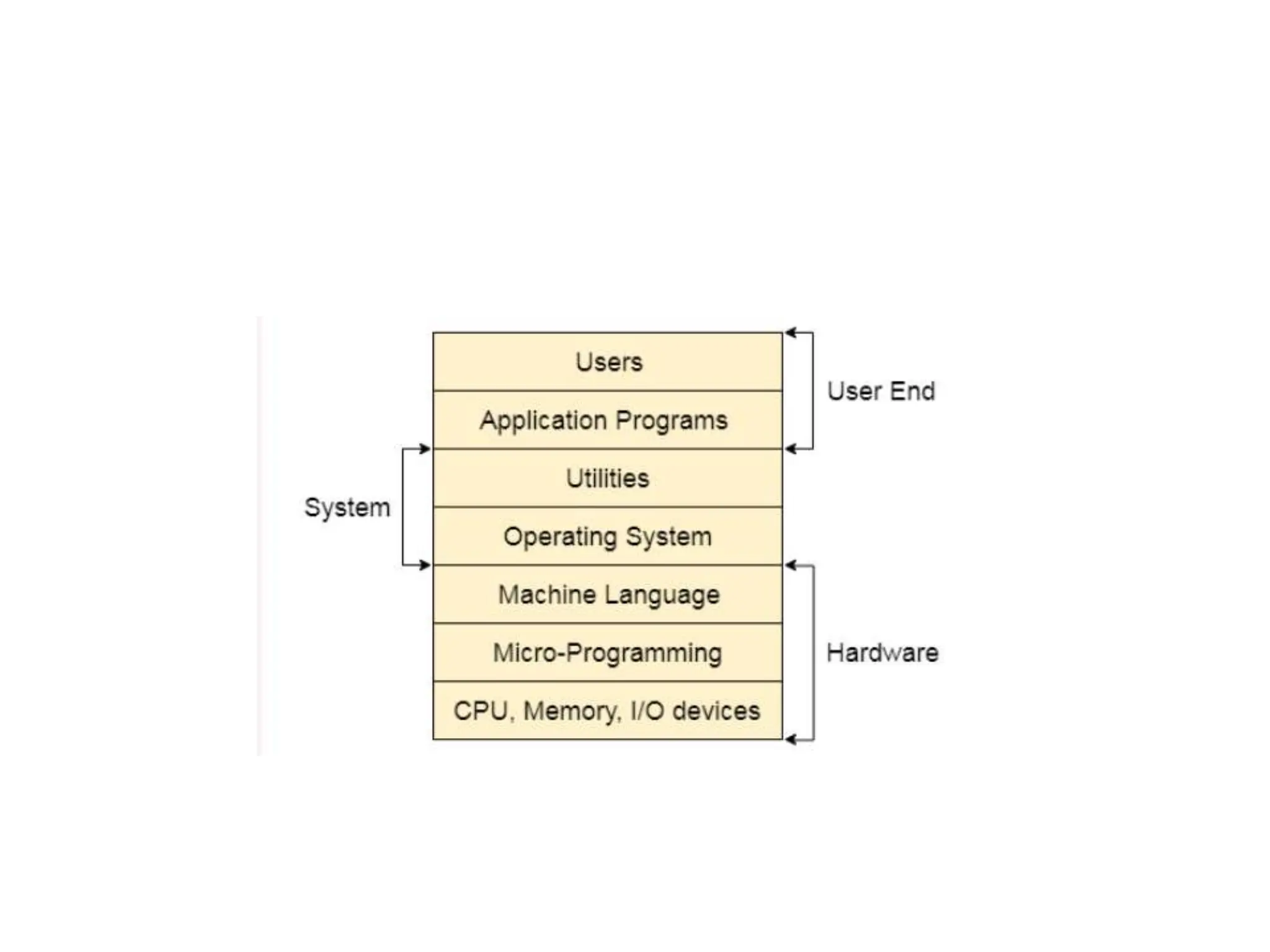
of operating system, Layered Architecture/Logical Structure
of Operating system, Type of OS(Multiprogramming , Time
Sharing, Real Time ,Networked, Distributed, Clustered,
Hand Held), Operating system as Resource Manager and
Virtual Machine, OS Services, BIOS, System Calls/Monitor
Calls, Firmware- BIOS, Boot Strap Loader. Threads-
processes versus threads, threading, concepts, models,
kernel & user level threads, thread usage, benefits,
multithreading models.
• Operating System can be defined as an interface
between user and the hardware. It provides an
environment to the user so that, the user can
perform its task in convenient and efficient way.
In the Computer System (comprises of Hardware
and software), Hardware can only understand
machine code (in the form of 0 and 1) which
doesn't make any sense to a naive user.
• We need a system which can act as an
intermediary and manage all the processes and
resources present in the system.
An Operating System can be defined as an interface
between user and hardware. It is responsible for the
execution of all the processes, Resource
Allocation, CPU management, File Management and
many other tasks.
The purpose of an operating system is to provide an
environment in which a user can execute programs in
convenient and efficient manner.
• Why to Learn Operating System?
• An Operating System (OS) is an interface between
a computer user and computer hardware. An
operating system is a software which performs all
the basic tasks like file management, memory
management, process management, handling
input and output, and controlling peripheral
devices such as disk drives and printers.
• Some popular Operating Systems include Linux
Operating System, Windows Operating System,
unix , linux,MAC os.
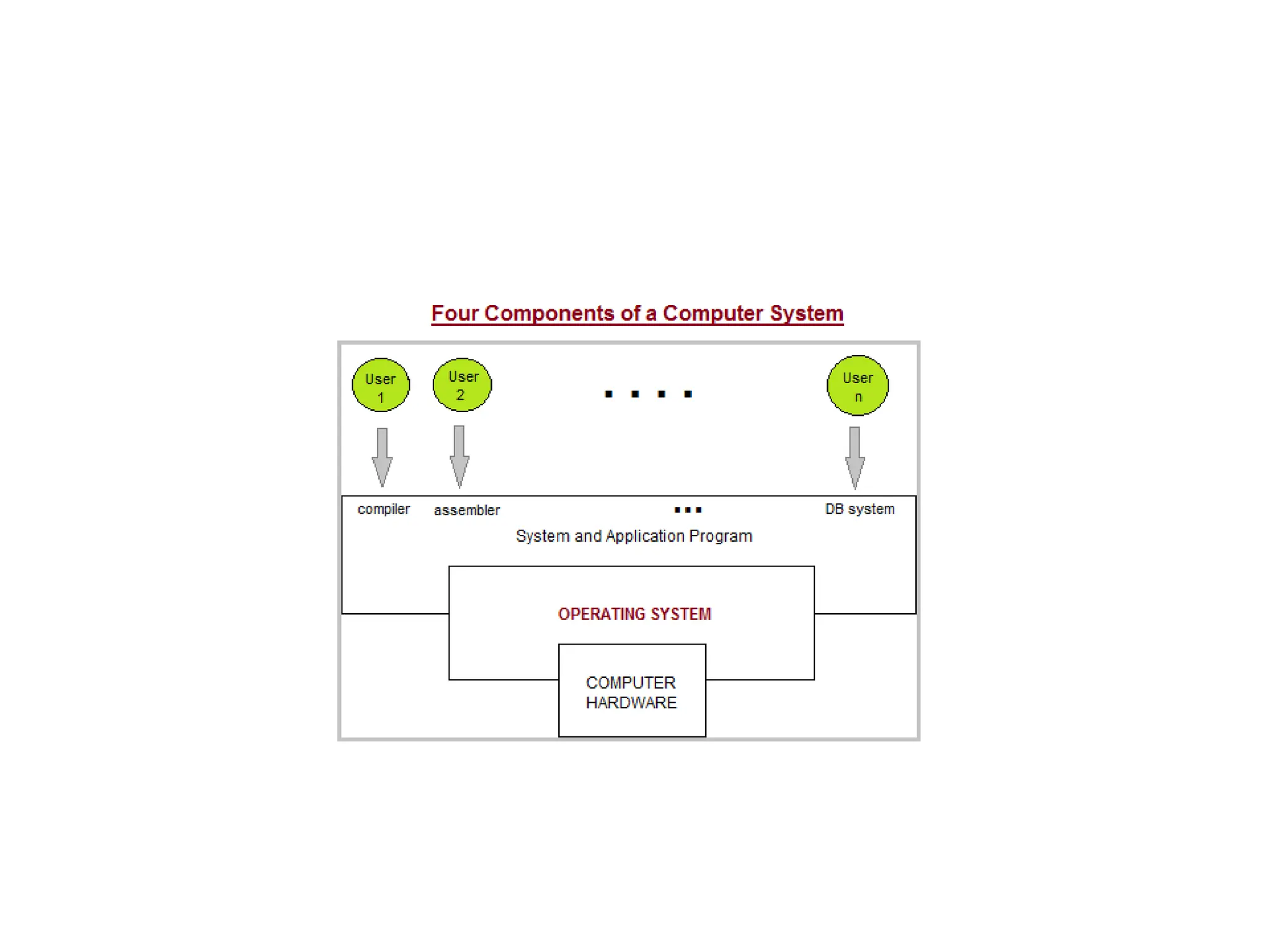
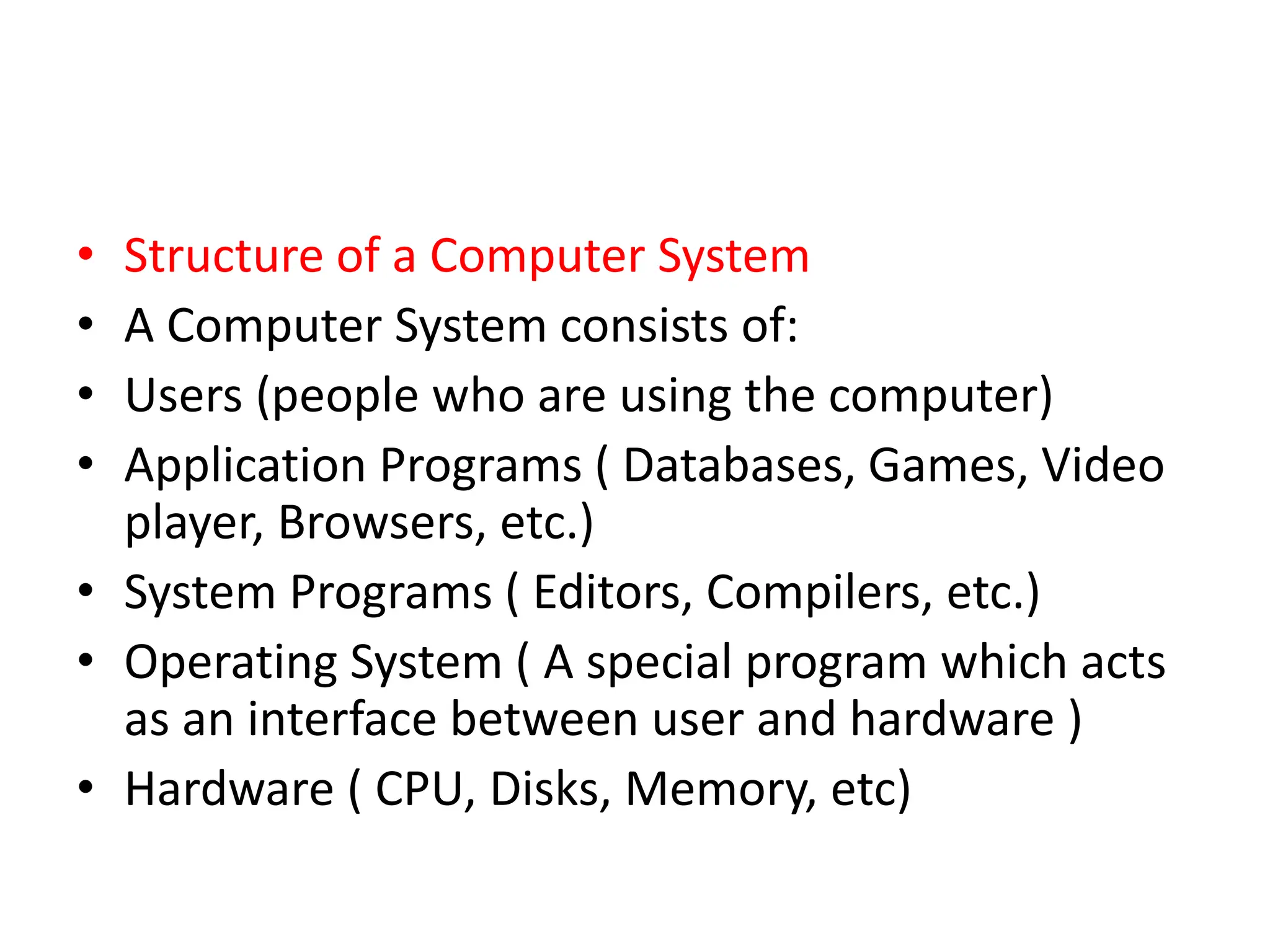
• Structure of a Computer System
• A Computer System consists of:
• Users (people who are using the computer)
• Application Programs ( Databases, Games, Video
player, Browsers, etc.)
• System Programs ( Editors, Compilers, etc.)
• Operating System ( A special program which acts
as an interface between user and hardware )
• Hardware ( CPU, Disks, Memory, etc)
Disadvantages of an Operating system
• Expensive
• Virus Threat
• System Failure
• Following are some of important functions of an
operating System.
• Memory Management
• Processor Management
• Device Management
• File Management
• Security
• Control over system performance
• Job accounting
• Error detecting aids
• Coordination between other software and users
What does an Operating system do?
• Process Management
• Process Synchronization
• Memory Management
• CPU Scheduling
• File Management
• Security
Memory Management
• Memory management refers to management of Primary Memory
or Main Memory. Main memory is a large array of words or bytes
where each word or byte has its own address.
• Main memory provides a fast storage that can be accessed directly
by the CPU. For a program to be executed, it must in the main
memory. An Operating System does the following activities for
memory management −
• Keeps tracks of primary memory, i.e., what part of it are in use by
whom, what part are not in use.
• In multiprogramming, the OS decides which process will get
memory when and how much.
• Allocates the memory when a process requests it to do so.
• De-allocates the memory when a process no longer needs it or has
been terminated.
Processor Management
• In multiprogramming environment, the OS decides
which process gets the processor when and for how
much time. This function is called process scheduling.
An Operating System does the following activities for
processor management −
• Keeps tracks of processor and status of process. The
program responsible for this task is known as traffic
controller.
• Allocates the processor (CPU) to a process.
• De-allocates processor when a process is no longer
required.
Device Management
• An Operating System manages device
communication via their respective drivers. It
does the following activities for device
management −
• Keeps tracks of all devices. Program responsible
for this task is known as the I/O controller.
• Decides which process gets the device when and
for how much time.
• Allocates the device in the efficient way.
• De-allocates devices.
File Management
• A file system is normally organized into directories for
easy navigation and usage. These directories may
contain files and other directions.
• An Operating System does the following activities for
file management −
• Keeps track of information, location, uses, status etc.
The collective facilities are often known as file system.
• Decides who gets the resources.
• Allocates the resources.
• De-allocates the resources.
• Following are some of the important activities that an Operating
System performs −
• Security − By means of password and similar other techniques, it
prevents unauthorized access to programs and data.
• Control over system performance − Recording delays between
request for a service and response from the system.
• Job accounting − Keeping track of time and resources used by
various jobs and users.
• Error detecting aids − Production of dumps, traces, error messages,
and other debugging and error detecting aids.
• Coordination between other softwares and users − Coordination
and assignment of compilers, interpreters, assemblers and other
software to the various users of the computer systems.
Types of Operating Systems
• Simple Batch System
• Multiprogramming Batch System
• Multiprocessor System
• Desktop System
• Distributed Operating System
• Clustered System
• Realtime Operating System
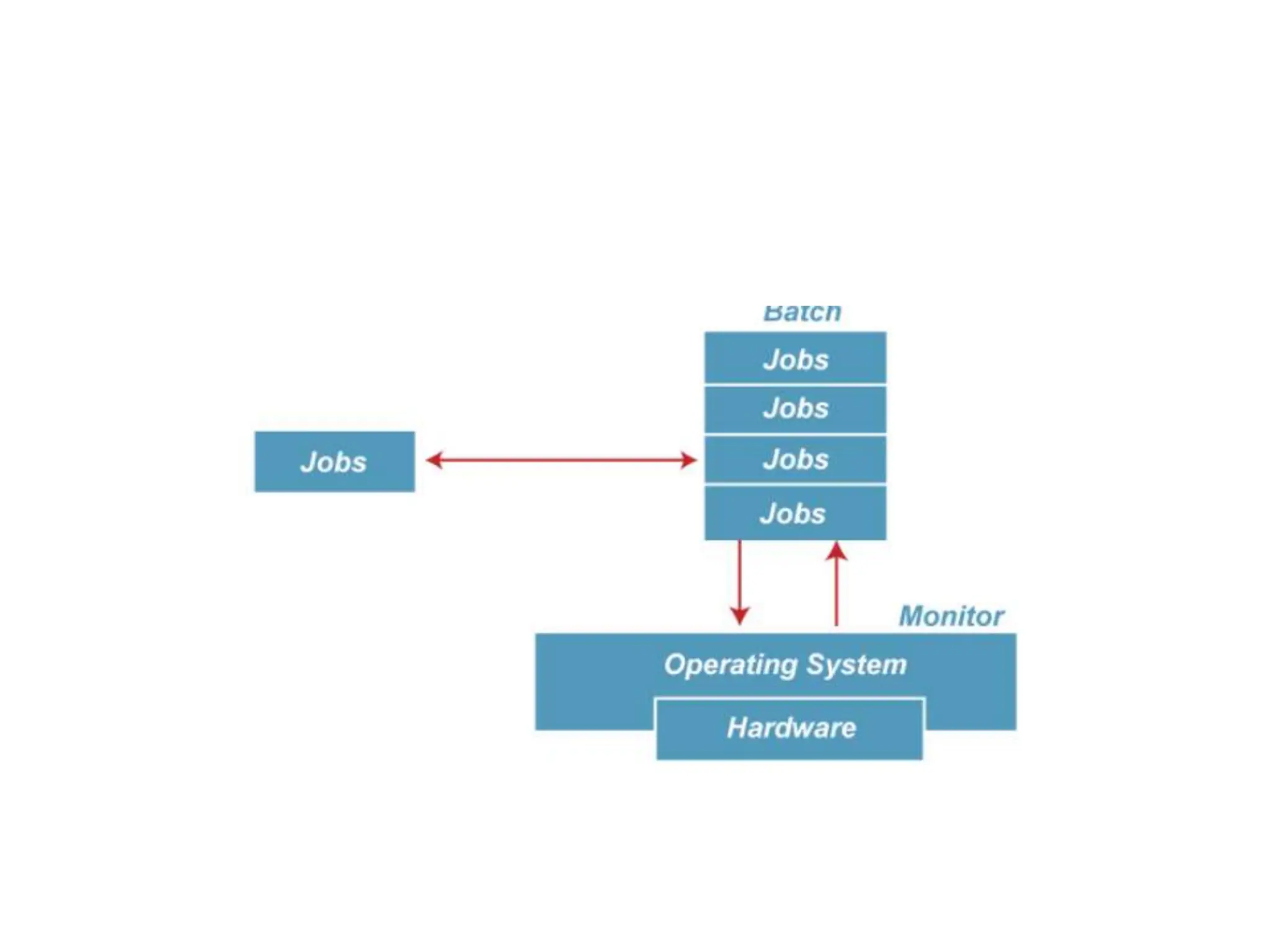
Batch operating system
• The users of a batch operating system do not interact with
the computer directly. Each user prepares his job on an off-
line device like punch cards and submits it to the computer
operator. To speed up processing, jobs with similar needs
are batched together and run as a group. The programmers
leave their programs with the operator and the operator
then sorts the programs with similar requirements into
batches.
• The problems with Batch Systems are as follows −
• Lack of interaction between the user and the job.
• CPU is often idle, because the speed of the mechanical I/O
devices is slower than the CPU.
• Difficult to provide the desired priority.
Multiprogramming Operating System
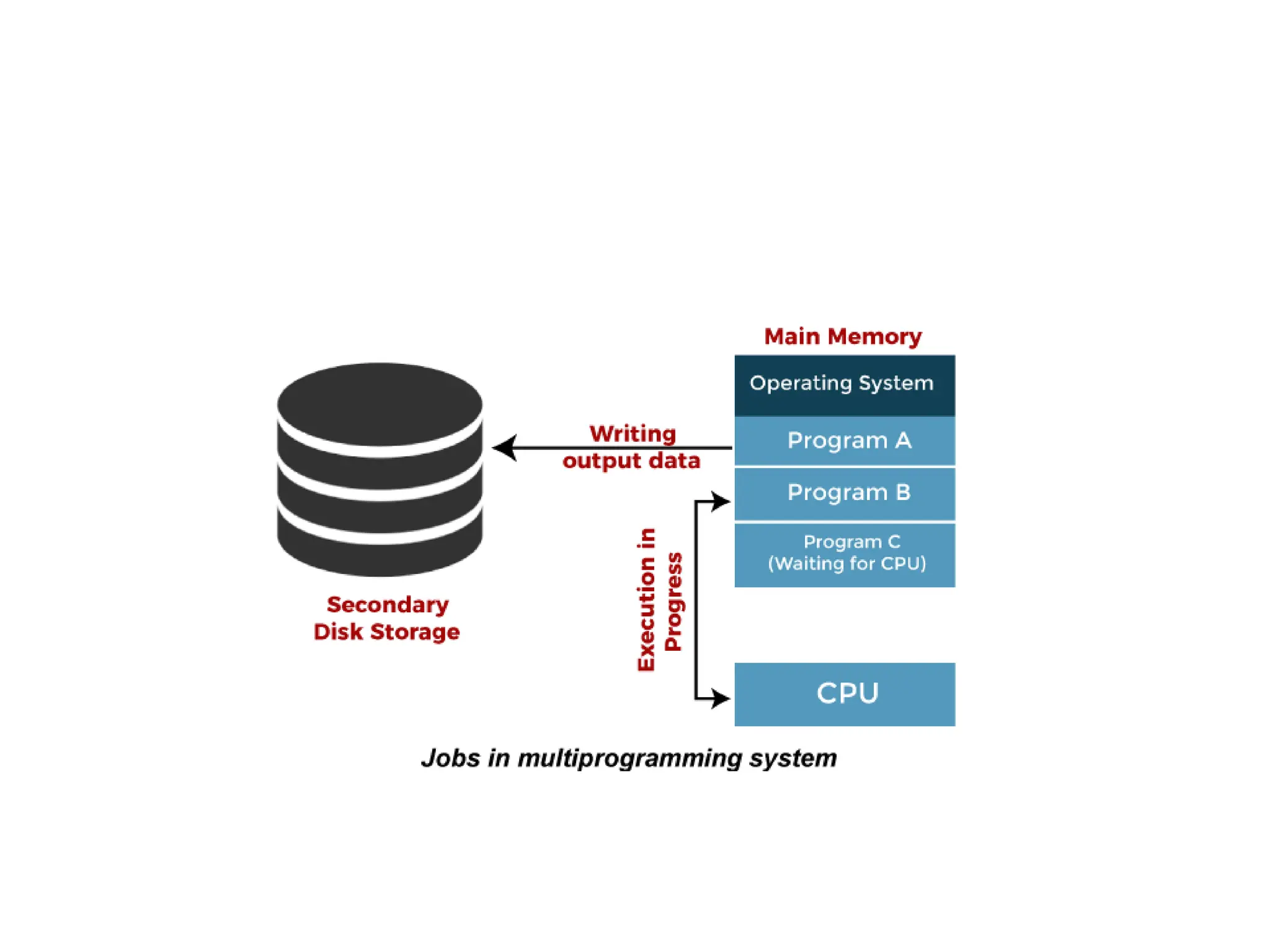
• In this the operating system picks up and begins to execute
one of the jobs from memory.
• Once this job needs an I/O operation operating system
switches to another job (CPU and OS always busy).
• Jobs in the memory are always less than the number of
jobs on disk(Job Pool).
• If several jobs are ready to run at the same time, then the
system chooses which one to run through the process
of CPU Scheduling.
• In Non-multiprogrammed system, there are moments when
CPU sits idle and does not do any work.
• In Multiprogramming system, CPU will never be idle and
keeps on processing.
Multiprogramming Operating System
• Multiprogramming is an extension to batch
processing where the CPU is always kept busy.
In a multiprogramming environment, when a
process does its I/O, The CPU can start the
execution of other processes. Therefore,
multiprogramming improves the efficiency of
the system.
multitasking operating system
• Time Sharing Systems are very similar to
Multiprogramming batch systems. In fact time
sharing systems are an extension of
multiprogramming systems.
• In Time sharing systems the prime focus is
on minimizing the response time, while in
multiprogramming the prime focus is to
maximize the CPU usage.
multitasking operating system
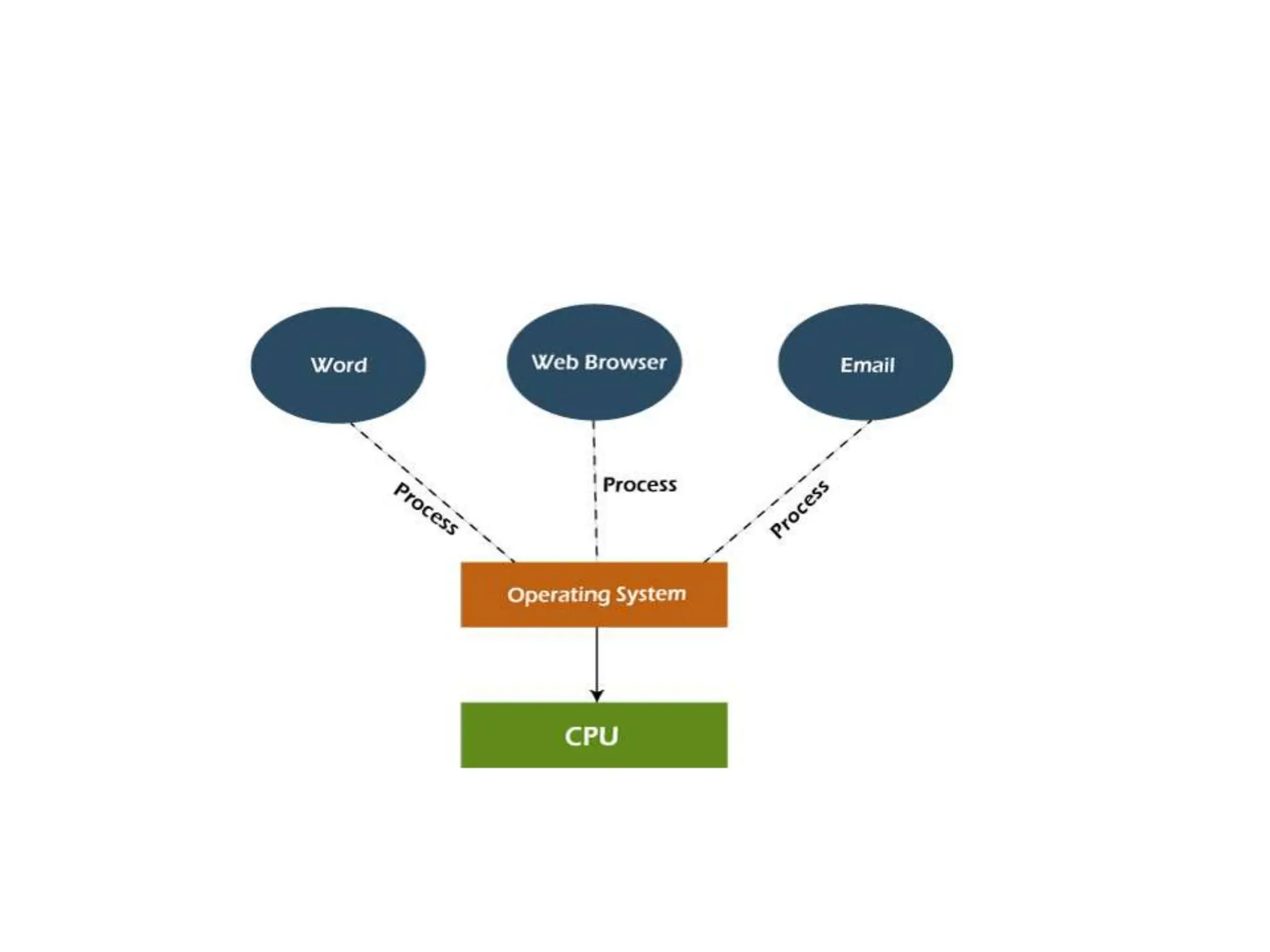
• The multitasking operating system is a logical
extension of a multiprogramming system that
enables multiple programs simultaneously. It
allows a user to perform more than one
computer task at the same time
Multiprocessor Systems
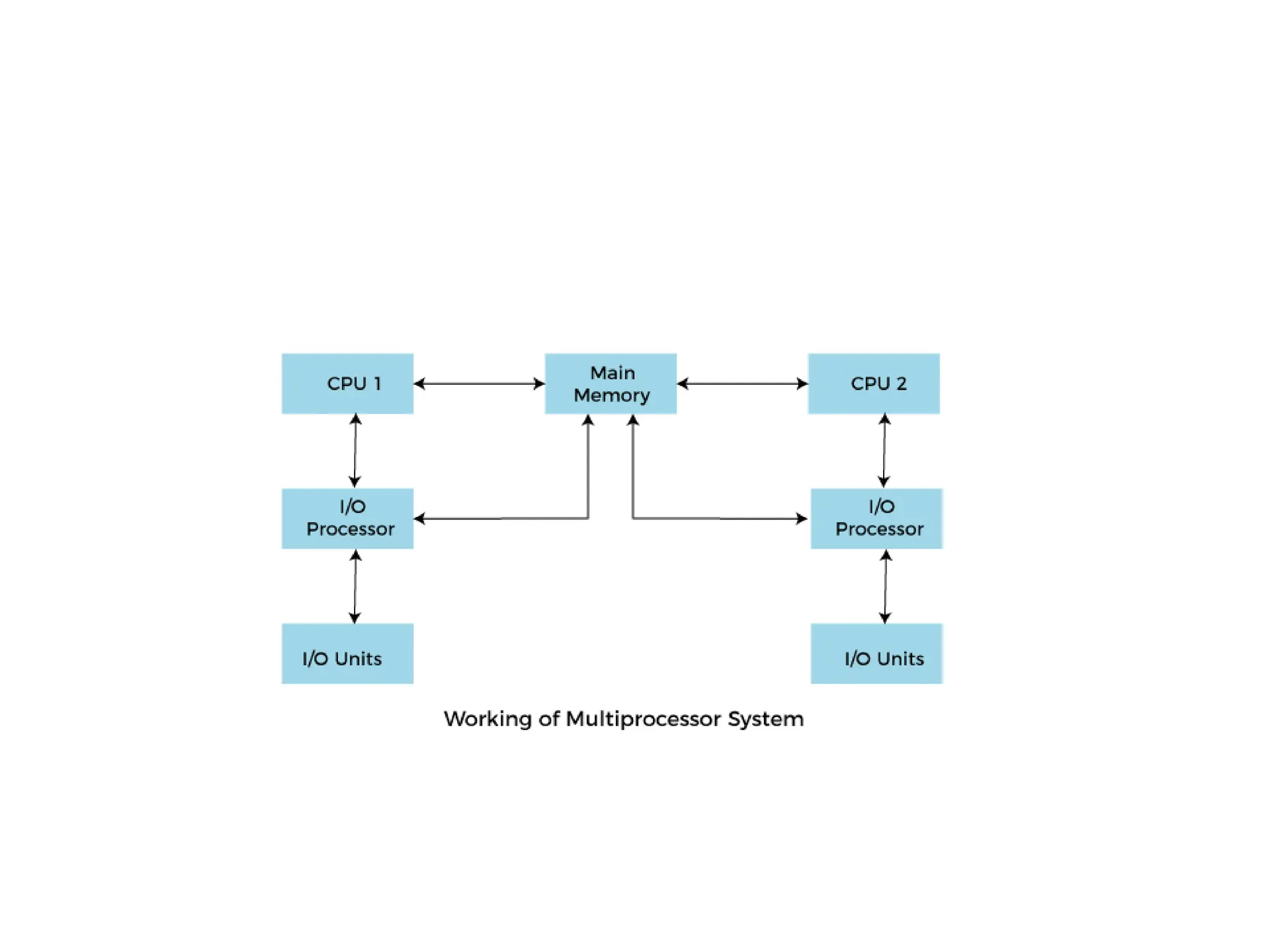
• In Multiprocessing, Parallel computing is
achieved. There are more than one processors
present in the system which can execute more
than one process at the same time. This will
increase the throughput of the system.
Network Operating System
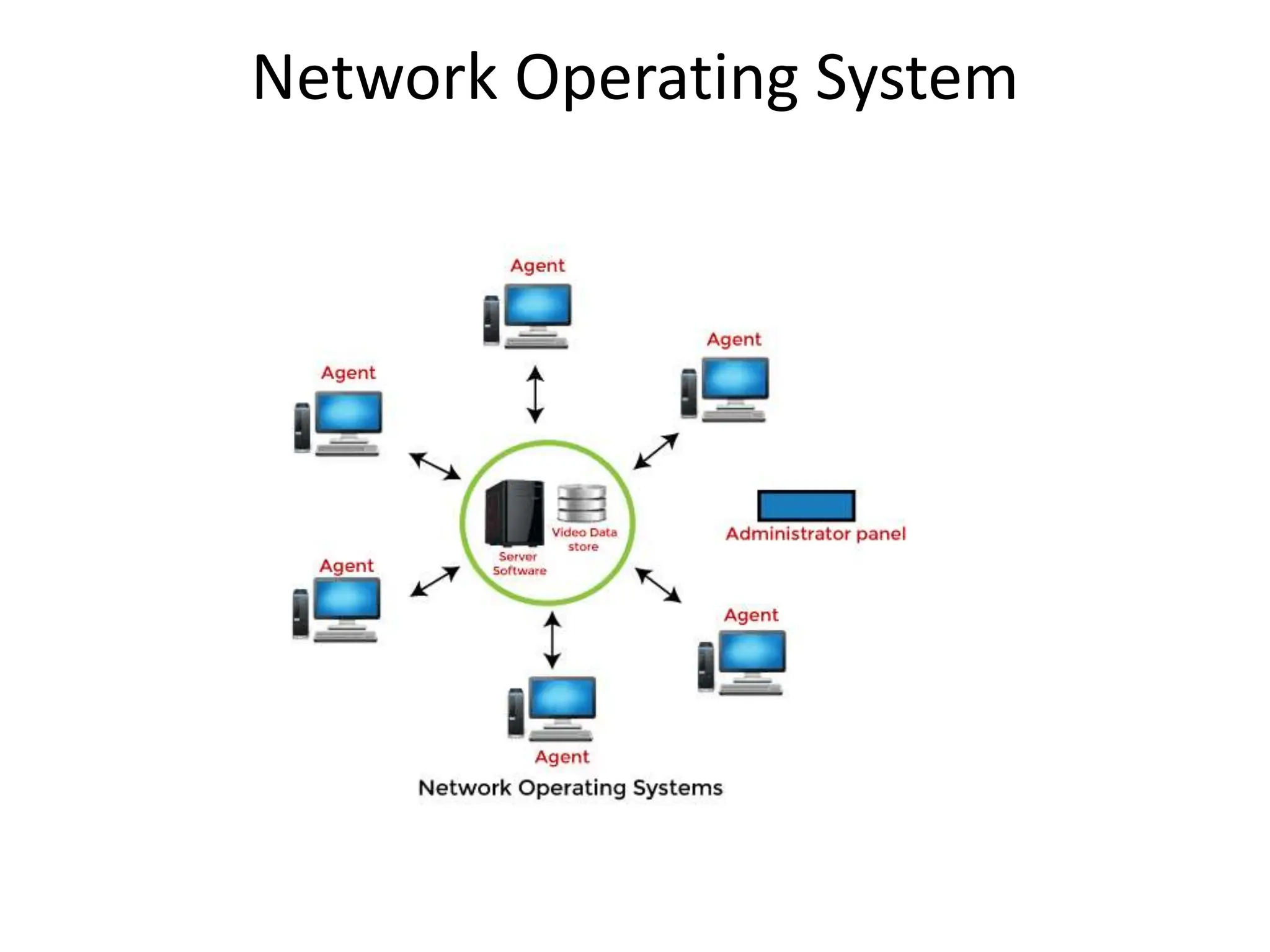
• An Operating system, which includes software
and associated protocols to communicate with
other computers via a network conveniently
and cost-effectively, is called Network
Operating System.
Real Time Operating System
• In Real-Time Systems, each job carries a
certain deadline within which the job is
supposed to be completed, otherwise, the
huge loss will be there, or even if the result is
produced, it will be completely useless.
• Examples of the real-time operating
systems: Airline traffic control systems,
Command Control Systems, Airlines
reservation system, Robot etc
Distributed Operating System
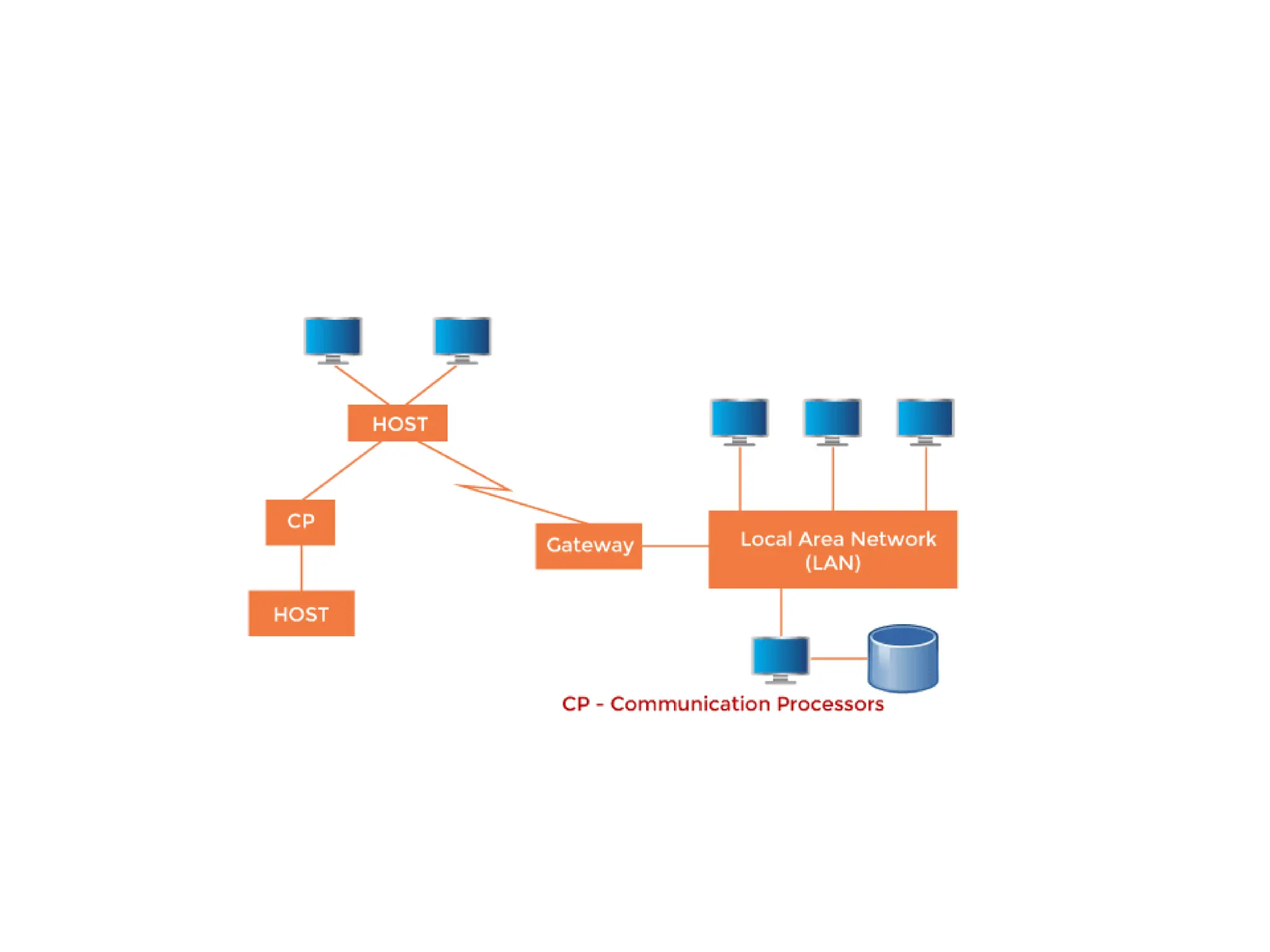
• The Distributed Operating system is not installed
on a single machine, it is divided into parts, and
these parts are loaded on different machines. A
part of the distributed Operating system is
installed on each machine to make their
communication possible. Distributed Operating
systems are much more complex, large, and
sophisticated than Network operating systems
because they also have to take care of varying
networking protocols.
Operating System as Resource
Manager
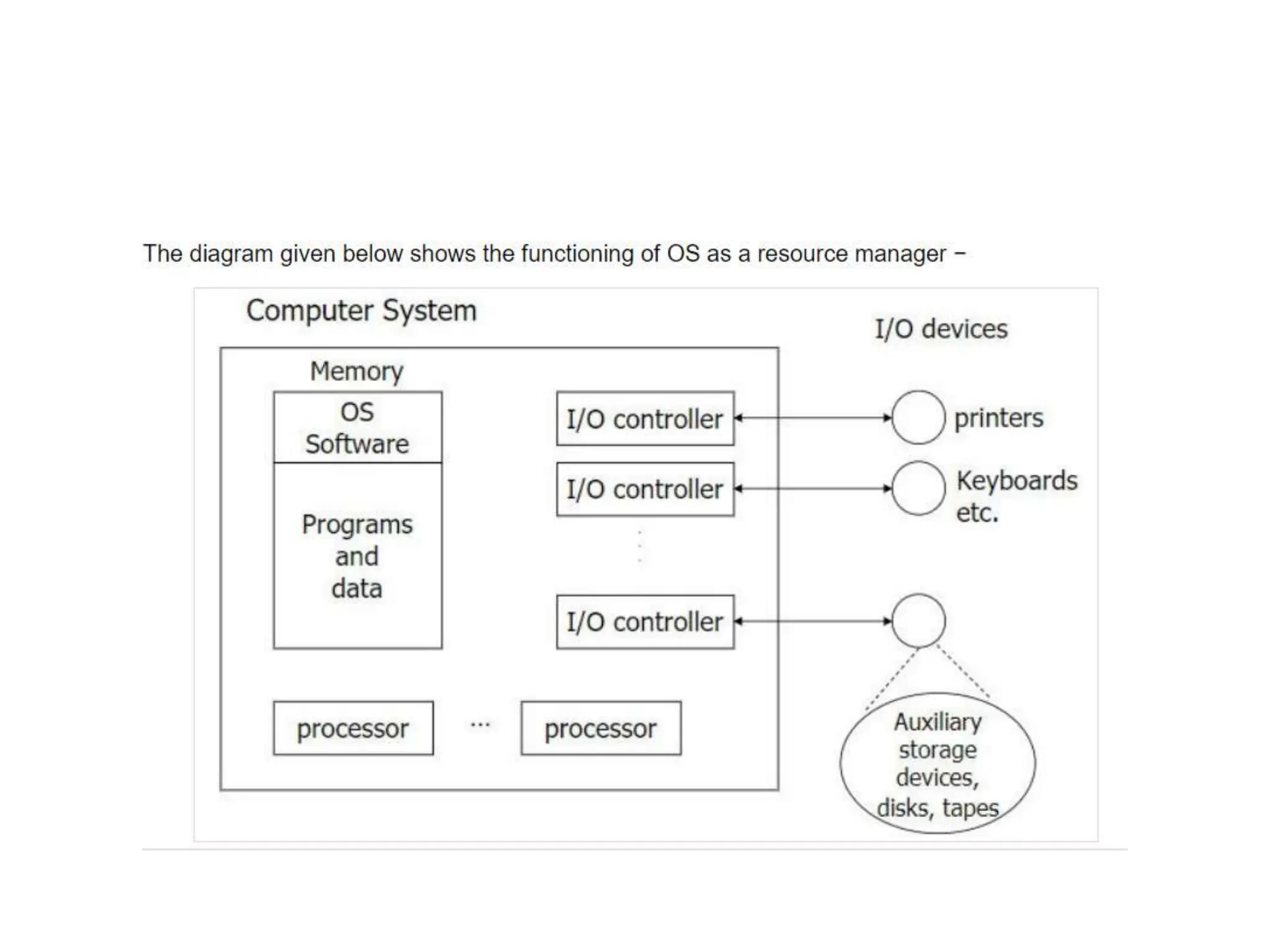
• Now-a-days all modern computers consist of processors, memories,
timers, network interfaces, printers, and so many other devices.
• The operating system provides for an orderly and controlled allocation of
the processors, memories, and I/O devices among the various programs in
the bottom-up view.
• Operating system allows multiple programs to be in memory and run at
the same time.
• Resource management includes multiplexing or sharing resources in two
different ways: in time and in space.
• In time multiplexed, different programs take a chance of using CPU. First
one tries to use the resource, then the next one that is ready in the queue
and so on. For example: Sharing the printer one after another.
• In space multiplexing, Instead of the customers taking a chance, each one
gets part of the resource. For example − Main memory is divided into
several running programs, so each one can be resident at the same time.
• With the help of system call, we can access
the services of os.
• What is System Call in Operating System?
• A system call is a mechanism that provides the
interface between a process and the operating
system. It is a programmatic method in which a
computer program requests a service from the
kernel of the OS.
• System call offers the services of the operating
system to the user programs via API (Application
Programming Interface). System calls are the only
entry points for the kernel system.
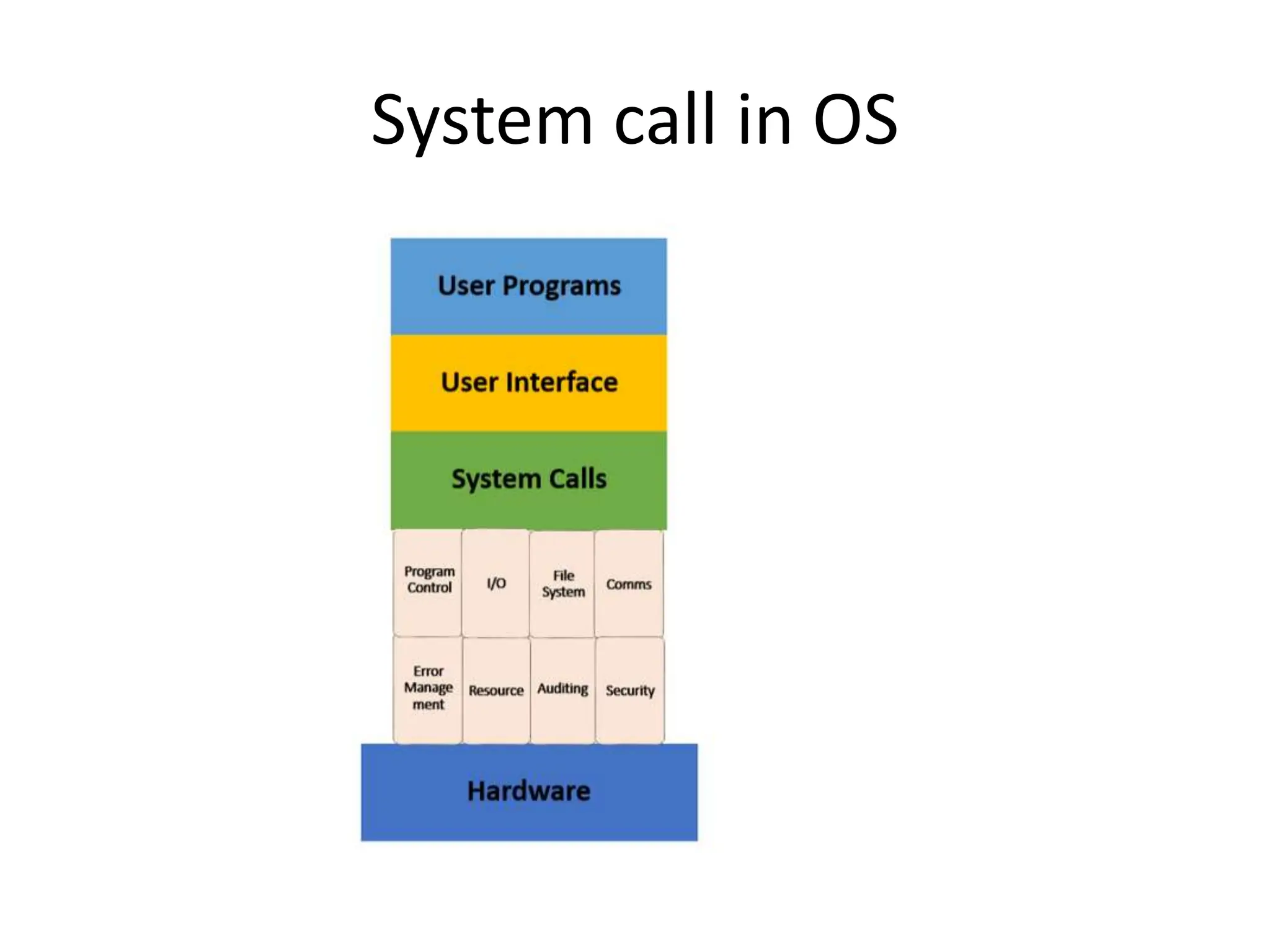
System call in OS
As you can see in the above-given System Call
example diagram.
Step 1) The processes executed in the user
mode till the time a system call interrupts it.
Step 2) After that, the system call is executed
in the kernel-mode on a priority basis.
Step 3) Once system call execution is over,
control returns to the user mode.,
Step 4) The execution of user processes
resumed in Kernel mode.
• Why do you need System Calls in OS?
• Following are situations which need system calls in OS:
• Reading and writing from files demand system calls.
• If a file system wants to create or delete files, system calls are
required.
• System calls are used for the creation and management of new
processes.
• Network connections need system calls for sending and receiving
packets.
• Access to hardware devices like scanner, printer, need a system call.
•
• Types of System calls
• Here are the five types of System Calls in OS:
• Process Control
• File Management
• Device Management
• Information Maintenance
• Communications
•
• Process Control
• This system calls perform the task of process
creation, process termination, etc.
• Functions:
• End and Abort
• Load and Execute
• Create Process and Terminate Process
• Wait and Signal Event
• Allocate and free memory
• File Management
• File management system calls handle file
manipulation jobs like creating a file, reading, and
writing, etc.
• Functions:
• Create a file
• Delete file
• Open and close file
• Read, write, and reposition
• Get and set file attributes
• Device Management
• Device management does the job of device
manipulation like reading from device buffers,
writing into device buffers, etc.
• Functions:
• Request and release device
• Logically attach/ detach devices
• Get and Set device attributes
• Information Maintenance
• It handles information and its transfer
between the OS and the user program.
• Functions:
• Get or set time and date
• Get process and device attributes
• Communication:
• These types of system calls are specially used
for interprocess communications.
• Functions:
• Create, delete communications connections
• Send, receive message
• Help OS to transfer status information
• Attach or detach remote devices
Important System Calls Used in OS
• wait()
• In some systems, a process needs to wait for
another process to complete its execution
• fork()
• Processes use this system call to create
processes that are a copy of themselves. With
the help of this system Call parent process
creates a child process,
• kill():
• The kill() system call is used by OS to send a
termination signal to a process that urges the process
to exit.
• exec()
• This system call runs when an executable file in the
context of an already running process that replaces the
older executable file.
• exit():
• The exit() system call is used to terminate program
execution
What is Process?
• A process is an instance of a program that is being
executed. When we run a program, it does not execute
directly. It takes some time to follow all the steps required
to execute the program, and following these execution
steps is known as a process.
• A process can create other processes to perform multiple
tasks at a time; the created processes are known as clone
or child process, and the main process is known as
the parent process. Each process contains its own memory
space and does not share it with the other processes. It is
known as the active entity.
•
• A process in OS can remain in any of the following
states:
• NEW: A new process is being created.
• READY: A process is ready and waiting to be
allocated to a processor.
• RUNNING: The program is being executed.
• WAITING: Waiting for some event to happen or
occur.
• TERMINATED: Execution finished.
• Features of Process
• Each time we create a process, we need to make
a separate system call for each process to the OS.
The fork() function creates the process.
• Each process exists within its own address or
memory space.
• Each process is independent and treated as an
isolated process by the OS.
• Processes need IPC (Inter-process
Communication) in order to communicate with
each other.
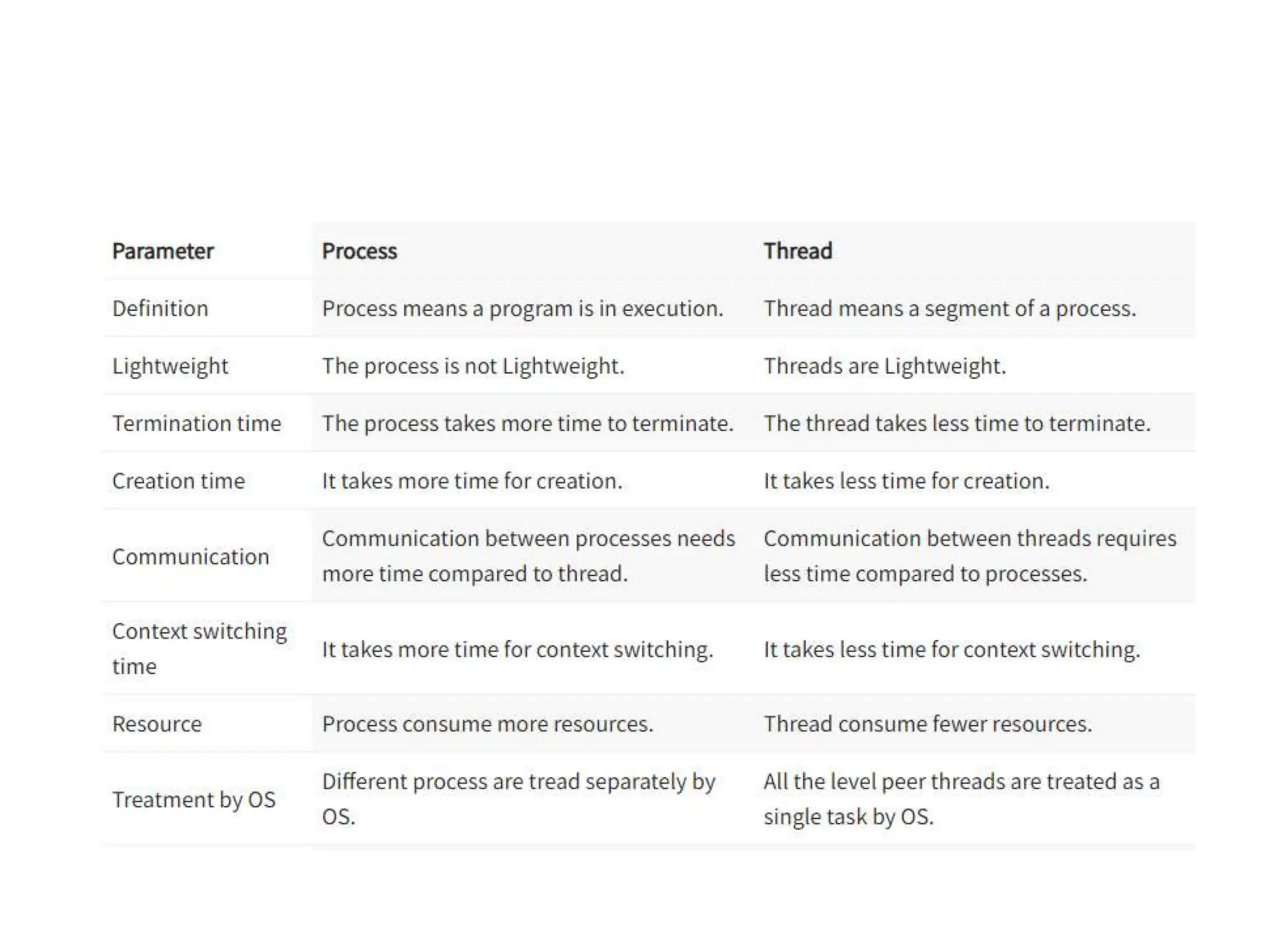
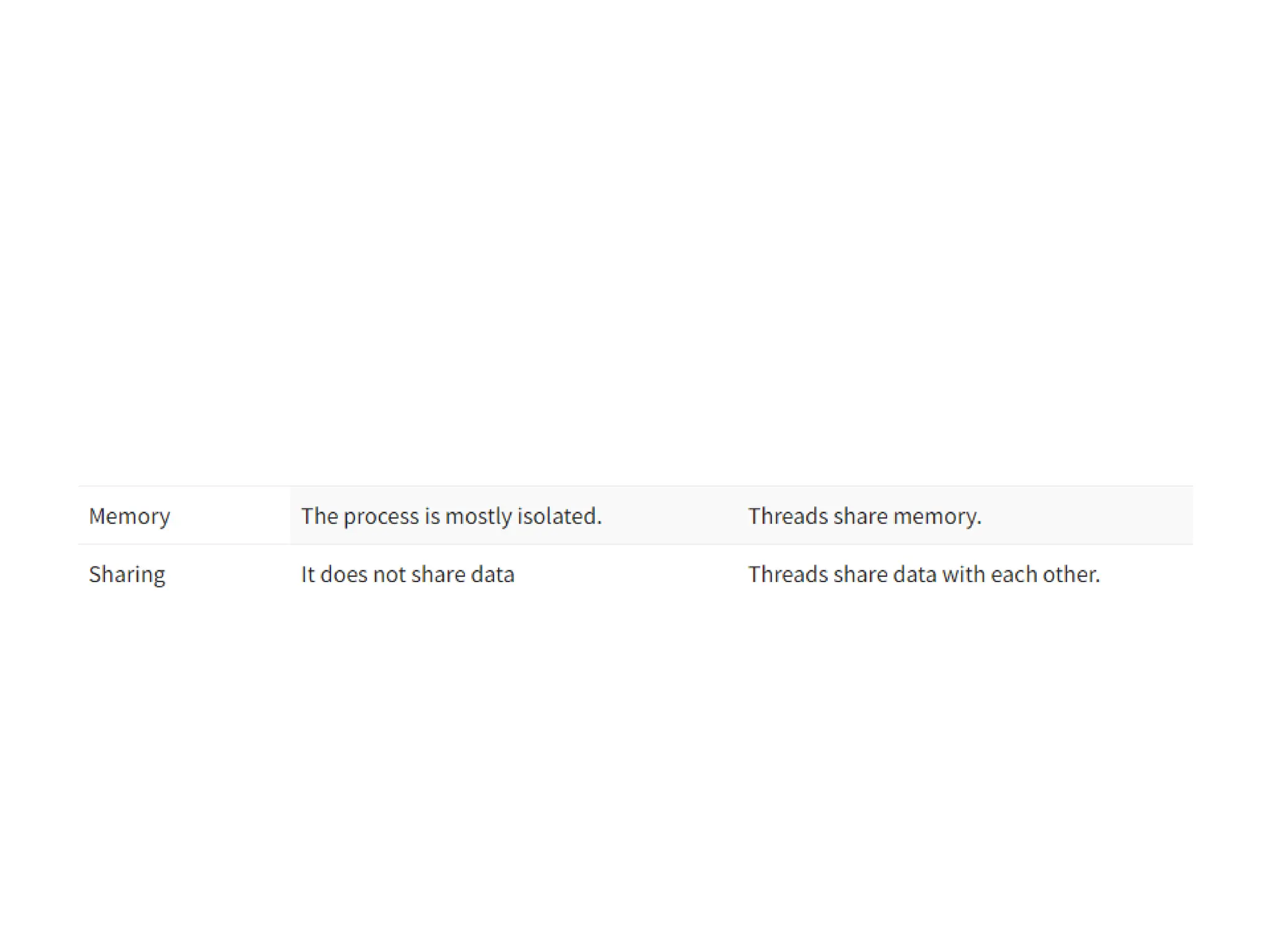
• What is Thread?
• A thread is the subset of a process and is also
known as the lightweight process. A process can
have more than one thread, and these threads
are managed independently by the scheduler. All
the threads within one process are interrelated to
each other. Threads have some common
information, such as data segment, code
segment, files, etc., that is shared to their peer
threads. But contains its own registers, stack, and
counter.
Types of Threads
• There are two types of threads, which are:
• 1. User Level Thread
• As the name suggests, the user-level threads
are only managed by users, and the kernel
does not have its information.
• These are faster, easy to create and manage.
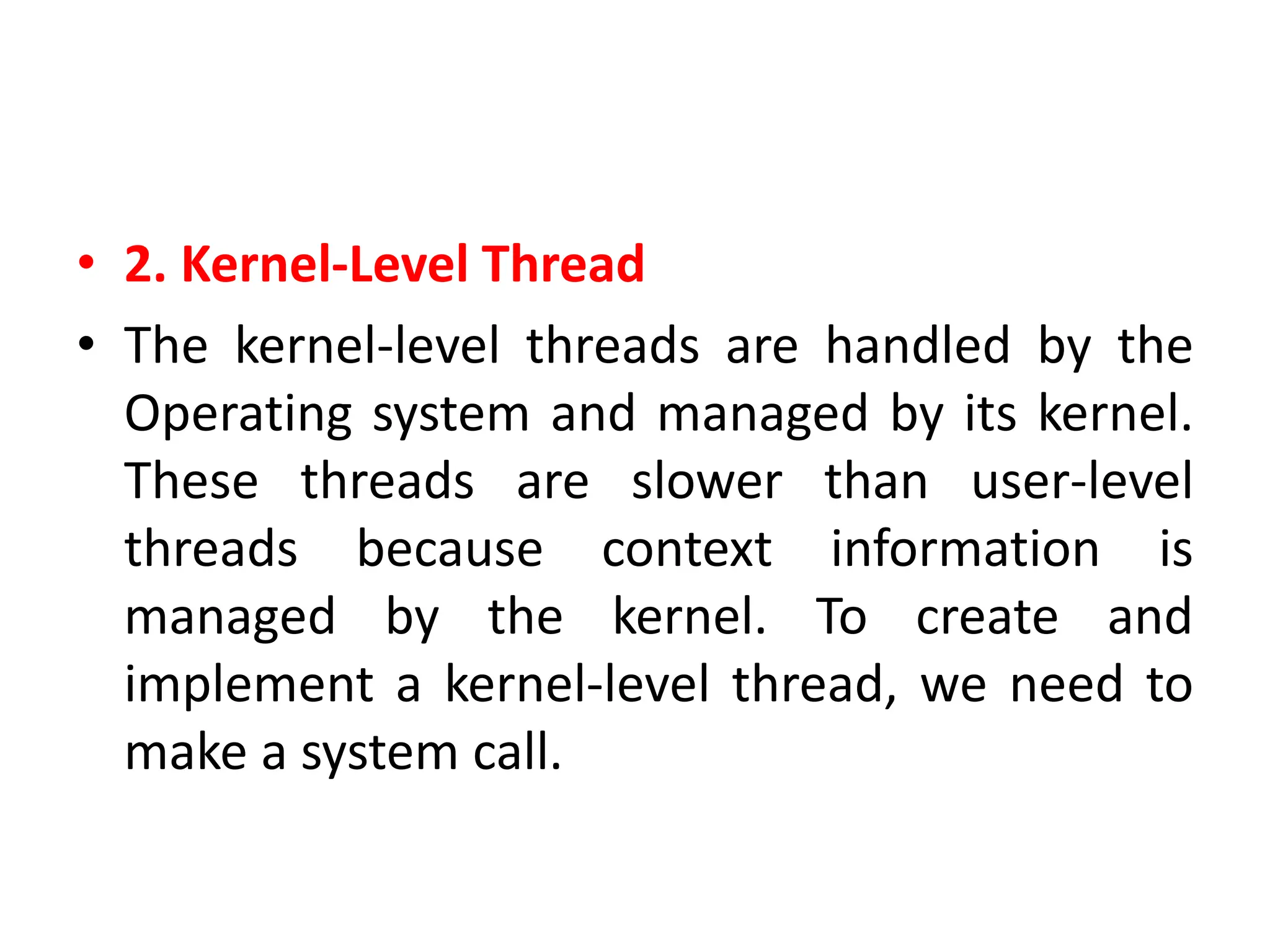
• 2. Kernel-Level Thread
• The kernel-level threads are handled by the
Operating system and managed by its kernel.
These threads are slower than user-level
threads because context information is
managed by the kernel. To create and
implement a kernel-level thread, we need to
make a system call.
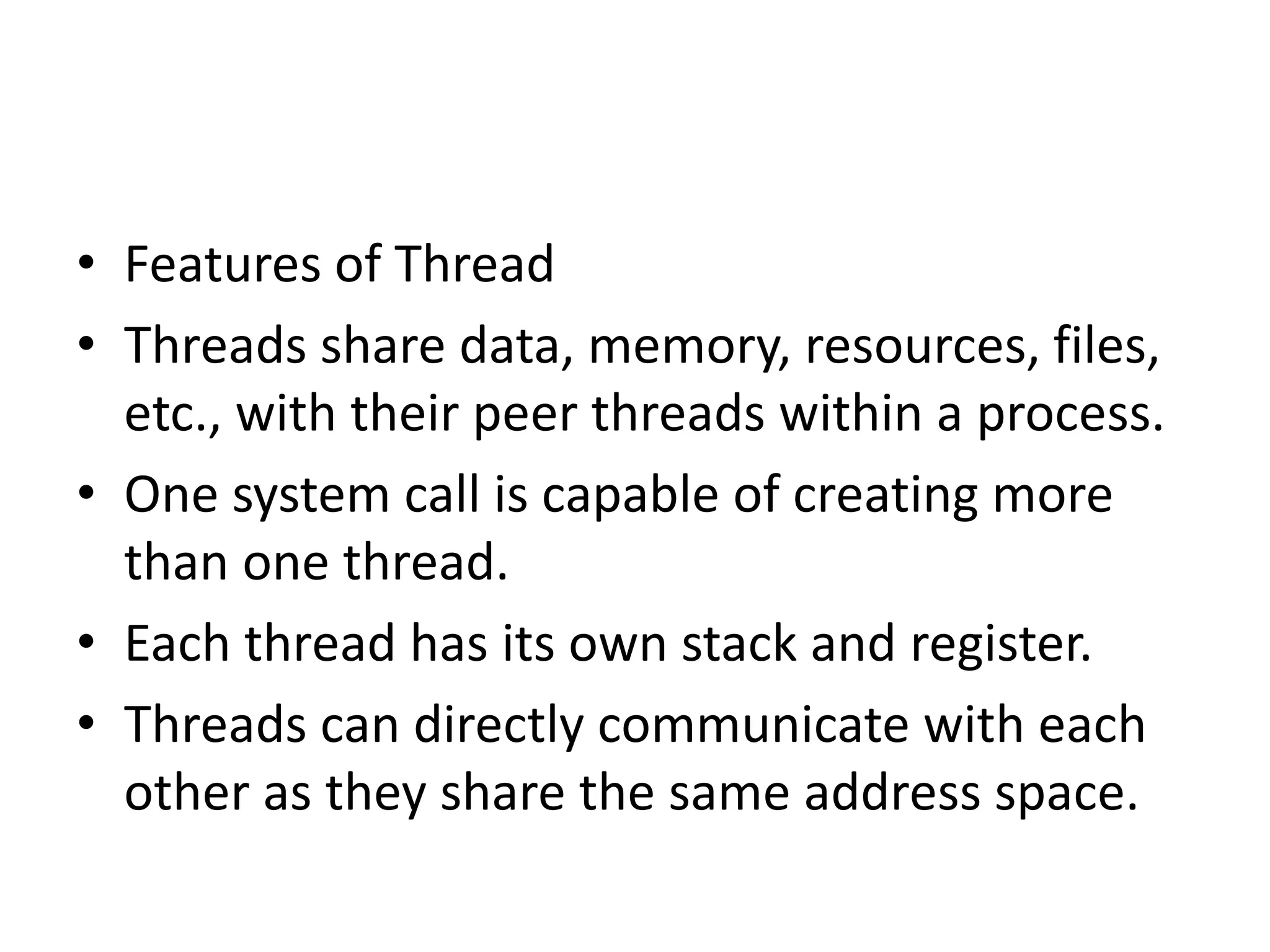
• Features of Thread
• Threads share data, memory, resources, files,
etc., with their peer threads within a process.
• One system call is capable of creating more
than one thread.
• Each thread has its own stack and register.
• Threads can directly communicate with each
other as they share the same address space.
os unit 1 (2).pptx. introduction to operating systems

os unit 1 (2).pptx. introduction to operating systems

  • 1.
    Unit 1 Introduction toOperating System: Introduction and Need of operating system, Layered Architecture/Logical Structure of Operating system, Type of OS(Multiprogramming , Time Sharing, Real Time ,Networked, Distributed, Clustered, Hand Held), Operating system as Resource Manager and Virtual Machine, OS Services, BIOS, System Calls/Monitor Calls, Firmware- BIOS, Boot Strap Loader. Threads- processes versus threads, threading, concepts, models, kernel & user level threads, thread usage, benefits, multithreading models.
  • 2.
    • Operating Systemcan be defined as an interface between user and the hardware. It provides an environment to the user so that, the user can perform its task in convenient and efficient way. In the Computer System (comprises of Hardware and software), Hardware can only understand machine code (in the form of 0 and 1) which doesn't make any sense to a naive user. • We need a system which can act as an intermediary and manage all the processes and resources present in the system.
  • 3.
    An Operating Systemcan be defined as an interface between user and hardware. It is responsible for the execution of all the processes, Resource Allocation, CPU management, File Management and many other tasks. The purpose of an operating system is to provide an environment in which a user can execute programs in convenient and efficient manner.
  • 4.
    • Why toLearn Operating System? • An Operating System (OS) is an interface between a computer user and computer hardware. An operating system is a software which performs all the basic tasks like file management, memory management, process management, handling input and output, and controlling peripheral devices such as disk drives and printers. • Some popular Operating Systems include Linux Operating System, Windows Operating System, unix , linux,MAC os.
  • 6.
    • Structure ofa Computer System • A Computer System consists of: • Users (people who are using the computer) • Application Programs ( Databases, Games, Video player, Browsers, etc.) • System Programs ( Editors, Compilers, etc.) • Operating System ( A special program which acts as an interface between user and hardware ) • Hardware ( CPU, Disks, Memory, etc)
  • 8.
    Disadvantages of anOperating system • Expensive • Virus Threat • System Failure
  • 9.
    • Following aresome of important functions of an operating System. • Memory Management • Processor Management • Device Management • File Management • Security • Control over system performance • Job accounting • Error detecting aids • Coordination between other software and users
  • 10.
    What does anOperating system do? • Process Management • Process Synchronization • Memory Management • CPU Scheduling • File Management • Security
  • 11.
    Memory Management • Memorymanagement refers to management of Primary Memory or Main Memory. Main memory is a large array of words or bytes where each word or byte has its own address. • Main memory provides a fast storage that can be accessed directly by the CPU. For a program to be executed, it must in the main memory. An Operating System does the following activities for memory management − • Keeps tracks of primary memory, i.e., what part of it are in use by whom, what part are not in use. • In multiprogramming, the OS decides which process will get memory when and how much. • Allocates the memory when a process requests it to do so. • De-allocates the memory when a process no longer needs it or has been terminated.
  • 12.
    Processor Management • Inmultiprogramming environment, the OS decides which process gets the processor when and for how much time. This function is called process scheduling. An Operating System does the following activities for processor management − • Keeps tracks of processor and status of process. The program responsible for this task is known as traffic controller. • Allocates the processor (CPU) to a process. • De-allocates processor when a process is no longer required.
  • 13.
    Device Management • AnOperating System manages device communication via their respective drivers. It does the following activities for device management − • Keeps tracks of all devices. Program responsible for this task is known as the I/O controller. • Decides which process gets the device when and for how much time. • Allocates the device in the efficient way. • De-allocates devices.
  • 14.
    File Management • Afile system is normally organized into directories for easy navigation and usage. These directories may contain files and other directions. • An Operating System does the following activities for file management − • Keeps track of information, location, uses, status etc. The collective facilities are often known as file system. • Decides who gets the resources. • Allocates the resources. • De-allocates the resources.
  • 15.
    • Following aresome of the important activities that an Operating System performs − • Security − By means of password and similar other techniques, it prevents unauthorized access to programs and data. • Control over system performance − Recording delays between request for a service and response from the system. • Job accounting − Keeping track of time and resources used by various jobs and users. • Error detecting aids − Production of dumps, traces, error messages, and other debugging and error detecting aids. • Coordination between other softwares and users − Coordination and assignment of compilers, interpreters, assemblers and other software to the various users of the computer systems.
  • 16.
    Types of OperatingSystems • Simple Batch System • Multiprogramming Batch System • Multiprocessor System • Desktop System • Distributed Operating System • Clustered System • Realtime Operating System
  • 17.
    Batch operating system •The users of a batch operating system do not interact with the computer directly. Each user prepares his job on an off- line device like punch cards and submits it to the computer operator. To speed up processing, jobs with similar needs are batched together and run as a group. The programmers leave their programs with the operator and the operator then sorts the programs with similar requirements into batches. • The problems with Batch Systems are as follows − • Lack of interaction between the user and the job. • CPU is often idle, because the speed of the mechanical I/O devices is slower than the CPU. • Difficult to provide the desired priority.
  • 19.
    Multiprogramming Operating System •In this the operating system picks up and begins to execute one of the jobs from memory. • Once this job needs an I/O operation operating system switches to another job (CPU and OS always busy). • Jobs in the memory are always less than the number of jobs on disk(Job Pool). • If several jobs are ready to run at the same time, then the system chooses which one to run through the process of CPU Scheduling. • In Non-multiprogrammed system, there are moments when CPU sits idle and does not do any work. • In Multiprogramming system, CPU will never be idle and keeps on processing.
  • 20.
    Multiprogramming Operating System •Multiprogramming is an extension to batch processing where the CPU is always kept busy. In a multiprogramming environment, when a process does its I/O, The CPU can start the execution of other processes. Therefore, multiprogramming improves the efficiency of the system.
  • 22.
    multitasking operating system •Time Sharing Systems are very similar to Multiprogramming batch systems. In fact time sharing systems are an extension of multiprogramming systems. • In Time sharing systems the prime focus is on minimizing the response time, while in multiprogramming the prime focus is to maximize the CPU usage.
  • 23.
    multitasking operating system •The multitasking operating system is a logical extension of a multiprogramming system that enables multiple programs simultaneously. It allows a user to perform more than one computer task at the same time
  • 25.
    Multiprocessor Systems • InMultiprocessing, Parallel computing is achieved. There are more than one processors present in the system which can execute more than one process at the same time. This will increase the throughput of the system.
  • 27.
  • 28.
    • An Operatingsystem, which includes software and associated protocols to communicate with other computers via a network conveniently and cost-effectively, is called Network Operating System.
  • 29.
    Real Time OperatingSystem • In Real-Time Systems, each job carries a certain deadline within which the job is supposed to be completed, otherwise, the huge loss will be there, or even if the result is produced, it will be completely useless. • Examples of the real-time operating systems: Airline traffic control systems, Command Control Systems, Airlines reservation system, Robot etc
  • 30.
    Distributed Operating System •The Distributed Operating system is not installed on a single machine, it is divided into parts, and these parts are loaded on different machines. A part of the distributed Operating system is installed on each machine to make their communication possible. Distributed Operating systems are much more complex, large, and sophisticated than Network operating systems because they also have to take care of varying networking protocols.
  • 32.
    Operating System asResource Manager • Now-a-days all modern computers consist of processors, memories, timers, network interfaces, printers, and so many other devices. • The operating system provides for an orderly and controlled allocation of the processors, memories, and I/O devices among the various programs in the bottom-up view. • Operating system allows multiple programs to be in memory and run at the same time. • Resource management includes multiplexing or sharing resources in two different ways: in time and in space. • In time multiplexed, different programs take a chance of using CPU. First one tries to use the resource, then the next one that is ready in the queue and so on. For example: Sharing the printer one after another. • In space multiplexing, Instead of the customers taking a chance, each one gets part of the resource. For example − Main memory is divided into several running programs, so each one can be resident at the same time.
  • 35.
    • With thehelp of system call, we can access the services of os.
  • 36.
    • What isSystem Call in Operating System? • A system call is a mechanism that provides the interface between a process and the operating system. It is a programmatic method in which a computer program requests a service from the kernel of the OS. • System call offers the services of the operating system to the user programs via API (Application Programming Interface). System calls are the only entry points for the kernel system.
  • 37.
  • 39.
    As you cansee in the above-given System Call example diagram. Step 1) The processes executed in the user mode till the time a system call interrupts it. Step 2) After that, the system call is executed in the kernel-mode on a priority basis. Step 3) Once system call execution is over, control returns to the user mode., Step 4) The execution of user processes resumed in Kernel mode.
  • 40.
    • Why doyou need System Calls in OS? • Following are situations which need system calls in OS: • Reading and writing from files demand system calls. • If a file system wants to create or delete files, system calls are required. • System calls are used for the creation and management of new processes. • Network connections need system calls for sending and receiving packets. • Access to hardware devices like scanner, printer, need a system call. •
  • 41.
    • Types ofSystem calls • Here are the five types of System Calls in OS: • Process Control • File Management • Device Management • Information Maintenance • Communications •
  • 42.
    • Process Control •This system calls perform the task of process creation, process termination, etc. • Functions: • End and Abort • Load and Execute • Create Process and Terminate Process • Wait and Signal Event • Allocate and free memory
  • 43.
    • File Management •File management system calls handle file manipulation jobs like creating a file, reading, and writing, etc. • Functions: • Create a file • Delete file • Open and close file • Read, write, and reposition • Get and set file attributes
  • 44.
    • Device Management •Device management does the job of device manipulation like reading from device buffers, writing into device buffers, etc. • Functions: • Request and release device • Logically attach/ detach devices • Get and Set device attributes
  • 45.
    • Information Maintenance •It handles information and its transfer between the OS and the user program. • Functions: • Get or set time and date • Get process and device attributes
  • 46.
    • Communication: • Thesetypes of system calls are specially used for interprocess communications. • Functions: • Create, delete communications connections • Send, receive message • Help OS to transfer status information • Attach or detach remote devices
  • 47.
    Important System CallsUsed in OS • wait() • In some systems, a process needs to wait for another process to complete its execution • fork() • Processes use this system call to create processes that are a copy of themselves. With the help of this system Call parent process creates a child process,
  • 48.
    • kill(): • Thekill() system call is used by OS to send a termination signal to a process that urges the process to exit. • exec() • This system call runs when an executable file in the context of an already running process that replaces the older executable file. • exit(): • The exit() system call is used to terminate program execution
  • 49.
    What is Process? •A process is an instance of a program that is being executed. When we run a program, it does not execute directly. It takes some time to follow all the steps required to execute the program, and following these execution steps is known as a process. • A process can create other processes to perform multiple tasks at a time; the created processes are known as clone or child process, and the main process is known as the parent process. Each process contains its own memory space and does not share it with the other processes. It is known as the active entity. •
  • 50.
    • A processin OS can remain in any of the following states: • NEW: A new process is being created. • READY: A process is ready and waiting to be allocated to a processor. • RUNNING: The program is being executed. • WAITING: Waiting for some event to happen or occur. • TERMINATED: Execution finished.
  • 51.
    • Features ofProcess • Each time we create a process, we need to make a separate system call for each process to the OS. The fork() function creates the process. • Each process exists within its own address or memory space. • Each process is independent and treated as an isolated process by the OS. • Processes need IPC (Inter-process Communication) in order to communicate with each other.
  • 52.
    • What isThread? • A thread is the subset of a process and is also known as the lightweight process. A process can have more than one thread, and these threads are managed independently by the scheduler. All the threads within one process are interrelated to each other. Threads have some common information, such as data segment, code segment, files, etc., that is shared to their peer threads. But contains its own registers, stack, and counter.
  • 54.
    Types of Threads •There are two types of threads, which are: • 1. User Level Thread • As the name suggests, the user-level threads are only managed by users, and the kernel does not have its information. • These are faster, easy to create and manage.
  • 55.
    • 2. Kernel-LevelThread • The kernel-level threads are handled by the Operating system and managed by its kernel. These threads are slower than user-level threads because context information is managed by the kernel. To create and implement a kernel-level thread, we need to make a system call.
  • 56.
    • Features ofThread • Threads share data, memory, resources, files, etc., with their peer threads within a process. • One system call is capable of creating more than one thread. • Each thread has its own stack and register. • Threads can directly communicate with each other as they share the same address space.