Silberschatz, Galvin and Gagne ©2013
Operating System Concepts – 9th Edition
Chapter 2: Operating-System
Structures
2.2 Silberschatz, Galvin and Gagne ©2013
Operating System Concepts – 9th Edition
Chapter 2: Operating-System Structures
 System Calls
 Types of System Calls
 System Programs
 Operating System Design and Implementation
 Operating System Structure
 Operating System Debugging
 Operating System Generation
 System Boot
2.3 Silberschatz, Galvin and Gagne ©2013
Operating System Concepts – 9th Edition
Objectives
 To describe the services an operating system provides to
users, processes, and other systems
 To discuss the various ways of structuring an operating
system
 To explain how operating systems are installed and
customized and how they boot
2.4 Silberschatz, Galvin and Gagne ©2013
Operating System Concepts – 9th Edition
A View of Operating System Services
2.5 Silberschatz, Galvin and Gagne ©2013
Operating System Concepts – 9th Edition
System Calls
 Programming interface to the services provided by the OS
 Typically written in a high-level language (C or C++)
 Mostly accessed by programs via a high-level
Application Programming Interface (API) rather than
direct system call use
 Three most common APIs are Win32 API for Windows,
POSIX API for POSIX-based systems (including virtually
all versions of UNIX, Linux, and Mac OS X), and Java API
for the Java virtual machine (JVM)
Note that the system-call names used throughout this
text are generic
2.6 Silberschatz, Galvin and Gagne ©2013
Operating System Concepts – 9th Edition
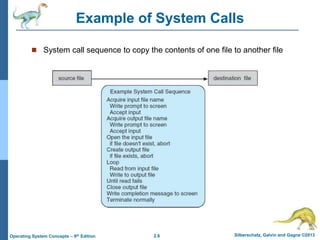
Example of System Calls
 System call sequence to copy the contents of one file to another file
2.7 Silberschatz, Galvin and Gagne ©2013
Operating System Concepts – 9th Edition
Example of Standard API
2.8 Silberschatz, Galvin and Gagne ©2013
Operating System Concepts – 9th Edition
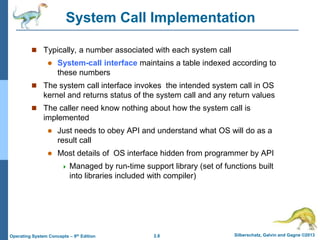
System Call Implementation
 Typically, a number associated with each system call
 System-call interface maintains a table indexed according to
these numbers
 The system call interface invokes the intended system call in OS
kernel and returns status of the system call and any return values
 The caller need know nothing about how the system call is
implemented
 Just needs to obey API and understand what OS will do as a
result call
 Most details of OS interface hidden from programmer by API
 Managed by run-time support library (set of functions built
into libraries included with compiler)
2.9 Silberschatz, Galvin and Gagne ©2013
Operating System Concepts – 9th Edition
API – System Call – OS Relationship
2.10 Silberschatz, Galvin and Gagne ©2013
Operating System Concepts – 9th Edition
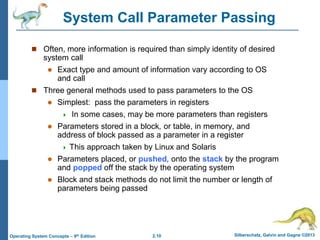
System Call Parameter Passing
 Often, more information is required than simply identity of desired
system call
 Exact type and amount of information vary according to OS
and call
 Three general methods used to pass parameters to the OS
 Simplest: pass the parameters in registers
 In some cases, may be more parameters than registers
 Parameters stored in a block, or table, in memory, and
address of block passed as a parameter in a register
 This approach taken by Linux and Solaris
 Parameters placed, or pushed, onto the stack by the program
and popped off the stack by the operating system
 Block and stack methods do not limit the number or length of
parameters being passed
2.11 Silberschatz, Galvin and Gagne ©2013
Operating System Concepts – 9th Edition
Parameter Passing via Table
2.12 Silberschatz, Galvin and Gagne ©2013
Operating System Concepts – 9th Edition
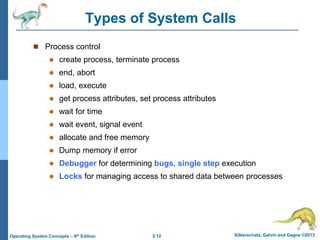
Types of System Calls
 Process control
 create process, terminate process
 end, abort
 load, execute
 get process attributes, set process attributes
 wait for time
 wait event, signal event
 allocate and free memory
 Dump memory if error
 Debugger for determining bugs, single step execution
 Locks for managing access to shared data between processes
2.13 Silberschatz, Galvin and Gagne ©2013
Operating System Concepts – 9th Edition
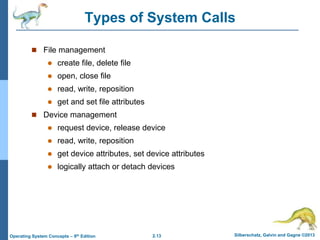
Types of System Calls
 File management
 create file, delete file
 open, close file
 read, write, reposition
 get and set file attributes
 Device management
 request device, release device
 read, write, reposition
 get device attributes, set device attributes
 logically attach or detach devices
2.14 Silberschatz, Galvin and Gagne ©2013
Operating System Concepts – 9th Edition
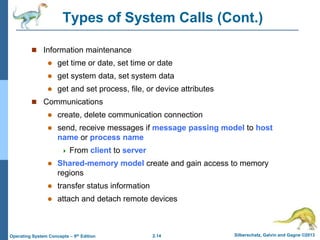
Types of System Calls (Cont.)
 Information maintenance
 get time or date, set time or date
 get system data, set system data
 get and set process, file, or device attributes
 Communications
 create, delete communication connection
 send, receive messages if message passing model to host
name or process name
 From client to server
 Shared-memory model create and gain access to memory
regions
 transfer status information
 attach and detach remote devices
2.15 Silberschatz, Galvin and Gagne ©2013
Operating System Concepts – 9th Edition
Types of System Calls (Cont.)
 Protection
 Control access to resources
 Get and set permissions
 Allow and deny user access
2.16 Silberschatz, Galvin and Gagne ©2013
Operating System Concepts – 9th Edition
Examples of Windows and Unix System Calls
2.17 Silberschatz, Galvin and Gagne ©2013
Operating System Concepts – 9th Edition
Standard C Library Example
 C program invoking printf() library call, which calls write() system call
2.18 Silberschatz, Galvin and Gagne ©2013
Operating System Concepts – 9th Edition
Example: MS-DOS
 Single-tasking
 Shell invoked when system
booted
 Simple method to run
program
 No process created
 Single memory space
 Loads program into memory,
overwriting all but the kernel
 Program exit -> shell
reloaded
At system startup running a program
2.19 Silberschatz, Galvin and Gagne ©2013
Operating System Concepts – 9th Edition
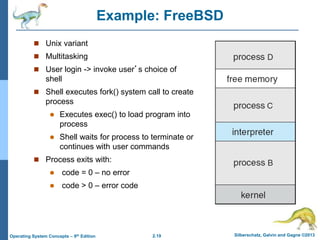
Example: FreeBSD
 Unix variant
 Multitasking
 User login -> invoke user’s choice of
shell
 Shell executes fork() system call to create
process
 Executes exec() to load program into
process
 Shell waits for process to terminate or
continues with user commands
 Process exits with:
 code = 0 – no error
 code > 0 – error code
2.20 Silberschatz, Galvin and Gagne ©2013
Operating System Concepts – 9th Edition
System Programs
 System programs provide a convenient environment for program
development and execution. They can be divided into:
 File manipulation
 Status information sometimes stored in a File modification
 Programming language support
 Program loading and execution
 Communications
 Background services
 Application programs
 Most users’ view of the operation system is defined by system
programs, not the actual system calls
2.21 Silberschatz, Galvin and Gagne ©2013
Operating System Concepts – 9th Edition
System Programs
 Provide a convenient environment for program development and
execution
 Some of them are simply user interfaces to system calls; others
are considerably more complex
 File management - Create, delete, copy, rename, print, dump, list,
and generally manipulate files and directories
 Status information
 Some ask the system for info - date, time, amount of available
memory, disk space, number of users
 Others provide detailed performance, logging, and debugging
information
 Typically, these programs format and print the output to the
terminal or other output devices
 Some systems implement a registry - used to store and
retrieve configuration information
2.22 Silberschatz, Galvin and Gagne ©2013
Operating System Concepts – 9th Edition
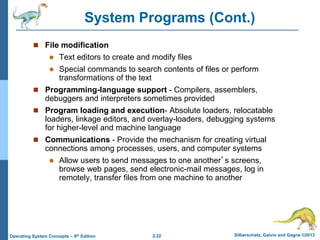
System Programs (Cont.)
 File modification
 Text editors to create and modify files
 Special commands to search contents of files or perform
transformations of the text
 Programming-language support - Compilers, assemblers,
debuggers and interpreters sometimes provided
 Program loading and execution- Absolute loaders, relocatable
loaders, linkage editors, and overlay-loaders, debugging systems
for higher-level and machine language
 Communications - Provide the mechanism for creating virtual
connections among processes, users, and computer systems
 Allow users to send messages to one another’s screens,
browse web pages, send electronic-mail messages, log in
remotely, transfer files from one machine to another
2.23 Silberschatz, Galvin and Gagne ©2013
Operating System Concepts – 9th Edition
System Programs (Cont.)
 Background Services
 Launch at boot time
 Some for system startup, then terminate
 Some from system boot to shutdown
 Provide facilities like disk checking, process scheduling, error
logging, printing
 Run in user context not kernel context
 Known as services, subsystems, daemons
 Application programs
 Don’t pertain to system
 Run by users
 Not typically considered part of OS
 Launched by command line, mouse click, finger poke
2.24 Silberschatz, Galvin and Gagne ©2013
Operating System Concepts – 9th Edition
2.25 Silberschatz, Galvin and Gagne ©2013
Operating System Concepts – 9th Edition
Operating-System Debugging
 Debugging is finding and fixing errors, or bugs
 OS generate log files containing error information
 Failure of an application can generate core dump file capturing
memory of the process
 Operating system failure can generate crash dump file containing
kernel memory
 Beyond crashes, performance tuning can optimize system performance
 Sometimes using trace listings of activities, recorded for analysis
 Profiling is periodic sampling of instruction pointer to look for
statistical trends
Kernighan’s Law: “Debugging is twice as hard as writing the code in the
first place. Therefore, if you write the code as cleverly as possible, you
are, by definition, not smart enough to debug it.”
2.26 Silberschatz, Galvin and Gagne ©2013
Operating System Concepts – 9th Edition
Performance Tuning
 Improve performance by
removing bottlenecks
 OS must provide means of
computing and displaying
measures of system
behavior
 For example, “top” program
or Windows Task Manager
2.27 Silberschatz, Galvin and Gagne ©2013
Operating System Concepts – 9th Edition
DTrace
 DTrace tool in Solaris,
FreeBSD, Mac OS X allows
live instrumentation on
production systems
 Probes fire when code is
executed within a provider,
capturing state data and
sending it to consumers of
those probes
 Example of following
XEventsQueued system call
move from libc library to
kernel and back
2.28 Silberschatz, Galvin and Gagne ©2013
Operating System Concepts – 9th Edition
Dtrace (Cont.)
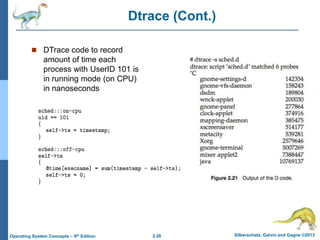
 DTrace code to record
amount of time each
process with UserID 101 is
in running mode (on CPU)
in nanoseconds
2.29 Silberschatz, Galvin and Gagne ©2013
Operating System Concepts – 9th Edition
System Boot
 When power initialized on system, execution starts at a fixed
memory location
 Firmware ROM used to hold initial boot code
 Operating system must be made available to hardware so hardware
can start it
 Small piece of code – bootstrap loader, stored in ROM or
EEPROM locates the kernel, loads it into memory, and starts it
 Sometimes two-step process where boot block at fixed
location loaded by ROM code, which loads bootstrap loader
from disk
 Common bootstrap loader, GRUB, allows selection of kernel from
multiple disks, versions, kernel options
 Kernel loads and system is then running

System Calls.ppt

  • 1.
    Silberschatz, Galvin andGagne ©2013 Operating System Concepts – 9th Edition Chapter 2: Operating-System Structures
  • 2.
    2.2 Silberschatz, Galvinand Gagne ©2013 Operating System Concepts – 9th Edition Chapter 2: Operating-System Structures  System Calls  Types of System Calls  System Programs  Operating System Design and Implementation  Operating System Structure  Operating System Debugging  Operating System Generation  System Boot
  • 3.
    2.3 Silberschatz, Galvinand Gagne ©2013 Operating System Concepts – 9th Edition Objectives  To describe the services an operating system provides to users, processes, and other systems  To discuss the various ways of structuring an operating system  To explain how operating systems are installed and customized and how they boot
  • 4.
    2.4 Silberschatz, Galvinand Gagne ©2013 Operating System Concepts – 9th Edition A View of Operating System Services
  • 5.
    2.5 Silberschatz, Galvinand Gagne ©2013 Operating System Concepts – 9th Edition System Calls  Programming interface to the services provided by the OS  Typically written in a high-level language (C or C++)  Mostly accessed by programs via a high-level Application Programming Interface (API) rather than direct system call use  Three most common APIs are Win32 API for Windows, POSIX API for POSIX-based systems (including virtually all versions of UNIX, Linux, and Mac OS X), and Java API for the Java virtual machine (JVM) Note that the system-call names used throughout this text are generic
  • 6.
    2.6 Silberschatz, Galvinand Gagne ©2013 Operating System Concepts – 9th Edition Example of System Calls  System call sequence to copy the contents of one file to another file
  • 7.
    2.7 Silberschatz, Galvinand Gagne ©2013 Operating System Concepts – 9th Edition Example of Standard API
  • 8.
    2.8 Silberschatz, Galvinand Gagne ©2013 Operating System Concepts – 9th Edition System Call Implementation  Typically, a number associated with each system call  System-call interface maintains a table indexed according to these numbers  The system call interface invokes the intended system call in OS kernel and returns status of the system call and any return values  The caller need know nothing about how the system call is implemented  Just needs to obey API and understand what OS will do as a result call  Most details of OS interface hidden from programmer by API  Managed by run-time support library (set of functions built into libraries included with compiler)
  • 9.
    2.9 Silberschatz, Galvinand Gagne ©2013 Operating System Concepts – 9th Edition API – System Call – OS Relationship
  • 10.
    2.10 Silberschatz, Galvinand Gagne ©2013 Operating System Concepts – 9th Edition System Call Parameter Passing  Often, more information is required than simply identity of desired system call  Exact type and amount of information vary according to OS and call  Three general methods used to pass parameters to the OS  Simplest: pass the parameters in registers  In some cases, may be more parameters than registers  Parameters stored in a block, or table, in memory, and address of block passed as a parameter in a register  This approach taken by Linux and Solaris  Parameters placed, or pushed, onto the stack by the program and popped off the stack by the operating system  Block and stack methods do not limit the number or length of parameters being passed
  • 11.
    2.11 Silberschatz, Galvinand Gagne ©2013 Operating System Concepts – 9th Edition Parameter Passing via Table
  • 12.
    2.12 Silberschatz, Galvinand Gagne ©2013 Operating System Concepts – 9th Edition Types of System Calls  Process control  create process, terminate process  end, abort  load, execute  get process attributes, set process attributes  wait for time  wait event, signal event  allocate and free memory  Dump memory if error  Debugger for determining bugs, single step execution  Locks for managing access to shared data between processes
  • 13.
    2.13 Silberschatz, Galvinand Gagne ©2013 Operating System Concepts – 9th Edition Types of System Calls  File management  create file, delete file  open, close file  read, write, reposition  get and set file attributes  Device management  request device, release device  read, write, reposition  get device attributes, set device attributes  logically attach or detach devices
  • 14.
    2.14 Silberschatz, Galvinand Gagne ©2013 Operating System Concepts – 9th Edition Types of System Calls (Cont.)  Information maintenance  get time or date, set time or date  get system data, set system data  get and set process, file, or device attributes  Communications  create, delete communication connection  send, receive messages if message passing model to host name or process name  From client to server  Shared-memory model create and gain access to memory regions  transfer status information  attach and detach remote devices
  • 15.
    2.15 Silberschatz, Galvinand Gagne ©2013 Operating System Concepts – 9th Edition Types of System Calls (Cont.)  Protection  Control access to resources  Get and set permissions  Allow and deny user access
  • 16.
    2.16 Silberschatz, Galvinand Gagne ©2013 Operating System Concepts – 9th Edition Examples of Windows and Unix System Calls
  • 17.
    2.17 Silberschatz, Galvinand Gagne ©2013 Operating System Concepts – 9th Edition Standard C Library Example  C program invoking printf() library call, which calls write() system call
  • 18.
    2.18 Silberschatz, Galvinand Gagne ©2013 Operating System Concepts – 9th Edition Example: MS-DOS  Single-tasking  Shell invoked when system booted  Simple method to run program  No process created  Single memory space  Loads program into memory, overwriting all but the kernel  Program exit -> shell reloaded At system startup running a program
  • 19.
    2.19 Silberschatz, Galvinand Gagne ©2013 Operating System Concepts – 9th Edition Example: FreeBSD  Unix variant  Multitasking  User login -> invoke user’s choice of shell  Shell executes fork() system call to create process  Executes exec() to load program into process  Shell waits for process to terminate or continues with user commands  Process exits with:  code = 0 – no error  code > 0 – error code
  • 20.
    2.20 Silberschatz, Galvinand Gagne ©2013 Operating System Concepts – 9th Edition System Programs  System programs provide a convenient environment for program development and execution. They can be divided into:  File manipulation  Status information sometimes stored in a File modification  Programming language support  Program loading and execution  Communications  Background services  Application programs  Most users’ view of the operation system is defined by system programs, not the actual system calls
  • 21.
    2.21 Silberschatz, Galvinand Gagne ©2013 Operating System Concepts – 9th Edition System Programs  Provide a convenient environment for program development and execution  Some of them are simply user interfaces to system calls; others are considerably more complex  File management - Create, delete, copy, rename, print, dump, list, and generally manipulate files and directories  Status information  Some ask the system for info - date, time, amount of available memory, disk space, number of users  Others provide detailed performance, logging, and debugging information  Typically, these programs format and print the output to the terminal or other output devices  Some systems implement a registry - used to store and retrieve configuration information
  • 22.
    2.22 Silberschatz, Galvinand Gagne ©2013 Operating System Concepts – 9th Edition System Programs (Cont.)  File modification  Text editors to create and modify files  Special commands to search contents of files or perform transformations of the text  Programming-language support - Compilers, assemblers, debuggers and interpreters sometimes provided  Program loading and execution- Absolute loaders, relocatable loaders, linkage editors, and overlay-loaders, debugging systems for higher-level and machine language  Communications - Provide the mechanism for creating virtual connections among processes, users, and computer systems  Allow users to send messages to one another’s screens, browse web pages, send electronic-mail messages, log in remotely, transfer files from one machine to another
  • 23.
    2.23 Silberschatz, Galvinand Gagne ©2013 Operating System Concepts – 9th Edition System Programs (Cont.)  Background Services  Launch at boot time  Some for system startup, then terminate  Some from system boot to shutdown  Provide facilities like disk checking, process scheduling, error logging, printing  Run in user context not kernel context  Known as services, subsystems, daemons  Application programs  Don’t pertain to system  Run by users  Not typically considered part of OS  Launched by command line, mouse click, finger poke
  • 24.
    2.24 Silberschatz, Galvinand Gagne ©2013 Operating System Concepts – 9th Edition
  • 25.
    2.25 Silberschatz, Galvinand Gagne ©2013 Operating System Concepts – 9th Edition Operating-System Debugging  Debugging is finding and fixing errors, or bugs  OS generate log files containing error information  Failure of an application can generate core dump file capturing memory of the process  Operating system failure can generate crash dump file containing kernel memory  Beyond crashes, performance tuning can optimize system performance  Sometimes using trace listings of activities, recorded for analysis  Profiling is periodic sampling of instruction pointer to look for statistical trends Kernighan’s Law: “Debugging is twice as hard as writing the code in the first place. Therefore, if you write the code as cleverly as possible, you are, by definition, not smart enough to debug it.”
  • 26.
    2.26 Silberschatz, Galvinand Gagne ©2013 Operating System Concepts – 9th Edition Performance Tuning  Improve performance by removing bottlenecks  OS must provide means of computing and displaying measures of system behavior  For example, “top” program or Windows Task Manager
  • 27.
    2.27 Silberschatz, Galvinand Gagne ©2013 Operating System Concepts – 9th Edition DTrace  DTrace tool in Solaris, FreeBSD, Mac OS X allows live instrumentation on production systems  Probes fire when code is executed within a provider, capturing state data and sending it to consumers of those probes  Example of following XEventsQueued system call move from libc library to kernel and back
  • 28.
    2.28 Silberschatz, Galvinand Gagne ©2013 Operating System Concepts – 9th Edition Dtrace (Cont.)  DTrace code to record amount of time each process with UserID 101 is in running mode (on CPU) in nanoseconds
  • 29.
    2.29 Silberschatz, Galvinand Gagne ©2013 Operating System Concepts – 9th Edition System Boot  When power initialized on system, execution starts at a fixed memory location  Firmware ROM used to hold initial boot code  Operating system must be made available to hardware so hardware can start it  Small piece of code – bootstrap loader, stored in ROM or EEPROM locates the kernel, loads it into memory, and starts it  Sometimes two-step process where boot block at fixed location loaded by ROM code, which loads bootstrap loader from disk  Common bootstrap loader, GRUB, allows selection of kernel from multiple disks, versions, kernel options  Kernel loads and system is then running