MICROSOFT 365
VirtualMARATHON
May 27 &28, 2020
36 hours/2 days
MICROSOFT 365 VIRTUAL MARATHON
INTRODUCTION TO MICROSOFTSEARCH
Kanwal Khipple
CEO
Broughttoyouby:
TheGlobalMicrosoftCommunity&
M365Conf.com|#M365CONF
#M365VM
M365VirtualMarathon.com
MICROSOFT 365
VirtualMARATHON
May 27 &28, 2020
36 hours/2 days
Mark Your Calendars:
March 23-25,2021,MGM Grand Resort
Las Vegas, Nevada, USA
M365Conf.com
#M365CONF
TheSharePointConferenceisnowTheMicrosoft365CollaborationConference
#M365VM
M365VirtualMarathon.com
Broughttoyouby:
TheGlobalMicrosoftCommunity&
M365Conf.com|#M365CONF
 Visit the Vendors Booth, Sessions and Watch the Videos
 Submit Your Answers to Enter the Raffle
 You need at least 5 correct answers then submit for a chance to win one of 3
(One in each Americas, APAC, EMEA)
ARE YOU READY FOR A RAFFLE?
We are giving away 3 Oculus Quest All In One!
https://bit.ly/m365raffle
Thank you to all our generous sponsors
CONSIDER DONATING TO THE FOLLOWING CHARITY RELIEF FUNDS:
UNITED WAY OR INTERNATIONAL MEDICAL CORPS
THANKYOUFORJOININGUS!
10%OFFUNDSFROMSPONSORSGOTOSUPPORTCOMMUNITYRELIEF
United Way: https://give.uwkc.org/M365VM
International Medical Corps: https://bit.ly/MedicalCorpsFund
 Kanwal Khipple, Canada
 CEO, 2toLead
 2x Nielsen Norman award winner
 Focused on improving productivity
 @kkhipple
LET ME INTRODUCE MYSELF…
Broughttoyouby:
TheGlobalMicrosoftCommunity&
M365Conf.com|#M365CONF
#M365VM
M365VirtualMarathon.com
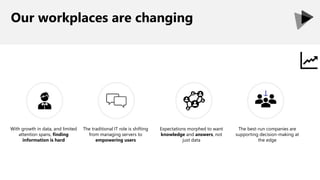
Our workplaces are changing
With growth in data, and limited
attention spans, finding
information is hard
The traditional IT role is shifting
from managing servers to
empowering users
Expectations morphed to want
knowledge and answers, not
just data
The best-run companies are
supporting decision-making at
the edge
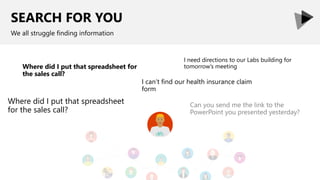
SEARCH FOR YOU
We all struggle finding information
Where did I put that spreadsheet for
the sales call?
I can’t find our health insurance claim
form
Where did I put that spreadsheet
for the sales call?
I need directions to our Labs building for
tomorrow’s meeting
Can you send me the link to the
PowerPoint you presented yesterday?
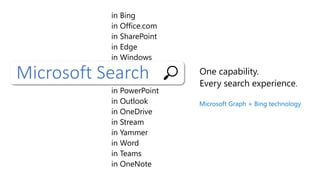
Microsoft Search One capability.
Every search experience.
in Bing
in Office.com
in SharePoint
in Edge
in Windows
in PowerPoint
in Outlook
in OneDrive
in Stream
in Yammer
in Word
in Teams
in OneNote
Microsoft Graph + Bing technology
World knowledge Work knowledge People knowledge
POWERED BY MICROSOFT GRAPH
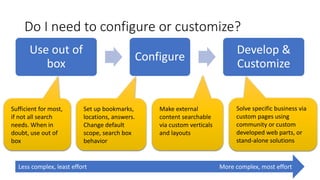
Make external
content searchable
via custom verticals
and layouts
Set up bookmarks,
locations, answers.
Change default
scope, search box
behavior
Solve specific business via
custom pages using
community or custom
developed web parts, or
stand-alone solutions
Sufficient for most,
if not all search
needs. When in
doubt, use out of
box
Do I need to configure or customize?
Use out of
box
Configure
Develop &
Customize
Less complex, least effort More complex, most effort
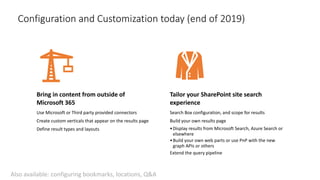
Configuration and Customization today (end of 2019)
Bring in content from outside of
Microsoft 365
Use Microsoft or Third party provided connectors
Create custom verticals that appear on the results page
Define result types and layouts
Tailor your SharePoint site search
experience
Search Box configuration, and scope for results
Build your own results page
•Display results from Microsoft Search, Azure Search or
elsewhere
•Build your own web parts or use PnP with the new
graph APIs or others
Extend the query pipeline
Also available: configuring bookmarks, locations, Q&A
Search result page customization
• Add search verticals to show
content indexed via
Connectors
• Design layouts as per your
need for added verticals
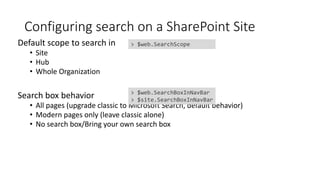
Configuring search on a SharePoint Site
Default scope to search in
• Site
• Hub
• Whole Organization
Search box behavior
• All pages (upgrade classic to Microsoft Search, default behavior)
• Modern pages only (leave classic alone)
• No search box/Bring your own search box
> $web.SearchBoxInNavBar
> $site.SearchBoxInNavBar
> $web.SearchScope
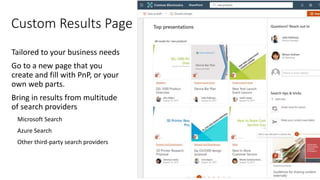
Tailored to your business needs
Go to a new page that you
create and fill with PnP, or your
own web parts.
Bring in results from multitude
of search providers
Microsoft Search
Azure Search
Other third-party search providers
Custom Results Page
Search results extensibility
• Modify search queries using SharePoint Framework (in v1.10)
• Add synonyms
• Translations or additional intelligence
• User roles/locations
• Your own business rules
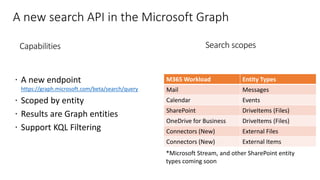
A new search API in the Microsoft Graph
M365 Workload Entity Types
Mail Messages
Calendar Events
SharePoint DriveItems (Files)
OneDrive for Business DriveItems (Files)
Connectors (New) External Files
Connectors (New) External Items
Capabilities Search scopes
https://graph.microsoft.com/beta/search/query
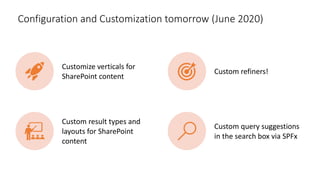
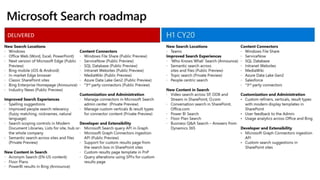
Configuration and Customization tomorrow (June 2020)
Customize verticals for
SharePoint content
Custom refiners!
Custom result types and
layouts for SharePoint
content
Custom query suggestions
in the search box via SPFx
DELIVERED
My twitter handle is @kkhipple and I work at
Thank You!
Organizers, Sponsors and You for making this possible.
75+ SharePoint Presentations @ Slideshare.Net/kkhipple
When to Use What Whitepaper @ WhentoUseWhat.com
Intranets w/ Office 365 Whitepaper @ Office365Intranets.com
External Sharing w/ Office 365 Whitepaper @ Office365Extranets.com
and more!
Message Me On LinkedIn or Email Kanwal@Khipple.com
SPEAKER | AUTHOR | SUPER GOOD LOOKING

Introduction to Microsoft Search #msvm

  • 1.
    MICROSOFT 365 VirtualMARATHON May 27&28, 2020 36 hours/2 days MICROSOFT 365 VIRTUAL MARATHON INTRODUCTION TO MICROSOFTSEARCH Kanwal Khipple CEO Broughttoyouby: TheGlobalMicrosoftCommunity& M365Conf.com|#M365CONF #M365VM M365VirtualMarathon.com
  • 2.
    MICROSOFT 365 VirtualMARATHON May 27&28, 2020 36 hours/2 days Mark Your Calendars: March 23-25,2021,MGM Grand Resort Las Vegas, Nevada, USA M365Conf.com #M365CONF TheSharePointConferenceisnowTheMicrosoft365CollaborationConference #M365VM M365VirtualMarathon.com Broughttoyouby: TheGlobalMicrosoftCommunity& M365Conf.com|#M365CONF
  • 3.
     Visit theVendors Booth, Sessions and Watch the Videos  Submit Your Answers to Enter the Raffle  You need at least 5 correct answers then submit for a chance to win one of 3 (One in each Americas, APAC, EMEA) ARE YOU READY FOR A RAFFLE? We are giving away 3 Oculus Quest All In One! https://bit.ly/m365raffle
  • 4.
    Thank you toall our generous sponsors
  • 5.
    CONSIDER DONATING TOTHE FOLLOWING CHARITY RELIEF FUNDS: UNITED WAY OR INTERNATIONAL MEDICAL CORPS THANKYOUFORJOININGUS! 10%OFFUNDSFROMSPONSORSGOTOSUPPORTCOMMUNITYRELIEF United Way: https://give.uwkc.org/M365VM International Medical Corps: https://bit.ly/MedicalCorpsFund
  • 6.
     Kanwal Khipple,Canada  CEO, 2toLead  2x Nielsen Norman award winner  Focused on improving productivity  @kkhipple LET ME INTRODUCE MYSELF… Broughttoyouby: TheGlobalMicrosoftCommunity& M365Conf.com|#M365CONF #M365VM M365VirtualMarathon.com
  • 7.
    Our workplaces arechanging With growth in data, and limited attention spans, finding information is hard The traditional IT role is shifting from managing servers to empowering users Expectations morphed to want knowledge and answers, not just data The best-run companies are supporting decision-making at the edge
  • 9.
    SEARCH FOR YOU Weall struggle finding information Where did I put that spreadsheet for the sales call? I can’t find our health insurance claim form Where did I put that spreadsheet for the sales call? I need directions to our Labs building for tomorrow’s meeting Can you send me the link to the PowerPoint you presented yesterday?
  • 10.
    Microsoft Search Onecapability. Every search experience. in Bing in Office.com in SharePoint in Edge in Windows in PowerPoint in Outlook in OneDrive in Stream in Yammer in Word in Teams in OneNote Microsoft Graph + Bing technology
  • 11.
    World knowledge Workknowledge People knowledge POWERED BY MICROSOFT GRAPH
  • 22.
    Make external content searchable viacustom verticals and layouts Set up bookmarks, locations, answers. Change default scope, search box behavior Solve specific business via custom pages using community or custom developed web parts, or stand-alone solutions Sufficient for most, if not all search needs. When in doubt, use out of box Do I need to configure or customize? Use out of box Configure Develop & Customize Less complex, least effort More complex, most effort
  • 23.
    Configuration and Customizationtoday (end of 2019) Bring in content from outside of Microsoft 365 Use Microsoft or Third party provided connectors Create custom verticals that appear on the results page Define result types and layouts Tailor your SharePoint site search experience Search Box configuration, and scope for results Build your own results page •Display results from Microsoft Search, Azure Search or elsewhere •Build your own web parts or use PnP with the new graph APIs or others Extend the query pipeline Also available: configuring bookmarks, locations, Q&A

  • 24.
    Search result pagecustomization • Add search verticals to show content indexed via Connectors • Design layouts as per your need for added verticals
  • 25.
    Configuring search ona SharePoint Site Default scope to search in • Site • Hub • Whole Organization Search box behavior • All pages (upgrade classic to Microsoft Search, default behavior) • Modern pages only (leave classic alone) • No search box/Bring your own search box > $web.SearchBoxInNavBar > $site.SearchBoxInNavBar > $web.SearchScope
  • 26.
    Tailored to yourbusiness needs Go to a new page that you create and fill with PnP, or your own web parts. Bring in results from multitude of search providers Microsoft Search Azure Search Other third-party search providers Custom Results Page
  • 27.
    Search results extensibility •Modify search queries using SharePoint Framework (in v1.10) • Add synonyms • Translations or additional intelligence • User roles/locations • Your own business rules
  • 28.
    A new searchAPI in the Microsoft Graph M365 Workload Entity Types Mail Messages Calendar Events SharePoint DriveItems (Files) OneDrive for Business DriveItems (Files) Connectors (New) External Files Connectors (New) External Items Capabilities Search scopes https://graph.microsoft.com/beta/search/query
  • 29.
    Configuration and Customizationtomorrow (June 2020) Customize verticals for SharePoint content Custom refiners! Custom result types and layouts for SharePoint content Custom query suggestions in the search box via SPFx
  • 34.
  • 36.
    My twitter handleis @kkhipple and I work at Thank You! Organizers, Sponsors and You for making this possible. 75+ SharePoint Presentations @ Slideshare.Net/kkhipple When to Use What Whitepaper @ WhentoUseWhat.com Intranets w/ Office 365 Whitepaper @ Office365Intranets.com External Sharing w/ Office 365 Whitepaper @ Office365Extranets.com and more! Message Me On LinkedIn or Email Kanwal@Khipple.com SPEAKER | AUTHOR | SUPER GOOD LOOKING

Editor's Notes

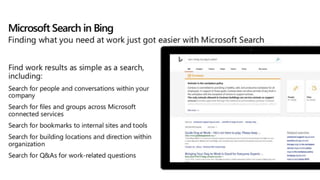
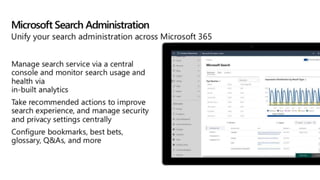
  • #2 Microsoft Search is looking to bring the search experiences across all Microsoft 365 services together into a single unified experience. Attend this session to learn how the experience impacts your users, how you can configure it as well as scenarios where you should customize it.
  • #9 Why is search frustrating? How much is too much? Why?