Peter Larsen
Red Hat Solutions Architect
For FredLug, October 2013
Introduction to
Linux
● Basic Computer Architecture
● Introduction to Operating Systems
● History of Linux and Open Source
● Features of Linux
● How to get started
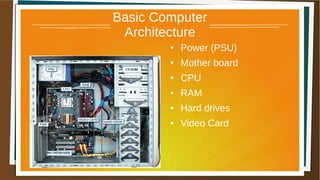
Basic Computer
Architecture
● Power (PSU)
● Mother board
● CPU
● RAM
● Hard drives
● Video Card
The CPU
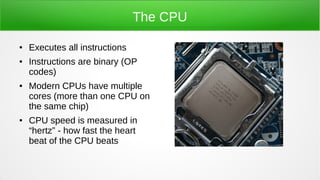
● Executes all instructions
● Instructions are binary (OP
codes)
● Modern CPUs have multiple
cores (more than one CPU on
the same chip)
● CPU speed is measured in
“hertz” - how fast the heart
beat of the CPU beats
Memory
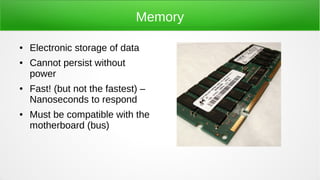
● Electronic storage of data
● Cannot persist without
power
● Fast! (but not the fastest) –
Nanoseconds to respond
● Must be compatible with the
motherboard (bus)
Mother Board
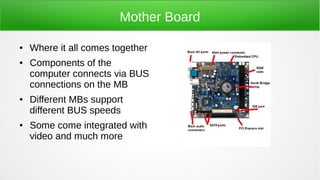
● Where it all comes together
● Components of the
computer connects via BUS
connections on the MB
● Different MBs support
different BUS speeds
● Some come integrated with
video and much more
Hard Drive
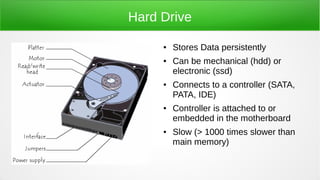
● Stores Data persistently
● Can be mechanical (hdd) or
electronic (ssd)
● Connects to a controller (SATA,
PATA, IDE)
● Controller is attached to or
embedded in the motherboard
● Slow (> 1000 times slower than
main memory)
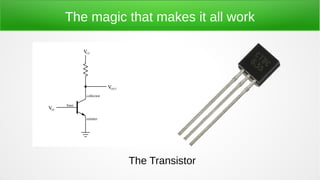
The magic that makes it all work
The Transistor
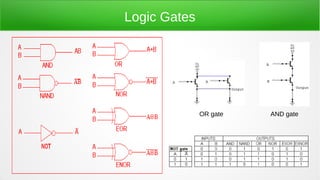
Logic Gates
AND gateOR gate
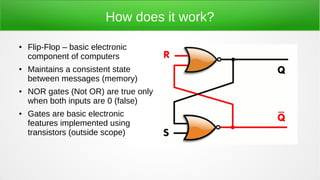
How does it work?
● Flip-Flop – basic electronic
component of computers
● Maintains a consistent state
between messages (memory)
● NOR gates (Not OR) are true only
when both inputs are 0 (false)
● Gates are basic electronic
features implemented using
transistors (outside scope)
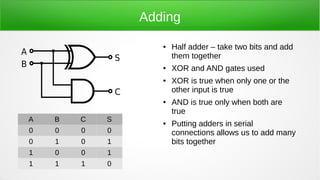
Adding
● Half adder – take two bits and add
them together
● XOR and AND gates used
● XOR is true when only one or the
other input is true
● AND is true only when both are
true
● Putting adders in serial
connections allows us to add many
bits together
A B C S
0 0 0 0
0 1 0 1
1 0 0 1
1 1 1 0
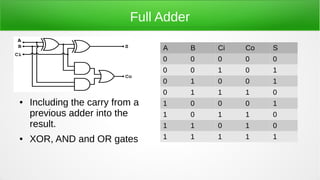
Full Adder
● Including the carry from a
previous adder into the
result.
● XOR, AND and OR gates
A B Ci Co S
0 0 0 0 0
0 0 1 0 1
0 1 0 0 1
0 1 1 1 0
1 0 0 0 1
1 0 1 1 0
1 1 0 1 0
1 1 1 1 1
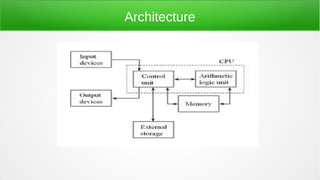
Architecture
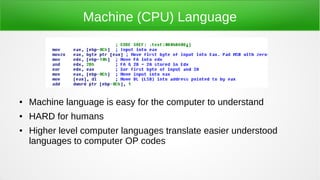
Machine (CPU) Language
● Machine language is easy for the computer to understand
● HARD for humans
● Higher level computer languages translate easier understood
languages to computer OP codes
Introduction to Operating Systems
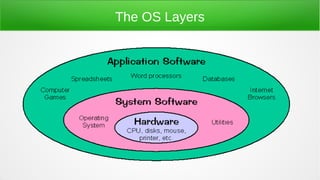
● Hardware does nothing without software
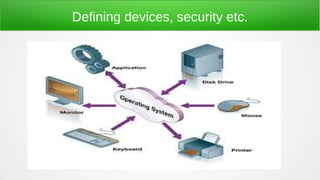
● The operating system is an “abstraction layer” between
your code and the hardware
● The hardware has no concept of “files”, “printers”,
“network” etc. - all of which is defined by the Operating
Systems
● Examples: Unix, Windows, Linux, VMS, DOS, CP-M
The OS Layers
Defining devices, security etc.
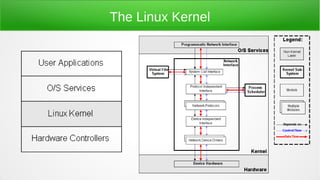
The Linux Kernel
History of Linux and Open Source
● First version published by Linus Torvalds in 1991
● Licensed under GNU GPL in 1992 – first Linux
Distributions appear
● 1994 version 1.x is released – Red Hat releases first
version
● 1998 Major companies announce support for Linux (IBM,
Oracle, Compaq)
● 2003 First enterprise release of Linux
● 2012 Red Hat becomes first company to cross $1 billion in
revenue on Open Source (not just Linux)
Why did it happen?
● Open Source started much earlier than Linux
– Early/Mid 1980s Richard Stallman and a group of engineers wanted a
free version of Unix to use in universities.
– Proprietary code and contracts prevented use of the systems to do what
Stallman wanted to do
– Established GNU, CopyLeft and FSF which lead to GPL 1.0
– http://www.gnu.org/gnu/thegnuproject.html
● Open Source is about FREEDOM – not “gratis” (free as in beer)
● The freedom to share created innovation and participation
Linux is just the tip of the ice berg
● Open Source existed before Linux – but GNU and Linux created a
platform making Open Source projects take off
– Apache
– Java
– Perl
– Python
– Postgresql
● Using commodity hardware and free software, everyone can take part
● The internet is the glue that holds the communities together
Software Repositories
● Early on – working with Linux meant custom compiling
everything to install it – including the kernel
● Today's Linux distributions all use binary distributions of
software
● The binaries are stored on repository servers making it very
simple to install any software
● Software comes in “packages” such as RPM and DEP
● Installing software on Linux is easier than on Windows
Features of Linux
● Linux is “just” a kernel – the core of the operating system
● The kernel does nothing without software. The GNU project provided
most of the software needed to be compatitble with Unix (commands
like ls, ps, cd, mkdir are all from the GNU project)
● Some prefer to call Linux “GNU/Linux” since this is more true to what
actually makes a basic Linux system run
● Linus Torvalds still maintains control of the kernel and it's development
● Linux dominates in most data-centers, in appliances and mobile
devices. Chances are you're running Linux already without knowing it!
Core features of any Linux system
● File systems
– Has a root (named /) and directories under it. Directories may be “mount
points” to other file systems. Software is not aware of where data is actually
stored
– Lots of different file systems: ext2/3/4, ReiserFS, XFS, vFAT, NTFS
● Everything is a file
– The concept of files goes beyond storing data. Everything is represented via
a file, such as raw devices to which to OS communicates
– Even processes are seen as files
Putting it all together
● Linux provides a base to run advanced and high performing software
on
● Open Source means you can get it for free
● Linux supports older hardware – because you can slim down what
you run, you can make it run with little memory and CPU power of
older hardware
● Tons of software written for Linux today.
● Community participation makes Linux grow – join the community!
More Core Features
● Processes
– A process is a unit that executes code
– Some processes are part of the operating system
– When your software runs, it becomes a process
– All processes have a PID (Process IDentifcation) number
– Processes are owned by a user
– Linux handles how to run many processes at the same time. It's not
unusual to have 200 processes at the same time
Features ....
● Security
– Multi User operating system. Linux is designed to be used by more than
one user at a time
– Everything must run as a user
– Every system has a “root” user with UID of 0. This “super admin” can
bypass pretty much every security feature of the system.
NO ONE SHOULD RUN AS ROOT PERMANENTLY!
– File security allows files to be kept private, shared with a few or shared
with everyone. Security defines rights to read, write and execute.
Features – the interface
● Linux can be used with or without a graphical interface
● Servers usually run without a GUI
● Users can choose between many different types of GUI
environments (window managers) – GNome, KDE, Sugar to
mention a few
● Command Line consoles – local and remote
Features - Networking
● Linux did not become TCP compliant until late in it's life. It was
one of the many delays before version 1 was released
● Today, Linux is used as the core in routers and switches. It's
modularity and highly customizable structure makes it ideal for
embedded devices
● Linux supports more than IP networking but it's by far the most
used
● Linux is ideal for firewalls and complex network usage
How to get started
● For end users, Linux provides all the features we use
computers for:
– Email, Web browsing, graphical design, movie making/editing,
photo management, 3D design, Music and much more
– Robust and secure OS
– No need to be grand techie to get started (this did not use to be
the case)
● How do I run my Microsoft/MAC program on Linux?
– Short answer: you don't
– Long answer: Find the same program made for Linux or
something that provides the same features
Distributions
● The first step is to pick a distribution
● Distributions are released collections of already compiled and
configured Linux systems. Without distributions, you'll have to
be an IT master to configure a system to run Linux
● There are many flavors of Linux distributions: Ubuntu, Fedora,
Debian, Arch, DSL, CentOS, Red Hat, SuSE – in facts
hundreds of distributions exit
● Where to begin: http://distrowatch.org
●
User Groups
● You're already here – so we can skip this :)
● Networking – learning from peers helps you getting over the
hurdles that you will run into
● Linux is all about the community – become part of it, attend
user group meetings, use IRC, Mailing lists etc. to make Linux
better. Without an active community, Open Source does not
work.
● A great place to work on getting better at public speaking
IRC
● Internet Relay Chat
● Has been around since the mid 1980'ies
● Group chat online
● Being able to talk to 10s or hundreds at the same time, is not only
fun but a great way to learn and exchange ideas
● Text based – old school!
● XChat and irrs are popular programs on Linux to use for IRC
● freenode.org is the IRC server for anything open source
Mailing Lists
● Web sites, Mailing lists, IRC – are ways of communication
● Mailing lists are email based communication where you send
emails out to all subscribers. It allows a community of people to
communicate easily together via email
● UUNET is dead – no more, where's the beer?
● Go to http://calypso.tux.org/ to sign up for our mailing list
● http://www.meetup.com/fredlug
● http://fredlug.info
Questions?
● Start from: What do you want to do?
● Once you find your answer, there is software out there to
help you do that!
● You do not have to be super technical to make use of Linux
● A little bit of knowledge helps tremendously

Introduction to linux

  • 1.
    Peter Larsen Red HatSolutions Architect For FredLug, October 2013
  • 2.
    Introduction to Linux ● BasicComputer Architecture ● Introduction to Operating Systems ● History of Linux and Open Source ● Features of Linux ● How to get started
  • 3.
    Basic Computer Architecture ● Power(PSU) ● Mother board ● CPU ● RAM ● Hard drives ● Video Card
  • 4.
    The CPU ● Executesall instructions ● Instructions are binary (OP codes) ● Modern CPUs have multiple cores (more than one CPU on the same chip) ● CPU speed is measured in “hertz” - how fast the heart beat of the CPU beats
  • 5.
    Memory ● Electronic storageof data ● Cannot persist without power ● Fast! (but not the fastest) – Nanoseconds to respond ● Must be compatible with the motherboard (bus)
  • 6.
    Mother Board ● Whereit all comes together ● Components of the computer connects via BUS connections on the MB ● Different MBs support different BUS speeds ● Some come integrated with video and much more
  • 7.
    Hard Drive ● StoresData persistently ● Can be mechanical (hdd) or electronic (ssd) ● Connects to a controller (SATA, PATA, IDE) ● Controller is attached to or embedded in the motherboard ● Slow (> 1000 times slower than main memory)
  • 8.
    The magic thatmakes it all work The Transistor
  • 9.
  • 10.
    How does itwork? ● Flip-Flop – basic electronic component of computers ● Maintains a consistent state between messages (memory) ● NOR gates (Not OR) are true only when both inputs are 0 (false) ● Gates are basic electronic features implemented using transistors (outside scope)
  • 11.
    Adding ● Half adder– take two bits and add them together ● XOR and AND gates used ● XOR is true when only one or the other input is true ● AND is true only when both are true ● Putting adders in serial connections allows us to add many bits together A B C S 0 0 0 0 0 1 0 1 1 0 0 1 1 1 1 0
  • 12.
    Full Adder ● Includingthe carry from a previous adder into the result. ● XOR, AND and OR gates A B Ci Co S 0 0 0 0 0 0 0 1 0 1 0 1 0 0 1 0 1 1 1 0 1 0 0 0 1 1 0 1 1 0 1 1 0 1 0 1 1 1 1 1
  • 13.
  • 14.
    Machine (CPU) Language ●Machine language is easy for the computer to understand ● HARD for humans ● Higher level computer languages translate easier understood languages to computer OP codes
  • 15.
    Introduction to OperatingSystems ● Hardware does nothing without software ● The operating system is an “abstraction layer” between your code and the hardware ● The hardware has no concept of “files”, “printers”, “network” etc. - all of which is defined by the Operating Systems ● Examples: Unix, Windows, Linux, VMS, DOS, CP-M
  • 16.
  • 17.
  • 18.
  • 19.
    History of Linuxand Open Source ● First version published by Linus Torvalds in 1991 ● Licensed under GNU GPL in 1992 – first Linux Distributions appear ● 1994 version 1.x is released – Red Hat releases first version ● 1998 Major companies announce support for Linux (IBM, Oracle, Compaq) ● 2003 First enterprise release of Linux ● 2012 Red Hat becomes first company to cross $1 billion in revenue on Open Source (not just Linux)
  • 20.
    Why did ithappen? ● Open Source started much earlier than Linux – Early/Mid 1980s Richard Stallman and a group of engineers wanted a free version of Unix to use in universities. – Proprietary code and contracts prevented use of the systems to do what Stallman wanted to do – Established GNU, CopyLeft and FSF which lead to GPL 1.0 – http://www.gnu.org/gnu/thegnuproject.html ● Open Source is about FREEDOM – not “gratis” (free as in beer) ● The freedom to share created innovation and participation
  • 21.
    Linux is justthe tip of the ice berg ● Open Source existed before Linux – but GNU and Linux created a platform making Open Source projects take off – Apache – Java – Perl – Python – Postgresql ● Using commodity hardware and free software, everyone can take part ● The internet is the glue that holds the communities together
  • 22.
    Software Repositories ● Earlyon – working with Linux meant custom compiling everything to install it – including the kernel ● Today's Linux distributions all use binary distributions of software ● The binaries are stored on repository servers making it very simple to install any software ● Software comes in “packages” such as RPM and DEP ● Installing software on Linux is easier than on Windows
  • 23.
    Features of Linux ●Linux is “just” a kernel – the core of the operating system ● The kernel does nothing without software. The GNU project provided most of the software needed to be compatitble with Unix (commands like ls, ps, cd, mkdir are all from the GNU project) ● Some prefer to call Linux “GNU/Linux” since this is more true to what actually makes a basic Linux system run ● Linus Torvalds still maintains control of the kernel and it's development ● Linux dominates in most data-centers, in appliances and mobile devices. Chances are you're running Linux already without knowing it!
  • 24.
    Core features ofany Linux system ● File systems – Has a root (named /) and directories under it. Directories may be “mount points” to other file systems. Software is not aware of where data is actually stored – Lots of different file systems: ext2/3/4, ReiserFS, XFS, vFAT, NTFS ● Everything is a file – The concept of files goes beyond storing data. Everything is represented via a file, such as raw devices to which to OS communicates – Even processes are seen as files
  • 25.
    Putting it alltogether ● Linux provides a base to run advanced and high performing software on ● Open Source means you can get it for free ● Linux supports older hardware – because you can slim down what you run, you can make it run with little memory and CPU power of older hardware ● Tons of software written for Linux today. ● Community participation makes Linux grow – join the community!
  • 26.
    More Core Features ●Processes – A process is a unit that executes code – Some processes are part of the operating system – When your software runs, it becomes a process – All processes have a PID (Process IDentifcation) number – Processes are owned by a user – Linux handles how to run many processes at the same time. It's not unusual to have 200 processes at the same time
  • 27.
    Features .... ● Security –Multi User operating system. Linux is designed to be used by more than one user at a time – Everything must run as a user – Every system has a “root” user with UID of 0. This “super admin” can bypass pretty much every security feature of the system. NO ONE SHOULD RUN AS ROOT PERMANENTLY! – File security allows files to be kept private, shared with a few or shared with everyone. Security defines rights to read, write and execute.
  • 28.
    Features – theinterface ● Linux can be used with or without a graphical interface ● Servers usually run without a GUI ● Users can choose between many different types of GUI environments (window managers) – GNome, KDE, Sugar to mention a few ● Command Line consoles – local and remote
  • 29.
    Features - Networking ●Linux did not become TCP compliant until late in it's life. It was one of the many delays before version 1 was released ● Today, Linux is used as the core in routers and switches. It's modularity and highly customizable structure makes it ideal for embedded devices ● Linux supports more than IP networking but it's by far the most used ● Linux is ideal for firewalls and complex network usage
  • 30.
    How to getstarted ● For end users, Linux provides all the features we use computers for: – Email, Web browsing, graphical design, movie making/editing, photo management, 3D design, Music and much more – Robust and secure OS – No need to be grand techie to get started (this did not use to be the case) ● How do I run my Microsoft/MAC program on Linux? – Short answer: you don't – Long answer: Find the same program made for Linux or something that provides the same features
  • 31.
    Distributions ● The firststep is to pick a distribution ● Distributions are released collections of already compiled and configured Linux systems. Without distributions, you'll have to be an IT master to configure a system to run Linux ● There are many flavors of Linux distributions: Ubuntu, Fedora, Debian, Arch, DSL, CentOS, Red Hat, SuSE – in facts hundreds of distributions exit ● Where to begin: http://distrowatch.org ●
  • 32.
    User Groups ● You'realready here – so we can skip this :) ● Networking – learning from peers helps you getting over the hurdles that you will run into ● Linux is all about the community – become part of it, attend user group meetings, use IRC, Mailing lists etc. to make Linux better. Without an active community, Open Source does not work. ● A great place to work on getting better at public speaking
  • 33.
    IRC ● Internet RelayChat ● Has been around since the mid 1980'ies ● Group chat online ● Being able to talk to 10s or hundreds at the same time, is not only fun but a great way to learn and exchange ideas ● Text based – old school! ● XChat and irrs are popular programs on Linux to use for IRC ● freenode.org is the IRC server for anything open source
  • 34.
    Mailing Lists ● Websites, Mailing lists, IRC – are ways of communication ● Mailing lists are email based communication where you send emails out to all subscribers. It allows a community of people to communicate easily together via email ● UUNET is dead – no more, where's the beer? ● Go to http://calypso.tux.org/ to sign up for our mailing list ● http://www.meetup.com/fredlug ● http://fredlug.info
  • 35.
    Questions? ● Start from:What do you want to do? ● Once you find your answer, there is software out there to help you do that! ● You do not have to be super technical to make use of Linux ● A little bit of knowledge helps tremendously