UNIT 1

●   Introduction to operating sytem , kernel and shell
●   FLOSS/FOSS
●   Linux features & Different Distros
●   Linux v/s Windows
OPERATING SYSTEM
●   To do anything useful with a computer, we need to run
    software, or programs, on the hardware. Two types of
    software exists --
●   APPLICATION SOFTWARE -- for each different application
    we need different application program like for word-
    processing we need the MS-Word etc.
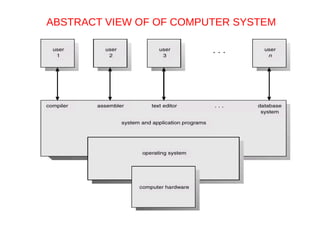
●   SYSTEM SOFTWARE – is a program or collection of
    programs that acts as an intermediary between a user of a
    computer and the computer hardware. It makes the
    hardware and software work together and different
    hardware to communicate with each other . Different types
    of OS --
●   Windows , Unix , Linux , Sun Solaris , Multics ,MacOS etc
ABSTRACT VIEW OF OF COMPUTER SYSTEM
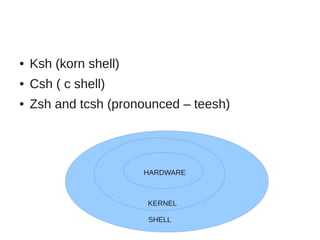
Kernel and Shell
●   Operating system can be further subdivided into 2 parts.
    While the system is operational a program is constantly
    running known as KERNEL. It forms the core of any
    operating system
●   The other part of operating system is shell which is the
    interface between user and system itself. It allows the user
    to instruct the machine and to run programs. A shell
    communicates with the kernel, but keeps the user at arm’s
    length from it. A shell only active when somebody is using
    the system while kernel is always active. Todays different
    type of shell exists depending on the ideas of different
    developers who created them .
●   Sh --Bourne shell (first shell named after its creator)
    bash – Bourne again shell
●   Ksh (korn shell)
●   Csh ( c shell)
●   Zsh and tcsh (pronounced – teesh)


                       HARDWARE


                       KERNEL

                       SHELL
FLOSS – FREE/LIBRE OPEN SOURCE SOFTWARE
●   OPEN SOURCE : software and source code available to all
    ●   The freedom to distribute software and source code
    ●   The ability to modify and create derived works
    ●   Integrity of author's code
●   GNU : In 1984, Richard M. Stallman started the GNU project
    (www.gnu.org), recursively named by the phrase GNU is Not
    UNIX.The GNU project aimed at creating a UNIX-like open
    source operating system free from regulations preventing it
    from being modified and redistributed.GNU worked on GNU
    Hurd OS and also build several open source compilers and
    libraries but Its aim of Open source Operating system was
    achieved in 1991 with the birth of LINUX KERNEL
●   LINUX :Linus Torvalds , a student at the University of Helsinki,
    created the first version of “Linux” in August 1991. Released
    as an open-source software under the Free Software
    Foundation's GNU General Public License (GPL)
●   A company can charge money for products that include
    Linux, as long as the source code is made available. The
    GPL allows people to distribute (and charge for) their own
    versions of free software.
●   According to the Free Software Foundation, the "free" in
    free software refers to freedom or liberty, not price.
●   Linux refers to the “ kernel or core ” of the operating
    system. Combining Linux with a set of open-source GNU
    programs from the Free Software Foundation turns it into
    what most people know as Linux ”forming both the full
    operating system and the core of most Linux distributions”.
●   Linux Distributions are built on the versions of Linux kernel,
    GNU programs, and other tools that are offered by different
    companies, organizations, or individuals. There are over
    600 Distro available today. (www.distrowatch.com)
    Categorise as    the commercial-backed distro like –
    Fedora(Redhat) ,openSUSE(novell),Ubuntu(Canonical Ltd)
●   And entirely community-driven distributions, such as
    Debian , Centos and Gentoo.
●   While different Linux systems will add different logos,
    choose some different soft-ware components to include,
    and have different ways of installing and configuring, one
    can easily move from one distro to another because --
●   include the same open source projects , like apache ,
    samba or mail servers etc
●   Linux Standard Base Specification (www.linuxbase.com)
    has as one of its primary goals to ensure that applications
    written for one Linux system will work on other systems.
●   A shell is a shell on all the different distros.
    TUX IS LINUX OFFICIAL MASCOT->
LINUX FEATURES
●   It's free
●   It's Open Source
●   It's Modular --Commercial Operating Systems normally get
    installed as a complete unit. One cannot, for example,
    install them without their Graphical User Interface, or
    without its printing support -- install everything or nothing
●   It’s got More Choices – Kde, GNOME ,lxde,xfce
●   It's portable – we can run on atmiga , arm arch , embedded
    systems, Machintosh, Sun Sparc, HP, Silicon Graphics ,
    Motorola etc.
●   Its comes loaded with softwares like web , ftp , samba and
    office suite etc on the distro CD.
●   Its stable -- Linux is rock-solid. Every application runs
    independently of all others – if one crashes, it crashes
    alone
●   Multiple OS’ s on a PC -- Linux can read Windows' files - it
    supports the FAT and FAT32 file system’s, and NTFS. The
    opposite, however, is not possible.
●   Linux is Multi User -- several users can log-on
    simultaneously. This means you can share the same
    program installation among various users.
●   Linux is Multi Vendo -- means that by choosing Linux, you
    choose to depend on a set of (more than 600) Linux
    distributors in the world, plus the open source community.
    Not dependent on a unique vendor. It is also safer, prices-if
    any are driven by the market, not by monopoly.
Red Hat Distributions
●   Red Hat Enterprise Linux---
●   Stable, thoroughly tested software
●   Professional support services with 24x7 coverage plans.
●   Centralized management tools for large networks
●   Version available started from 2.1, 3.0, 4.0, 5.0 now 6.0
●   Support many processor architectures – Intel x86
    compatible, Intel Titanium 2, AMD64, IBM PowerPC
●   The Fedora Project---
●   More, newer applications
●   Community supported (no official Red Hat support)
●   For personal systems
LINUX                   VS              WINDOWS
●   Open source                           Closed Source
●   Can modify & Redistribute             Cant modify & Redistribute
●   Covers the 70 % share of              Covers the 23% share webservers
    webservers
●   91 % of supercomputer run              1% of supercompter share run on
    linux (top 14 runs linux only)         windows
●   Filesystem – ext2,ext3,ext4           Filesystem - NTFS, FAT, ISO 9660
    reiserfs ,FAT, NTFS, NFS, UDF         UDF ,HFS
     ISO 9660 , JFS,XFS
●   Linux installers will automatically   Windows installers will overwrite the
    detect and set up other operating     MBR , thus rendering non-Windows
    systems for dual/multiple boot        partition unusable
    with Linux
●   Linux Kernel is modular , drivers     Windows Kernel is Monolithic and all
    are loaded dynamically whenever       drivers are loaded at boot time thus
    required thus, reducing boot time     boot time is more
●   Linux doesnt require defrag-        Windows partition require
    mentation.                          Defragmentation.
●   Linux application are installed     Windows rely on windows installer
    with package manager such as        to install third party applications.
    apt or yum etc which ensure all
    dependencies are met.
●   As of 2006 more than 800 pieces     As of 2009 more than 2 million of
    malware had been detected           malware have been detected for
                                        windows
●   Linux stores configuration in plain Windows Database of configuration
    text file                           is Registry
●   “/” is the head of system file      “c:” is generally where we get
     storage                             system files
●   “/home” stores the user files and   “Document & Settings” stores the
     /root stores the admin files        user files and admin files also
●   “/bin” stores the normal binaries    “Program files” stores the binaries
     “/sbin” --system binaries
     “/usr/bin” -- user binaries
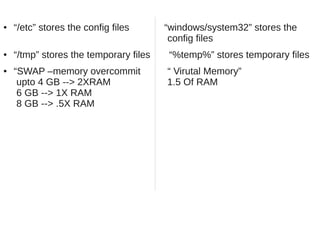
●   “/etc” stores the config files      “windows/system32” stores the
                                         config files
●   “/tmp” stores the temporary files    “%temp%” stores temporary files
●   “SWAP –memory overcommit            “ Virutal Memory”
     upto 4 GB --> 2XRAM                1.5 Of RAM
     6 GB --> 1X RAM
     8 GB --> .5X RAM
?
EXERCISE
●   What is GPL /GNU Licensing ?
●   What are differences b/w linux and unix
●   Study Linux Distro family
●   Study ext3 , ext4 and other linux filesystem
●   References --
    ●   http://en.wikipedia.org
    ●   http://www.nrcfoss.au-kbc.org.in
    ●   http://www.distrowatch.com
    ●   http://encyclopedia.thefreedictionary.com
    ●   RHCE Red Hat Certified Engineer Linux Study
        Guide by Michael Jang

Before begining linux

  • 1.
    UNIT 1 ● Introduction to operating sytem , kernel and shell ● FLOSS/FOSS ● Linux features & Different Distros ● Linux v/s Windows
  • 2.
    OPERATING SYSTEM ● To do anything useful with a computer, we need to run software, or programs, on the hardware. Two types of software exists -- ● APPLICATION SOFTWARE -- for each different application we need different application program like for word- processing we need the MS-Word etc. ● SYSTEM SOFTWARE – is a program or collection of programs that acts as an intermediary between a user of a computer and the computer hardware. It makes the hardware and software work together and different hardware to communicate with each other . Different types of OS -- ● Windows , Unix , Linux , Sun Solaris , Multics ,MacOS etc
  • 3.
    ABSTRACT VIEW OFOF COMPUTER SYSTEM
  • 4.
    Kernel and Shell ● Operating system can be further subdivided into 2 parts. While the system is operational a program is constantly running known as KERNEL. It forms the core of any operating system ● The other part of operating system is shell which is the interface between user and system itself. It allows the user to instruct the machine and to run programs. A shell communicates with the kernel, but keeps the user at arm’s length from it. A shell only active when somebody is using the system while kernel is always active. Todays different type of shell exists depending on the ideas of different developers who created them . ● Sh --Bourne shell (first shell named after its creator) bash – Bourne again shell
  • 5.
    Ksh (korn shell) ● Csh ( c shell) ● Zsh and tcsh (pronounced – teesh) HARDWARE KERNEL SHELL
  • 6.
    FLOSS – FREE/LIBREOPEN SOURCE SOFTWARE ● OPEN SOURCE : software and source code available to all ● The freedom to distribute software and source code ● The ability to modify and create derived works ● Integrity of author's code ● GNU : In 1984, Richard M. Stallman started the GNU project (www.gnu.org), recursively named by the phrase GNU is Not UNIX.The GNU project aimed at creating a UNIX-like open source operating system free from regulations preventing it from being modified and redistributed.GNU worked on GNU Hurd OS and also build several open source compilers and libraries but Its aim of Open source Operating system was achieved in 1991 with the birth of LINUX KERNEL ● LINUX :Linus Torvalds , a student at the University of Helsinki, created the first version of “Linux” in August 1991. Released as an open-source software under the Free Software Foundation's GNU General Public License (GPL)
  • 7.
    A company can charge money for products that include Linux, as long as the source code is made available. The GPL allows people to distribute (and charge for) their own versions of free software. ● According to the Free Software Foundation, the "free" in free software refers to freedom or liberty, not price. ● Linux refers to the “ kernel or core ” of the operating system. Combining Linux with a set of open-source GNU programs from the Free Software Foundation turns it into what most people know as Linux ”forming both the full operating system and the core of most Linux distributions”. ● Linux Distributions are built on the versions of Linux kernel, GNU programs, and other tools that are offered by different companies, organizations, or individuals. There are over 600 Distro available today. (www.distrowatch.com) Categorise as the commercial-backed distro like – Fedora(Redhat) ,openSUSE(novell),Ubuntu(Canonical Ltd)
  • 8.
    And entirely community-driven distributions, such as Debian , Centos and Gentoo. ● While different Linux systems will add different logos, choose some different soft-ware components to include, and have different ways of installing and configuring, one can easily move from one distro to another because -- ● include the same open source projects , like apache , samba or mail servers etc ● Linux Standard Base Specification (www.linuxbase.com) has as one of its primary goals to ensure that applications written for one Linux system will work on other systems. ● A shell is a shell on all the different distros. TUX IS LINUX OFFICIAL MASCOT->
  • 9.
    LINUX FEATURES ● It's free ● It's Open Source ● It's Modular --Commercial Operating Systems normally get installed as a complete unit. One cannot, for example, install them without their Graphical User Interface, or without its printing support -- install everything or nothing ● It’s got More Choices – Kde, GNOME ,lxde,xfce ● It's portable – we can run on atmiga , arm arch , embedded systems, Machintosh, Sun Sparc, HP, Silicon Graphics , Motorola etc. ● Its comes loaded with softwares like web , ftp , samba and office suite etc on the distro CD. ● Its stable -- Linux is rock-solid. Every application runs independently of all others – if one crashes, it crashes alone
  • 10.
    Multiple OS’ s on a PC -- Linux can read Windows' files - it supports the FAT and FAT32 file system’s, and NTFS. The opposite, however, is not possible. ● Linux is Multi User -- several users can log-on simultaneously. This means you can share the same program installation among various users. ● Linux is Multi Vendo -- means that by choosing Linux, you choose to depend on a set of (more than 600) Linux distributors in the world, plus the open source community. Not dependent on a unique vendor. It is also safer, prices-if any are driven by the market, not by monopoly.
  • 11.
    Red Hat Distributions ● Red Hat Enterprise Linux--- ● Stable, thoroughly tested software ● Professional support services with 24x7 coverage plans. ● Centralized management tools for large networks ● Version available started from 2.1, 3.0, 4.0, 5.0 now 6.0 ● Support many processor architectures – Intel x86 compatible, Intel Titanium 2, AMD64, IBM PowerPC ● The Fedora Project--- ● More, newer applications ● Community supported (no official Red Hat support) ● For personal systems
  • 12.
    LINUX VS WINDOWS ● Open source Closed Source ● Can modify & Redistribute Cant modify & Redistribute ● Covers the 70 % share of Covers the 23% share webservers webservers ● 91 % of supercomputer run 1% of supercompter share run on linux (top 14 runs linux only) windows ● Filesystem – ext2,ext3,ext4 Filesystem - NTFS, FAT, ISO 9660 reiserfs ,FAT, NTFS, NFS, UDF UDF ,HFS ISO 9660 , JFS,XFS ● Linux installers will automatically Windows installers will overwrite the detect and set up other operating MBR , thus rendering non-Windows systems for dual/multiple boot partition unusable with Linux ● Linux Kernel is modular , drivers Windows Kernel is Monolithic and all are loaded dynamically whenever drivers are loaded at boot time thus required thus, reducing boot time boot time is more
  • 13.
    Linux doesnt require defrag- Windows partition require mentation. Defragmentation. ● Linux application are installed Windows rely on windows installer with package manager such as to install third party applications. apt or yum etc which ensure all dependencies are met. ● As of 2006 more than 800 pieces As of 2009 more than 2 million of malware had been detected malware have been detected for windows ● Linux stores configuration in plain Windows Database of configuration text file is Registry ● “/” is the head of system file “c:” is generally where we get storage system files ● “/home” stores the user files and “Document & Settings” stores the /root stores the admin files user files and admin files also ● “/bin” stores the normal binaries “Program files” stores the binaries “/sbin” --system binaries “/usr/bin” -- user binaries
  • 14.
    “/etc” stores the config files “windows/system32” stores the config files ● “/tmp” stores the temporary files “%temp%” stores temporary files ● “SWAP –memory overcommit “ Virutal Memory” upto 4 GB --> 2XRAM 1.5 Of RAM 6 GB --> 1X RAM 8 GB --> .5X RAM
  • 15.
  • 16.
    EXERCISE ● What is GPL /GNU Licensing ? ● What are differences b/w linux and unix ● Study Linux Distro family ● Study ext3 , ext4 and other linux filesystem
  • 17.
    References -- ● http://en.wikipedia.org ● http://www.nrcfoss.au-kbc.org.in ● http://www.distrowatch.com ● http://encyclopedia.thefreedictionary.com ● RHCE Red Hat Certified Engineer Linux Study Guide by Michael Jang