a basic introduction
What and why Eclipse?What and why Eclipse?
 It is an editor
 Integrated development environment (IDE)
 Java Development Tools (JDT)
 Compiler (ECJ)
 Variety plug-in modules
 Open source software
PrerequisitePrerequisite
 Release builds eclipse installer (
http://www.eclipse.org/downloads )
 Java Development Kit (JDK)
 Java Runtime Environment (JRE)
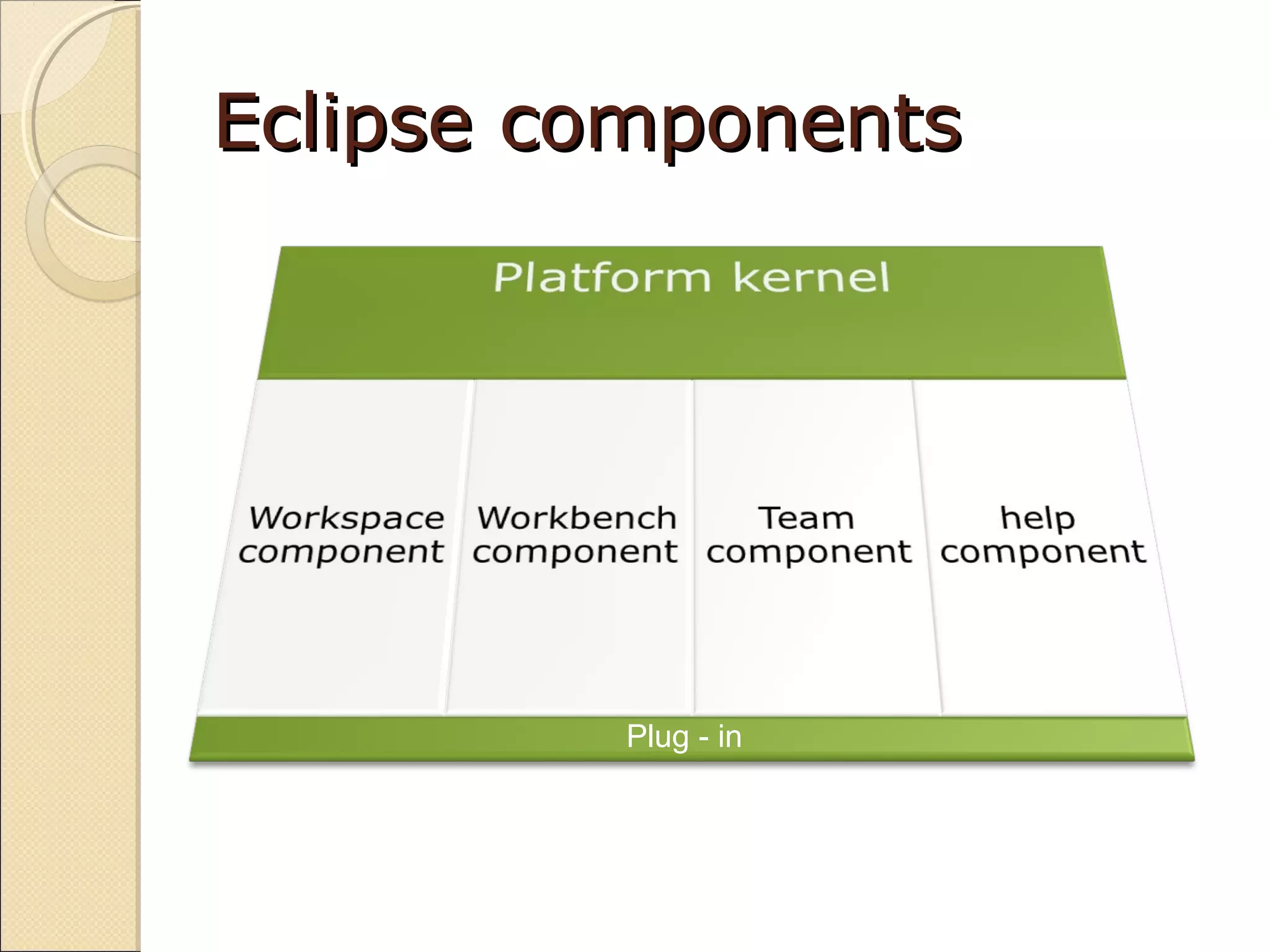
Eclipse componentsEclipse components
Plug - in
Eclipse componentsEclipse components
 the platform kernel
◦ The kernel's task is to get everything started and to
load needed plug-ins. When you start Eclipse, this
is the component that runs first, and it loads the
other plug-ins that you normally think of as Eclipse
itself, such as the workbench
 the workbench
◦ It is Eclipse's graphical user interface
 the workspace
◦ responsible for managing all the resources
connected to a project, which includes all the files
in the project
Eclipse componentsEclipse components
 the team component
◦ acts like a Concurrent Versions System (CVS) client
that interacts with a CVS server
 the help component
◦ provides help to the user
Views and perspectivesViews and perspectives
 select Window -> Show View, and select
the view you want from the menu that
appears
Working with eclipseWorking with eclipse (1)(1)
 Define workspace
 Create Java Project
 Create Java Class
 Write code
 Delete project
 Import project
Working with eclipseWorking with eclipse (2)(2)
 Create Method
 Overwrite Method
 Create Setter & Getter Methods
 Selecting a JRE
 Refactoring
 File search
 Code customizing
CVSCVS
 Add a new CVS repository location
 Check-out source from CVS
 Commit into CVS
 Update from CVS
 Synchronizing source code

Introduction to Eclipse IDE

  • 1.
  • 2.
    What and whyEclipse?What and why Eclipse?  It is an editor  Integrated development environment (IDE)  Java Development Tools (JDT)  Compiler (ECJ)  Variety plug-in modules  Open source software
  • 3.
    PrerequisitePrerequisite  Release buildseclipse installer ( http://www.eclipse.org/downloads )  Java Development Kit (JDK)  Java Runtime Environment (JRE)
  • 4.
  • 5.
    Eclipse componentsEclipse components the platform kernel ◦ The kernel's task is to get everything started and to load needed plug-ins. When you start Eclipse, this is the component that runs first, and it loads the other plug-ins that you normally think of as Eclipse itself, such as the workbench  the workbench ◦ It is Eclipse's graphical user interface  the workspace ◦ responsible for managing all the resources connected to a project, which includes all the files in the project
  • 6.
    Eclipse componentsEclipse components the team component ◦ acts like a Concurrent Versions System (CVS) client that interacts with a CVS server  the help component ◦ provides help to the user
  • 7.
    Views and perspectivesViewsand perspectives  select Window -> Show View, and select the view you want from the menu that appears
  • 8.
    Working with eclipseWorkingwith eclipse (1)(1)  Define workspace  Create Java Project  Create Java Class  Write code  Delete project  Import project
  • 9.
    Working with eclipseWorkingwith eclipse (2)(2)  Create Method  Overwrite Method  Create Setter & Getter Methods  Selecting a JRE  Refactoring  File search  Code customizing
  • 10.
    CVSCVS  Add anew CVS repository location  Check-out source from CVS  Commit into CVS  Update from CVS  Synchronizing source code