An introduction
Agenda
Ant, and why to use it
Ant terminology and concepts
Installing and executing Ant
Core Ant tasks
A working build script
Ant techniques and patterns
What is ant ?
Ant is the ubiquitous build tool in Java environments
Ant is implemented in Java
Ant is Open Source, maintained by Apache
Ant is cross platform and portable
Ant is well suited to a large number of automation
and scripting tasks
Ant is not a programming language
What can Ant do ?
Ant can get source code from version control (CVS)
Ant can compile source code
Ant can run unit tests
Ant can package compiled code and resources
Ant can handle dependencies between targets
Build automation (cron)
More details on all these later...
Installation
i. Download the binaries from
http://jakarta.apache.org/ant/index.html,
unzip them to a suitable directory.
ii. Define ANT_HOME to be the location where Ant was
unzipped
iii. Define JAVA_HOME to be the location where the
JDK is installed
iv. Add %ANT_HOME%bin;%JAVA_HOME%bin to
the PATH
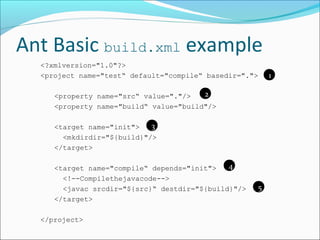
Ant Basic build.xml example
<?xmlversion="1.0"?>
<project name="test“ default="compile“ basedir=".">
<property name="src“ value="."/>
<property name="build“ value="build"/>
<target name="init">
<mkdirdir="${build}"/>
</target>
<target name="compile“ depends="init">
<!--Compilethejavacode-->
<javac srcdir="${src}“ destdir="${build}"/>
</target>
</project>
1
2
3
4
5
Ant techniques & patterns
Use simple targets
Each target do a single well defined job
Use standard targets
Easier for other people
Use properties.xml for configurability

Introduction to Apache Ant

  • 1.
  • 2.
    Agenda Ant, and whyto use it Ant terminology and concepts Installing and executing Ant Core Ant tasks A working build script Ant techniques and patterns
  • 3.
    What is ant? Ant is the ubiquitous build tool in Java environments Ant is implemented in Java Ant is Open Source, maintained by Apache Ant is cross platform and portable Ant is well suited to a large number of automation and scripting tasks Ant is not a programming language
  • 4.
    What can Antdo ? Ant can get source code from version control (CVS) Ant can compile source code Ant can run unit tests Ant can package compiled code and resources Ant can handle dependencies between targets Build automation (cron) More details on all these later...
  • 5.
    Installation i. Download thebinaries from http://jakarta.apache.org/ant/index.html, unzip them to a suitable directory. ii. Define ANT_HOME to be the location where Ant was unzipped iii. Define JAVA_HOME to be the location where the JDK is installed iv. Add %ANT_HOME%bin;%JAVA_HOME%bin to the PATH
  • 6.
    Ant Basic build.xmlexample <?xmlversion="1.0"?> <project name="test“ default="compile“ basedir="."> <property name="src“ value="."/> <property name="build“ value="build"/> <target name="init"> <mkdirdir="${build}"/> </target> <target name="compile“ depends="init"> <!--Compilethejavacode--> <javac srcdir="${src}“ destdir="${build}"/> </target> </project> 1 2 3 4 5
  • 7.
    Ant techniques &patterns Use simple targets Each target do a single well defined job Use standard targets Easier for other people Use properties.xml for configurability