Introduction To
CodeIgniter
Prerequisite
 OOP – Object Oriented Programming
 PHP
 MySQL
Outline
Introduction
 Evolution Of Web Development
 Basic Idea Of Web Framework
 Why Framework not Scratch?
 MVC ( Model View Controller)
Architecture
 What is CodeIgniter
Installation of CodeIgniter
 Apache
 PHP
 MySQL
Application Flow of CodeIgniter
 CodeIgniter URL
 Controllers
 Views
 Models
 CodeIgniter Libraries
 Helpers
Lab Work
 Getting started
 Database selection
 Html Helpers
 CRUD – Create Read Update Delete
 Pagination
 File upload
 Security
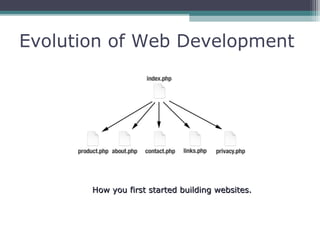
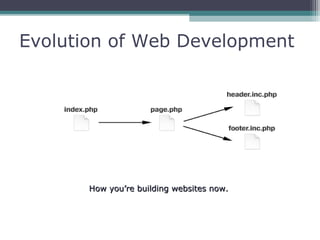
Evolution of Web Development
How you first started building websites.How you first started building websites.
Evolution of Web Development
How you’re building websites now.How you’re building websites now.
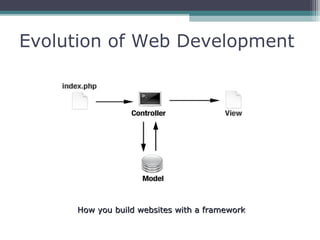
Evolution of Web Development
How you build websites with a frameworkHow you build websites with a framework
Basic Idea Of Web Framework
 Is a Software framework
 Designed to support the development of
 Dynamic websites
 Web applications
 Web services
 Aims to alleviate the overhead associated with common
activities used in Web development
 Libraries for database access
 Templating frameworks
 Session management
 Often promote code reuse
 Many more …….
Why Framework Not Scratch ?
 Key Factors of a Development
 Interface Design
 Business Logic
 Database Manipulation
 User Access Control
 Advantage of Framework
 Templating
 Provide Solutions to Common problems
 Abstract Levels of functionality
 Make Rapid Development Easier
 Disadvantage of Scratch Development
 Make your own Abstract Layer
 Solve Common Problems Yourself
 The more Typing Speed the more faster
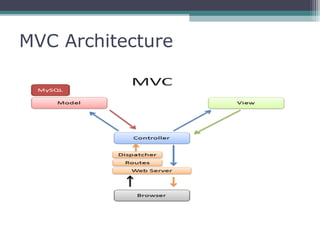
MVC Architecture
 Separates User Interface From Business Logic
 Model
 Encapsulates core application data and functionality Business Logic
 View
 obtains data from the model and presents it to the user
 Controller
 receives and translates input to requests on the model or the view
MVC Architecture
What is CodeIgniter
 An Open Source Web Application Framework
 Nearly Zero Configuration
 MVC ( Model View Controller ) Architecture
 Multiple DB (Database) support
 DB Objects
 Templating
 Caching
 Modules
 Validation
 Rich Sets of Libraries for Commonly Needed Tasks
 Has a Clear, Thorough documentation
Installation of CodeIgniter
 Requirements
 Web Server - Download & Install Apache
 PHP – 4.3.2 or Higher
 Database – MySQL ( support for other DB exists )
 XAMPP
Installation of CodeIgniter
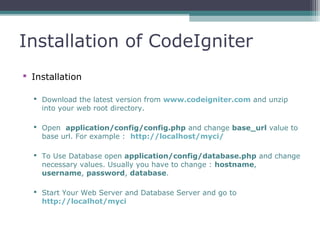
 Installation
 Download the latest version from www.codeigniter.com and unzip
into your web root directory.
 Open application/config/config.php and change base_url value to
base url. For example : http://localhost/myci/
 To Use Database open application/config/database.php and change
necessary values. Usually you have to change : hostname,
username, password, database.
 Start Your Web Server and Database Server and go to
http://localhot/myci
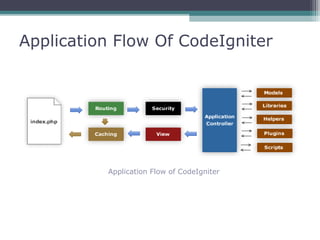
Application Flow Of CodeIgniter
Application Flow of CodeIgniter
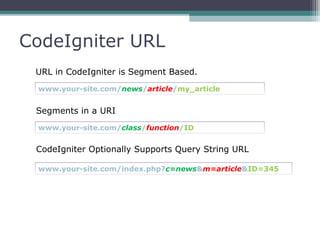
CodeIgniter URL
URL in CodeIgniter is Segment Based.
www.your-site.com/news/article/my_article
Segments in a URI
www.your-site.com/class/function/ID
CodeIgniter Optionally Supports Query String URL
www.your-site.com/index.php?c=news&m=article&ID=345
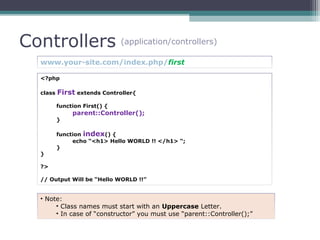
Controllers (application/controllers)
www.your-site.com/index.php/first
<?php
class First extends Controller{
function First() {
parent::Controller();
}
function index() {
echo “<h1> Hello WORLD !! </h1> “;
}
}
?>
// Output Will be “Hello WORLD !!”
• Note:
• Class names must start with an Uppercase Letter.
• In case of “constructor” you must use “parent::Controller();”
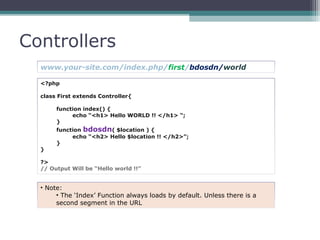
Controllers
<?php
class First extends Controller{
function index() {
echo “<h1> Hello WORLD !! </h1> “;
}
function bdosdn( $location ) {
echo “<h2> Hello $location !! </h2>”;
}
}
?>
// Output Will be “Hello world !!”
www.your-site.com/index.php/first/bdosdn/world
• Note:
• The ‘Index’ Function always loads by default. Unless there is a
second segment in the URL
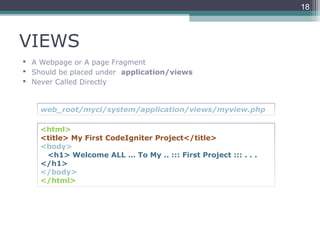
VIEWS
 A Webpage or A page Fragment
 Should be placed under application/views
 Never Called Directly
18
<html>
<title> My First CodeIgniter Project</title>
<body>
<h1> Welcome ALL … To My .. ::: First Project ::: . . .
</h1>
</body>
</html>
web_root/myci/system/application/views/myview.php
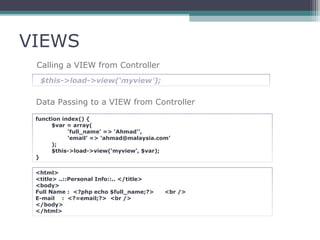
VIEWS
Calling a VIEW from Controller
$this->load->view(‘myview’);
Data Passing to a VIEW from Controller
function index() {
$var = array(
‘full_name’ => 'Ahmad'’,
‘email’ => ‘ahmad@malaysia.com’
);
$this->load->view(‘myview’, $var);
}
<html>
<title> ..::Personal Info::.. </title>
<body>
Full Name : <?php echo $full_name;?> <br />
E-mail : <?=email;?> <br />
</body>
</html>
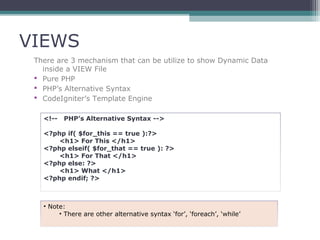
VIEWS
There are 3 mechanism that can be utilize to show Dynamic Data
inside a VIEW File
 Pure PHP
 PHP’s Alternative Syntax
 CodeIgniter’s Template Engine
<!-- PHP’s Alternative Syntax -->
<?php if( $for_this == true ):?>
<h1> For This </h1>
<?php elseif( $for_that == true ): ?>
<h1> For That </h1>
<?php else: ?>
<h1> What </h1>
<?php endif; ?>
• Note:
• There are other alternative syntax ‘for’, ‘foreach’, ‘while’
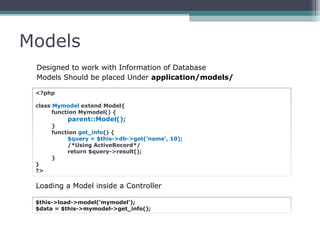
Models
Designed to work with Information of Database
Models Should be placed Under application/models/
<?php
class Mymodel extend Model{
function Mymodel() {
parent::Model();
}
function get_info() {
$query = $this->db->get(‘name’, 10);
/*Using ActiveRecord*/
return $query->result();
}
}
?>
Loading a Model inside a Controller
$this->load->model(‘mymodel’);
$data = $this->mymodel->get_info();
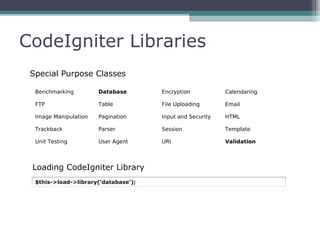
CodeIgniter Libraries
Benchmarking Database Encryption Calendaring
FTP Table File Uploading Email
Image Manipulation Pagination Input and Security HTML
Trackback Parser Session Template
Unit Testing User Agent URI Validation
Special Purpose Classes
$this->load->library(‘database’);
Loading CodeIgniter Library
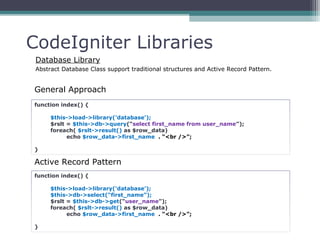
CodeIgniter Libraries
Database Library
Abstract Database Class support traditional structures and Active Record Pattern.
function index() {
$this->load->library(‘database’);
$rslt = $this->db->query(“select first_name from user_name”);
foreach( $rslt->result() as $row_data)
echo $row_data->first_name . “<br />”;
}
function index() {
$this->load->library(‘database’);
$this->db->select(“first_name”);
$rslt = $this->db->get(“user_name”);
foreach( $rslt->result() as $row_data)
echo $row_data->first_name . “<br />”;
}
Active Record Pattern
General Approach
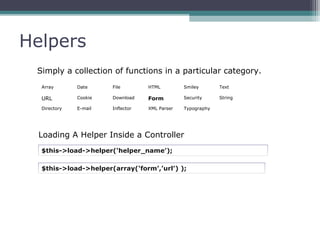
Helpers
Simply a collection of functions in a particular category.
Array Date File HTML Smiley Text
URL Cookie Download Form Security String
Directory E-mail Inflector XML Parser Typography
$this->load->helper(‘helper_name’);
Loading A Helper Inside a Controller
$this->load->helper(array(‘form’,’url’) );
Helpers
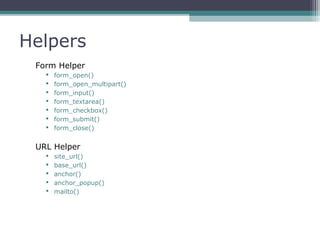
Form Helper
 form_open()
 form_open_multipart()
 form_input()
 form_textarea()
 form_checkbox()
 form_submit()
 form_close()
URL Helper
 site_url()
 base_url()
 anchor()
 anchor_popup()
 mailto()
Lab work

Introduction To CodeIgniter

  • 1.
  • 2.
    Prerequisite  OOP –Object Oriented Programming  PHP  MySQL
  • 3.
    Outline Introduction  Evolution OfWeb Development  Basic Idea Of Web Framework  Why Framework not Scratch?  MVC ( Model View Controller) Architecture  What is CodeIgniter Installation of CodeIgniter  Apache  PHP  MySQL Application Flow of CodeIgniter  CodeIgniter URL  Controllers  Views  Models  CodeIgniter Libraries  Helpers Lab Work  Getting started  Database selection  Html Helpers  CRUD – Create Read Update Delete  Pagination  File upload  Security
  • 4.
    Evolution of WebDevelopment How you first started building websites.How you first started building websites.
  • 5.
    Evolution of WebDevelopment How you’re building websites now.How you’re building websites now.
  • 6.
    Evolution of WebDevelopment How you build websites with a frameworkHow you build websites with a framework
  • 7.
    Basic Idea OfWeb Framework  Is a Software framework  Designed to support the development of  Dynamic websites  Web applications  Web services  Aims to alleviate the overhead associated with common activities used in Web development  Libraries for database access  Templating frameworks  Session management  Often promote code reuse  Many more …….
  • 8.
    Why Framework NotScratch ?  Key Factors of a Development  Interface Design  Business Logic  Database Manipulation  User Access Control  Advantage of Framework  Templating  Provide Solutions to Common problems  Abstract Levels of functionality  Make Rapid Development Easier  Disadvantage of Scratch Development  Make your own Abstract Layer  Solve Common Problems Yourself  The more Typing Speed the more faster
  • 9.
    MVC Architecture  SeparatesUser Interface From Business Logic  Model  Encapsulates core application data and functionality Business Logic  View  obtains data from the model and presents it to the user  Controller  receives and translates input to requests on the model or the view
  • 10.
  • 11.
    What is CodeIgniter An Open Source Web Application Framework  Nearly Zero Configuration  MVC ( Model View Controller ) Architecture  Multiple DB (Database) support  DB Objects  Templating  Caching  Modules  Validation  Rich Sets of Libraries for Commonly Needed Tasks  Has a Clear, Thorough documentation
  • 12.
    Installation of CodeIgniter Requirements  Web Server - Download & Install Apache  PHP – 4.3.2 or Higher  Database – MySQL ( support for other DB exists )  XAMPP
  • 13.
    Installation of CodeIgniter Installation  Download the latest version from www.codeigniter.com and unzip into your web root directory.  Open application/config/config.php and change base_url value to base url. For example : http://localhost/myci/  To Use Database open application/config/database.php and change necessary values. Usually you have to change : hostname, username, password, database.  Start Your Web Server and Database Server and go to http://localhot/myci
  • 14.
    Application Flow OfCodeIgniter Application Flow of CodeIgniter
  • 15.
    CodeIgniter URL URL inCodeIgniter is Segment Based. www.your-site.com/news/article/my_article Segments in a URI www.your-site.com/class/function/ID CodeIgniter Optionally Supports Query String URL www.your-site.com/index.php?c=news&m=article&ID=345
  • 16.
    Controllers (application/controllers) www.your-site.com/index.php/first <?php class Firstextends Controller{ function First() { parent::Controller(); } function index() { echo “<h1> Hello WORLD !! </h1> “; } } ?> // Output Will be “Hello WORLD !!” • Note: • Class names must start with an Uppercase Letter. • In case of “constructor” you must use “parent::Controller();”
  • 17.
    Controllers <?php class First extendsController{ function index() { echo “<h1> Hello WORLD !! </h1> “; } function bdosdn( $location ) { echo “<h2> Hello $location !! </h2>”; } } ?> // Output Will be “Hello world !!” www.your-site.com/index.php/first/bdosdn/world • Note: • The ‘Index’ Function always loads by default. Unless there is a second segment in the URL
  • 18.
    VIEWS  A Webpageor A page Fragment  Should be placed under application/views  Never Called Directly 18 <html> <title> My First CodeIgniter Project</title> <body> <h1> Welcome ALL … To My .. ::: First Project ::: . . . </h1> </body> </html> web_root/myci/system/application/views/myview.php
  • 19.
    VIEWS Calling a VIEWfrom Controller $this->load->view(‘myview’); Data Passing to a VIEW from Controller function index() { $var = array( ‘full_name’ => 'Ahmad'’, ‘email’ => ‘ahmad@malaysia.com’ ); $this->load->view(‘myview’, $var); } <html> <title> ..::Personal Info::.. </title> <body> Full Name : <?php echo $full_name;?> <br /> E-mail : <?=email;?> <br /> </body> </html>
  • 20.
    VIEWS There are 3mechanism that can be utilize to show Dynamic Data inside a VIEW File  Pure PHP  PHP’s Alternative Syntax  CodeIgniter’s Template Engine <!-- PHP’s Alternative Syntax --> <?php if( $for_this == true ):?> <h1> For This </h1> <?php elseif( $for_that == true ): ?> <h1> For That </h1> <?php else: ?> <h1> What </h1> <?php endif; ?> • Note: • There are other alternative syntax ‘for’, ‘foreach’, ‘while’
  • 21.
    Models Designed to workwith Information of Database Models Should be placed Under application/models/ <?php class Mymodel extend Model{ function Mymodel() { parent::Model(); } function get_info() { $query = $this->db->get(‘name’, 10); /*Using ActiveRecord*/ return $query->result(); } } ?> Loading a Model inside a Controller $this->load->model(‘mymodel’); $data = $this->mymodel->get_info();
  • 22.
    CodeIgniter Libraries Benchmarking DatabaseEncryption Calendaring FTP Table File Uploading Email Image Manipulation Pagination Input and Security HTML Trackback Parser Session Template Unit Testing User Agent URI Validation Special Purpose Classes $this->load->library(‘database’); Loading CodeIgniter Library
  • 23.
    CodeIgniter Libraries Database Library AbstractDatabase Class support traditional structures and Active Record Pattern. function index() { $this->load->library(‘database’); $rslt = $this->db->query(“select first_name from user_name”); foreach( $rslt->result() as $row_data) echo $row_data->first_name . “<br />”; } function index() { $this->load->library(‘database’); $this->db->select(“first_name”); $rslt = $this->db->get(“user_name”); foreach( $rslt->result() as $row_data) echo $row_data->first_name . “<br />”; } Active Record Pattern General Approach
  • 24.
    Helpers Simply a collectionof functions in a particular category. Array Date File HTML Smiley Text URL Cookie Download Form Security String Directory E-mail Inflector XML Parser Typography $this->load->helper(‘helper_name’); Loading A Helper Inside a Controller $this->load->helper(array(‘form’,’url’) );
  • 25.
    Helpers Form Helper  form_open() form_open_multipart()  form_input()  form_textarea()  form_checkbox()  form_submit()  form_close() URL Helper  site_url()  base_url()  anchor()  anchor_popup()  mailto()
  • 26.