CI & CD


Continuous integration
         and
Continuous deployment
     with Jenkins
What is Continuous integration

    A development methodology

    Of daily developer integrations

    Verified by automated builds

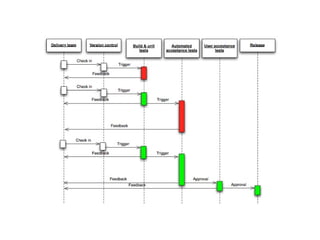
    Every commit triggers a build
    −   As soon as you have completed an independent
        functionality
    −   A full build on another, empty machine
Self-testing build

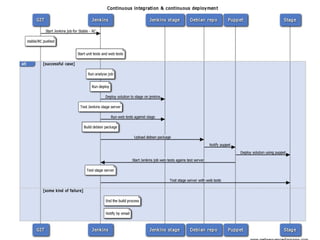
    Directly go from source to running build
    −   No manual copying
    −   No click on dialog boxes
    −   No configuration file editing

    Test with
    −   Unit tests
    −   Functional tests (web tests)
    −   Performance tests

    Responsible persons should be notified when
    anything fails

    Tests web in more browsers
What is it not

    Nightly builds

    Developer branches

    Scheduled integration points

    Building via IDEs
Why use continuous integration

    Automate the build

    Make the build self testing

    Keep the build fast

    Test in a clone of the production environment

    Everyone can see what's happening

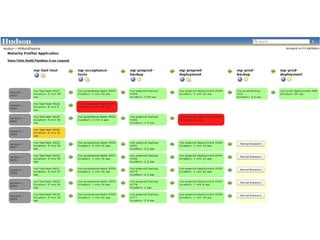
    Automate deployment
Continuous Delivery

    Continuous delivery/Continuous deployment

    Continuous, successful and repeatable
    methodology to deploying code

    Automated the steps of taking checked in
    code and making it run on production servers,
    used by customers
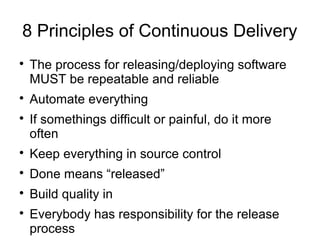
8 Principles of Continuous Delivery

    The process for releasing/deploying software
    MUST be repeatable and reliable

    Automate everything

    If somethings difficult or painful, do it more
    often

    Keep everything in source control

    Done means “released”

    Build quality in

    Everybody has responsibility for the release
    process
CI and CD with Jenkins

CI and CD with Jenkins

  • 1.
    CI & CD Continuousintegration and Continuous deployment with Jenkins
  • 2.
    What is Continuousintegration  A development methodology  Of daily developer integrations  Verified by automated builds  Every commit triggers a build − As soon as you have completed an independent functionality − A full build on another, empty machine
  • 3.
    Self-testing build  Directly go from source to running build − No manual copying − No click on dialog boxes − No configuration file editing  Test with − Unit tests − Functional tests (web tests) − Performance tests  Responsible persons should be notified when anything fails  Tests web in more browsers
  • 4.
    What is itnot  Nightly builds  Developer branches  Scheduled integration points  Building via IDEs
  • 5.
    Why use continuousintegration  Automate the build  Make the build self testing  Keep the build fast  Test in a clone of the production environment  Everyone can see what's happening  Automate deployment
  • 7.
    Continuous Delivery  Continuous delivery/Continuous deployment  Continuous, successful and repeatable methodology to deploying code  Automated the steps of taking checked in code and making it run on production servers, used by customers
  • 8.
    8 Principles ofContinuous Delivery  The process for releasing/deploying software MUST be repeatable and reliable  Automate everything  If somethings difficult or painful, do it more often  Keep everything in source control  Done means “released”  Build quality in  Everybody has responsibility for the release process