Docker Storage
Introduction
http://bit.ly/2EzR13M
ejlp12@gmail.com
Container Immutability
● The data doesn’t persist when that container no longer exists.
● A container’s writable layer is tightly coupled to the host machine where the
container is running.
● Not easy move the data somewhere else.
● Writing into requires a storage driver to manage the filesystem.
This extra abstraction reduces performance as compared to using data
volumes, which write directly to the host filesystem.
Where are docker images stored
/var/lib/docker
● It stores images (data) and metadata in different
folder
● The content is depend on the storage driver
● Different OS different default storage driver
● You can change storage driver used by Docker
daemon
Storage Drivers:
● aufs
● btrfs
● devicemapper
● vfs
● zfs
● overlay
● overlay2
Storage in Docker (Concept)
Union File System
Union mounting concept:
a way of combining multiple directories
into one that appears to contain their
combined contents.
-- wikipedia
Graph Driver
“graph drivers” is interface (API) to
make storage in Docker pluggable.
Because Docker modeled the images
and the relationship of images to
various layers in a graph and the
filesystems mostly stored images.
Choose Storage Driver based on your workload
● overlay2, aufs, and overlay all operate at the file level rather than the block level. This uses
memory more efficiently, but the container’s writable layer may grow quite large in write-heavy
workloads.
● Block-level storage drivers such as devicemapper, btrfs, and zfs perform better for write-heavy
workloads (though not as well as Docker volumes).
● For lots of small writes or containers with many layers or deep filesystems, overlay may perform
better than overlay2, but consumes more inodes, which can lead to inode exhaustion.
● btrfs and zfs require a lot of memory.
● zfs is a good choice for high-density workloads such as PaaS.
Why so many storage divers?
In order to provide Docker to a broader user base on a variety of distros,
we decided that filesystem support in Docker needs to be pluggable.
https://blog.mobyproject.org/where-are-containerds-graph-drivers-145fc9b7255
Choose stable Storage Driver
The choices with the highest stability:
● overlay2
● aufs
● overlay, and
● devicemapper
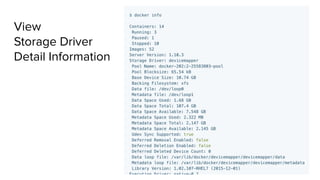
View
Storage Driver
Detail Information
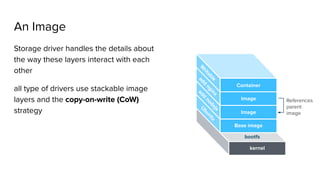
An Image
Storage driver handles the details about
the way these layers interact with each
other
all type of drivers use stackable image
layers and the copy-on-write (CoW)
strategy
bootfs
kernel
Base image
Image
Image
W
ritable
Container
add
nginx
add
nodejs
U
buntu
References
parent
image
What is Copy on Write
Copy-on-write is a strategy of sharing and copying files for maximum efficiency
It save space, and also reduces start-up time.
The data appears to be a copy, but is only a link (or reference) to the original data.
The actual copy happens only when someone tries to change the shared data.
Whoever changes the shared data ends up sharing their own copy instead.
http://jpetazzo.github.io/assets/2015-07-01-deep-dive-into-docker-storage-drivers.html#11
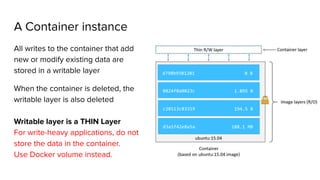
A Container instance
All writes to the container that add
new or modify existing data are
stored in a writable layer
When the container is deleted, the
writable layer is also deleted
Writable layer is a THIN Layer
For write-heavy applications, do not
store the data in the container.
Use Docker volume instead.
d798b9381281 0 B
0824f8a0823c 1.895 B
c20113c83319 194.5 B
d3a1f42e8a5a 188.1 MB
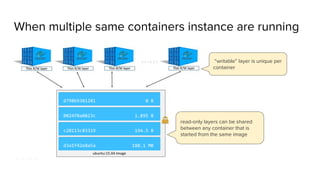
When multiple same containers instance are running
read-only layers can be shared
between any container that is
started from the same image
“writable” layer is unique per
container
d798b9381281 0 B
0824f8a0823c 1.895 B
c20113c83319 194.5 B
d3a1f42e8a5a 188.1 MB
FROM node:argon
# Create app directory
RUN mkdir -p /usr/src/app
WORKDIR /usr/src/app
# Install app dependencies
COPY package.json /usr/src/app/
RUN npm install
# Bundle app source
COPY . /usr/src/app
EXPOSE 8080
CMD [ "npm", "start" ]
Instruction in
the Dockerfile
adds a layer
to the image
Data Volume
Way to store data
Options for containers to store files in the host machine:
1. volumes (persisted on disk)
stored in a part of the host filesystem which is managed by Docker
(/var/lib/docker/volumes/ on Linux)
2. bind mounts (persisted on disk)
stored anywhere on the host system
3. tmpfs mounts (not persisted on disk & Linux only)
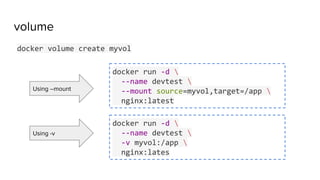
volume
docker volume create myvol
docker run -d 
--name devtest 
--mount source=myvol,target=/app 
nginx:latest
docker run -d 
--name devtest 
-v myvol:/app 
nginx:lates
Using --mount
Using -v
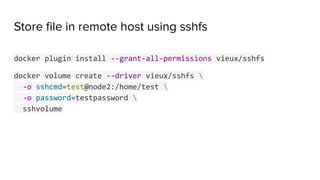
Store file in remote host using sshfs
docker plugin install --grant-all-permissions vieux/sshfs
docker volume create --driver vieux/sshfs 
-o sshcmd=test@node2:/home/test 
-o password=testpassword 
sshvolume
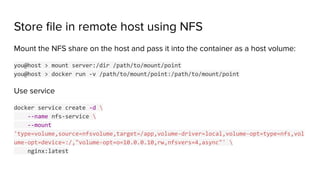
Store file in remote host using NFS
Mount the NFS share on the host and pass it into the container as a host volume:
you@host > mount server:/dir /path/to/mount/point
you@host > docker run -v /path/to/mount/point:/path/to/mount/point
Use service
docker service create -d 
--name nfs-service 
--mount
'type=volume,source=nfsvolume,target=/app,volume-driver=local,volume-opt=type=nfs,vol
ume-opt=device=:/,"volume-opt=o=10.0.0.10,rw,nfsvers=4,async"' 
nginx:latest
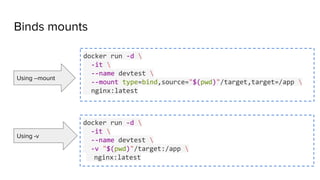
Binds mounts
docker run -d 
-it 
--name devtest 
--mount type=bind,source="$(pwd)"/target,target=/app 
nginx:latest
docker run -d 
-it 
--name devtest 
-v "$(pwd)"/target:/app 
nginx:latest
Using --mount
Using -v
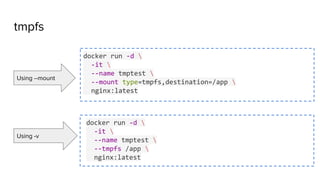
tmpfs
docker run -d 
-it 
--name tmptest 
--mount type=tmpfs,destination=/app 
nginx:latest
docker run -d 
-it 
--name tmptest 
--tmpfs /app 
nginx:latest
Using --mount
Using -v
Strategies to Manage Persistent Data
It is recommended to isolate the data from a container to
retain the benefits of adopting containerization.
Data management should be distinctly separate from the
container lifecycle.
https://thenewstack.io/methods-dealing-container-storage/
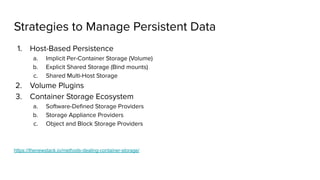
Strategies to Manage Persistent Data
1. Host-Based Persistence
a. Implicit Per-Container Storage (Volume)
b. Explicit Shared Storage (Bind mounts)
c. Shared Multi-Host Storage
2. Volume Plugins
3. Container Storage Ecosystem
a. Software-Defined Storage Providers
b. Storage Appliance Providers
c. Object and Block Storage Providers
https://thenewstack.io/methods-dealing-container-storage/
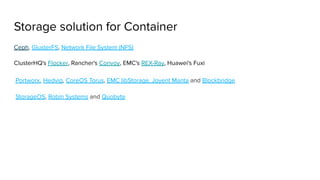
Storage solution for Container
Ceph, GlusterFS, Network File System (NFS)
ClusterHQ's Flocker, Rancher's Convoy, EMC's REX-Ray, Huawei's Fuxi
Portworx, Hedvig, CoreOS Torus, EMC libStorage, Joyent Manta and Blockbridge
StorageOS, Robin Systems and Quobyte
Resources for deep dive
1. https://docs.docker.com/storage/
2. Deep dive into Docker storage drivers [Jerome Petazzoni]
a. Video - https://www.youtube.com/watch?v=9oh_M11-foU
b. Presentation Slides -
3. https://integratedcode.us/2016/08/30/storage-drivers-in-docker-a-deep-dive/
4. https://thenewstack.io/methods-dealing-container-storage/
5. https://blog.mobyproject.org/where-are-containerds-graph-drivers-145fc9b7255
6. https://blog.jessfraz.com/post/the-brutally-honest-guide-to-docker-graphdrivers/
Thank You
Container Image
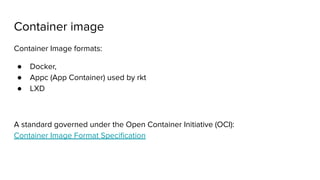
Container image
Container Image formats:
● Docker,
● Appc (App Container) used by rkt
● LXD
A standard governed under the Open Container Initiative (OCI):
Container Image Format Specification
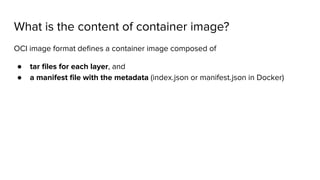
What is the content of container image?
OCI image format defines a container image composed of
● tar files for each layer, and
● a manifest file with the metadata (index.json or manifest.json in Docker)
Manifest file
{
"schemaVersion": 2,
"mediaType": "application/vnd.docker.distribution.manifest.v2+json",
"config": {
"mediaType": "application/vnd.docker.container.image.v1+json",
"size": 190,
"digest": "sha256:efe184abb97e76d7d900b2e97171cc20830b6b1b0e0fe504a4ee7097a6b5c91b"
},
"layers": [
{
"mediaType": "application/vnd.docker.image.rootfs.diff.tar.gzip",
"size": 170,
"digest": "sha256:9964c16915b8956cb01eb77028b1fd1976287b5ec87cc1663844a0bd32933a47"
}
]
}
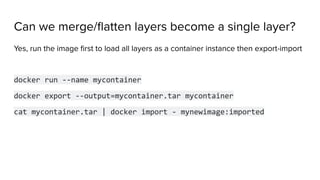
Can we merge/flatten layers become a single layer?
Yes, run the image first to load all layers as a container instance then export-import
docker run --name mycontainer
docker export --output=mycontainer.tar mycontainer
cat mycontainer.tar | docker import - mynewimage:imported
Can we merge/flatten layers become a single layer?
Yes, run container then use docker commit
docker commit <container id> <new image name>
Example: Commit a container with new CMD and EXPOSE instructions
docker commit --change='CMD ["apachectl", "-DFOREGROUND"]' 
-c "EXPOSE 80" c3f279d17e0a ejlp12/testimage:version4
Docker Image Tools
● docker-squash a utility to squash multiple docker layers into one in order to
create an image with fewer and smaller layers
● wagoodman/dive a tool for exploring each layer in a docker image
// TODO: add more tools here
Container Image Build Tools
● Jib builds Docker and OCI images in Java
● Kaniko builds images in Kubernetes using a Dockerfile
● rules_docker provides Bazel rules for building images
● BuildKit is the underlying engine used by Docker to build images
● img provides a standalone frontend for BuildKit
● buildah builds OCI images
Multi-stage build
Docker > 17.5
//TODO: Explain multi-stage build here
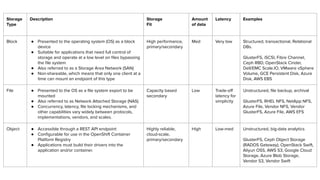
Storage use-cases and properties
Storage
Type
Description Storage
Fit
Amount
of data
Latency Examples
Block ● Presented to the operating system (OS) as a block
device
● Suitable for applications that need full control of
storage and operate at a low level on files bypassing
the file system
● Also referred to as a Storage Area Network (SAN)
● Non-shareable, which means that only one client at a
time can mount an endpoint of this type
High performance,
primary/secondary
Med Very low Structured, transactional, Relational
DBs.
GlusterFS, iSCSI, Fibre Channel,
Ceph RBD, OpenStack Cinder,
Dell/EMC Scale.IO, VMware vSphere
Volume, GCE Persistent Disk, Azure
Disk, AWS EBS
File ● Presented to the OS as a file system export to be
mounted
● Also referred to as Network Attached Storage (NAS)
● Concurrency, latency, file locking mechanisms, and
other capabilities vary widely between protocols,
implementations, vendors, and scales.
Capacity based
secondary
Low Trade-off
latency for
simplicity
Unstructured, file backup, archival
GlusterFS, RHEL NFS, NetApp NFS,
Azure File, Vendor NFS, Vendor
GlusterFS, Azure File, AWS EFS
Object ● Accessible through a REST API endpoint
● Configurable for use in the OpenShift Container
Platform Registry
● Applications must build their drivers into the
application and/or container.
Highly reliable,
cloud-scale,
primary/secondary
High Low-med Unstructured, big-data analytics
GlusterFS, Ceph Object Storage
(RADOS Gateway), OpenStack Swift,
Aliyun OSS, AWS S3, Google Cloud
Storage, Azure Blob Storage,
Vendor S3, Vendor Swift

Introduction to Docker storage, volume and image

  • 1.
  • 2.
    Container Immutability ● Thedata doesn’t persist when that container no longer exists. ● A container’s writable layer is tightly coupled to the host machine where the container is running. ● Not easy move the data somewhere else. ● Writing into requires a storage driver to manage the filesystem. This extra abstraction reduces performance as compared to using data volumes, which write directly to the host filesystem.
  • 3.
    Where are dockerimages stored /var/lib/docker ● It stores images (data) and metadata in different folder ● The content is depend on the storage driver ● Different OS different default storage driver ● You can change storage driver used by Docker daemon Storage Drivers: ● aufs ● btrfs ● devicemapper ● vfs ● zfs ● overlay ● overlay2
  • 4.
    Storage in Docker(Concept) Union File System Union mounting concept: a way of combining multiple directories into one that appears to contain their combined contents. -- wikipedia Graph Driver “graph drivers” is interface (API) to make storage in Docker pluggable. Because Docker modeled the images and the relationship of images to various layers in a graph and the filesystems mostly stored images.
  • 5.
    Choose Storage Driverbased on your workload ● overlay2, aufs, and overlay all operate at the file level rather than the block level. This uses memory more efficiently, but the container’s writable layer may grow quite large in write-heavy workloads. ● Block-level storage drivers such as devicemapper, btrfs, and zfs perform better for write-heavy workloads (though not as well as Docker volumes). ● For lots of small writes or containers with many layers or deep filesystems, overlay may perform better than overlay2, but consumes more inodes, which can lead to inode exhaustion. ● btrfs and zfs require a lot of memory. ● zfs is a good choice for high-density workloads such as PaaS.
  • 6.
    Why so manystorage divers? In order to provide Docker to a broader user base on a variety of distros, we decided that filesystem support in Docker needs to be pluggable. https://blog.mobyproject.org/where-are-containerds-graph-drivers-145fc9b7255
  • 7.
    Choose stable StorageDriver The choices with the highest stability: ● overlay2 ● aufs ● overlay, and ● devicemapper
  • 8.
  • 9.
    An Image Storage driverhandles the details about the way these layers interact with each other all type of drivers use stackable image layers and the copy-on-write (CoW) strategy bootfs kernel Base image Image Image W ritable Container add nginx add nodejs U buntu References parent image
  • 10.
    What is Copyon Write Copy-on-write is a strategy of sharing and copying files for maximum efficiency It save space, and also reduces start-up time. The data appears to be a copy, but is only a link (or reference) to the original data. The actual copy happens only when someone tries to change the shared data. Whoever changes the shared data ends up sharing their own copy instead. http://jpetazzo.github.io/assets/2015-07-01-deep-dive-into-docker-storage-drivers.html#11
  • 11.
    A Container instance Allwrites to the container that add new or modify existing data are stored in a writable layer When the container is deleted, the writable layer is also deleted Writable layer is a THIN Layer For write-heavy applications, do not store the data in the container. Use Docker volume instead. d798b9381281 0 B 0824f8a0823c 1.895 B c20113c83319 194.5 B d3a1f42e8a5a 188.1 MB
  • 12.
    When multiple samecontainers instance are running read-only layers can be shared between any container that is started from the same image “writable” layer is unique per container d798b9381281 0 B 0824f8a0823c 1.895 B c20113c83319 194.5 B d3a1f42e8a5a 188.1 MB
  • 13.
    FROM node:argon # Createapp directory RUN mkdir -p /usr/src/app WORKDIR /usr/src/app # Install app dependencies COPY package.json /usr/src/app/ RUN npm install # Bundle app source COPY . /usr/src/app EXPOSE 8080 CMD [ "npm", "start" ] Instruction in the Dockerfile adds a layer to the image
  • 14.
  • 15.
    Way to storedata Options for containers to store files in the host machine: 1. volumes (persisted on disk) stored in a part of the host filesystem which is managed by Docker (/var/lib/docker/volumes/ on Linux) 2. bind mounts (persisted on disk) stored anywhere on the host system 3. tmpfs mounts (not persisted on disk & Linux only)
  • 16.
    volume docker volume createmyvol docker run -d --name devtest --mount source=myvol,target=/app nginx:latest docker run -d --name devtest -v myvol:/app nginx:lates Using --mount Using -v
  • 17.
    Store file inremote host using sshfs docker plugin install --grant-all-permissions vieux/sshfs docker volume create --driver vieux/sshfs -o sshcmd=test@node2:/home/test -o password=testpassword sshvolume
  • 18.
    Store file inremote host using NFS Mount the NFS share on the host and pass it into the container as a host volume: you@host > mount server:/dir /path/to/mount/point you@host > docker run -v /path/to/mount/point:/path/to/mount/point Use service docker service create -d --name nfs-service --mount 'type=volume,source=nfsvolume,target=/app,volume-driver=local,volume-opt=type=nfs,vol ume-opt=device=:/,"volume-opt=o=10.0.0.10,rw,nfsvers=4,async"' nginx:latest
  • 19.
    Binds mounts docker run-d -it --name devtest --mount type=bind,source="$(pwd)"/target,target=/app nginx:latest docker run -d -it --name devtest -v "$(pwd)"/target:/app nginx:latest Using --mount Using -v
  • 20.
    tmpfs docker run -d -it --name tmptest --mount type=tmpfs,destination=/app nginx:latest docker run -d -it --name tmptest --tmpfs /app nginx:latest Using --mount Using -v
  • 21.
    Strategies to ManagePersistent Data
  • 22.
    It is recommendedto isolate the data from a container to retain the benefits of adopting containerization. Data management should be distinctly separate from the container lifecycle. https://thenewstack.io/methods-dealing-container-storage/
  • 23.
    Strategies to ManagePersistent Data 1. Host-Based Persistence a. Implicit Per-Container Storage (Volume) b. Explicit Shared Storage (Bind mounts) c. Shared Multi-Host Storage 2. Volume Plugins 3. Container Storage Ecosystem a. Software-Defined Storage Providers b. Storage Appliance Providers c. Object and Block Storage Providers https://thenewstack.io/methods-dealing-container-storage/
  • 24.
    Storage solution forContainer Ceph, GlusterFS, Network File System (NFS) ClusterHQ's Flocker, Rancher's Convoy, EMC's REX-Ray, Huawei's Fuxi Portworx, Hedvig, CoreOS Torus, EMC libStorage, Joyent Manta and Blockbridge StorageOS, Robin Systems and Quobyte
  • 25.
    Resources for deepdive 1. https://docs.docker.com/storage/ 2. Deep dive into Docker storage drivers [Jerome Petazzoni] a. Video - https://www.youtube.com/watch?v=9oh_M11-foU b. Presentation Slides - 3. https://integratedcode.us/2016/08/30/storage-drivers-in-docker-a-deep-dive/ 4. https://thenewstack.io/methods-dealing-container-storage/ 5. https://blog.mobyproject.org/where-are-containerds-graph-drivers-145fc9b7255 6. https://blog.jessfraz.com/post/the-brutally-honest-guide-to-docker-graphdrivers/
  • 26.
  • 27.
  • 28.
    Container image Container Imageformats: ● Docker, ● Appc (App Container) used by rkt ● LXD A standard governed under the Open Container Initiative (OCI): Container Image Format Specification
  • 29.
    What is thecontent of container image? OCI image format defines a container image composed of ● tar files for each layer, and ● a manifest file with the metadata (index.json or manifest.json in Docker)
  • 30.
    Manifest file { "schemaVersion": 2, "mediaType":"application/vnd.docker.distribution.manifest.v2+json", "config": { "mediaType": "application/vnd.docker.container.image.v1+json", "size": 190, "digest": "sha256:efe184abb97e76d7d900b2e97171cc20830b6b1b0e0fe504a4ee7097a6b5c91b" }, "layers": [ { "mediaType": "application/vnd.docker.image.rootfs.diff.tar.gzip", "size": 170, "digest": "sha256:9964c16915b8956cb01eb77028b1fd1976287b5ec87cc1663844a0bd32933a47" } ] }
  • 31.
    Can we merge/flattenlayers become a single layer? Yes, run the image first to load all layers as a container instance then export-import docker run --name mycontainer docker export --output=mycontainer.tar mycontainer cat mycontainer.tar | docker import - mynewimage:imported
  • 32.
    Can we merge/flattenlayers become a single layer? Yes, run container then use docker commit docker commit <container id> <new image name> Example: Commit a container with new CMD and EXPOSE instructions docker commit --change='CMD ["apachectl", "-DFOREGROUND"]' -c "EXPOSE 80" c3f279d17e0a ejlp12/testimage:version4
  • 33.
    Docker Image Tools ●docker-squash a utility to squash multiple docker layers into one in order to create an image with fewer and smaller layers ● wagoodman/dive a tool for exploring each layer in a docker image // TODO: add more tools here
  • 34.
    Container Image BuildTools ● Jib builds Docker and OCI images in Java ● Kaniko builds images in Kubernetes using a Dockerfile ● rules_docker provides Bazel rules for building images ● BuildKit is the underlying engine used by Docker to build images ● img provides a standalone frontend for BuildKit ● buildah builds OCI images
  • 35.
    Multi-stage build Docker >17.5 //TODO: Explain multi-stage build here
  • 36.
  • 37.
    Storage Type Description Storage Fit Amount of data LatencyExamples Block ● Presented to the operating system (OS) as a block device ● Suitable for applications that need full control of storage and operate at a low level on files bypassing the file system ● Also referred to as a Storage Area Network (SAN) ● Non-shareable, which means that only one client at a time can mount an endpoint of this type High performance, primary/secondary Med Very low Structured, transactional, Relational DBs. GlusterFS, iSCSI, Fibre Channel, Ceph RBD, OpenStack Cinder, Dell/EMC Scale.IO, VMware vSphere Volume, GCE Persistent Disk, Azure Disk, AWS EBS File ● Presented to the OS as a file system export to be mounted ● Also referred to as Network Attached Storage (NAS) ● Concurrency, latency, file locking mechanisms, and other capabilities vary widely between protocols, implementations, vendors, and scales. Capacity based secondary Low Trade-off latency for simplicity Unstructured, file backup, archival GlusterFS, RHEL NFS, NetApp NFS, Azure File, Vendor NFS, Vendor GlusterFS, Azure File, AWS EFS Object ● Accessible through a REST API endpoint ● Configurable for use in the OpenShift Container Platform Registry ● Applications must build their drivers into the application and/or container. Highly reliable, cloud-scale, primary/secondary High Low-med Unstructured, big-data analytics GlusterFS, Ceph Object Storage (RADOS Gateway), OpenStack Swift, Aliyun OSS, AWS S3, Google Cloud Storage, Azure Blob Storage, Vendor S3, Vendor Swift