A bit of docker container file
system
Deepak kumar
Fosscafe
Agenda
• File system
• Why it is needed
• Docker images
Pre-requisites
• On mind
• Docker basics idea in theory
• Basic hands-on of docker
• File system purpose
• On hand
• Laptop for trying out demo
• Internet connection
Known file systems in day-2-day life
• Ext3, ext4
• Linux
• FAT, NTFS
• Windows
When it comes to picture
• Docker is successful because of shipping container
• Shipping container is made possible by docker image
• Docker image uses file system
• To maintain file structure specified by user (Dockerfile)
• To share this file structure to multiple container instantiations
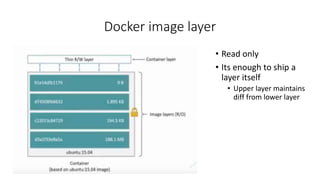
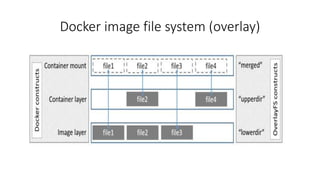
Docker image layer
• Read only
• Its enough to ship a
layer itself
• Upper layer maintains
diff from lower layer
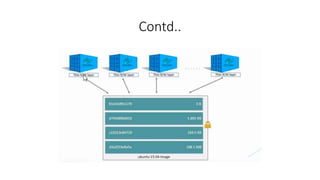
Contd..
Docker image file system (overlay)
Demo
• Image layer size increment
• Extra size to container
• Image based share is efficient
• View docker image size and container size
• At beginning
• After edit of container
Docker commands
• docker info
• docker ps –s
• docker history
• docker system df
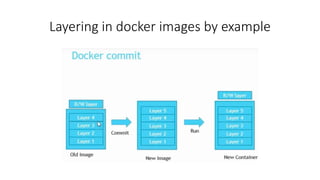
Layering in docker images by example
Demo
• Commit an existing container
• Run docker history on new image
• Check the parent image ID and new image ID position
More about overlays
• Now default is overlay filesystem (overlay2)
• Earlier docker uses aufs
• You can check it using ‘docker info’ command
• Look for ‘Storage Driver’ option
Why overlay is default
• The copy-on-write (CoW) strategy
• Page Caching
Change storage driver to overlay
• Instruct in /etc/docker/daemon.json
• Change the option to overlay2
• Restart docker
When not to use writable layer
• write-heavy workloads
• Use –v option and mount the volume
• Use block level storage driver
Handling data volume (-v option)
• Data volumes are not controlled by the storage driver
• Read/Write bypass storage driver
• Operate at native host speed
• Data volume survives on deletion of container
Other file systems
• Vfs, AUFS, OVERLAY, Overlay2
• aufs, overlay, and overlay2 all operate at the file level rather than the
block level.
• Block-level storage drivers such as devicemapper, btrfs, and zfs
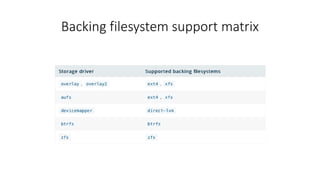
Backing filesystem support matrix
• https://www.youtube.com/watch?v=24bKqcWVGgc
• For File system
• https://www.youtube.com/watch?v=vlS5EiapiII
• Creating Effective Docker Images

Learning of docker storage driver (container file system)

  • 1.
    A bit ofdocker container file system Deepak kumar Fosscafe
  • 2.
    Agenda • File system •Why it is needed • Docker images
  • 3.
    Pre-requisites • On mind •Docker basics idea in theory • Basic hands-on of docker • File system purpose • On hand • Laptop for trying out demo • Internet connection
  • 4.
    Known file systemsin day-2-day life • Ext3, ext4 • Linux • FAT, NTFS • Windows
  • 5.
    When it comesto picture • Docker is successful because of shipping container • Shipping container is made possible by docker image • Docker image uses file system • To maintain file structure specified by user (Dockerfile) • To share this file structure to multiple container instantiations
  • 6.
    Docker image layer •Read only • Its enough to ship a layer itself • Upper layer maintains diff from lower layer
  • 7.
  • 8.
    Docker image filesystem (overlay)
  • 9.
    Demo • Image layersize increment • Extra size to container • Image based share is efficient • View docker image size and container size • At beginning • After edit of container
  • 10.
    Docker commands • dockerinfo • docker ps –s • docker history • docker system df
  • 11.
    Layering in dockerimages by example
  • 12.
    Demo • Commit anexisting container • Run docker history on new image • Check the parent image ID and new image ID position
  • 13.
    More about overlays •Now default is overlay filesystem (overlay2) • Earlier docker uses aufs • You can check it using ‘docker info’ command • Look for ‘Storage Driver’ option
  • 14.
    Why overlay isdefault • The copy-on-write (CoW) strategy • Page Caching
  • 15.
    Change storage driverto overlay • Instruct in /etc/docker/daemon.json • Change the option to overlay2 • Restart docker
  • 16.
    When not touse writable layer • write-heavy workloads • Use –v option and mount the volume • Use block level storage driver
  • 17.
    Handling data volume(-v option) • Data volumes are not controlled by the storage driver • Read/Write bypass storage driver • Operate at native host speed • Data volume survives on deletion of container
  • 18.
    Other file systems •Vfs, AUFS, OVERLAY, Overlay2 • aufs, overlay, and overlay2 all operate at the file level rather than the block level. • Block-level storage drivers such as devicemapper, btrfs, and zfs
  • 19.
  • 20.
    • https://www.youtube.com/watch?v=24bKqcWVGgc • ForFile system • https://www.youtube.com/watch?v=vlS5EiapiII • Creating Effective Docker Images