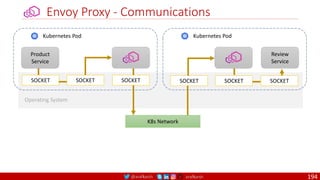
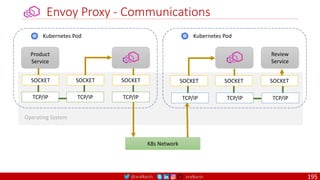
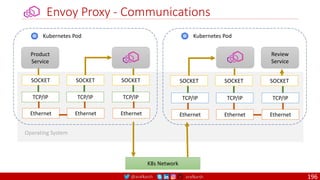
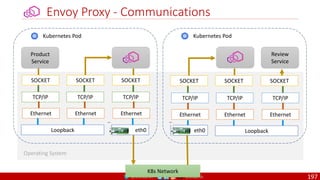
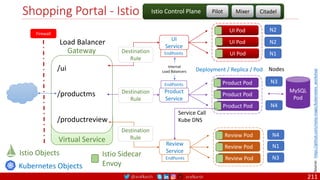
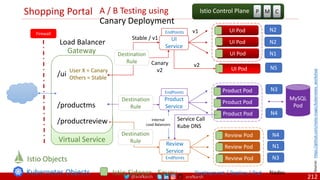
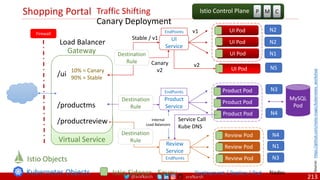
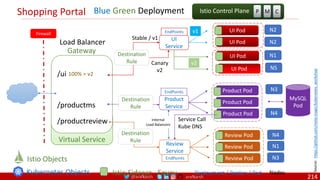
@arafkarsh arafkarsh
ARAF KARSH HAMID
Co-Founder / CTO
MetaMagic Global Inc., NJ, USA
@arafkarsh
arafkarsh
Microservices
Architecture Series
Building Cloud Native Apps
Docker
Kubernetes, KinD
Service Mesh: Istio
Part 7 of 11
@arafkarsh arafkarsh
Docker / Kubernetes / Istio
Containers Container Orchestration Service Mesh
2
MicroservicesArchitectureStyles © 2017 byAraf Karsh Hamid is licensed under CC BY 4.0
@arafkarsh arafkarsh
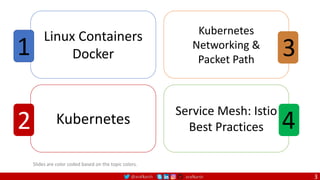
Slides are color coded based on the topic colors.
Linux Containers
Docker
1
Kubernetes
2
Kubernetes
Networking &
Packet Path
3
Service Mesh: Istio
Best Practices 4
3
@arafkarsh arafkarsh
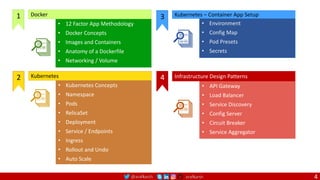
• 12 Factor App Methodology
• Docker Concepts
• Images and Containers
• Anatomy of a Dockerfile
• Networking / Volume
Docker
1
• Kubernetes Concepts
• Namespace
• Pods
• RelicaSet
• Deployment
• Service / Endpoints
• Ingress
• Rollout and Undo
• Auto Scale
Kubernetes
2
• API Gateway
• Load Balancer
• Service Discovery
• Config Server
• Circuit Breaker
• Service Aggregator
Infrastructure Design Patterns
4
• Environment
• Config Map
• Pod Presets
• Secrets
3 Kubernetes – Container App Setup
4
@arafkarsh arafkarsh
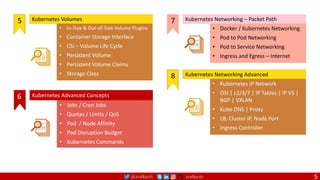
• Docker / Kubernetes Networking
• Pod to Pod Networking
• Pod to Service Networking
• Ingress and Egress – Internet
Kubernetes Networking – Packet Path
7
• Kubernetes IP Network
• OSI | L2/3/7 | IP Tables | IP VS |
BGP | VXLAN
• Kube DNS | Proxy
• LB, Cluster IP, Node Port
• Ingress Controller
Kubernetes Networking Advanced
8
• In-Tree & Out-of-Tree Volume Plugins
• Container Storage Interface
• CSI – Volume Life Cycle
• Persistent Volume
• Persistent Volume Claims
• Storage Class
Kubernetes Volumes
5
• Jobs / Cron Jobs
• Quotas / Limits / QoS
• Pod / Node Affinity
• Pod Disruption Budget
• Kubernetes Commands
Kubernetes Advanced Concepts
6
5
@arafkarsh arafkarsh
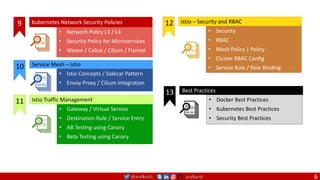
• Docker Best Practices
• Kubernetes Best Practices
• Security Best Practices
13 Best Practices
• Istio Concepts / Sidecar Pattern
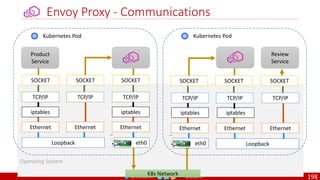
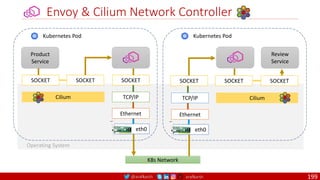
• Envoy Proxy / Cilium Integration
10 Service Mesh – Istio
• Security
• RBAC
• Mesh Policy | Policy
• Cluster RBAC Config
• Service Role / Role Binding
Istio – Security and RBAC
12
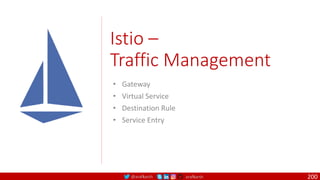
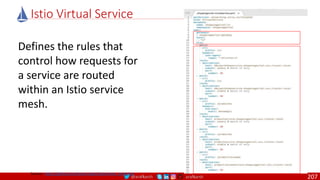
• Gateway / Virtual Service
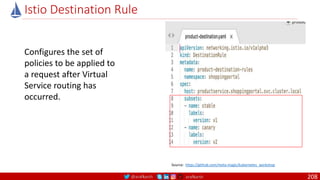
• Destination Rule / Service Entry
• AB Testing using Canary
• Beta Testing using Canary
Istio Traffic Management
11
• Network Policy L3 / L4
• Security Policy for Microservices
• Weave / Calico / Cilium / Flannel
Kubernetes Network Security Policies
9
6
@arafkarsh arafkarsh
Agile
Scrum (4-6 Weeks)
Developer Journey
Monolithic
Domain Driven Design
Event Sourcing and CQRS
Waterfall
Optional
Design
Patterns
Continuous Integration (CI)
6/12 Months
Enterprise Service Bus
Relational Database [SQL] / NoSQL
Development QA / QC Ops
7
Microservices
Domain Driven Design
Event Sourcing and CQRS
Scrum / Kanban (1-5 Days)
Mandatory
Design
Patterns
Infrastructure Design Patterns
CI
DevOps
Event Streaming / Replicated Logs
SQL NoSQL
CD
Container Orchestrator Service Mesh
@arafkarsh arafkarsh
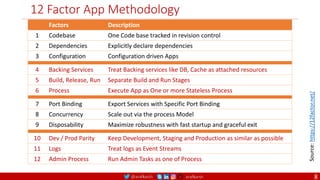
12 Factor App Methodology
4 Backing Services Treat Backing services like DB, Cache as attached resources
5 Build, Release, Run Separate Build and Run Stages
6 Process Execute App as One or more Stateless Process
7 Port Binding Export Services with Specific Port Binding
8 Concurrency Scale out via the process Model
9 Disposability Maximize robustness with fast startup and graceful exit
10 Dev / Prod Parity Keep Development, Staging and Production as similar as possible
11 Logs Treat logs as Event Streams
12 Admin Process Run Admin Tasks as one of Process
Source:
https://12factor.net/
Factors Description
1 Codebase One Code base tracked in revision control
2 Dependencies Explicitly declare dependencies
3 Configuration Configuration driven Apps
8
@arafkarsh arafkarsh
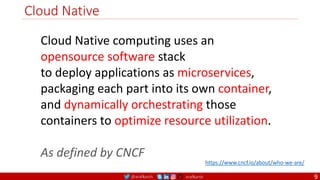
Cloud Native
9
Cloud Native computing uses an
opensource software stack
to deploy applications as microservices,
packaging each part into its own container,
and dynamically orchestrating those
containers to optimize resource utilization.
As defined by CNCF
https://www.cncf.io/about/who-we-are/
@arafkarsh arafkarsh
Docker Containers
• 12 Factor App Methodology
• Docker Concepts
• Images and Containers
• Anatomy of a Dockerfile
• Networking / Volume
Source: https://github.com/MetaArivu/k8s-workshop
10
1
@arafkarsh arafkarsh
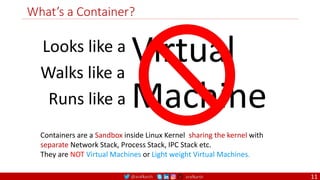
What’s a Container?
Virtual
Machine
Looks like a
Walks like a
Runs like a
Containers are a Sandbox inside Linux Kernel sharing the kernel with
separate Network Stack, Process Stack, IPC Stack etc.
They are NOT Virtual Machines or Light weight Virtual Machines.
11
@arafkarsh arafkarsh
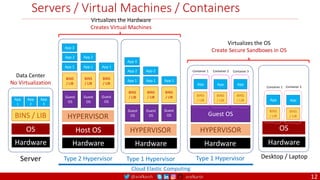
Servers / Virtual Machines / Containers
Hardware
Host OS
HYPERVISOR
App 1 App 1 App 1
Guest
OS
BINS
/ LIB
Guest
OS
BINS
/ LIB
Guest
OS
BINS
/ LIB
Type 2 Hypervisor
App 2
App 3
App 2
OS
Hardware
Desktop / Laptop
BINS
/ LIB
App
BINS
/ LIB
App
Container 1 Container 2
Type 1 Hypervisor
Hardware
HYPERVISOR
App 1 App 1 App 1
Guest
OS
BINS
/ LIB
Guest
OS
BINS
/ LIB
Guest
OS
BINS
/ LIB
App 2
App 3
App 2
Guest OS
Hardware
Type 1 Hypervisor
BINS
/ LIB
App
BINS
/ LIB
App
BINS
/ LIB
App
Container 1 Container 2 Container 3
HYPERVISOR
Virtualizes the OS
Create Secure Sandboxes in OS
Virtualizes the Hardware
Creates Virtual Machines
Hardware
OS
BINS / LIB
App
1
App
2
App
3
Server
Data Center
No Virtualization
Cloud Elastic Computing
12
@arafkarsh arafkarsh
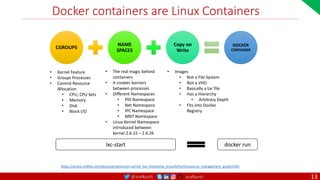
Docker containers are Linux Containers
CGROUPS
NAME
SPACES
Copy on
Write
DOCKER
CONTAINER
• Kernel Feature
• Groups Processes
• Control Resource
Allocation
• CPU, CPU Sets
• Memory
• Disk
• Block I/O
• Images
• Not a File System
• Not a VHD
• Basically a tar file
• Has a Hierarchy
• Arbitrary Depth
• Fits into Docker
Registry
• The real magic behind
containers
• It creates barriers
between processes
• Different Namespaces
• PID Namespace
• Net Namespace
• IPC Namespace
• MNT Namespace
• Linux Kernel Namespace
introduced between
kernel 2.6.15 – 2.6.26
docker run
lxc-start
https://access.redhat.com/documentation/en-us/red_hat_enterprise_linux/6/html/resource_management_guide/ch01
13
@arafkarsh arafkarsh
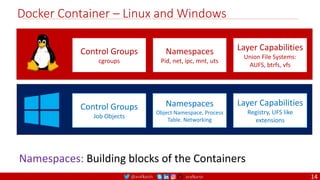
Docker Container – Linux and Windows
Control Groups
cgroups
Namespaces
Pid, net, ipc, mnt, uts
Layer Capabilities
Union File Systems:
AUFS, btrfs, vfs
Control Groups
Job Objects
Namespaces
Object Namespace, Process
Table. Networking
Layer Capabilities
Registry, UFS like
extensions
Namespaces: Building blocks of the Containers
14
@arafkarsh arafkarsh
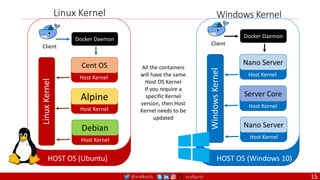
Linux Kernel
HOST OS (Ubuntu)
Client
Docker Daemon
Cent OS
Alpine
Debian
Linux
Kernel
Host Kernel
Host Kernel
Host Kernel
All the containers
will have the same
Host OS Kernel
If you require a
specific Kernel
version, then Host
Kernel needs to be
updated
HOST OS (Windows 10)
Client
Docker Daemon
Nano Server
Server Core
Nano Server
Windows
Kernel
Host Kernel
Host Kernel
Host Kernel
Windows Kernel
15
@arafkarsh arafkarsh
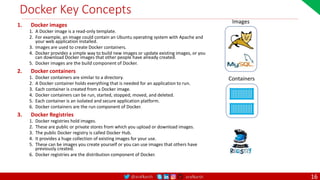
Docker Key Concepts
1. Docker images
1. A Docker image is a read-only template.
2. For example, an image could contain an Ubuntu operating system with Apache and
your web application installed.
3. Images are used to create Docker containers.
4. Docker provides a simple way to build new images or update existing images, or you
can download Docker images that other people have already created.
5. Docker images are the build component of Docker.
2. Docker containers
1. Docker containers are similar to a directory.
2. A Docker container holds everything that is needed for an application to run.
3. Each container is created from a Docker image.
4. Docker containers can be run, started, stopped, moved, and deleted.
5. Each container is an isolated and secure application platform.
6. Docker containers are the run component of Docker.
3. Docker Registries
1. Docker registries hold images.
2. These are public or private stores from which you upload or download images.
3. The public Docker registry is called Docker Hub.
4. It provides a huge collection of existing images for your use.
5. These can be images you create yourself or you can use images that others have
previously created.
6. Docker registries are the distribution component of Docker.
Images
Containers
16
@arafkarsh arafkarsh
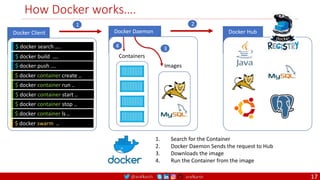
Docker Daemon
Docker Client
How Docker works….
$ docker search ….
$ docker build ….
$ docker container create ..
Docker Hub
Images
Containers
$ docker container run ..
$ docker container start ..
$ docker container stop ..
$ docker container ls ..
$ docker push ….
$ docker swarm ..
2
1
3
4
1. Search for the Container
2. Docker Daemon Sends the request to Hub
3. Downloads the image
4. Run the Container from the image
17
@arafkarsh arafkarsh
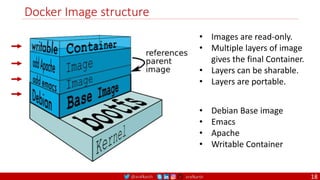
Docker Image structure
• Images are read-only.
• Multiple layers of image
gives the final Container.
• Layers can be sharable.
• Layers are portable.
• Debian Base image
• Emacs
• Apache
• Writable Container
18
@arafkarsh arafkarsh
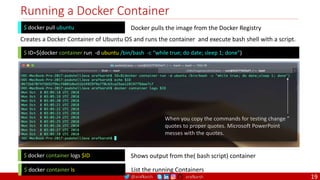
Running a Docker Container
$ ID=$(docker container run -d ubuntu /bin/bash -c “while true; do date; sleep 1; done”)
Creates a Docker Container of Ubuntu OS and runs the container and execute bash shell with a script.
$ docker container logs $ID Shows output from the( bash script) container
$ docker container ls List the running Containers
$ docker pull ubuntu Docker pulls the image from the Docker Registry
When you copy the commands for testing change ”
quotes to proper quotes. Microsoft PowerPoint
messes with the quotes.
19
@arafkarsh arafkarsh
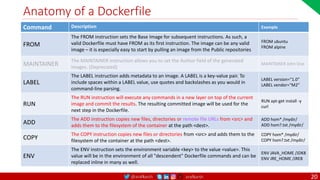
Anatomy of a Dockerfile
Command Description Example
FROM
The FROM instruction sets the Base Image for subsequent instructions. As such, a
valid Dockerfile must have FROM as its first instruction. The image can be any valid
image – it is especially easy to start by pulling an image from the Public repositories
FROM ubuntu
FROM alpine
MAINTAINER
The MAINTAINER instruction allows you to set the Author field of the generated
images. (Deprecated)
MAINTAINER John Doe
LABEL
The LABEL instruction adds metadata to an image. A LABEL is a key-value pair. To
include spaces within a LABEL value, use quotes and backslashes as you would in
command-line parsing.
LABEL version="1.0”
LABEL vendor=“M2”
RUN
The RUN instruction will execute any commands in a new layer on top of the current
image and commit the results. The resulting committed image will be used for the
next step in the Dockerfile.
RUN apt-get install -y
curl
ADD
The ADD instruction copies new files, directories or remote file URLs from <src> and
adds them to the filesystem of the container at the path <dest>.
ADD hom* /mydir/
ADD hom?.txt /mydir/
COPY
The COPY instruction copies new files or directories from <src> and adds them to the
filesystem of the container at the path <dest>.
COPY hom* /mydir/
COPY hom?.txt /mydir/
ENV
The ENV instruction sets the environment variable <key> to the value <value>. This
value will be in the environment of all "descendent" Dockerfile commands and can be
replaced inline in many as well.
ENV JAVA_HOME /JDK8
ENV JRE_HOME /JRE8
20
@arafkarsh arafkarsh
Anatomy of a Dockerfile
Command Description Example
VOLUME
The VOLUME instruction creates a mount point with the specified name and marks it as
holding externally mounted volumes from native host or other containers. The value can be a
JSON array, VOLUME ["/var/log/"], or a plain string with multiple arguments, such as VOLUME
/var/log or VOLUME /var/log
VOLUME /data/webapps
USER
The USER instruction sets the user name or UID to use when running the image and for any
RUN, CMD and ENTRYPOINT instructions that follow it in the Dockerfile.
USER johndoe
WORKDIR
The WORKDIR instruction sets the working directory for any RUN, CMD, ENTRYPOINT, COPY
and ADD instructions that follow it in the Dockerfile.
WORKDIR /home/user
CMD
There can only be one CMD instruction in a Dockerfile. If you list more than one CMD then only
the last CMD will take effect.
The main purpose of a CMD is to provide defaults for an executing container. These defaults
can include an executable, or they can omit the executable, in which case you must specify an
ENTRYPOINT instruction as well.
CMD echo "This is a test." |
wc -
EXPOSE
The EXPOSE instructions informs Docker that the container will listen on the
specified network ports at runtime. Docker uses this information to interconnect
containers using links and to determine which ports to expose to the host when
using the –P flag with docker client.
EXPOSE 8080
ENTRYPOINT
An ENTRYPOINT allows you to configure a container that will run as an executable. Command
line arguments to docker run <image> will be appended after all elements in an exec form
ENTRYPOINT, and will override all elements specified using CMD. This allows arguments to be
passed to the entry point, i.e., docker run <image> -d will pass the -d argument to the entry
point. You can override the ENTRYPOINT instruction using the docker run --entrypoint flag.
ENTRYPOINT ["top", "-b"]
21
@arafkarsh arafkarsh
Docker Image
• Dockerfile
• Docker Container Management
• Docker Images
22
@arafkarsh arafkarsh
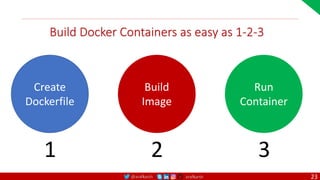
Build Docker Containers as easy as 1-2-3
Create
Dockerfile
1
Build
Image
2
Run
Container
3
23
@arafkarsh arafkarsh
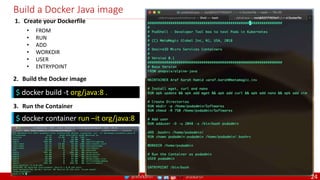
Build a Docker Java image
1. Create your Dockerfile
• FROM
• RUN
• ADD
• WORKDIR
• USER
• ENTRYPOINT
2. Build the Docker image
3. Run the Container
$ docker build -t org/java:8 .
$ docker container run –it org/java:8
24
@arafkarsh arafkarsh
Docker Container Management
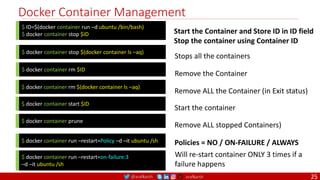
$ ID=$(docker container run –d ubuntu /bin/bash)
$ docker container stop $ID Start the Container and Store ID in ID field
Stop the container using Container ID
$ docker container stop $(docker container ls –aq)
Stops all the containers
$ docker container rm $ID
Remove the Container
$ docker container rm $(docker container ls –aq)
Remove ALL the Container (in Exit status)
$ docker container prune
Remove ALL stopped Containers)
$ docker container run –restart=Policy –d –it ubuntu /sh Policies = NO / ON-FAILURE / ALWAYS
$ docker container run –restart=on-failure:3
–d –it ubuntu /sh
Will re-start container ONLY 3 times if a
failure happens
$ docker container start $ID
Start the container
25
@arafkarsh arafkarsh
Docker Container Management
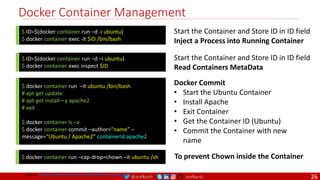
$ ID=$(docker container run –d -i ubuntu)
$ docker container exec -it $ID /bin/bash
Start the Container and Store ID in ID field
Inject a Process into Running Container
$ ID=$(docker container run –d –i ubuntu)
$ docker container exec inspect $ID
Start the Container and Store ID in ID field
Read Containers MetaData
$ docker container run –it ubuntu /bin/bash
# apt-get update
# apt-get install—y apache2
# exit
$ docker container ls –a
$ docker container commit –author=“name” –
message=“Ubuntu / Apache2” containerId apache2
Docker Commit
• Start the Ubuntu Container
• Install Apache
• Exit Container
• Get the Container ID (Ubuntu)
• Commit the Container with new
name
$ docker container run –cap-drop=chown –it ubuntu /sh To prevent Chown inside the Container
Source: https://github.com/meta-magic/kubernetes_workshop
26
@arafkarsh arafkarsh
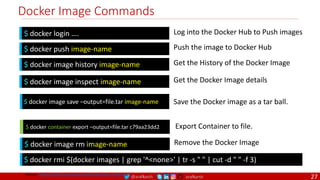
Docker Image Commands
$ docker login …. Log into the Docker Hub to Push images
$ docker push image-name Push the image to Docker Hub
$ docker image history image-name Get the History of the Docker Image
$ docker image inspect image-name Get the Docker Image details
$ docker image save –output=file.tar image-name Save the Docker image as a tar ball.
$ docker container export –output=file.tar c79aa23dd2 Export Container to file.
Source: https://github.com/meta-magic/kubernetes_workshop
$ docker image rm image-name Remove the Docker Image
$ docker rmi $(docker images | grep '^<none>' | tr -s " " | cut -d " " -f 3)
27
@arafkarsh arafkarsh
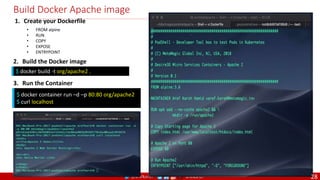
Build Docker Apache image
1. Create your Dockerfile
• FROM alpine
• RUN
• COPY
• EXPOSE
• ENTRYPOINT
2. Build the Docker image
3. Run the Container
$ docker build -t org/apache2 .
$ docker container run –d –p 80:80 org/apache2
$ curl localhost
28
@arafkarsh arafkarsh
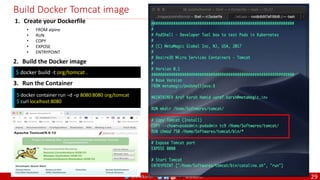
Build Docker Tomcat image
1. Create your Dockerfile
• FROM alpine
• RUN
• COPY
• EXPOSE
• ENTRYPOINT
2. Build the Docker image
3. Run the Container
$ docker build -t org/tomcat .
$ docker container run –d –p 8080:8080 org/tomcat
$ curl localhost:8080
29
@arafkarsh arafkarsh
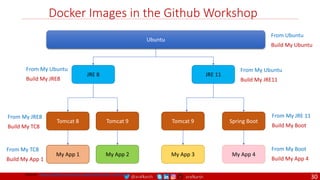
Docker Images in the Github Workshop
Ubuntu
JRE 8 JRE 11
Tomcat 8 Tomcat 9
My App 1
Tomcat 9
My App 3
Spring Boot
My App 4
From Ubuntu
Build My Ubuntu
From My Ubuntu
Build My JRE8
From My Ubuntu
Build My JRE11
From My JRE 11
Build My Boot
From My Boot
Build My App 4
From My JRE8
Build My TC8
From My TC8
Build My App 1
My App 2
Source: https://github.com/meta-magic/kubernetes_workshop
30
@arafkarsh arafkarsh
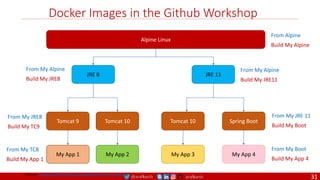
Docker Images in the Github Workshop
Alpine Linux
JRE 8 JRE 11
Tomcat 9 Tomcat 10
My App 1
Tomcat 10
My App 3
Spring Boot
My App 4
From Alpine
Build My Alpine
From My Alpine
Build My JRE8
From My Alpine
Build My JRE11
From My JRE 11
Build My Boot
From My Boot
Build My App 4
From My JRE8
Build My TC9
From My TC8
Build My App 1
My App 2
Source: https://github.com/meta-magic/kubernetes_workshop
31
@arafkarsh arafkarsh
Docker Networking
• Docker Networking – Bridge / Host / None
• Docker Container sharing IP Address
• Docker Communication – Node to Node
• Docker Volumes
32
@arafkarsh arafkarsh
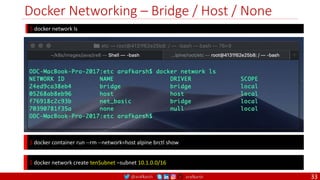
Docker Networking – Bridge / Host / None
$ docker network ls
$ docker container run --rm --network=host alpine brctl show
$ docker network create tenSubnet –subnet 10.1.0.0/16
33
@arafkarsh arafkarsh
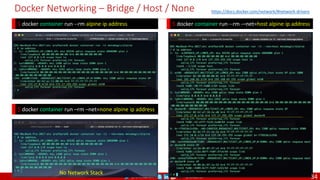
Docker Networking – Bridge / Host / None
$ docker container run --rm -–net=host alpine ip address
$ docker container run --rm alpine ip address
$ docker container run –rm –net=none alpine ip address
No Network Stack
https://docs.docker.com/network/#network-drivers
34
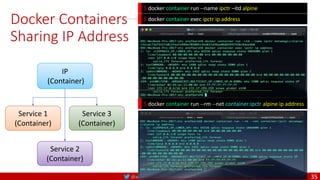
@arafkarsh arafkarsh
Docker Containers
Sharing IP Address
$ docker container run --name ipctr –itd alpine
$ docker container run --rm --net container:ipctr alpine ip address
IP
(Container)
Service 1
(Container)
Service 3
(Container)
Service 2
(Container)
$ docker container exec ipctr ip address
35
@arafkarsh arafkarsh
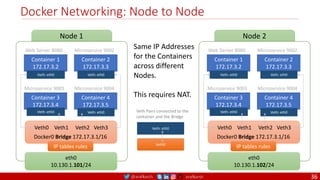
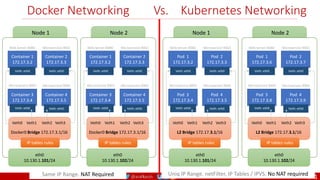
Docker Networking: Node to Node
Same IP Addresses
for the Containers
across different
Nodes.
This requires NAT.
Container 1
172.17.3.2
Web Server 8080
Veth: eth0
Container 2
172.17.3.3
Microservice 9002
Veth: eth0
Container 3
172.17.3.4
Microservice 9003
Veth: eth0
Container 4
172.17.3.5
Microservice 9004
Veth: eth0
IP tables rules
eth0
10.130.1.101/24
Node 1
Docker0 Bridge 172.17.3.1/16
Veth0 Veth1 Veth2 Veth3
Container 1
172.17.3.2
Web Server 8080
Veth: eth0
Container 2
172.17.3.3
Microservice 9002
Veth: eth0
Container 3
172.17.3.4
Microservice 9003
Veth: eth0
Container 4
172.17.3.5
Microservice 9004
Veth: eth0
IP tables rules
eth0
10.130.1.102/24
Node 2
Docker0 Bridge 172.17.3.1/16
Veth0 Veth1 Veth2 Veth3
Veth: eth0
Veth0
Veth Pairs connected to the
container and the Bridge
36
@arafkarsh arafkarsh
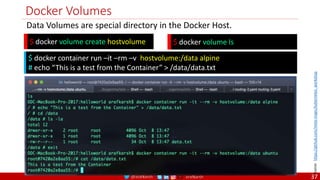
Docker Volumes
$ docker volume create hostvolume
Data Volumes are special directory in the Docker Host.
$ docker volume ls
$ docker container run –it –rm –v hostvolume:/data alpine
# echo “This is a test from the Container” > /data/data.txt
Source:
https://github.com/meta-magic/kubernetes_workshop
37
@arafkarsh arafkarsh
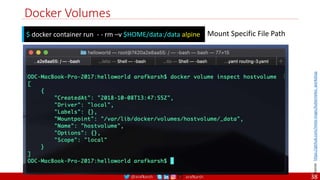
Docker Volumes
$ docker container run - - rm –v $HOME/data:/data alpine Mount Specific File Path
Source:
https://github.com/meta-magic/kubernetes_workshop
38
@arafkarsh arafkarsh
Kubernetes
39
2
@arafkarsh arafkarsh
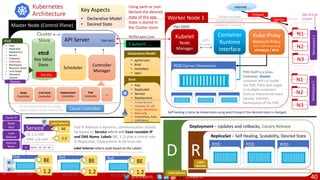
Deployment – Updates and rollbacks, Canary Release
D
ReplicaSet – Self Healing, Scalability, Desired State
R
Worker Node 1
Master Node (Control Plane)
Kubernetes
Architecture
POD
POD itself is a Linux
Container, Docker
container will run inside
the POD. PODs with single
or multiple containers
(Sidecar Pattern) will share
Cgroup, Volumes,
Namespaces of the POD.
(Cgroup / Namespaces)
Scheduler
Controller
Manager
Using yaml or json
declare the desired
state of the app.
State is stored in
the Cluster store.
Self healing is done by Kubernetes using watch loops if the desired state is changed.
POD POD POD
BE
1.2
10.1.2.34
BE
1.2
10.1.2.35
BE
1.2
10.1.2.36
BE
15.1.2.100
DNS: a.b.com 1.2
Service Pod IP Address is dynamic, communication should
be based on Service which will have routable IP
and DNS Name. Labels (BE, 1.2) play a critical role
in ReplicaSet, Deployment, & Services etc.
Cluster
Store
etcd
Key Value
Store
Pod Pod Pod
Label Selector selects pods based on the Labels.
Label
Selector
Label Selector
Label Selector
Node
Controller
End Point
Controller
Deployment
Controller
Pod
Controller
….
Labels
Internet
Firewall K8s Virtual
Cluster
Cloud Controller
For the cloud providers to manage
nodes, services, routes, volumes etc.
Kubelet
Node
Manager
Container
Runtime
Interface
Port 10255
gRPC
ProtoBuf
Kube-Proxy
Network Proxy
TCP / UDP Forwarding
IPTABLES / IPVS
Allows multiple
implementation of
containers from v1.7
RESTful yaml / json
$ kubectl ….
Port 443
API Server
Pod IP ...34 ...35 ...36
EP
• Declarative Model
• Desired State
Key Aspects
N1
N2
N3
Namespace
1
N1
N2
N3
Namespace
2
• Pods
• ReplicaSet
• Deployment
• Service
• Endpoints
• StatefulSet
• Namespace
• Resource Quota
• Limit Range
• Persistent
Volume
Kind
Secrets
Kind
• apiVersion:
• kind:
• metadata:
• spec:
Declarative Model
• Pod
• ReplicaSet
• Service
• Deployment
• Virtual Service
• Gateway, SE, DR
• Policy, MeshPolicy
• RbaConfig
• Prometheus, Rule,
• ListChekcer …
@
@
Annotations
Names
Cluster IP
Node
Port
Load
Balancer
External
Name
@
Ingress
40
@arafkarsh arafkarsh
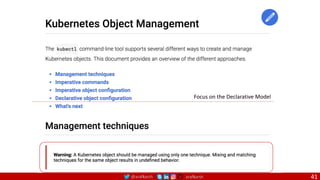
Focus on the Declarative Model
41
@arafkarsh arafkarsh
Ubuntu Installation
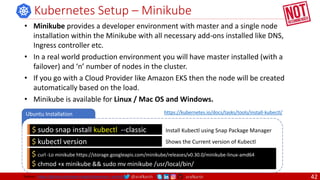
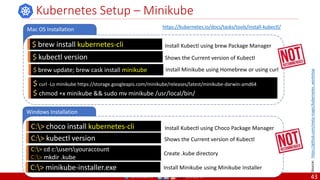
Kubernetes Setup – Minikube
$ sudo snap install kubectl --classic Install Kubectl using Snap Package Manager
$ kubectl version Shows the Current version of Kubectl
• Minikube provides a developer environment with master and a single node
installation within the Minikube with all necessary add-ons installed like DNS,
Ingress controller etc.
• In a real world production environment you will have master installed (with a
failover) and ‘n’ number of nodes in the cluster.
• If you go with a Cloud Provider like Amazon EKS then the node will be created
automatically based on the load.
• Minikube is available for Linux / Mac OS and Windows.
$ curl -Lo minikube https://storage.googleapis.com/minikube/releases/v0.30.0/minikube-linux-amd64
$ chmod +x minikube && sudo mv minikube /usr/local/bin/
https://kubernetes.io/docs/tasks/tools/install-kubectl/
Source: https://github.com/meta-magic/kubernetes_workshop 42
@arafkarsh arafkarsh
Windows Installation
Kubernetes Setup – Minikube
C:> choco install kubernetes-cli Install Kubectl using Choco Package Manager
C:> kubectl version Shows the Current version of Kubectl
Mac OS Installation
$ brew install kubernetes-cli Install Kubectl using brew Package Manager
$ kubectl version Shows the Current version of Kubectl
C:> cd c:usersyouraccount
C:> mkdir .kube
Create .kube directory
$ curl -Lo minikube https://storage.googleapis.com/minikube/releases/latest/minikube-darwin-amd64
$ chmod +x minikube && sudo mv minikube /usr/local/bin/
C:> minikube-installer.exe Install Minikube using Minikube Installer
https://kubernetes.io/docs/tasks/tools/install-kubectl/
Source:
https://github.com/meta-magic/kubernetes_workshop
$ brew update; brew cask install minikube Install Minikube using Homebrew or using curl
43
@arafkarsh arafkarsh
Kubernetes Minikube - Commands
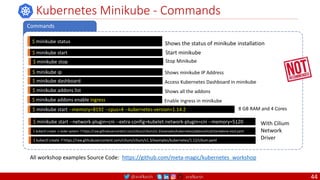
Commands
$ minikube status Shows the status of minikube installation
$ minikube start Start minikube
All workshop examples Source Code: https://github.com/meta-magic/kubernetes_workshop
$ minikube stop Stop Minikube
$ minikube ip Shows minikube IP Address
$ minikube addons list Shows all the addons
$ minikube addons enable ingress Enable ingress in minikube
$ minikube start --memory=8192 --cpus=4 --kubernetes-version=1.14.2 8 GB RAM and 4 Cores
$ minikube dashboard Access Kubernetes Dashboard in minikube
$ minikube start --network-plugin=cni --extra-config=kubelet.network-plugin=cni --memory=5120 With Cilium
Network
Driver
$ kubectl create -n kube-system -f https://raw.githubusercontent.com/cilium/cilium/v1.3/examples/kubernetes/addons/etcd/standalone-etcd.yaml
$ kubectl create -f https://raw.githubusercontent.com/cilium/cilium/v1.3/examples/kubernetes/1.12/cilium.yaml
44
@arafkarsh arafkarsh
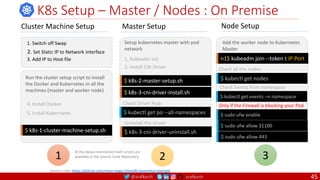
K8s Setup – Master / Nodes : On Premise
Cluster Machine Setup
1. Switch off Swap
2. Set Static IP to Network interface
3. Add IP to Host file
$ k8s-1-cluster-machine-setup.sh
4. Install Docker
5. Install Kubernetes
Run the cluster setup script to install
the Docker and Kubernetes in all the
machines (master and worker node)
1
Master Setup
Setup kubernetes master with pod
network
1. Kubeadm init
2. Install CNI Driver
$ k8s-2-master-setup.sh
$ k8s-3-cni-driver-install.sh
$ k8s-3-cni-driver-uninstall.sh
$ kubectl get po --all-namespaces
Check Driver Pods
Uninstall the driver
2
Node Setup
n1$ kubeadm join --token t IP:Port
Add the worker node to Kubernetes
Master
$ kubectl get nodes
Check Events from namespace
3
$ kubectl get events –n namespace
Check all the nodes
$ sudo ufw enable
$ sudo ufw allow 31100
Source Code: https://github.com/meta-magic/metallb-baremetal-example
Only if the Firewall is blocking your Pod
Al the above-mentioned shell scripts are
available in the Source Code Repository
$ sudo ufw allow 443
45
@arafkarsh arafkarsh
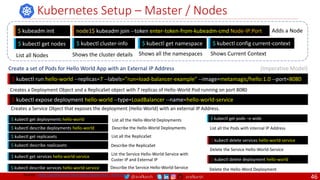
Kubernetes Setup – Master / Nodes
$ kubeadm init node1$ kubeadm join --token enter-token-from-kubeadm-cmd Node-IP:Port Adds a Node
$ kubectl get nodes $ kubectl cluster-info
List all Nodes
$ kubectl run hello-world --replicas=7 --labels="run=load-balancer-example" --image=metamagic/hello:1.0 --port=8080
Creates a Deployment Object and a ReplicaSet object with 7 replicas of Hello-World Pod running on port 8080
$ kubectl expose deployment hello-world --type=LoadBalancer --name=hello-world-service
List all the Hello-World Deployments
$ kubectl get deployments hello-world
Describe the Hello-World Deployments
$ kubectl describe deployments hello-world
List all the ReplicaSet
$ kubectl get replicasets
Describe the ReplicaSet
$ kubectl describe replicasets
List the Service Hello-World-Service with
Custer IP and External IP
$ kubectl get services hello-world-service
Describe the Service Hello-World-Service
$ kubectl describe services hello-world-service
Creates a Service Object that exposes the deployment (Hello-World) with an external IP Address.
List all the Pods with internal IP Address
$ kubectl get pods –o wide
$ kubectl delete services hello-world-service
Delete the Service Hello-World-Service
$ kubectl delete deployment hello-world
Delete the Hello-Word Deployment
Create a set of Pods for Hello World App with an External IP Address (Imperative Model)
Shows the cluster details
$ kubectl get namespace
Shows all the namespaces
$ kubectl config current-context
Shows Current Context
Source: https://github.com/meta-magic/kubernetes_workshop
46
@arafkarsh arafkarsh
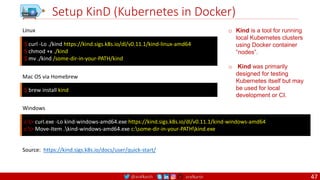
Setup KinD (Kubernetes in Docker)
$ curl -Lo ./kind https://kind.sigs.k8s.io/dl/v0.11.1/kind-linux-amd64
$ chmod +x ./kind
$ mv ./kind /some-dir-in-your-PATH/kind
Linux
Source: https://kind.sigs.k8s.io/docs/user/quick-start/
$ brew install kind
Mac OS via Homebrew
c:> curl.exe -Lo kind-windows-amd64.exe https://kind.sigs.k8s.io/dl/v0.11.1/kind-windows-amd64
c:> Move-Item .kind-windows-amd64.exe c:some-dir-in-your-PATHkind.exe
Windows
o Kind is a tool for running
local Kubernetes clusters
using Docker container
“nodes”.
o Kind was primarily
designed for testing
Kubernetes itself but may
be used for local
development or CI.
47
@arafkarsh arafkarsh
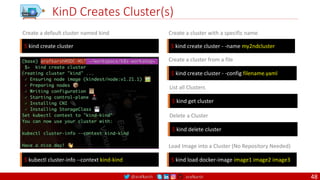
KinD Creates Cluster(s)
$ kind create cluster $ kind create cluster - -name my2ndcluster
Create a default cluster named kind Create a cluster with a specific name
$ kind create cluster - -config filename.yaml
Create a cluster from a file
$ kind get cluster
List all Clusters
$ kind delete cluster
Delete a Cluster
$ kubectl cluster-info --context kind-kind $ kind load docker-image image1 image2 image3
Load Image into a Cluster (No Repository Needed)
48
@arafkarsh arafkarsh
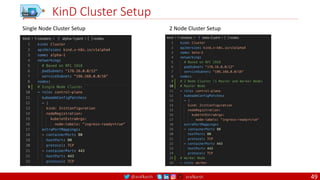
KinD Cluster Setup
Single Node Cluster Setup 2 Node Cluster Setup
49
@arafkarsh arafkarsh
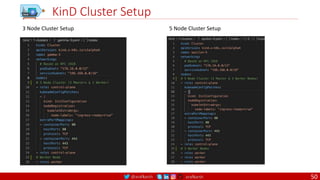
KinD Cluster Setup
3 Node Cluster Setup 5 Node Cluster Setup
50
@arafkarsh arafkarsh
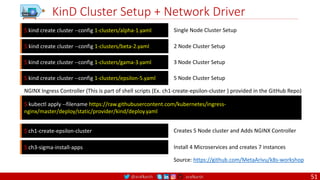
KinD Cluster Setup + Network Driver
Single Node Cluster Setup
$ kind create cluster --config 1-clusters/alpha-1.yaml
Source: https://github.com/MetaArivu/k8s-workshop
2 Node Cluster Setup
$ kind create cluster --config 1-clusters/beta-2.yaml
3 Node Cluster Setup
$ kind create cluster --config 1-clusters/gama-3.yaml
5 Node Cluster Setup
$ kind create cluster --config 1-clusters/epsilon-5.yaml
$ kubectl apply --filename https://raw.githubusercontent.com/kubernetes/ingress-
nginx/master/deploy/static/provider/kind/deploy.yaml
NGINX Ingress Controller (This is part of shell scripts (Ex. ch1-create-epsilon-cluster ) provided in the GitHub Repo)
Creates 5 Node cluster and Adds NGINX Controller
$ ch1-create-epsilon-cluster
Install 4 Microservices and creates 7 instances
$ ch3-sigma-install-apps
51
@arafkarsh arafkarsh
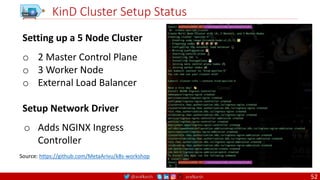
KinD Cluster Setup Status
Setting up a 5 Node Cluster
o 2 Master Control Plane
o 3 Worker Node
o External Load Balancer
Setup Network Driver
o Adds NGINX Ingress
Controller
Source: https://github.com/MetaArivu/k8s-workshop
52
@arafkarsh arafkarsh
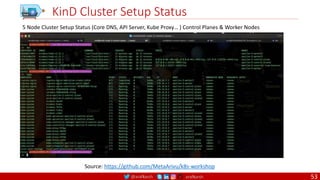
KinD Cluster Setup Status
5 Node Cluster Setup Status (Core DNS, API Server, Kube Proxy… ) Control Planes & Worker Nodes
Source: https://github.com/MetaArivu/k8s-workshop
53
@arafkarsh arafkarsh
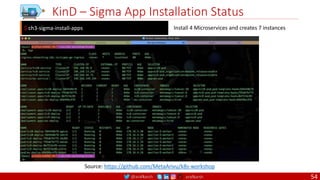
KinD – Sigma App Installation Status
Install 4 Microservices and creates 7 instances
$ ch3-sigma-install-apps
Source: https://github.com/MetaArivu/k8s-workshop
54
@arafkarsh arafkarsh
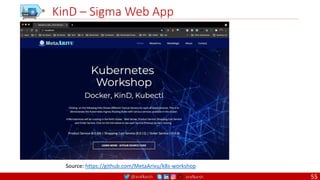
KinD – Sigma Web App
Source: https://github.com/MetaArivu/k8s-workshop
55
@arafkarsh arafkarsh
3 Fundamental Concepts
1. Desired State
2. Current State
3. Declarative Model
56
@arafkarsh arafkarsh
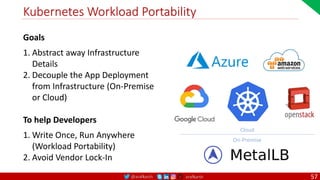
Kubernetes Workload Portability
Goals
1. Abstract away Infrastructure
Details
2. Decouple the App Deployment
from Infrastructure (On-Premise
or Cloud)
To help Developers
1. Write Once, Run Anywhere
(Workload Portability)
2. Avoid Vendor Lock-In
Cloud
On-Premise
57
@arafkarsh arafkarsh
Kubernetes
Getting Started
• Namespace
• Pods / ReplicaSet / Deployment
• Service / Endpoints
• Ingress
• Rollout / Undo
• Auto Scale
Source: https://github.com/MetaArivu/k8s-workshop
58
@arafkarsh arafkarsh
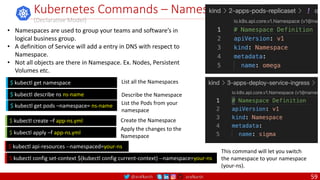
Kubernetes Commands – Namespace
(Declarative Model)
$ kubectl config set-context $(kubectl config current-context) --namespace=your-ns
This command will let you switch
the namespace to your namespace
(your-ns).
$ kubectl get namespace
$ kubectl describe ns ns-name
$ kubectl create –f app-ns.yml
List all the Namespaces
Describe the Namespace
Create the Namespace
$ kubectl apply –f app-ns.yml
Apply the changes to the
Namespace
$ kubectl get pods –namespace= ns-name List the Pods from your
namespace
• Namespaces are used to group your teams and software’s in
logical business group.
• A definition of Service will add a entry in DNS with respect to
Namespace.
• Not all objects are there in Namespace. Ex. Nodes, Persistent
Volumes etc.
$ kubectl api-resources --namespaced=your-ns
59
@arafkarsh arafkarsh
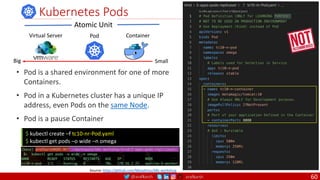
• Pod is a shared environment for one of more
Containers.
• Pod in a Kubernetes cluster has a unique IP
address, even Pods on the same Node.
• Pod is a pause Container
Kubernetes Pods
$ kubectl create –f tc10-nr-Pod.yaml
$ kubectl get pods –o wide –n omega
Atomic Unit
Container
Pod
Virtual Server
Small
Big
Source: https://github.com/MetaArivu/k8s-workshop
60
@arafkarsh arafkarsh
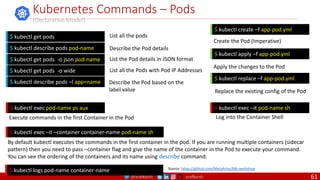
Kubernetes Commands – Pods
(Declarative Model)
$ kubectl exec pod-name ps aux $ kubectl exec –it pod-name sh
$ kubectl exec –it –container container-name pod-name sh
By default kubectl executes the commands in the first container in the pod. If you are running multiple containers (sidecar
pattern) then you need to pass –container flag and give the name of the container in the Pod to execute your command.
You can see the ordering of the containers and its name using describe command.
$ kubectl get pods
$ kubectl describe pods pod-name
$ kubectl get pods -o json pod-name
$ kubectl create –f app-pod.yml
List all the pods
Describe the Pod details
List the Pod details in JSON format
Create the Pod (Imperative)
Execute commands in the first Container in the Pod Log into the Container Shell
$ kubectl get pods -o wide List all the Pods with Pod IP Addresses
$ kubectl apply –f app-pod.yml
Apply the changes to the Pod
$ kubectl replace –f app-pod.yml
Replace the existing config of the Pod
$ kubectl describe pods –l app=name Describe the Pod based on the
label value
$ kubectl logs pod-name container-name Source: https://github.com/MetaArivu/k8s-workshop
61
@arafkarsh arafkarsh
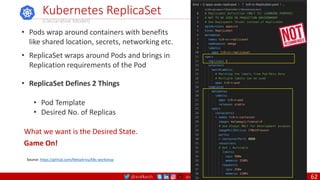
• Pods wrap around containers with benefits
like shared location, secrets, networking etc.
• ReplicaSet wraps around Pods and brings in
Replication requirements of the Pod
• ReplicaSet Defines 2 Things
• Pod Template
• Desired No. of Replicas
Kubernetes ReplicaSet
(Declarative Model)
What we want is the Desired State.
Game On!
Source: https://github.com/MetaArivu/k8s-workshop
62
@arafkarsh arafkarsh
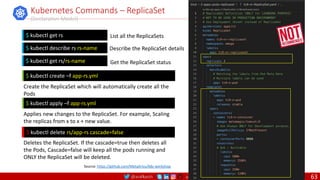
Kubernetes Commands – ReplicaSet
(Declarative Model)
$ kubectl delete rs/app-rs cascade=false
$ kubectl get rs
$ kubectl describe rs rs-name
$ kubectl get rs/rs-name
$ kubectl create –f app-rs.yml
List all the ReplicaSets
Describe the ReplicaSet details
Get the ReplicaSet status
Create the ReplicaSet which will automatically create all the
Pods
Deletes the ReplicaSet. If the cascade=true then deletes all
the Pods, Cascade=false will keep all the pods running and
ONLY the ReplicaSet will be deleted.
$ kubectl apply –f app-rs.yml
Applies new changes to the ReplicaSet. For example, Scaling
the replicas from x to x + new value.
Source: https://github.com/MetaArivu/k8s-workshop
63
@arafkarsh arafkarsh
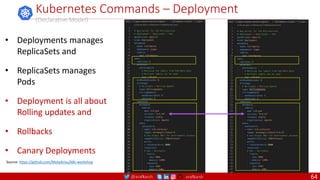
Kubernetes Commands – Deployment
(Declarative Model)
• Deployments manages
ReplicaSets and
• ReplicaSets manages
Pods
• Deployment is all about
Rolling updates and
• Rollbacks
• Canary Deployments
Source: https://github.com/MetaArivu/k8s-workshop
64
@arafkarsh arafkarsh
Kubernetes Commands – Deployment
(Declarative Model)
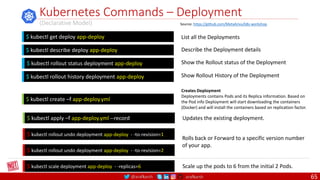
List all the Deployments
Describe the Deployment details
Show the Rollout status of the Deployment
Creates Deployment
Deployments contains Pods and its Replica information. Based on
the Pod info Deployment will start downloading the containers
(Docker) and will install the containers based on replication factor.
Updates the existing deployment.
Show Rollout History of the Deployment
$ kubectl get deploy app-deploy
$ kubectl describe deploy app-deploy
$ kubectl rollout status deployment app-deploy
$ kubectl rollout history deployment app-deploy
$ kubectl create –f app-deploy.yml
$ kubectl apply –f app-deploy.yml --record
$ kubectl rollout undo deployment app-deploy - -to-revision=1
$ kubectl rollout undo deployment app-deploy - -to-revision=2
Rolls back or Forward to a specific version number
of your app.
$ kubectl scale deployment app-deploy - -replicas=6 Scale up the pods to 6 from the initial 2 Pods.
Source: https://github.com/MetaArivu/k8s-workshop
65
@arafkarsh arafkarsh
Kubernetes Services
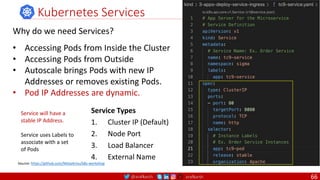
Why do we need Services?
• Accessing Pods from Inside the Cluster
• Accessing Pods from Outside
• Autoscale brings Pods with new IP
Addresses or removes existing Pods.
• Pod IP Addresses are dynamic.
Service Types
1. Cluster IP (Default)
2. Node Port
3. Load Balancer
4. External Name
Service will have a
stable IP Address.
Service uses Labels to
associate with a set
of Pods
Source: https://github.com/MetaArivu/k8s-workshop
66
@arafkarsh arafkarsh
Kubernetes Commands – Service / Endpoints
(Declarative Model)
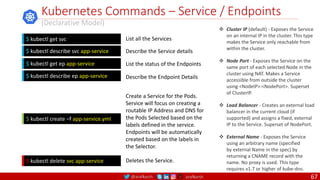
$ kubectl delete svc app-service
$ kubectl create –f app-service.yml
List all the Services
Describe the Service details
List the status of the Endpoints
Create a Service for the Pods.
Service will focus on creating a
routable IP Address and DNS for
the Pods Selected based on the
labels defined in the service.
Endpoints will be automatically
created based on the labels in
the Selector.
Deletes the Service.
$ kubectl get svc
$ kubectl describe svc app-service
$ kubectl get ep app-service
$ kubectl describe ep app-service Describe the Endpoint Details
 Cluster IP (default) - Exposes the Service
on an internal IP in the cluster. This type
makes the Service only reachable from
within the cluster.
 Node Port - Exposes the Service on the
same port of each selected Node in the
cluster using NAT. Makes a Service
accessible from outside the cluster
using <NodeIP>:<NodePort>. Superset
of ClusterIP.
 Load Balancer - Creates an external load
balancer in the current cloud (if
supported) and assigns a fixed, external
IP to the Service. Superset of NodePort.
 External Name - Exposes the Service
using an arbitrary name (specified
by external Name in the spec) by
returning a CNAME record with the
name. No proxy is used. This type
requires v1.7 or higher of kube-dns.
67
@arafkarsh arafkarsh
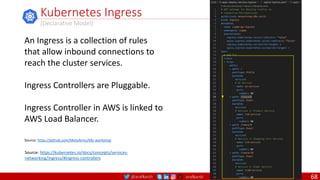
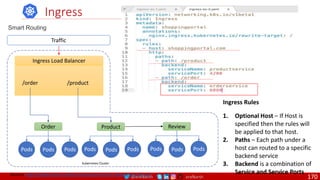
Kubernetes Ingress
(Declarative Model)
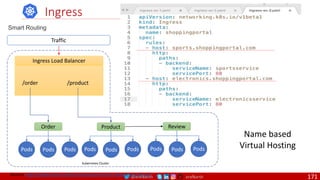
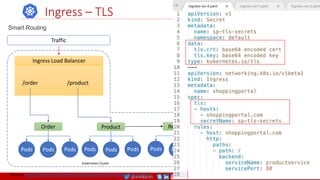
An Ingress is a collection of rules
that allow inbound connections to
reach the cluster services.
Ingress Controllers are Pluggable.
Ingress Controller in AWS is linked to
AWS Load Balancer.
Source: https://kubernetes.io/docs/concepts/services-
networking/ingress/#ingress-controllers
Source: https://github.com/MetaArivu/k8s-workshop
68
@arafkarsh arafkarsh
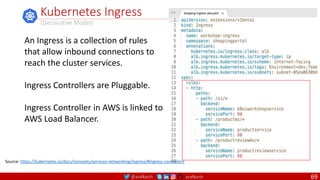
Kubernetes Ingress
(Declarative Model)
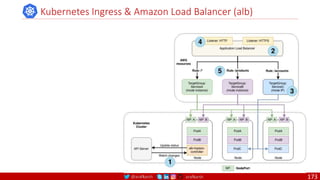
An Ingress is a collection of rules
that allow inbound connections to
reach the cluster services.
Ingress Controllers are Pluggable.
Ingress Controller in AWS is linked to
AWS Load Balancer.
Source: https://kubernetes.io/docs/concepts/services-networking/ingress/#ingress-controllers
69
@arafkarsh arafkarsh
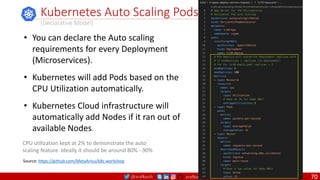
Kubernetes Auto Scaling Pods
(Declarative Model)
• You can declare the Auto scaling
requirements for every Deployment
(Microservices).
• Kubernetes will add Pods based on the
CPU Utilization automatically.
• Kubernetes Cloud infrastructure will
automatically add Nodes if it ran out of
available Nodes.
CPU utilization kept at 2% to demonstrate the auto
scaling feature. Ideally it should be around 80% - 90%
Source: https://github.com/MetaArivu/k8s-workshop
70
@arafkarsh arafkarsh
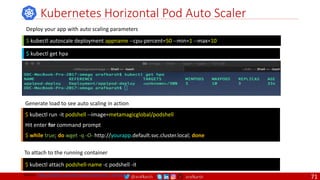
Kubernetes Horizontal Pod Auto Scaler
$ kubectl autoscale deployment appname --cpu-percent=50 --min=1 --max=10
$ kubectl run -it podshell --image=metamagicglobal/podshell
Hit enter for command prompt
$ while true; do wget -q -O- http://yourapp.default.svc.cluster.local; done
Deploy your app with auto scaling parameters
Generate load to see auto scaling in action
$ kubectl get hpa
$ kubectl attach podshell-name -c podshell -it
To attach to the running container
Source: https://github.com/meta-magic/kubernetes_workshop
71
@arafkarsh arafkarsh
Kubernetes
App Setup
• Environment
• Config Map
• Pod Preset
• Secrets
72
@arafkarsh arafkarsh
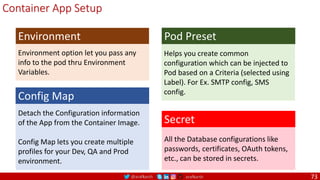
Detach the Configuration information
of the App from the Container Image.
Config Map lets you create multiple
profiles for your Dev, QA and Prod
environment.
Config Map
All the Database configurations like
passwords, certificates, OAuth tokens,
etc., can be stored in secrets.
Secret
Helps you create common
configuration which can be injected to
Pod based on a Criteria (selected using
Label). For Ex. SMTP config, SMS
config.
Pod Preset
Environment option let you pass any
info to the pod thru Environment
Variables.
Environment
Container App Setup
73
@arafkarsh arafkarsh
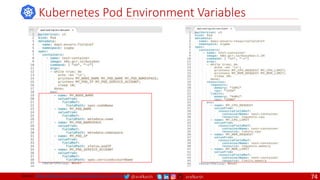
Kubernetes Pod Environment Variables
Source: https://github.com/meta-magic/kubernetes_workshop 74
@arafkarsh arafkarsh
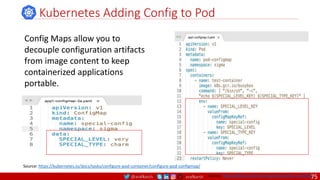
Kubernetes Adding Config to Pod
Config Maps allow you to
decouple configuration artifacts
from image content to keep
containerized applications
portable.
Source: https://kubernetes.io/docs/tasks/configure-pod-container/configure-pod-configmap/
Source: https://github.com/meta-magic/kubernetes_workshop
75
@arafkarsh arafkarsh
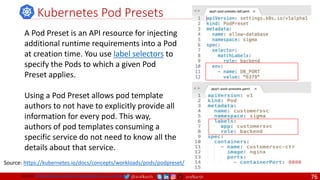
Kubernetes Pod Presets
A Pod Preset is an API resource for injecting
additional runtime requirements into a Pod
at creation time. You use label selectors to
specify the Pods to which a given Pod
Preset applies.
Using a Pod Preset allows pod template
authors to not have to explicitly provide all
information for every pod. This way,
authors of pod templates consuming a
specific service do not need to know all the
details about that service.
Source: https://kubernetes.io/docs/concepts/workloads/pods/podpreset/
Source: https://github.com/meta-magic/kubernetes_workshop 76
@arafkarsh arafkarsh
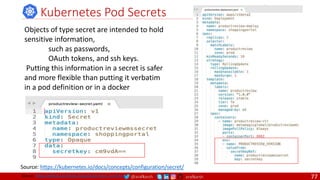
Kubernetes Pod Secrets
Objects of type secret are intended to hold
sensitive information,
such as passwords,
OAuth tokens, and ssh keys.
Putting this information in a secret is safer
and more flexible than putting it verbatim
in a pod definition or in a docker
Source: https://kubernetes.io/docs/concepts/configuration/secret/
Source: https://github.com/meta-magic/kubernetes_workshop 77
@arafkarsh arafkarsh
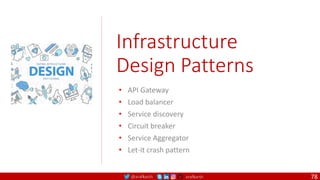
Infrastructure
Design Patterns
• API Gateway
• Load balancer
• Service discovery
• Circuit breaker
• Service Aggregator
• Let-it crash pattern
78
@arafkarsh arafkarsh
API Gateway Design Pattern – Software Stack
UI
Layer
WS
BL
DL
Database
Shopping Cart
Order
Customer
Product
Firewall
Users
API Gateway
Load
Balancer
Circuit
Breaker
UI
Layer
Web
Services
Business
Logic
Database
Layer
Product
SE
MySQL
DB
Product
Microservice
With 4 node
cluster
Load
Balancer
Circuit
Breaker
UI
Layer
Web
Services
Business
Logic
Database
Layer
Customer
Redis
DB
Customer
Microservice
With 2 node
cluster
Users
Access the
Monolithic
App
Directly
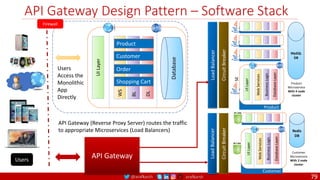
API Gateway (Reverse Proxy Server) routes the traffic
to appropriate Microservices (Load Balancers)
79
@arafkarsh arafkarsh
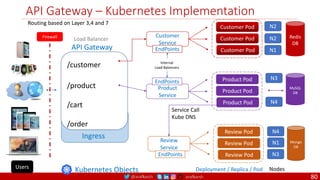
API Gateway – Kubernetes Implementation
/customer
/product
/cart
/order
API Gateway
Ingress
Deployment / Replica / Pod Nodes
Kubernetes Objects
Firewall
Customer Pod
Customer Pod
Customer Pod
Customer
Service
N1
N2
N2
EndPoints
Product Pod
Product Pod
Product Pod
Product
Service
N4
N3
MySQL
DB
EndPoints
Review Pod
Review Pod
Review Pod
Review
Service
N4
N3
N1
Service Call
Kube DNS
EndPoints
Internal
Load Balancers
Users
Routing based on Layer 3,4 and 7
Redis
DB
Mongo
DB
Load Balancer
80
@arafkarsh arafkarsh
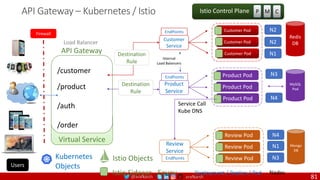
API Gateway – Kubernetes / Istio
/customer
/product
/auth
/order
API Gateway
Virtual Service
Deployment / Replica / Pod Nodes
Istio Sidecar - Envoy
Load Balancer
Firewall
P M C
Istio Control Plane
MySQL
Pod
N4
N3
Destination
Rule
Product Pod
Product Pod
Product Pod
Product
Service
Service Call
Kube DNS
EndPoints
Internal
Load Balancers
81
Kubernetes
Objects
Istio Objects
Users
Review Pod
Review Pod
Review Pod
Review
Service
N1
N4
N3
EndPoints
Customer Pod
Customer Pod
Customer Pod
Customer
Service
N1
N2
N2
Destination
Rule
EndPoints
Redis
DB
Mongo
DB
81
@arafkarsh arafkarsh
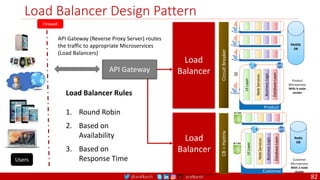
Load Balancer Design Pattern
Firewall
Users
API Gateway
Load
Balancer
Circuit
Breaker
UI
Layer
Web
Services
Business
Logic
Database
Layer
Product
SE
MySQL
DB
Product
Microservice
With 4 node
cluster
Load
Balancer
CB
=
Hystrix
UI
Layer
Web
Services
Business
Logic
Database
Layer
Customer
Redis
DB
Customer
Microservice
With 2 node
cluster
API Gateway (Reverse Proxy Server) routes
the traffic to appropriate Microservices
(Load Balancers)
Load Balancer Rules
1. Round Robin
2. Based on
Availability
3. Based on
Response Time
82
@arafkarsh arafkarsh
Ingress
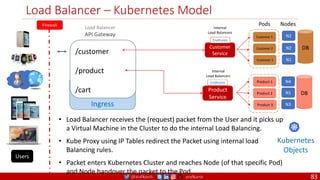
Load Balancer – Kubernetes Model
Kubernetes
Objects
Firewall
Users
Product 1
Product 2
Product 3
Product
Service
N4
N3
N1
EndPoints
Internal
Load Balancers
DB
Load Balancer
API Gateway
N1
N2
N2
Customer 1
Customer 2
Customer 3
Customer
Service
EndPoints
DB
Internal
Load Balancers
Pods Nodes
• Load Balancer receives the (request) packet from the User and it picks up
a Virtual Machine in the Cluster to do the internal Load Balancing.
• Kube Proxy using IP Tables redirect the Packet using internal load
Balancing rules.
• Packet enters Kubernetes Cluster and reaches Node (of that specific Pod)
and Node handover the packet to the Pod.
/customer
/product
/cart
83
@arafkarsh arafkarsh
Service Discovery – NetFlix Network Stack Model
Firewall
Users
API Gateway
Load
Balancer
Circuit
Breaker
Product
MySQL
DB
Product
Microservice
With 4 node
cluster
Load
Balancer
Circuit
Breaker
UI
Layer
Web
Services
Business
Logic
Database
Layer
Customer
Redis
DB
Customer
Microservice
With 2 node
cluster
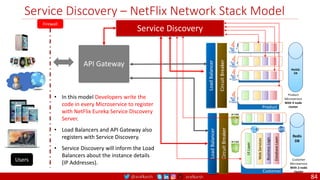
• In this model Developers write the
code in every Microservice to register
with NetFlix Eureka Service Discovery
Server.
• Load Balancers and API Gateway also
registers with Service Discovery.
• Service Discovery will inform the Load
Balancers about the instance details
(IP Addresses).
Service Discovery
84
@arafkarsh arafkarsh
Ingress
Service Discovery – Kubernetes Model
Kubernetes
Objects
Firewall
Users
Product 1
Product 2
Product 3
Product
Service
N4
N3
N1
EndPoints
Internal
Load Balancers
DB
API Gateway
N1
N2
N2
Customer 1
Customer 2
Customer 3
Customer
Service
EndPoints
DB
Internal
Load Balancers
Pods Nodes
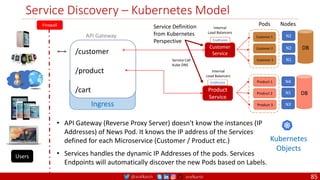
• API Gateway (Reverse Proxy Server) doesn't know the instances (IP
Addresses) of News Pod. It knows the IP address of the Services
defined for each Microservice (Customer / Product etc.)
• Services handles the dynamic IP Addresses of the pods. Services
Endpoints will automatically discover the new Pods based on Labels.
Service Definition
from Kubernetes
Perspective
/customer
/product
/cart
Service Call
Kube DNS
85
@arafkarsh arafkarsh
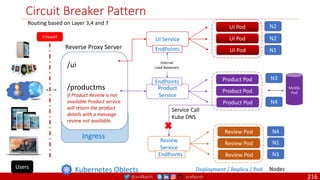
Circuit Breaker Pattern
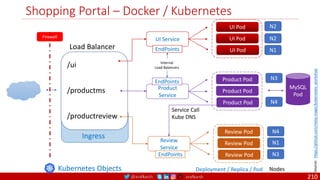
/ui
/productms
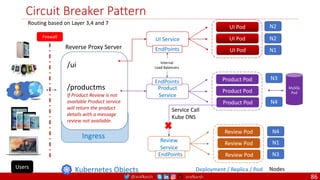
If Product Review is not
available Product service
will return the product
details with a message
review not available.
Reverse Proxy Server
Ingress
Deployment / Replica / Pod Nodes
Kubernetes Objects
Firewall
UI Pod
UI Pod
UI Pod
UI Service
N1
N2
N2
EndPoints
Product Pod
Product Pod
Product Pod
Product
Service
N4
N3
MySQL
Pod
EndPoints
Internal
Load Balancers
Users
Routing based on Layer 3,4 and 7
Review Pod
Review Pod
Review Pod
Review
Service
N4
N3
N1
Service Call
Kube DNS
EndPoints
86
@arafkarsh arafkarsh
Service Aggregator Pattern
/newservice
Reverse Proxy Server
Ingress
Deployment / Replica / Pod Nodes
Kubernetes
Objects
Firewall
Service Call
Kube DNS
Users
Internal
Load Balancers
EndPoints News Pod
News Pod
News Pod
News
Service
N4
N3
N2
News Service Portal
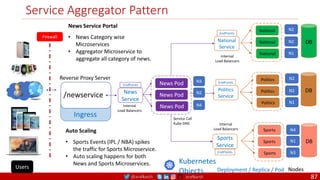
• News Category wise
Microservices
• Aggregator Microservice to
aggregate all category of news.
Auto Scaling
• Sports Events (IPL / NBA) spikes
the traffic for Sports Microservice.
• Auto scaling happens for both
News and Sports Microservices.
N1
N2
N2
National
National
National
National
Service
EndPoints
Internal
Load Balancers
DB
N1
N2
N2
Politics
Politics
Politics
Politics
Service
EndPoints
DB
Sports
Sports
Sports
Sports
Service
N4
N3
N1
EndPoints
Internal
Load Balancers
DB
87
@arafkarsh arafkarsh
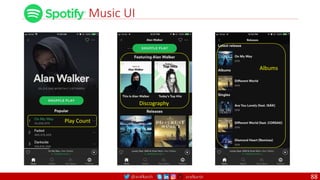
Music UI
Play Count
Discography
Albums
88
@arafkarsh arafkarsh
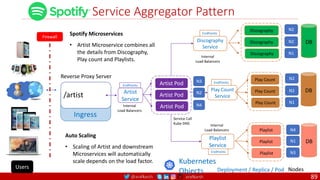
Service Aggregator Pattern
/artist
Reverse Proxy Server
Ingress
Deployment / Replica / Pod Nodes
Kubernetes
Objects
Firewall
Service Call
Kube DNS
Users
Internal
Load Balancers
EndPoints Artist Pod
Artist Pod
Artist Pod
Artist
Service
N4
N3
N2
Spotify Microservices
• Artist Microservice combines all
the details from Discography,
Play count and Playlists.
Auto Scaling
• Scaling of Artist and downstream
Microservices will automatically
scale depends on the load factor.
N1
N2
N2
Discography
Discography
Discography
Discography
Service
EndPoints
Internal
Load Balancers
DB
N1
N2
N2
Play Count
Play Count
Play Count
Play Count
Service
EndPoints
DB
Playlist
Playlist
Playlist
Playlist
Service
N4
N3
N1
EndPoints
Internal
Load Balancers
DB
89
@arafkarsh arafkarsh
Config Store – Spring Config Server
Firewall
Users
API Gateway
Load
Balancer
Circuit
Breaker
Product
MySQL
DB
Product
Microservice
With 4 node
cluster
Load
Balancer
Circuit
Breaker
UI
Layer
Web
Services
Business
Logic
Database
Layer
Customer
Redis
DB
Customer
Microservice
With 2 node
cluster
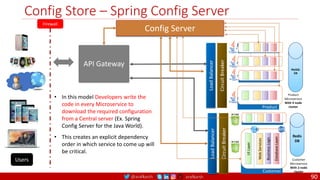
• In this model Developers write the
code in every Microservice to
download the required configuration
from a Central server (Ex. Spring
Config Server for the Java World).
• This creates an explicit dependency
order in which service to come up will
be critical.
Config Server
90
@arafkarsh arafkarsh
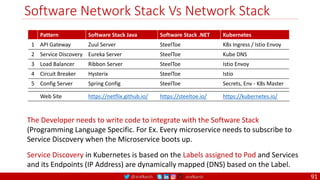
Software Network Stack Vs Network Stack
Pattern Software Stack Java Software Stack .NET Kubernetes
1 API Gateway Zuul Server SteelToe K8s Ingress / Istio Envoy
2 Service Discovery Eureka Server SteelToe Kube DNS
3 Load Balancer Ribbon Server SteelToe Istio Envoy
4 Circuit Breaker Hysterix SteelToe Istio
5 Config Server Spring Config SteelToe Secrets, Env - K8s Master
Web Site https://netflix.github.io/ https://steeltoe.io/ https://kubernetes.io/
The Developer needs to write code to integrate with the Software Stack
(Programming Language Specific. For Ex. Every microservice needs to subscribe to
Service Discovery when the Microservice boots up.
Service Discovery in Kubernetes is based on the Labels assigned to Pod and Services
and its Endpoints (IP Address) are dynamically mapped (DNS) based on the Label.
91
@arafkarsh arafkarsh
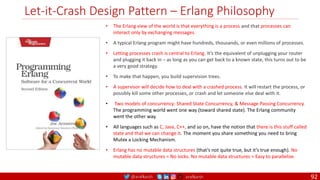
Let-it-Crash Design Pattern – Erlang Philosophy
• The Erlang view of the world is that everything is a process and that processes can
interact only by exchanging messages.
• A typical Erlang program might have hundreds, thousands, or even millions of processes.
• Letting processes crash is central to Erlang. It’s the equivalent of unplugging your router
and plugging it back in – as long as you can get back to a known state, this turns out to be
a very good strategy.
• To make that happen, you build supervision trees.
• A supervisor will decide how to deal with a crashed process. It will restart the process, or
possibly kill some other processes, or crash and let someone else deal with it.
• Two models of concurrency: Shared State Concurrency, & Message Passing Concurrency.
The programming world went one way (toward shared state). The Erlang community
went the other way.
• All languages such as C, Java, C++, and so on, have the notion that there is this stuff called
state and that we can change it. The moment you share something you need to bring
Mutex a Locking Mechanism.
• Erlang has no mutable data structures (that’s not quite true, but it’s true enough). No
mutable data structures = No locks. No mutable data structures = Easy to parallelize.
92
@arafkarsh arafkarsh
Let-it-Crash Design Pattern
1. The idea of Messages as the first class citizens of a system, has been
rediscovered by the Event Sourcing / CQRS community, along with a strong
focus on domain models.
2. Event Sourced Aggregates are a way to Model the Processes and NOT things.
3. Each component MUST tolerate a crash and restart at any point in time.
4. All interaction between the components must tolerate that peers can crash.
This mean ubiquitous use of timeouts and Circuit Breaker.
5. Each component must be strongly encapsulated so that failures are fully
contained and cannot spread.
6. All requests sent to a component MUST be self describing as is practical so
that processing can resume with a little recovery cost as possible after a
restart.
93
@arafkarsh arafkarsh
Let-it-Crash : Comparison Erlang Vs. Microservices Vs. Monolithic Apps
Erlang Philosophy Micro Services Architecture Monolithic Apps (Java, C++, C#, Node JS ...)
1 Perspective
Everything is a
Process
Event Sourced Aggregates are a way to
model the Process and NOT things.
Things (defined as Objects) and
Behaviors
2
Crash
Recovery
Supervisor will
decide how to
handle the
crashed process
Kubernetes Manager monitors all the
Pods (Microservices) and its Readiness
and Health. K8s terminates the Pod if
the health is bad and spawns a new
Pod. Circuit Breaker Pattern is used
handle the fallback mechanism.
Not available. Most of the monolithic
Apps are Stateful and Crash Recovery
needs to be handled manually and all
languages other than Erlang focuses
on defensive programming.
3 Concurrency
Message Passing
Concurrency
Domain Events for state changes within
a Bounded Context & Integration Events
for external Systems.
Mostly Shared State Concurrency
4 State
Stateless :
Mostly Immutable
Structures
Immutability is handled thru Event
Sourcing along with Domain Events and
Integration Events.
Predominantly Stateful with Mutable
structures and Mutex as a Locking
Mechanism
5 Citizen Messages
Messages are 1st class citizen by Event
Sourcing / CQRS pattern with a strong
focus on Domain Models
Mutable Objects and Strong focus on
Domain Models and synchronous
communication.
94
@arafkarsh arafkarsh
Summary
Setup
1. Setting up Kubernetes Cluster
• 1 Master and
• 2 Worker nodes
Getting Started
1. Create Pods
2. Create ReplicaSets
3. Create Deployments
4. Rollouts and Rollbacks
5. Create Service
6. Create Ingress
7. App Auto Scaling
App Setup
1. Secrets
2. Environments
3. ConfigMap
4. PodPresets
On Premise Setup
1. Setting up External Load
Balancer using Metal LB
2. Setting up nginx Ingress
Controller
Infrastructure Design Patterns
1. API Gateway
2. Service Discovery
3. Load Balancer
4. Config Server
5. Circuit Breaker
6. Service Aggregator Pattern
7. Let It Crash Pattern
95
@arafkarsh arafkarsh
Kubernetes Pods
Advanced
• Jobs / Cron Jobs
• Quality of Service: Resource Quota and Limits
• Pod Disruption Range
• Pod / Node Affinity
• Daemon Set
• Container Level features
96
@arafkarsh arafkarsh
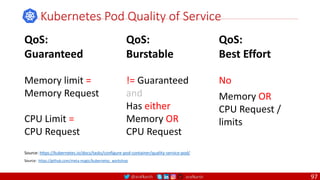
Kubernetes Pod Quality of Service
Source: https://kubernetes.io/docs/tasks/configure-pod-container/quality-service-pod/
QoS:
Guaranteed
Memory limit =
Memory Request
CPU Limit =
CPU Request
QoS:
Burstable
!= Guaranteed
and
Has either
Memory OR
CPU Request
QoS:
Best Effort
No
Memory OR
CPU Request /
limits
Source: https://github.com/meta-magic/kubernetes_workshop
97
@arafkarsh arafkarsh
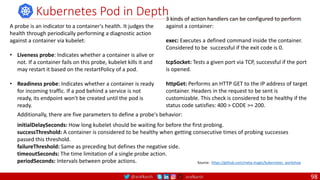
A probe is an indicator to a container's health. It judges the
health through periodically performing a diagnostic action
against a container via kubelet:
• Liveness probe: Indicates whether a container is alive or
not. If a container fails on this probe, kubelet kills it and
may restart it based on the restartPolicy of a pod.
• Readiness probe: Indicates whether a container is ready
for incoming traffic. If a pod behind a service is not
ready, its endpoint won't be created until the pod is
ready.
Kubernetes Pod in Depth
3 kinds of action handlers can be configured to perform
against a container:
exec: Executes a defined command inside the container.
Considered to be successful if the exit code is 0.
tcpSocket: Tests a given port via TCP, successful if the port
is opened.
httpGet: Performs an HTTP GET to the IP address of target
container. Headers in the request to be sent is
customizable. This check is considered to be healthy if the
status code satisfies: 400 > CODE >= 200.
Additionally, there are five parameters to define a probe's behavior:
initialDelaySeconds: How long kubelet should be waiting for before the first probing.
successThreshold: A container is considered to be healthy when getting consecutive times of probing successes
passed this threshold.
failureThreshold: Same as preceding but defines the negative side.
timeoutSeconds: The time limitation of a single probe action.
periodSeconds: Intervals between probe actions. Source: https://github.com/meta-magic/kubernetes_workshop
98
@arafkarsh arafkarsh
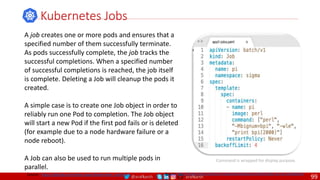
A job creates one or more pods and ensures that a
specified number of them successfully terminate.
As pods successfully complete, the job tracks the
successful completions. When a specified number
of successful completions is reached, the job itself
is complete. Deleting a Job will cleanup the pods it
created.
A simple case is to create one Job object in order to
reliably run one Pod to completion. The Job object
will start a new Pod if the first pod fails or is deleted
(for example due to a node hardware failure or a
node reboot).
A Job can also be used to run multiple pods in
parallel.
Kubernetes Jobs
Source: https://kubernetes.io/docs/concepts/workloads/controllers/jobs-run-to-completion/
Command is wrapped for display purpose.
Source: https://github.com/meta-magic/kubernetes_workshop
99
@arafkarsh arafkarsh
Kubernetes Cron Jobs
Source: https://kubernetes.io/docs/tasks/job/automated-tasks-with-cron-jobs//
Command is wrapped for display purpose.
Source: https://github.com/meta-magic/kubernetes_workshop
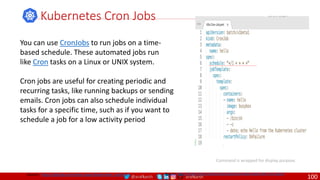
You can use CronJobs to run jobs on a time-
based schedule. These automated jobs run
like Cron tasks on a Linux or UNIX system.
Cron jobs are useful for creating periodic and
recurring tasks, like running backups or sending
emails. Cron jobs can also schedule individual
tasks for a specific time, such as if you want to
schedule a job for a low activity period
100
@arafkarsh arafkarsh
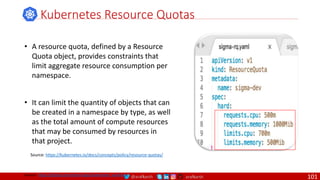
• A resource quota, defined by a Resource
Quota object, provides constraints that
limit aggregate resource consumption per
namespace.
• It can limit the quantity of objects that can
be created in a namespace by type, as well
as the total amount of compute resources
that may be consumed by resources in
that project.
Kubernetes Resource Quotas
Source: https://kubernetes.io/docs/concepts/policy/resource-quotas/
Source: https://github.com/meta-magic/kubernetes_workshop
101
@arafkarsh arafkarsh
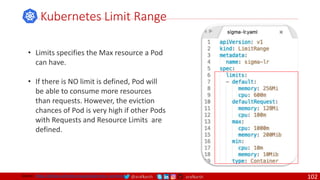
• Limits specifies the Max resource a Pod
can have.
• If there is NO limit is defined, Pod will
be able to consume more resources
than requests. However, the eviction
chances of Pod is very high if other Pods
with Requests and Resource Limits are
defined.
Kubernetes Limit Range
Source: https://github.com/meta-magic/kubernetes_workshop 102
@arafkarsh arafkarsh
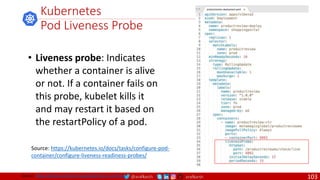
• Liveness probe: Indicates
whether a container is alive
or not. If a container fails on
this probe, kubelet kills it
and may restart it based on
the restartPolicy of a pod.
Kubernetes
Pod Liveness Probe
Source: https://kubernetes.io/docs/tasks/configure-pod-
container/configure-liveness-readiness-probes/
Source: https://github.com/meta-magic/kubernetes_workshop 103
@arafkarsh arafkarsh
• A PDB limits the number pods
of a replicated application that
are down simultaneously from
voluntary disruptions.
• Cluster managers and hosting
providers should use tools
which respect Pod Disruption
Budgets by calling the Eviction
API instead of directly deleting
pods.
Kubernetes Pod Disruption Range
Source: https://kubernetes.io/docs/tasks/run-application/configure-pdb/
$ kubectl drain NODE [options]
Source: https://github.com/meta-magic/kubernetes_workshop 104
@arafkarsh arafkarsh
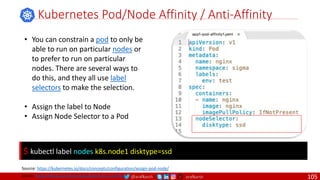
• You can constrain a pod to only be
able to run on particular nodes or
to prefer to run on particular
nodes. There are several ways to
do this, and they all use label
selectors to make the selection.
• Assign the label to Node
• Assign Node Selector to a Pod
Kubernetes Pod/Node Affinity / Anti-Affinity
Source: https://kubernetes.io/docs/concepts/configuration/assign-pod-node/
$ kubectl label nodes k8s.node1 disktype=ssd
Source: https://github.com/meta-magic/kubernetes_workshop 105
@arafkarsh arafkarsh
Kubernetes Pod Configuration
Source: https://kubernetes.io/docs/user-journeys/users/application-developer/advanced/
Pod configuration
You use labels and annotations to attach metadata to your resources. To inject data into your
resources, you’d likely create ConfigMaps (for non-confidential data) or Secrets (for confidential data).
Taints and Tolerations - These provide a way for nodes to “attract” or “repel” your Pods. They are often
used when an application needs to be deployed onto specific hardware, such as GPUs for scientific
computing. Read more.
Pod Presets - Normally, to mount runtime requirements (such as environmental variables, ConfigMaps,
and Secrets) into a resource, you specify them in the resource’s configuration file. PodPresets allow you
to dynamically inject these requirements instead, when the resource is created. For instance, this
allows team A to mount any number of new Secrets into the resources created by teams B and C,
without requiring action from B and C.
Source: https://github.com/meta-magic/kubernetes_workshop 106
@arafkarsh arafkarsh
Kubernetes DaemonSet
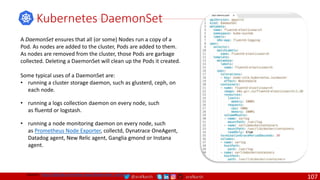
A DaemonSet ensures that all (or some) Nodes run a copy of a
Pod. As nodes are added to the cluster, Pods are added to them.
As nodes are removed from the cluster, those Pods are garbage
collected. Deleting a DaemonSet will clean up the Pods it created.
Some typical uses of a DaemonSet are:
• running a cluster storage daemon, such as glusterd, ceph, on
each node.
• running a logs collection daemon on every node, such
as fluentd or logstash.
• running a node monitoring daemon on every node, such
as Prometheus Node Exporter, collectd, Dynatrace OneAgent,
Datadog agent, New Relic agent, Ganglia gmond or Instana
agent.
Source: https://github.com/meta-magic/kubernetes_workshop
107
@arafkarsh arafkarsh
Container-level features
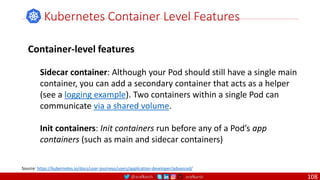
Sidecar container: Although your Pod should still have a single main
container, you can add a secondary container that acts as a helper
(see a logging example). Two containers within a single Pod can
communicate via a shared volume.
Init containers: Init containers run before any of a Pod’s app
containers (such as main and sidecar containers)
Kubernetes Container Level Features
Source: https://kubernetes.io/docs/user-journeys/users/application-developer/advanced/
108
@arafkarsh arafkarsh
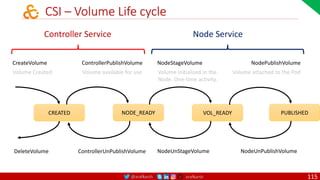
Kubernetes Volumes
• In-Tree and Out-Tree Volume Plugins
• Container Storage Interface – Components
• CSI – Volume Life Cycle
• Persistent Volume
• Persistent Volume Claims
• Storage Class
• Volume Snapshot
109
@arafkarsh arafkarsh
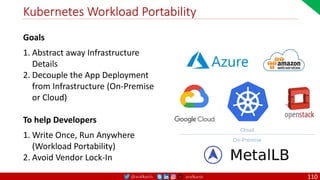
Kubernetes Workload Portability
Goals
1. Abstract away Infrastructure
Details
2. Decouple the App Deployment
from Infrastructure (On-Premise
or Cloud)
To help Developers
1. Write Once, Run Anywhere
(Workload Portability)
2. Avoid Vendor Lock-In
Cloud
On-Premise
110
@arafkarsh arafkarsh
K8s Volume Plugin – History
In-Tree Volume Plugins
• First set of Volume plugins with K8s.
• They are linked and compiled and
shipped with K8s releases.
• They were part of Core K8s libraries.
• Volume Driver Development is
tightly coupled with K8s releases.
• Bugs in the Volume Driver crashes
critical K8s components.
• Deprecated since K8s v1.8
Out-of-Tree Volume Plugins
• Flex Volume Driver
• Executable Binaries
• Worker Node communicates
with binaries in CLI.
• Need to access the Root File
System of the Worker Node
• Dependency issues
• CSI – Container Storage Interface
• Address the pain points of Flex
Volume Driver
111
@arafkarsh arafkarsh
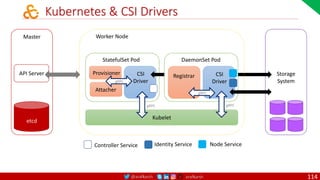
Container Storage Interface
Source:https://blogs.vmware.com/cloudnative/2019/04/18/supercharging-kubernetes-storage-with-csi/
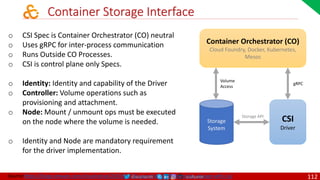
o CSI Spec is Container Orchestrator (CO) neutral
o Uses gRPC for inter-process communication
o Runs Outside CO Processes.
o CSI is control plane only Specs.
o Identity: Identity and capability of the Driver
o Controller: Volume operations such as
provisioning and attachment.
o Node: Mount / unmount ops must be executed
on the node where the volume is needed.
o Identity and Node are mandatory requirement
for the driver implementation.
Container Orchestrator (CO)
Cloud Foundry, Docker, Kubernetes,
Mesos
CSI
Driver
gRPC
Volume
Access
Storage API
Storage
System
112
@arafkarsh arafkarsh
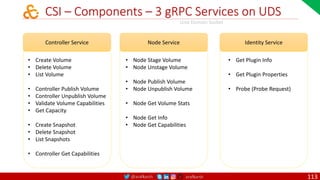
CSI – Components – 3 gRPC Services on UDS
Controller Service
• Create Volume
• Delete Volume
• List Volume
• Controller Publish Volume
• Controller Unpublish Volume
• Validate Volume Capabilities
• Get Capacity
• Create Snapshot
• Delete Snapshot
• List Snapshots
• Controller Get Capabilities
Node Service
• Node Stage Volume
• Node Unstage Volume
• Node Publish Volume
• Node Unpublish Volume
• Node Get Volume Stats
• Node Get Info
• Node Get Capabilities
Identity Service
• Get Plugin Info
• Get Plugin Properties
• Probe (Probe Request)
Unix Domain Socket
113
@arafkarsh arafkarsh
StatefulSet Pod
Provisioner CSI
Driver
Attacher
Storage
System
Kubernetes & CSI Drivers
DaemonSet Pod
Registrar CSI
Driver
Kubelet
Worker Node
Master
API Server
etcd
gRPC
gRPC
gRPC
gRPC
Node Service
Identity Service
Controller Service
114
@arafkarsh arafkarsh
CSI – Volume Life cycle
Controller Service Node Service
CreateVolume ControllerPublishVolume NodeStageVolume
NodeUnStageVolume
NodePublishVolume
NodeUnPublishVolume
DeleteVolume ControllerUnPublishVolume
CREATED NODE_READY VOL_READY PUBLISHED
Volume Created Volume available for use Volume initialized in the
Node. One-time activity.
Volume attached to the Pod
115
@arafkarsh arafkarsh
Container Storage Interface Adoption
Container
Orchestrator
CO Version CSI Version
Kubernetes
1.10 0.2
1.13 0.3, 1.0
OpenShift 3.11 0.2
Mesos 1.6 0.2
Cloud Foundry 2.5 0.3
PKS 1.4 1.0
116
@arafkarsh arafkarsh
CSI – Drivers
Name
CSI Production Name
Provisioner
Ver Persistence Access Mode
Dynamic
Provisioning
Raw Block
Support
Volume
Snapshot
1 AWS EBS ebs.csi.aws.com v0.3, v1.0 Yes RW Single Pod Yes Yes Yes
2 AWS EFS efs.csi.aws.com v0.3 Yes RW Multi Pod No No No
3 Azure Disk disk.csi.azure.com v0.3, v1.0 Yes RW Single Pod Yes No No
4 Azure File file.csi.azure.com v0.3, v1.0 Yes RW Multi Pod Yes No No
5 CephFS cephfs.csi.ceph.com v0.3, v1.0 Yes RW Multi Pod Yes No No
6 Ceph RBD rbd.csi.ceph.com v0.3, v1.0 Yes RW Single Pod Yes Yes Yes
7 GCE PD pd.csi.storage.gke.io v0.3, v1.0 Yes RW Single Pod Yes No Yes
8 Nutanix Vol com.nutanix.csi v0.3, v1.0 Yes RW Single Pod Yes No No
9 Nutanix Files com.nutanix.csi v0.3, v1.0 Yes RW Multi Pod Yes No No
10 Portworx pxd.openstorage.org v0.3, v1.1 Yes RW Multi Pod Yes No Yes
Source: https://kubernetes-csi.github.io/docs/drivers.html
117
@arafkarsh arafkarsh
Kubernetes Volume Types
Host Based
o EmptyDir
o HostPath
o Local
Block Storage
o Amazon EBS
o OpenStack Cinder
o GCE Persistent Disk
o Azure Disk
o vSphere Volume
Others
o iScsi
o Flocker
o Git Repo
o Quobyte
Distributed File System
o NFS
o Ceph
o Gluster
o FlexVolume
o PortworxVolume
o Amazon EFS
o Azure File System
Life cycle of a
Persistent Volume
o Provisioning
o Binding
o Using
o Releasing
o Reclaiming
Source: https://github.com/meta-magic/kubernetes_workshop 118
@arafkarsh arafkarsh
Ephemeral Storage
Volume Plugin: EmptyDir
o Scratch Space (Temporary) from the
Host Machine.
o Data exits only for the Life Cycle of
the Pod.
o Containers in the Pod can R/W to
mounted path.
o Can ONLY be referenced in-line from
the Pod.
o Can’t be referenced via Persistent
Volume or Claim.
119
@arafkarsh arafkarsh
Remote Storage Block Storage
o Amazon EBS
o OpenStack Cinder
o GCE Persistent Disk
o Azure Disk
o vSphere Volume
Distributed File System
o NFS
o Ceph
o Gluster
o FlexVolume
o PortworxVolume
o Amazon EFS
o Azure File System
o Remote Storage attached to the
Pod based on the requirement.
o Data persists beyond the life
cycle of the Pod.
o Two Types of Remote Storage
o Block Storage
o File System
o Referenced in the Pod either in-
line or PV/PVC
120
@arafkarsh arafkarsh
Remote Storage
Kubernetes will do the
following Automatically.
o Kubernetes will attach the
Remote (Block or FS)
Volume to the Node.
o Kubernetes will mount the
volume to the Pod.
This is NOT recommended because it breaks the
Kubernetes principle of workload portability.
121
@arafkarsh arafkarsh
Deployment and StatefulSet
Source: https://cloud.google.com/kubernetes-engine/docs/concepts/persistent-volumes#deployments_vs_statefulsets
Deployment
Kind: Deployment
• All Replicas of the Deployment share
the same Persistent volume Claim.
• ReadWriteOnce Volumes are NOT
recommended even with ReplicaSet 1
as it can fail or get into a deadlock
(when the Pod goes down and Master
tries to bring another Pod).
• Volumes with ReadOnlyMany &
ReadWriteMany are the best modes.
• Deployments are used for Stateless
Apps
For
Stateful
Apps
StatefulSet
Kind: StatefulSet
• StatefulSet is recommended for App
that need a unique volume per
ReplicaSet.
• ReadWriteOnce should be used with a
StatefulSet. RWO will create a unique
volume per ReplicaSet.
122
@arafkarsh arafkarsh
Node 3
Node 2
Deployment and StatefulSet
Storage GCE PD
Node 1
D Service1 Pod1
D Service1 Pod2
D Service1 Pod3
Test Case 1
Kind Deployment
Replica 3
Provisioning Storage Class
Volume GCE PD
Volume Type File System
Access Mode ReadWriteOnce (RWO)
Storage NFS
Node 1
D Service1 Pod1
D Service1 Pod2
D Service1 Pod3
Test Case 2
Kind Deployment
Replica 3
Provisioning Persistent Volume
Volume NFS
Volume Type File System
Access Mode RWX, ReadOnlyMany
Node 3
Node 2
Storage GCE PD
Node 1
S Service2 Pod1
Test Case 3
Kind StatefulSet
Replica 3
Provisioning Storage Class
Volume GCE PD
Volume Type File System
Access Mode ReadWriteOnce (RWO)
S Service2 Pod2
S Service2 Pod3
Node 3
Node 2
Storage NFS
Node 1
S Service2 Pod1
Test Case 4
Kind StatefulSet
Replica 3
Provisioning Persistent Volume
Volume NFS
Volume Type File System
Access Mode ReadWriteMany (RWX)
S Service2 Pod2
S Service2 Pod3
Mounted Storage System Mounted Storage System (Shared Drive) Mounted Storage System Mounted Storage System (Shared Drive)
Error Creating Pod
GCE – PD – 10 GB Storage GCE – PD – 10 GB Storage
Source: https://github.com/meta-magic/kubernetes_workshop/tree/master/yaml/volume-nfs-gcppd-scenarios
S1 S3
S2
S3
S2
S1
123
@arafkarsh arafkarsh
Node 3
Node 2
Deployment/StatefulSet – NFS Shared Disk – 4 PV & 4 PVC
Storage NFS
Node 1
D Service2 Pod1
D Service2 Pod2
D Service2 Pod3
Test Case 6
Kind Deployment
Replica 3
PVC pvc-3gb-disk
Volume NFS
Volume Type File System (ext4)
Access Mode ReadWriteMany (RWX)
Node 3
Node 2
Storage NFS
Node 1
S Service4 Pod1
Test Case 8
Kind StatefulSet
Replica 3
PVC pvc-1gb-disk
Volume NFS
Volume Type File System (ext4)
Access Mode ReadWriteMany (RWX)
S Service4 Pod2
S Service4 Pod3
Mounted Storage System (Shared Drive) Mounted Storage System (Shared Drive)
Node 3
Node 2
Storage NFS
Node 1
D Service1 Pod1
D Service1 Pod2
D Service1 Pod3
Test Case 5
Kind Deployment
Replica 3
PVC pvc-2gb-disk
Volume NFS
Volume Type File System (ext4)
Access Mode ReadWriteMany (RWX)
Mounted Storage System (Shared Drive)
Node 3
Node 2
Storage NFS
Node 1
D Service3 Pod1
D Service3 Pod2
D Service3 Pod3
Test Case 7
Kind Deployment
Replica 3
PVC pvc-4gb-disk
Volume NFS
Volume Type File System (ext4)
Access Mode ReadWriteMany (RWX)
Mounted Storage System (Shared Drive)
GCE – PD – 2 GB Storage GCE – PD – 3 GB Storage GCE – PD – 4 GB Storage GCE – PD – 1 GB Storage
Source: https://github.com/meta-magic/kubernetes_workshop/tree/master/yaml/volume-nfs-gcppd-scenarios
PV, PVC mapping is 1:1
124
@arafkarsh arafkarsh
Volume Plugin: ReadWriteOnce, ReadOnlyMany, ReadWriteMany
Volume Plugin Kind: Deployment Kind: StatefulSet ReadWriteOnce ReadOnlyMany ReadWriteMany
AWS EBS Yes ✓ - -
AzureFile Yes Yes ✓ ✓ ✓
AzureDisk Yes ✓ - -
CephFS Yes Yes ✓ ✓ ✓
Cinder Yes ✓ - -
CSI depends on the driver depends on the driver depends on the driver
FC Yes Yes ✓ ✓ -
Flexvolume Yes Yes ✓ ✓ depends on the driver
Flocker Yes ✓ - -
GCEPersistentDisk Yes Yes ✓ ✓ -
Glusterfs Yes Yes ✓ ✓ ✓
HostPath Yes ✓ - -
iSCSI Yes Yes ✓ ✓ -
Quobyte Yes Yes ✓ ✓ ✓
NFS Yes Yes ✓ ✓ ✓
RBD Yes Yes ✓ ✓ -
VsphereVolume Yes ✓ - - (works when pods are collocated)
PortworxVolume Yes Yes ✓ - ✓
ScaleIO Yes Yes ✓ ✓ -
StorageOS Yes ✓ - -
Source: https://kubernetes.io/docs/concepts/storage/persistent-volumes/
125
@arafkarsh arafkarsh
Kubernetes Volumes for Stateful Pods
Provision
Network
Storage
Static / Dynamic
1
Request
Storage
2
Use
Storage
3
Static: Persistent Volume
Dynamic: Storage Class
Persistent Volume Claim
Claims are mounted
as Volumes inside the
Pod
126
@arafkarsh arafkarsh
Storage Class, PV, PVC and Pods
Physical Storage
AWS: EBS, EFS
GCP: PD
Azure: Disk
NFS: Path, Server
Dynamic
Storage Class
Static
Persistent Volume
Persistent Volume Claims
spec:
accessModes:
- ReadWriteOnce
resources:
requests:
storage: 1Gi
storageClassName:
csi-hp-sc
Pod
spec:
volumes
- name: my-csi-v
persisitentVolumeClaim
claimName: my-csi-pvc
Ref: https://rancher.com/blog/2018/2018-09-20-unexpected-kubernetes-part-1/.
127
@arafkarsh arafkarsh
Kubernetes Volume
Volume
• A Persistent Volume is the
physical storage available.
• Storage Class is used to configure
custom Storage option (nfs, cloud
storage) in the cluster. They are
the foundation of Dynamic
Provisioning.
• Persistent Volume Claim is used
to mount the required storage
into the Pod.
• ReadOnlyMany: Can be
mounted as read-only by many
nodes
• ReadWriteOnce: Can be
mounted as read-write by a
single node
• ReadWriteMany: Can be
mounted as read-write by many
nodes
Access Mode
Source: https://kubernetes.io/docs/concepts/storage/persistent-volumes/#claims-as-volumes
Persistent
Volume
Persistent
Volume Claim
Storage Class
Volume Mode
• There are two modes
• File System and or
• raw Storage Block.
• Default is File System.
Retain: The volume will need to
be reclaimed manually
Delete: The associated storage
asset, such as AWS EBS, GCE PD,
Azure disk, or OpenStack Cinder
volume, is deleted
Recycle: Delete content only (rm
-rf /volume/*) - Deprecated
Reclaim Policy
128
@arafkarsh arafkarsh
Kubernetes Persistent Volume – AWS EBS
• Use a Network File System or Block Storage for Pods to access
and data from multiple sources. AWS EBS is such a storage
system.
• A Volume is created and its linked with a storage provider. In
the following example the storage provider is AWS for the
EBS.
• Any PVC (Persistent Volume Claim) will be bound to the
Persistent Volume which matches the storage class.
1
Volume ID is auto generated
$ aws ec2 create-volume - -size 100
Storage class is mainly
meant for dynamic
provisioning of the
persistent volumes.
Persistent Volume is not
bound to any specific
namespace.
Source: https://github.com/meta-magic/kubernetes_workshop 129
@arafkarsh arafkarsh
Persistent Volume – AWS EBS
Pod Access storage by issuing a
Persistent Volume Claim.
In the following example Pod
claims for 2Gi Disk space from
the network on AWS EBS.
• Manual Provisioning of
the AWS EBS supports
ReadWriteMany,
However all the pods
are getting scheduled
into a Single Node.
• For Dynamic
Provisioning use
ReadWriteOnce.
• Google Compute Engine
also doesn't support
ReadWriteMany for
dynamic provisioning.
2
3
https://cloud.google.com/kubernetes-engine/docs/concepts/persistent-volumes
Source:
https://github.com/meta-magic/kubernetes_workshop
130
@arafkarsh arafkarsh
Kubernetes Persistent Volume - hostPath
• HostPath option is to make the Volume available from the
Host Machine.
• A Volume is created and its linked with a storage provider. In
the following example the storage provider is Minikube for
the host path.
• Any PVC (Persistent Volume Claim) will be bound to the
Persistent Volume which matches the storage class.
• If it doesn't match a dynamic persistent volume will be
created.
Storage class is mainly
meant for dynamic
provisioning of the
persistent volumes.
Persistent Volume is not
bound to any specific
namespace.
Host Path is NOT Recommended in Production
1
Source: https://github.com/meta-magic/kubernetes_workshop 131
@arafkarsh arafkarsh
Persistent Volume - hostPath
Pod Access storage by issuing a
Persistent Volume Claim.
In the following example Pod
claims for 2Gi Disk space from the
network on the host machine.
• Persistent Volume Claim
and Pods with
Deployment properties
are bound to a specific
namespace.
• Developer is focused on
the availability of
storage space using PVC
and is not bothered
about storage solutions
or provisioning.
• Ops Team will focus on
Provisioning of
Persistent Volume and
Storage class.
2
3
Source: https://github.com/meta-magic/kubernetes_workshop 132
@arafkarsh arafkarsh
Persistent Volume - hostPath
Running the Yaml’s
from the Github
2
3
1
1. Create Static Persistent Volumes OR Dynamic Volumes (using Storage Class)
2. Persistent Volume Claim is created and bound static and dynamic volumes.
3. Pods refer PVC to mount volumes inside the Pod.
Source: https://github.com/meta-magic/kubernetes_workshop 133
@arafkarsh arafkarsh
Kubernetes Commands
• Kubernetes Commands – Quick Help
• Kubernetes Commands – Field Selectors
134
@arafkarsh arafkarsh
Kubernetes Commands – Quick Help
$ kubectl create –f app-rs.yml
$ kubectl get rs/app-rs
$ kubectl get rs $ kubectl delete rs/app-rs cascade=false
$ kubectl describe rs app-rs
$ kubectl apply –f app-rs.yml Cascade=true will delete all the pods
$ kubectl get pods
$ kubectl describe pods pod-name
$ kubectl get pods -o json pod-name
$ kubectl create –f app-pod.yml
$ kubectl get pods –show-labels
$ kubectl exec pod-name ps aux
$ kubectl exec –it pod-name sh
Pods
ReplicaSet
(Declarative Model)
$ kubectl get pods –all-namespaces
$ kubectl apply –f app-pod.yml
$ kubectl replace –f app-pod.yml
$ kubectl replace –f app-rs.yml
Source: https://github.com/meta-magic/kubernetes_workshop
135
@arafkarsh arafkarsh
Kubernetes Commands – Quick Help
$ kubectl create –f app-service.yml
$ kubectl get svc
$ kubectl describe svc app-service
$ kubectl get ep app-service
$ kubectl describe ep app-service
$ kubectl delete svc app-service
$ kubectl create –f app-deploy.yml
$ kubectl get deploy app-deploy
$ kubectl describe deploy app-deploy
$ kubectl rollout status deployment app-deploy
$ kubectl apply –f app-deploy.yml
$ kubectl rollout history deployment app-deploy
$ kubectl rollout undo deployment
app-deploy - -to-revision=1
Service
Deployment
(Declarative Model)
$ kubectl apply –f app-service.yml
$ kubectl replace –f app-service.yml
$ kubectl replace –f app-deploy.yml
Source: https://github.com/meta-magic/kubernetes_workshop
136
@arafkarsh arafkarsh
Kubernetes Commands – Field Selectors
$ kubectl get pods --field-selector status.phase=Running Get the list of pods where status.phase = Running
Source: https://kubernetes.io/docs/concepts/overview/working-with-objects/field-selectors/
Field selectors let you select Kubernetes resources based on the value of one or
more resource fields. Here are some example field selector queries:
• metadata.name=my-service
• metadata.namespace!=default
• status.phase=Pending
Supported Operators
You can use the =, ==, and != operators with field selectors (= and == mean the
same thing). This kubectl command, for example, selects all Kubernetes Services
that aren’t in the default namespace:
$ kubectl get services --field-selector metadata.namespace!=default
137
@arafkarsh arafkarsh
Kubernetes Commands – Field Selectors
$ kubectl get pods --field-selector=status.phase!=Running,spec.restartPolicy=Always
Source: https://kubernetes.io/docs/concepts/overview/working-with-objects/field-selectors/
Chained Selectors
As with label and other selectors, field selectors can be chained together as a
comma-separated list. This kubectl command selects all Pods for which
the status.phase does not equal Running and the spec.restartPolicy field
equals Always:
Multiple Resource Type
You use field selectors across multiple resource types. This kubectl command
selects all Statefulsets and Services that are not in the default namespace:
$ kubectl get statefulsets,services --field-selector metadata.namespace!=default
138
@arafkarsh arafkarsh
K8s Packet Path
• Kubernetes Networking
• Compare Docker and Kubernetes Networking
• Pod to Pod Networking within the same Node
• Pod to Pod Networking across the Node
• Pod to Service Networking
• Ingress - Internet to Service Networking
• Egress – Pod to Internet Networking
139
3
@arafkarsh arafkarsh
Kubernetes Networking
Mandatory requirements for Network implementation
1. All Pods can communicate with All other Pods
without using Network Address Translation
(NAT).
2. All Nodes can communicate with all the Pods
without NAT.
3. The IP that is assigned to a Pod is the same IP the
Pod sees itself as well as all other Pods in the
cluster. Source: https://github.com/meta-magic/kubernetes_workshop
140
@arafkarsh arafkarsh
Docker Networking Vs. Kubernetes Networking
Container 1
172.17.3.2
Web Server 8080
Veth: eth0
Container 2
172.17.3.3
Microservice 9002
Veth: eth0
Container 3
172.17.3.4
Microservice 9003
Veth: eth0
Container 4
172.17.3.5
Microservice 9004
Veth: eth0
IP tables rules
eth0
10.130.1.101/24
Node 1
Docker0 Bridge 172.17.3.1/16
Veth0 Veth1 Veth2 Veth3
Container 1
172.17.3.2
Web Server 8080
Veth: eth0
Container 2
172.17.3.3
Microservice 9002
Veth: eth0
Container 3
172.17.3.4
Microservice 9003
Veth: eth0
Container 4
172.17.3.5
Microservice 9004
Veth: eth0
IP tables rules
eth0
10.130.1.102/24
Node 2
Docker0 Bridge 172.17.3.1/16
Veth0 Veth1 Veth2 Veth3
Pod 1
172.17.3.2
Web Server 8080
Veth: eth0
Pod 2
172.17.3.3
Microservice 9002
Veth: eth0
Pod 3
172.17.3.4
Microservice 9003
Veth: eth0
Pod 4
172.17.3.5
Microservice 9004
Veth: eth0
IP tables rules
eth0
10.130.1.101/24
Node 1
L2 Bridge 172.17.3.1/16
Veth0 Veth1 Veth2 Veth3
Same IP Range. NAT Required Uniq IP Range. netFilter, IP Tables / IPVS. No NAT required
Pod 1
172.17.3.6
Web Server 8080
Veth: eth0
Pod 2
172.17.3.7
Microservice 9002
Veth: eth0
Pod 3
172.17.3.8
Microservice 9003
Veth: eth0
Pod 4
172.17.3.9
Microservice 9004
Veth: eth0
IP tables rules
eth0
10.130.1.102/24
Node 2
L2 Bridge 172.17.3.1/16
Veth0 Veth1 Veth2 Veth3
141
@arafkarsh arafkarsh
Kubernetes Networking
3 Networks
Networks
1. Physical Network
2. Pod Network
3. Service Network
Source: https://github.com/meta-magic/kubernetes_workshop
CIDR Range (RFC 1918)
1. 10.0.0.0/8
2. 172.0.0.0/11
3. 192.168.0.0/16
Keep the Address ranges separate – Best Practices
RFC 1918
1. Class A
2. Class B
3. Class C
142
@arafkarsh arafkarsh
Kubernetes Networking
3 Networks
Source: https://github.com/meta-magic/kubernetes_workshop
eth0 10.130.1.102/24
Node 1
veth0
eth0
Pod 1
Container 1
172.17.4.1
eth0
Pod 2
Container 1
172.17.4.2
veth1
eth0
10.130.1.103/24
Node 2
veth1
eth0
Pod 1
Container 1
172.17.5.1
eth0
10.130.1.104/24
Node 3
veth1
eth0
Pod 1
Container 1
172.17.6.1
Service
EP EP EP
VIP
192.168.1.2/16
1. Physical Network
2. Pod Network
3. Service Network
End Points
handles
dynamic IP
Addresses of
the Pods
selected by a
Service based
on Pod Labels
Virtual IP doesn’t have any
physical network card or
system attached.
143
@arafkarsh arafkarsh
Kubernetes: Pod to Pod Networking inside a Node
By Default Linux has a Single Namespace and all the process in
the namespace share the Network Stack. If you create a new
namespace then all the process running in that namespace will
have its own Network Stack, Routes, Firewall Rules etc.
$ ip netns add namespace1
A mount point for namespace1 is created under /var/run/netns
Create Namespace
$ ip netns List Namespace
eth0 10.130.1.101/24
Node 1
Root NW Namespace
L2 Bridge 10.17.3.1/16
veth0 veth1
Forwarding
Tables
Bridge
implements
ARP
to
discover
link-
layer
MAC
Address
eth0
Container 1
10.17.3.2
Pod 1
Container 2
10.17.3.2
eth0
Pod 2
Container 1
10.17.3.3
1. Pod 1 sends packet to eth0 – eth0 is connected to
veth0
2. Bridge resolves the Destination with ARP protocol and
3. Bridge sends the packet to veth1
4. veth1 forwards the packet directly to Pod 2 thru eth0
of the Pod 2
1
2
4
3
This entire communication happens in localhost. So, Data
transfer speed will NOT be affected by Ethernet card speed.
Kube Proxy
144
@arafkarsh arafkarsh
eth0 10.130.1.102/24
Node 2
Root NW Namespace
L2 Bridge 10.17.4.1/16
veth0
Kubernetes: Pod to Pod Networking Across Node
eth0 10.130.1.101/24
Node 1
Root NW Namespace
L2 Bridge 10.17.3.1/16
veth0 veth1
Forwarding
Tables
eth0
Container 1
10.17.3.2
Pod 1
Container 2
10.17.3.2
eth0
Pod 2
Container 1
10.17.3.3
1. Pod 1 sends packet to eth0 –
eth0 is connected to veth0
2. Bridge will try to resolve the
Destination with ARP protocol
and ARP will fail because there
is no device connected to that
IP.
3. On Failure Bridge will send the
packet to eth0 of the Node 1.
4. At this point packet leaves eth0
and enters the Network and
network routes the packet to
Node 2.
5. Packet enters the Root
namespace and routed to the
L2 Bridge.
6. veth0 forwards the packet to
eth0 of Pod 3
1
2
4
3
eth0
Pod 3
Container 1
10.17.4.1
5
6
Kube Proxy
Kube Proxy
Src-IP:Port: Pod1:17711 – Dst-IP:Port: Pod3:80
145
@arafkarsh arafkarsh
eth0 10.130.1.102/24
Node 2
Root NW Namespace
L2 Bridge 10.17.4.1/16
veth0
Kubernetes: Pod to Service to Pod – Load Balancer
eth0 10.130.1.101/24
Node 1
Root NW Namespace
L2 Bridge 10.17.3.1/16
veth0 veth1
Forwarding
Tables
eth0
Container 1
10.17.3.2
Pod 1
Container 2
10.17.3.2
eth0
Pod 2
Container 1
10.17.3.3
1. Pod 1 sends packet to eth0 – eth0 is
connected to veth0
2. Bridge will try to resolve the Destination
with ARP protocol and ARP will fail
because there is no device connected to
that IP.
3. On Failure Bridge will give the packet to
Kube Proxy
4. it goes thru ip tables rules installed by
Kube Proxy and rewrites the Dst-IP with
Pod3-IP. IPVS has done the Cluster load
Balancing directly on the node and
packet is given to eth0 of the Node1.
5. Now packet leaves Node 1 eth0 and
enters the Network and network routes
the packet to Node 2.
6. Packet enters the Root namespace and
routed to the L2 Bridge.
7. veth0 forwards the packet to eth0 of
Pod 3
1
2
4
3
eth0
Pod 3
Container 1
10.17.4.1
5
6
Kube Proxy
Kube Proxy
7
SrcIP:Port: Pod1:17711 – Dst-IP:Port: Service1:80 Src-IP:Port: Pod1:17711 – Dst-IP:Port: Pod3:80
Order Payments
146
@arafkarsh arafkarsh
eth0 10.130.1.102/24
Node 2
Root NW Namespace
L2 Bridge 10.17.4.1/16
veth0
Kubernetes Pod to Service to Pod – Return Journey
eth0 10.130.1.101/24
Node 1
Root NW Namespace
L2 Bridge 10.17.3.1/16
veth0 veth1
Forwarding
Tables
eth0
Container 1
10.17.3.2
Pod 1
Container 2
10.17.3.2
eth0
Pod 2
Container 1
10.17.3.3
1. Pod 3 receives data from Pod 1 and
sends the reply back with Source as
Pod3 and Destination as Pod1
2. Bridge will try to resolve the Destination
with ARP protocol and ARP will fail
because there is no device connected to
that IP.
3. On Failure Bridge will give the packet
Node 2 eth0
4. Now packet leaves Node 2 eth0 and
enters the Network and network routes
the packet to Node 1. (Dst = Pod1)
5. it goes thru ip tables rules installed by
Kube Proxy and rewrites the Src-IP with
Service-IP. Kube Proxy gives the packet
to L2 Bridge.
6. L2 bridge makes the ARP call and hand
over the packet to veth0
7. veth0 forwards the packet to eth0 of
Pod1
1
2
4
3
eth0
Pod 3
Container 1
10.17.4.1
5
6
Kube Proxy
Kube Proxy
7
Src-IP: Pod3:80 – Dst-IP:Port: Pod1:17711
Src-IP:Port: Service1:80– Dst-IP:Port: Pod1:17711
Order
Payments
147
@arafkarsh arafkarsh
eth0 10.130.1.102/24
Node X
Root NW Namespace
L2 Bridge 10.17.4.1/16
veth0
Kubernetes: Internet to Pod 1. Client Connects to App published
Domain.
2. Once the Ingress Load Balancer
receives the packet it picks a VM (K8s
Node).
3. Once inside the VM IP Tables knows
how to redirect the packet to the Pod
using internal load Balancing rules
installed into the cluster using Kube
Proxy.
4. Traffic enters Kubernetes cluster and
reaches the Node X (10.130.1.102).
5. Node X gives the packet to the L2
Bridge
6. L2 bridge makes the ARP call and hand
over the packet to veth0
7. veth0 forwards the packet to eth0 of
Pod 8
1
2
4
3
5
6
7
Src: Client IP –
Dst: App Dst
Src: Client IP –
Dst: Pod IP
Ingress
Load
Balancer
Client /
User
Src: Client IP –
Dst: VM-IP
eth0
Pod 8
Container 1
10.17.4.1
Kube Proxy
VM
VM
VM
148
@arafkarsh arafkarsh
Kubernetes: Pod to Internet
eth0 10.130.1.101/24
Node 1
Root NW Namespace
L2 Bridge 10.17.3.1/16
veth0 veth1
Forwarding
Tables
eth0
Container 1
10.17.3.2
Pod 1
Container 2
10.17.3.2
eth0
Pod 2
Container 1
10.17.3.3
1. Pod 1 sends packet to eth0 – eth0 is
connected to veth0
2. Bridge will try to resolve the Destination
with ARP protocol and ARP will fail because
there is no device connected to that IP.
3. On Failure Bridge will give the packet to IP
Tables
4. The Gateway will reject the Pod IP as it will
recognize only the VM IP. So, source IP is
replaced with VM-IP (NAT)
5. Packet enters the network and routed to
Internet Gateway.
6. Packet reaches the GW and it replaces the
VM-IP (internal) with an External IP.
7. Packet Reaches External Site (Google)
1
2
4
3
5
6
Kube Proxy
7
Src: Pod1 – Dst: Google Src: VM-IP –
Dst: Google
Gateway
Google
Src: Ex-IP –
Dst: Google
On the way back the packet follows the same
path and any Src IP mangling is undone, and
each layer understands VM-IP and Pod IP within
Pod Namespace.
VM
149
@arafkarsh arafkarsh
Kubernetes
Networking Advanced
• Kubernetes IP Network
• OSI Layer | L2 | L3 | L4 | L7 |
• IP Tables | IPVS | BGP | VXLAN
• Kubernetes DNS
• Kubernetes Proxy
• Kubernetes Load Balancer, Cluster IP, Node Port
• Kubernetes Ingress
• Kubernetes Ingress – Amazon Load Balancer
• Kubernetes Ingress – Metal LB (On Premise)
150
@arafkarsh arafkarsh
Kubernetes Network Requirements
Source: https://github.com/meta-magic/kubernetes_workshop
1. IPAM (IP Address Management & Life
cycle Management of Network
Devices
2. Connectivity and Container Network
3. Route Advertisement
151
@arafkarsh arafkarsh
OSI Layers
152
@arafkarsh arafkarsh
Networking Glossary
Netfilter – Packet Filtering in Linux
Software that does packet filtering, NAT and other
Packet mangling
IP Tables
It allows Admin to configure the netfilter for
managing IP traffic.
ConnTrack
Conntrack is built on top of netfilter to handle
connection tracking..
IPVS – IP Virtual Server
Implements a transport layer load balancing as part
of the Linux Kernel. It’s similar to IP Tables and
based on netfilter hook function and uses hash
table for the lookup.
Border Gateway Protocol
BGP is a standardized exterior gateway protocol
designed to exchange routing and reachability
information among autonomous systems (AS) on
the Internet. The protocol is often classified as a
path vector protocol but is sometimes also classed
as a distance-vector routing protocol. Some of the
well known & mandatory attributes are AS Path,
Next Hop Origin.
L2 Bridge (Software Switch)
Network devices, called switches (or bridges) are
responsible for connecting several network links to
each other, creating a LAN. Major components of a
network switch are a set of network ports, a control
plane, a forwarding plane, and a MAC learning
database. The set of ports are used to forward traffic
between other switches and end-hosts in the
network. The control plane of a switch is typically used
to run the Spanning Tree Protocol, that calculates a
minimum spanning tree for the LAN, preventing
physical loops from crashing the network. The
forwarding plane is responsible for processing input
frames from the network ports and making a
forwarding decision on which network port or ports
the input frame is forwarded to.
153
@arafkarsh arafkarsh
Networking Glossary
Layer 2 Networking
Layer 2 is the Data Link Layer (OSI Mode) providing Node to
Node Data Transfer. Layer 2 deals with delivery of frames
between 2 adjacent nodes on a network. Ethernet is an Ex.
Of Layer 2 networking with MAC represented as a Sub Layer.
Flannel uses L3 with VXLAN (L2) networking.
Layer 4 Networking
Transport layer controls the reliability of a given link
through flow control.
Layer 7 Networking
Application layer networking (HTTP, FTP etc.,) This is the
closet layer to the end user. Kubernetes Ingress Controller
is a L7 Load Balancer.
Layer 3 Networking
Layer 3’s primary concern involves routing packets between
hosts on top of the layer 2 connections. IPv4, IPv6, and ICMP
are examples of Layer 3 networking protocols. Calico uses L3
networking.
VXLAN Networking
Virtual Extensible LAN used to help large cloud
deployments by encapsulating L2 Frames within UDP
Datagrams. VXLAN is similar to VLAN (which has a
limitation of 4K network IDs). VXLAN is an encapsulation
and overlay protocol that runs on top of existing Underlay
networks. VXLAN can have 16 million Network IDs.
Overlay Networking
An overlay network is a virtual, logical network built on
top of an existing network. Overlay networks are often
used to provide useful abstractions on top of existing
networks and to separate and secure different logical
networks.
Source Network Address Translation
SNAT refers to a NAT procedure that modifies the source
address of an IP Packet.
Destination Network Address Translation
DNAT refers to a NAT procedure that modifies the
Destination address of an IP Packet.
154
@arafkarsh arafkarsh
eth0 10.130.1.102
Node / Server 1
172.17.4.1
VSWITCH
172.17.4.1
Customer 1
Customer 2
eth0 10.130.2.187
Node / Server 2
172.17.5.1
VSWITCH
172.17.5.1
Customer 1
Customer 2
VXLAN Encapsulation
10.130.1.0/24 10.130.2.0/24
Underlay Network
VSWITCH: Virtual Switch
Switch Switch
Router
155
@arafkarsh arafkarsh
eth0 10.130.1.102
Node / Server 1
172.17.4.1
VSWITCH
VTEP
172.17.4.1
Customer 1
Customer 2
eth0 10.130.2.187
Node / Server 2
172.17.5.1
VSWITCH
VTEP
172.17.5.1
Customer 1
Customer 2
VXLAN Encapsulation
Overlay Network
VSWITCH: Virtual Switch. | VTEP : Virtual Tunnel End Point
VXLAN encapsulate L2 into UDP
packets tunneling using L3. This
means no specialized hardware
required. So, the Overlay networks
could be created purely in
Software.
VLAN = 4094 (2 reserved) Networks
VNI = 16 Million Networks (24-bit ID)
156
@arafkarsh arafkarsh
eth0 10.130.1.102
Node / Server 1
172.17.4.1
VSWITCH
VTEP
172.17.4.1
Customer 1
Customer 2
eth0 10.130.2.187
Node / Server 2
172.17.5.1
VSWITCH
VTEP
172.17.5.1
Customer 1
Customer 2
VXLAN Encapsulation
Overlay Network
ARP Broadcast ARP Broadcast
ARP Broadcast
Multicast
VSWITCH: Virtual Switch. | VTEP : Virtual Tunnel End Point
ARP Unicast
157
@arafkarsh arafkarsh
eth0 10.130.1.102
Node / Server 1
172.17.4.1
B1 – MAC
VSWITCH
VTEP
172.17.4.1
Y1 – MAC
Customer 1
Customer 2
eth0 10.130.2.187
Node / Server 2
172.17.5.1
B2 – MAC
VSWITCH
VTEP
172.17.5.1
Y2 – MAC
Customer 1
Customer 2
VXLAN Encapsulation
Overlay Network
Src: 172.17.4.1
Src: B1 – MAC
Dst: 172.17.5.1
Dst: B2 - MAC
Src: 10.130.1.102
Dst: 10.130.2.187
Src UDP Port: Dynamic
Dst UDP Port: 4789
VNI: 100
Src: 172.17.4.1
Src: B1 – MAC
Dst: 172.17.5.1
Dst: B2 - MAC
Src: 172.17.4.1
Src: B1 – MAC
Dst: 172.17.5.1
Dst: B2 - MAC
VSWITCH: Virtual Switch. | VTEP : Virtual Tunnel End Point | VNI : Virtual Network Identifier
158
@arafkarsh arafkarsh
eth0 10.130.1.102
Node / Server 1
172.17.4.1
B1 – MAC
VSWITCH
VTEP
172.17.4.1
Y1 – MAC
Customer 1
Customer 2
eth0 10.130.2.187
Node / Server 2
172.17.5.1
B2 – MAC
VSWITCH
VTEP
172.17.5.1
Y2 – MAC
Customer 1
Customer 2
VXLAN Encapsulation
Overlay Network
Src: 10.130.2.187
Dst: 10.130.1.102
Src UDP Port: Dynamic
Dst UDP Port: 4789
VNI: 100
VSWITCH: Virtual Switch. | VTEP : Virtual Tunnel End Point | VNI : Virtual Network Identifier
Src: 172.17.5.1
Src: B2 - MAC
Dst: 172.17.4.1
Dst: B1 – MAC
Src: 172.17.5.1
Src: B2 - MAC
Dst: 172.17.4.1
Dst: B1 – MAC
Src: 172.17.5.1
Src: B2 - MAC
Dst: 172.17.4.1
Dst: B1 – MAC
159
@arafkarsh arafkarsh
eth0 10.130.1.102
Node / Server 1
172.17.4.1
B1 – MAC
VSWITCH
VTEP
172.17.4.1
Y1 – MAC
Customer 1
Customer 2
eth0 10.130.2.187
Node / Server 2
172.17.5.1
B2 – MAC
VSWITCH
VTEP
172.17.5.1
Y2 – MAC
Customer 1
Customer 2
VXLAN Encapsulation
Overlay Network
Src: 172.17.4.1
Src: Y1 – MAC
Dst: 172.17.5.1
Dst: Y2 - MAC
Src: 10.130.1.102
Dst: 10.130.2.187
Src UDP Port: Dynamic
Dst UDP Port: 4789
VNI: 200
Src: 172.17.4.1
Src: Y1 – MAC
Dst: 172.17.5.1
Dst: Y2 - MAC
Src: 172.17.4.1
Src: Y1 – MAC
Dst: 172.17.5.1
Dst: Y2 - MAC
VSWITCH: Virtual Switch. | VTEP : Virtual Tunnel End Point | VNI : Virtual Network Identifier
160
@arafkarsh arafkarsh
eth0 10.130.1.102
Node / Server 1
172.17.4.1
B1 – MAC
VSWITCH
VTEP
172.17.4.1
Y1 – MAC
Customer 1
Customer 2
eth0 10.130.2.187
Node / Server 2
172.17.5.1
B2 – MAC
VSWITCH
VTEP
172.17.5.1
Y2 – MAC
Customer 1
Customer 2
VXLAN Encapsulation
Overlay Network
VNI: 100
VNI: 200
VSWITCH: Virtual Switch. | VTEP : Virtual Tunnel End Point | VNI : Virtual Network Identifier
161
@arafkarsh arafkarsh
Kubernetes Network Support
Source: https://github.com/meta-magic/kubernetes_workshop
Features L2 L3 Overlay Cloud
Pods Communicate
using L2 Bridge
Pod Traffic is routed
in underlay network
Pod Traffic is
encapsulated &
uses underlay for
reachability
Pod Traffic is routed
in Cloud Virtual
Network
Technology Linux L2 Bridge
L2 ARP
Routing Protocol
BGP
VXLAN Amazon EKS
Google GKE
Encapsulation No No Yes No
Example Cilium Calico, Cilium Flannel, Weave,
Cilium
AWS EKS,
Google GKE,
Microsoft ACS
162
@arafkarsh arafkarsh
Kubernetes Networking
3 Networks
Source: https://github.com/meta-magic/kubernetes_workshop
eth0 10.130.1.102/24
Node 1
veth0
eth0
Pod 1
Container 1
172.17.4.1
eth0
Pod 2
Container 1
172.17.4.2
veth1
eth0
10.130.1.103/24
Node 2
veth1
eth0
Pod 1
Container 1
172.17.5.1
eth0
10.130.1.104/24
Node 3
veth1
eth0
Pod 1
Container 1
172.17.6.1
Service
EP EP EP
VIP
192.168.1.2/16
1. Physical Network
2. Pod Network
3. Service Network
End Points
handles
dynamic IP
Addresses of
the Pods
selected by a
Service based
on Pod Labels
Virtual IP doesn’t have any
physical network card or
system attached.
Virtual Network - L2 / L3 /Overlay / Cloud
163
@arafkarsh arafkarsh
Kubernetes DNS / Core DNS v1.11 onwards
Kubernetes DNS to avoid IP Addresses in the configuration or Application Codebase.
It Configures Kubelet running on each Node so the containers uses DNS Service IP to
resolve the IP Address.
A DNS Pod consists of three separate containers
1. Kube DNS: Watches the Kubernetes Master for changes in Service and Endpoints
2. DNS Masq: Adds DNS caching to Improve the performance
3. Sidecar: Provides a single health check endpoint to perform health checks for
Kube DNS and DNS Masq.
• DNS Pod itself is a Kubernetes Service with a Cluster IP.
• DNS State is stored in etcd.
• Kube DNS uses a library the converts etcd name – value pairs into DNS Records.
• Core DNS is similar to Kube DNS but with a plugin Architecture in v1.11 Core DNS is
the default DNS Server. Source: https://github.com/meta-magic/kubernetes_workshop
164
@arafkarsh arafkarsh
Kube Proxy
Kube-proxy comes close to Reverse Proxy model from design perspective. It can also
work as a load balancer for the Service’s Pods. It can do simple TCP, UDP, and SCTP
stream forwarding or round-robin TCP, UDP, and SCTP forwarding across a set of
backend.
• When Service of the type “ClusterIP” is created, the system assigns a virtual IP to it
and there is no network interface or MAC address associated with it.
• Kube-Proxy uses netfilter and iptables in the Linux kernel for the routing including
VIP.
Proxy Type
• Tunnelling proxy passes
unmodified requests from
clients to servers on some
network. It works as
a gateway that enables
packets from one network
access servers on another
network.
• A forward proxy is an
Internet-facing proxy
that mediates client
connections to web
resources/servers on
the Internet.
• A Reverse proxy is an
internal-facing proxy. It
takes incoming requests
and redirects them to
some internal server
without the client knowing
which one he/she is
accessing.
Load balancing between backend
Pods is done by the round-robin
algorithm by default. Other
supported Algos:
1. lc: least connection
2. dh: destination hashing
3. sh: source hashing
4. sed: shortest expected delay
5. nq: never queue
Kube-Proxy can work in 3 modes
1. User space
2. IPTABLES
3. IPVS
The differences comes in how Kube-Proxy
interact with User Space and Kernel Space.
How this is different for each of the modes
by routing the traffic to service and then
doing load balancing.
165
@arafkarsh arafkarsh
Kubernetes Cluster IP, Load Balancer, & Node Port
LoadBalancer:
This is the standard way to expose
service to the internet. All the traffic on
the port is forwarded to the service. It's
designed to assign an external IP to
act as a load balancer for the
service. There's no filtering, no
routing. LoadBalancer uses cloud
service or MetalLB for on-premise.
Cluster IP:
Cluster IP is the default and
used when access within the
cluster is required. We use this
type of service when we want to
expose a service to other pods
within the same cluster. This
service is accessed using
kubernetes proxy.
Nodeport:
Opens a port in the Node when Pod
needs to be accessed from outside
the cluster. Few Limitations & hence
its not advised to use NodePort
• only one service per port
• Ports between 30,000-32,767
• HTTP Traffic exposed in non std
port
• Changing node/VM IP is difficult
166
@arafkarsh arafkarsh
K8s Cluster IP:
Kube Proxy
Service
Pods Pods Pods
Traffic
Kubernetes
Cluster
Node Port:
VM
Service
Pods Pods Pods
Traffic
VM VM
NP: 30000 NP: 30000 NP: 30000
Kubernetes
Cluster
Load Balancer:
Load Balancer
Service
Pods Pods Pods
Traffic
Kubernetes
Cluster
Ingress: Does Smart Routing
Ingress Load Balancer
Order
Pods Pods Pods
Traffic
Kubernetes Cluster
Product
Pods Pods Pods
/order /product
Review
Pods Pods Pods
167
@arafkarsh arafkarsh
Ingress An Ingress can be configured to give Services
1. Externally-reachable URLs,
2. Load balance traffic,
3. Terminate SSL / TLS, and offer
4. Name based Virtual hosting.
An Ingress controller is responsible for fulfilling the Ingress,
usually with a load balancer, though it may also configure
your edge router or additional frontends to help handle the
traffic.
Smart Routing
Ingress Load Balancer
Order
Pods Pods Pods
Traffic
Kubernetes Cluster
Product
Pods Pods Pods
/order /product
Review
Pods Pods Pods
Source: https://kubernetes.io/docs/concepts/services-networking/ingress/
An Ingress does not expose
arbitrary ports or
protocols. Exposing
services other than HTTP
and HTTPS to the internet
typically uses a service of
type
Service.Type=NodePort or
Service.Type=LoadBalancer.
168
@arafkarsh arafkarsh
Ingress
Smart Routing
Ingress Load Balancer
Order
Pods Pods Pods
Traffic
Kubernetes Cluster
Product
Pods Pods Pods
/order /product
Review
Pods Pods Pods
Source: https://kubernetes.io/docs/concepts/services-networking/ingress/
Ingress Rules
1. Optional Host – If Host is
specified then the rules will
be applied to that host.
2. Paths – Each path under a
host can routed to a specific
backend service
3. Backend is a combination of
Service and Service Ports
169
@arafkarsh arafkarsh
Ingress
Smart Routing
Ingress Load Balancer
Order
Pods Pods Pods
Traffic
Kubernetes Cluster
Product
Pods Pods Pods
/order /product
Review
Pods Pods Pods
Source: https://kubernetes.io/docs/concepts/services-networking/ingress/
Ingress Rules
1. Optional Host – If Host is
specified then the rules will
be applied to that host.
2. Paths – Each path under a
host can routed to a specific
backend service
3. Backend is a combination of
Service and Service Ports
170
@arafkarsh arafkarsh
Ingress
Smart Routing
Ingress Load Balancer
Order
Pods Pods Pods
Traffic
Kubernetes Cluster
Product
Pods Pods Pods
/order /product
Review
Pods Pods Pods
Source: https://kubernetes.io/docs/concepts/services-networking/ingress/
Name based
Virtual Hosting
171
@arafkarsh arafkarsh
Smart Routing
Ingress Load Balancer
Order
Pods Pods Pods
Traffic
Kubernetes Cluster
Product
Pods Pods Pods
/order /product
Review
Pods Pods Pods
Ingress – TLS
Source: https://kubernetes.io/docs/concepts/services-networking/ingress/
172
@arafkarsh arafkarsh
Kubernetes Ingress & Amazon Load Balancer (alb)
173
@arafkarsh arafkarsh
Security
• Network Security Policy
• Service Mesh
174
4
@arafkarsh arafkarsh
Kubernetes
Network Security Policy
• Kubernetes Network Policy – L3 / L4
• Kubernetes Security Policy for Microservices
• Cilium Network / Security Policy
• Berkeley Packet Filter (BPF)
• Express Data Path (XDP)
• Compare Weave | Calico | Romana | Cilium | Flannel
• Cilium Architecture
• Cilium Features
175
@arafkarsh arafkarsh
K8s Network Policies L3/L4
Kubernetes blocks the
Product UI to access
Database or Product
Review directly.
You can create
Network policies
across name spaces,
services etc., for both
incoming (Ingress) and
outgoing (Egress)
traffic.
Product UI Pod
Product UI Pod
Product UI Pod
Product Pod
Product Pod
Product Pod
Review Pod
Review Pod
Review Pod
MySQL
Pod
Mongo
Pod
Order UI Pod
Order UI Pod
Order UI Pod
Order Pod
Order Pod
Order Pod
Oracle
Pod
Blocks Access
Blocks Access
176
@arafkarsh arafkarsh
K8s Network Policies – L3 / L4
Source: https://github.com/meta-magic/kubernetes_workshop
Allow All Inbound
Allow All Outbound
endPort for Range of Ports
177
@arafkarsh arafkarsh
Network Security Policy for Microservices
Product Review
Microservice
Product
Microservice
172.27.1.2
L3 / L4
L7 – API
GET /live
GET /ready
GET /reviews/{id}
POST /reviews
PUT /reviews/{id}
DELETE /reviews/{id}
GET /reviews/192351
Product review can be accessed ONLY by
Product. IP Tables enforces this rule.
Exposed
Exposed
Exposed
Exposed
Exposed
All other method calls are also
exposed to Product Microservice.
iptables –s 172.27.1.2
-p tcp –dport 80
-j accept
178
@arafkarsh arafkarsh
Network Security Policy for Microservices
Product Review
Microservice
Product
Microservice
L3 / L4
L7 – API
GET /live
GET /ready
GET /reviews/{id}
POST /reviews
PUT /reviews/{id}
DELETE /reviews/{id}
GET /reviews/192351
Rules are implemented by BPF (Berkeley
Packet Filter) at Linux Kernel level.
From Product Microservice
only GET /reviews/{id}
allowed.
BPF / XDP performance is much
superior to IPVS.
Except GET /reviews All other
calls are blocked for Product
Microservice
179
@arafkarsh arafkarsh
Cilium Network Policy
1. Cilium Network Policy works in sync with
Istio in the Kubernetes world.
2. In Docker world Cilium works as a network
driver and you can apply the policy using
ciliumctl.
In the previous example with Kubernetes
Network policy you will be allowing access to
Product Review from Product Microservice.
However, that results in all the API calls of
Product Review accessible by the Product
Microservice.
Now with the New Policy only GET /reviews/{id}
is allowed.
These Network policy gets executed at Linux
Kernel using BPF.
Product
Microservice can
access ONLY
GET /reviews from
Product Review
Microservice
User Microservice
can access
GET /reviews &
POST /reviews from
Product Review
Microservice
180
@arafkarsh arafkarsh
BPF / XDP (eXpress Data Path)
Network Driver Software Stack
Network Card
BPF
Regular BPF (Berkeley Packet Filter) mode
Network Driver Software Stack
Network Card
BPF
XDP allows BPF program to run inside the network driver with access to DMA buffer.
Berkeley Packet Filters (BPF) provide a powerful tool for intrusion detection analysis.
Use BPF filtering to quickly reduce large packet captures to a reduced set of results
by filtering based on a specific type of traffic.
Source: https://www.ibm.com/support/knowledgecenter/en/SS42VS_7.3.2/com.ibm.qradar.doc/c_forensics_bpf.html
181
@arafkarsh arafkarsh
XDP (eXpress Data Path)
BPF Program can
drop millions packet
per second when
there is DDoS attack.
Network Driver Software Stack
Network Card
BPF
Drop
Stack
Network Driver Software Stack
Network Card
BPF
Drop
Stack
LB & Tx
BPF can perform
Load Balancing and
transmit out the
data to wire again.
Source: http://www.brendangregg.com/ebpf.html
182
@arafkarsh arafkarsh
Kubernetes Container Network Interface
Container Runtime
Container Network Interface
Weave Calico Romana Cilium Flannel
Layer 3
BGP
BGP Route Reflector
Network Policies
IP Tables
Stores data in Etcd
Project Calico
Layer 3
VXLAN (No Encryption)
IPSec
Overlay Network
Host-GW (L2)
Stores data in Etcd
https://coreos.com/
Layer 3
IPSec
Network Policies
Multi Cloud NW
Stores data in Etcd
https://www.weave.works/
Layer 3
L3 + BGP & L2 +VXLAN
IPSec
Network Policies
IP Tables
Stores data in Etcd
https://romana.io/
Layer 3 / 7
BPF / XDP
L7 Filtering using BPF
Network Policies
L2 VXLAN
API Aware (HTTP, gRPC,
Kafka, Cassandra… )
Multi Cluster Support
https://cilium.io/
BPF (Berkeley Packet Filter) – Runs inside the Linux Kernel
On-Premise Ingress Load Balancer
Mostly Mostly Yes Yes Yes
183
@arafkarsh arafkarsh
Cilium Architecture
Plugins
Cilium
Agent
BPF
BPF
BPF
CLI
Monitor
Policy
1. Can compile and deploy BPF code
(based on the labels of that
Container) in the kernel when the
containers is started.
2. When the 2nd container is deployed
Cilium generates the 2nd BPF and
deploy that rule in the kernel.
3. To get the network Connectivity
Cilium compiles the BPF and
attach it to the network device.
184
@arafkarsh arafkarsh
Summary
Networking – Packet Routing
1. Compare Docker and Kubernetes Networking
2. Pod to Pod Networking within the same Node
3. Pod to Pod Networking across the Node
4. Pod to Service Networking
5. Ingress - Internet to Service Networking
6. Egress – Pod to Internet Networking
Kubernetes Volume
• Installed nfs server in the cluster
• Created Persistent Volume
• Create Persistent Volume Claim
• Linked Persistent Volume Claim to Pod
Network Policies
1. Kubernetes Network Policy – L3 / L4
2. Created Network Policies within the same
Namespace and across Namespace
Networking - Components
1. Kubernetes IP Network
2. Kubernetes DNS
3. Kubernetes Proxy
4. Created Service (with Cluster IP)
5. Created Ingress
185
@arafkarsh arafkarsh
Service Mesh: Istio
Service Discovery
Traffic Routing
Security
Gateway
Virtual Service
Destination Rule
Service Entry
186
@arafkarsh arafkarsh
• Enforces access
control and
usage policies
across service
mesh and
• Collects
telemetry data
from Envoy and
other services.
• Also includes a
flexible plugin
model.
Mixer
Provides
• Service Discovery
• Traffic Management
• Routing
• Resiliency (Timeouts,
Circuit Breakers, etc.)
Pilot
Provides
• Strong Service to
Service and end
user Authentication
with built-in
Identity and
credential
management.
• Can enforce policies
based on Service
identity rather than
network controls.
Citadel
Provides
• Configuration
Injection
• Processing and
• Distribution
Component of Istio
Galley
Control Plane
Envoy is deployed
as a Sidecar in the
same K8S Pod.
• Dynamic Service
Discovery
• Load Balancing
• TLS Termination
• HTTP/2 and gRPC
Proxies
• Circuit Breakers
• Health Checks
• Staged Rollouts with
% based traffic split
• Fault Injection
• Rich Metrics
Envoy
Data Plane
Istio Components
187
@arafkarsh arafkarsh
Service Mesh – Sidecar Design Pattern
CB – Circuit Breaker
LB – Load Balancer
SD – Service Discovery
Microservice
Process
1
Process
2
Service Mesh Control Plane
Service
Discovery
Routing
Rules
Control Plane will have all the rules for Routing and
Service Discovery. Local Service Mesh will download the
rules from the Control pane will have a local copy.
Service Discovery Calls
Service
Mesh
Calls
Customer Microservice
Application Localhost calls
http://localhost/order/processOrder
Router
Network Stack
LB
CB SD
Service
Mesh
Sidecar
UI Layer
Web Services
Business Logic
Order Microservice
Application Localhost calls
http://localhost/payment/processPayment
Router
Network Stack
LB
CB SD
Service
Mesh
Sidecar
UI Layer
Web Services
Business Logic
Data Plane
Source: https://github.com/meta-magic/kubernetes_workshop
188
@arafkarsh arafkarsh
Service Mesh – Traffic Control
API Gateway
End User
Business Logic
Service Mesh
Sidecar
Customer
Service Mesh
Control Plane
Admin
Traffic Rules
Traffic Control rules can be
applied for
• different Microservices
versions
• Re Routing the request
to debugging system to
analyze the problem in
real time.
• Smooth migration path
Business Logic
Service Mesh
Sidecar
Business Logic
Service Mesh
Sidecar
Business Logic
Service Mesh
Sidecar
Business Logic
Service Mesh
Sidecar
Business Logic
Service Mesh
Sidecar
Order v1.0
Business Logic
Service Mesh
Sidecar
Business Logic
Service Mesh
Sidecar
Order v2.0
Service
Cluster
Source: https://github.com/meta-magic/kubernetes_workshop
189
@arafkarsh arafkarsh
Why Service Mesh?
• Multi Language / Technology
stack Microservices requires a
standard telemetry service.
• Adding SSL certificates across
all the services.
• Abstracting Horizontal
concerns
• Stakeholders: Identify whose
affected.
• Incentives: What Service
Mesh brings onto the table.
• Concerns: Their worries
• Mitigate Concerns
Source: https://github.com/meta-magic/kubernetes_workshop
190
@arafkarsh arafkarsh
Envoy Proxy
• Sidecar
• Envoy Proxy Communications
• Envoy Proxy Cilium Integration
191
@arafkarsh arafkarsh
Envoy is deployed
as a Sidecar in the
same K8s Pod.
• Dynamic Service
Discovery
• Load Balancing
• TLS Termination
• HTTP/2 and gRPC
Proxies
• Circuit Breakers
• Health Checks
• Staged Rollouts with
% based traffic split
• Fault Injection
• Rich Metrics
Envoy
Data Plane
Istio Components – Envoy Proxy
• Why Envoy as a Sidecar?
• Microservice can focus on Business Logic and NOT on
networking concerns and other NPR (logging, Security).
• Features
• Out of process Architecture
• Low Latency, high performance
• L3/L4 Packet Filtering
• L7 Filters – HTTP
• Service Discovery
• Advanced Load Balancing
• Observability
• Proxy
• Hot Restart
Envoy deployed in
production at Lyft,
Apple, Salesforce,
Google, and others.
Source: https://blog.getambassador.io/envoy-vs-nginx-vs-haproxy-why-the-open-source-ambassador-api-gateway-chose-envoy-23826aed79ef
Apart from static
configurations Envoy
also allows
configuration via
gRPC/protobuf APIs.
192
@arafkarsh arafkarsh
Envoy Proxy - Communications
Product
Service
Kubernetes Pod
Review
Service
Kubernetes Pod
K8s Network
With Istio (Service Mesh) Envoy in place the Product Service (inside the Pod) will
talk to Envoy (Proxy) to connect to Product Review Service.
1. Product Service Talks to Envoy inside Product Pod
2. Envoy in Product Pod talks to Envoy in Review Pod
3. Envoy in Review Pod talks to Review Pod
193
@arafkarsh arafkarsh
Envoy Proxy - Communications
Product
Service
Kubernetes Pod
Review
Service
Kubernetes Pod
SOCKET SOCKET SOCKET SOCKET SOCKET SOCKET
K8s Network
Operating System
194
@arafkarsh arafkarsh
Envoy Proxy - Communications
Product
Service
Kubernetes Pod
Review
Service
Kubernetes Pod
SOCKET SOCKET SOCKET SOCKET SOCKET SOCKET
K8s Network
Operating System
TCP/IP TCP/IP TCP/IP TCP/IP TCP/IP TCP/IP
195
@arafkarsh arafkarsh
Envoy Proxy - Communications
Product
Service
Kubernetes Pod
Review
Service
Kubernetes Pod
SOCKET SOCKET SOCKET SOCKET SOCKET SOCKET
K8s Network
Operating System
TCP/IP TCP/IP TCP/IP TCP/IP TCP/IP TCP/IP
Ethernet Ethernet Ethernet Ethernet Ethernet Ethernet
196
@arafkarsh arafkarsh
Envoy Proxy - Communications
Product
Service
Kubernetes Pod
Review
Service
Kubernetes Pod
SOCKET SOCKET SOCKET SOCKET SOCKET SOCKET
K8s Network
Operating System
TCP/IP TCP/IP TCP/IP TCP/IP TCP/IP TCP/IP
Ethernet Ethernet Ethernet Ethernet Ethernet Ethernet
Loopback eth0 Loopback
eth0
197
@arafkarsh arafkarsh
Envoy Proxy - Communications
Product
Service
Kubernetes Pod
Review
Service
Kubernetes Pod
SOCKET SOCKET SOCKET SOCKET SOCKET SOCKET
K8s Network
Operating System
Ethernet Ethernet Ethernet
Loopback eth0 Loopback
eth0
Ethernet Ethernet Ethernet
iptables iptables
TCP/IP TCP/IP TCP/IP
iptables iptables
TCP/IP TCP/IP TCP/IP
198
@arafkarsh arafkarsh
Envoy & Cilium Network Controller
Product
Service
Kubernetes Pod
Review
Service
Kubernetes Pod
SOCKET SOCKET SOCKET SOCKET SOCKET SOCKET
K8s Network
Operating System
Ethernet
eth0 eth0
Ethernet
Cilium TCP/IP TCP/IP Cilium
199
@arafkarsh arafkarsh
Istio –
Traffic Management
• Gateway
• Virtual Service
• Destination Rule
• Service Entry
200
@arafkarsh arafkarsh
Istio Sidecar Automatic Injection
Source: https://github.com/meta-magic/kubernetes_workshop
201
@arafkarsh arafkarsh
Kubernetes & Istio - Kinds
# Kubernetes # Istio Kinds Description
1 Ingress
1 Gateway Exposes Ports to outside world
2 Virtual Service Traffic Routing based on URL path
3 Destination Rule Traffic Routing based on Business Rules
2 Service 4 Service Entry App Service Definition
3 Service Account
5 Cluster RBA Config Enable RBAC on the Cluster
6 Mesh Policy Enable mTLS across the Mesh
7 Policy Enable mTLS for a name space
8 Service Role Define the Role of Microservice
9 Service Role Binding Service Account to Service Role Binding
4 Network Policy
10 Cilium Network Policy More granular Network Policies
202
@arafkarsh arafkarsh
Istio – Traffic Management
Virtual Service
Gateway
Destination Rule
Routing Rules Policies
• Match
• URI Patterns
• URI ReWrites
• Headers
• Routes
• Fault
• Fault
• Route
• Weightages
• Traffic Policies
• Load Balancer
Configures a load balancer for HTTP/TCP
traffic, most commonly operating at the
edge of the mesh to enable ingress traffic
for an application.
Defines the rules
that control how
requests for a
service are routed
within an Istio
service mesh.
Configures the set of policies
to be applied to a request
after Virtual Service routing
has occurred.
Source: https://github.com/meta-magic/kubernetes_workshop
203
@arafkarsh arafkarsh
Istio Gateway
Gateway describes a load balancer
operating at the edge of the mesh
receiving incoming or outgoing
HTTP/TCP connections.
The Gateway specification above describes
the L4-L6 properties of a load balancer.
Source: https://github.com/meta-magic/kubernetes_workshop
204
@arafkarsh arafkarsh
Istio Gateway
In this Gateway configuration sets up a proxy to act as
a load balancer exposing
• port 80 and
• 9080 (http),
• 443 (https),
• 9443(https)
for ingress.
Multiple Sub-domains are mapped to the single Load
Balancer IP Address.
The same rule is also applicable inside the mesh for requests to the
“reviews.prod.svc.cluster.local” service. This rule is applicable across ports
443, 9080. Note that http://in.shoppingportal.com
gets redirected to https:// in.shoppingportal..com
(i.e. 80 redirects to 443).
apiVersion: networking.istio.io/v1alpha3 kind: VirtualService metadata:
name: bookinfo-rule namespace: bookinfo-namespace spec: hosts: -
reviews.prod.svc.cluster.local
Both sub domains mapped
to a single IP Address
205
@arafkarsh arafkarsh
Istio Virtual Service
The following VirtualService splits traffic for
• https//in.shoppingportal.com/reviews,
• https:// us.shoppingportal.com/reviews,
• http:// in.shoppingportal.com:9080/reviews,
• http:// in.shoppingportal com:9080/reviews
• into two versions (prod and qa) of an internal
reviews service on port 9080.
In addition, requests containing the cookie “user:
dev-610” will be sent to special port 7777 in the qa
version
You can have multiple Virtual Service attached to
the same Gateway.
206
@arafkarsh arafkarsh
Istio Virtual Service
Defines the rules that
control how requests for
a service are routed
within an Istio service
mesh.
Source: https://github.com/meta-magic/kubernetes_workshop
207
@arafkarsh arafkarsh
Istio Destination Rule
Configures the set of
policies to be applied to
a request after Virtual
Service routing has
occurred.
Source: https://github.com/meta-magic/kubernetes_workshop
208
@arafkarsh arafkarsh
For HTTP-based services, it is possible to create a VirtualService backed
by multiple DNS addressable endpoints. In such a scenario, the
application can use the HTTP_PROXY environment variable to
transparently reroute API calls for the VirtualService to a chosen
backend.
For example, the following configuration
• creates a non-existent external service called foo.bar.com backed by
three domains:
• us.foo.bar.com:8080,
• uk.foo.bar.com:9080, and
• in.foo.bar.com:7080
Source: https://istio.io/docs/reference/config/networking/v1alpha3/service-entry/
MESH_EXTERNAL Signifies that the service is external to the mesh.
Typically used to indicate external services consumed
through APIs.
MESH_INTERNAL Signifies that the service is part of the mesh.
Istio ServiceEntry
Resolution determines how the proxy will
resolve the IP addresses of the network
endpoints associated with the service, so that
it can route to one of them. Values: DNS :
Static : None
A service entry describes the properties of a service
• DNS name,
• VIPs (Virtual IPs)
• ports, protocols
• endpoints
209
@arafkarsh arafkarsh
Shopping Portal – Docker / Kubernetes
/ui
/productms
/productreview
Load Balancer
Ingress
UI Pod
UI Pod
UI Pod
UI Service
Product Pod
Product Pod
Product Pod
Product
Service
Review Pod
Review Pod
Review Pod
Review
Service
Deployment / Replica / Pod
N1
N2
N2
Nodes
N4
N3
MySQL
Pod
N4
N3
N1
Kubernetes Objects
Firewall
Service Call
Kube DNS
EndPoints
EndPoints
EndPoints
Internal
Load Balancers
Source:
https://github.com/meta-magic/kubernetes_workshop
210
@arafkarsh arafkarsh
Shopping Portal - Istio
/ui
/productms
/productreview
Gateway
Virtual Service
UI Pod
UI Pod
UI Pod
UI
Service
Product Pod
Product Pod
Product Pod
Product
Service
Review Pod
Review Pod
Review Pod
Review
Service
MySQL
Pod
Deployment / Replica / Pod
N1
N2
N2
N4
N1
N3
N4
N3
Nodes
Istio Sidecar
Envoy
Destination
Rule
Destination
Rule
Destination
Rule
Load Balancer
Kubernetes Objects
Istio Objects
Firewall
Pilot Mixer Citadel
Istio Control Plane
Service Call
Kube DNS
EndPoints
EndPoints
EndPoints
Internal
Load Balancers
Source:
https://github.com/meta-magic/kubernetes_workshop
211
@arafkarsh arafkarsh
Shopping Portal
/ui
/productms
/productreview
Gateway
Virtual Service
UI Pod
UI Pod
UI Pod
UI
Service
Product Pod
Product Pod
Product Pod
Product
Service
Review Pod
Review Pod
Review Pod
Review
Service
Deployment / Replica / Pod
N1
N2
N2
MySQL
Pod
N4
N3
N1
N4
N3
Nodes
Istio Sidecar - Envoy
Destination
Rule
Destination
Rule
Destination
Rule
Load Balancer
Kubernetes Objects
Istio Objects
Firewall
P M C
Istio Control Plane
UI Pod N5
v1
v2
Stable / v1
Canary
v2
User X = Canary
Others = Stable
A / B Testing using
Canary Deployment
Service Call
Kube DNS
EndPoints
EndPoints
EndPoints
Internal
Load Balancers
Source:
https://github.com/meta-magic/kubernetes_workshop
212
@arafkarsh arafkarsh
Shopping Portal
/ui
/productms
/productreview
Gateway
Virtual Service
UI Pod
UI Pod
UI Pod
UI
Service
Product Pod
Product Pod
Product Pod
Product
Service
Review Pod
Review Pod
Review Pod
Review
Service
Deployment / Replica / Pod
N1
N2
N2
MySQL
Pod
N4
N3
N1
N4
N3
Nodes
Istio Sidecar - Envoy
Destination
Rule
Destination
Rule
Destination
Rule
Load Balancer
Kubernetes Objects
Istio Objects
Firewall
P M C
Istio Control Plane
UI Pod N5
v1
v2
Stable / v1
Canary
v2
10% = Canary
90% = Stable
Traffic Shifting
Canary Deployment
Service Call
Kube DNS
EndPoints
EndPoints
EndPoints
Internal
Load Balancers
Source:
https://github.com/meta-magic/kubernetes_workshop
213
@arafkarsh arafkarsh
Shopping Portal
/ui
/productms
/productreview
Gateway
Virtual Service
UI Pod
UI Pod
UI Pod
UI
Service
Product Pod
Product Pod
Product Pod
Product
Service
Review Pod
Review Pod
Review Pod
Review
Service
Deployment / Replica / Pod
N1
N2
N2
MySQL
Pod
N4
N3
N1
N4
N3
Nodes
Istio Sidecar - Envoy
Destination
Rule
Destination
Rule
Destination
Rule
Load Balancer
Kubernetes Objects
Istio Objects
Firewall
P M C
Istio Control Plane
UI Pod N5
v1
v2
Stable / v1
Canary
v2
100% = v2
Blue Green Deployment
Service Call
Kube DNS
EndPoints
EndPoints
EndPoints
Internal
Load Balancers
Source:
https://github.com/meta-magic/kubernetes_workshop
214
@arafkarsh arafkarsh
Shopping Portal
/ui
/productms
/productreview
Gateway
Virtual Service
UI Pod
UI Pod
UI Pod
UI
Service
Product Pod
Product Pod
Product Pod
Product
Service
Review Pod
Review Pod
Review Pod
Review
Service
Deployment / Replica / Pod
N1
N2
N2
MySQL
Pod
N4
N3
N1
N4
N3
Nodes
Istio Sidecar - Envoy
Destination
Rule
Destination
Rule
Destination
Rule
Load Balancer
Kubernetes Objects
Istio Objects
Firewall
P M C
Istio Control Plane
UI Pod N5
v1
v2
Stable / v1
Canary
v2
100% = Stable
Mirror = Canary
Mirror Data
Service Call
Kube DNS
EndPoints
EndPoints
EndPoints
Internal
Load Balancers
Source:
https://github.com/meta-magic/kubernetes_workshop
215
@arafkarsh arafkarsh
Circuit Breaker Pattern
/ui
/productms
If Product Review is not
available Product service
will return the product
details with a message
review not available.
Reverse Proxy Server
Ingress
Deployment / Replica / Pod Nodes
Kubernetes Objects
Firewall
UI Pod
UI Pod
UI Pod
UI Service
N1
N2
N2
EndPoints
Product Pod
Product Pod
Product Pod
Product
Service
N4
N3
MySQL
Pod
EndPoints
Internal
Load Balancers
Users
Routing based on Layer 3,4 and 7
Review Pod
Review Pod
Review Pod
Review
Service
N4
N3
N1
Service Call
Kube DNS
EndPoints
216
@arafkarsh arafkarsh
Shopping Portal:
/ui
/productms
/productreview
Gateway
Virtual Service
UI Pod
UI Pod
UI Pod
UI
Service
Review Pod
Review Pod
Review Pod
Review
Service
Deployment / Replica / Pod
N1
N2
N2
MySQL
Pod
N4
N3
N1
N4
N3
Nodes
Istio Sidecar - Envoy
Destination
Rule
Destination
Rule
Destination
Rule
Load Balancer
Kubernetes Objects
Istio Objects
Firewall
P M C
Istio Control Plane
v1
Fault Injection
Delay = 2 Sec
Abort = 10%
Circuit Breaker
Product Pod
Product Pod
Product Pod
Product
Service
Service Call
Kube DNS
EndPoints
EndPoints
EndPoints
Internal
Load Balancers
Source:
https://github.com/meta-magic/kubernetes_workshop
217
@arafkarsh arafkarsh
Shopping Portal
/ui
/productms
/productreview
Gateway
Virtual Service
UI Pod
UI Pod
UI Pod
UI
Service
Review Pod
Review Pod
Review Pod
Review
Service
Deployment / Replica / Pod
N1
N2
N2
MySQL
Pod
N4
N3
N1
N4
N3
Nodes
Istio Sidecar - Envoy
Destination
Rule
Destination
Rule
Destination
Rule
Load Balancer
Kubernetes Objects
Istio Objects
Firewall
P M C
Istio Control Plane
v1
Fault Injection
Delay = 2 Sec
Abort = 10%
Fault Injection
Product Pod
Product Pod
Product Pod
Product
Service
Service Call
Kube DNS
EndPoints
EndPoints
EndPoints
Internal
Load Balancers
Source:
https://github.com/meta-magic/kubernetes_workshop
218
@arafkarsh arafkarsh
Shopping Portal
/ui
/productms
/productreview
Gateway
Virtual Service
UI Pod
UI Pod
UI Pod
UI
Service
Review Pod
Review Pod
Review Pod
Review
Service
Deployment / Replica / Pod
N1
N2
N2
MySQL
Pod
N4
N3
N1
N4
N3
Nodes
Istio Sidecar - Envoy
Destination
Rule
Destination
Rule
Destination
Rule
Load Balancer
Kubernetes Objects
Istio Objects
Firewall
P M C
Istio Control Plane
v1
Fault Injection
Delay = 2 Sec
Abort = 10%
Fault Injection
Product Pod
Product Pod
Product Pod
Product
Service
Service Call
Kube DNS
EndPoints
EndPoints
EndPoints
Internal
Load Balancers
Source:
https://github.com/meta-magic/kubernetes_workshop
219
@arafkarsh arafkarsh
Istio – Security
• Network Security
• Role Based Access Control
• Mesh Policy
• Policy
• Cluster RBAC Config
• Service Role
• Service Role Binding
220
@arafkarsh arafkarsh
Istio Security
Source: https://istio.io/docs/concepts/security/
It provide strong identity, powerful policy,
transparent TLS encryption, and authentication,
authorization and audit (AAA) tools to protect
your services and data. The goals of Istio security
are
• Security by default: no changes
needed for application code
and infrastructure
• Defense in depth: integrate
with existing security systems to
provide multiple layers of
defense
• Zero-trust network: build
security solutions on untrusted
networks
221
@arafkarsh arafkarsh
Istio Security Architecture
Source: https://istio.io/docs/concepts/security/
• Citadel for key and
certificate management
• Sidecar and perimeter
proxies to implement
secure communication
between clients and
servers
• Pilot to
distribute authentication
policies and secure
naming information to the
proxies
• Mixer to manage
authorization and auditing
222
@arafkarsh arafkarsh
Istio Service Identities
• Kubernetes: Kubernetes service account
• GKE/GCE: may use GCP service account
• GCP: GCP service account
• AWS: AWS IAM user/role account
• On-premises (non-Kubernetes): user account, custom service
account, service name, Istio service account, or GCP service account.
The custom service account refers to the existing service account just
like the identities that the customer’s Identity Directory manages.
Source: https://istio.io/docs/concepts/security/
Istio and SPIFFE share the same identity
document: SVID (SPIFFE Verifiable
Identity Document).
For example, in Kubernetes, the X.509
certificate has the URI field in the format
of spiffe://<domain>/ns/<namespace
>/sa/<serviceaccount>. This enables
Istio services to establish and accept
connections with other SPIFFE-compliant
systems
SPIFFE Secure Production Identity Framework for Everyone. Inspired by the production infrastructure of Google and others, SPIFFE is a set of
open-source standards for securely identifying software systems in dynamic and heterogeneous environments.
223
@arafkarsh arafkarsh
Kubernetes Scenario
1. Citadel watches the Kubernetes API Server, creates a SPIFFE
certificate and key pair for each of the existing and new service
accounts. Citadel stores the certificate and key pairs as Kubernetes
secrets.
2. When you create a pod, Kubernetes mounts the certificate and key
pair to the pod according to its service account via Kubernetes
secret volume.
3. Citadel watches the lifetime of each certificate, and automatically
rotates the certificates by rewriting the Kubernetes secrets.
4. Pilot generates the secure naming information, which defines what
service account or accounts can run a certain service. Pilot then
passes the secure naming information to the sidecar Envoy.
Source: https://istio.io/docs/concepts/security/
224
@arafkarsh arafkarsh
Node Agent in Kubernetes
Source: https://istio.io/docs/concepts/security/
1. Citadel creates a gRPC service to take CSR
requests.
2. Envoy sends a certificate and key request via
Envoy secret discovery service (SDS) API.
3. Upon receiving the SDS request, the Node
agent creates the private key and CSR before
sending the CSR with its credentials to Citadel
for signing.
4. Citadel validates the credentials carried in the
CSR and signs the CSR to generate the
certificate.
5. The Node agent sends the certificate received
from Citadel and the private key to Envoy via
the Envoy SDS API.
6. The above CSR process repeats periodically for
certificate and key rotation.
Istio provides the option of using node agent
in Kubernetes for certificate and key
provisioning.
225
@arafkarsh arafkarsh
Mesh Policy Policy
Istio Kinds for Security and RBAC
Destination
Rule
Service
Account
Service Role
Service Role
Binding
Cluster RBAC
Config
226
@arafkarsh arafkarsh
Cluster Security: Mesh Policy / Policy
• Mesh-wide policy: A policy defined in the mesh-scope
storage with no target selector section. There can be at
most one mesh-wide policy in the mesh.
• Namespace-wide policy: A policy defined in the namespace-
scope storage with name default and no target selector
section. There can be at most one namespace-wide
policy per namespace.
• Service-specific policy: a policy defined in the namespace-
scope storage, with non-empty target selector section. A
namespace can have zero, one, or many service-specific
policies
Source: https://istio.io/docs/concepts/security/#authentication-architecture
To enforce uniqueness for mesh-wide and
namespace-wide policies, Istio accepts only
one authentication policy per mesh and one
authentication policy per namespace. Istio
also requires mesh-wide and namespace-
wide policies to have the specific
name default.
227
@arafkarsh arafkarsh
Istio Destination Rule
Configure Istio
services to send
mutual TLS traffic by
setting Destination
Rule.
Source: https://github.com/meta-magic/kubernetes_workshop
228
@arafkarsh arafkarsh
Istio RBAC
Enable / Disable
RBAC for specific
namespace(s) or
all.
229
@arafkarsh arafkarsh
RBAC – Service Account / Role / Binding
Service Account
Service Role
RBAC Rules
(App) Deployment
Service Account
Refer
Service Role Binding
Service
Account
Refer
Service Role
User Account
User
Account
230
@arafkarsh arafkarsh
Service Account
231
@arafkarsh arafkarsh
Best Practices
Docker Best Practices
Kubernetes Best Practices
232
@arafkarsh arafkarsh
Build Small Container Images
1. Simple Java Web Apps with Ubuntu & Tomcat can have a size of
700 MB
2. Use Alpine Image as your base Linux OS
3. Alpine images are 10x smaller than base Ubuntu images
4. Smaller Image size reduce the Container vulnerabilities.
5. Ensure that only Runtime Environments are there in your
container. For Example your Alpine + Java + Tomcat image
should contain only the JRE and NOT JDK.
6. Log the App output to Container Std out and Std error.
1
233
@arafkarsh arafkarsh
Docker: To Root or Not to Root!
1. Create Multiple layers of Images
2. Create a User account
3. Add Runtime software’s based on the User
Account.
4. Run the App under the user account
5. This gives added security to the container.
6. Add Security module SELinux or AppArmour
to increase the security.
Alpine
JRE 8
Tomcat 8
My App 1
2
234
@arafkarsh arafkarsh
Docker: Container Security
1. Secure your HOST OS! Containers runs on Host Kernel.
2. No Runtime software downloads inside the container.
Declare the software requirements at the build time itself.
3. Download Docker base images from Authentic site.
4. Limit the resource utilization using Container orchestrators
like Kubernetes.
5. Don’t run anything on Super privileged mode.
3
235
@arafkarsh arafkarsh
Kubernetes: Naked Pods
1. Never use a Naked Pod, that is Pod without any
ReplicaSet or Deployments. Naked pods will
never get re-scheduled if the Pod goes down.
2. Never access a Pod directly from another Pod.
Always use a Service to access a Pod.
3. User labels to select the pods { app: myapp, tier:
frontend, phase: test, deployment: v3 }.
4. Never use :latest tag in the image in the
production scenario.
4
236
@arafkarsh arafkarsh
Kubernetes: Namespace
default
Kube system
Kube public
Kubernetes Cluster
1. Group your Services / Pods / Traffic Rules based on
Specific Namespace.
2. This helps you apply specific Network Policies for
that Namespace with increase in Security and
Performance.
3. Handle specific Resource Allocations for a
Namespace.
4. If you have more than a dozen Microservices then
it’s time to bring in Namespaces.
Service-Name.Namespace.svc.cluster.local
$ kubectl config set-context $(kubectl config current-context) --namespace=your-ns
The above command will let you switch the namespace to your namespace (your-ns).
5
237
@arafkarsh arafkarsh
Kubernetes: Pod Health Check
1. Pod Health check is critical to increase the overall
resiliency of the network.
2. Readiness
3. Liveness
4. Ensure that all your Pods have Readiness and
Liveness Probes.
5. Choose the Protocol wisely (HTTP, Command &
TCP)
6
238
@arafkarsh arafkarsh
Kubernetes: Resource Utilization
1. For the Best Quality define the requests and
limits for your Pods.
2. You can set specific resource requests for a Dev
Namespace to ensure that developers don’t
create pods with a very large resource or a very
small resource.
3. Limit Range can be set to ensure that containers
were create with too low resource or too large
resource.
7
239
@arafkarsh arafkarsh
Kubernetes: Pod Termination Lifecycle
1. Make sure that the Application to Handle SIGTERM
message.
2. You can use preStop Hook
3. Set the terminationGracePeriodSeconds: 60
4. Ensure that you clean up the connections or any other
artefacts and ready for clean shutdown of the App
(Microservice).
5. If the Container is still running after the grace period,
Kubernetes sends a SIGKILL event to shutdown the Pod.
8
240
@arafkarsh arafkarsh
Kubernetes: External Services
1. There are systems that can be outside the Kubernetes
cluster like
1. Databases or
2. external services in the cloud.
2. You can create an Endpoint with Specific IP Address and
Port with the same name as Service.
3. You can create a Service with an External Name (URL)
which does a CNAME redirection at the Kernel level.
9
241
@arafkarsh arafkarsh
Kubernetes: Upgrade Cluster
1. Make sure that the Master behind a Load Balancer.
2. Upgrade Master
1. Scale up the Node with an extra Node
2. Drain the Node and
3. Upgrade Node
3. Cluster will be running even if the master is not working.
Only Kubectl and any master specific functions will be
down until the master is up.
10
242
@arafkarsh arafkarsh 243
Design Patterns are
solutions to general
problems that
software developers
faced during software
development.
Design Patterns
@arafkarsh arafkarsh 244
DREAM | AUTOMATE | EMPOWER
Araf Karsh Hamid :
India: +91.999.545.8627
http://www.slideshare.net/arafkarsh
https://www.linkedin.com/in/arafkarsh/
https://www.youtube.com/user/arafkarsh/playlists
http://www.arafkarsh.com/
@arafkarsh
arafkarsh
@arafkarsh arafkarsh 245
Source Code: https://github.com/MetaArivu Web Site: https://metarivu.com/ https://pyxida.cloud/
@arafkarsh arafkarsh 246
http://www.slideshare.net/arafkarsh
@arafkarsh arafkarsh
References
1. July 15, 2015 – Agile is Dead : GoTo 2015 By Dave Thomas
2. Apr 7, 2016 - Agile Project Management with Kanban | Eric Brechner | Talks at Google
3. Sep 27, 2017 - Scrum vs Kanban - Two Agile Teams Go Head-to-Head
4. Feb 17, 2019 - Lean vs Agile vs Design Thinking
5. Dec 17, 2020 - Scrum vs Kanban | Differences & Similarities Between Scrum & Kanban
6. Feb 24, 2021 - Agile Methodology Tutorial for Beginners | Jira Tutorial | Agile Methodology Explained.
Agile Methodologies
247
@arafkarsh arafkarsh
References
1. Vmware: What is Cloud Architecture?
2. Redhat: What is Cloud Architecture?
3. Cloud Computing Architecture
4. Cloud Adoption Essentials:
5. Google: Hybrid and Multi Cloud
6. IBM: Hybrid Cloud Architecture Intro
7. IBM: Hybrid Cloud Architecture: Part 1
8. IBM: Hybrid Cloud Architecture: Part 2
9. Cloud Computing Basics: IaaS, PaaS, SaaS
248
1. IBM: IaaS Explained
2. IBM: PaaS Explained
3. IBM: SaaS Explained
4. IBM: FaaS Explained
5. IBM: What is Hypervisor?
Cloud Architecture
@arafkarsh arafkarsh
References
Microservices
1. Microservices Definition by Martin Fowler
2. When to use Microservices By Martin Fowler
3. GoTo: Sep 3, 2020: When to use Microservices By Martin Fowler
4. GoTo: Feb 26, 2020: Monolith Decomposition Pattern
5. Thought Works: Microservices in a Nutshell
6. Microservices Prerequisites
7. What do you mean by Event Driven?
8. Understanding Event Driven Design Patterns for Microservices
249
@arafkarsh arafkarsh
References – Microservices – Videos
250
1. Martin Fowler – Micro Services : https://www.youtube.com/watch?v=2yko4TbC8cI&feature=youtu.be&t=15m53s
2. GOTO 2016 – Microservices at NetFlix Scale: Principles, Tradeoffs & Lessons Learned. By R Meshenberg
3. Mastering Chaos – A NetFlix Guide to Microservices. By Josh Evans
4. GOTO 2015 – Challenges Implementing Micro Services By Fred George
5. GOTO 2016 – From Monolith to Microservices at Zalando. By Rodrigue Scaefer
6. GOTO 2015 – Microservices @ Spotify. By Kevin Goldsmith
7. Modelling Microservices @ Spotify : https://www.youtube.com/watch?v=7XDA044tl8k
8. GOTO 2015 – DDD & Microservices: At last, Some Boundaries By Eric Evans
9. GOTO 2016 – What I wish I had known before Scaling Uber to 1000 Services. By Matt Ranney
10. DDD Europe – Tackling Complexity in the Heart of Software By Eric Evans, April 11, 2016
11. AWS re:Invent 2016 – From Monolithic to Microservices: Evolving Architecture Patterns. By Emerson L, Gilt D. Chiles
12. AWS 2017 – An overview of designing Microservices based Applications on AWS. By Peter Dalbhanjan
13. GOTO Jun, 2017 – Effective Microservices in a Data Centric World. By Randy Shoup.
14. GOTO July, 2017 – The Seven (more) Deadly Sins of Microservices. By Daniel Bryant
15. Sept, 2017 – Airbnb, From Monolith to Microservices: How to scale your Architecture. By Melanie Cubula
16. GOTO Sept, 2017 – Rethinking Microservices with Stateful Streams. By Ben Stopford.
17. GOTO 2017 – Microservices without Servers. By Glynn Bird.
@arafkarsh arafkarsh
References
251
Domain Driven Design
1. Oct 27, 2012 What I have learned about DDD Since the book. By Eric Evans
2. Mar 19, 2013 Domain Driven Design By Eric Evans
3. Jun 02, 2015 Applied DDD in Java EE 7 and Open Source World
4. Aug 23, 2016 Domain Driven Design the Good Parts By Jimmy Bogard
5. Sep 22, 2016 GOTO 2015 – DDD & REST Domain Driven API’s for the Web. By Oliver Gierke
6. Jan 24, 2017 Spring Developer – Developing Micro Services with Aggregates. By Chris Richardson
7. May 17. 2017 DEVOXX – The Art of Discovering Bounded Contexts. By Nick Tune
8. Dec 21, 2019 What is DDD - Eric Evans - DDD Europe 2019. By Eric Evans
9. Oct 2, 2020 - Bounded Contexts - Eric Evans - DDD Europe 2020. By. Eric Evans
10. Oct 2, 2020 - DDD By Example - Paul Rayner - DDD Europe 2020. By Paul Rayner
@arafkarsh arafkarsh
References
Event Sourcing and CQRS
1. IBM: Event Driven Architecture – Mar 21, 2021
2. Martin Fowler: Event Driven Architecture – GOTO 2017
3. Greg Young: A Decade of DDD, Event Sourcing & CQRS – April 11, 2016
4. Nov 13, 2014 GOTO 2014 – Event Sourcing. By Greg Young
5. Mar 22, 2016 Building Micro Services with Event Sourcing and CQRS
6. Apr 15, 2016 YOW! Nights – Event Sourcing. By Martin Fowler
7. May 08, 2017 When Micro Services Meet Event Sourcing. By Vinicius Gomes
252
@arafkarsh arafkarsh
References
253
Kafka
1. Understanding Kafka
2. Understanding RabbitMQ
3. IBM: Apache Kafka – Sept 18, 2020
4. Confluent: Apache Kafka Fundamentals – April 25, 2020
5. Confluent: How Kafka Works – Aug 25, 2020
6. Confluent: How to integrate Kafka into your environment – Aug 25, 2020
7. Kafka Streams – Sept 4, 2021
8. Kafka: Processing Streaming Data with KSQL – Jul 16, 2018
9. Kafka: Processing Streaming Data with KSQL – Nov 28, 2019
@arafkarsh arafkarsh
References
Databases: Big Data / Cloud Databases
1. Google: How to Choose the right database?
2. AWS: Choosing the right Database
3. IBM: NoSQL Vs. SQL
4. A Guide to NoSQL Databases
5. How does NoSQL Databases Work?
6. What is Better? SQL or NoSQL?
7. What is DBaaS?
8. NoSQL Concepts
9. Key Value Databases
10. Document Databases
11. Jun 29, 2012 – Google I/O 2012 - SQL vs NoSQL: Battle of the Backends
12. Feb 19, 2013 - Introduction to NoSQL • Martin Fowler • GOTO 2012
13. Jul 25, 2018 - SQL vs NoSQL or MySQL vs MongoDB
14. Oct 30, 2020 - Column vs Row Oriented Databases Explained
15. Dec 9, 2020 - How do NoSQL databases work? Simply Explained!
1. Graph Databases
2. Column Databases
3. Row Vs. Column Oriented Databases
4. Database Indexing Explained
5. MongoDB Indexing
6. AWS: DynamoDB Global Indexing
7. AWS: DynamoDB Local Indexing
8. Google Cloud Spanner
9. AWS: DynamoDB Design Patterns
10. Cloud Provider Database Comparisons
11. CockroachDB: When to use a Cloud DB?
254
@arafkarsh arafkarsh
References
Docker / Kubernetes / Istio
1. IBM: Virtual Machines and Containers
2. IBM: What is a Hypervisor?
3. IBM: Docker Vs. Kubernetes
4. IBM: Containerization Explained
5. IBM: Kubernetes Explained
6. IBM: Kubernetes Ingress in 5 Minutes
7. Microsoft: How Service Mesh works in Kubernetes
8. IBM: Istio Service Mesh Explained
9. IBM: Kubernetes and OpenShift
10. IBM: Kubernetes Operators
11. 10 Consideration for Kubernetes Deployments
Istio – Metrics
1. Istio – Metrics
2. Monitoring Istio Mesh with Grafana
3. Visualize your Istio Service Mesh
4. Security and Monitoring with Istio
5. Observing Services using Prometheus, Grafana, Kiali
6. Istio Cookbook: Kiali Recipe
7. Kubernetes: Open Telemetry
8. Open Telemetry
9. How Prometheus works
10. IBM: Observability vs. Monitoring
255
@arafkarsh arafkarsh
References
256
1. Feb 6, 2020 – An introduction to TDD
2. Aug 14, 2019 – Component Software Testing
3. May 30, 2020 – What is Component Testing?
4. Apr 23, 2013 – Component Test By Martin Fowler
5. Jan 12, 2011 – Contract Testing By Martin Fowler
6. Jan 16, 2018 – Integration Testing By Martin Fowler
7. Testing Strategies in Microservices Architecture
8. Practical Test Pyramid By Ham Vocke
Testing – TDD / BDD
@arafkarsh arafkarsh 257
1. Simoorg : LinkedIn’s own failure inducer framework. It was designed to be easy to extend and
most of the important components are plug‐ gable.
2. Pumba : A chaos testing and network emulation tool for Docker.
3. Chaos Lemur : Self-hostable application to randomly destroy virtual machines in a BOSH-
managed environment, as an aid to resilience testing of high-availability systems.
4. Chaos Lambda : Randomly terminate AWS ASG instances during business hours.
5. Blockade : Docker-based utility for testing network failures and partitions in distributed
applications.
6. Chaos-http-proxy : Introduces failures into HTTP requests via a proxy server.
7. Monkey-ops : Monkey-Ops is a simple service implemented in Go, which is deployed into an
OpenShift V3.X and generates some chaos within it. Monkey-Ops seeks some OpenShift
components like Pods or Deployment Configs and randomly terminates them.
8. Chaos Dingo : Chaos Dingo currently supports performing operations on Azure VMs and VMSS
deployed to an Azure Resource Manager-based resource group.
9. Tugbot : Testing in Production (TiP) framework for Docker.
Testing tools
@arafkarsh arafkarsh
References
CI / CD
1. What is Continuous Integration?
2. What is Continuous Delivery?
3. CI / CD Pipeline
4. What is CI / CD Pipeline?
5. CI / CD Explained
6. CI / CD Pipeline using Java Example Part 1
7. CI / CD Pipeline using Ansible Part 2
8. Declarative Pipeline vs Scripted Pipeline
9. Complete Jenkins Pipeline Tutorial
10. Common Pipeline Mistakes
11. CI / CD for a Docker Application
258
@arafkarsh arafkarsh
References
259
DevOps
1. IBM: What is DevOps?
2. IBM: Cloud Native DevOps Explained
3. IBM: Application Transformation
4. IBM: Virtualization Explained
5. What is DevOps? Easy Way
6. DevOps?! How to become a DevOps Engineer???
7. Amazon: https://www.youtube.com/watch?v=mBU3AJ3j1rg
8. NetFlix: https://www.youtube.com/watch?v=UTKIT6STSVM
9. DevOps and SRE: https://www.youtube.com/watch?v=uTEL8Ff1Zvk
10. SLI, SLO, SLA : https://www.youtube.com/watch?v=tEylFyxbDLE
11. DevOps and SRE : Risks and Budgets : https://www.youtube.com/watch?v=y2ILKr8kCJU
12. SRE @ Google: https://www.youtube.com/watch?v=d2wn_E1jxn4
@arafkarsh arafkarsh
References
260
1. Lewis, James, and Martin Fowler. “Microservices: A Definition of This New Architectural Term”, March 25, 2014.
2. Miller, Matt. “Innovate or Die: The Rise of Microservices”. e Wall Street Journal, October 5, 2015.
3. Newman, Sam. Building Microservices. O’Reilly Media, 2015.
4. Alagarasan, Vijay. “Seven Microservices Anti-patterns”, August 24, 2015.
5. Cockcroft, Adrian. “State of the Art in Microservices”, December 4, 2014.
6. Fowler, Martin. “Microservice Prerequisites”, August 28, 2014.
7. Fowler, Martin. “Microservice Tradeoffs”, July 1, 2015.
8. Humble, Jez. “Four Principles of Low-Risk Software Release”, February 16, 2012.
9. Zuul Edge Server, Ketan Gote, May 22, 2017
10. Ribbon, Hysterix using Spring Feign, Ketan Gote, May 22, 2017
11. Eureka Server with Spring Cloud, Ketan Gote, May 22, 2017
12. Apache Kafka, A Distributed Streaming Platform, Ketan Gote, May 20, 2017
13. Functional Reactive Programming, Araf Karsh Hamid, August 7, 2016
14. Enterprise Software Architectures, Araf Karsh Hamid, July 30, 2016
15. Docker and Linux Containers, Araf Karsh Hamid, April 28, 2015
@arafkarsh arafkarsh
References
261
16. MSDN – Microsoft https://msdn.microsoft.com/en-us/library/dn568103.aspx
17. Martin Fowler : CQRS – http://martinfowler.com/bliki/CQRS.html
18. Udi Dahan : CQRS – http://www.udidahan.com/2009/12/09/clarified-cqrs/
19. Greg Young : CQRS - https://www.youtube.com/watch?v=JHGkaShoyNs
20. Bertrand Meyer – CQS - http://en.wikipedia.org/wiki/Bertrand_Meyer
21. CQS : http://en.wikipedia.org/wiki/Command–query_separation
22. CAP Theorem : http://en.wikipedia.org/wiki/CAP_theorem
23. CAP Theorem : http://www.julianbrowne.com/article/viewer/brewers-cap-theorem
24. CAP 12 years how the rules have changed
25. EBay Scalability Best Practices : http://www.infoq.com/articles/ebay-scalability-best-practices
26. Pat Helland (Amazon) : Life beyond distributed transactions
27. Stanford University: Rx https://www.youtube.com/watch?v=y9xudo3C1Cw
28. Princeton University: SAGAS (1987) Hector Garcia Molina / Kenneth Salem
29. Rx Observable : https://dzone.com/articles/using-rx-java-observable

Containers Docker Kind Kubernetes Istio

  • 1.
    @arafkarsh arafkarsh ARAF KARSHHAMID Co-Founder / CTO MetaMagic Global Inc., NJ, USA @arafkarsh arafkarsh Microservices Architecture Series Building Cloud Native Apps Docker Kubernetes, KinD Service Mesh: Istio Part 7 of 11
  • 2.
    @arafkarsh arafkarsh Docker /Kubernetes / Istio Containers Container Orchestration Service Mesh 2 MicroservicesArchitectureStyles © 2017 byAraf Karsh Hamid is licensed under CC BY 4.0
  • 3.
    @arafkarsh arafkarsh Slides arecolor coded based on the topic colors. Linux Containers Docker 1 Kubernetes 2 Kubernetes Networking & Packet Path 3 Service Mesh: Istio Best Practices 4 3
  • 4.
    @arafkarsh arafkarsh • 12Factor App Methodology • Docker Concepts • Images and Containers • Anatomy of a Dockerfile • Networking / Volume Docker 1 • Kubernetes Concepts • Namespace • Pods • RelicaSet • Deployment • Service / Endpoints • Ingress • Rollout and Undo • Auto Scale Kubernetes 2 • API Gateway • Load Balancer • Service Discovery • Config Server • Circuit Breaker • Service Aggregator Infrastructure Design Patterns 4 • Environment • Config Map • Pod Presets • Secrets 3 Kubernetes – Container App Setup 4
  • 5.
    @arafkarsh arafkarsh • Docker/ Kubernetes Networking • Pod to Pod Networking • Pod to Service Networking • Ingress and Egress – Internet Kubernetes Networking – Packet Path 7 • Kubernetes IP Network • OSI | L2/3/7 | IP Tables | IP VS | BGP | VXLAN • Kube DNS | Proxy • LB, Cluster IP, Node Port • Ingress Controller Kubernetes Networking Advanced 8 • In-Tree & Out-of-Tree Volume Plugins • Container Storage Interface • CSI – Volume Life Cycle • Persistent Volume • Persistent Volume Claims • Storage Class Kubernetes Volumes 5 • Jobs / Cron Jobs • Quotas / Limits / QoS • Pod / Node Affinity • Pod Disruption Budget • Kubernetes Commands Kubernetes Advanced Concepts 6 5
  • 6.
    @arafkarsh arafkarsh • DockerBest Practices • Kubernetes Best Practices • Security Best Practices 13 Best Practices • Istio Concepts / Sidecar Pattern • Envoy Proxy / Cilium Integration 10 Service Mesh – Istio • Security • RBAC • Mesh Policy | Policy • Cluster RBAC Config • Service Role / Role Binding Istio – Security and RBAC 12 • Gateway / Virtual Service • Destination Rule / Service Entry • AB Testing using Canary • Beta Testing using Canary Istio Traffic Management 11 • Network Policy L3 / L4 • Security Policy for Microservices • Weave / Calico / Cilium / Flannel Kubernetes Network Security Policies 9 6
  • 7.
    @arafkarsh arafkarsh Agile Scrum (4-6Weeks) Developer Journey Monolithic Domain Driven Design Event Sourcing and CQRS Waterfall Optional Design Patterns Continuous Integration (CI) 6/12 Months Enterprise Service Bus Relational Database [SQL] / NoSQL Development QA / QC Ops 7 Microservices Domain Driven Design Event Sourcing and CQRS Scrum / Kanban (1-5 Days) Mandatory Design Patterns Infrastructure Design Patterns CI DevOps Event Streaming / Replicated Logs SQL NoSQL CD Container Orchestrator Service Mesh
  • 8.
    @arafkarsh arafkarsh 12 FactorApp Methodology 4 Backing Services Treat Backing services like DB, Cache as attached resources 5 Build, Release, Run Separate Build and Run Stages 6 Process Execute App as One or more Stateless Process 7 Port Binding Export Services with Specific Port Binding 8 Concurrency Scale out via the process Model 9 Disposability Maximize robustness with fast startup and graceful exit 10 Dev / Prod Parity Keep Development, Staging and Production as similar as possible 11 Logs Treat logs as Event Streams 12 Admin Process Run Admin Tasks as one of Process Source: https://12factor.net/ Factors Description 1 Codebase One Code base tracked in revision control 2 Dependencies Explicitly declare dependencies 3 Configuration Configuration driven Apps 8
  • 9.
    @arafkarsh arafkarsh Cloud Native 9 CloudNative computing uses an opensource software stack to deploy applications as microservices, packaging each part into its own container, and dynamically orchestrating those containers to optimize resource utilization. As defined by CNCF https://www.cncf.io/about/who-we-are/
  • 10.
    @arafkarsh arafkarsh Docker Containers •12 Factor App Methodology • Docker Concepts • Images and Containers • Anatomy of a Dockerfile • Networking / Volume Source: https://github.com/MetaArivu/k8s-workshop 10 1
  • 11.
    @arafkarsh arafkarsh What’s aContainer? Virtual Machine Looks like a Walks like a Runs like a Containers are a Sandbox inside Linux Kernel sharing the kernel with separate Network Stack, Process Stack, IPC Stack etc. They are NOT Virtual Machines or Light weight Virtual Machines. 11
  • 12.
    @arafkarsh arafkarsh Servers /Virtual Machines / Containers Hardware Host OS HYPERVISOR App 1 App 1 App 1 Guest OS BINS / LIB Guest OS BINS / LIB Guest OS BINS / LIB Type 2 Hypervisor App 2 App 3 App 2 OS Hardware Desktop / Laptop BINS / LIB App BINS / LIB App Container 1 Container 2 Type 1 Hypervisor Hardware HYPERVISOR App 1 App 1 App 1 Guest OS BINS / LIB Guest OS BINS / LIB Guest OS BINS / LIB App 2 App 3 App 2 Guest OS Hardware Type 1 Hypervisor BINS / LIB App BINS / LIB App BINS / LIB App Container 1 Container 2 Container 3 HYPERVISOR Virtualizes the OS Create Secure Sandboxes in OS Virtualizes the Hardware Creates Virtual Machines Hardware OS BINS / LIB App 1 App 2 App 3 Server Data Center No Virtualization Cloud Elastic Computing 12
  • 13.
    @arafkarsh arafkarsh Docker containersare Linux Containers CGROUPS NAME SPACES Copy on Write DOCKER CONTAINER • Kernel Feature • Groups Processes • Control Resource Allocation • CPU, CPU Sets • Memory • Disk • Block I/O • Images • Not a File System • Not a VHD • Basically a tar file • Has a Hierarchy • Arbitrary Depth • Fits into Docker Registry • The real magic behind containers • It creates barriers between processes • Different Namespaces • PID Namespace • Net Namespace • IPC Namespace • MNT Namespace • Linux Kernel Namespace introduced between kernel 2.6.15 – 2.6.26 docker run lxc-start https://access.redhat.com/documentation/en-us/red_hat_enterprise_linux/6/html/resource_management_guide/ch01 13
  • 14.
    @arafkarsh arafkarsh Docker Container– Linux and Windows Control Groups cgroups Namespaces Pid, net, ipc, mnt, uts Layer Capabilities Union File Systems: AUFS, btrfs, vfs Control Groups Job Objects Namespaces Object Namespace, Process Table. Networking Layer Capabilities Registry, UFS like extensions Namespaces: Building blocks of the Containers 14
  • 15.
    @arafkarsh arafkarsh Linux Kernel HOSTOS (Ubuntu) Client Docker Daemon Cent OS Alpine Debian Linux Kernel Host Kernel Host Kernel Host Kernel All the containers will have the same Host OS Kernel If you require a specific Kernel version, then Host Kernel needs to be updated HOST OS (Windows 10) Client Docker Daemon Nano Server Server Core Nano Server Windows Kernel Host Kernel Host Kernel Host Kernel Windows Kernel 15
  • 16.
    @arafkarsh arafkarsh Docker KeyConcepts 1. Docker images 1. A Docker image is a read-only template. 2. For example, an image could contain an Ubuntu operating system with Apache and your web application installed. 3. Images are used to create Docker containers. 4. Docker provides a simple way to build new images or update existing images, or you can download Docker images that other people have already created. 5. Docker images are the build component of Docker. 2. Docker containers 1. Docker containers are similar to a directory. 2. A Docker container holds everything that is needed for an application to run. 3. Each container is created from a Docker image. 4. Docker containers can be run, started, stopped, moved, and deleted. 5. Each container is an isolated and secure application platform. 6. Docker containers are the run component of Docker. 3. Docker Registries 1. Docker registries hold images. 2. These are public or private stores from which you upload or download images. 3. The public Docker registry is called Docker Hub. 4. It provides a huge collection of existing images for your use. 5. These can be images you create yourself or you can use images that others have previously created. 6. Docker registries are the distribution component of Docker. Images Containers 16
  • 17.
    @arafkarsh arafkarsh Docker Daemon DockerClient How Docker works…. $ docker search …. $ docker build …. $ docker container create .. Docker Hub Images Containers $ docker container run .. $ docker container start .. $ docker container stop .. $ docker container ls .. $ docker push …. $ docker swarm .. 2 1 3 4 1. Search for the Container 2. Docker Daemon Sends the request to Hub 3. Downloads the image 4. Run the Container from the image 17
  • 18.
    @arafkarsh arafkarsh Docker Imagestructure • Images are read-only. • Multiple layers of image gives the final Container. • Layers can be sharable. • Layers are portable. • Debian Base image • Emacs • Apache • Writable Container 18
  • 19.
    @arafkarsh arafkarsh Running aDocker Container $ ID=$(docker container run -d ubuntu /bin/bash -c “while true; do date; sleep 1; done”) Creates a Docker Container of Ubuntu OS and runs the container and execute bash shell with a script. $ docker container logs $ID Shows output from the( bash script) container $ docker container ls List the running Containers $ docker pull ubuntu Docker pulls the image from the Docker Registry When you copy the commands for testing change ” quotes to proper quotes. Microsoft PowerPoint messes with the quotes. 19
  • 20.
    @arafkarsh arafkarsh Anatomy ofa Dockerfile Command Description Example FROM The FROM instruction sets the Base Image for subsequent instructions. As such, a valid Dockerfile must have FROM as its first instruction. The image can be any valid image – it is especially easy to start by pulling an image from the Public repositories FROM ubuntu FROM alpine MAINTAINER The MAINTAINER instruction allows you to set the Author field of the generated images. (Deprecated) MAINTAINER John Doe LABEL The LABEL instruction adds metadata to an image. A LABEL is a key-value pair. To include spaces within a LABEL value, use quotes and backslashes as you would in command-line parsing. LABEL version="1.0” LABEL vendor=“M2” RUN The RUN instruction will execute any commands in a new layer on top of the current image and commit the results. The resulting committed image will be used for the next step in the Dockerfile. RUN apt-get install -y curl ADD The ADD instruction copies new files, directories or remote file URLs from <src> and adds them to the filesystem of the container at the path <dest>. ADD hom* /mydir/ ADD hom?.txt /mydir/ COPY The COPY instruction copies new files or directories from <src> and adds them to the filesystem of the container at the path <dest>. COPY hom* /mydir/ COPY hom?.txt /mydir/ ENV The ENV instruction sets the environment variable <key> to the value <value>. This value will be in the environment of all "descendent" Dockerfile commands and can be replaced inline in many as well. ENV JAVA_HOME /JDK8 ENV JRE_HOME /JRE8 20
  • 21.
    @arafkarsh arafkarsh Anatomy ofa Dockerfile Command Description Example VOLUME The VOLUME instruction creates a mount point with the specified name and marks it as holding externally mounted volumes from native host or other containers. The value can be a JSON array, VOLUME ["/var/log/"], or a plain string with multiple arguments, such as VOLUME /var/log or VOLUME /var/log VOLUME /data/webapps USER The USER instruction sets the user name or UID to use when running the image and for any RUN, CMD and ENTRYPOINT instructions that follow it in the Dockerfile. USER johndoe WORKDIR The WORKDIR instruction sets the working directory for any RUN, CMD, ENTRYPOINT, COPY and ADD instructions that follow it in the Dockerfile. WORKDIR /home/user CMD There can only be one CMD instruction in a Dockerfile. If you list more than one CMD then only the last CMD will take effect. The main purpose of a CMD is to provide defaults for an executing container. These defaults can include an executable, or they can omit the executable, in which case you must specify an ENTRYPOINT instruction as well. CMD echo "This is a test." | wc - EXPOSE The EXPOSE instructions informs Docker that the container will listen on the specified network ports at runtime. Docker uses this information to interconnect containers using links and to determine which ports to expose to the host when using the –P flag with docker client. EXPOSE 8080 ENTRYPOINT An ENTRYPOINT allows you to configure a container that will run as an executable. Command line arguments to docker run <image> will be appended after all elements in an exec form ENTRYPOINT, and will override all elements specified using CMD. This allows arguments to be passed to the entry point, i.e., docker run <image> -d will pass the -d argument to the entry point. You can override the ENTRYPOINT instruction using the docker run --entrypoint flag. ENTRYPOINT ["top", "-b"] 21
  • 22.
    @arafkarsh arafkarsh Docker Image •Dockerfile • Docker Container Management • Docker Images 22
  • 23.
    @arafkarsh arafkarsh Build DockerContainers as easy as 1-2-3 Create Dockerfile 1 Build Image 2 Run Container 3 23
  • 24.
    @arafkarsh arafkarsh Build aDocker Java image 1. Create your Dockerfile • FROM • RUN • ADD • WORKDIR • USER • ENTRYPOINT 2. Build the Docker image 3. Run the Container $ docker build -t org/java:8 . $ docker container run –it org/java:8 24
  • 25.
    @arafkarsh arafkarsh Docker ContainerManagement $ ID=$(docker container run –d ubuntu /bin/bash) $ docker container stop $ID Start the Container and Store ID in ID field Stop the container using Container ID $ docker container stop $(docker container ls –aq) Stops all the containers $ docker container rm $ID Remove the Container $ docker container rm $(docker container ls –aq) Remove ALL the Container (in Exit status) $ docker container prune Remove ALL stopped Containers) $ docker container run –restart=Policy –d –it ubuntu /sh Policies = NO / ON-FAILURE / ALWAYS $ docker container run –restart=on-failure:3 –d –it ubuntu /sh Will re-start container ONLY 3 times if a failure happens $ docker container start $ID Start the container 25
  • 26.
    @arafkarsh arafkarsh Docker ContainerManagement $ ID=$(docker container run –d -i ubuntu) $ docker container exec -it $ID /bin/bash Start the Container and Store ID in ID field Inject a Process into Running Container $ ID=$(docker container run –d –i ubuntu) $ docker container exec inspect $ID Start the Container and Store ID in ID field Read Containers MetaData $ docker container run –it ubuntu /bin/bash # apt-get update # apt-get install—y apache2 # exit $ docker container ls –a $ docker container commit –author=“name” – message=“Ubuntu / Apache2” containerId apache2 Docker Commit • Start the Ubuntu Container • Install Apache • Exit Container • Get the Container ID (Ubuntu) • Commit the Container with new name $ docker container run –cap-drop=chown –it ubuntu /sh To prevent Chown inside the Container Source: https://github.com/meta-magic/kubernetes_workshop 26
  • 27.
    @arafkarsh arafkarsh Docker ImageCommands $ docker login …. Log into the Docker Hub to Push images $ docker push image-name Push the image to Docker Hub $ docker image history image-name Get the History of the Docker Image $ docker image inspect image-name Get the Docker Image details $ docker image save –output=file.tar image-name Save the Docker image as a tar ball. $ docker container export –output=file.tar c79aa23dd2 Export Container to file. Source: https://github.com/meta-magic/kubernetes_workshop $ docker image rm image-name Remove the Docker Image $ docker rmi $(docker images | grep '^<none>' | tr -s " " | cut -d " " -f 3) 27
  • 28.
    @arafkarsh arafkarsh Build DockerApache image 1. Create your Dockerfile • FROM alpine • RUN • COPY • EXPOSE • ENTRYPOINT 2. Build the Docker image 3. Run the Container $ docker build -t org/apache2 . $ docker container run –d –p 80:80 org/apache2 $ curl localhost 28
  • 29.
    @arafkarsh arafkarsh Build DockerTomcat image 1. Create your Dockerfile • FROM alpine • RUN • COPY • EXPOSE • ENTRYPOINT 2. Build the Docker image 3. Run the Container $ docker build -t org/tomcat . $ docker container run –d –p 8080:8080 org/tomcat $ curl localhost:8080 29
  • 30.
    @arafkarsh arafkarsh Docker Imagesin the Github Workshop Ubuntu JRE 8 JRE 11 Tomcat 8 Tomcat 9 My App 1 Tomcat 9 My App 3 Spring Boot My App 4 From Ubuntu Build My Ubuntu From My Ubuntu Build My JRE8 From My Ubuntu Build My JRE11 From My JRE 11 Build My Boot From My Boot Build My App 4 From My JRE8 Build My TC8 From My TC8 Build My App 1 My App 2 Source: https://github.com/meta-magic/kubernetes_workshop 30
  • 31.
    @arafkarsh arafkarsh Docker Imagesin the Github Workshop Alpine Linux JRE 8 JRE 11 Tomcat 9 Tomcat 10 My App 1 Tomcat 10 My App 3 Spring Boot My App 4 From Alpine Build My Alpine From My Alpine Build My JRE8 From My Alpine Build My JRE11 From My JRE 11 Build My Boot From My Boot Build My App 4 From My JRE8 Build My TC9 From My TC8 Build My App 1 My App 2 Source: https://github.com/meta-magic/kubernetes_workshop 31
  • 32.
    @arafkarsh arafkarsh Docker Networking •Docker Networking – Bridge / Host / None • Docker Container sharing IP Address • Docker Communication – Node to Node • Docker Volumes 32
  • 33.
    @arafkarsh arafkarsh Docker Networking– Bridge / Host / None $ docker network ls $ docker container run --rm --network=host alpine brctl show $ docker network create tenSubnet –subnet 10.1.0.0/16 33
  • 34.
    @arafkarsh arafkarsh Docker Networking– Bridge / Host / None $ docker container run --rm -–net=host alpine ip address $ docker container run --rm alpine ip address $ docker container run –rm –net=none alpine ip address No Network Stack https://docs.docker.com/network/#network-drivers 34
  • 35.
    @arafkarsh arafkarsh Docker Containers SharingIP Address $ docker container run --name ipctr –itd alpine $ docker container run --rm --net container:ipctr alpine ip address IP (Container) Service 1 (Container) Service 3 (Container) Service 2 (Container) $ docker container exec ipctr ip address 35
  • 36.
    @arafkarsh arafkarsh Docker Networking:Node to Node Same IP Addresses for the Containers across different Nodes. This requires NAT. Container 1 172.17.3.2 Web Server 8080 Veth: eth0 Container 2 172.17.3.3 Microservice 9002 Veth: eth0 Container 3 172.17.3.4 Microservice 9003 Veth: eth0 Container 4 172.17.3.5 Microservice 9004 Veth: eth0 IP tables rules eth0 10.130.1.101/24 Node 1 Docker0 Bridge 172.17.3.1/16 Veth0 Veth1 Veth2 Veth3 Container 1 172.17.3.2 Web Server 8080 Veth: eth0 Container 2 172.17.3.3 Microservice 9002 Veth: eth0 Container 3 172.17.3.4 Microservice 9003 Veth: eth0 Container 4 172.17.3.5 Microservice 9004 Veth: eth0 IP tables rules eth0 10.130.1.102/24 Node 2 Docker0 Bridge 172.17.3.1/16 Veth0 Veth1 Veth2 Veth3 Veth: eth0 Veth0 Veth Pairs connected to the container and the Bridge 36
  • 37.
    @arafkarsh arafkarsh Docker Volumes $docker volume create hostvolume Data Volumes are special directory in the Docker Host. $ docker volume ls $ docker container run –it –rm –v hostvolume:/data alpine # echo “This is a test from the Container” > /data/data.txt Source: https://github.com/meta-magic/kubernetes_workshop 37
  • 38.
    @arafkarsh arafkarsh Docker Volumes $docker container run - - rm –v $HOME/data:/data alpine Mount Specific File Path Source: https://github.com/meta-magic/kubernetes_workshop 38
  • 39.
  • 40.
    @arafkarsh arafkarsh Deployment –Updates and rollbacks, Canary Release D ReplicaSet – Self Healing, Scalability, Desired State R Worker Node 1 Master Node (Control Plane) Kubernetes Architecture POD POD itself is a Linux Container, Docker container will run inside the POD. PODs with single or multiple containers (Sidecar Pattern) will share Cgroup, Volumes, Namespaces of the POD. (Cgroup / Namespaces) Scheduler Controller Manager Using yaml or json declare the desired state of the app. State is stored in the Cluster store. Self healing is done by Kubernetes using watch loops if the desired state is changed. POD POD POD BE 1.2 10.1.2.34 BE 1.2 10.1.2.35 BE 1.2 10.1.2.36 BE 15.1.2.100 DNS: a.b.com 1.2 Service Pod IP Address is dynamic, communication should be based on Service which will have routable IP and DNS Name. Labels (BE, 1.2) play a critical role in ReplicaSet, Deployment, & Services etc. Cluster Store etcd Key Value Store Pod Pod Pod Label Selector selects pods based on the Labels. Label Selector Label Selector Label Selector Node Controller End Point Controller Deployment Controller Pod Controller …. Labels Internet Firewall K8s Virtual Cluster Cloud Controller For the cloud providers to manage nodes, services, routes, volumes etc. Kubelet Node Manager Container Runtime Interface Port 10255 gRPC ProtoBuf Kube-Proxy Network Proxy TCP / UDP Forwarding IPTABLES / IPVS Allows multiple implementation of containers from v1.7 RESTful yaml / json $ kubectl …. Port 443 API Server Pod IP ...34 ...35 ...36 EP • Declarative Model • Desired State Key Aspects N1 N2 N3 Namespace 1 N1 N2 N3 Namespace 2 • Pods • ReplicaSet • Deployment • Service • Endpoints • StatefulSet • Namespace • Resource Quota • Limit Range • Persistent Volume Kind Secrets Kind • apiVersion: • kind: • metadata: • spec: Declarative Model • Pod • ReplicaSet • Service • Deployment • Virtual Service • Gateway, SE, DR • Policy, MeshPolicy • RbaConfig • Prometheus, Rule, • ListChekcer … @ @ Annotations Names Cluster IP Node Port Load Balancer External Name @ Ingress 40
  • 41.
    @arafkarsh arafkarsh Focus onthe Declarative Model 41
  • 42.
    @arafkarsh arafkarsh Ubuntu Installation KubernetesSetup – Minikube $ sudo snap install kubectl --classic Install Kubectl using Snap Package Manager $ kubectl version Shows the Current version of Kubectl • Minikube provides a developer environment with master and a single node installation within the Minikube with all necessary add-ons installed like DNS, Ingress controller etc. • In a real world production environment you will have master installed (with a failover) and ‘n’ number of nodes in the cluster. • If you go with a Cloud Provider like Amazon EKS then the node will be created automatically based on the load. • Minikube is available for Linux / Mac OS and Windows. $ curl -Lo minikube https://storage.googleapis.com/minikube/releases/v0.30.0/minikube-linux-amd64 $ chmod +x minikube && sudo mv minikube /usr/local/bin/ https://kubernetes.io/docs/tasks/tools/install-kubectl/ Source: https://github.com/meta-magic/kubernetes_workshop 42
  • 43.
    @arafkarsh arafkarsh Windows Installation KubernetesSetup – Minikube C:> choco install kubernetes-cli Install Kubectl using Choco Package Manager C:> kubectl version Shows the Current version of Kubectl Mac OS Installation $ brew install kubernetes-cli Install Kubectl using brew Package Manager $ kubectl version Shows the Current version of Kubectl C:> cd c:usersyouraccount C:> mkdir .kube Create .kube directory $ curl -Lo minikube https://storage.googleapis.com/minikube/releases/latest/minikube-darwin-amd64 $ chmod +x minikube && sudo mv minikube /usr/local/bin/ C:> minikube-installer.exe Install Minikube using Minikube Installer https://kubernetes.io/docs/tasks/tools/install-kubectl/ Source: https://github.com/meta-magic/kubernetes_workshop $ brew update; brew cask install minikube Install Minikube using Homebrew or using curl 43
  • 44.
    @arafkarsh arafkarsh Kubernetes Minikube- Commands Commands $ minikube status Shows the status of minikube installation $ minikube start Start minikube All workshop examples Source Code: https://github.com/meta-magic/kubernetes_workshop $ minikube stop Stop Minikube $ minikube ip Shows minikube IP Address $ minikube addons list Shows all the addons $ minikube addons enable ingress Enable ingress in minikube $ minikube start --memory=8192 --cpus=4 --kubernetes-version=1.14.2 8 GB RAM and 4 Cores $ minikube dashboard Access Kubernetes Dashboard in minikube $ minikube start --network-plugin=cni --extra-config=kubelet.network-plugin=cni --memory=5120 With Cilium Network Driver $ kubectl create -n kube-system -f https://raw.githubusercontent.com/cilium/cilium/v1.3/examples/kubernetes/addons/etcd/standalone-etcd.yaml $ kubectl create -f https://raw.githubusercontent.com/cilium/cilium/v1.3/examples/kubernetes/1.12/cilium.yaml 44
  • 45.
    @arafkarsh arafkarsh K8s Setup– Master / Nodes : On Premise Cluster Machine Setup 1. Switch off Swap 2. Set Static IP to Network interface 3. Add IP to Host file $ k8s-1-cluster-machine-setup.sh 4. Install Docker 5. Install Kubernetes Run the cluster setup script to install the Docker and Kubernetes in all the machines (master and worker node) 1 Master Setup Setup kubernetes master with pod network 1. Kubeadm init 2. Install CNI Driver $ k8s-2-master-setup.sh $ k8s-3-cni-driver-install.sh $ k8s-3-cni-driver-uninstall.sh $ kubectl get po --all-namespaces Check Driver Pods Uninstall the driver 2 Node Setup n1$ kubeadm join --token t IP:Port Add the worker node to Kubernetes Master $ kubectl get nodes Check Events from namespace 3 $ kubectl get events –n namespace Check all the nodes $ sudo ufw enable $ sudo ufw allow 31100 Source Code: https://github.com/meta-magic/metallb-baremetal-example Only if the Firewall is blocking your Pod Al the above-mentioned shell scripts are available in the Source Code Repository $ sudo ufw allow 443 45
  • 46.
    @arafkarsh arafkarsh Kubernetes Setup– Master / Nodes $ kubeadm init node1$ kubeadm join --token enter-token-from-kubeadm-cmd Node-IP:Port Adds a Node $ kubectl get nodes $ kubectl cluster-info List all Nodes $ kubectl run hello-world --replicas=7 --labels="run=load-balancer-example" --image=metamagic/hello:1.0 --port=8080 Creates a Deployment Object and a ReplicaSet object with 7 replicas of Hello-World Pod running on port 8080 $ kubectl expose deployment hello-world --type=LoadBalancer --name=hello-world-service List all the Hello-World Deployments $ kubectl get deployments hello-world Describe the Hello-World Deployments $ kubectl describe deployments hello-world List all the ReplicaSet $ kubectl get replicasets Describe the ReplicaSet $ kubectl describe replicasets List the Service Hello-World-Service with Custer IP and External IP $ kubectl get services hello-world-service Describe the Service Hello-World-Service $ kubectl describe services hello-world-service Creates a Service Object that exposes the deployment (Hello-World) with an external IP Address. List all the Pods with internal IP Address $ kubectl get pods –o wide $ kubectl delete services hello-world-service Delete the Service Hello-World-Service $ kubectl delete deployment hello-world Delete the Hello-Word Deployment Create a set of Pods for Hello World App with an External IP Address (Imperative Model) Shows the cluster details $ kubectl get namespace Shows all the namespaces $ kubectl config current-context Shows Current Context Source: https://github.com/meta-magic/kubernetes_workshop 46
  • 47.
    @arafkarsh arafkarsh Setup KinD(Kubernetes in Docker) $ curl -Lo ./kind https://kind.sigs.k8s.io/dl/v0.11.1/kind-linux-amd64 $ chmod +x ./kind $ mv ./kind /some-dir-in-your-PATH/kind Linux Source: https://kind.sigs.k8s.io/docs/user/quick-start/ $ brew install kind Mac OS via Homebrew c:> curl.exe -Lo kind-windows-amd64.exe https://kind.sigs.k8s.io/dl/v0.11.1/kind-windows-amd64 c:> Move-Item .kind-windows-amd64.exe c:some-dir-in-your-PATHkind.exe Windows o Kind is a tool for running local Kubernetes clusters using Docker container “nodes”. o Kind was primarily designed for testing Kubernetes itself but may be used for local development or CI. 47
  • 48.
    @arafkarsh arafkarsh KinD CreatesCluster(s) $ kind create cluster $ kind create cluster - -name my2ndcluster Create a default cluster named kind Create a cluster with a specific name $ kind create cluster - -config filename.yaml Create a cluster from a file $ kind get cluster List all Clusters $ kind delete cluster Delete a Cluster $ kubectl cluster-info --context kind-kind $ kind load docker-image image1 image2 image3 Load Image into a Cluster (No Repository Needed) 48
  • 49.
    @arafkarsh arafkarsh KinD ClusterSetup Single Node Cluster Setup 2 Node Cluster Setup 49
  • 50.
    @arafkarsh arafkarsh KinD ClusterSetup 3 Node Cluster Setup 5 Node Cluster Setup 50
  • 51.
    @arafkarsh arafkarsh KinD ClusterSetup + Network Driver Single Node Cluster Setup $ kind create cluster --config 1-clusters/alpha-1.yaml Source: https://github.com/MetaArivu/k8s-workshop 2 Node Cluster Setup $ kind create cluster --config 1-clusters/beta-2.yaml 3 Node Cluster Setup $ kind create cluster --config 1-clusters/gama-3.yaml 5 Node Cluster Setup $ kind create cluster --config 1-clusters/epsilon-5.yaml $ kubectl apply --filename https://raw.githubusercontent.com/kubernetes/ingress- nginx/master/deploy/static/provider/kind/deploy.yaml NGINX Ingress Controller (This is part of shell scripts (Ex. ch1-create-epsilon-cluster ) provided in the GitHub Repo) Creates 5 Node cluster and Adds NGINX Controller $ ch1-create-epsilon-cluster Install 4 Microservices and creates 7 instances $ ch3-sigma-install-apps 51
  • 52.
    @arafkarsh arafkarsh KinD ClusterSetup Status Setting up a 5 Node Cluster o 2 Master Control Plane o 3 Worker Node o External Load Balancer Setup Network Driver o Adds NGINX Ingress Controller Source: https://github.com/MetaArivu/k8s-workshop 52
  • 53.
    @arafkarsh arafkarsh KinD ClusterSetup Status 5 Node Cluster Setup Status (Core DNS, API Server, Kube Proxy… ) Control Planes & Worker Nodes Source: https://github.com/MetaArivu/k8s-workshop 53
  • 54.
    @arafkarsh arafkarsh KinD –Sigma App Installation Status Install 4 Microservices and creates 7 instances $ ch3-sigma-install-apps Source: https://github.com/MetaArivu/k8s-workshop 54
  • 55.
    @arafkarsh arafkarsh KinD –Sigma Web App Source: https://github.com/MetaArivu/k8s-workshop 55
  • 56.
    @arafkarsh arafkarsh 3 FundamentalConcepts 1. Desired State 2. Current State 3. Declarative Model 56
  • 57.
    @arafkarsh arafkarsh Kubernetes WorkloadPortability Goals 1. Abstract away Infrastructure Details 2. Decouple the App Deployment from Infrastructure (On-Premise or Cloud) To help Developers 1. Write Once, Run Anywhere (Workload Portability) 2. Avoid Vendor Lock-In Cloud On-Premise 57
  • 58.
    @arafkarsh arafkarsh Kubernetes Getting Started •Namespace • Pods / ReplicaSet / Deployment • Service / Endpoints • Ingress • Rollout / Undo • Auto Scale Source: https://github.com/MetaArivu/k8s-workshop 58
  • 59.
    @arafkarsh arafkarsh Kubernetes Commands– Namespace (Declarative Model) $ kubectl config set-context $(kubectl config current-context) --namespace=your-ns This command will let you switch the namespace to your namespace (your-ns). $ kubectl get namespace $ kubectl describe ns ns-name $ kubectl create –f app-ns.yml List all the Namespaces Describe the Namespace Create the Namespace $ kubectl apply –f app-ns.yml Apply the changes to the Namespace $ kubectl get pods –namespace= ns-name List the Pods from your namespace • Namespaces are used to group your teams and software’s in logical business group. • A definition of Service will add a entry in DNS with respect to Namespace. • Not all objects are there in Namespace. Ex. Nodes, Persistent Volumes etc. $ kubectl api-resources --namespaced=your-ns 59
  • 60.
    @arafkarsh arafkarsh • Podis a shared environment for one of more Containers. • Pod in a Kubernetes cluster has a unique IP address, even Pods on the same Node. • Pod is a pause Container Kubernetes Pods $ kubectl create –f tc10-nr-Pod.yaml $ kubectl get pods –o wide –n omega Atomic Unit Container Pod Virtual Server Small Big Source: https://github.com/MetaArivu/k8s-workshop 60
  • 61.
    @arafkarsh arafkarsh Kubernetes Commands– Pods (Declarative Model) $ kubectl exec pod-name ps aux $ kubectl exec –it pod-name sh $ kubectl exec –it –container container-name pod-name sh By default kubectl executes the commands in the first container in the pod. If you are running multiple containers (sidecar pattern) then you need to pass –container flag and give the name of the container in the Pod to execute your command. You can see the ordering of the containers and its name using describe command. $ kubectl get pods $ kubectl describe pods pod-name $ kubectl get pods -o json pod-name $ kubectl create –f app-pod.yml List all the pods Describe the Pod details List the Pod details in JSON format Create the Pod (Imperative) Execute commands in the first Container in the Pod Log into the Container Shell $ kubectl get pods -o wide List all the Pods with Pod IP Addresses $ kubectl apply –f app-pod.yml Apply the changes to the Pod $ kubectl replace –f app-pod.yml Replace the existing config of the Pod $ kubectl describe pods –l app=name Describe the Pod based on the label value $ kubectl logs pod-name container-name Source: https://github.com/MetaArivu/k8s-workshop 61
  • 62.
    @arafkarsh arafkarsh • Podswrap around containers with benefits like shared location, secrets, networking etc. • ReplicaSet wraps around Pods and brings in Replication requirements of the Pod • ReplicaSet Defines 2 Things • Pod Template • Desired No. of Replicas Kubernetes ReplicaSet (Declarative Model) What we want is the Desired State. Game On! Source: https://github.com/MetaArivu/k8s-workshop 62
  • 63.
    @arafkarsh arafkarsh Kubernetes Commands– ReplicaSet (Declarative Model) $ kubectl delete rs/app-rs cascade=false $ kubectl get rs $ kubectl describe rs rs-name $ kubectl get rs/rs-name $ kubectl create –f app-rs.yml List all the ReplicaSets Describe the ReplicaSet details Get the ReplicaSet status Create the ReplicaSet which will automatically create all the Pods Deletes the ReplicaSet. If the cascade=true then deletes all the Pods, Cascade=false will keep all the pods running and ONLY the ReplicaSet will be deleted. $ kubectl apply –f app-rs.yml Applies new changes to the ReplicaSet. For example, Scaling the replicas from x to x + new value. Source: https://github.com/MetaArivu/k8s-workshop 63
  • 64.
    @arafkarsh arafkarsh Kubernetes Commands– Deployment (Declarative Model) • Deployments manages ReplicaSets and • ReplicaSets manages Pods • Deployment is all about Rolling updates and • Rollbacks • Canary Deployments Source: https://github.com/MetaArivu/k8s-workshop 64
  • 65.
    @arafkarsh arafkarsh Kubernetes Commands– Deployment (Declarative Model) List all the Deployments Describe the Deployment details Show the Rollout status of the Deployment Creates Deployment Deployments contains Pods and its Replica information. Based on the Pod info Deployment will start downloading the containers (Docker) and will install the containers based on replication factor. Updates the existing deployment. Show Rollout History of the Deployment $ kubectl get deploy app-deploy $ kubectl describe deploy app-deploy $ kubectl rollout status deployment app-deploy $ kubectl rollout history deployment app-deploy $ kubectl create –f app-deploy.yml $ kubectl apply –f app-deploy.yml --record $ kubectl rollout undo deployment app-deploy - -to-revision=1 $ kubectl rollout undo deployment app-deploy - -to-revision=2 Rolls back or Forward to a specific version number of your app. $ kubectl scale deployment app-deploy - -replicas=6 Scale up the pods to 6 from the initial 2 Pods. Source: https://github.com/MetaArivu/k8s-workshop 65
  • 66.
    @arafkarsh arafkarsh Kubernetes Services Whydo we need Services? • Accessing Pods from Inside the Cluster • Accessing Pods from Outside • Autoscale brings Pods with new IP Addresses or removes existing Pods. • Pod IP Addresses are dynamic. Service Types 1. Cluster IP (Default) 2. Node Port 3. Load Balancer 4. External Name Service will have a stable IP Address. Service uses Labels to associate with a set of Pods Source: https://github.com/MetaArivu/k8s-workshop 66
  • 67.
    @arafkarsh arafkarsh Kubernetes Commands– Service / Endpoints (Declarative Model) $ kubectl delete svc app-service $ kubectl create –f app-service.yml List all the Services Describe the Service details List the status of the Endpoints Create a Service for the Pods. Service will focus on creating a routable IP Address and DNS for the Pods Selected based on the labels defined in the service. Endpoints will be automatically created based on the labels in the Selector. Deletes the Service. $ kubectl get svc $ kubectl describe svc app-service $ kubectl get ep app-service $ kubectl describe ep app-service Describe the Endpoint Details  Cluster IP (default) - Exposes the Service on an internal IP in the cluster. This type makes the Service only reachable from within the cluster.  Node Port - Exposes the Service on the same port of each selected Node in the cluster using NAT. Makes a Service accessible from outside the cluster using <NodeIP>:<NodePort>. Superset of ClusterIP.  Load Balancer - Creates an external load balancer in the current cloud (if supported) and assigns a fixed, external IP to the Service. Superset of NodePort.  External Name - Exposes the Service using an arbitrary name (specified by external Name in the spec) by returning a CNAME record with the name. No proxy is used. This type requires v1.7 or higher of kube-dns. 67
  • 68.
    @arafkarsh arafkarsh Kubernetes Ingress (DeclarativeModel) An Ingress is a collection of rules that allow inbound connections to reach the cluster services. Ingress Controllers are Pluggable. Ingress Controller in AWS is linked to AWS Load Balancer. Source: https://kubernetes.io/docs/concepts/services- networking/ingress/#ingress-controllers Source: https://github.com/MetaArivu/k8s-workshop 68
  • 69.
    @arafkarsh arafkarsh Kubernetes Ingress (DeclarativeModel) An Ingress is a collection of rules that allow inbound connections to reach the cluster services. Ingress Controllers are Pluggable. Ingress Controller in AWS is linked to AWS Load Balancer. Source: https://kubernetes.io/docs/concepts/services-networking/ingress/#ingress-controllers 69
  • 70.
    @arafkarsh arafkarsh Kubernetes AutoScaling Pods (Declarative Model) • You can declare the Auto scaling requirements for every Deployment (Microservices). • Kubernetes will add Pods based on the CPU Utilization automatically. • Kubernetes Cloud infrastructure will automatically add Nodes if it ran out of available Nodes. CPU utilization kept at 2% to demonstrate the auto scaling feature. Ideally it should be around 80% - 90% Source: https://github.com/MetaArivu/k8s-workshop 70
  • 71.
    @arafkarsh arafkarsh Kubernetes HorizontalPod Auto Scaler $ kubectl autoscale deployment appname --cpu-percent=50 --min=1 --max=10 $ kubectl run -it podshell --image=metamagicglobal/podshell Hit enter for command prompt $ while true; do wget -q -O- http://yourapp.default.svc.cluster.local; done Deploy your app with auto scaling parameters Generate load to see auto scaling in action $ kubectl get hpa $ kubectl attach podshell-name -c podshell -it To attach to the running container Source: https://github.com/meta-magic/kubernetes_workshop 71
  • 72.
    @arafkarsh arafkarsh Kubernetes App Setup •Environment • Config Map • Pod Preset • Secrets 72
  • 73.
    @arafkarsh arafkarsh Detach theConfiguration information of the App from the Container Image. Config Map lets you create multiple profiles for your Dev, QA and Prod environment. Config Map All the Database configurations like passwords, certificates, OAuth tokens, etc., can be stored in secrets. Secret Helps you create common configuration which can be injected to Pod based on a Criteria (selected using Label). For Ex. SMTP config, SMS config. Pod Preset Environment option let you pass any info to the pod thru Environment Variables. Environment Container App Setup 73
  • 74.
    @arafkarsh arafkarsh Kubernetes PodEnvironment Variables Source: https://github.com/meta-magic/kubernetes_workshop 74
  • 75.
    @arafkarsh arafkarsh Kubernetes AddingConfig to Pod Config Maps allow you to decouple configuration artifacts from image content to keep containerized applications portable. Source: https://kubernetes.io/docs/tasks/configure-pod-container/configure-pod-configmap/ Source: https://github.com/meta-magic/kubernetes_workshop 75
  • 76.
    @arafkarsh arafkarsh Kubernetes PodPresets A Pod Preset is an API resource for injecting additional runtime requirements into a Pod at creation time. You use label selectors to specify the Pods to which a given Pod Preset applies. Using a Pod Preset allows pod template authors to not have to explicitly provide all information for every pod. This way, authors of pod templates consuming a specific service do not need to know all the details about that service. Source: https://kubernetes.io/docs/concepts/workloads/pods/podpreset/ Source: https://github.com/meta-magic/kubernetes_workshop 76
  • 77.
    @arafkarsh arafkarsh Kubernetes PodSecrets Objects of type secret are intended to hold sensitive information, such as passwords, OAuth tokens, and ssh keys. Putting this information in a secret is safer and more flexible than putting it verbatim in a pod definition or in a docker Source: https://kubernetes.io/docs/concepts/configuration/secret/ Source: https://github.com/meta-magic/kubernetes_workshop 77
  • 78.
    @arafkarsh arafkarsh Infrastructure Design Patterns •API Gateway • Load balancer • Service discovery • Circuit breaker • Service Aggregator • Let-it crash pattern 78
  • 79.
    @arafkarsh arafkarsh API GatewayDesign Pattern – Software Stack UI Layer WS BL DL Database Shopping Cart Order Customer Product Firewall Users API Gateway Load Balancer Circuit Breaker UI Layer Web Services Business Logic Database Layer Product SE MySQL DB Product Microservice With 4 node cluster Load Balancer Circuit Breaker UI Layer Web Services Business Logic Database Layer Customer Redis DB Customer Microservice With 2 node cluster Users Access the Monolithic App Directly API Gateway (Reverse Proxy Server) routes the traffic to appropriate Microservices (Load Balancers) 79
  • 80.
    @arafkarsh arafkarsh API Gateway– Kubernetes Implementation /customer /product /cart /order API Gateway Ingress Deployment / Replica / Pod Nodes Kubernetes Objects Firewall Customer Pod Customer Pod Customer Pod Customer Service N1 N2 N2 EndPoints Product Pod Product Pod Product Pod Product Service N4 N3 MySQL DB EndPoints Review Pod Review Pod Review Pod Review Service N4 N3 N1 Service Call Kube DNS EndPoints Internal Load Balancers Users Routing based on Layer 3,4 and 7 Redis DB Mongo DB Load Balancer 80
  • 81.
    @arafkarsh arafkarsh API Gateway– Kubernetes / Istio /customer /product /auth /order API Gateway Virtual Service Deployment / Replica / Pod Nodes Istio Sidecar - Envoy Load Balancer Firewall P M C Istio Control Plane MySQL Pod N4 N3 Destination Rule Product Pod Product Pod Product Pod Product Service Service Call Kube DNS EndPoints Internal Load Balancers 81 Kubernetes Objects Istio Objects Users Review Pod Review Pod Review Pod Review Service N1 N4 N3 EndPoints Customer Pod Customer Pod Customer Pod Customer Service N1 N2 N2 Destination Rule EndPoints Redis DB Mongo DB 81
  • 82.
    @arafkarsh arafkarsh Load BalancerDesign Pattern Firewall Users API Gateway Load Balancer Circuit Breaker UI Layer Web Services Business Logic Database Layer Product SE MySQL DB Product Microservice With 4 node cluster Load Balancer CB = Hystrix UI Layer Web Services Business Logic Database Layer Customer Redis DB Customer Microservice With 2 node cluster API Gateway (Reverse Proxy Server) routes the traffic to appropriate Microservices (Load Balancers) Load Balancer Rules 1. Round Robin 2. Based on Availability 3. Based on Response Time 82
  • 83.
    @arafkarsh arafkarsh Ingress Load Balancer– Kubernetes Model Kubernetes Objects Firewall Users Product 1 Product 2 Product 3 Product Service N4 N3 N1 EndPoints Internal Load Balancers DB Load Balancer API Gateway N1 N2 N2 Customer 1 Customer 2 Customer 3 Customer Service EndPoints DB Internal Load Balancers Pods Nodes • Load Balancer receives the (request) packet from the User and it picks up a Virtual Machine in the Cluster to do the internal Load Balancing. • Kube Proxy using IP Tables redirect the Packet using internal load Balancing rules. • Packet enters Kubernetes Cluster and reaches Node (of that specific Pod) and Node handover the packet to the Pod. /customer /product /cart 83
  • 84.
    @arafkarsh arafkarsh Service Discovery– NetFlix Network Stack Model Firewall Users API Gateway Load Balancer Circuit Breaker Product MySQL DB Product Microservice With 4 node cluster Load Balancer Circuit Breaker UI Layer Web Services Business Logic Database Layer Customer Redis DB Customer Microservice With 2 node cluster • In this model Developers write the code in every Microservice to register with NetFlix Eureka Service Discovery Server. • Load Balancers and API Gateway also registers with Service Discovery. • Service Discovery will inform the Load Balancers about the instance details (IP Addresses). Service Discovery 84
  • 85.
    @arafkarsh arafkarsh Ingress Service Discovery– Kubernetes Model Kubernetes Objects Firewall Users Product 1 Product 2 Product 3 Product Service N4 N3 N1 EndPoints Internal Load Balancers DB API Gateway N1 N2 N2 Customer 1 Customer 2 Customer 3 Customer Service EndPoints DB Internal Load Balancers Pods Nodes • API Gateway (Reverse Proxy Server) doesn't know the instances (IP Addresses) of News Pod. It knows the IP address of the Services defined for each Microservice (Customer / Product etc.) • Services handles the dynamic IP Addresses of the pods. Services Endpoints will automatically discover the new Pods based on Labels. Service Definition from Kubernetes Perspective /customer /product /cart Service Call Kube DNS 85
  • 86.
    @arafkarsh arafkarsh Circuit BreakerPattern /ui /productms If Product Review is not available Product service will return the product details with a message review not available. Reverse Proxy Server Ingress Deployment / Replica / Pod Nodes Kubernetes Objects Firewall UI Pod UI Pod UI Pod UI Service N1 N2 N2 EndPoints Product Pod Product Pod Product Pod Product Service N4 N3 MySQL Pod EndPoints Internal Load Balancers Users Routing based on Layer 3,4 and 7 Review Pod Review Pod Review Pod Review Service N4 N3 N1 Service Call Kube DNS EndPoints 86
  • 87.
    @arafkarsh arafkarsh Service AggregatorPattern /newservice Reverse Proxy Server Ingress Deployment / Replica / Pod Nodes Kubernetes Objects Firewall Service Call Kube DNS Users Internal Load Balancers EndPoints News Pod News Pod News Pod News Service N4 N3 N2 News Service Portal • News Category wise Microservices • Aggregator Microservice to aggregate all category of news. Auto Scaling • Sports Events (IPL / NBA) spikes the traffic for Sports Microservice. • Auto scaling happens for both News and Sports Microservices. N1 N2 N2 National National National National Service EndPoints Internal Load Balancers DB N1 N2 N2 Politics Politics Politics Politics Service EndPoints DB Sports Sports Sports Sports Service N4 N3 N1 EndPoints Internal Load Balancers DB 87
  • 88.
    @arafkarsh arafkarsh Music UI PlayCount Discography Albums 88
  • 89.
    @arafkarsh arafkarsh Service AggregatorPattern /artist Reverse Proxy Server Ingress Deployment / Replica / Pod Nodes Kubernetes Objects Firewall Service Call Kube DNS Users Internal Load Balancers EndPoints Artist Pod Artist Pod Artist Pod Artist Service N4 N3 N2 Spotify Microservices • Artist Microservice combines all the details from Discography, Play count and Playlists. Auto Scaling • Scaling of Artist and downstream Microservices will automatically scale depends on the load factor. N1 N2 N2 Discography Discography Discography Discography Service EndPoints Internal Load Balancers DB N1 N2 N2 Play Count Play Count Play Count Play Count Service EndPoints DB Playlist Playlist Playlist Playlist Service N4 N3 N1 EndPoints Internal Load Balancers DB 89
  • 90.
    @arafkarsh arafkarsh Config Store– Spring Config Server Firewall Users API Gateway Load Balancer Circuit Breaker Product MySQL DB Product Microservice With 4 node cluster Load Balancer Circuit Breaker UI Layer Web Services Business Logic Database Layer Customer Redis DB Customer Microservice With 2 node cluster • In this model Developers write the code in every Microservice to download the required configuration from a Central server (Ex. Spring Config Server for the Java World). • This creates an explicit dependency order in which service to come up will be critical. Config Server 90
  • 91.
    @arafkarsh arafkarsh Software NetworkStack Vs Network Stack Pattern Software Stack Java Software Stack .NET Kubernetes 1 API Gateway Zuul Server SteelToe K8s Ingress / Istio Envoy 2 Service Discovery Eureka Server SteelToe Kube DNS 3 Load Balancer Ribbon Server SteelToe Istio Envoy 4 Circuit Breaker Hysterix SteelToe Istio 5 Config Server Spring Config SteelToe Secrets, Env - K8s Master Web Site https://netflix.github.io/ https://steeltoe.io/ https://kubernetes.io/ The Developer needs to write code to integrate with the Software Stack (Programming Language Specific. For Ex. Every microservice needs to subscribe to Service Discovery when the Microservice boots up. Service Discovery in Kubernetes is based on the Labels assigned to Pod and Services and its Endpoints (IP Address) are dynamically mapped (DNS) based on the Label. 91
  • 92.
    @arafkarsh arafkarsh Let-it-Crash DesignPattern – Erlang Philosophy • The Erlang view of the world is that everything is a process and that processes can interact only by exchanging messages. • A typical Erlang program might have hundreds, thousands, or even millions of processes. • Letting processes crash is central to Erlang. It’s the equivalent of unplugging your router and plugging it back in – as long as you can get back to a known state, this turns out to be a very good strategy. • To make that happen, you build supervision trees. • A supervisor will decide how to deal with a crashed process. It will restart the process, or possibly kill some other processes, or crash and let someone else deal with it. • Two models of concurrency: Shared State Concurrency, & Message Passing Concurrency. The programming world went one way (toward shared state). The Erlang community went the other way. • All languages such as C, Java, C++, and so on, have the notion that there is this stuff called state and that we can change it. The moment you share something you need to bring Mutex a Locking Mechanism. • Erlang has no mutable data structures (that’s not quite true, but it’s true enough). No mutable data structures = No locks. No mutable data structures = Easy to parallelize. 92
  • 93.
    @arafkarsh arafkarsh Let-it-Crash DesignPattern 1. The idea of Messages as the first class citizens of a system, has been rediscovered by the Event Sourcing / CQRS community, along with a strong focus on domain models. 2. Event Sourced Aggregates are a way to Model the Processes and NOT things. 3. Each component MUST tolerate a crash and restart at any point in time. 4. All interaction between the components must tolerate that peers can crash. This mean ubiquitous use of timeouts and Circuit Breaker. 5. Each component must be strongly encapsulated so that failures are fully contained and cannot spread. 6. All requests sent to a component MUST be self describing as is practical so that processing can resume with a little recovery cost as possible after a restart. 93
  • 94.
    @arafkarsh arafkarsh Let-it-Crash :Comparison Erlang Vs. Microservices Vs. Monolithic Apps Erlang Philosophy Micro Services Architecture Monolithic Apps (Java, C++, C#, Node JS ...) 1 Perspective Everything is a Process Event Sourced Aggregates are a way to model the Process and NOT things. Things (defined as Objects) and Behaviors 2 Crash Recovery Supervisor will decide how to handle the crashed process Kubernetes Manager monitors all the Pods (Microservices) and its Readiness and Health. K8s terminates the Pod if the health is bad and spawns a new Pod. Circuit Breaker Pattern is used handle the fallback mechanism. Not available. Most of the monolithic Apps are Stateful and Crash Recovery needs to be handled manually and all languages other than Erlang focuses on defensive programming. 3 Concurrency Message Passing Concurrency Domain Events for state changes within a Bounded Context & Integration Events for external Systems. Mostly Shared State Concurrency 4 State Stateless : Mostly Immutable Structures Immutability is handled thru Event Sourcing along with Domain Events and Integration Events. Predominantly Stateful with Mutable structures and Mutex as a Locking Mechanism 5 Citizen Messages Messages are 1st class citizen by Event Sourcing / CQRS pattern with a strong focus on Domain Models Mutable Objects and Strong focus on Domain Models and synchronous communication. 94
  • 95.
    @arafkarsh arafkarsh Summary Setup 1. Settingup Kubernetes Cluster • 1 Master and • 2 Worker nodes Getting Started 1. Create Pods 2. Create ReplicaSets 3. Create Deployments 4. Rollouts and Rollbacks 5. Create Service 6. Create Ingress 7. App Auto Scaling App Setup 1. Secrets 2. Environments 3. ConfigMap 4. PodPresets On Premise Setup 1. Setting up External Load Balancer using Metal LB 2. Setting up nginx Ingress Controller Infrastructure Design Patterns 1. API Gateway 2. Service Discovery 3. Load Balancer 4. Config Server 5. Circuit Breaker 6. Service Aggregator Pattern 7. Let It Crash Pattern 95
  • 96.
    @arafkarsh arafkarsh Kubernetes Pods Advanced •Jobs / Cron Jobs • Quality of Service: Resource Quota and Limits • Pod Disruption Range • Pod / Node Affinity • Daemon Set • Container Level features 96
  • 97.
    @arafkarsh arafkarsh Kubernetes PodQuality of Service Source: https://kubernetes.io/docs/tasks/configure-pod-container/quality-service-pod/ QoS: Guaranteed Memory limit = Memory Request CPU Limit = CPU Request QoS: Burstable != Guaranteed and Has either Memory OR CPU Request QoS: Best Effort No Memory OR CPU Request / limits Source: https://github.com/meta-magic/kubernetes_workshop 97
  • 98.
    @arafkarsh arafkarsh A probeis an indicator to a container's health. It judges the health through periodically performing a diagnostic action against a container via kubelet: • Liveness probe: Indicates whether a container is alive or not. If a container fails on this probe, kubelet kills it and may restart it based on the restartPolicy of a pod. • Readiness probe: Indicates whether a container is ready for incoming traffic. If a pod behind a service is not ready, its endpoint won't be created until the pod is ready. Kubernetes Pod in Depth 3 kinds of action handlers can be configured to perform against a container: exec: Executes a defined command inside the container. Considered to be successful if the exit code is 0. tcpSocket: Tests a given port via TCP, successful if the port is opened. httpGet: Performs an HTTP GET to the IP address of target container. Headers in the request to be sent is customizable. This check is considered to be healthy if the status code satisfies: 400 > CODE >= 200. Additionally, there are five parameters to define a probe's behavior: initialDelaySeconds: How long kubelet should be waiting for before the first probing. successThreshold: A container is considered to be healthy when getting consecutive times of probing successes passed this threshold. failureThreshold: Same as preceding but defines the negative side. timeoutSeconds: The time limitation of a single probe action. periodSeconds: Intervals between probe actions. Source: https://github.com/meta-magic/kubernetes_workshop 98
  • 99.
    @arafkarsh arafkarsh A jobcreates one or more pods and ensures that a specified number of them successfully terminate. As pods successfully complete, the job tracks the successful completions. When a specified number of successful completions is reached, the job itself is complete. Deleting a Job will cleanup the pods it created. A simple case is to create one Job object in order to reliably run one Pod to completion. The Job object will start a new Pod if the first pod fails or is deleted (for example due to a node hardware failure or a node reboot). A Job can also be used to run multiple pods in parallel. Kubernetes Jobs Source: https://kubernetes.io/docs/concepts/workloads/controllers/jobs-run-to-completion/ Command is wrapped for display purpose. Source: https://github.com/meta-magic/kubernetes_workshop 99
  • 100.
    @arafkarsh arafkarsh Kubernetes CronJobs Source: https://kubernetes.io/docs/tasks/job/automated-tasks-with-cron-jobs// Command is wrapped for display purpose. Source: https://github.com/meta-magic/kubernetes_workshop You can use CronJobs to run jobs on a time- based schedule. These automated jobs run like Cron tasks on a Linux or UNIX system. Cron jobs are useful for creating periodic and recurring tasks, like running backups or sending emails. Cron jobs can also schedule individual tasks for a specific time, such as if you want to schedule a job for a low activity period 100
  • 101.
    @arafkarsh arafkarsh • Aresource quota, defined by a Resource Quota object, provides constraints that limit aggregate resource consumption per namespace. • It can limit the quantity of objects that can be created in a namespace by type, as well as the total amount of compute resources that may be consumed by resources in that project. Kubernetes Resource Quotas Source: https://kubernetes.io/docs/concepts/policy/resource-quotas/ Source: https://github.com/meta-magic/kubernetes_workshop 101
  • 102.
    @arafkarsh arafkarsh • Limitsspecifies the Max resource a Pod can have. • If there is NO limit is defined, Pod will be able to consume more resources than requests. However, the eviction chances of Pod is very high if other Pods with Requests and Resource Limits are defined. Kubernetes Limit Range Source: https://github.com/meta-magic/kubernetes_workshop 102
  • 103.
    @arafkarsh arafkarsh • Livenessprobe: Indicates whether a container is alive or not. If a container fails on this probe, kubelet kills it and may restart it based on the restartPolicy of a pod. Kubernetes Pod Liveness Probe Source: https://kubernetes.io/docs/tasks/configure-pod- container/configure-liveness-readiness-probes/ Source: https://github.com/meta-magic/kubernetes_workshop 103
  • 104.
    @arafkarsh arafkarsh • APDB limits the number pods of a replicated application that are down simultaneously from voluntary disruptions. • Cluster managers and hosting providers should use tools which respect Pod Disruption Budgets by calling the Eviction API instead of directly deleting pods. Kubernetes Pod Disruption Range Source: https://kubernetes.io/docs/tasks/run-application/configure-pdb/ $ kubectl drain NODE [options] Source: https://github.com/meta-magic/kubernetes_workshop 104
  • 105.
    @arafkarsh arafkarsh • Youcan constrain a pod to only be able to run on particular nodes or to prefer to run on particular nodes. There are several ways to do this, and they all use label selectors to make the selection. • Assign the label to Node • Assign Node Selector to a Pod Kubernetes Pod/Node Affinity / Anti-Affinity Source: https://kubernetes.io/docs/concepts/configuration/assign-pod-node/ $ kubectl label nodes k8s.node1 disktype=ssd Source: https://github.com/meta-magic/kubernetes_workshop 105
  • 106.
    @arafkarsh arafkarsh Kubernetes PodConfiguration Source: https://kubernetes.io/docs/user-journeys/users/application-developer/advanced/ Pod configuration You use labels and annotations to attach metadata to your resources. To inject data into your resources, you’d likely create ConfigMaps (for non-confidential data) or Secrets (for confidential data). Taints and Tolerations - These provide a way for nodes to “attract” or “repel” your Pods. They are often used when an application needs to be deployed onto specific hardware, such as GPUs for scientific computing. Read more. Pod Presets - Normally, to mount runtime requirements (such as environmental variables, ConfigMaps, and Secrets) into a resource, you specify them in the resource’s configuration file. PodPresets allow you to dynamically inject these requirements instead, when the resource is created. For instance, this allows team A to mount any number of new Secrets into the resources created by teams B and C, without requiring action from B and C. Source: https://github.com/meta-magic/kubernetes_workshop 106
  • 107.
    @arafkarsh arafkarsh Kubernetes DaemonSet ADaemonSet ensures that all (or some) Nodes run a copy of a Pod. As nodes are added to the cluster, Pods are added to them. As nodes are removed from the cluster, those Pods are garbage collected. Deleting a DaemonSet will clean up the Pods it created. Some typical uses of a DaemonSet are: • running a cluster storage daemon, such as glusterd, ceph, on each node. • running a logs collection daemon on every node, such as fluentd or logstash. • running a node monitoring daemon on every node, such as Prometheus Node Exporter, collectd, Dynatrace OneAgent, Datadog agent, New Relic agent, Ganglia gmond or Instana agent. Source: https://github.com/meta-magic/kubernetes_workshop 107
  • 108.
    @arafkarsh arafkarsh Container-level features Sidecarcontainer: Although your Pod should still have a single main container, you can add a secondary container that acts as a helper (see a logging example). Two containers within a single Pod can communicate via a shared volume. Init containers: Init containers run before any of a Pod’s app containers (such as main and sidecar containers) Kubernetes Container Level Features Source: https://kubernetes.io/docs/user-journeys/users/application-developer/advanced/ 108
  • 109.
    @arafkarsh arafkarsh Kubernetes Volumes •In-Tree and Out-Tree Volume Plugins • Container Storage Interface – Components • CSI – Volume Life Cycle • Persistent Volume • Persistent Volume Claims • Storage Class • Volume Snapshot 109
  • 110.
    @arafkarsh arafkarsh Kubernetes WorkloadPortability Goals 1. Abstract away Infrastructure Details 2. Decouple the App Deployment from Infrastructure (On-Premise or Cloud) To help Developers 1. Write Once, Run Anywhere (Workload Portability) 2. Avoid Vendor Lock-In Cloud On-Premise 110
  • 111.
    @arafkarsh arafkarsh K8s VolumePlugin – History In-Tree Volume Plugins • First set of Volume plugins with K8s. • They are linked and compiled and shipped with K8s releases. • They were part of Core K8s libraries. • Volume Driver Development is tightly coupled with K8s releases. • Bugs in the Volume Driver crashes critical K8s components. • Deprecated since K8s v1.8 Out-of-Tree Volume Plugins • Flex Volume Driver • Executable Binaries • Worker Node communicates with binaries in CLI. • Need to access the Root File System of the Worker Node • Dependency issues • CSI – Container Storage Interface • Address the pain points of Flex Volume Driver 111
  • 112.
    @arafkarsh arafkarsh Container StorageInterface Source:https://blogs.vmware.com/cloudnative/2019/04/18/supercharging-kubernetes-storage-with-csi/ o CSI Spec is Container Orchestrator (CO) neutral o Uses gRPC for inter-process communication o Runs Outside CO Processes. o CSI is control plane only Specs. o Identity: Identity and capability of the Driver o Controller: Volume operations such as provisioning and attachment. o Node: Mount / unmount ops must be executed on the node where the volume is needed. o Identity and Node are mandatory requirement for the driver implementation. Container Orchestrator (CO) Cloud Foundry, Docker, Kubernetes, Mesos CSI Driver gRPC Volume Access Storage API Storage System 112
  • 113.
    @arafkarsh arafkarsh CSI –Components – 3 gRPC Services on UDS Controller Service • Create Volume • Delete Volume • List Volume • Controller Publish Volume • Controller Unpublish Volume • Validate Volume Capabilities • Get Capacity • Create Snapshot • Delete Snapshot • List Snapshots • Controller Get Capabilities Node Service • Node Stage Volume • Node Unstage Volume • Node Publish Volume • Node Unpublish Volume • Node Get Volume Stats • Node Get Info • Node Get Capabilities Identity Service • Get Plugin Info • Get Plugin Properties • Probe (Probe Request) Unix Domain Socket 113
  • 114.
    @arafkarsh arafkarsh StatefulSet Pod ProvisionerCSI Driver Attacher Storage System Kubernetes & CSI Drivers DaemonSet Pod Registrar CSI Driver Kubelet Worker Node Master API Server etcd gRPC gRPC gRPC gRPC Node Service Identity Service Controller Service 114
  • 115.
    @arafkarsh arafkarsh CSI –Volume Life cycle Controller Service Node Service CreateVolume ControllerPublishVolume NodeStageVolume NodeUnStageVolume NodePublishVolume NodeUnPublishVolume DeleteVolume ControllerUnPublishVolume CREATED NODE_READY VOL_READY PUBLISHED Volume Created Volume available for use Volume initialized in the Node. One-time activity. Volume attached to the Pod 115
  • 116.
    @arafkarsh arafkarsh Container StorageInterface Adoption Container Orchestrator CO Version CSI Version Kubernetes 1.10 0.2 1.13 0.3, 1.0 OpenShift 3.11 0.2 Mesos 1.6 0.2 Cloud Foundry 2.5 0.3 PKS 1.4 1.0 116
  • 117.
    @arafkarsh arafkarsh CSI –Drivers Name CSI Production Name Provisioner Ver Persistence Access Mode Dynamic Provisioning Raw Block Support Volume Snapshot 1 AWS EBS ebs.csi.aws.com v0.3, v1.0 Yes RW Single Pod Yes Yes Yes 2 AWS EFS efs.csi.aws.com v0.3 Yes RW Multi Pod No No No 3 Azure Disk disk.csi.azure.com v0.3, v1.0 Yes RW Single Pod Yes No No 4 Azure File file.csi.azure.com v0.3, v1.0 Yes RW Multi Pod Yes No No 5 CephFS cephfs.csi.ceph.com v0.3, v1.0 Yes RW Multi Pod Yes No No 6 Ceph RBD rbd.csi.ceph.com v0.3, v1.0 Yes RW Single Pod Yes Yes Yes 7 GCE PD pd.csi.storage.gke.io v0.3, v1.0 Yes RW Single Pod Yes No Yes 8 Nutanix Vol com.nutanix.csi v0.3, v1.0 Yes RW Single Pod Yes No No 9 Nutanix Files com.nutanix.csi v0.3, v1.0 Yes RW Multi Pod Yes No No 10 Portworx pxd.openstorage.org v0.3, v1.1 Yes RW Multi Pod Yes No Yes Source: https://kubernetes-csi.github.io/docs/drivers.html 117
  • 118.
    @arafkarsh arafkarsh Kubernetes VolumeTypes Host Based o EmptyDir o HostPath o Local Block Storage o Amazon EBS o OpenStack Cinder o GCE Persistent Disk o Azure Disk o vSphere Volume Others o iScsi o Flocker o Git Repo o Quobyte Distributed File System o NFS o Ceph o Gluster o FlexVolume o PortworxVolume o Amazon EFS o Azure File System Life cycle of a Persistent Volume o Provisioning o Binding o Using o Releasing o Reclaiming Source: https://github.com/meta-magic/kubernetes_workshop 118
  • 119.
    @arafkarsh arafkarsh Ephemeral Storage VolumePlugin: EmptyDir o Scratch Space (Temporary) from the Host Machine. o Data exits only for the Life Cycle of the Pod. o Containers in the Pod can R/W to mounted path. o Can ONLY be referenced in-line from the Pod. o Can’t be referenced via Persistent Volume or Claim. 119
  • 120.
    @arafkarsh arafkarsh Remote StorageBlock Storage o Amazon EBS o OpenStack Cinder o GCE Persistent Disk o Azure Disk o vSphere Volume Distributed File System o NFS o Ceph o Gluster o FlexVolume o PortworxVolume o Amazon EFS o Azure File System o Remote Storage attached to the Pod based on the requirement. o Data persists beyond the life cycle of the Pod. o Two Types of Remote Storage o Block Storage o File System o Referenced in the Pod either in- line or PV/PVC 120
  • 121.
    @arafkarsh arafkarsh Remote Storage Kuberneteswill do the following Automatically. o Kubernetes will attach the Remote (Block or FS) Volume to the Node. o Kubernetes will mount the volume to the Pod. This is NOT recommended because it breaks the Kubernetes principle of workload portability. 121
  • 122.
    @arafkarsh arafkarsh Deployment andStatefulSet Source: https://cloud.google.com/kubernetes-engine/docs/concepts/persistent-volumes#deployments_vs_statefulsets Deployment Kind: Deployment • All Replicas of the Deployment share the same Persistent volume Claim. • ReadWriteOnce Volumes are NOT recommended even with ReplicaSet 1 as it can fail or get into a deadlock (when the Pod goes down and Master tries to bring another Pod). • Volumes with ReadOnlyMany & ReadWriteMany are the best modes. • Deployments are used for Stateless Apps For Stateful Apps StatefulSet Kind: StatefulSet • StatefulSet is recommended for App that need a unique volume per ReplicaSet. • ReadWriteOnce should be used with a StatefulSet. RWO will create a unique volume per ReplicaSet. 122
  • 123.
    @arafkarsh arafkarsh Node 3 Node2 Deployment and StatefulSet Storage GCE PD Node 1 D Service1 Pod1 D Service1 Pod2 D Service1 Pod3 Test Case 1 Kind Deployment Replica 3 Provisioning Storage Class Volume GCE PD Volume Type File System Access Mode ReadWriteOnce (RWO) Storage NFS Node 1 D Service1 Pod1 D Service1 Pod2 D Service1 Pod3 Test Case 2 Kind Deployment Replica 3 Provisioning Persistent Volume Volume NFS Volume Type File System Access Mode RWX, ReadOnlyMany Node 3 Node 2 Storage GCE PD Node 1 S Service2 Pod1 Test Case 3 Kind StatefulSet Replica 3 Provisioning Storage Class Volume GCE PD Volume Type File System Access Mode ReadWriteOnce (RWO) S Service2 Pod2 S Service2 Pod3 Node 3 Node 2 Storage NFS Node 1 S Service2 Pod1 Test Case 4 Kind StatefulSet Replica 3 Provisioning Persistent Volume Volume NFS Volume Type File System Access Mode ReadWriteMany (RWX) S Service2 Pod2 S Service2 Pod3 Mounted Storage System Mounted Storage System (Shared Drive) Mounted Storage System Mounted Storage System (Shared Drive) Error Creating Pod GCE – PD – 10 GB Storage GCE – PD – 10 GB Storage Source: https://github.com/meta-magic/kubernetes_workshop/tree/master/yaml/volume-nfs-gcppd-scenarios S1 S3 S2 S3 S2 S1 123
  • 124.
    @arafkarsh arafkarsh Node 3 Node2 Deployment/StatefulSet – NFS Shared Disk – 4 PV & 4 PVC Storage NFS Node 1 D Service2 Pod1 D Service2 Pod2 D Service2 Pod3 Test Case 6 Kind Deployment Replica 3 PVC pvc-3gb-disk Volume NFS Volume Type File System (ext4) Access Mode ReadWriteMany (RWX) Node 3 Node 2 Storage NFS Node 1 S Service4 Pod1 Test Case 8 Kind StatefulSet Replica 3 PVC pvc-1gb-disk Volume NFS Volume Type File System (ext4) Access Mode ReadWriteMany (RWX) S Service4 Pod2 S Service4 Pod3 Mounted Storage System (Shared Drive) Mounted Storage System (Shared Drive) Node 3 Node 2 Storage NFS Node 1 D Service1 Pod1 D Service1 Pod2 D Service1 Pod3 Test Case 5 Kind Deployment Replica 3 PVC pvc-2gb-disk Volume NFS Volume Type File System (ext4) Access Mode ReadWriteMany (RWX) Mounted Storage System (Shared Drive) Node 3 Node 2 Storage NFS Node 1 D Service3 Pod1 D Service3 Pod2 D Service3 Pod3 Test Case 7 Kind Deployment Replica 3 PVC pvc-4gb-disk Volume NFS Volume Type File System (ext4) Access Mode ReadWriteMany (RWX) Mounted Storage System (Shared Drive) GCE – PD – 2 GB Storage GCE – PD – 3 GB Storage GCE – PD – 4 GB Storage GCE – PD – 1 GB Storage Source: https://github.com/meta-magic/kubernetes_workshop/tree/master/yaml/volume-nfs-gcppd-scenarios PV, PVC mapping is 1:1 124
  • 125.
    @arafkarsh arafkarsh Volume Plugin:ReadWriteOnce, ReadOnlyMany, ReadWriteMany Volume Plugin Kind: Deployment Kind: StatefulSet ReadWriteOnce ReadOnlyMany ReadWriteMany AWS EBS Yes ✓ - - AzureFile Yes Yes ✓ ✓ ✓ AzureDisk Yes ✓ - - CephFS Yes Yes ✓ ✓ ✓ Cinder Yes ✓ - - CSI depends on the driver depends on the driver depends on the driver FC Yes Yes ✓ ✓ - Flexvolume Yes Yes ✓ ✓ depends on the driver Flocker Yes ✓ - - GCEPersistentDisk Yes Yes ✓ ✓ - Glusterfs Yes Yes ✓ ✓ ✓ HostPath Yes ✓ - - iSCSI Yes Yes ✓ ✓ - Quobyte Yes Yes ✓ ✓ ✓ NFS Yes Yes ✓ ✓ ✓ RBD Yes Yes ✓ ✓ - VsphereVolume Yes ✓ - - (works when pods are collocated) PortworxVolume Yes Yes ✓ - ✓ ScaleIO Yes Yes ✓ ✓ - StorageOS Yes ✓ - - Source: https://kubernetes.io/docs/concepts/storage/persistent-volumes/ 125
  • 126.
    @arafkarsh arafkarsh Kubernetes Volumesfor Stateful Pods Provision Network Storage Static / Dynamic 1 Request Storage 2 Use Storage 3 Static: Persistent Volume Dynamic: Storage Class Persistent Volume Claim Claims are mounted as Volumes inside the Pod 126
  • 127.
    @arafkarsh arafkarsh Storage Class,PV, PVC and Pods Physical Storage AWS: EBS, EFS GCP: PD Azure: Disk NFS: Path, Server Dynamic Storage Class Static Persistent Volume Persistent Volume Claims spec: accessModes: - ReadWriteOnce resources: requests: storage: 1Gi storageClassName: csi-hp-sc Pod spec: volumes - name: my-csi-v persisitentVolumeClaim claimName: my-csi-pvc Ref: https://rancher.com/blog/2018/2018-09-20-unexpected-kubernetes-part-1/. 127
  • 128.
    @arafkarsh arafkarsh Kubernetes Volume Volume •A Persistent Volume is the physical storage available. • Storage Class is used to configure custom Storage option (nfs, cloud storage) in the cluster. They are the foundation of Dynamic Provisioning. • Persistent Volume Claim is used to mount the required storage into the Pod. • ReadOnlyMany: Can be mounted as read-only by many nodes • ReadWriteOnce: Can be mounted as read-write by a single node • ReadWriteMany: Can be mounted as read-write by many nodes Access Mode Source: https://kubernetes.io/docs/concepts/storage/persistent-volumes/#claims-as-volumes Persistent Volume Persistent Volume Claim Storage Class Volume Mode • There are two modes • File System and or • raw Storage Block. • Default is File System. Retain: The volume will need to be reclaimed manually Delete: The associated storage asset, such as AWS EBS, GCE PD, Azure disk, or OpenStack Cinder volume, is deleted Recycle: Delete content only (rm -rf /volume/*) - Deprecated Reclaim Policy 128
  • 129.
    @arafkarsh arafkarsh Kubernetes PersistentVolume – AWS EBS • Use a Network File System or Block Storage for Pods to access and data from multiple sources. AWS EBS is such a storage system. • A Volume is created and its linked with a storage provider. In the following example the storage provider is AWS for the EBS. • Any PVC (Persistent Volume Claim) will be bound to the Persistent Volume which matches the storage class. 1 Volume ID is auto generated $ aws ec2 create-volume - -size 100 Storage class is mainly meant for dynamic provisioning of the persistent volumes. Persistent Volume is not bound to any specific namespace. Source: https://github.com/meta-magic/kubernetes_workshop 129
  • 130.
    @arafkarsh arafkarsh Persistent Volume– AWS EBS Pod Access storage by issuing a Persistent Volume Claim. In the following example Pod claims for 2Gi Disk space from the network on AWS EBS. • Manual Provisioning of the AWS EBS supports ReadWriteMany, However all the pods are getting scheduled into a Single Node. • For Dynamic Provisioning use ReadWriteOnce. • Google Compute Engine also doesn't support ReadWriteMany for dynamic provisioning. 2 3 https://cloud.google.com/kubernetes-engine/docs/concepts/persistent-volumes Source: https://github.com/meta-magic/kubernetes_workshop 130
  • 131.
    @arafkarsh arafkarsh Kubernetes PersistentVolume - hostPath • HostPath option is to make the Volume available from the Host Machine. • A Volume is created and its linked with a storage provider. In the following example the storage provider is Minikube for the host path. • Any PVC (Persistent Volume Claim) will be bound to the Persistent Volume which matches the storage class. • If it doesn't match a dynamic persistent volume will be created. Storage class is mainly meant for dynamic provisioning of the persistent volumes. Persistent Volume is not bound to any specific namespace. Host Path is NOT Recommended in Production 1 Source: https://github.com/meta-magic/kubernetes_workshop 131
  • 132.
    @arafkarsh arafkarsh Persistent Volume- hostPath Pod Access storage by issuing a Persistent Volume Claim. In the following example Pod claims for 2Gi Disk space from the network on the host machine. • Persistent Volume Claim and Pods with Deployment properties are bound to a specific namespace. • Developer is focused on the availability of storage space using PVC and is not bothered about storage solutions or provisioning. • Ops Team will focus on Provisioning of Persistent Volume and Storage class. 2 3 Source: https://github.com/meta-magic/kubernetes_workshop 132
  • 133.
    @arafkarsh arafkarsh Persistent Volume- hostPath Running the Yaml’s from the Github 2 3 1 1. Create Static Persistent Volumes OR Dynamic Volumes (using Storage Class) 2. Persistent Volume Claim is created and bound static and dynamic volumes. 3. Pods refer PVC to mount volumes inside the Pod. Source: https://github.com/meta-magic/kubernetes_workshop 133
  • 134.
    @arafkarsh arafkarsh Kubernetes Commands •Kubernetes Commands – Quick Help • Kubernetes Commands – Field Selectors 134
  • 135.
    @arafkarsh arafkarsh Kubernetes Commands– Quick Help $ kubectl create –f app-rs.yml $ kubectl get rs/app-rs $ kubectl get rs $ kubectl delete rs/app-rs cascade=false $ kubectl describe rs app-rs $ kubectl apply –f app-rs.yml Cascade=true will delete all the pods $ kubectl get pods $ kubectl describe pods pod-name $ kubectl get pods -o json pod-name $ kubectl create –f app-pod.yml $ kubectl get pods –show-labels $ kubectl exec pod-name ps aux $ kubectl exec –it pod-name sh Pods ReplicaSet (Declarative Model) $ kubectl get pods –all-namespaces $ kubectl apply –f app-pod.yml $ kubectl replace –f app-pod.yml $ kubectl replace –f app-rs.yml Source: https://github.com/meta-magic/kubernetes_workshop 135
  • 136.
    @arafkarsh arafkarsh Kubernetes Commands– Quick Help $ kubectl create –f app-service.yml $ kubectl get svc $ kubectl describe svc app-service $ kubectl get ep app-service $ kubectl describe ep app-service $ kubectl delete svc app-service $ kubectl create –f app-deploy.yml $ kubectl get deploy app-deploy $ kubectl describe deploy app-deploy $ kubectl rollout status deployment app-deploy $ kubectl apply –f app-deploy.yml $ kubectl rollout history deployment app-deploy $ kubectl rollout undo deployment app-deploy - -to-revision=1 Service Deployment (Declarative Model) $ kubectl apply –f app-service.yml $ kubectl replace –f app-service.yml $ kubectl replace –f app-deploy.yml Source: https://github.com/meta-magic/kubernetes_workshop 136
  • 137.
    @arafkarsh arafkarsh Kubernetes Commands– Field Selectors $ kubectl get pods --field-selector status.phase=Running Get the list of pods where status.phase = Running Source: https://kubernetes.io/docs/concepts/overview/working-with-objects/field-selectors/ Field selectors let you select Kubernetes resources based on the value of one or more resource fields. Here are some example field selector queries: • metadata.name=my-service • metadata.namespace!=default • status.phase=Pending Supported Operators You can use the =, ==, and != operators with field selectors (= and == mean the same thing). This kubectl command, for example, selects all Kubernetes Services that aren’t in the default namespace: $ kubectl get services --field-selector metadata.namespace!=default 137
  • 138.
    @arafkarsh arafkarsh Kubernetes Commands– Field Selectors $ kubectl get pods --field-selector=status.phase!=Running,spec.restartPolicy=Always Source: https://kubernetes.io/docs/concepts/overview/working-with-objects/field-selectors/ Chained Selectors As with label and other selectors, field selectors can be chained together as a comma-separated list. This kubectl command selects all Pods for which the status.phase does not equal Running and the spec.restartPolicy field equals Always: Multiple Resource Type You use field selectors across multiple resource types. This kubectl command selects all Statefulsets and Services that are not in the default namespace: $ kubectl get statefulsets,services --field-selector metadata.namespace!=default 138
  • 139.
    @arafkarsh arafkarsh K8s PacketPath • Kubernetes Networking • Compare Docker and Kubernetes Networking • Pod to Pod Networking within the same Node • Pod to Pod Networking across the Node • Pod to Service Networking • Ingress - Internet to Service Networking • Egress – Pod to Internet Networking 139 3
  • 140.
    @arafkarsh arafkarsh Kubernetes Networking Mandatoryrequirements for Network implementation 1. All Pods can communicate with All other Pods without using Network Address Translation (NAT). 2. All Nodes can communicate with all the Pods without NAT. 3. The IP that is assigned to a Pod is the same IP the Pod sees itself as well as all other Pods in the cluster. Source: https://github.com/meta-magic/kubernetes_workshop 140
  • 141.
    @arafkarsh arafkarsh Docker NetworkingVs. Kubernetes Networking Container 1 172.17.3.2 Web Server 8080 Veth: eth0 Container 2 172.17.3.3 Microservice 9002 Veth: eth0 Container 3 172.17.3.4 Microservice 9003 Veth: eth0 Container 4 172.17.3.5 Microservice 9004 Veth: eth0 IP tables rules eth0 10.130.1.101/24 Node 1 Docker0 Bridge 172.17.3.1/16 Veth0 Veth1 Veth2 Veth3 Container 1 172.17.3.2 Web Server 8080 Veth: eth0 Container 2 172.17.3.3 Microservice 9002 Veth: eth0 Container 3 172.17.3.4 Microservice 9003 Veth: eth0 Container 4 172.17.3.5 Microservice 9004 Veth: eth0 IP tables rules eth0 10.130.1.102/24 Node 2 Docker0 Bridge 172.17.3.1/16 Veth0 Veth1 Veth2 Veth3 Pod 1 172.17.3.2 Web Server 8080 Veth: eth0 Pod 2 172.17.3.3 Microservice 9002 Veth: eth0 Pod 3 172.17.3.4 Microservice 9003 Veth: eth0 Pod 4 172.17.3.5 Microservice 9004 Veth: eth0 IP tables rules eth0 10.130.1.101/24 Node 1 L2 Bridge 172.17.3.1/16 Veth0 Veth1 Veth2 Veth3 Same IP Range. NAT Required Uniq IP Range. netFilter, IP Tables / IPVS. No NAT required Pod 1 172.17.3.6 Web Server 8080 Veth: eth0 Pod 2 172.17.3.7 Microservice 9002 Veth: eth0 Pod 3 172.17.3.8 Microservice 9003 Veth: eth0 Pod 4 172.17.3.9 Microservice 9004 Veth: eth0 IP tables rules eth0 10.130.1.102/24 Node 2 L2 Bridge 172.17.3.1/16 Veth0 Veth1 Veth2 Veth3 141
  • 142.
    @arafkarsh arafkarsh Kubernetes Networking 3Networks Networks 1. Physical Network 2. Pod Network 3. Service Network Source: https://github.com/meta-magic/kubernetes_workshop CIDR Range (RFC 1918) 1. 10.0.0.0/8 2. 172.0.0.0/11 3. 192.168.0.0/16 Keep the Address ranges separate – Best Practices RFC 1918 1. Class A 2. Class B 3. Class C 142
  • 143.
    @arafkarsh arafkarsh Kubernetes Networking 3Networks Source: https://github.com/meta-magic/kubernetes_workshop eth0 10.130.1.102/24 Node 1 veth0 eth0 Pod 1 Container 1 172.17.4.1 eth0 Pod 2 Container 1 172.17.4.2 veth1 eth0 10.130.1.103/24 Node 2 veth1 eth0 Pod 1 Container 1 172.17.5.1 eth0 10.130.1.104/24 Node 3 veth1 eth0 Pod 1 Container 1 172.17.6.1 Service EP EP EP VIP 192.168.1.2/16 1. Physical Network 2. Pod Network 3. Service Network End Points handles dynamic IP Addresses of the Pods selected by a Service based on Pod Labels Virtual IP doesn’t have any physical network card or system attached. 143
  • 144.
    @arafkarsh arafkarsh Kubernetes: Podto Pod Networking inside a Node By Default Linux has a Single Namespace and all the process in the namespace share the Network Stack. If you create a new namespace then all the process running in that namespace will have its own Network Stack, Routes, Firewall Rules etc. $ ip netns add namespace1 A mount point for namespace1 is created under /var/run/netns Create Namespace $ ip netns List Namespace eth0 10.130.1.101/24 Node 1 Root NW Namespace L2 Bridge 10.17.3.1/16 veth0 veth1 Forwarding Tables Bridge implements ARP to discover link- layer MAC Address eth0 Container 1 10.17.3.2 Pod 1 Container 2 10.17.3.2 eth0 Pod 2 Container 1 10.17.3.3 1. Pod 1 sends packet to eth0 – eth0 is connected to veth0 2. Bridge resolves the Destination with ARP protocol and 3. Bridge sends the packet to veth1 4. veth1 forwards the packet directly to Pod 2 thru eth0 of the Pod 2 1 2 4 3 This entire communication happens in localhost. So, Data transfer speed will NOT be affected by Ethernet card speed. Kube Proxy 144
  • 145.
    @arafkarsh arafkarsh eth0 10.130.1.102/24 Node2 Root NW Namespace L2 Bridge 10.17.4.1/16 veth0 Kubernetes: Pod to Pod Networking Across Node eth0 10.130.1.101/24 Node 1 Root NW Namespace L2 Bridge 10.17.3.1/16 veth0 veth1 Forwarding Tables eth0 Container 1 10.17.3.2 Pod 1 Container 2 10.17.3.2 eth0 Pod 2 Container 1 10.17.3.3 1. Pod 1 sends packet to eth0 – eth0 is connected to veth0 2. Bridge will try to resolve the Destination with ARP protocol and ARP will fail because there is no device connected to that IP. 3. On Failure Bridge will send the packet to eth0 of the Node 1. 4. At this point packet leaves eth0 and enters the Network and network routes the packet to Node 2. 5. Packet enters the Root namespace and routed to the L2 Bridge. 6. veth0 forwards the packet to eth0 of Pod 3 1 2 4 3 eth0 Pod 3 Container 1 10.17.4.1 5 6 Kube Proxy Kube Proxy Src-IP:Port: Pod1:17711 – Dst-IP:Port: Pod3:80 145
  • 146.
    @arafkarsh arafkarsh eth0 10.130.1.102/24 Node2 Root NW Namespace L2 Bridge 10.17.4.1/16 veth0 Kubernetes: Pod to Service to Pod – Load Balancer eth0 10.130.1.101/24 Node 1 Root NW Namespace L2 Bridge 10.17.3.1/16 veth0 veth1 Forwarding Tables eth0 Container 1 10.17.3.2 Pod 1 Container 2 10.17.3.2 eth0 Pod 2 Container 1 10.17.3.3 1. Pod 1 sends packet to eth0 – eth0 is connected to veth0 2. Bridge will try to resolve the Destination with ARP protocol and ARP will fail because there is no device connected to that IP. 3. On Failure Bridge will give the packet to Kube Proxy 4. it goes thru ip tables rules installed by Kube Proxy and rewrites the Dst-IP with Pod3-IP. IPVS has done the Cluster load Balancing directly on the node and packet is given to eth0 of the Node1. 5. Now packet leaves Node 1 eth0 and enters the Network and network routes the packet to Node 2. 6. Packet enters the Root namespace and routed to the L2 Bridge. 7. veth0 forwards the packet to eth0 of Pod 3 1 2 4 3 eth0 Pod 3 Container 1 10.17.4.1 5 6 Kube Proxy Kube Proxy 7 SrcIP:Port: Pod1:17711 – Dst-IP:Port: Service1:80 Src-IP:Port: Pod1:17711 – Dst-IP:Port: Pod3:80 Order Payments 146
  • 147.
    @arafkarsh arafkarsh eth0 10.130.1.102/24 Node2 Root NW Namespace L2 Bridge 10.17.4.1/16 veth0 Kubernetes Pod to Service to Pod – Return Journey eth0 10.130.1.101/24 Node 1 Root NW Namespace L2 Bridge 10.17.3.1/16 veth0 veth1 Forwarding Tables eth0 Container 1 10.17.3.2 Pod 1 Container 2 10.17.3.2 eth0 Pod 2 Container 1 10.17.3.3 1. Pod 3 receives data from Pod 1 and sends the reply back with Source as Pod3 and Destination as Pod1 2. Bridge will try to resolve the Destination with ARP protocol and ARP will fail because there is no device connected to that IP. 3. On Failure Bridge will give the packet Node 2 eth0 4. Now packet leaves Node 2 eth0 and enters the Network and network routes the packet to Node 1. (Dst = Pod1) 5. it goes thru ip tables rules installed by Kube Proxy and rewrites the Src-IP with Service-IP. Kube Proxy gives the packet to L2 Bridge. 6. L2 bridge makes the ARP call and hand over the packet to veth0 7. veth0 forwards the packet to eth0 of Pod1 1 2 4 3 eth0 Pod 3 Container 1 10.17.4.1 5 6 Kube Proxy Kube Proxy 7 Src-IP: Pod3:80 – Dst-IP:Port: Pod1:17711 Src-IP:Port: Service1:80– Dst-IP:Port: Pod1:17711 Order Payments 147
  • 148.
    @arafkarsh arafkarsh eth0 10.130.1.102/24 NodeX Root NW Namespace L2 Bridge 10.17.4.1/16 veth0 Kubernetes: Internet to Pod 1. Client Connects to App published Domain. 2. Once the Ingress Load Balancer receives the packet it picks a VM (K8s Node). 3. Once inside the VM IP Tables knows how to redirect the packet to the Pod using internal load Balancing rules installed into the cluster using Kube Proxy. 4. Traffic enters Kubernetes cluster and reaches the Node X (10.130.1.102). 5. Node X gives the packet to the L2 Bridge 6. L2 bridge makes the ARP call and hand over the packet to veth0 7. veth0 forwards the packet to eth0 of Pod 8 1 2 4 3 5 6 7 Src: Client IP – Dst: App Dst Src: Client IP – Dst: Pod IP Ingress Load Balancer Client / User Src: Client IP – Dst: VM-IP eth0 Pod 8 Container 1 10.17.4.1 Kube Proxy VM VM VM 148
  • 149.
    @arafkarsh arafkarsh Kubernetes: Podto Internet eth0 10.130.1.101/24 Node 1 Root NW Namespace L2 Bridge 10.17.3.1/16 veth0 veth1 Forwarding Tables eth0 Container 1 10.17.3.2 Pod 1 Container 2 10.17.3.2 eth0 Pod 2 Container 1 10.17.3.3 1. Pod 1 sends packet to eth0 – eth0 is connected to veth0 2. Bridge will try to resolve the Destination with ARP protocol and ARP will fail because there is no device connected to that IP. 3. On Failure Bridge will give the packet to IP Tables 4. The Gateway will reject the Pod IP as it will recognize only the VM IP. So, source IP is replaced with VM-IP (NAT) 5. Packet enters the network and routed to Internet Gateway. 6. Packet reaches the GW and it replaces the VM-IP (internal) with an External IP. 7. Packet Reaches External Site (Google) 1 2 4 3 5 6 Kube Proxy 7 Src: Pod1 – Dst: Google Src: VM-IP – Dst: Google Gateway Google Src: Ex-IP – Dst: Google On the way back the packet follows the same path and any Src IP mangling is undone, and each layer understands VM-IP and Pod IP within Pod Namespace. VM 149
  • 150.
    @arafkarsh arafkarsh Kubernetes Networking Advanced •Kubernetes IP Network • OSI Layer | L2 | L3 | L4 | L7 | • IP Tables | IPVS | BGP | VXLAN • Kubernetes DNS • Kubernetes Proxy • Kubernetes Load Balancer, Cluster IP, Node Port • Kubernetes Ingress • Kubernetes Ingress – Amazon Load Balancer • Kubernetes Ingress – Metal LB (On Premise) 150
  • 151.
    @arafkarsh arafkarsh Kubernetes NetworkRequirements Source: https://github.com/meta-magic/kubernetes_workshop 1. IPAM (IP Address Management & Life cycle Management of Network Devices 2. Connectivity and Container Network 3. Route Advertisement 151
  • 152.
  • 153.
    @arafkarsh arafkarsh Networking Glossary Netfilter– Packet Filtering in Linux Software that does packet filtering, NAT and other Packet mangling IP Tables It allows Admin to configure the netfilter for managing IP traffic. ConnTrack Conntrack is built on top of netfilter to handle connection tracking.. IPVS – IP Virtual Server Implements a transport layer load balancing as part of the Linux Kernel. It’s similar to IP Tables and based on netfilter hook function and uses hash table for the lookup. Border Gateway Protocol BGP is a standardized exterior gateway protocol designed to exchange routing and reachability information among autonomous systems (AS) on the Internet. The protocol is often classified as a path vector protocol but is sometimes also classed as a distance-vector routing protocol. Some of the well known & mandatory attributes are AS Path, Next Hop Origin. L2 Bridge (Software Switch) Network devices, called switches (or bridges) are responsible for connecting several network links to each other, creating a LAN. Major components of a network switch are a set of network ports, a control plane, a forwarding plane, and a MAC learning database. The set of ports are used to forward traffic between other switches and end-hosts in the network. The control plane of a switch is typically used to run the Spanning Tree Protocol, that calculates a minimum spanning tree for the LAN, preventing physical loops from crashing the network. The forwarding plane is responsible for processing input frames from the network ports and making a forwarding decision on which network port or ports the input frame is forwarded to. 153
  • 154.
    @arafkarsh arafkarsh Networking Glossary Layer2 Networking Layer 2 is the Data Link Layer (OSI Mode) providing Node to Node Data Transfer. Layer 2 deals with delivery of frames between 2 adjacent nodes on a network. Ethernet is an Ex. Of Layer 2 networking with MAC represented as a Sub Layer. Flannel uses L3 with VXLAN (L2) networking. Layer 4 Networking Transport layer controls the reliability of a given link through flow control. Layer 7 Networking Application layer networking (HTTP, FTP etc.,) This is the closet layer to the end user. Kubernetes Ingress Controller is a L7 Load Balancer. Layer 3 Networking Layer 3’s primary concern involves routing packets between hosts on top of the layer 2 connections. IPv4, IPv6, and ICMP are examples of Layer 3 networking protocols. Calico uses L3 networking. VXLAN Networking Virtual Extensible LAN used to help large cloud deployments by encapsulating L2 Frames within UDP Datagrams. VXLAN is similar to VLAN (which has a limitation of 4K network IDs). VXLAN is an encapsulation and overlay protocol that runs on top of existing Underlay networks. VXLAN can have 16 million Network IDs. Overlay Networking An overlay network is a virtual, logical network built on top of an existing network. Overlay networks are often used to provide useful abstractions on top of existing networks and to separate and secure different logical networks. Source Network Address Translation SNAT refers to a NAT procedure that modifies the source address of an IP Packet. Destination Network Address Translation DNAT refers to a NAT procedure that modifies the Destination address of an IP Packet. 154
  • 155.
    @arafkarsh arafkarsh eth0 10.130.1.102 Node/ Server 1 172.17.4.1 VSWITCH 172.17.4.1 Customer 1 Customer 2 eth0 10.130.2.187 Node / Server 2 172.17.5.1 VSWITCH 172.17.5.1 Customer 1 Customer 2 VXLAN Encapsulation 10.130.1.0/24 10.130.2.0/24 Underlay Network VSWITCH: Virtual Switch Switch Switch Router 155
  • 156.
    @arafkarsh arafkarsh eth0 10.130.1.102 Node/ Server 1 172.17.4.1 VSWITCH VTEP 172.17.4.1 Customer 1 Customer 2 eth0 10.130.2.187 Node / Server 2 172.17.5.1 VSWITCH VTEP 172.17.5.1 Customer 1 Customer 2 VXLAN Encapsulation Overlay Network VSWITCH: Virtual Switch. | VTEP : Virtual Tunnel End Point VXLAN encapsulate L2 into UDP packets tunneling using L3. This means no specialized hardware required. So, the Overlay networks could be created purely in Software. VLAN = 4094 (2 reserved) Networks VNI = 16 Million Networks (24-bit ID) 156
  • 157.
    @arafkarsh arafkarsh eth0 10.130.1.102 Node/ Server 1 172.17.4.1 VSWITCH VTEP 172.17.4.1 Customer 1 Customer 2 eth0 10.130.2.187 Node / Server 2 172.17.5.1 VSWITCH VTEP 172.17.5.1 Customer 1 Customer 2 VXLAN Encapsulation Overlay Network ARP Broadcast ARP Broadcast ARP Broadcast Multicast VSWITCH: Virtual Switch. | VTEP : Virtual Tunnel End Point ARP Unicast 157
  • 158.
    @arafkarsh arafkarsh eth0 10.130.1.102 Node/ Server 1 172.17.4.1 B1 – MAC VSWITCH VTEP 172.17.4.1 Y1 – MAC Customer 1 Customer 2 eth0 10.130.2.187 Node / Server 2 172.17.5.1 B2 – MAC VSWITCH VTEP 172.17.5.1 Y2 – MAC Customer 1 Customer 2 VXLAN Encapsulation Overlay Network Src: 172.17.4.1 Src: B1 – MAC Dst: 172.17.5.1 Dst: B2 - MAC Src: 10.130.1.102 Dst: 10.130.2.187 Src UDP Port: Dynamic Dst UDP Port: 4789 VNI: 100 Src: 172.17.4.1 Src: B1 – MAC Dst: 172.17.5.1 Dst: B2 - MAC Src: 172.17.4.1 Src: B1 – MAC Dst: 172.17.5.1 Dst: B2 - MAC VSWITCH: Virtual Switch. | VTEP : Virtual Tunnel End Point | VNI : Virtual Network Identifier 158
  • 159.
    @arafkarsh arafkarsh eth0 10.130.1.102 Node/ Server 1 172.17.4.1 B1 – MAC VSWITCH VTEP 172.17.4.1 Y1 – MAC Customer 1 Customer 2 eth0 10.130.2.187 Node / Server 2 172.17.5.1 B2 – MAC VSWITCH VTEP 172.17.5.1 Y2 – MAC Customer 1 Customer 2 VXLAN Encapsulation Overlay Network Src: 10.130.2.187 Dst: 10.130.1.102 Src UDP Port: Dynamic Dst UDP Port: 4789 VNI: 100 VSWITCH: Virtual Switch. | VTEP : Virtual Tunnel End Point | VNI : Virtual Network Identifier Src: 172.17.5.1 Src: B2 - MAC Dst: 172.17.4.1 Dst: B1 – MAC Src: 172.17.5.1 Src: B2 - MAC Dst: 172.17.4.1 Dst: B1 – MAC Src: 172.17.5.1 Src: B2 - MAC Dst: 172.17.4.1 Dst: B1 – MAC 159
  • 160.
    @arafkarsh arafkarsh eth0 10.130.1.102 Node/ Server 1 172.17.4.1 B1 – MAC VSWITCH VTEP 172.17.4.1 Y1 – MAC Customer 1 Customer 2 eth0 10.130.2.187 Node / Server 2 172.17.5.1 B2 – MAC VSWITCH VTEP 172.17.5.1 Y2 – MAC Customer 1 Customer 2 VXLAN Encapsulation Overlay Network Src: 172.17.4.1 Src: Y1 – MAC Dst: 172.17.5.1 Dst: Y2 - MAC Src: 10.130.1.102 Dst: 10.130.2.187 Src UDP Port: Dynamic Dst UDP Port: 4789 VNI: 200 Src: 172.17.4.1 Src: Y1 – MAC Dst: 172.17.5.1 Dst: Y2 - MAC Src: 172.17.4.1 Src: Y1 – MAC Dst: 172.17.5.1 Dst: Y2 - MAC VSWITCH: Virtual Switch. | VTEP : Virtual Tunnel End Point | VNI : Virtual Network Identifier 160
  • 161.
    @arafkarsh arafkarsh eth0 10.130.1.102 Node/ Server 1 172.17.4.1 B1 – MAC VSWITCH VTEP 172.17.4.1 Y1 – MAC Customer 1 Customer 2 eth0 10.130.2.187 Node / Server 2 172.17.5.1 B2 – MAC VSWITCH VTEP 172.17.5.1 Y2 – MAC Customer 1 Customer 2 VXLAN Encapsulation Overlay Network VNI: 100 VNI: 200 VSWITCH: Virtual Switch. | VTEP : Virtual Tunnel End Point | VNI : Virtual Network Identifier 161
  • 162.
    @arafkarsh arafkarsh Kubernetes NetworkSupport Source: https://github.com/meta-magic/kubernetes_workshop Features L2 L3 Overlay Cloud Pods Communicate using L2 Bridge Pod Traffic is routed in underlay network Pod Traffic is encapsulated & uses underlay for reachability Pod Traffic is routed in Cloud Virtual Network Technology Linux L2 Bridge L2 ARP Routing Protocol BGP VXLAN Amazon EKS Google GKE Encapsulation No No Yes No Example Cilium Calico, Cilium Flannel, Weave, Cilium AWS EKS, Google GKE, Microsoft ACS 162
  • 163.
    @arafkarsh arafkarsh Kubernetes Networking 3Networks Source: https://github.com/meta-magic/kubernetes_workshop eth0 10.130.1.102/24 Node 1 veth0 eth0 Pod 1 Container 1 172.17.4.1 eth0 Pod 2 Container 1 172.17.4.2 veth1 eth0 10.130.1.103/24 Node 2 veth1 eth0 Pod 1 Container 1 172.17.5.1 eth0 10.130.1.104/24 Node 3 veth1 eth0 Pod 1 Container 1 172.17.6.1 Service EP EP EP VIP 192.168.1.2/16 1. Physical Network 2. Pod Network 3. Service Network End Points handles dynamic IP Addresses of the Pods selected by a Service based on Pod Labels Virtual IP doesn’t have any physical network card or system attached. Virtual Network - L2 / L3 /Overlay / Cloud 163
  • 164.
    @arafkarsh arafkarsh Kubernetes DNS/ Core DNS v1.11 onwards Kubernetes DNS to avoid IP Addresses in the configuration or Application Codebase. It Configures Kubelet running on each Node so the containers uses DNS Service IP to resolve the IP Address. A DNS Pod consists of three separate containers 1. Kube DNS: Watches the Kubernetes Master for changes in Service and Endpoints 2. DNS Masq: Adds DNS caching to Improve the performance 3. Sidecar: Provides a single health check endpoint to perform health checks for Kube DNS and DNS Masq. • DNS Pod itself is a Kubernetes Service with a Cluster IP. • DNS State is stored in etcd. • Kube DNS uses a library the converts etcd name – value pairs into DNS Records. • Core DNS is similar to Kube DNS but with a plugin Architecture in v1.11 Core DNS is the default DNS Server. Source: https://github.com/meta-magic/kubernetes_workshop 164
  • 165.
    @arafkarsh arafkarsh Kube Proxy Kube-proxycomes close to Reverse Proxy model from design perspective. It can also work as a load balancer for the Service’s Pods. It can do simple TCP, UDP, and SCTP stream forwarding or round-robin TCP, UDP, and SCTP forwarding across a set of backend. • When Service of the type “ClusterIP” is created, the system assigns a virtual IP to it and there is no network interface or MAC address associated with it. • Kube-Proxy uses netfilter and iptables in the Linux kernel for the routing including VIP. Proxy Type • Tunnelling proxy passes unmodified requests from clients to servers on some network. It works as a gateway that enables packets from one network access servers on another network. • A forward proxy is an Internet-facing proxy that mediates client connections to web resources/servers on the Internet. • A Reverse proxy is an internal-facing proxy. It takes incoming requests and redirects them to some internal server without the client knowing which one he/she is accessing. Load balancing between backend Pods is done by the round-robin algorithm by default. Other supported Algos: 1. lc: least connection 2. dh: destination hashing 3. sh: source hashing 4. sed: shortest expected delay 5. nq: never queue Kube-Proxy can work in 3 modes 1. User space 2. IPTABLES 3. IPVS The differences comes in how Kube-Proxy interact with User Space and Kernel Space. How this is different for each of the modes by routing the traffic to service and then doing load balancing. 165
  • 166.
    @arafkarsh arafkarsh Kubernetes ClusterIP, Load Balancer, & Node Port LoadBalancer: This is the standard way to expose service to the internet. All the traffic on the port is forwarded to the service. It's designed to assign an external IP to act as a load balancer for the service. There's no filtering, no routing. LoadBalancer uses cloud service or MetalLB for on-premise. Cluster IP: Cluster IP is the default and used when access within the cluster is required. We use this type of service when we want to expose a service to other pods within the same cluster. This service is accessed using kubernetes proxy. Nodeport: Opens a port in the Node when Pod needs to be accessed from outside the cluster. Few Limitations & hence its not advised to use NodePort • only one service per port • Ports between 30,000-32,767 • HTTP Traffic exposed in non std port • Changing node/VM IP is difficult 166
  • 167.
    @arafkarsh arafkarsh K8s ClusterIP: Kube Proxy Service Pods Pods Pods Traffic Kubernetes Cluster Node Port: VM Service Pods Pods Pods Traffic VM VM NP: 30000 NP: 30000 NP: 30000 Kubernetes Cluster Load Balancer: Load Balancer Service Pods Pods Pods Traffic Kubernetes Cluster Ingress: Does Smart Routing Ingress Load Balancer Order Pods Pods Pods Traffic Kubernetes Cluster Product Pods Pods Pods /order /product Review Pods Pods Pods 167
  • 168.
    @arafkarsh arafkarsh Ingress AnIngress can be configured to give Services 1. Externally-reachable URLs, 2. Load balance traffic, 3. Terminate SSL / TLS, and offer 4. Name based Virtual hosting. An Ingress controller is responsible for fulfilling the Ingress, usually with a load balancer, though it may also configure your edge router or additional frontends to help handle the traffic. Smart Routing Ingress Load Balancer Order Pods Pods Pods Traffic Kubernetes Cluster Product Pods Pods Pods /order /product Review Pods Pods Pods Source: https://kubernetes.io/docs/concepts/services-networking/ingress/ An Ingress does not expose arbitrary ports or protocols. Exposing services other than HTTP and HTTPS to the internet typically uses a service of type Service.Type=NodePort or Service.Type=LoadBalancer. 168
  • 169.
    @arafkarsh arafkarsh Ingress Smart Routing IngressLoad Balancer Order Pods Pods Pods Traffic Kubernetes Cluster Product Pods Pods Pods /order /product Review Pods Pods Pods Source: https://kubernetes.io/docs/concepts/services-networking/ingress/ Ingress Rules 1. Optional Host – If Host is specified then the rules will be applied to that host. 2. Paths – Each path under a host can routed to a specific backend service 3. Backend is a combination of Service and Service Ports 169
  • 170.
    @arafkarsh arafkarsh Ingress Smart Routing IngressLoad Balancer Order Pods Pods Pods Traffic Kubernetes Cluster Product Pods Pods Pods /order /product Review Pods Pods Pods Source: https://kubernetes.io/docs/concepts/services-networking/ingress/ Ingress Rules 1. Optional Host – If Host is specified then the rules will be applied to that host. 2. Paths – Each path under a host can routed to a specific backend service 3. Backend is a combination of Service and Service Ports 170
  • 171.
    @arafkarsh arafkarsh Ingress Smart Routing IngressLoad Balancer Order Pods Pods Pods Traffic Kubernetes Cluster Product Pods Pods Pods /order /product Review Pods Pods Pods Source: https://kubernetes.io/docs/concepts/services-networking/ingress/ Name based Virtual Hosting 171
  • 172.
    @arafkarsh arafkarsh Smart Routing IngressLoad Balancer Order Pods Pods Pods Traffic Kubernetes Cluster Product Pods Pods Pods /order /product Review Pods Pods Pods Ingress – TLS Source: https://kubernetes.io/docs/concepts/services-networking/ingress/ 172
  • 173.
    @arafkarsh arafkarsh Kubernetes Ingress& Amazon Load Balancer (alb) 173
  • 174.
    @arafkarsh arafkarsh Security • NetworkSecurity Policy • Service Mesh 174 4
  • 175.
    @arafkarsh arafkarsh Kubernetes Network SecurityPolicy • Kubernetes Network Policy – L3 / L4 • Kubernetes Security Policy for Microservices • Cilium Network / Security Policy • Berkeley Packet Filter (BPF) • Express Data Path (XDP) • Compare Weave | Calico | Romana | Cilium | Flannel • Cilium Architecture • Cilium Features 175
  • 176.
    @arafkarsh arafkarsh K8s NetworkPolicies L3/L4 Kubernetes blocks the Product UI to access Database or Product Review directly. You can create Network policies across name spaces, services etc., for both incoming (Ingress) and outgoing (Egress) traffic. Product UI Pod Product UI Pod Product UI Pod Product Pod Product Pod Product Pod Review Pod Review Pod Review Pod MySQL Pod Mongo Pod Order UI Pod Order UI Pod Order UI Pod Order Pod Order Pod Order Pod Oracle Pod Blocks Access Blocks Access 176
  • 177.
    @arafkarsh arafkarsh K8s NetworkPolicies – L3 / L4 Source: https://github.com/meta-magic/kubernetes_workshop Allow All Inbound Allow All Outbound endPort for Range of Ports 177
  • 178.
    @arafkarsh arafkarsh Network SecurityPolicy for Microservices Product Review Microservice Product Microservice 172.27.1.2 L3 / L4 L7 – API GET /live GET /ready GET /reviews/{id} POST /reviews PUT /reviews/{id} DELETE /reviews/{id} GET /reviews/192351 Product review can be accessed ONLY by Product. IP Tables enforces this rule. Exposed Exposed Exposed Exposed Exposed All other method calls are also exposed to Product Microservice. iptables –s 172.27.1.2 -p tcp –dport 80 -j accept 178
  • 179.
    @arafkarsh arafkarsh Network SecurityPolicy for Microservices Product Review Microservice Product Microservice L3 / L4 L7 – API GET /live GET /ready GET /reviews/{id} POST /reviews PUT /reviews/{id} DELETE /reviews/{id} GET /reviews/192351 Rules are implemented by BPF (Berkeley Packet Filter) at Linux Kernel level. From Product Microservice only GET /reviews/{id} allowed. BPF / XDP performance is much superior to IPVS. Except GET /reviews All other calls are blocked for Product Microservice 179
  • 180.
    @arafkarsh arafkarsh Cilium NetworkPolicy 1. Cilium Network Policy works in sync with Istio in the Kubernetes world. 2. In Docker world Cilium works as a network driver and you can apply the policy using ciliumctl. In the previous example with Kubernetes Network policy you will be allowing access to Product Review from Product Microservice. However, that results in all the API calls of Product Review accessible by the Product Microservice. Now with the New Policy only GET /reviews/{id} is allowed. These Network policy gets executed at Linux Kernel using BPF. Product Microservice can access ONLY GET /reviews from Product Review Microservice User Microservice can access GET /reviews & POST /reviews from Product Review Microservice 180
  • 181.
    @arafkarsh arafkarsh BPF /XDP (eXpress Data Path) Network Driver Software Stack Network Card BPF Regular BPF (Berkeley Packet Filter) mode Network Driver Software Stack Network Card BPF XDP allows BPF program to run inside the network driver with access to DMA buffer. Berkeley Packet Filters (BPF) provide a powerful tool for intrusion detection analysis. Use BPF filtering to quickly reduce large packet captures to a reduced set of results by filtering based on a specific type of traffic. Source: https://www.ibm.com/support/knowledgecenter/en/SS42VS_7.3.2/com.ibm.qradar.doc/c_forensics_bpf.html 181
  • 182.
    @arafkarsh arafkarsh XDP (eXpressData Path) BPF Program can drop millions packet per second when there is DDoS attack. Network Driver Software Stack Network Card BPF Drop Stack Network Driver Software Stack Network Card BPF Drop Stack LB & Tx BPF can perform Load Balancing and transmit out the data to wire again. Source: http://www.brendangregg.com/ebpf.html 182
  • 183.
    @arafkarsh arafkarsh Kubernetes ContainerNetwork Interface Container Runtime Container Network Interface Weave Calico Romana Cilium Flannel Layer 3 BGP BGP Route Reflector Network Policies IP Tables Stores data in Etcd Project Calico Layer 3 VXLAN (No Encryption) IPSec Overlay Network Host-GW (L2) Stores data in Etcd https://coreos.com/ Layer 3 IPSec Network Policies Multi Cloud NW Stores data in Etcd https://www.weave.works/ Layer 3 L3 + BGP & L2 +VXLAN IPSec Network Policies IP Tables Stores data in Etcd https://romana.io/ Layer 3 / 7 BPF / XDP L7 Filtering using BPF Network Policies L2 VXLAN API Aware (HTTP, gRPC, Kafka, Cassandra… ) Multi Cluster Support https://cilium.io/ BPF (Berkeley Packet Filter) – Runs inside the Linux Kernel On-Premise Ingress Load Balancer Mostly Mostly Yes Yes Yes 183
  • 184.
    @arafkarsh arafkarsh Cilium Architecture Plugins Cilium Agent BPF BPF BPF CLI Monitor Policy 1.Can compile and deploy BPF code (based on the labels of that Container) in the kernel when the containers is started. 2. When the 2nd container is deployed Cilium generates the 2nd BPF and deploy that rule in the kernel. 3. To get the network Connectivity Cilium compiles the BPF and attach it to the network device. 184
  • 185.
    @arafkarsh arafkarsh Summary Networking –Packet Routing 1. Compare Docker and Kubernetes Networking 2. Pod to Pod Networking within the same Node 3. Pod to Pod Networking across the Node 4. Pod to Service Networking 5. Ingress - Internet to Service Networking 6. Egress – Pod to Internet Networking Kubernetes Volume • Installed nfs server in the cluster • Created Persistent Volume • Create Persistent Volume Claim • Linked Persistent Volume Claim to Pod Network Policies 1. Kubernetes Network Policy – L3 / L4 2. Created Network Policies within the same Namespace and across Namespace Networking - Components 1. Kubernetes IP Network 2. Kubernetes DNS 3. Kubernetes Proxy 4. Created Service (with Cluster IP) 5. Created Ingress 185
  • 186.
    @arafkarsh arafkarsh Service Mesh:Istio Service Discovery Traffic Routing Security Gateway Virtual Service Destination Rule Service Entry 186
  • 187.
    @arafkarsh arafkarsh • Enforcesaccess control and usage policies across service mesh and • Collects telemetry data from Envoy and other services. • Also includes a flexible plugin model. Mixer Provides • Service Discovery • Traffic Management • Routing • Resiliency (Timeouts, Circuit Breakers, etc.) Pilot Provides • Strong Service to Service and end user Authentication with built-in Identity and credential management. • Can enforce policies based on Service identity rather than network controls. Citadel Provides • Configuration Injection • Processing and • Distribution Component of Istio Galley Control Plane Envoy is deployed as a Sidecar in the same K8S Pod. • Dynamic Service Discovery • Load Balancing • TLS Termination • HTTP/2 and gRPC Proxies • Circuit Breakers • Health Checks • Staged Rollouts with % based traffic split • Fault Injection • Rich Metrics Envoy Data Plane Istio Components 187
  • 188.
    @arafkarsh arafkarsh Service Mesh– Sidecar Design Pattern CB – Circuit Breaker LB – Load Balancer SD – Service Discovery Microservice Process 1 Process 2 Service Mesh Control Plane Service Discovery Routing Rules Control Plane will have all the rules for Routing and Service Discovery. Local Service Mesh will download the rules from the Control pane will have a local copy. Service Discovery Calls Service Mesh Calls Customer Microservice Application Localhost calls http://localhost/order/processOrder Router Network Stack LB CB SD Service Mesh Sidecar UI Layer Web Services Business Logic Order Microservice Application Localhost calls http://localhost/payment/processPayment Router Network Stack LB CB SD Service Mesh Sidecar UI Layer Web Services Business Logic Data Plane Source: https://github.com/meta-magic/kubernetes_workshop 188
  • 189.
    @arafkarsh arafkarsh Service Mesh– Traffic Control API Gateway End User Business Logic Service Mesh Sidecar Customer Service Mesh Control Plane Admin Traffic Rules Traffic Control rules can be applied for • different Microservices versions • Re Routing the request to debugging system to analyze the problem in real time. • Smooth migration path Business Logic Service Mesh Sidecar Business Logic Service Mesh Sidecar Business Logic Service Mesh Sidecar Business Logic Service Mesh Sidecar Business Logic Service Mesh Sidecar Order v1.0 Business Logic Service Mesh Sidecar Business Logic Service Mesh Sidecar Order v2.0 Service Cluster Source: https://github.com/meta-magic/kubernetes_workshop 189
  • 190.
    @arafkarsh arafkarsh Why ServiceMesh? • Multi Language / Technology stack Microservices requires a standard telemetry service. • Adding SSL certificates across all the services. • Abstracting Horizontal concerns • Stakeholders: Identify whose affected. • Incentives: What Service Mesh brings onto the table. • Concerns: Their worries • Mitigate Concerns Source: https://github.com/meta-magic/kubernetes_workshop 190
  • 191.
    @arafkarsh arafkarsh Envoy Proxy •Sidecar • Envoy Proxy Communications • Envoy Proxy Cilium Integration 191
  • 192.
    @arafkarsh arafkarsh Envoy isdeployed as a Sidecar in the same K8s Pod. • Dynamic Service Discovery • Load Balancing • TLS Termination • HTTP/2 and gRPC Proxies • Circuit Breakers • Health Checks • Staged Rollouts with % based traffic split • Fault Injection • Rich Metrics Envoy Data Plane Istio Components – Envoy Proxy • Why Envoy as a Sidecar? • Microservice can focus on Business Logic and NOT on networking concerns and other NPR (logging, Security). • Features • Out of process Architecture • Low Latency, high performance • L3/L4 Packet Filtering • L7 Filters – HTTP • Service Discovery • Advanced Load Balancing • Observability • Proxy • Hot Restart Envoy deployed in production at Lyft, Apple, Salesforce, Google, and others. Source: https://blog.getambassador.io/envoy-vs-nginx-vs-haproxy-why-the-open-source-ambassador-api-gateway-chose-envoy-23826aed79ef Apart from static configurations Envoy also allows configuration via gRPC/protobuf APIs. 192
  • 193.
    @arafkarsh arafkarsh Envoy Proxy- Communications Product Service Kubernetes Pod Review Service Kubernetes Pod K8s Network With Istio (Service Mesh) Envoy in place the Product Service (inside the Pod) will talk to Envoy (Proxy) to connect to Product Review Service. 1. Product Service Talks to Envoy inside Product Pod 2. Envoy in Product Pod talks to Envoy in Review Pod 3. Envoy in Review Pod talks to Review Pod 193
  • 194.
    @arafkarsh arafkarsh Envoy Proxy- Communications Product Service Kubernetes Pod Review Service Kubernetes Pod SOCKET SOCKET SOCKET SOCKET SOCKET SOCKET K8s Network Operating System 194
  • 195.
    @arafkarsh arafkarsh Envoy Proxy- Communications Product Service Kubernetes Pod Review Service Kubernetes Pod SOCKET SOCKET SOCKET SOCKET SOCKET SOCKET K8s Network Operating System TCP/IP TCP/IP TCP/IP TCP/IP TCP/IP TCP/IP 195
  • 196.
    @arafkarsh arafkarsh Envoy Proxy- Communications Product Service Kubernetes Pod Review Service Kubernetes Pod SOCKET SOCKET SOCKET SOCKET SOCKET SOCKET K8s Network Operating System TCP/IP TCP/IP TCP/IP TCP/IP TCP/IP TCP/IP Ethernet Ethernet Ethernet Ethernet Ethernet Ethernet 196
  • 197.
    @arafkarsh arafkarsh Envoy Proxy- Communications Product Service Kubernetes Pod Review Service Kubernetes Pod SOCKET SOCKET SOCKET SOCKET SOCKET SOCKET K8s Network Operating System TCP/IP TCP/IP TCP/IP TCP/IP TCP/IP TCP/IP Ethernet Ethernet Ethernet Ethernet Ethernet Ethernet Loopback eth0 Loopback eth0 197
  • 198.
    @arafkarsh arafkarsh Envoy Proxy- Communications Product Service Kubernetes Pod Review Service Kubernetes Pod SOCKET SOCKET SOCKET SOCKET SOCKET SOCKET K8s Network Operating System Ethernet Ethernet Ethernet Loopback eth0 Loopback eth0 Ethernet Ethernet Ethernet iptables iptables TCP/IP TCP/IP TCP/IP iptables iptables TCP/IP TCP/IP TCP/IP 198
  • 199.
    @arafkarsh arafkarsh Envoy &Cilium Network Controller Product Service Kubernetes Pod Review Service Kubernetes Pod SOCKET SOCKET SOCKET SOCKET SOCKET SOCKET K8s Network Operating System Ethernet eth0 eth0 Ethernet Cilium TCP/IP TCP/IP Cilium 199
  • 200.
    @arafkarsh arafkarsh Istio – TrafficManagement • Gateway • Virtual Service • Destination Rule • Service Entry 200
  • 201.
    @arafkarsh arafkarsh Istio SidecarAutomatic Injection Source: https://github.com/meta-magic/kubernetes_workshop 201
  • 202.
    @arafkarsh arafkarsh Kubernetes &Istio - Kinds # Kubernetes # Istio Kinds Description 1 Ingress 1 Gateway Exposes Ports to outside world 2 Virtual Service Traffic Routing based on URL path 3 Destination Rule Traffic Routing based on Business Rules 2 Service 4 Service Entry App Service Definition 3 Service Account 5 Cluster RBA Config Enable RBAC on the Cluster 6 Mesh Policy Enable mTLS across the Mesh 7 Policy Enable mTLS for a name space 8 Service Role Define the Role of Microservice 9 Service Role Binding Service Account to Service Role Binding 4 Network Policy 10 Cilium Network Policy More granular Network Policies 202
  • 203.
    @arafkarsh arafkarsh Istio –Traffic Management Virtual Service Gateway Destination Rule Routing Rules Policies • Match • URI Patterns • URI ReWrites • Headers • Routes • Fault • Fault • Route • Weightages • Traffic Policies • Load Balancer Configures a load balancer for HTTP/TCP traffic, most commonly operating at the edge of the mesh to enable ingress traffic for an application. Defines the rules that control how requests for a service are routed within an Istio service mesh. Configures the set of policies to be applied to a request after Virtual Service routing has occurred. Source: https://github.com/meta-magic/kubernetes_workshop 203
  • 204.
    @arafkarsh arafkarsh Istio Gateway Gatewaydescribes a load balancer operating at the edge of the mesh receiving incoming or outgoing HTTP/TCP connections. The Gateway specification above describes the L4-L6 properties of a load balancer. Source: https://github.com/meta-magic/kubernetes_workshop 204
  • 205.
    @arafkarsh arafkarsh Istio Gateway Inthis Gateway configuration sets up a proxy to act as a load balancer exposing • port 80 and • 9080 (http), • 443 (https), • 9443(https) for ingress. Multiple Sub-domains are mapped to the single Load Balancer IP Address. The same rule is also applicable inside the mesh for requests to the “reviews.prod.svc.cluster.local” service. This rule is applicable across ports 443, 9080. Note that http://in.shoppingportal.com gets redirected to https:// in.shoppingportal..com (i.e. 80 redirects to 443). apiVersion: networking.istio.io/v1alpha3 kind: VirtualService metadata: name: bookinfo-rule namespace: bookinfo-namespace spec: hosts: - reviews.prod.svc.cluster.local Both sub domains mapped to a single IP Address 205
  • 206.
    @arafkarsh arafkarsh Istio VirtualService The following VirtualService splits traffic for • https//in.shoppingportal.com/reviews, • https:// us.shoppingportal.com/reviews, • http:// in.shoppingportal.com:9080/reviews, • http:// in.shoppingportal com:9080/reviews • into two versions (prod and qa) of an internal reviews service on port 9080. In addition, requests containing the cookie “user: dev-610” will be sent to special port 7777 in the qa version You can have multiple Virtual Service attached to the same Gateway. 206
  • 207.
    @arafkarsh arafkarsh Istio VirtualService Defines the rules that control how requests for a service are routed within an Istio service mesh. Source: https://github.com/meta-magic/kubernetes_workshop 207
  • 208.
    @arafkarsh arafkarsh Istio DestinationRule Configures the set of policies to be applied to a request after Virtual Service routing has occurred. Source: https://github.com/meta-magic/kubernetes_workshop 208
  • 209.
    @arafkarsh arafkarsh For HTTP-basedservices, it is possible to create a VirtualService backed by multiple DNS addressable endpoints. In such a scenario, the application can use the HTTP_PROXY environment variable to transparently reroute API calls for the VirtualService to a chosen backend. For example, the following configuration • creates a non-existent external service called foo.bar.com backed by three domains: • us.foo.bar.com:8080, • uk.foo.bar.com:9080, and • in.foo.bar.com:7080 Source: https://istio.io/docs/reference/config/networking/v1alpha3/service-entry/ MESH_EXTERNAL Signifies that the service is external to the mesh. Typically used to indicate external services consumed through APIs. MESH_INTERNAL Signifies that the service is part of the mesh. Istio ServiceEntry Resolution determines how the proxy will resolve the IP addresses of the network endpoints associated with the service, so that it can route to one of them. Values: DNS : Static : None A service entry describes the properties of a service • DNS name, • VIPs (Virtual IPs) • ports, protocols • endpoints 209
  • 210.
    @arafkarsh arafkarsh Shopping Portal– Docker / Kubernetes /ui /productms /productreview Load Balancer Ingress UI Pod UI Pod UI Pod UI Service Product Pod Product Pod Product Pod Product Service Review Pod Review Pod Review Pod Review Service Deployment / Replica / Pod N1 N2 N2 Nodes N4 N3 MySQL Pod N4 N3 N1 Kubernetes Objects Firewall Service Call Kube DNS EndPoints EndPoints EndPoints Internal Load Balancers Source: https://github.com/meta-magic/kubernetes_workshop 210
  • 211.
    @arafkarsh arafkarsh Shopping Portal- Istio /ui /productms /productreview Gateway Virtual Service UI Pod UI Pod UI Pod UI Service Product Pod Product Pod Product Pod Product Service Review Pod Review Pod Review Pod Review Service MySQL Pod Deployment / Replica / Pod N1 N2 N2 N4 N1 N3 N4 N3 Nodes Istio Sidecar Envoy Destination Rule Destination Rule Destination Rule Load Balancer Kubernetes Objects Istio Objects Firewall Pilot Mixer Citadel Istio Control Plane Service Call Kube DNS EndPoints EndPoints EndPoints Internal Load Balancers Source: https://github.com/meta-magic/kubernetes_workshop 211
  • 212.
    @arafkarsh arafkarsh Shopping Portal /ui /productms /productreview Gateway VirtualService UI Pod UI Pod UI Pod UI Service Product Pod Product Pod Product Pod Product Service Review Pod Review Pod Review Pod Review Service Deployment / Replica / Pod N1 N2 N2 MySQL Pod N4 N3 N1 N4 N3 Nodes Istio Sidecar - Envoy Destination Rule Destination Rule Destination Rule Load Balancer Kubernetes Objects Istio Objects Firewall P M C Istio Control Plane UI Pod N5 v1 v2 Stable / v1 Canary v2 User X = Canary Others = Stable A / B Testing using Canary Deployment Service Call Kube DNS EndPoints EndPoints EndPoints Internal Load Balancers Source: https://github.com/meta-magic/kubernetes_workshop 212
  • 213.
    @arafkarsh arafkarsh Shopping Portal /ui /productms /productreview Gateway VirtualService UI Pod UI Pod UI Pod UI Service Product Pod Product Pod Product Pod Product Service Review Pod Review Pod Review Pod Review Service Deployment / Replica / Pod N1 N2 N2 MySQL Pod N4 N3 N1 N4 N3 Nodes Istio Sidecar - Envoy Destination Rule Destination Rule Destination Rule Load Balancer Kubernetes Objects Istio Objects Firewall P M C Istio Control Plane UI Pod N5 v1 v2 Stable / v1 Canary v2 10% = Canary 90% = Stable Traffic Shifting Canary Deployment Service Call Kube DNS EndPoints EndPoints EndPoints Internal Load Balancers Source: https://github.com/meta-magic/kubernetes_workshop 213
  • 214.
    @arafkarsh arafkarsh Shopping Portal /ui /productms /productreview Gateway VirtualService UI Pod UI Pod UI Pod UI Service Product Pod Product Pod Product Pod Product Service Review Pod Review Pod Review Pod Review Service Deployment / Replica / Pod N1 N2 N2 MySQL Pod N4 N3 N1 N4 N3 Nodes Istio Sidecar - Envoy Destination Rule Destination Rule Destination Rule Load Balancer Kubernetes Objects Istio Objects Firewall P M C Istio Control Plane UI Pod N5 v1 v2 Stable / v1 Canary v2 100% = v2 Blue Green Deployment Service Call Kube DNS EndPoints EndPoints EndPoints Internal Load Balancers Source: https://github.com/meta-magic/kubernetes_workshop 214
  • 215.
    @arafkarsh arafkarsh Shopping Portal /ui /productms /productreview Gateway VirtualService UI Pod UI Pod UI Pod UI Service Product Pod Product Pod Product Pod Product Service Review Pod Review Pod Review Pod Review Service Deployment / Replica / Pod N1 N2 N2 MySQL Pod N4 N3 N1 N4 N3 Nodes Istio Sidecar - Envoy Destination Rule Destination Rule Destination Rule Load Balancer Kubernetes Objects Istio Objects Firewall P M C Istio Control Plane UI Pod N5 v1 v2 Stable / v1 Canary v2 100% = Stable Mirror = Canary Mirror Data Service Call Kube DNS EndPoints EndPoints EndPoints Internal Load Balancers Source: https://github.com/meta-magic/kubernetes_workshop 215
  • 216.
    @arafkarsh arafkarsh Circuit BreakerPattern /ui /productms If Product Review is not available Product service will return the product details with a message review not available. Reverse Proxy Server Ingress Deployment / Replica / Pod Nodes Kubernetes Objects Firewall UI Pod UI Pod UI Pod UI Service N1 N2 N2 EndPoints Product Pod Product Pod Product Pod Product Service N4 N3 MySQL Pod EndPoints Internal Load Balancers Users Routing based on Layer 3,4 and 7 Review Pod Review Pod Review Pod Review Service N4 N3 N1 Service Call Kube DNS EndPoints 216
  • 217.
    @arafkarsh arafkarsh Shopping Portal: /ui /productms /productreview Gateway VirtualService UI Pod UI Pod UI Pod UI Service Review Pod Review Pod Review Pod Review Service Deployment / Replica / Pod N1 N2 N2 MySQL Pod N4 N3 N1 N4 N3 Nodes Istio Sidecar - Envoy Destination Rule Destination Rule Destination Rule Load Balancer Kubernetes Objects Istio Objects Firewall P M C Istio Control Plane v1 Fault Injection Delay = 2 Sec Abort = 10% Circuit Breaker Product Pod Product Pod Product Pod Product Service Service Call Kube DNS EndPoints EndPoints EndPoints Internal Load Balancers Source: https://github.com/meta-magic/kubernetes_workshop 217
  • 218.
    @arafkarsh arafkarsh Shopping Portal /ui /productms /productreview Gateway VirtualService UI Pod UI Pod UI Pod UI Service Review Pod Review Pod Review Pod Review Service Deployment / Replica / Pod N1 N2 N2 MySQL Pod N4 N3 N1 N4 N3 Nodes Istio Sidecar - Envoy Destination Rule Destination Rule Destination Rule Load Balancer Kubernetes Objects Istio Objects Firewall P M C Istio Control Plane v1 Fault Injection Delay = 2 Sec Abort = 10% Fault Injection Product Pod Product Pod Product Pod Product Service Service Call Kube DNS EndPoints EndPoints EndPoints Internal Load Balancers Source: https://github.com/meta-magic/kubernetes_workshop 218
  • 219.
    @arafkarsh arafkarsh Shopping Portal /ui /productms /productreview Gateway VirtualService UI Pod UI Pod UI Pod UI Service Review Pod Review Pod Review Pod Review Service Deployment / Replica / Pod N1 N2 N2 MySQL Pod N4 N3 N1 N4 N3 Nodes Istio Sidecar - Envoy Destination Rule Destination Rule Destination Rule Load Balancer Kubernetes Objects Istio Objects Firewall P M C Istio Control Plane v1 Fault Injection Delay = 2 Sec Abort = 10% Fault Injection Product Pod Product Pod Product Pod Product Service Service Call Kube DNS EndPoints EndPoints EndPoints Internal Load Balancers Source: https://github.com/meta-magic/kubernetes_workshop 219
  • 220.
    @arafkarsh arafkarsh Istio –Security • Network Security • Role Based Access Control • Mesh Policy • Policy • Cluster RBAC Config • Service Role • Service Role Binding 220
  • 221.
    @arafkarsh arafkarsh Istio Security Source:https://istio.io/docs/concepts/security/ It provide strong identity, powerful policy, transparent TLS encryption, and authentication, authorization and audit (AAA) tools to protect your services and data. The goals of Istio security are • Security by default: no changes needed for application code and infrastructure • Defense in depth: integrate with existing security systems to provide multiple layers of defense • Zero-trust network: build security solutions on untrusted networks 221
  • 222.
    @arafkarsh arafkarsh Istio SecurityArchitecture Source: https://istio.io/docs/concepts/security/ • Citadel for key and certificate management • Sidecar and perimeter proxies to implement secure communication between clients and servers • Pilot to distribute authentication policies and secure naming information to the proxies • Mixer to manage authorization and auditing 222
  • 223.
    @arafkarsh arafkarsh Istio ServiceIdentities • Kubernetes: Kubernetes service account • GKE/GCE: may use GCP service account • GCP: GCP service account • AWS: AWS IAM user/role account • On-premises (non-Kubernetes): user account, custom service account, service name, Istio service account, or GCP service account. The custom service account refers to the existing service account just like the identities that the customer’s Identity Directory manages. Source: https://istio.io/docs/concepts/security/ Istio and SPIFFE share the same identity document: SVID (SPIFFE Verifiable Identity Document). For example, in Kubernetes, the X.509 certificate has the URI field in the format of spiffe://<domain>/ns/<namespace >/sa/<serviceaccount>. This enables Istio services to establish and accept connections with other SPIFFE-compliant systems SPIFFE Secure Production Identity Framework for Everyone. Inspired by the production infrastructure of Google and others, SPIFFE is a set of open-source standards for securely identifying software systems in dynamic and heterogeneous environments. 223
  • 224.
    @arafkarsh arafkarsh Kubernetes Scenario 1.Citadel watches the Kubernetes API Server, creates a SPIFFE certificate and key pair for each of the existing and new service accounts. Citadel stores the certificate and key pairs as Kubernetes secrets. 2. When you create a pod, Kubernetes mounts the certificate and key pair to the pod according to its service account via Kubernetes secret volume. 3. Citadel watches the lifetime of each certificate, and automatically rotates the certificates by rewriting the Kubernetes secrets. 4. Pilot generates the secure naming information, which defines what service account or accounts can run a certain service. Pilot then passes the secure naming information to the sidecar Envoy. Source: https://istio.io/docs/concepts/security/ 224
  • 225.
    @arafkarsh arafkarsh Node Agentin Kubernetes Source: https://istio.io/docs/concepts/security/ 1. Citadel creates a gRPC service to take CSR requests. 2. Envoy sends a certificate and key request via Envoy secret discovery service (SDS) API. 3. Upon receiving the SDS request, the Node agent creates the private key and CSR before sending the CSR with its credentials to Citadel for signing. 4. Citadel validates the credentials carried in the CSR and signs the CSR to generate the certificate. 5. The Node agent sends the certificate received from Citadel and the private key to Envoy via the Envoy SDS API. 6. The above CSR process repeats periodically for certificate and key rotation. Istio provides the option of using node agent in Kubernetes for certificate and key provisioning. 225
  • 226.
    @arafkarsh arafkarsh Mesh PolicyPolicy Istio Kinds for Security and RBAC Destination Rule Service Account Service Role Service Role Binding Cluster RBAC Config 226
  • 227.
    @arafkarsh arafkarsh Cluster Security:Mesh Policy / Policy • Mesh-wide policy: A policy defined in the mesh-scope storage with no target selector section. There can be at most one mesh-wide policy in the mesh. • Namespace-wide policy: A policy defined in the namespace- scope storage with name default and no target selector section. There can be at most one namespace-wide policy per namespace. • Service-specific policy: a policy defined in the namespace- scope storage, with non-empty target selector section. A namespace can have zero, one, or many service-specific policies Source: https://istio.io/docs/concepts/security/#authentication-architecture To enforce uniqueness for mesh-wide and namespace-wide policies, Istio accepts only one authentication policy per mesh and one authentication policy per namespace. Istio also requires mesh-wide and namespace- wide policies to have the specific name default. 227
  • 228.
    @arafkarsh arafkarsh Istio DestinationRule Configure Istio services to send mutual TLS traffic by setting Destination Rule. Source: https://github.com/meta-magic/kubernetes_workshop 228
  • 229.
    @arafkarsh arafkarsh Istio RBAC Enable/ Disable RBAC for specific namespace(s) or all. 229
  • 230.
    @arafkarsh arafkarsh RBAC –Service Account / Role / Binding Service Account Service Role RBAC Rules (App) Deployment Service Account Refer Service Role Binding Service Account Refer Service Role User Account User Account 230
  • 231.
  • 232.
    @arafkarsh arafkarsh Best Practices DockerBest Practices Kubernetes Best Practices 232
  • 233.
    @arafkarsh arafkarsh Build SmallContainer Images 1. Simple Java Web Apps with Ubuntu & Tomcat can have a size of 700 MB 2. Use Alpine Image as your base Linux OS 3. Alpine images are 10x smaller than base Ubuntu images 4. Smaller Image size reduce the Container vulnerabilities. 5. Ensure that only Runtime Environments are there in your container. For Example your Alpine + Java + Tomcat image should contain only the JRE and NOT JDK. 6. Log the App output to Container Std out and Std error. 1 233
  • 234.
    @arafkarsh arafkarsh Docker: ToRoot or Not to Root! 1. Create Multiple layers of Images 2. Create a User account 3. Add Runtime software’s based on the User Account. 4. Run the App under the user account 5. This gives added security to the container. 6. Add Security module SELinux or AppArmour to increase the security. Alpine JRE 8 Tomcat 8 My App 1 2 234
  • 235.
    @arafkarsh arafkarsh Docker: ContainerSecurity 1. Secure your HOST OS! Containers runs on Host Kernel. 2. No Runtime software downloads inside the container. Declare the software requirements at the build time itself. 3. Download Docker base images from Authentic site. 4. Limit the resource utilization using Container orchestrators like Kubernetes. 5. Don’t run anything on Super privileged mode. 3 235
  • 236.
    @arafkarsh arafkarsh Kubernetes: NakedPods 1. Never use a Naked Pod, that is Pod without any ReplicaSet or Deployments. Naked pods will never get re-scheduled if the Pod goes down. 2. Never access a Pod directly from another Pod. Always use a Service to access a Pod. 3. User labels to select the pods { app: myapp, tier: frontend, phase: test, deployment: v3 }. 4. Never use :latest tag in the image in the production scenario. 4 236
  • 237.
    @arafkarsh arafkarsh Kubernetes: Namespace default Kubesystem Kube public Kubernetes Cluster 1. Group your Services / Pods / Traffic Rules based on Specific Namespace. 2. This helps you apply specific Network Policies for that Namespace with increase in Security and Performance. 3. Handle specific Resource Allocations for a Namespace. 4. If you have more than a dozen Microservices then it’s time to bring in Namespaces. Service-Name.Namespace.svc.cluster.local $ kubectl config set-context $(kubectl config current-context) --namespace=your-ns The above command will let you switch the namespace to your namespace (your-ns). 5 237
  • 238.
    @arafkarsh arafkarsh Kubernetes: PodHealth Check 1. Pod Health check is critical to increase the overall resiliency of the network. 2. Readiness 3. Liveness 4. Ensure that all your Pods have Readiness and Liveness Probes. 5. Choose the Protocol wisely (HTTP, Command & TCP) 6 238
  • 239.
    @arafkarsh arafkarsh Kubernetes: ResourceUtilization 1. For the Best Quality define the requests and limits for your Pods. 2. You can set specific resource requests for a Dev Namespace to ensure that developers don’t create pods with a very large resource or a very small resource. 3. Limit Range can be set to ensure that containers were create with too low resource or too large resource. 7 239
  • 240.
    @arafkarsh arafkarsh Kubernetes: PodTermination Lifecycle 1. Make sure that the Application to Handle SIGTERM message. 2. You can use preStop Hook 3. Set the terminationGracePeriodSeconds: 60 4. Ensure that you clean up the connections or any other artefacts and ready for clean shutdown of the App (Microservice). 5. If the Container is still running after the grace period, Kubernetes sends a SIGKILL event to shutdown the Pod. 8 240
  • 241.
    @arafkarsh arafkarsh Kubernetes: ExternalServices 1. There are systems that can be outside the Kubernetes cluster like 1. Databases or 2. external services in the cloud. 2. You can create an Endpoint with Specific IP Address and Port with the same name as Service. 3. You can create a Service with an External Name (URL) which does a CNAME redirection at the Kernel level. 9 241
  • 242.
    @arafkarsh arafkarsh Kubernetes: UpgradeCluster 1. Make sure that the Master behind a Load Balancer. 2. Upgrade Master 1. Scale up the Node with an extra Node 2. Drain the Node and 3. Upgrade Node 3. Cluster will be running even if the master is not working. Only Kubectl and any master specific functions will be down until the master is up. 10 242
  • 243.
    @arafkarsh arafkarsh 243 DesignPatterns are solutions to general problems that software developers faced during software development. Design Patterns
  • 244.
    @arafkarsh arafkarsh 244 DREAM| AUTOMATE | EMPOWER Araf Karsh Hamid : India: +91.999.545.8627 http://www.slideshare.net/arafkarsh https://www.linkedin.com/in/arafkarsh/ https://www.youtube.com/user/arafkarsh/playlists http://www.arafkarsh.com/ @arafkarsh arafkarsh
  • 245.
    @arafkarsh arafkarsh 245 SourceCode: https://github.com/MetaArivu Web Site: https://metarivu.com/ https://pyxida.cloud/
  • 246.
  • 247.
    @arafkarsh arafkarsh References 1. July15, 2015 – Agile is Dead : GoTo 2015 By Dave Thomas 2. Apr 7, 2016 - Agile Project Management with Kanban | Eric Brechner | Talks at Google 3. Sep 27, 2017 - Scrum vs Kanban - Two Agile Teams Go Head-to-Head 4. Feb 17, 2019 - Lean vs Agile vs Design Thinking 5. Dec 17, 2020 - Scrum vs Kanban | Differences & Similarities Between Scrum & Kanban 6. Feb 24, 2021 - Agile Methodology Tutorial for Beginners | Jira Tutorial | Agile Methodology Explained. Agile Methodologies 247
  • 248.
    @arafkarsh arafkarsh References 1. Vmware:What is Cloud Architecture? 2. Redhat: What is Cloud Architecture? 3. Cloud Computing Architecture 4. Cloud Adoption Essentials: 5. Google: Hybrid and Multi Cloud 6. IBM: Hybrid Cloud Architecture Intro 7. IBM: Hybrid Cloud Architecture: Part 1 8. IBM: Hybrid Cloud Architecture: Part 2 9. Cloud Computing Basics: IaaS, PaaS, SaaS 248 1. IBM: IaaS Explained 2. IBM: PaaS Explained 3. IBM: SaaS Explained 4. IBM: FaaS Explained 5. IBM: What is Hypervisor? Cloud Architecture
  • 249.
    @arafkarsh arafkarsh References Microservices 1. MicroservicesDefinition by Martin Fowler 2. When to use Microservices By Martin Fowler 3. GoTo: Sep 3, 2020: When to use Microservices By Martin Fowler 4. GoTo: Feb 26, 2020: Monolith Decomposition Pattern 5. Thought Works: Microservices in a Nutshell 6. Microservices Prerequisites 7. What do you mean by Event Driven? 8. Understanding Event Driven Design Patterns for Microservices 249
  • 250.
    @arafkarsh arafkarsh References –Microservices – Videos 250 1. Martin Fowler – Micro Services : https://www.youtube.com/watch?v=2yko4TbC8cI&feature=youtu.be&t=15m53s 2. GOTO 2016 – Microservices at NetFlix Scale: Principles, Tradeoffs & Lessons Learned. By R Meshenberg 3. Mastering Chaos – A NetFlix Guide to Microservices. By Josh Evans 4. GOTO 2015 – Challenges Implementing Micro Services By Fred George 5. GOTO 2016 – From Monolith to Microservices at Zalando. By Rodrigue Scaefer 6. GOTO 2015 – Microservices @ Spotify. By Kevin Goldsmith 7. Modelling Microservices @ Spotify : https://www.youtube.com/watch?v=7XDA044tl8k 8. GOTO 2015 – DDD & Microservices: At last, Some Boundaries By Eric Evans 9. GOTO 2016 – What I wish I had known before Scaling Uber to 1000 Services. By Matt Ranney 10. DDD Europe – Tackling Complexity in the Heart of Software By Eric Evans, April 11, 2016 11. AWS re:Invent 2016 – From Monolithic to Microservices: Evolving Architecture Patterns. By Emerson L, Gilt D. Chiles 12. AWS 2017 – An overview of designing Microservices based Applications on AWS. By Peter Dalbhanjan 13. GOTO Jun, 2017 – Effective Microservices in a Data Centric World. By Randy Shoup. 14. GOTO July, 2017 – The Seven (more) Deadly Sins of Microservices. By Daniel Bryant 15. Sept, 2017 – Airbnb, From Monolith to Microservices: How to scale your Architecture. By Melanie Cubula 16. GOTO Sept, 2017 – Rethinking Microservices with Stateful Streams. By Ben Stopford. 17. GOTO 2017 – Microservices without Servers. By Glynn Bird.
  • 251.
    @arafkarsh arafkarsh References 251 Domain DrivenDesign 1. Oct 27, 2012 What I have learned about DDD Since the book. By Eric Evans 2. Mar 19, 2013 Domain Driven Design By Eric Evans 3. Jun 02, 2015 Applied DDD in Java EE 7 and Open Source World 4. Aug 23, 2016 Domain Driven Design the Good Parts By Jimmy Bogard 5. Sep 22, 2016 GOTO 2015 – DDD & REST Domain Driven API’s for the Web. By Oliver Gierke 6. Jan 24, 2017 Spring Developer – Developing Micro Services with Aggregates. By Chris Richardson 7. May 17. 2017 DEVOXX – The Art of Discovering Bounded Contexts. By Nick Tune 8. Dec 21, 2019 What is DDD - Eric Evans - DDD Europe 2019. By Eric Evans 9. Oct 2, 2020 - Bounded Contexts - Eric Evans - DDD Europe 2020. By. Eric Evans 10. Oct 2, 2020 - DDD By Example - Paul Rayner - DDD Europe 2020. By Paul Rayner
  • 252.
    @arafkarsh arafkarsh References Event Sourcingand CQRS 1. IBM: Event Driven Architecture – Mar 21, 2021 2. Martin Fowler: Event Driven Architecture – GOTO 2017 3. Greg Young: A Decade of DDD, Event Sourcing & CQRS – April 11, 2016 4. Nov 13, 2014 GOTO 2014 – Event Sourcing. By Greg Young 5. Mar 22, 2016 Building Micro Services with Event Sourcing and CQRS 6. Apr 15, 2016 YOW! Nights – Event Sourcing. By Martin Fowler 7. May 08, 2017 When Micro Services Meet Event Sourcing. By Vinicius Gomes 252
  • 253.
    @arafkarsh arafkarsh References 253 Kafka 1. UnderstandingKafka 2. Understanding RabbitMQ 3. IBM: Apache Kafka – Sept 18, 2020 4. Confluent: Apache Kafka Fundamentals – April 25, 2020 5. Confluent: How Kafka Works – Aug 25, 2020 6. Confluent: How to integrate Kafka into your environment – Aug 25, 2020 7. Kafka Streams – Sept 4, 2021 8. Kafka: Processing Streaming Data with KSQL – Jul 16, 2018 9. Kafka: Processing Streaming Data with KSQL – Nov 28, 2019
  • 254.
    @arafkarsh arafkarsh References Databases: BigData / Cloud Databases 1. Google: How to Choose the right database? 2. AWS: Choosing the right Database 3. IBM: NoSQL Vs. SQL 4. A Guide to NoSQL Databases 5. How does NoSQL Databases Work? 6. What is Better? SQL or NoSQL? 7. What is DBaaS? 8. NoSQL Concepts 9. Key Value Databases 10. Document Databases 11. Jun 29, 2012 – Google I/O 2012 - SQL vs NoSQL: Battle of the Backends 12. Feb 19, 2013 - Introduction to NoSQL • Martin Fowler • GOTO 2012 13. Jul 25, 2018 - SQL vs NoSQL or MySQL vs MongoDB 14. Oct 30, 2020 - Column vs Row Oriented Databases Explained 15. Dec 9, 2020 - How do NoSQL databases work? Simply Explained! 1. Graph Databases 2. Column Databases 3. Row Vs. Column Oriented Databases 4. Database Indexing Explained 5. MongoDB Indexing 6. AWS: DynamoDB Global Indexing 7. AWS: DynamoDB Local Indexing 8. Google Cloud Spanner 9. AWS: DynamoDB Design Patterns 10. Cloud Provider Database Comparisons 11. CockroachDB: When to use a Cloud DB? 254
  • 255.
    @arafkarsh arafkarsh References Docker /Kubernetes / Istio 1. IBM: Virtual Machines and Containers 2. IBM: What is a Hypervisor? 3. IBM: Docker Vs. Kubernetes 4. IBM: Containerization Explained 5. IBM: Kubernetes Explained 6. IBM: Kubernetes Ingress in 5 Minutes 7. Microsoft: How Service Mesh works in Kubernetes 8. IBM: Istio Service Mesh Explained 9. IBM: Kubernetes and OpenShift 10. IBM: Kubernetes Operators 11. 10 Consideration for Kubernetes Deployments Istio – Metrics 1. Istio – Metrics 2. Monitoring Istio Mesh with Grafana 3. Visualize your Istio Service Mesh 4. Security and Monitoring with Istio 5. Observing Services using Prometheus, Grafana, Kiali 6. Istio Cookbook: Kiali Recipe 7. Kubernetes: Open Telemetry 8. Open Telemetry 9. How Prometheus works 10. IBM: Observability vs. Monitoring 255
  • 256.
    @arafkarsh arafkarsh References 256 1. Feb6, 2020 – An introduction to TDD 2. Aug 14, 2019 – Component Software Testing 3. May 30, 2020 – What is Component Testing? 4. Apr 23, 2013 – Component Test By Martin Fowler 5. Jan 12, 2011 – Contract Testing By Martin Fowler 6. Jan 16, 2018 – Integration Testing By Martin Fowler 7. Testing Strategies in Microservices Architecture 8. Practical Test Pyramid By Ham Vocke Testing – TDD / BDD
  • 257.
    @arafkarsh arafkarsh 257 1.Simoorg : LinkedIn’s own failure inducer framework. It was designed to be easy to extend and most of the important components are plug‐ gable. 2. Pumba : A chaos testing and network emulation tool for Docker. 3. Chaos Lemur : Self-hostable application to randomly destroy virtual machines in a BOSH- managed environment, as an aid to resilience testing of high-availability systems. 4. Chaos Lambda : Randomly terminate AWS ASG instances during business hours. 5. Blockade : Docker-based utility for testing network failures and partitions in distributed applications. 6. Chaos-http-proxy : Introduces failures into HTTP requests via a proxy server. 7. Monkey-ops : Monkey-Ops is a simple service implemented in Go, which is deployed into an OpenShift V3.X and generates some chaos within it. Monkey-Ops seeks some OpenShift components like Pods or Deployment Configs and randomly terminates them. 8. Chaos Dingo : Chaos Dingo currently supports performing operations on Azure VMs and VMSS deployed to an Azure Resource Manager-based resource group. 9. Tugbot : Testing in Production (TiP) framework for Docker. Testing tools
  • 258.
    @arafkarsh arafkarsh References CI /CD 1. What is Continuous Integration? 2. What is Continuous Delivery? 3. CI / CD Pipeline 4. What is CI / CD Pipeline? 5. CI / CD Explained 6. CI / CD Pipeline using Java Example Part 1 7. CI / CD Pipeline using Ansible Part 2 8. Declarative Pipeline vs Scripted Pipeline 9. Complete Jenkins Pipeline Tutorial 10. Common Pipeline Mistakes 11. CI / CD for a Docker Application 258
  • 259.
    @arafkarsh arafkarsh References 259 DevOps 1. IBM:What is DevOps? 2. IBM: Cloud Native DevOps Explained 3. IBM: Application Transformation 4. IBM: Virtualization Explained 5. What is DevOps? Easy Way 6. DevOps?! How to become a DevOps Engineer??? 7. Amazon: https://www.youtube.com/watch?v=mBU3AJ3j1rg 8. NetFlix: https://www.youtube.com/watch?v=UTKIT6STSVM 9. DevOps and SRE: https://www.youtube.com/watch?v=uTEL8Ff1Zvk 10. SLI, SLO, SLA : https://www.youtube.com/watch?v=tEylFyxbDLE 11. DevOps and SRE : Risks and Budgets : https://www.youtube.com/watch?v=y2ILKr8kCJU 12. SRE @ Google: https://www.youtube.com/watch?v=d2wn_E1jxn4
  • 260.
    @arafkarsh arafkarsh References 260 1. Lewis,James, and Martin Fowler. “Microservices: A Definition of This New Architectural Term”, March 25, 2014. 2. Miller, Matt. “Innovate or Die: The Rise of Microservices”. e Wall Street Journal, October 5, 2015. 3. Newman, Sam. Building Microservices. O’Reilly Media, 2015. 4. Alagarasan, Vijay. “Seven Microservices Anti-patterns”, August 24, 2015. 5. Cockcroft, Adrian. “State of the Art in Microservices”, December 4, 2014. 6. Fowler, Martin. “Microservice Prerequisites”, August 28, 2014. 7. Fowler, Martin. “Microservice Tradeoffs”, July 1, 2015. 8. Humble, Jez. “Four Principles of Low-Risk Software Release”, February 16, 2012. 9. Zuul Edge Server, Ketan Gote, May 22, 2017 10. Ribbon, Hysterix using Spring Feign, Ketan Gote, May 22, 2017 11. Eureka Server with Spring Cloud, Ketan Gote, May 22, 2017 12. Apache Kafka, A Distributed Streaming Platform, Ketan Gote, May 20, 2017 13. Functional Reactive Programming, Araf Karsh Hamid, August 7, 2016 14. Enterprise Software Architectures, Araf Karsh Hamid, July 30, 2016 15. Docker and Linux Containers, Araf Karsh Hamid, April 28, 2015
  • 261.
    @arafkarsh arafkarsh References 261 16. MSDN– Microsoft https://msdn.microsoft.com/en-us/library/dn568103.aspx 17. Martin Fowler : CQRS – http://martinfowler.com/bliki/CQRS.html 18. Udi Dahan : CQRS – http://www.udidahan.com/2009/12/09/clarified-cqrs/ 19. Greg Young : CQRS - https://www.youtube.com/watch?v=JHGkaShoyNs 20. Bertrand Meyer – CQS - http://en.wikipedia.org/wiki/Bertrand_Meyer 21. CQS : http://en.wikipedia.org/wiki/Command–query_separation 22. CAP Theorem : http://en.wikipedia.org/wiki/CAP_theorem 23. CAP Theorem : http://www.julianbrowne.com/article/viewer/brewers-cap-theorem 24. CAP 12 years how the rules have changed 25. EBay Scalability Best Practices : http://www.infoq.com/articles/ebay-scalability-best-practices 26. Pat Helland (Amazon) : Life beyond distributed transactions 27. Stanford University: Rx https://www.youtube.com/watch?v=y9xudo3C1Cw 28. Princeton University: SAGAS (1987) Hector Garcia Molina / Kenneth Salem 29. Rx Observable : https://dzone.com/articles/using-rx-java-observable

Editor's Notes

  • #14  Memory You can limit the amount of RAM and swap space that can be used by a group of processes.It accounts for the memory used by the processes for their private use (their Resident Set Size, or RSS), but also for the memory used for caching purposes. This is actually quite powerful, because traditional tools (ps, analysis of /proc, etc.) have no way to find out the cache memory usage incurred by specific processes. This can make a big difference, for instance, with databases. A database will typically use very little memory for its processes (unless you do complex queries, but let’s pretend you don’t!), but can be a huge consumer of cache memory: after all, to perform optimally, your whole database (or at least, your “active set” of data that you refer to the most often) should fit into memory. Limiting the memory available to the processes inside a cgroup is as easy as echo1000000000 > /cgroup/polkadot/memory.limit_in_bytes (it will be rounded to a page size). To check the current usage for a cgroup, inspect the pseudo-filememory.usage_in_bytes in the cgroup directory. You can gather very detailed (and very useful) information into memory.stat; the data contained in this file could justify a whole blog post by itself! CPU You might already be familiar with scheduler priorities, and with the nice and renice commands. Once again, control groups will let you define the amount of CPU, that should be shared by a group of processes, instead of a single one. You can give each cgroup a relative number of CPU shares, and the kernel will make sure that each group of process gets access to the CPU in proportion of the number of shares you gave it. Setting the number of shares is as simple as echo 250 > /cgroup/polkadot/cpu.shares. Remember that those shares are just relative numbers: if you multiply everyone’s share by 10, the end result will be exactly the same. This control group also gives statistics incpu.stat. CPU sets This is different from the cpu controller.In systems with multiple CPUs (i.e., the vast majority of servers, desktop & laptop computers, and even phones today!), the cpuset control group lets you define which processes can use which CPU. This can be useful to reserve a full CPU to a given process or group of processes. Those processes will receive a fixed amount of CPU cycles, and they might also run faster because there will be less thrashing at the level of the CPU cache. On systems with Non Uniform Memory Access (NUMA), the memory is split in multiple banks, and each bank is tied to a specific CPU (or set of CPUs); so binding a process (or group of processes) to a specific CPU (or a specific group of CPUs) can also reduce the overhead happening when a process is scheduled to run on a CPU, but accessing RAM tied to another CPU. Block I/O The blkio controller gives a lot of information about the disk accesses (technically, block devices requests) performed by a group of processes. This is very useful, because I/O resources are much harder to share than CPU or RAM. A system has a given, known, and fixed amount of RAM. It has a fixed number of CPU cycles every second – and even on systems where the number of CPU cycles can change (tickless systems, or virtual machines), it is not an issue, because the kernel will slice the CPU time in shares of e.g. 1 millisecond, and there is a given, known, and fixed number of milliseconds every second (doh!). I/O bandwidth, however, is quite unpredictable. Or rather, as we will see, it is predictable, but the prediction isn’t very useful. A hard disk with a 10ms average seek time will be able to do about 100 requests of 4 KB per second; but if the requests are sequential, typical desktop hard drives can easily sustain 80 MB/s transfer rates – which means 20000 requests of 4 kB per second. The average throughput (measured in IOPS, I/O Operations Per Second) will be somewhere between those two extremes. But as soon as some application performs a task requiring a lot of scattered, random I/O operations, the performance will drop – dramatically. The system does give you some guaranteed performance, but this guaranteed performance is so low, that it doesn’t help much (that’s exactly the problem of AWS EBS, by the way). It’s like a highway with an anti-traffic jam system that would guarantee that you can always go above a given speed, except that this speed is 5 mph. Not very helpful, is it? That’s why SSD storage is becoming increasingly popular. SSD has virtually no seek time, and can therefore sustain random I/O as fast as sequential I/O. The available throughput is therefore predictably good, under any given load. Actually, there are some workloads that can cause problems; for instance, if you continuously write and rewrite a whole disk, you will find that the performance will drop dramatically. This is because read and write operations are fast, but erase, which must be performed at some point before write, is slow. This won’t be a problem in most situations. An example use-case which could exhibit the issue would be to use SSD to do catch-up TV for 100 HD channels simultaneously: the disk will sustain the write throughput until it has written every block once; then it will need to erase, and performance will drop below acceptable levels.) To get back to the topic – what’s the purpose of the blkio controller in a PaaS environment like dotCloud? The blkio controller metrics will help detecting applications that are putting an excessive strain on the I/O subsystem. Then, the controller lets you set limits, which can be expressed in number of operations and/or bytes per second. It also allows for different limits for read and write operations. It allows to set some safeguard limits (to make sure that a single app won’t significantly degrade performance for everyone). Furthermore, once a I/O-hungry app has been identified, its quota can be adapted to reduce impact on other apps. more The pid namespace This is probably the most useful for basic isolation. Each pid namespace has its own process numbering. Different pid namespaces form a hierarchy: the kernel keeps track of which namespace created which other. A “parent” namespace can see its children namespaces, and it can affect them (for instance, with signals); but a child namespace cannot do anything to its parent namespace. As a consequence: each pid namespace has its own “PID 1” init-like process; processes living in a namespace cannot affect processes living in parent or sibling namespaces with system calls like kill or ptrace, since process ids are meaningful only inside a given namespace; if a pseudo-filesystem like proc is mounted by a process within a pid namespace, it will only show the processes belonging to the namespace; since the numbering is different in each namespace, it means that a process in a child namespace will have multiple PIDs: one in its own namespace, and a different PID in its parent namespace. The last item means that from the top-level pid namespace, you will be able to see all processes running in all namespaces, but with different PIDs. Of course, a process can have more than 2 PIDs if there are more than two levels of hierarchy in the namespaces. The net namespace With the pid namespace, you can start processes in multiple isolated environments (let’s bite the bullet and call them “containers” once and for all). But if you want to run e.g. a different Apache in each container, you will have a problem: there can be only one process listening to port 80/tcp at a time. You could configure your instances of Apache to listen on different ports… or you could use the net namespace. As its name implies, the net namespace is about networking. Each different net namespace can have different network interfaces. Even lo, the loopback interface supporting 127.0.0.1, will be different in each different net namespace. It is possible to create pairs of special interfaces, which will appear in two different net namespaces, and allow a net namespace to talk to the outside world. A typical container will have its own loopback interface (lo), as well as one end of such a special interface, generally named eth0. The other end of the special interface will be in the “original” namespace, and will bear a poetic name like veth42xyz0. It is then possible to put those special interfaces together within an Ethernet bridge (to achieve switching between containers), or route packets between them, etc. (If you are familiar with the Xen networking model, this is probably no news to you!) Note that each net namespace has its own meaning for INADDR_ANY, a.k.a. 0.0.0.0; so when your Apache process binds to *:80 within its namespace, it will only receive connections directed to the IP addresses and interfaces of its namespace – thus allowing you, at the end of the day, to run multiple Apache instances, with their default configuration listening on port 80. In case you were wondering: each net namespace has its own routing table, but also its own iptables chains and rules. The ipc namespace This one won’t appeal a lot to you; unless you passed your UNIX 101 a long time ago, when they still taught about IPC (InterProcess Communication)! IPC provides semaphores, message queues, and shared memory segments. While still supported by virtually all UNIX flavors, those features are considered by many people as obsolete, and superseded by POSIX semaphores, POSIX message queues, and mmap. Nonetheless, some programs – including PostgreSQL – still use IPC. What’s the connection with namespaces? Well, each IPC resources are accessed through a unique 32-bits ID. IPC implement permissions on resources, but nonetheless, one application could be surprised if it failed to access a given resource because it has already been claimed by another process in a different container. Introduce the ipc namespace: processes within a given ipc namespace cannot access (or even see at all) IPC resources living in other ipc namespaces. And now you can safely run a PostgreSQL instance in each container without fearing IPC key collisions! The mnt namespace You might already be familiar with chroot, a mechanism allowing to sandbox a process (and its children) within a given directory. The mnt namespace takes that concept one step further. As its name implies, the mnt namespace deals with mountpoints. Processes living in different mnt namespaces can see different sets of mounted filesystems – and different root directories. If a filesystem is mounted in a mnt namespace, it will be accessible only to those processes within that namespace; it will remain invisible for processes in other namespaces. At first, it sounds useful, since it allows to sandbox each container within its own directory, hiding other containers. At a second glance, is it really that useful? After all, if each container is chroot‘ed in a different directory, container C1 won’t be able to access or see the filesystem of container C2, right? Well, that’s right, but there are side effects. Inspecting /proc/mounts in a container will show the mountpoints of all containers. Also, those mountpoints will be relative to the original namespace, which can give some hints about the layout of your system – and maybe confuse some applications which would rely on the paths in /proc/mounts. The mnt namespace makes the situation much cleaner, allowing each container to have its own mountpoints, and see only those mountpoints, with their path correctly translated to the actual root of the namespace. The uts namespace Finally, the uts namespace deals with one little detail: the hostname that will be “seen” by a group of processes. Each uts namespace will hold a different hostname, and changing the hostname (through the sethostname system call) will only change it for processes running in the same namespace.
  • #35 https://docs.docker.com/network/#network-drivers
  • #58 Source: https://events.linuxfoundation.org/wp-content/uploads/2017/12/Internals-of-Docking-Storage-with-Kubernetes-Workloads-Dennis-Chen-Arm.pdf
  • #61 Unique IP Address of the Pod: https://kubernetes.io/docs/tutorials/kubernetes-basics/expose/expose-intro/ Sometimes you don’t need or want load-balancing and a single service IP. In this case, you can create “headless” services by specifying "None" for the cluster IP (.spec.clusterIP). By default Pod name is considered as hostname (metadata.name). However, an optional hostname and subdomain tag is available under spec spec hostname: subdomain:.
  • #62 CPU resources are defined in milli cores 1 core = 1000 milli core Eg. 250m = 1/4th of a CPU Core
  • #63 Unique IP Address of the Pod: https://kubernetes.io/docs/tutorials/kubernetes-basics/expose/expose-intro/
  • #67 Headless Service: Service without load Balancer. Specify .spec.clusterIP = none
  • #72 Unique IP Address of the Pod: https://kubernetes.io/docs/tutorials/kubernetes-basics/expose/expose-intro/
  • #75 Unique IP Address of the Pod: https://kubernetes.io/docs/tutorials/kubernetes-basics/expose/expose-intro/
  • #98 Unique IP Address of the Pod: https://kubernetes.io/docs/tutorials/kubernetes-basics/expose/expose-intro/
  • #99 Unique IP Address of the Pod: https://kubernetes.io/docs/tutorials/kubernetes-basics/expose/expose-intro/
  • #100 Unique IP Address of the Pod: https://kubernetes.io/docs/tutorials/kubernetes-basics/expose/expose-intro/
  • #101 Unique IP Address of the Pod: https://kubernetes.io/docs/tutorials/kubernetes-basics/expose/expose-intro/
  • #102 Unique IP Address of the Pod: https://kubernetes.io/docs/tutorials/kubernetes-basics/expose/expose-intro/
  • #103 Unique IP Address of the Pod: https://kubernetes.io/docs/tutorials/kubernetes-basics/expose/expose-intro/
  • #104 Unique IP Address of the Pod: https://kubernetes.io/docs/tutorials/kubernetes-basics/expose/expose-intro/
  • #105 Unique IP Address of the Pod: https://kubernetes.io/docs/tutorials/kubernetes-basics/expose/expose-intro/
  • #106 Unique IP Address of the Pod: https://kubernetes.io/docs/tutorials/kubernetes-basics/expose/expose-intro/
  • #107 Unique IP Address of the Pod: https://kubernetes.io/docs/tutorials/kubernetes-basics/expose/expose-intro/
  • #109 Unique IP Address of the Pod: https://kubernetes.io/docs/tutorials/kubernetes-basics/expose/expose-intro/
  • #111 Source: https://events.linuxfoundation.org/wp-content/uploads/2017/12/Internals-of-Docking-Storage-with-Kubernetes-Workloads-Dennis-Chen-Arm.pdf
  • #112 Source: https://events.linuxfoundation.org/wp-content/uploads/2017/12/Internals-of-Docking-Storage-with-Kubernetes-Workloads-Dennis-Chen-Arm.pdf
  • #113 Source:https://blogs.vmware.com/cloudnative/2019/04/18/supercharging-kubernetes-storage-with-csi/
  • #119 Unique IP Address of the Pod: https://kubernetes.io/docs/tutorials/kubernetes-basics/expose/expose-intro/
  • #120 Source:https://blogs.vmware.com/cloudnative/2019/04/18/supercharging-kubernetes-storage-with-csi/
  • #121 Unique IP Address of the Pod: https://kubernetes.io/docs/tutorials/kubernetes-basics/expose/expose-intro/
  • #128 https://rancher.com/blog/2018/2018-09-20-unexpected-kubernetes-part-1/
  • #129 https://rancher.com/blog/2018/2018-09-20-unexpected-kubernetes-part-1/ Unique IP Address of the Pod: https://kubernetes.io/docs/tutorials/kubernetes-basics/expose/expose-intro/
  • #130 Unique IP Address of the Pod: https://kubernetes.io/docs/tutorials/kubernetes-basics/expose/expose-intro/
  • #131 Unique IP Address of the Pod: https://kubernetes.io/docs/tutorials/kubernetes-basics/expose/expose-intro/
  • #132 Unique IP Address of the Pod: https://kubernetes.io/docs/tutorials/kubernetes-basics/expose/expose-intro/
  • #133 Unique IP Address of the Pod: https://kubernetes.io/docs/tutorials/kubernetes-basics/expose/expose-intro/
  • #134 Unique IP Address of the Pod: https://kubernetes.io/docs/tutorials/kubernetes-basics/expose/expose-intro/
  • #141 Unique IP Address of the Pod: https://kubernetes.io/docs/tutorials/kubernetes-basics/expose/expose-intro/
  • #143 Unique IP Address of the Pod: https://kubernetes.io/docs/tutorials/kubernetes-basics/expose/expose-intro/
  • #144 Unique IP Address of the Pod: https://kubernetes.io/docs/tutorials/kubernetes-basics/expose/expose-intro/
  • #145 Unique IP Address of the Pod: https://kubernetes.io/docs/tutorials/kubernetes-basics/expose/expose-intro/
  • #146 Unique IP Address of the Pod: https://kubernetes.io/docs/tutorials/kubernetes-basics/expose/expose-intro/
  • #147 Unique IP Address of the Pod: https://kubernetes.io/docs/tutorials/kubernetes-basics/expose/expose-intro/
  • #148 Unique IP Address of the Pod: https://kubernetes.io/docs/tutorials/kubernetes-basics/expose/expose-intro/
  • #149 Unique IP Address of the Pod: https://kubernetes.io/docs/tutorials/kubernetes-basics/expose/expose-intro/
  • #150 Unique IP Address of the Pod: https://kubernetes.io/docs/tutorials/kubernetes-basics/expose/expose-intro/
  • #154 Unique IP Address of the Pod: https://kubernetes.io/docs/tutorials/kubernetes-basics/expose/expose-intro/
  • #155 Unique IP Address of the Pod: https://kubernetes.io/docs/tutorials/kubernetes-basics/expose/expose-intro/
  • #163 Unique IP Address of the Pod: https://kubernetes.io/docs/tutorials/kubernetes-basics/expose/expose-intro/
  • #164 Unique IP Address of the Pod: https://kubernetes.io/docs/tutorials/kubernetes-basics/expose/expose-intro/
  • #165 Unique IP Address of the Pod: https://kubernetes.io/docs/tutorials/kubernetes-basics/expose/expose-intro/
  • #166 Unique IP Address of the Pod: https://kubernetes.io/docs/tutorials/kubernetes-basics/expose/expose-intro/ https://supergiant.io/blog/understanding-kubernetes-kube-proxy/
  • #180 https://www.netdevconf.org/2.1/slides/apr6/zhou-netdev-xdp-2017.pdf
  • #189 https://buoyant.io/2017/04/25/whats-a-service-mesh-and-why-do-i-need-one/