Database Management Systems and Enterprise Software
This lesson includes the following sections: Databases and Management Systems   Working with a Database   Enterprise Software
The Difference between Databases and DBMSes Database Basics DBMSes Basics   Databases and Database Management  Systems
A database is a repository for collections of related data or facts. A database management system (DBMS) is a software tool that lets users add, view, and work with the data in a database. Large databases and DBMS’ are commonly used by companies, but many productivity applications are built around database concepts.   Databases and Database Management Systems The Difference between Databases and DBMSes
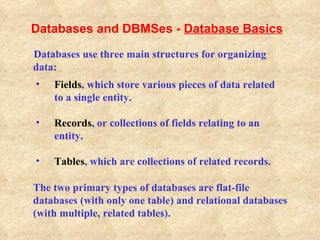
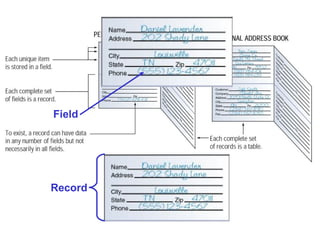
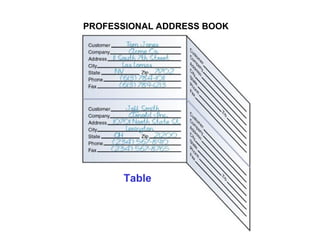
The two primary types of databases are flat-file databases (with only one table) and relational databases (with multiple, related tables).   Fields , which store various pieces of data related to a single entity. Records , or collections of fields relating to an entity. Tables , which are collections of related records.   Databases use three main structures for organizing data: Databases and DBMSes -  Database Basics
Field Record
PROFESSIONAL ADDRESS BOOK Table
Entering data into the database. Sorting (rearranging) the data in the  database. Obtaining subsets of the data for use.   A DBMS allows users to access and manage the data collected in a database. Data management tasks (all done through the DBMS) can be divided into three categories:   Databases and DBMSes -  DBMS Basics
Creating Database Tables Viewing Records Sorting Records Querying a Database Generating Reports   Working With a Database
Text   Logical  Numeric Date/Time Memo   Binary  Counter   The first step in building a database is to create its tables.  This means identifying, naming, and organizing  its fields to receive data. Databases can store the following types of fields:   Working With a Database –  Creating Database Tables
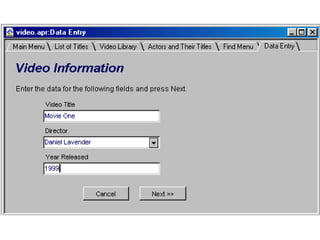
You can create forms that let you view and enter data  for one record at a time. Database tools such as masks can validate data as it is  entered and thus ensure the data is in the correct  format.   Working With a Database –  Creating Database Tables
 
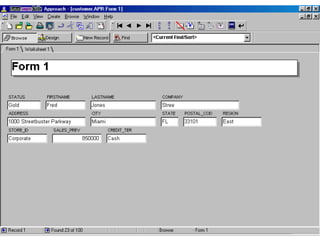
A filter is a tool that lets you view records that match a given criterion. Filters are helpful when searching for certain types of information in a large database with many records. A form can work with a filter, but enables you to view information about a single record. Working With a Database -  Viewing Records
 
Sorting means arranging the records in a database. A DBMS enables you to sort records alphabetically, numerically, and chronologically. You can sort records in ascending (A-Z) order or descending (Z-A) order. Working With a Database -  Sorting Records
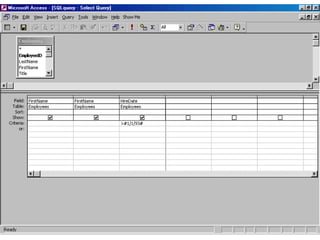
SQL (Structured Query Language) Query by Example (QBE) Xbase   A query is a statement you define, which tells the DBMS  to find records that match criteria you specify. Modern DMBS software provides built-in querying tools, based on one or more of the following languages:   Working With a Database -  Querying a Database
 
A report is a subset of information from a database, produced in printed form. You can generate the data for a report by using  a query, filter, or other tools. Reports can be formatted in a wide variety of ways.   Working With a Database -  Generating Reports
Enterprise software is a large-scale application based on a DBMS, used by a large organization. Enterprise software can meet the needs of many different users in different locations. In an enterprise, different users have different interfaces to the database, so they can work only  with the data they need. Enterprise Software
Define the terms database and database management system (DBMS). List three tasks that a DBMS enables users to do. Differentiate between flat-file databases and relational databases. List three steps needed to create a database. Explain the purpose of filters and forms. List three examples of query languages. review

Introduction to databases

  • 1.
    Database Management Systemsand Enterprise Software
  • 2.
    This lesson includesthe following sections: Databases and Management Systems Working with a Database Enterprise Software
  • 3.
    The Difference betweenDatabases and DBMSes Database Basics DBMSes Basics Databases and Database Management Systems
  • 4.
    A database isa repository for collections of related data or facts. A database management system (DBMS) is a software tool that lets users add, view, and work with the data in a database. Large databases and DBMS’ are commonly used by companies, but many productivity applications are built around database concepts. Databases and Database Management Systems The Difference between Databases and DBMSes
  • 5.
    The two primarytypes of databases are flat-file databases (with only one table) and relational databases (with multiple, related tables). Fields , which store various pieces of data related to a single entity. Records , or collections of fields relating to an entity. Tables , which are collections of related records. Databases use three main structures for organizing data: Databases and DBMSes - Database Basics
  • 6.
  • 7.
  • 8.
    Entering data intothe database. Sorting (rearranging) the data in the database. Obtaining subsets of the data for use. A DBMS allows users to access and manage the data collected in a database. Data management tasks (all done through the DBMS) can be divided into three categories: Databases and DBMSes - DBMS Basics
  • 9.
    Creating Database TablesViewing Records Sorting Records Querying a Database Generating Reports Working With a Database
  • 10.
    Text Logical Numeric Date/Time Memo Binary Counter The first step in building a database is to create its tables. This means identifying, naming, and organizing its fields to receive data. Databases can store the following types of fields: Working With a Database – Creating Database Tables
  • 11.
    You can createforms that let you view and enter data for one record at a time. Database tools such as masks can validate data as it is entered and thus ensure the data is in the correct format. Working With a Database – Creating Database Tables
  • 12.
  • 13.
    A filter isa tool that lets you view records that match a given criterion. Filters are helpful when searching for certain types of information in a large database with many records. A form can work with a filter, but enables you to view information about a single record. Working With a Database - Viewing Records
  • 14.
  • 15.
    Sorting means arrangingthe records in a database. A DBMS enables you to sort records alphabetically, numerically, and chronologically. You can sort records in ascending (A-Z) order or descending (Z-A) order. Working With a Database - Sorting Records
  • 16.
    SQL (Structured QueryLanguage) Query by Example (QBE) Xbase A query is a statement you define, which tells the DBMS to find records that match criteria you specify. Modern DMBS software provides built-in querying tools, based on one or more of the following languages: Working With a Database - Querying a Database
  • 17.
  • 18.
    A report isa subset of information from a database, produced in printed form. You can generate the data for a report by using a query, filter, or other tools. Reports can be formatted in a wide variety of ways. Working With a Database - Generating Reports
  • 19.
    Enterprise software isa large-scale application based on a DBMS, used by a large organization. Enterprise software can meet the needs of many different users in different locations. In an enterprise, different users have different interfaces to the database, so they can work only with the data they need. Enterprise Software
  • 20.
    Define the termsdatabase and database management system (DBMS). List three tasks that a DBMS enables users to do. Differentiate between flat-file databases and relational databases. List three steps needed to create a database. Explain the purpose of filters and forms. List three examples of query languages. review