Database Management
Systems(DBMS)
ASI/RM H.D.SATI
22/01/2025
• A database is a repository for collections of
related data or facts.
• A database system is designed to be built and
populated with data for a certain task.
• A database management system (DBMS) is a
software tool that lets users add, view, and
work with the data in a database.
DATABASES
PROPERTIES OF DATABASES
1 Data Integrity: Ensures that the data is accurate, consistent,
and reliable throughout its lifecycle.
2 Data Redundancy Control:
•Reduces unnecessary duplication of data, which saves space and
improves performance.
•Database normalization techniques are used to organize data into
tables to minimize redundancy.
3 Data Security:
•Protects data from unauthorized access and modifications.
•Security measures include user authentication, role-based access
control, encryption, and auditing.
PROPERTIES OF DATABASES
4 Data Independence: Allows data to be modified without
affecting the application layer or the user interface.
5 Backup and Recovery: Ensures that data can be recovered
in case of system failure, human error, or disasters.
6 Data Scalability: Ability to handle increasing volumes of
data or growing numbers of users without significant performance
degradation.
PROPERTIES OF DATABASES
7. Transaction management properties
Atomicity: All or nothing (either the whole transaction happens, or none of it
does).
Consistency: The database moves from one valid state to another (no data
corruption or violation of rules).
Isolation: Transactions are executed in isolation from one another (no
interference from concurrent transactions).
Durability: Committed transactions are permanent, even in the face of failures.
The two primary types of databases are flat-file
databases (with only one table) and relational databases
(with multiple, related tables).
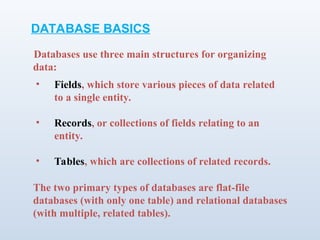
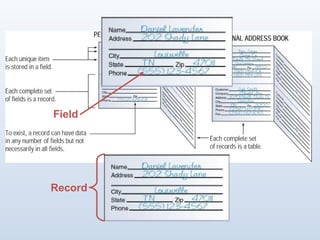
• Fields, which store various pieces of data related
to a single entity.
• Records, or collections of fields relating to an
entity.
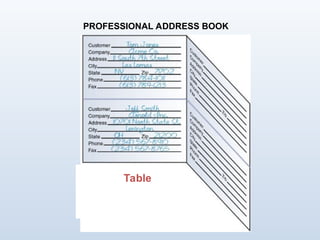
• Tables, which are collections of related records.
Databases use three main structures for organizing
data:
DATABASE BASICS
Field
Record
Table
PROFESSIONAL ADDRESS BOOK
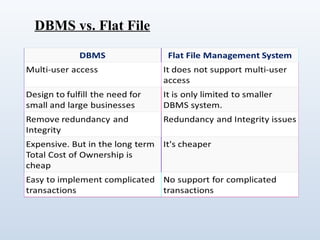
DBMS vs. Flat File
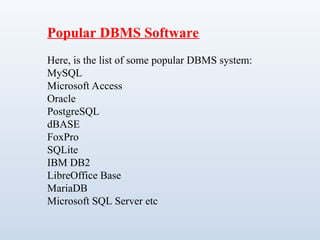
Popular DBMS Software
Here, is the list of some popular DBMS system:
MySQL
Microsoft Access
Oracle
PostgreSQL
dBASE
FoxPro
SQLite
IBM DB2
LibreOffice Base
MariaDB
Microsoft SQL Server etc
• Entering data into the database.
• Sorting (rearranging) the data in the database.
• Obtaining subsets of the data for use.
A DBMS is a application software that allows users to
access and manage the data collected in a database.
Data management tasks (all done through the DBMS)
can be divided into three categories:
DBMS BASICS
• Creating Database Tables
• Viewing Records
• Sorting Records
• Querying a Database
• Generating Reports
WORKING WITH A DATABASE
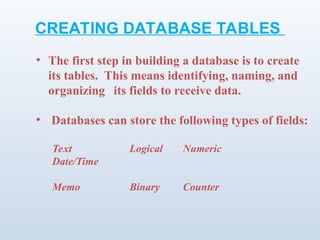
Text Logical Numeric
Date/Time
Memo Binary Counter
• The first step in building a database is to create
its tables. This means identifying, naming, and
organizing its fields to receive data.
• Databases can store the following types of fields:
CREATING DATABASE TABLES
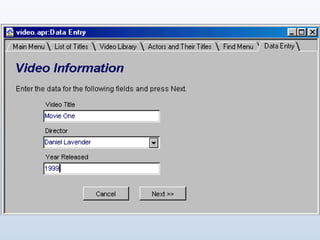
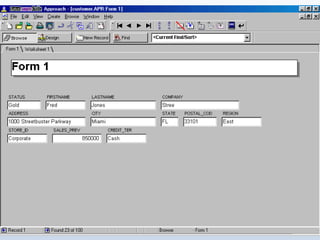
• You can create forms that let you view and enter data
for one record at a time.
• Database tools such as masks can validate data as it is
entered and thus ensure the data is in the
correct format.
CREATING DATABASE FORMS
• A filter is a tool that lets you view records that
match a given criteria.
• Filters are helpful when searching for certain
types of information in a large database with
many records.
• A form can work with a filter, but enables you
to view information about a single record.
VIEWING RECORDS
• Sorting means arranging the records in a
database.
• A DBMS enables you to sort records
alphabetically, numerically, and
chronologically.
• You can sort records in ascending (A-Z)
order or descending (Z-A) order.
SORTING RECORDS
• SQL
• Query by Example (QBE)
• Xbase
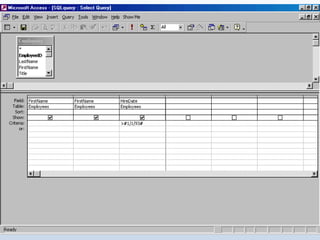
A query is a statement you define, which tells the DBMS
to find records that match criteria you specify.
Modern DMBS software provides built-in querying tools,
based on one or more of the following languages:
QUERYING A DATABASE
• A report is a subset of information from a database,
produced in printed form.
• You can generate the data for a report by using a
query, filter, or other tools.
• Reports can be formatted in a wide variety of ways.
GENERATING REPORTS
• Enterprise software is a large-scale application based
on a DBMS, used by a large organization.
• Enterprise software can meet the needs of many
different users in different locations.
• In an enterprise, different users by have different
interfaces to the database, so they can work only with
the data they need.
ENTERPRISE SOFTWARE
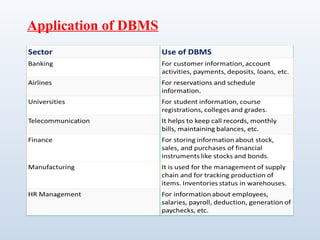
Application of DBMS
TYPES OF DATABASE
Hierarchical DBMS
In a Hierarchical database, model data is organized in a tree-like
structure. Data is Stored Hierarchically (top down or bottom up)
format. Data is represented using a parent-child relationship. In
Hierarchical DBMS parent may have many children, but children
have only one parent.
Network Model
The network database model allows each child to have multiple
parents. It helps you to address the need to model more complex
relationships like as the orders/parts many-to-many relationship. In
this model, entities are organized in a graph which can be accessed
through several paths.
Relational model
Relational DBMS is the most widely used DBMS model because
it is one of the easiest. This model is based on normalizing data
in the rows and columns of the tables. Relational model stored in
fixed structures and manipulated using SQL.
Object-Oriented Model
In Object-oriented Model data stored in the form of objects. The
structure which is called classes which display data within it. It
defines a database as a collection of objects which stores both
data members values and operations.
Advantages of DBMS
DBMS offers a variety of techniques to store & retrieve data.
DBMS serves as an efficient handler to balance the needs of
multiple applications using the same data.
Uniform administration procedures for data.
Application programmers never exposed to details of data
representation and storage.
A DBMS uses various powerful functions to store and retrieve data
efficiently.
Offers Data Integrity and Security.
The DBMS implies integrity constraints to get a high level of
protection against prohibited access to data.
A DBMS schedules concurrent access to the data in such a manner
that only one user can access the same data at a time.
•Reduced Application Development Time.
Disadvantage of DBMS
Cost of Hardware and Software of a DBMS is quite high
which increases the budget of your organization.
Most database management systems are often complex
systems, so the training for users to use the DBMS is
required.
In some organizations, all data is integrated into a single
database which can be damaged because of electric failure or
database is corrupted on the storage media.
Use of the same program at a time by many users
sometimes lead to the loss of some data.
DBMS can't perform sophisticated calculations.
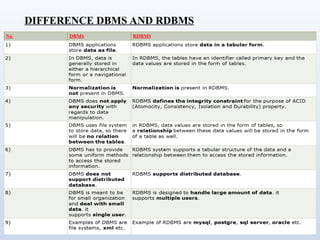
DIFFERENCE DBMS AND RDBMS
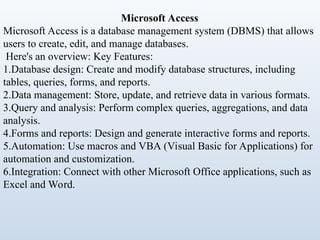
Microsoft Access
Microsoft Access is a database management system (DBMS) that allows
users to create, edit, and manage databases.
Here's an overview: Key Features:
1.Database design: Create and modify database structures, including
tables, queries, forms, and reports.
2.Data management: Store, update, and retrieve data in various formats.
3.Query and analysis: Perform complex queries, aggregations, and data
analysis.
4.Forms and reports: Design and generate interactive forms and reports.
5.Automation: Use macros and VBA (Visual Basic for Applications) for
automation and customization.
6.Integration: Connect with other Microsoft Office applications, such as
Excel and Word.
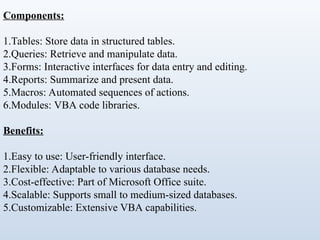
Components:
1.Tables: Store data in structured tables.
2.Queries: Retrieve and manipulate data.
3.Forms: Interactive interfaces for data entry and editing.
4.Reports: Summarize and present data.
5.Macros: Automated sequences of actions.
6.Modules: VBA code libraries.
Benefits:
1.Easy to use: User-friendly interface.
2.Flexible: Adaptable to various database needs.
3.Cost-effective: Part of Microsoft Office suite.
4.Scalable: Supports small to medium-sized databases.
5.Customizable: Extensive VBA capabilities.
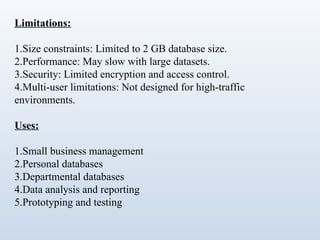
Limitations:
1.Size constraints: Limited to 2 GB database size.
2.Performance: May slow with large datasets.
3.Security: Limited encryption and access control.
4.Multi-user limitations: Not designed for high-traffic
environments.
Uses:
1.Small business management
2.Personal databases
3.Departmental databases
4.Data analysis and reporting
5.Prototyping and testing
Alternatives:
1.Microsoft SQL Server
2.Oracle Database
3.MySQL
4.PostgreSQL
5.LibreOffice Base
Versions:
1.Access 2010
2.Access 2013
3.Access 2016
4.Access 2019
5.Access 2021 (Microsoft 365)
System Requirements:
1.Windows operating system
2.Microsoft Office suite
3.Minimum 1 GB RAM (recommended 4 GB)
4.2 GB free disk space
To get started with Microsoft Access, consider:
1.Online tutorials and guides
2.Microsoft Access documentation
3.Training courses and certifications
4.Community forums and support resources
Conclusions:
Microsoft Access is a powerful tool for managing and analyzing
data. Its versatility and ease of use make it a popular choice for
various applications.

DBMS ACCESS programming and learning .ppt

  • 1.
  • 2.
    • A databaseis a repository for collections of related data or facts. • A database system is designed to be built and populated with data for a certain task. • A database management system (DBMS) is a software tool that lets users add, view, and work with the data in a database. DATABASES
  • 3.
    PROPERTIES OF DATABASES 1Data Integrity: Ensures that the data is accurate, consistent, and reliable throughout its lifecycle. 2 Data Redundancy Control: •Reduces unnecessary duplication of data, which saves space and improves performance. •Database normalization techniques are used to organize data into tables to minimize redundancy. 3 Data Security: •Protects data from unauthorized access and modifications. •Security measures include user authentication, role-based access control, encryption, and auditing.
  • 4.
    PROPERTIES OF DATABASES 4Data Independence: Allows data to be modified without affecting the application layer or the user interface. 5 Backup and Recovery: Ensures that data can be recovered in case of system failure, human error, or disasters. 6 Data Scalability: Ability to handle increasing volumes of data or growing numbers of users without significant performance degradation.
  • 5.
    PROPERTIES OF DATABASES 7.Transaction management properties Atomicity: All or nothing (either the whole transaction happens, or none of it does). Consistency: The database moves from one valid state to another (no data corruption or violation of rules). Isolation: Transactions are executed in isolation from one another (no interference from concurrent transactions). Durability: Committed transactions are permanent, even in the face of failures.
  • 6.
    The two primarytypes of databases are flat-file databases (with only one table) and relational databases (with multiple, related tables). • Fields, which store various pieces of data related to a single entity. • Records, or collections of fields relating to an entity. • Tables, which are collections of related records. Databases use three main structures for organizing data: DATABASE BASICS
  • 7.
  • 8.
  • 9.
  • 10.
    Popular DBMS Software Here,is the list of some popular DBMS system: MySQL Microsoft Access Oracle PostgreSQL dBASE FoxPro SQLite IBM DB2 LibreOffice Base MariaDB Microsoft SQL Server etc
  • 11.
    • Entering datainto the database. • Sorting (rearranging) the data in the database. • Obtaining subsets of the data for use. A DBMS is a application software that allows users to access and manage the data collected in a database. Data management tasks (all done through the DBMS) can be divided into three categories: DBMS BASICS
  • 12.
    • Creating DatabaseTables • Viewing Records • Sorting Records • Querying a Database • Generating Reports WORKING WITH A DATABASE
  • 13.
    Text Logical Numeric Date/Time MemoBinary Counter • The first step in building a database is to create its tables. This means identifying, naming, and organizing its fields to receive data. • Databases can store the following types of fields: CREATING DATABASE TABLES
  • 14.
    • You cancreate forms that let you view and enter data for one record at a time. • Database tools such as masks can validate data as it is entered and thus ensure the data is in the correct format. CREATING DATABASE FORMS
  • 16.
    • A filteris a tool that lets you view records that match a given criteria. • Filters are helpful when searching for certain types of information in a large database with many records. • A form can work with a filter, but enables you to view information about a single record. VIEWING RECORDS
  • 18.
    • Sorting meansarranging the records in a database. • A DBMS enables you to sort records alphabetically, numerically, and chronologically. • You can sort records in ascending (A-Z) order or descending (Z-A) order. SORTING RECORDS
  • 19.
    • SQL • Queryby Example (QBE) • Xbase A query is a statement you define, which tells the DBMS to find records that match criteria you specify. Modern DMBS software provides built-in querying tools, based on one or more of the following languages: QUERYING A DATABASE
  • 21.
    • A reportis a subset of information from a database, produced in printed form. • You can generate the data for a report by using a query, filter, or other tools. • Reports can be formatted in a wide variety of ways. GENERATING REPORTS
  • 22.
    • Enterprise softwareis a large-scale application based on a DBMS, used by a large organization. • Enterprise software can meet the needs of many different users in different locations. • In an enterprise, different users by have different interfaces to the database, so they can work only with the data they need. ENTERPRISE SOFTWARE
  • 23.
  • 24.
    TYPES OF DATABASE HierarchicalDBMS In a Hierarchical database, model data is organized in a tree-like structure. Data is Stored Hierarchically (top down or bottom up) format. Data is represented using a parent-child relationship. In Hierarchical DBMS parent may have many children, but children have only one parent. Network Model The network database model allows each child to have multiple parents. It helps you to address the need to model more complex relationships like as the orders/parts many-to-many relationship. In this model, entities are organized in a graph which can be accessed through several paths.
  • 25.
    Relational model Relational DBMSis the most widely used DBMS model because it is one of the easiest. This model is based on normalizing data in the rows and columns of the tables. Relational model stored in fixed structures and manipulated using SQL. Object-Oriented Model In Object-oriented Model data stored in the form of objects. The structure which is called classes which display data within it. It defines a database as a collection of objects which stores both data members values and operations.
  • 26.
    Advantages of DBMS DBMSoffers a variety of techniques to store & retrieve data. DBMS serves as an efficient handler to balance the needs of multiple applications using the same data. Uniform administration procedures for data. Application programmers never exposed to details of data representation and storage. A DBMS uses various powerful functions to store and retrieve data efficiently. Offers Data Integrity and Security. The DBMS implies integrity constraints to get a high level of protection against prohibited access to data. A DBMS schedules concurrent access to the data in such a manner that only one user can access the same data at a time. •Reduced Application Development Time.
  • 27.
    Disadvantage of DBMS Costof Hardware and Software of a DBMS is quite high which increases the budget of your organization. Most database management systems are often complex systems, so the training for users to use the DBMS is required. In some organizations, all data is integrated into a single database which can be damaged because of electric failure or database is corrupted on the storage media. Use of the same program at a time by many users sometimes lead to the loss of some data. DBMS can't perform sophisticated calculations.
  • 28.
  • 29.
    Microsoft Access Microsoft Accessis a database management system (DBMS) that allows users to create, edit, and manage databases. Here's an overview: Key Features: 1.Database design: Create and modify database structures, including tables, queries, forms, and reports. 2.Data management: Store, update, and retrieve data in various formats. 3.Query and analysis: Perform complex queries, aggregations, and data analysis. 4.Forms and reports: Design and generate interactive forms and reports. 5.Automation: Use macros and VBA (Visual Basic for Applications) for automation and customization. 6.Integration: Connect with other Microsoft Office applications, such as Excel and Word.
  • 30.
    Components: 1.Tables: Store datain structured tables. 2.Queries: Retrieve and manipulate data. 3.Forms: Interactive interfaces for data entry and editing. 4.Reports: Summarize and present data. 5.Macros: Automated sequences of actions. 6.Modules: VBA code libraries. Benefits: 1.Easy to use: User-friendly interface. 2.Flexible: Adaptable to various database needs. 3.Cost-effective: Part of Microsoft Office suite. 4.Scalable: Supports small to medium-sized databases. 5.Customizable: Extensive VBA capabilities.
  • 31.
    Limitations: 1.Size constraints: Limitedto 2 GB database size. 2.Performance: May slow with large datasets. 3.Security: Limited encryption and access control. 4.Multi-user limitations: Not designed for high-traffic environments. Uses: 1.Small business management 2.Personal databases 3.Departmental databases 4.Data analysis and reporting 5.Prototyping and testing
  • 32.
    Alternatives: 1.Microsoft SQL Server 2.OracleDatabase 3.MySQL 4.PostgreSQL 5.LibreOffice Base Versions: 1.Access 2010 2.Access 2013 3.Access 2016 4.Access 2019 5.Access 2021 (Microsoft 365)
  • 33.
    System Requirements: 1.Windows operatingsystem 2.Microsoft Office suite 3.Minimum 1 GB RAM (recommended 4 GB) 4.2 GB free disk space To get started with Microsoft Access, consider: 1.Online tutorials and guides 2.Microsoft Access documentation 3.Training courses and certifications 4.Community forums and support resources Conclusions: Microsoft Access is a powerful tool for managing and analyzing data. Its versatility and ease of use make it a popular choice for various applications.