1 / 37
Introduction - Realtime Database
FirebaseEueung Mulyana
https://eueung.github.io/112016/firebase
CodeLabs | Attribution-ShareAlike CC BY-SA
Firebase Version: 3.6.4
Vue.JS 2.1.6 | VueFire 1.3.0 | Vue Material 0.5.2
2 / 37
Outline
Introduction
Quick Start
VueFire
3 / 37
Introduction
4 / 37
5 / 37
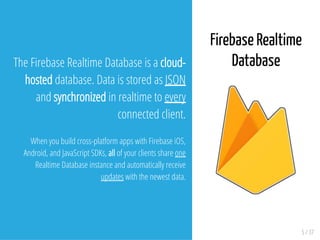
The Firebase Realtime Database is a cloud-
hosted database. Data is stored as JSON
and synchronized in realtime to every
connected client.
When you build cross-platform apps with Firebase iOS,
Android, and JavaScript SDKs, all of your clients share one
Realtime Database instance and automatically receive
updates with the newest data.
Firebase Realtime
Database
6 / 37
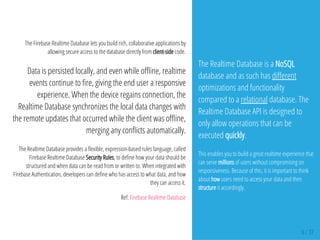
The Firebase Realtime Database lets you build rich, collaborative applications by
allowing secure access to the database directly from client-side code.
Data is persisted locally, and even while o ine, realtime
events continue to re, giving the end user a responsive
experience. When the device regains connection, the
Realtime Database synchronizes the local data changes with
the remote updates that occurred while the client was o ine,
merging any con icts automatically.
The Realtime Database provides a exible, expression-based rules language, called
Firebase Realtime Database Security Rules, to de ne how your data should be
structured and when data can be read from or written to. When integrated with
Firebase Authentication, developers can de ne who has access to what data, and how
they can access it.
Ref: Firebase Realtime Database
The Realtime Database is a NoSQL
database and as such has di erent
optimizations and functionality
compared to a relational database. The
Realtime Database API is designed to
only allow operations that can be
executed quickly.
This enables you to build a great realtime experience that
can serve millions of users without compromising on
responsiveness. Because of this, it is important to think
about how users need to access your data and then
structure it accordingly.
Quick Start
7 / 37
8 / 37
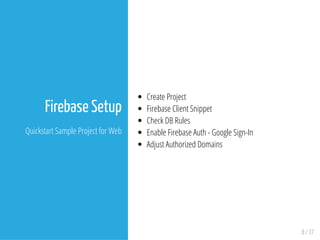
Firebase Setup
Quickstart Sample Project for Web
Create Project
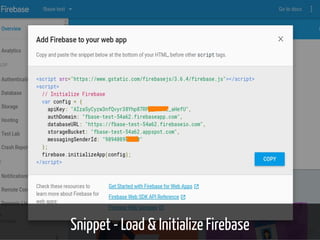
Firebase Client Snippet
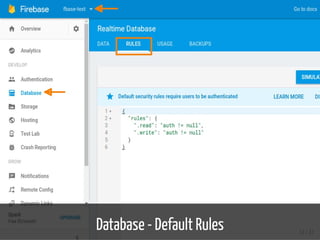
Check DB Rules
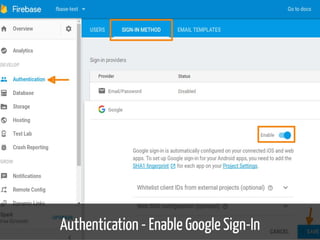
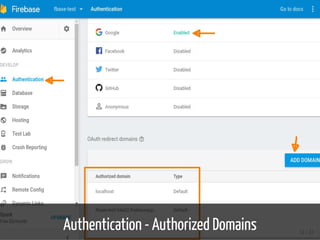
Enable Firebase Auth - Google Sign-In
Adjust Authorized Domains
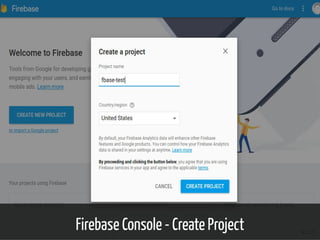
Firebase Console - Create Project 9 / 37
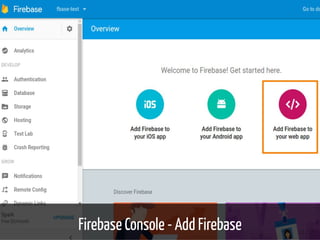
Firebase Console - Add Firebase 10 / 37
Snippet - Load & Initialize Firebase 11 / 37
Database - Default Rules 12 / 37
Authentication - Enable Google Sign-In 13 / 37
Authentication - Authorized Domains 14 / 37
15 / 37
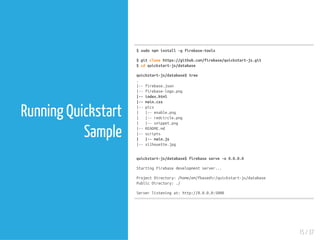
Running Quickstart
Sample
$sudonpminstall-gfirebase-tools
$gitclonehttps://github.com/firebase/quickstart-js.git
$cdquickstart-js/database
quickstart-js/database$tree
.
|--firebase.json
|--firebase-logo.png
|--index.html
|--main.css
|--pics
| |--enable.png
| |--redcircle.png
| |--snippet.png
|--README.md
|--scripts
| |--main.js
|--silhouette.jpg
quickstart-js/database$firebaseserve-o0.0.0.0
StartingFirebasedevelopmentserver...
ProjectDirectory:/home/em/fbasedir/quickstart-js/database
PublicDirectory:./
Serverlisteningat:http://0.0.0.0:5000
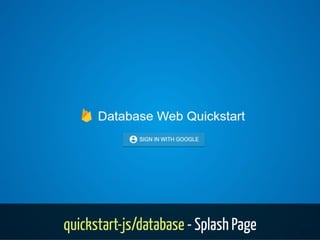
quickstart-js/database - Splash Page 16 / 37
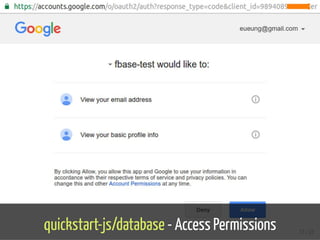
quickstart-js/database - Access Permissions 17 / 37
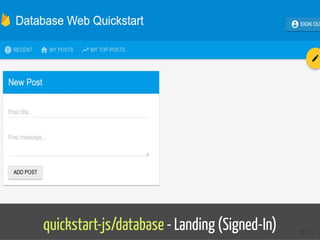
quickstart-js/database - Landing (Signed-In) 18 / 37
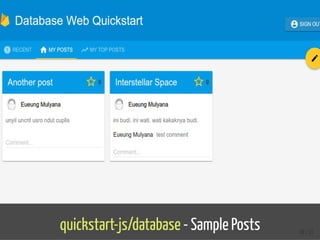
quickstart-js/database - Sample Posts 19 / 37
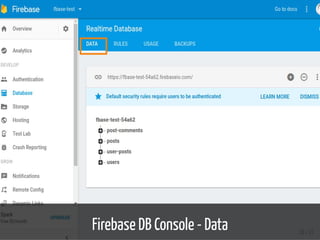
Firebase DB Console - Data 20 / 37
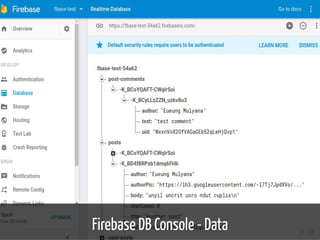
Firebase DB Console - Data 21 / 37
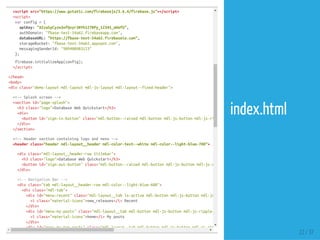
<!--Firebase-->
<scriptsrc="https://www.gstatic.com/firebasejs/3.6.4/firebase.js"></script>
<script>
varconfig={
apiKey:"AIzaSyCyzw3nfQvyr38Yh127RPy_12345_aHefU",
authDomain:"fbase-test-54a62.firebaseapp.com",
databaseURL:"https://fbase-test-54a62.firebaseio.com",
storageBucket:"fbase-test-54a62.appspot.com",
messagingSenderId:"989408983123"
};
firebase.initializeApp(config);
</script>
</head>
<body>
<divclass="demo-layoutmdl-layoutmdl-js-layoutmdl-layout--fixed-header">
<!--Splashscreen-->
<sectionid="page-splash">
<h3class="logo">DatabaseWebQuickstart</h3>
<div>
<buttonid="sign-in-button"class="mdl-button--raisedmdl-buttonmdl-js-buttonmdl-js-ripple-effect"
</div>
</section>
<!--Headersectioncontaininglogoandmenu-->
<headerclass="headermdl-layout__headermdl-color-text--whitemdl-color--light-blue-700">
<divclass="mdl-layout__header-rowtitlebar">
<h3class="logo">DatabaseWebQuickstart</h3>
<buttonid="sign-out-button"class="mdl-button--raisedmdl-buttonmdl-js-buttonmdl-js-ripple-effect"
</div>
<!--NavigationBar-->
<divclass="tabmdl-layout__header-rowmdl-color--light-blue-600">
<divclass="mdl-tab">
<divid="menu-recent"class="mdl-layout__tabis-activemdl-buttonmdl-js-buttonmdl-js-ripple-effect"
<iclass="material-icons">new_releases</i>Recent
</div>
<divid="menu-my-posts"class="mdl-layout__tabmdl-buttonmdl-js-buttonmdl-js-ripple-effect"
<iclass="material-icons">home</i>Myposts
</div>
<divid="menu-my-top-posts"class="mdl-layout__tabmdl-buttonmdl-js-buttonmdl-js-ripple-effect"
22 / 37
index.html
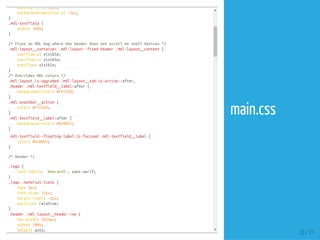
padding-left:50px;
background-position-y:-2px;
}
.mdl-textfield{
width:100%;
}
/*FixesanMDLbugwheretheheaderdoesnotscrollonsmalldevices*/
.mdl-layout__container.mdl-layout--fixed-header.mdl-layout__content{
overflow-y:visible;
overflow-x:visible;
overflow:visible;
}
/*OverridesMDLcolors*/
.mdl-layout.is-upgraded.mdl-layout__tab.is-active::after,
.header.mdl-textfield__label:after{
background-color:#FFCA28;
}
.mdl-snackbar__action{
color:#FFCA28;
}
.mdl-textfield__label:after{
background-color:#0288D1;
}
.mdl-textfield--floating-label.is-focused.mdl-textfield__label{
color:#0288D1;
}
/*Header*/
.logo{
font-family:'Amaranth',sans-serif;
}
.logo.material-icons{
top:4px;
font-size:32px;
margin-right:-2px;
position:relative;
}
.header.mdl-layout__header-row{
max-width:1024px;
width:100%;
height:auto;
23 / 37
main.css
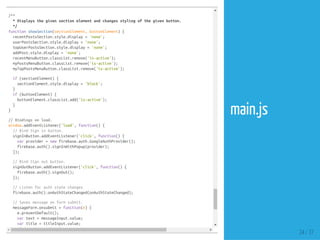
}
/**
*Displaysthegivensectionelementandchangesstylingofthegivenbutton.
*/
functionshowSection(sectionElement,buttonElement){
recentPostsSection.style.display='none';
userPostsSection.style.display='none';
topUserPostsSection.style.display='none';
addPost.style.display='none';
recentMenuButton.classList.remove('is-active');
myPostsMenuButton.classList.remove('is-active');
myTopPostsMenuButton.classList.remove('is-active');
if(sectionElement){
sectionElement.style.display='block';
}
if(buttonElement){
buttonElement.classList.add('is-active');
}
}
//Bindingsonload.
window.addEventListener('load',function(){
//BindSigninbutton.
signInButton.addEventListener('click',function(){
varprovider=newfirebase.auth.GoogleAuthProvider();
firebase.auth().signInWithPopup(provider);
});
//BindSignoutbutton.
signOutButton.addEventListener('click',function(){
firebase.auth().signOut();
});
//Listenforauthstatechanges
firebase.auth().onAuthStateChanged(onAuthStateChanged);
//Savesmessageonformsubmit.
messageForm.onsubmit=function(e){
e.preventDefault();
vartext=messageInput.value;
vartitle=titleInput.value;
if(text&&title){
24 / 37
main.js
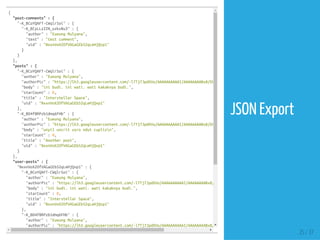
{
"post-comments":{
"-K_BCoYQAFT-CWqlrSoi":{
"-K_BCyLLzZZN_uzkv8u3":{
"author":"EueungMulyana",
"text":"testcomment",
"uid":"NxxnVoX2OfVAGaGEb52qLeHjQvp1"
}
}
},
"posts":{
"-K_BCoYQAFT-CWqlrSoi":{
"author":"EueungMulyana",
"authorPic":"https://lh3.googleusercontent.com/-l7Tj7JpdXVo/AAAAAAAAAAI/AAAAAAAABx8/EHbAGOhag-A/photo.jpg"
"body":"inibudi.iniwati.watikakaknyabudi.",
"starCount":0,
"title":"InterstellarSpace",
"uid":"NxxnVoX2OfVAGaGEb52qLeHjQvp1"
},
"-K_BD4f8RPzb1dmq6FHb":{
"author":"EueungMulyana",
"authorPic":"https://lh3.googleusercontent.com/-l7Tj7JpdXVo/AAAAAAAAAAI/AAAAAAAABx8/EHbAGOhag-A/photo.jpg"
"body":"unyiluncritusrondutcuplisn",
"starCount":0,
"title":"Anotherpost",
"uid":"NxxnVoX2OfVAGaGEb52qLeHjQvp1"
}
},
"user-posts":{
"NxxnVoX2OfVAGaGEb52qLeHjQvp1":{
"-K_BCoYQAFT-CWqlrSoi":{
"author":"EueungMulyana",
"authorPic":"https://lh3.googleusercontent.com/-l7Tj7JpdXVo/AAAAAAAAAAI/AAAAAAAABx8/EHbAGOhag-A/photo.jpg"
"body":"inibudi.iniwati.watikakaknyabudi.",
"starCount":0,
"title":"InterstellarSpace",
"uid":"NxxnVoX2OfVAGaGEb52qLeHjQvp1"
},
"-K_BD4f8RPzb1dmq6FHb":{
"author":"EueungMulyana",
"authorPic":"https://lh3.googleusercontent.com/-l7Tj7JpdXVo/AAAAAAAAAAI/AAAAAAAABx8/EHbAGOhag-A/photo.jpg"
25 / 37
JSON Export
VueFire
Firebase bindings for Vue.js
26 / 37
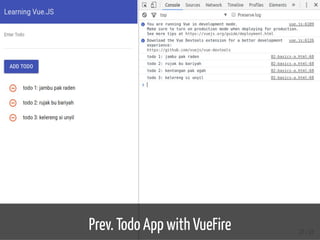
Prev. Todo App with VueFire 27 / 37
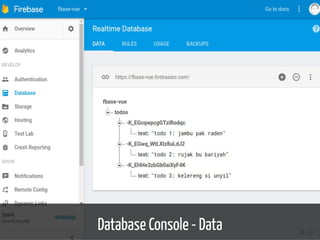
Database Console - Data 28 / 37
{
"todos":{
"-K_EGcqwpcgGTziRodqc":{
"text":"todo1:jambupakraden"
},
"-K_EGwq_WtLXlz8uLdJ2":{
"text":"todo2:rujakbubariyah"
},
"-K_EHHe3zbGb0aiXyF4K":{
"text":"todo3:kelerengsiunyil"
}
}
}
#--------------------------------------
#ForComparison,PreviouslyEquivalent:
{
"todos":[
{
"text":"todo1:jambupakraden"
},
{
"text":"todo2:rujakbubariyah"
},
{
"text":"todo3:kelerengsiunyil"
}
]
}
29 / 37
JSON Export
<scriptsrc="https://www.gstatic.com/firebasejs/3.6.4/firebase.js"></script>
</head>
<body>
<divid="app">
<md-toolbar><h1class="md-title">LearningVue.JS</h1></md-toolbar>
<divclass="main-content">
<md-input-container>
<label>EnterTodo</label>
<md-inputv-model="newTodo"></md-input>
</md-input-container>
<md-buttonclass="md-raisedmd-primary"v-on:click="addTodo">AddTodo</md-button>
<ul>
<liv-for="todointodos">
<md-buttonclass="md-icon-buttonmd-warn"v-on:click="removeTodo(todo)"><md-icon>remove_circle_outline
{{todo.text}}
</li>
</ul>
</div></div>
<scriptsrc="//unpkg.com/vue/dist/vue.js"></script>
<scriptsrc="//unpkg.com/vuefire/dist/vuefire.js"></script>
<scriptsrc="//unpkg.com/vue-material@latest"></script>
<scripttype="text/javascript">
Vue.use(VueMaterial);
Vue.use(VueFire);
varconfig={
apiKey:"AIzaSyC8TM42dWYF123_12345gvMPvYHdtEMWMc",
authDomain:"fbase-vue.firebaseapp.com",
databaseURL:"https://fbase-vue.firebaseio.com"
};
firebase.initializeApp(config);
vartodosRef=firebase.database().ref('todos');
varApp=newVue({
el:'#app',
30 / 37
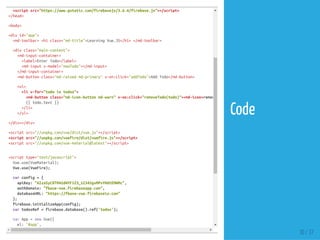
Code
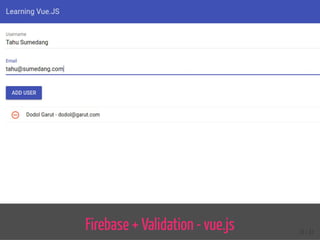
Firebase + Validation - vue.js 31 / 37
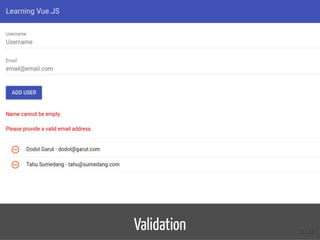
Validation 32 / 37
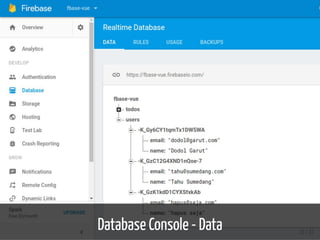
Database Console - Data 33 / 37
<divid="app">
<md-toolbar><h1class="md-title">LearningVue.JS</h1></md-toolbar>
<divclass="main-content">
<md-input-container>
<label>Username</label>
<md-inputtype="text"v-model="newUser.name"placeholder="Username"></md-input>
</md-input-container>
<md-input-container>
<label>Email</label>
<md-inputtype="email"v-model="newUser.email"placeholder="email@email.com"></md-input>
</md-input-container>
<md-buttonclass="md-raisedmd-primary"v-on:click="addUser">AddUser</md-button>
<ulclass="errors">
<liv-show="!validation.name">Namecannotbeempty.</li>
<liv-show="!validation.email">Pleaseprovideavalidemailaddress.</li>
</ul>
<ulis="transition-group">
<liv-for="userinusers"class="user":key="user['.key']">
<md-buttonclass="md-icon-buttonmd-warn"v-on:click="removeUser(user)"><md-icon>remove_circle_outline
<span>{{user.name}}-{{user.email}}</span>
</li>
</ul>
</div></div>
<scriptsrc="//unpkg.com/vue/dist/vue.js"></script>
<scriptsrc="//unpkg.com/vuefire/dist/vuefire.js"></script>
<scriptsrc="//unpkg.com/vue-material@latest"></script>
<scripttype="text/javascript">
Vue.use(VueMaterial);
Vue.use(VueFire);
varemailRE=/^(([^<>()[].,;:s@"]+(.[^<>()[].,;:s@"]+)*)|(".+"))@(([[0-9]{1,3}.[0-9]{1,3}.[0-9]{1,3}.[0-9]{1,3}])|(([a-zA-
varconfig={
apiKey:"AIzaSyC8TM42dWYF123_12345gvMPvYHdtEMWMc",
authDomain:"fbase-vue.firebaseapp.com",
34 / 37
Code
Refs
35 / 37
Refs
1. rebase/quickstart-js: Firebase Quickstart Samples for Web
2. Firebase Web Codelab
3. Firebase Realtime Database
4. vuejs/vue re: Firebase bindings for Vue.js
5. Firebase + Validation - vue.js
36 / 37
37 / 37
END
Eueung Mulyana
https://eueung.github.io/112016/firebase
CodeLabs | Attribution-ShareAlike CC BY-SA

Introduction, Examples - Firebase