



Firebase Basics
By building a simple webapp with firebase
Tharaka Devinda
Product Development and Tech Strategy, Dialog
Organizer, GDG Sri Lanka
What is Firebase?
Firebase
Firebase is a no-hassle back end for your application
Supports Web, Android, iOS, and more...
Has a comprehensive toolset for building and operating
applications
SaaS
Traditional method
● Buy / Request for a VM
● Deploy app on VM
● Take care of storage, memory, CPU, and Security
● Look after the back end like a baby
Why Firebase?
● Removes the hassle of setting up servers, security and all infrastructure
related issues
● Cross platform
● Easily scalable
● Support available in multiple channels
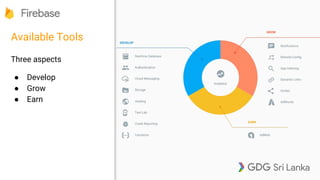
Available Tools
Three aspects
● Develop
● Grow
● Earn
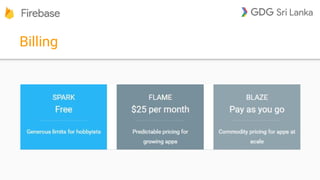
Billing
Today’s special
What we’ll build
● We will build a web page
● It will sign users in with the Google ID
● Collect details from participants and save in the db.
Hosting
Holds the static files of the page
Can be used to host websites under
a firebaseapp.com domain.
Has versioning, can be rolled back
to old deployments
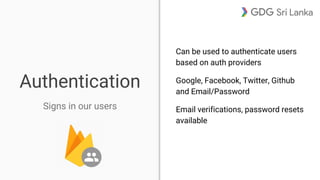
Authentication
Can be used to authenticate users
based on auth providers
Google, Facebook, Twitter, Github
and Email/Password
Email verifications, password resets
available
Signs in our users
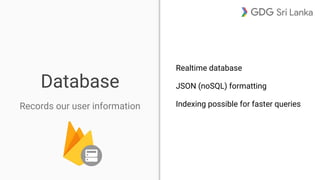
Database
Records our user information
Realtime database
JSON (noSQL) formatting
Indexing possible for faster queries
Let’s try it out
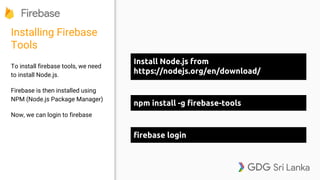
Installing Firebase
Tools
To install firebase tools, we need
to install Node.js.
Firebase is then installed using
NPM (Node.js Package Manager)
Now, we can login to firebase
Install Node.js from
https://nodejs.org/en/download/
npm install -g firebase-tools
firebase login
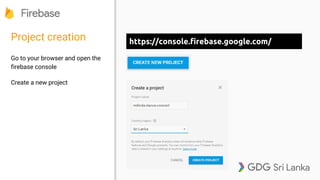
Project creation
Go to your browser and open the
firebase console
Create a new project
https://console.firebase.google.com/
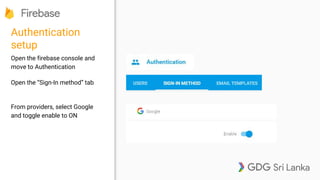
Authentication
setup
Open the firebase console and
move to Authentication
Open the “Sign-In method” tab
From providers, select Google
and toggle enable to ON
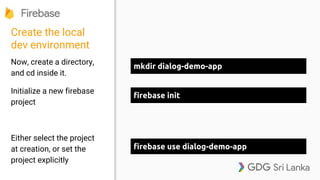
Create the local
dev environment
Now, create a directory,
and cd inside it.
Initialize a new firebase
project
Either select the project
at creation, or set the
project explicitly
firebase init
mkdir dialog-demo-app
firebase use dialog-demo-app
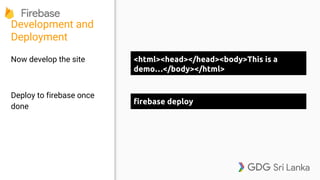
Development and
Deployment
Now develop the site
Deploy to firebase once
done
firebase deploy
<html><head></head><body>This is a
demo…</body></html>
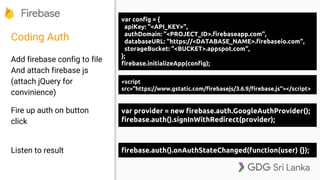
Coding Auth
Add firebase config to file
And attach firebase js
(attach jQuery for
convinience)
Fire up auth on button
click
Listen to result
var config = {
apiKey: "<API_KEY>",
authDomain: "<PROJECT_ID>.firebaseapp.com",
databaseURL: "https://<DATABASE_NAME>.firebaseio.com",
storageBucket: "<BUCKET>.appspot.com",
};
firebase.initializeApp(config);
var provider = new firebase.auth.GoogleAuthProvider();
firebase.auth().signInWithRedirect(provider);
firebase.auth().onAuthStateChanged(function(user) {});
<script
src="https://www.gstatic.com/firebasejs/3.6.9/firebase.js"></script>
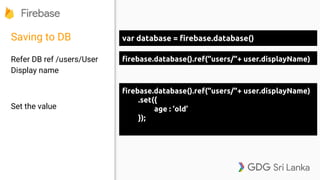
Saving to DB
Refer DB ref /users/User
Display name
Set the value
var database = firebase.database()
firebase.database().ref("users/"+ user.displayName)
.set({
age : ‘old’
});
Realtime data
● Note that the data here is changing realtime
● We can listen to these changes and trigger alerts
Homework
● Find out querying the DB
● Find out security of DB
● Try other Auth providers
○ Facebook requires you to create an app in FB
● Check out other features like analytics by the use of a codelab on Android
○ https://codelabs.developers.google.com
Thank You

Firebase Basics - Dialog Demo for Group Tech Staff

  • 1.
    Firebase Basics By buildinga simple webapp with firebase Tharaka Devinda Product Development and Tech Strategy, Dialog Organizer, GDG Sri Lanka
  • 2.
  • 3.
    Firebase Firebase is ano-hassle back end for your application Supports Web, Android, iOS, and more... Has a comprehensive toolset for building and operating applications SaaS
  • 4.
    Traditional method ● Buy/ Request for a VM ● Deploy app on VM ● Take care of storage, memory, CPU, and Security ● Look after the back end like a baby
  • 5.
    Why Firebase? ● Removesthe hassle of setting up servers, security and all infrastructure related issues ● Cross platform ● Easily scalable ● Support available in multiple channels
  • 6.
    Available Tools Three aspects ●Develop ● Grow ● Earn
  • 7.
  • 8.
  • 9.
    What we’ll build ●We will build a web page ● It will sign users in with the Google ID ● Collect details from participants and save in the db.
  • 10.
    Hosting Holds the staticfiles of the page Can be used to host websites under a firebaseapp.com domain. Has versioning, can be rolled back to old deployments
  • 11.
    Authentication Can be usedto authenticate users based on auth providers Google, Facebook, Twitter, Github and Email/Password Email verifications, password resets available Signs in our users
  • 12.
    Database Records our userinformation Realtime database JSON (noSQL) formatting Indexing possible for faster queries
  • 13.
  • 14.
    Installing Firebase Tools To installfirebase tools, we need to install Node.js. Firebase is then installed using NPM (Node.js Package Manager) Now, we can login to firebase Install Node.js from https://nodejs.org/en/download/ npm install -g firebase-tools firebase login
  • 15.
    Project creation Go toyour browser and open the firebase console Create a new project https://console.firebase.google.com/
  • 16.
    Authentication setup Open the firebaseconsole and move to Authentication Open the “Sign-In method” tab From providers, select Google and toggle enable to ON
  • 17.
    Create the local devenvironment Now, create a directory, and cd inside it. Initialize a new firebase project Either select the project at creation, or set the project explicitly firebase init mkdir dialog-demo-app firebase use dialog-demo-app
  • 18.
    Development and Deployment Now developthe site Deploy to firebase once done firebase deploy <html><head></head><body>This is a demo…</body></html>
  • 19.
    Coding Auth Add firebaseconfig to file And attach firebase js (attach jQuery for convinience) Fire up auth on button click Listen to result var config = { apiKey: "<API_KEY>", authDomain: "<PROJECT_ID>.firebaseapp.com", databaseURL: "https://<DATABASE_NAME>.firebaseio.com", storageBucket: "<BUCKET>.appspot.com", }; firebase.initializeApp(config); var provider = new firebase.auth.GoogleAuthProvider(); firebase.auth().signInWithRedirect(provider); firebase.auth().onAuthStateChanged(function(user) {}); <script src="https://www.gstatic.com/firebasejs/3.6.9/firebase.js"></script>
  • 20.
    Saving to DB ReferDB ref /users/User Display name Set the value var database = firebase.database() firebase.database().ref("users/"+ user.displayName) firebase.database().ref("users/"+ user.displayName) .set({ age : ‘old’ });
  • 21.
    Realtime data ● Notethat the data here is changing realtime ● We can listen to these changes and trigger alerts
  • 22.
    Homework ● Find outquerying the DB ● Find out security of DB ● Try other Auth providers ○ Facebook requires you to create an app in FB ● Check out other features like analytics by the use of a codelab on Android ○ https://codelabs.developers.google.com
  • 23.