1 / 45
Looking at the Codes
React Examples
Eueung Mulyana
https://eueung.github.io/112016/react-exp
CodeLabs | Attribution-ShareAlike CC BY-SA
React Version: 15.4.1
Part 1 - Basic Examples: https://eueung.github.io/112016/react-cont
Introduction to React already covered here: https://eueung.github.io/112016/react
2 / 45
Outline
Starter Kit - Cnt'd
React Bootstraped
3 / 45
Starter Kit - Cnt'd
4 / 45
5 / 45
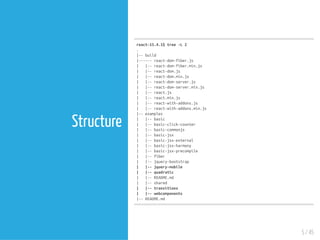
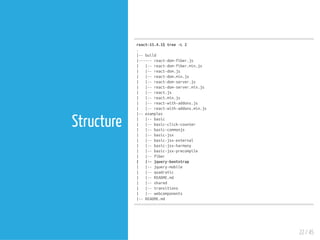
Structure
react-15.4.1$tree-L2
.
|--build
|------react-dom-fiber.js
| |--react-dom-fiber.min.js
| |--react-dom.js
| |--react-dom.min.js
| |--react-dom-server.js
| |--react-dom-server.min.js
| |--react.js
| |--react.min.js
| |--react-with-addons.js
| |--react-with-addons.min.js
|--examples
| |--basic
| |--basic-click-counter
| |--basic-commonjs
| |--basic-jsx
| |--basic-jsx-external
| |--basic-jsx-harmony
| |--basic-jsx-precompile
| |--fiber
| |--jquery-bootstrap
| |--jquery-mobile
| |--quadratic
| |--README.md
| |--shared
| |--transitions
| |--webcomponents
|--README.md
6 / 45
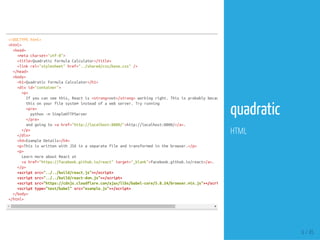
<!DOCTYPEhtml>
<html>
<head>
<metacharset="utf-8">
<title>QuadraticFormulaCalculator</title>
<linkrel="stylesheet"href="../shared/css/base.css"/>
</head>
<body>
<h1>QuadraticFormulaCalculator</h1>
<divid="container">
<p>
Ifyoucanseethis,Reactis<strong>not</strong>workingright.Thisisprobablybecauseyou&apos;reviewing
thisonyourfilesysteminsteadofawebserver.Tryrunning
<pre>
python-mSimpleHTTPServer
</pre>
andgoingto<ahref="http://localhost:8000/">http://localhost:8000/</a>.
</p>
</div>
<h4>ExampleDetails</h4>
<p>ThisiswrittenwithJSXinaseparatefileandtransformedinthebrowser.</p>
<p>
LearnmoreaboutReactat
<ahref="https://facebook.github.io/react"target="_blank">facebook.github.io/react</a>.
</p>
<scriptsrc="../../build/react.js"></script>
<scriptsrc="../../build/react-dom.js"></script>
<scriptsrc="https://cdnjs.cloudflare.com/ajax/libs/babel-core/5.8.24/browser.min.js"></script
<scripttype="text/babel"src="example.js"></script>
</body>
</html>
quadratic
HTML
getInitialState:function(){
return{
a:1,
b:3,
c:-4
};
},
/**
*Thisfunctionwillbere-boundinrendermultipletimes.Each.bind()will
*createanewfunctionthatcallsthiswiththeappropriatekeyaswellas
*theevent.Thekeyisthekeyinthestateobjectthatthevalueshouldbe
*mappedfrom.
*/
handleInputChange:function(key,event){
varpartialState={};
partialState[key]=parseFloat(event.target.value);
this.setState(partialState);
},
render:function(){
vara=this.state.a;
varb=this.state.b;
varc=this.state.c;
varroot=Math.sqrt(Math.pow(b,2)-4*a*c);
vardenominator=2*a;
varx1=(-b+root)/denominator;
varx2=(-b-root)/denominator;
return(
<div>
<strong>
<em>ax</em><sup>2</sup>+<em>bx</em>+<em>c</em>=0
</strong>
<h4>Solvefor<em>x</em>:</h4>
<p>
<label>
a:<inputtype="number"value={a}onChange={this.handleInputChange.bind(null,'a')}/>
</label>
<br/>
<label>
b:<inputtype="number"value={b}onChange={this.handleInputChange.bind(null,'b')}/>
</label>
7 / 45
quadratic
JS+JSX
Requires babel
render
this.state
Multi-Element
...bind()
8 / 45
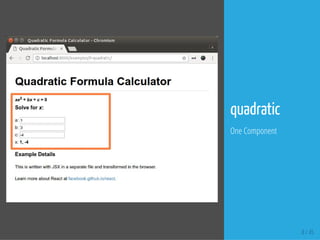
quadratic
One Component
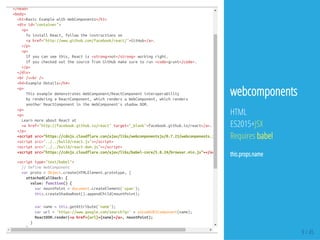
</head>
<body>
<h1>BasicExamplewithWebComponents</h1>
<divid="container">
<p>
ToinstallReact,followtheinstructionson
<ahref="http://www.github.com/facebook/react/">GitHub</a>.
</p>
<p>
Ifyoucanseethis,Reactis<strong>not</strong>workingright.
IfyoucheckedoutthesourcefromGitHubmakesuretorun<code>grunt</code>.
</p>
</div>
<br/><br/>
<h4>ExampleDetails</h4>
<p>
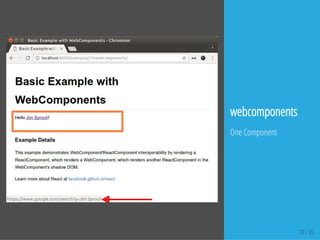
ThisexampledemonstratesWebComponent/ReactComponentinteroperability
byrenderingaReactComponent,whichrendersaWebComponent,whichrenders
anotherReactComponentintheWebComponent'sshadowDOM.
<p>
<p>
LearnmoreaboutReactat
<ahref="http://facebook.github.io/react"target="_blank">facebook.github.io/react</a>.
</p>
<scriptsrc="https://cdnjs.cloudflare.com/ajax/libs/webcomponentsjs/0.7.21/webcomponents.js"
<scriptsrc="../../build/react.js"></script>
<scriptsrc="../../build/react-dom.js"></script>
<scriptsrc="https://cdnjs.cloudflare.com/ajax/libs/babel-core/5.8.24/browser.min.js"></script
<scripttype="text/babel">
//DefineWebComponent
varproto=Object.create(HTMLElement.prototype,{
attachedCallback:{
value:function(){
varmountPoint=document.createElement('span');
this.createShadowRoot().appendChild(mountPoint);
varname=this.getAttribute('name');
varurl='https://www.google.com/search?q='+encodeURIComponent(name);
ReactDOM.render(<ahref={url}>{name}</a>,mountPoint);
}
}
9 / 45
webcomponents
HTML
ES2015+JSX
Requires babel
this.props.name
10 / 45
webcomponents
One Component
LearnmoreaboutReactat
<ahref="https://facebook.github.io/react"target="_blank">facebook.github.io/react</a>.
</p>
<scriptsrc="../../build/react-with-addons.js"></script>
<scriptsrc="../../build/react-dom.js"></script>
<scriptsrc="https://cdnjs.cloudflare.com/ajax/libs/babel-core/5.8.24/browser.min.js"></script
<scripttype="text/babel">
varCSSTransitionGroup=React.addons.CSSTransitionGroup;
varINTERVAL=2000;
varAnimateDemo=React.createClass({
getInitialState:function(){
return{current:0};
},
componentDidMount:function(){
this.interval=setInterval(this.tick,INTERVAL);
},
componentWillUnmount:function(){
clearInterval(this.interval);
},
tick:function(){
this.setState({current:this.state.current+1});
},
render:function(){
varchildren=[];
varpos=0;
varcolors=['red','gray','blue'];
for(vari=this.state.current;i<this.state.current+colors.length;i++){
varstyle={
left:pos*128,
background:colors[i%colors.length]
};
pos++;
children.push(<divkey={i}className="animateItem"style={style}>{i}</div>);
}
return(
<CSSTransitionGroup
className="animateExample"
11 / 45
transitions
HTML
JS+JSX
Requires babel
..addons.js
this.state.current
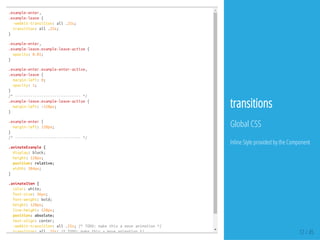
.example-enter,
.example-leave{
-webkit-transition:all.25s;
transition:all.25s;
}
.example-enter,
.example-leave.example-leave-active{
opacity:0.01;
}
.example-enter.example-enter-active,
.example-leave{
margin-left:0;
opacity:1;
}
/*------------------------------*/
.example-leave.example-leave-active{
margin-left:-128px;
}
.example-enter{
margin-left:128px;
}
/*------------------------------*/
.animateExample{
display:block;
height:128px;
position:relative;
width:384px;
}
.animateItem{
color:white;
font-size:36px;
font-weight:bold;
height:128px;
line-height:128px;
position:absolute;
text-align:center;
-webkit-transition:all.25s;/*TODO:makethisamoveanimation*/
transition:all.25s;/*TODO:makethisamoveanimation*/ 12 / 45
transitions
Global CSS
Inline Style provided by the Component
13 / 45
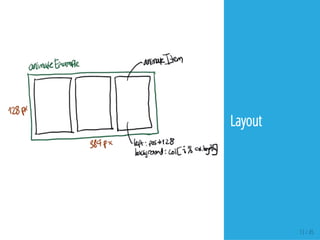
Layout
14 / 45
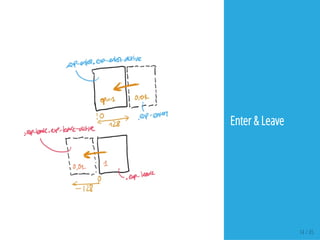
Enter & Leave
15 / 45
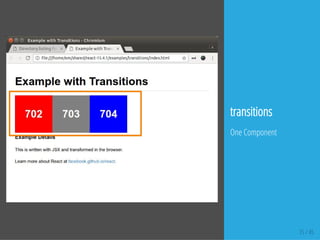
transitions
One Component
16 / 45
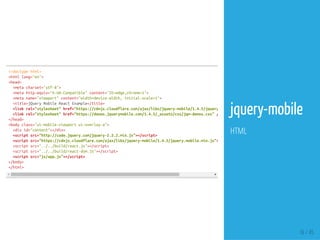
<!doctypehtml>
<htmllang="en">
<head>
<metacharset="utf-8">
<metahttp-equiv="X-UA-Compatible"content="IE=edge,chrome=1">
<metaname="viewport"content="width=device-width,initial-scale=1">
<title>jQueryMobileReactExample</title>
<linkrel="stylesheet"href="https://cdnjs.cloudflare.com/ajax/libs/jquery-mobile/1.4.5/jquery.mobile.min.css"
<linkrel="stylesheet"href="https://demos.jquerymobile.com/1.4.5/_assets/css/jqm-demos.css"/>
</head>
<bodyclass="ui-mobile-viewportui-overlay-a">
<divid="content"></div>
<scriptsrc="http://code.jquery.com/jquery-2.2.2.min.js"></script>
<scriptsrc="https://cdnjs.cloudflare.com/ajax/libs/jquery-mobile/1.4.5/jquery.mobile.min.js"></
<scriptsrc="../../build/react.js"></script>
<scriptsrc="../../build/react-dom.js"></script>
<scriptsrc="js/app.js"></script>
</body>
</html>
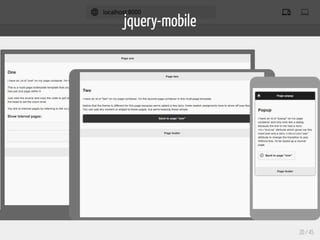
jquery-mobile
HTML
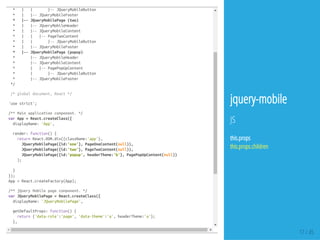
* | | |--JQueryMobileButton
* | |--JQueryMobileFooter
* |--JQueryMobilePage(two)
* | |--JQueryMobileHeader
* | |--JQueryMobileContent
* | | |--PageTwoContent
* | | |--JQueryMobileButton
* | |--JQueryMobileFooter
* |--JQueryMobilePage(popup)
* |--JQueryMobileHeader
* |--JQueryMobileContent
* | |--PagePopUpContent
* | |--JQueryMobileButton
* |--JQueryMobileFooter
*/
/*globaldocument,React*/
'usestrict';
/**Mainapplicationcomponent.*/
varApp=React.createClass({
displayName:'App',
render:function(){
returnReact.DOM.div({className:'app'},
JQueryMobilePage({id:'one'},PageOneContent(null)),
JQueryMobilePage({id:'two'},PageTwoContent(null)),
JQueryMobilePage({id:'popup',headerTheme:'b'},PagePopUpContent(null))
);
}
});
App=React.createFactory(App);
/**jQueryMobilepagecomponent.*/
varJQueryMobilePage=React.createClass({
displayName:'JQueryMobilePage',
getDefaultProps:function(){
return{'data-role':'page','data-theme':'a',headerTheme:'a'};
},
17 / 45
jquery-mobile
JS
this.props
this.props.children
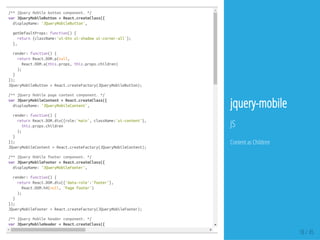
/**jQueryMobilebuttoncomponent.*/
varJQueryMobileButton=React.createClass({
displayName:'JQueryMobileButton',
getDefaultProps:function(){
return{className:'ui-btnui-shadowui-corner-all'};
},
render:function(){
returnReact.DOM.p(null,
React.DOM.a(this.props,this.props.children)
);
}
});
JQueryMobileButton=React.createFactory(JQueryMobileButton);
/**jQueryMobilepagecontentcomponent.*/
varJQueryMobileContent=React.createClass({
displayName:'JQueryMobileContent',
render:function(){
returnReact.DOM.div({role:'main',className:'ui-content'},
this.props.children
);
}
});
JQueryMobileContent=React.createFactory(JQueryMobileContent);
/**jQueryMobilefootercomponent.*/
varJQueryMobileFooter=React.createClass({
displayName:'JQueryMobileFooter',
render:function(){
returnReact.DOM.div({'data-role':'footer'},
React.DOM.h4(null,'Pagefooter')
);
}
});
JQueryMobileFooter=React.createFactory(JQueryMobileFooter);
/**jQueryMobileheadercomponent.*/
varJQueryMobileHeader=React.createClass({
displayName:'JQueryMobileHeader',
18 / 45
jquery-mobile
JS
Content as Children
19 / 45
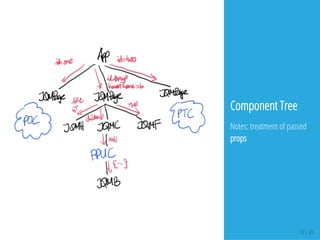
Component Tree
Notes: treatment of passed
props
jquery-mobile
20 / 45
React Bootstraped
Or the Other Way Around
21 / 45
22 / 45
Structure
react-15.4.1$tree-L2
.
|--build
|------react-dom-fiber.js
| |--react-dom-fiber.min.js
| |--react-dom.js
| |--react-dom.min.js
| |--react-dom-server.js
| |--react-dom-server.min.js
| |--react.js
| |--react.min.js
| |--react-with-addons.js
| |--react-with-addons.min.js
|--examples
| |--basic
| |--basic-click-counter
| |--basic-commonjs
| |--basic-jsx
| |--basic-jsx-external
| |--basic-jsx-harmony
| |--basic-jsx-precompile
| |--fiber
| |--jquery-bootstrap
| |--jquery-mobile
| |--quadratic
| |--README.md
| |--shared
| |--transitions
| |--webcomponents
|--README.md
23 / 45
<!doctypehtml>
<htmllang="en">
<head>
<metacharset="utf-8">
<metahttp-equiv="X-UA-Compatible"content="IE=edge,chrome=1">
<title>jQueryIntegration</title>
<linkrel="stylesheet"href="https://maxcdn.bootstrapcdn.com/bootstrap/3.3.6/css/bootstrap.min.css"
<linkrel="stylesheet"href="https://maxcdn.bootstrapcdn.com/bootstrap/3.3.6/css/bootstrap-theme.min.css"
<style>
.example{
margin:20px;
}
</style>
</head>
<body>
<divid="jqueryexample"></div>
<scriptsrc="../../build/react.js"></script>
<scriptsrc="../../build/react-dom.js"></script>
<scriptsrc="https://cdnjs.cloudflare.com/ajax/libs/babel-core/5.8.24/browser.min.js"></script
<scriptsrc="http://code.jquery.com/jquery-2.2.2.min.js"></script>
<scriptsrc="https://maxcdn.bootstrapcdn.com/bootstrap/3.3.6/js/bootstrap.min.js"integrity="sha384-0mSbJDEHialfmuBBQP6A4Qrprq5OVfW37PRR3j5
<scripttype="text/babel"src="js/app.js"></script>
</body>
</html>
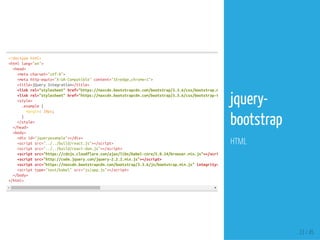
jquery-
bootstrap
HTML
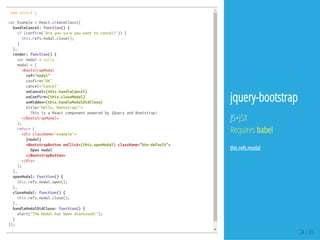
'usestrict';
varExample=React.createClass({
handleCancel:function(){
if(confirm('Areyousureyouwanttocancel?')){
this.refs.modal.close();
}
},
render:function(){
varmodal=null;
modal=(
<BootstrapModal
ref="modal"
confirm="OK"
cancel="Cancel"
onCancel={this.handleCancel}
onConfirm={this.closeModal}
onHidden={this.handleModalDidClose}
title="Hello,Bootstrap!">
ThisisaReactcomponentpoweredbyjQueryandBootstrap!
</BootstrapModal>
);
return(
<divclassName="example">
{modal}
<BootstrapButtononClick={this.openModal}className="btn-default">
Openmodal
</BootstrapButton>
</div>
);
},
openModal:function(){
this.refs.modal.open();
},
closeModal:function(){
this.refs.modal.close();
},
handleModalDidClose:function(){
alert("Themodalhasbeendismissed!");
}
});
ReactDOM.render(<Example/>,document.getElementById('jqueryexample')); 24 / 45
jquery-bootstrap
JS+JSX
Requires babel
this.refs.modal
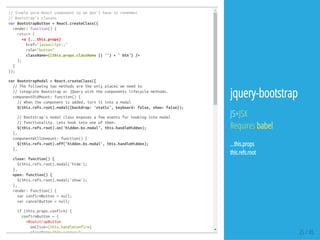
//Simplepure-Reactcomponentsowedon'thavetoremember
//Bootstrap'sclasses
varBootstrapButton=React.createClass({
render:function(){
return(
<a{...this.props}
href="javascript:;"
role="button"
className={(this.props.className||'')+'btn'}/>
);
}
});
varBootstrapModal=React.createClass({
//Thefollowingtwomethodsaretheonlyplacesweneedto
//integrateBootstraporjQuerywiththecomponentslifecyclemethods.
componentDidMount:function(){
//Whenthecomponentisadded,turnitintoamodal
$(this.refs.root).modal({backdrop:'static',keyboard:false,show:false});
//Bootstrap'smodalclassexposesafeweventsforhookingintomodal
//functionality.Letshookintooneofthem:
$(this.refs.root).on('hidden.bs.modal',this.handleHidden);
},
componentWillUnmount:function(){
$(this.refs.root).off('hidden.bs.modal',this.handleHidden);
},
close:function(){
$(this.refs.root).modal('hide');
},
open:function(){
$(this.refs.root).modal('show');
},
render:function(){
varconfirmButton=null;
varcancelButton=null;
if(this.props.confirm){
confirmButton=(
<BootstrapButton
onClick={this.handleConfirm}
className="btn-primary"> 25 / 45
jquery-bootstrap
JS+JSX
Requires babel
...this.props
this.refs.root
26 / 45
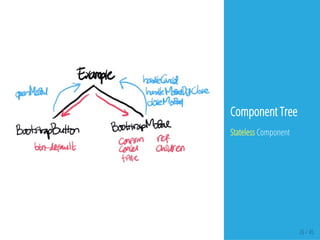
Component Tree
Stateless Component
27 / 45
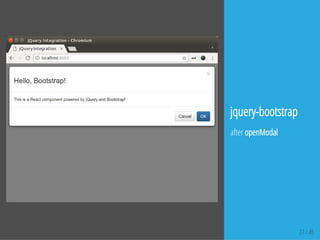
jquery-bootstrap
after openModal
28 / 45
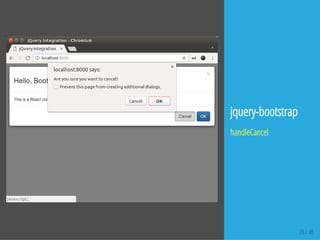
jquery-bootstrap
handleCancel
29 / 45
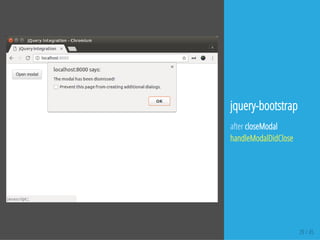
jquery-bootstrap
after closeModal
handleModalDidClose
30 / 45
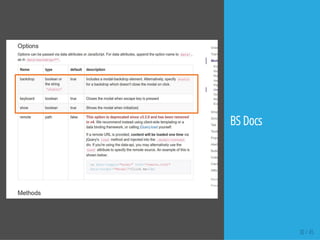
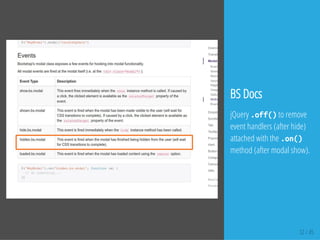
BS Docs
31 / 45
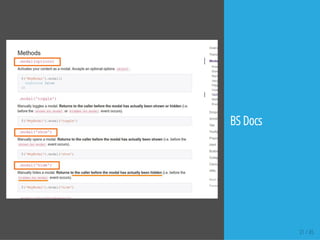
BS Docs
32 / 45
BS Docs
jQuery .off()to remove
event handlers (after hide)
attached with the .on()
method (after modal show).
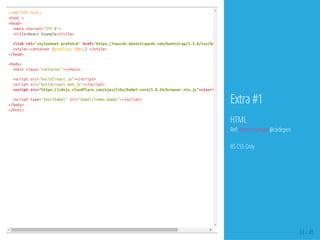
<!DOCTYPEhtml>
<html>
<head>
<metacharset="UTF-8">
<title>ReactExample</title>
<linkrel='stylesheetprefetch'href='https://maxcdn.bootstrapcdn.com/bootstrap/3.3.6/css/bootstrap.min.css'
<style>.container{padding:20px;}</style>
</head>
<body>
<mainclass="container"></main>
<scriptsrc="build/react.js"></script>
<scriptsrc="build/react-dom.js"></script>
<scriptsrc="https://cdnjs.cloudflare.com/ajax/libs/babel-core/5.8.24/browser.min.js"></script
<scripttype="text/babel"src="babel/index.babel"></script>
</body>
</html>
33 / 45
Extra #1
HTML
Ref: React Example @codepen
BS CSS Only
classNavextendsReact.Component{
constructor(props){
super(props);
this.state={selected:0};
}
setActive(index){
this.setState(Object.assign(this.state,{selected:index}));
//this.setState({selected:index});
}
renderItems(){
returnthis.props.items.map((item,i)=>{
return(
<liclassName={i===this.state.selected?'active':''}>
<ahref="#"onClick={()=>this.setActive(i)}>
{item}
</a>
</li>
);
});
}
render(){
return<ulclassName="navnav-pills">{this.renderItems()}</ul>;
}
}
constnavItems=[
'Home',
'About',
'Contact'
];
ReactDOM.render(<Navitems={navItems}/>,document.querySelector('main'));
34 / 45
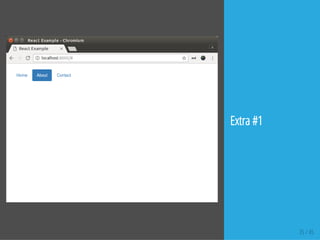
Extra #1
ES2015+JSX
Requires babel
One Component
this.state
35 / 45
Extra #1
36 / 45
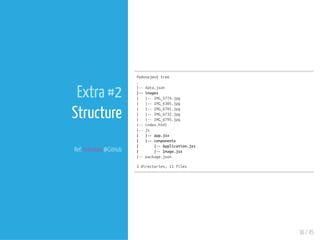
Extra #2
Structure
Ref: fedosejev @GitHub
fedosejev$tree
.
|--data.json
|--images
| |--IMG_5774.jpg
| |--IMG_6305.jpg
| |--IMG_6701.jpg
| |--IMG_6732.jpg
| |--IMG_6795.jpg
|--index.html
|--js
| |--app.jsx
| |--components
| |--Application.jsx
| |--Image.jsx
|--package.json
3directories,11files
37 / 45
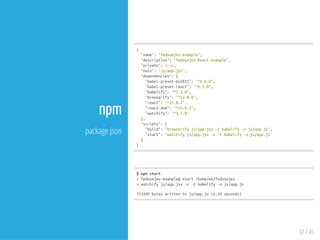
npm
package.json
{
"name":"fedosejev-example",
"description":"fedosejevReactexample",
"private":true,
"main":"js/app.jsx",
"dependencies":{
"babel-preset-es2015":"^6.6.0",
"babel-preset-react":"^6.5.0",
"babelify":"^7.3.0",
"browserify":"^13.0.0",
"react":"^15.0.2",
"react-dom":"^15.0.2",
"watchify":"^3.7.0"
},
"scripts":{
"build":"browserifyjs/app.jsx-tbabelify-ojs/app.js",
"start":"watchifyjs/app.jsx-v-tbabelify-ojs/app.js"
}
}
$npmstart
>fedosejev-example@start/home/em/fedosejev
>watchifyjs/app.jsx-v-tbabelify-ojs/app.js
723589byteswrittentojs/app.js(6.14seconds)
38 / 45
<!doctypehtml>
<htmllang="en">
<head>
<metacharset="utf-8"/>
<metahttp-equiv="x-ua-compatible"content="ie=edge,chrome=1"/>
<title>Application</title>
<linkrel="stylesheet"href="https://maxcdn.bootstrapcdn.com/bootstrap/3.3.6/css/bootstrap.min.css"
</head>
<body>
<divdata-react-application>
<h5class="text-centertext-muted">Loadingapplication...</h5>
</div>
<scriptsrc="./js/app.js"></script>
</body>
</html>
{
"images":[
"IMG_5774.jpg",
"IMG_6305.jpg",
"IMG_6701.jpg",
"IMG_6732.jpg",
"IMG_6795.jpg"
]
}
Extra #2
HTML
data.json
BS CSS Only
39 / 45
$tree
.
|--data.json
|--images
| |--IMG_5774.jpg
| |--IMG_6305.jpg
| |--IMG_6701.jpg
| |--IMG_6732.jpg
| |--IMG_6795.jpg
|--index.html
|--js
| |--app.jsx
| |--components
| |--Application.jsx
| |--Image.jsx
|--package.json
importReactfrom'react';
importReactDOMfrom'react-dom';
importApplicationfrom'./components/Application.jsx';
ReactDOM.render(<Application/>,document.querySelector('[data-react-application]'));
Extra #2
js/app.jsx
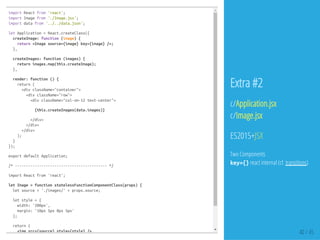
importReactfrom'react';
importImagefrom'./Image.jsx';
importdatafrom'../../data.json';
letApplication=React.createClass({
createImage:function(image){
return<Imagesource={image}key={image}/>;
},
createImages:function(images){
returnimages.map(this.createImage);
},
render:function(){
return(
<divclassName="container">
<divclassName="row">
<divclassName="col-sm-12text-center">
{this.createImages(data.images)}
</div>
</div>
</div>
);
}
});
exportdefaultApplication;
/*------------------------------------------*/
importReactfrom'react';
letImage=functionstatelessFunctionComponentClass(props){
letsource='./images/'+props.source;
letstyle={
width:'200px',
margin:'10px5px0px5px'
};
return(
<imgsrc={source}style={style}/> 40 / 45
Extra #2
c/Application.jsx
c/Image.jsx
ES2015+JSX
Two Components
key={}react internal (cf. transitions)
41 / 45
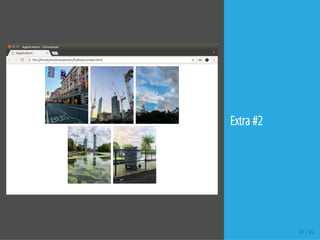
Extra #2
Refs
42 / 45
Refs
1. A JavaScript library for building user interfaces | React
2. facebook/react: A declarative, e cient, and exible JavaScript library for building user
interfaces.
3. Intro and Concept - Learning React
4. React Example
5. JavaScript - Bootstrap
6. fedosejev/how-to-create-react-components-dynamically
43 / 45
44 / 45
END
Eueung Mulyana
https://eueung.github.io/112016/react-exp
CodeLabs | Attribution-ShareAlike CC BY-SA
45 / 45
That's All
for the basics ...
piece of cake, no?

React Example + Bootstrap