Getting started with
Firebase
@rorypreddy
Meet Rory
• Developer in R&D team at BBD
• Organizer for the Java and AWS User groups
• Not related to Tyrion Lannister
• Don’t do kids parties
@rorypreddy
• History of the Cloud and Firebase
• Creating a Firebase App
• Using Firebase in an Angular App
• Deploying and version control
Agenda
Cloud Computing
Cloud computing is a model for enabling convenient, on-
demand network access to a shared pool of configurable
computing resources (e.g., networks, servers, storage,
applications, and services) that can be rapidly
provisioned and released with minimal management
effort or service provider interaction.
https://nvlpubs.nist.gov/nistpubs/legacy/sp/nistspecialpublication800-145.pdf
Benefits of Cloud Computing:
• Cost
• Global Scale
• Reliability
• Speed and Performance
• Productivity
Deployment models
• Public cloud
• Private cloud
• Hybrid cloud
Tactic SolutionNew IT realityOld IT Implementation
History of firebase
• Originally firebase was online chat message integration service.
• Later the real time architecture was separated to create firebase
database in 2012.
• Firebase surfaced as a popular choice when Parse.com went down.
• Google acquired firebase in 2014 and added a whole lot of features
in Google IO-2016.
• Firebase is now a complete cloud solution.
Firebase Hosting
• Firebase hosting provides a fast and secure static hosting for
your web app.
• It is a production grade web content hosting.
• CDN edges around the world
• Hosting gives a subdomain of “firebaseapp.com”
• You can also get a custom domain.
• Free SSL certificate
• Install firebase CLI
• Also suited for SPA/Progressive web apps
• Version controlled
Not Suited For
• Dynamic web pages (Node.js)
• use Cloud functions with Node.js instead
• Server-Side Applications (PHP, JAVA, and so on)
• use Google Cloud Platform instead
• Authentication
• use Firebase Auth instead
• Authorization
• use Real Time and Storage security rules instead
• Heavy files
• Firebase Storage recommended
Pricing
Firebase console
• Google has several "consoles".
• These are webpages to control varying things.
• Other Examples:
• https://partner.android.com/things/console#/ android things
• https://console.developers.google.com/apis/ for apis like maps
• https://developers.google.com/beacons/dashboard/ for beacons
• Firebase has its own as well:
• https://console.firebase.google.com/
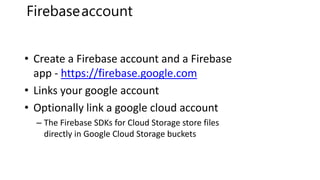
• Create a Firebase account and a Firebase
app - https://firebase.google.com
• Links your google account
• Optionally link a google cloud account
– The Firebase SDKs for Cloud Storage store files
directly in Google Cloud Storage buckets
Firebaseaccount
Deploy Your site
1. Install node and npm.
2. Install firebase CLI
➢ npm install –g firebase-tools
3. Initialize your app
➢ firebase login
• Link your google account
➢ firebase init
4. Set root folder and put your static content there.
➢ firebase serve
5. Deploy
➢ firebase deploy
Your app will be hosted at “subdomain”.firebase-app.com
Demo
https://github.com/roryp/basic_css_js_website
Creating an Angular App
• npm install -g @angular/cli
• ng new wtc
• cd wtc
• ng serve --open
Creating an Angular App
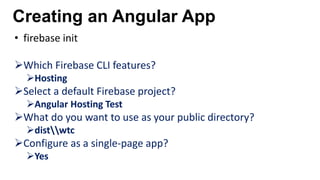
• firebase init
➢Which Firebase CLI features?
➢Hosting
➢Select a default Firebase project?
➢Angular Hosting Test
➢What do you want to use as your public directory?
➢distwtc
➢Configure as a single-page app?
➢Yes
Creating an Angular App
• ng build –prod
• firebase deploy
–Deploys distwtc
• firebase open hosting:site
Creating an Angular App
Demo
References
• https://console.firebase.google.com/
• https://firebase.google.com/docs/
• https://github.com/roryp/basic_css_js_website
• Code lab: Friendly Chat web app (about 1ish hours)
• https://codelabs.developers.google.com/codelabs/firebase-web/index.html
• Covers database, storage, auth, messaging, firebase notifications..

Getting started with Firebase

  • 1.
  • 2.
    Meet Rory • Developerin R&D team at BBD • Organizer for the Java and AWS User groups • Not related to Tyrion Lannister • Don’t do kids parties @rorypreddy
  • 5.
    • History ofthe Cloud and Firebase • Creating a Firebase App • Using Firebase in an Angular App • Deploying and version control Agenda
  • 6.
    Cloud Computing Cloud computingis a model for enabling convenient, on- demand network access to a shared pool of configurable computing resources (e.g., networks, servers, storage, applications, and services) that can be rapidly provisioned and released with minimal management effort or service provider interaction. https://nvlpubs.nist.gov/nistpubs/legacy/sp/nistspecialpublication800-145.pdf
  • 7.
    Benefits of CloudComputing: • Cost • Global Scale • Reliability • Speed and Performance • Productivity
  • 9.
    Deployment models • Publiccloud • Private cloud • Hybrid cloud
  • 10.
    Tactic SolutionNew ITrealityOld IT Implementation
  • 12.
    History of firebase •Originally firebase was online chat message integration service. • Later the real time architecture was separated to create firebase database in 2012. • Firebase surfaced as a popular choice when Parse.com went down. • Google acquired firebase in 2014 and added a whole lot of features in Google IO-2016. • Firebase is now a complete cloud solution.
  • 14.
    Firebase Hosting • Firebasehosting provides a fast and secure static hosting for your web app. • It is a production grade web content hosting. • CDN edges around the world • Hosting gives a subdomain of “firebaseapp.com” • You can also get a custom domain. • Free SSL certificate • Install firebase CLI • Also suited for SPA/Progressive web apps • Version controlled
  • 15.
    Not Suited For •Dynamic web pages (Node.js) • use Cloud functions with Node.js instead • Server-Side Applications (PHP, JAVA, and so on) • use Google Cloud Platform instead • Authentication • use Firebase Auth instead • Authorization • use Real Time and Storage security rules instead • Heavy files • Firebase Storage recommended
  • 16.
  • 17.
    Firebase console • Googlehas several "consoles". • These are webpages to control varying things. • Other Examples: • https://partner.android.com/things/console#/ android things • https://console.developers.google.com/apis/ for apis like maps • https://developers.google.com/beacons/dashboard/ for beacons • Firebase has its own as well: • https://console.firebase.google.com/
  • 18.
    • Create aFirebase account and a Firebase app - https://firebase.google.com • Links your google account • Optionally link a google cloud account – The Firebase SDKs for Cloud Storage store files directly in Google Cloud Storage buckets Firebaseaccount
  • 19.
    Deploy Your site 1.Install node and npm. 2. Install firebase CLI ➢ npm install –g firebase-tools 3. Initialize your app ➢ firebase login • Link your google account ➢ firebase init 4. Set root folder and put your static content there. ➢ firebase serve 5. Deploy ➢ firebase deploy Your app will be hosted at “subdomain”.firebase-app.com
  • 20.
  • 21.
  • 22.
  • 23.
    • npm install-g @angular/cli • ng new wtc • cd wtc • ng serve --open Creating an Angular App
  • 24.
    • firebase init ➢WhichFirebase CLI features? ➢Hosting ➢Select a default Firebase project? ➢Angular Hosting Test ➢What do you want to use as your public directory? ➢distwtc ➢Configure as a single-page app? ➢Yes Creating an Angular App
  • 25.
    • ng build–prod • firebase deploy –Deploys distwtc • firebase open hosting:site Creating an Angular App
  • 27.
  • 28.
    References • https://console.firebase.google.com/ • https://firebase.google.com/docs/ •https://github.com/roryp/basic_css_js_website • Code lab: Friendly Chat web app (about 1ish hours) • https://codelabs.developers.google.com/codelabs/firebase-web/index.html • Covers database, storage, auth, messaging, firebase notifications..