Platinum
Gold
Silver
SharePint
Community
Thanks to our sponsors!
Hi! I’m Seb!
@sebastienlevert | http://sebastienlevert.com | Product Evangelist & Partner Manager at
Agenda
Agenda
SharePoint REST APIs
Our Scenario
• Building a SharePoint Framework webpart that connects to a
SharePoint list to play with its data
• Using a single Interface to define our Data Access services to enable
easy on-the-fly switch of data sources
• Mocking Service for swapping and localWorkbench development
1
2
3
4
5
6
7
8
9
10
11
12
13
14
15
16
17
18
19
import { IHelpDeskItem } from "./../models/IHelpDeskItem";
import { WebPartContext } from "@microsoft/sp-webpart-base";
export default interface IDataService {
getTitle(): string;
isConfigured(): boolean;
getItems(context: WebPartContext): Promise<IHelpDeskItem[]>;
addItem(context: WebPartContext, item: IHelpDeskItem): Promise<void>;
updateItem(context: WebPartContext, item: IHelpDeskItem): Promise<void>;
deleteItem(context: WebPartContext, item: IHelpDeskItem): Promise<void>;
}
export default class SharePointDataService implements IDataService {
//…
}
Data Service Architecture
Using the SharePoint REST APIs?
• Enable almost all your CRUD scenarios in the solutions you are
building on SharePoint Online and SharePoint On-Premises
• When called from a SharePoint context, no authentication required
as it’s all cookie based
• It follows the OData standards, making it easy to query your content
OData URI at a glance
1
2
3
4
5
6
7
8
9
10
11
12
13
14
15
16
17
18
19
# Creating a new SPFx Project
yo @Microsoft/sharepoint --skip-install
# Installing all dependencies
npm install
# Opening the newly created project
code .
Creating a new SPFx Project
1
2
3
4
5
6
7
8
9
10
11
12
13
14
15
16
17
18
19
// Getting all the sessions of the specified list using SharePoint REST APIs
public getItems(context: WebPartContext): Promise<IHelpDeskItem[]> {
return new Promise<IHelpDeskItem[]>((resolve, reject) => {
context.spHttpClient.get(
`${absoluteUrl}/_api/web/lists/GetById('${this._listId}')/items` +
`?$select=*,HelpDeskAssignedTo/Title&$expand=HelpDeskAssignedTo`,
SPHttpClient.configurations.v1)
.then(res => res.json())
.then(res => {
let helpDeskItems:IHelpDeskItem[] = [];
for(let helpDeskListItem of res.value) {
helpDeskItems.push(this.buildHelpDeskItem(helpDeskListItem));
}
resolve(helpDeskItems);
}).catch(err => console.log(err));
});
}
Retrieving Data
1
2
3
4
5
6
7
8
9
10
11
12
13
14
15
16
17
18
19
// Creating a new session in the specified list
public addItem(item: IHelpDeskItem): Promise<void> {
return new Promise<void>((resolve, reject) => {
//…
return this._webPartContext.spHttpClient.post(
`${currentWebUrl}/_api/web/lists/GetById('${this._listId}')/items`,
SPHttpClient.configurations.v1, {
headers: { "Accept": "application/json;odata=nometadata",
"Content-type": "application/json;odata=verbose",
"odata-version": "" },
body: body
});
}).then((response: SPHttpClientResponse): Promise<any> => {
return response.json();
}).then((item: any): void => {
resolve();
});
});
}
Creating Data
1
2
3
4
5
6
7
8
9
10
11
12
13
14
15
16
17
18
19
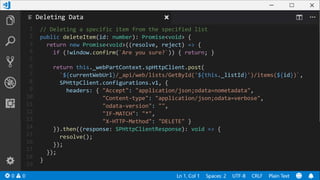
// Deleting a specific item from the specified list
public deleteItem(id: number): Promise<void> {
return new Promise<void>((resolve, reject) => {
if (!window.confirm(`Are you sure?`)) { return; }
return this._webPartContext.spHttpClient.post(
`${currentWebUrl}/_api/web/lists/GetById('${this._listId}')/items(${id})`,
SPHttpClient.configurations.v1, {
headers: { "Accept": "application/json;odata=nometadata",
"Content-type": "application/json;odata=verbose",
"odata-version": "",
"IF-MATCH": "*",
"X-HTTP-Method": "DELETE" }
}).then((response: SPHttpClientResponse): void => {
resolve();
});
});
}
Deleting Data
Using SharePoint Search
• Using search allows you to query content in multiple lists or multiple
sites or site collections
• Uses a totally other query language (KQL or Keyword Query
Language)
• Very performant and optimized for fetching a lot of data, but has a 15
minutes-ish delay in terms of data freshness
• Does not support any data modification
KQL Crash Course
• See Mickael Svenson blog series “SharePoint Search Queries
Explained”
• https://www.techmikael.com/2014/03/sharepoint-search-queries-
explained.html
1
2
3
4
5
6
7
8
9
10
11
12
13
14
15
16
17
18
19
// Getting all the sessions of the specified list using SharePoint Search
public getItems(context: IWebPartContext): Promise<IHelpDeskItem[]> {
return new Promise<IHelpDeskItem[]>((resolve, reject) => {
context.spHttpClient.get(`${absoluteUrl}/_api/search/query?` +
`querytext='ContentTypeId:0x0100…* AND ListID:${this._listId}'` +
`&selectproperties='…'` +
`&orderby='ListItemID asc'`, SPHttpClient.configurations.v1, {
headers: { "odata-version": "3.0" }
}).then(res => res.json()).then(res => {
let helpDeskItems:IHelpDeskItem[] = [];
if(res.PrimaryQueryResult) {
for(var row of res.PrimaryQueryResult.RelevantResults.Table.Rows) {
helpDeskItems.push(this.buildHelpDeskItem(row));
}
}
resolve(helpDeskItems);
});
}
Retrieving Data
Notes on legacy APIs support
• SharePoint APIs cover a wide-range of options, but not everything
• You “might” have to revert to JSOM for some scenarios (Managed
Metadata, etc.)
• Or even to the ASMXWeb Services for more specific scenarios
(Recurring Events in Calendars, etc.)
• The SharePoint Framework supports those scenarios, but will require
some extra work
Microsoft Graph and Custom APIs
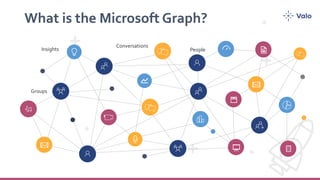
What is the Microsoft Graph?
Groups
People
Conversations
Insights
Microsoft Graph is all about you
If you or your customers are part of the millions of users that are using Microsoft
cloud services, then Microsoft Graph is the fabric of all your data
It all starts with /me
Gateway to your data in the Microsoft
cloud
Your app
Gateway
Your or your
customer’s
data
Office 365 Windows 10 Enterprise Mobility + Security
1Microsoft Graph
Microsoft Graph
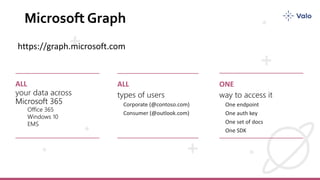
ALL
Microsoft 365
Office 365
Windows 10
EMS
ALL ONE
https://graph.microsoft.com
Microsoft 365 Platform
web, device,
and service apps
Extend Microsoft 365 experiences
1
iOS/Android/Windows/Web
Build your experience
Microsoft Graph
Options for the Microsoft Graph
• Using the built-in MsGraphClient class that takes care of the entire
authentication flow and token management for you
• Using a custom implementation using ADAL or MSAL
Are there any limitations?
• Every scope will have to be defined beforehand and could open some
security challenges
• Authentication challenges could bring a broken experience to your
users depending on the platform and browser used
1
2
3
4
5
6
7
8
9
10
11
12
13
14
15
16
17
18
19
// In your package-solution.json
{
// …
"webApiPermissionRequests": [
{
"resource": "Microsoft Graph",
"scope": "Sites.ReadWrite.All"
},
// …
]
// …
}
Enabling Graph in your solution
1
2
3
4
5
6
7
8
9
10
11
12
13
14
15
16
17
18
19
// Getting all the sessions of the specified list using the Microsoft Graph
public getItems(context: WebPartContext): Promise<IHelpDeskItem[]> {
let graphUrl: string = `https://graph.microsoft.com/v1.0` +
`/sites/${this.getCurrentSiteCollectionGraphId()}` +
`/lists/${this._listId}` +
`/items?expand=fields(${this.getFieldsToExpand()})`;
return new Promise<IHelpDeskItem[]>((resolve, reject) => {
this._client.api(graphUrl).get((error, response: any) => {
let helpDeskItems:IHelpDeskItem[] = [];
for(let helpDeskListItem of response.value) {
helpDeskItems.push(this.buildHelpDeskItem(helpDeskListItem));
}
resolve(helpDeskItems);
});
});
}
Retrieving Data
1
2
3
4
5
6
7
8
9
10
11
12
13
14
15
16
17
18
19
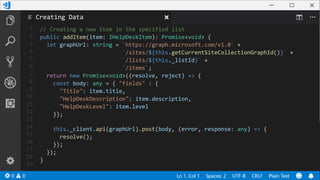
// Creating a new item in the specified list
public addItem(item: IHelpDeskItem): Promise<void> {
let graphUrl: string = `https://graph.microsoft.com/v1.0` +
`/sites/${this.getCurrentSiteCollectionGraphId()}` +
`/lists/${this._listId}` +
`/items`;
return new Promise<void>((resolve, reject) => {
const body: any = { "fields" : {
"Title": item.title,
"HelpDeskDescription": item.description,
"HelpDeskLevel": item.level
}};
this._client.api(graphUrl).post(body, (error, response: any) => {
resolve();
});
});
}
Creating Data
1
2
3
4
5
6
7
8
9
10
11
12
13
14
15
16
17
18
19
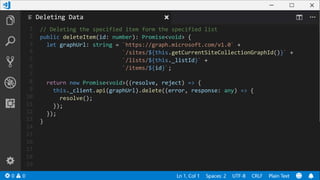
// Deleting the specified item form the specified list
public deleteItem(id: number): Promise<void> {
let graphUrl: string = `https://graph.microsoft.com/v1.0` +
`/sites/${this.getCurrentSiteCollectionGraphId()}` +
`/lists/${this._listId}` +
`/items/${id}`;
return new Promise<void>((resolve, reject) => {
this._client.api(graphUrl).delete((error, response: any) => {
resolve();
});
});
}
Deleting Data
Custom APIs
• Using the built-in AadGraphClient class that takes care of the entire
authentication flow and token management for you
• Using a custom implementation using ADAL or MSAL
• You can use user impersonation (or not) to query SharePoint content
based on user permissions
1
2
3
4
5
6
7
8
9
10
11
12
13
14
15
16
17
18
19
// Getting all the sessions of the specified list using the AAD Client
public getItems(context: WebPartContext): Promise<IHelpDeskItem[]> {
return new Promise<IHelpDeskItem[]>((resolve, reject) => {
let apiUrl: string = "<url>/api/GetHelpDeskItems";
this._client
.get(apiUrl, AadHttpClient.configurations.v1)
.then((res: HttpClientResponse): Promise<any> => {
return res.json();
}).then((res: any): void => {
let helpDeskItems:IHelpDeskItem[] = [];
for(let helpDeskListItem of res) {
helpDeskItems.push(this.buildHelpDeskItem(helpDeskListItem));
}
resolve(helpDeskItems);
});
});
}
}
Retrieving Data
Patterns & Practices JS Core
What is PnP JS Core?
PnPJS is a fluent JavaScript API for consuming SharePoint and Office 365
REST APIs in a type-safe way.You can use it with SharePoint Framework,
Nodejs, or JavaScript projects.This an open source initiative that
complements existing SDKs provided by Microsoft offering developers
another way to consume information from SharePoint and Office 365.
https://github.com/pnp/pnpjs
Benefits of PnP JS Core
• Type safe so you get your errors while you code and not when you
execute and test
• Works on all versions of SharePoint (On-Premises, Online, etc.)
• Offers built-in caching mechanisms
• Heavily used in the SharePoint Development Community
1
2
3
4
5
6
7
8
9
10
11
12
13
14
15
16
17
18
19
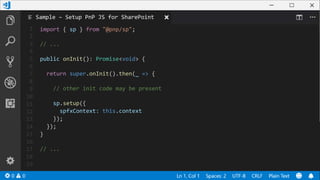
import { sp } from "@pnp/sp";
// ...
public onInit(): Promise<void> {
return super.onInit().then(_ => {
// other init code may be present
sp.setup({
spfxContext: this.context
});
});
}
// ...
Sample – Setup PnP JS for SharePoint
1
2
3
4
5
6
7
8
9
10
11
12
13
14
15
16
17
18
19
// Getting all the sessions of the specified list using PnP JS Core
public getItems(context: WebPartContext): Promise<IHelpDeskItem[]> {
return new Promise<IHelpDeskItem[]>((resolve, reject) => {
sp.web.lists.getById(this._listId).items
.select("*", "HelpDeskAssignedTo/Title")
.expand("HelpDeskAssignedTo").getAll().then((sessionItems: any[]) => {
let helpDeskItems:IHelpDeskItem[] = [];
for(let helpDeskListItem of sessionItems) {
helpDeskItems.push(this.buildHelpDeskItem(helpDeskListItem));
}
resolve(helpDeskItems);
});
});
}
Retrieving Data
Next Steps
Resources
• https://docs.microsoft.com/en-us/sharepoint/dev/spfx/web-
parts/guidance/connect-to-sharepoint-using-jsom
• https://www.techmikael.com/2014/03/sharepoint-search-queries-
explained.html
• https://github.com/pnp/pnpjs
• https://github.com/sebastienlevert/apis-apis-everywhere
Share your experience
• Use hashtags to share your experience
• #Office365Dev
• #MicrosoftGraph
• #SPFx
• Log issues & questions to the GitHub Repositories
Thanks!
@sebastienlevert | http://sebastienlevert.com | Product Evangelist & Partner Manager at
APIs, APIs Everywhere!

APIs, APIs Everywhere!

  • 2.
  • 3.
    Hi! I’m Seb! @sebastienlevert| http://sebastienlevert.com | Product Evangelist & Partner Manager at
  • 4.
  • 5.
  • 6.
  • 7.
    Our Scenario • Buildinga SharePoint Framework webpart that connects to a SharePoint list to play with its data • Using a single Interface to define our Data Access services to enable easy on-the-fly switch of data sources • Mocking Service for swapping and localWorkbench development
  • 8.
    1 2 3 4 5 6 7 8 9 10 11 12 13 14 15 16 17 18 19 import { IHelpDeskItem} from "./../models/IHelpDeskItem"; import { WebPartContext } from "@microsoft/sp-webpart-base"; export default interface IDataService { getTitle(): string; isConfigured(): boolean; getItems(context: WebPartContext): Promise<IHelpDeskItem[]>; addItem(context: WebPartContext, item: IHelpDeskItem): Promise<void>; updateItem(context: WebPartContext, item: IHelpDeskItem): Promise<void>; deleteItem(context: WebPartContext, item: IHelpDeskItem): Promise<void>; } export default class SharePointDataService implements IDataService { //… } Data Service Architecture
  • 9.
    Using the SharePointREST APIs? • Enable almost all your CRUD scenarios in the solutions you are building on SharePoint Online and SharePoint On-Premises • When called from a SharePoint context, no authentication required as it’s all cookie based • It follows the OData standards, making it easy to query your content
  • 10.
    OData URI ata glance
  • 11.
    OData URI ata glance
  • 12.
    1 2 3 4 5 6 7 8 9 10 11 12 13 14 15 16 17 18 19 # Creating anew SPFx Project yo @Microsoft/sharepoint --skip-install # Installing all dependencies npm install # Opening the newly created project code . Creating a new SPFx Project
  • 13.
    1 2 3 4 5 6 7 8 9 10 11 12 13 14 15 16 17 18 19 // Getting allthe sessions of the specified list using SharePoint REST APIs public getItems(context: WebPartContext): Promise<IHelpDeskItem[]> { return new Promise<IHelpDeskItem[]>((resolve, reject) => { context.spHttpClient.get( `${absoluteUrl}/_api/web/lists/GetById('${this._listId}')/items` + `?$select=*,HelpDeskAssignedTo/Title&$expand=HelpDeskAssignedTo`, SPHttpClient.configurations.v1) .then(res => res.json()) .then(res => { let helpDeskItems:IHelpDeskItem[] = []; for(let helpDeskListItem of res.value) { helpDeskItems.push(this.buildHelpDeskItem(helpDeskListItem)); } resolve(helpDeskItems); }).catch(err => console.log(err)); }); } Retrieving Data
  • 14.
    1 2 3 4 5 6 7 8 9 10 11 12 13 14 15 16 17 18 19 // Creating anew session in the specified list public addItem(item: IHelpDeskItem): Promise<void> { return new Promise<void>((resolve, reject) => { //… return this._webPartContext.spHttpClient.post( `${currentWebUrl}/_api/web/lists/GetById('${this._listId}')/items`, SPHttpClient.configurations.v1, { headers: { "Accept": "application/json;odata=nometadata", "Content-type": "application/json;odata=verbose", "odata-version": "" }, body: body }); }).then((response: SPHttpClientResponse): Promise<any> => { return response.json(); }).then((item: any): void => { resolve(); }); }); } Creating Data
  • 15.
    1 2 3 4 5 6 7 8 9 10 11 12 13 14 15 16 17 18 19 // Deleting aspecific item from the specified list public deleteItem(id: number): Promise<void> { return new Promise<void>((resolve, reject) => { if (!window.confirm(`Are you sure?`)) { return; } return this._webPartContext.spHttpClient.post( `${currentWebUrl}/_api/web/lists/GetById('${this._listId}')/items(${id})`, SPHttpClient.configurations.v1, { headers: { "Accept": "application/json;odata=nometadata", "Content-type": "application/json;odata=verbose", "odata-version": "", "IF-MATCH": "*", "X-HTTP-Method": "DELETE" } }).then((response: SPHttpClientResponse): void => { resolve(); }); }); } Deleting Data
  • 16.
    Using SharePoint Search •Using search allows you to query content in multiple lists or multiple sites or site collections • Uses a totally other query language (KQL or Keyword Query Language) • Very performant and optimized for fetching a lot of data, but has a 15 minutes-ish delay in terms of data freshness • Does not support any data modification
  • 17.
    KQL Crash Course •See Mickael Svenson blog series “SharePoint Search Queries Explained” • https://www.techmikael.com/2014/03/sharepoint-search-queries- explained.html
  • 18.
    1 2 3 4 5 6 7 8 9 10 11 12 13 14 15 16 17 18 19 // Getting allthe sessions of the specified list using SharePoint Search public getItems(context: IWebPartContext): Promise<IHelpDeskItem[]> { return new Promise<IHelpDeskItem[]>((resolve, reject) => { context.spHttpClient.get(`${absoluteUrl}/_api/search/query?` + `querytext='ContentTypeId:0x0100…* AND ListID:${this._listId}'` + `&selectproperties='…'` + `&orderby='ListItemID asc'`, SPHttpClient.configurations.v1, { headers: { "odata-version": "3.0" } }).then(res => res.json()).then(res => { let helpDeskItems:IHelpDeskItem[] = []; if(res.PrimaryQueryResult) { for(var row of res.PrimaryQueryResult.RelevantResults.Table.Rows) { helpDeskItems.push(this.buildHelpDeskItem(row)); } } resolve(helpDeskItems); }); } Retrieving Data
  • 19.
    Notes on legacyAPIs support • SharePoint APIs cover a wide-range of options, but not everything • You “might” have to revert to JSOM for some scenarios (Managed Metadata, etc.) • Or even to the ASMXWeb Services for more specific scenarios (Recurring Events in Calendars, etc.) • The SharePoint Framework supports those scenarios, but will require some extra work
  • 20.
  • 21.
    What is theMicrosoft Graph? Groups People Conversations Insights
  • 22.
    Microsoft Graph isall about you If you or your customers are part of the millions of users that are using Microsoft cloud services, then Microsoft Graph is the fabric of all your data It all starts with /me
  • 23.
    Gateway to yourdata in the Microsoft cloud Your app Gateway Your or your customer’s data Office 365 Windows 10 Enterprise Mobility + Security 1Microsoft Graph
  • 24.
    Microsoft Graph ALL Microsoft 365 Office365 Windows 10 EMS ALL ONE https://graph.microsoft.com
  • 25.
    Microsoft 365 Platform web,device, and service apps Extend Microsoft 365 experiences 1 iOS/Android/Windows/Web Build your experience Microsoft Graph
  • 26.
    Options for theMicrosoft Graph • Using the built-in MsGraphClient class that takes care of the entire authentication flow and token management for you • Using a custom implementation using ADAL or MSAL
  • 27.
    Are there anylimitations? • Every scope will have to be defined beforehand and could open some security challenges • Authentication challenges could bring a broken experience to your users depending on the platform and browser used
  • 28.
    1 2 3 4 5 6 7 8 9 10 11 12 13 14 15 16 17 18 19 // In yourpackage-solution.json { // … "webApiPermissionRequests": [ { "resource": "Microsoft Graph", "scope": "Sites.ReadWrite.All" }, // … ] // … } Enabling Graph in your solution
  • 29.
    1 2 3 4 5 6 7 8 9 10 11 12 13 14 15 16 17 18 19 // Getting allthe sessions of the specified list using the Microsoft Graph public getItems(context: WebPartContext): Promise<IHelpDeskItem[]> { let graphUrl: string = `https://graph.microsoft.com/v1.0` + `/sites/${this.getCurrentSiteCollectionGraphId()}` + `/lists/${this._listId}` + `/items?expand=fields(${this.getFieldsToExpand()})`; return new Promise<IHelpDeskItem[]>((resolve, reject) => { this._client.api(graphUrl).get((error, response: any) => { let helpDeskItems:IHelpDeskItem[] = []; for(let helpDeskListItem of response.value) { helpDeskItems.push(this.buildHelpDeskItem(helpDeskListItem)); } resolve(helpDeskItems); }); }); } Retrieving Data
  • 30.
    1 2 3 4 5 6 7 8 9 10 11 12 13 14 15 16 17 18 19 // Creating anew item in the specified list public addItem(item: IHelpDeskItem): Promise<void> { let graphUrl: string = `https://graph.microsoft.com/v1.0` + `/sites/${this.getCurrentSiteCollectionGraphId()}` + `/lists/${this._listId}` + `/items`; return new Promise<void>((resolve, reject) => { const body: any = { "fields" : { "Title": item.title, "HelpDeskDescription": item.description, "HelpDeskLevel": item.level }}; this._client.api(graphUrl).post(body, (error, response: any) => { resolve(); }); }); } Creating Data
  • 31.
    1 2 3 4 5 6 7 8 9 10 11 12 13 14 15 16 17 18 19 // Deleting thespecified item form the specified list public deleteItem(id: number): Promise<void> { let graphUrl: string = `https://graph.microsoft.com/v1.0` + `/sites/${this.getCurrentSiteCollectionGraphId()}` + `/lists/${this._listId}` + `/items/${id}`; return new Promise<void>((resolve, reject) => { this._client.api(graphUrl).delete((error, response: any) => { resolve(); }); }); } Deleting Data
  • 32.
    Custom APIs • Usingthe built-in AadGraphClient class that takes care of the entire authentication flow and token management for you • Using a custom implementation using ADAL or MSAL • You can use user impersonation (or not) to query SharePoint content based on user permissions
  • 33.
    1 2 3 4 5 6 7 8 9 10 11 12 13 14 15 16 17 18 19 // Getting allthe sessions of the specified list using the AAD Client public getItems(context: WebPartContext): Promise<IHelpDeskItem[]> { return new Promise<IHelpDeskItem[]>((resolve, reject) => { let apiUrl: string = "<url>/api/GetHelpDeskItems"; this._client .get(apiUrl, AadHttpClient.configurations.v1) .then((res: HttpClientResponse): Promise<any> => { return res.json(); }).then((res: any): void => { let helpDeskItems:IHelpDeskItem[] = []; for(let helpDeskListItem of res) { helpDeskItems.push(this.buildHelpDeskItem(helpDeskListItem)); } resolve(helpDeskItems); }); }); } } Retrieving Data
  • 34.
  • 35.
    What is PnPJS Core? PnPJS is a fluent JavaScript API for consuming SharePoint and Office 365 REST APIs in a type-safe way.You can use it with SharePoint Framework, Nodejs, or JavaScript projects.This an open source initiative that complements existing SDKs provided by Microsoft offering developers another way to consume information from SharePoint and Office 365. https://github.com/pnp/pnpjs
  • 36.
    Benefits of PnPJS Core • Type safe so you get your errors while you code and not when you execute and test • Works on all versions of SharePoint (On-Premises, Online, etc.) • Offers built-in caching mechanisms • Heavily used in the SharePoint Development Community
  • 37.
    1 2 3 4 5 6 7 8 9 10 11 12 13 14 15 16 17 18 19 import { sp} from "@pnp/sp"; // ... public onInit(): Promise<void> { return super.onInit().then(_ => { // other init code may be present sp.setup({ spfxContext: this.context }); }); } // ... Sample – Setup PnP JS for SharePoint
  • 38.
    1 2 3 4 5 6 7 8 9 10 11 12 13 14 15 16 17 18 19 // Getting allthe sessions of the specified list using PnP JS Core public getItems(context: WebPartContext): Promise<IHelpDeskItem[]> { return new Promise<IHelpDeskItem[]>((resolve, reject) => { sp.web.lists.getById(this._listId).items .select("*", "HelpDeskAssignedTo/Title") .expand("HelpDeskAssignedTo").getAll().then((sessionItems: any[]) => { let helpDeskItems:IHelpDeskItem[] = []; for(let helpDeskListItem of sessionItems) { helpDeskItems.push(this.buildHelpDeskItem(helpDeskListItem)); } resolve(helpDeskItems); }); }); } Retrieving Data
  • 39.
  • 40.
  • 41.
    Share your experience •Use hashtags to share your experience • #Office365Dev • #MicrosoftGraph • #SPFx • Log issues & questions to the GitHub Repositories
  • 42.
    Thanks! @sebastienlevert | http://sebastienlevert.com| Product Evangelist & Partner Manager at