Firebase
Not really yohoho, but Yarr
“one strange pirate notes”
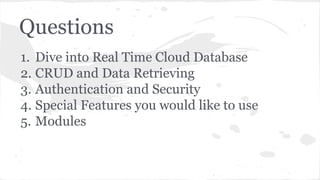
Questions
1. Dive into Real Time Cloud Database
2. CRUD and Data Retrieving
3. Authentication and Security
4. Special Features you would like to use
5. Modules
Break Points
1. Main Goals
2. Firebase as Service Provider
3. Get it Working
4. Play Around
5. Something special
6. Pros and Cons
7. What are we waiting for?
8. Conclusion
Main Goals
- provide with short review of technologie
- play around and show examples
- provide with directions of using Firebase
- conclude everything
Firebase as Service Provider
Main Information
Firebase is a cloud services provider and backend as a service company
based in San Francisco, California. The company makes a number of
products for software developers building mobile or web applications.
Firebase was founded in 2011 by Andrew Lee and James Tamplin and
launched with a real time cloud database in April 2012. © Wikipedia
Firebase as Service Provider
Services:
- Real Time Database Provider
- Hosting
- Simple Login
Firebase as Service Provider
Real Time Database Provider
Firebase provides a realtime database and backend as a service. The
service provides application developers an API that allows application
data to be synchronized across clients and stored on Firebase's cloud.
© Wikipedia
Firebase as Service Provider
Languages:
- Java Script
- Android
- iOS
- Node.js
- Java
- Objective-C
Frameworks:
- Angular
- Ember
- Backbone
- React
Get it Working: Data
Data Storage:
- JSON-structed
- relative-oriented
How it works:
- pub/sub server
- web-sockets
Get it Working: Start
Installation:
- <script
src="https://cdn.firebase.com/js/client/2.2.4/firebase.js">
</script>
- bower install firebase
- npm install firebase
Get it Working: Create DB
1. Sign Up: https://www.firebase.com/
2. Create Database
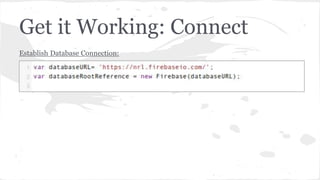
Get it Working: Connect
Establish Database Connection:
let’s code, Yarr!
Play Around: CRUD
Create
Read
Update
Delete
Play Around: CRUD
CRUD in Firebase:
- flexible (as many ways as you can imagine)
- one method and a lot of results
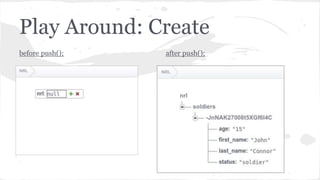
Play Around: Create
Create:
- push();
- set();
Play Around: Create
push();
- soft insert: just adds a new object
Play Around: Create
before push(); after push();
Play Around: Create
unique ids
Play Around: Create
set();
- strong: replace all the existing data
Play Around: Create
before set(); after set();
Play Around: Create
push();
- adds new object
- assigns unique Id
set();
- replace referenced data by incoming
object
- doesn’t assign unique Id
Play Around: Events
Events:
- on/once ‘value’
- on/once ‘child_added’
- on/once ‘child_removed’
- on/once ‘child_moved’
Play Around: Data View
Data View:
- data snapshot
- val();
- exists()
- child();
- parent();
- hasChild();
- hasChildren();
- isNumbers();
- isString();
- isBoolean();
- isNumber();
- getPriority();
Play Around: Read
Read:
- on.(‘value’);
- on.(child_added’);
- on.(child_removed’);
- on.(‘child_changed’);
- on.(‘child_moved’);
Play Around: Read
on.(‘value’)
Play Around: Read
on.(‘value’)
Play Around: Read
on.(‘child_added’)
<= show object key
Play Around: Update
Update:
- update();
- set();
Play Around: Update
update();
new field
Play Around: Delete
Delete:
- remove();
Play Around: Delete
remove();
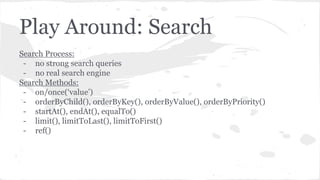
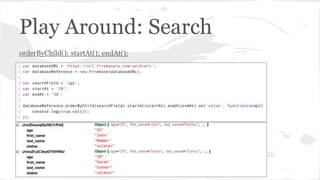
Play Around: Search
Search Process:
- no strong search queries
- no real search engine
Search Methods:
- on/once(‘value’)
- orderByChild(), orderByKey(), orderByValue(), orderByPriority()
- startAt(), endAt(), equalTo()
- limit(), limitToLast(), limitToFirst()
- ref()
Play Around: Search
Source Database:
Play Around: Search
orderByChild(); startAt(); endAt();
Play Around: Search
limitToFirst(); equalTo();
Play Around: Search
equalTo();
Play Around: Auth
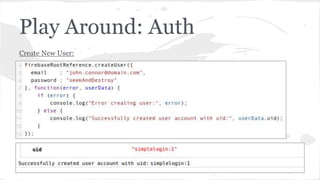
Pretty-looking and Easy:
- automatic user creation
- service-side authentication
- multiple authentication methods
Authentication Methods:
- email and password (using pre-registered email and password)
- social network-based (Facebook, Google, Twitter, GitHub)
- anonymous (new session = new identifier)
- custom (using pre-generated token)
Play Around: Auth
Auth Settings:
Play Around: Auth
Create New User:
Play Around: Auth
User List:
Play Around: Auth
Authentication:
Play Around: Security
Access Permissions:
- .read
- .write
- .validate
- .indexOn
Variables:
- auth
- $location
- now
- root
- data
- new Data
Methods:
- val()
- child()
- parent()
- isNumber()
- isString()
- matches(regex)
Operators:
- +,-,*,/,%
- ===, !==, &&, ||, >, <
Play Around: Security
Security Rules:
Play Around: Security
Security Rules & Authentication:
- not authenticated user
Play Around: Security
Security Rules & Authentication:
- authenticated user
- read soldiers record
Play Around: Security
Security Rules & Authentication:
- authenticated user
- write soldiers record
Play Around: Security
- not flexible security rules
- breaks search ability
- complicated in configuration
- force to duplicate data
Something Special
onDisconnect():
- set();
- update();
- remove();
- cancel();
ServerValue:
- TIMESTAMP
databaseReference.child(‘.info’)
- authenticated
- connected
- serverTimeOffset
Pros and Cons
Pros:
- fast
- auto-scalable
- service-side process handling
- events-oriented
- build-in graphic editor
- easy to jump in
- user-friendly
- understandable API
Cons:
- poor search engine
- no map reduce implemented
- no reference or join functionality
- not counted amount of
connections
Pros and Cons
Free Trial Plan:
- 50 connections
- 5 GB Data Transfer
- 100 MB Data Storage
- 1 GB Hosting Storage
- 100 GB Hosting Transfer
Paid Plans:
https://www.firebase.com/pricing.html
Modules
Module List:
https://github.com/firebase/geofire-js
https://github.com/firebase/vulcan
https://github.com/firebase/angularfire
More:
https://github.com/firebase
What are we waiting for?
- map reduce
- url handling
Links: no porn :(
https://www.firebase.com/
https://www.firebase.com/blog/
https://github.com/firebase/
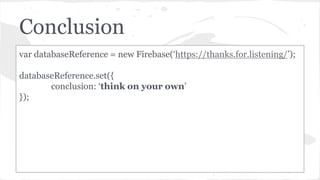
Conclusion
var databaseReference = new Firebase(‘https://thanks.for.listening/’);
databaseReference.set({
conclusion: ‘think on your own’
});
Put Something Here
var presentation = {
author: {
name: ‘Roman Sachenko’,
email: ‘roman.sachenko@gmail.com’,
skype: ‘roman.sachenko’,
statusMessage: ‘there is no way, but the hard way’
},
subject: ‘Firebase: not really yohoho, but
yarr’,
date: new Date(‘2015/04/30’),
};
DA-14 2015 Roman Sachenko

Firebase not really_yohoho