INTRODUCTION TO EMAIL
Tuesday, May 4, 2010

        @

The Warren Township
       Library

        By

 Catherine DeBerry
INTRODUCTION TO EMAIL
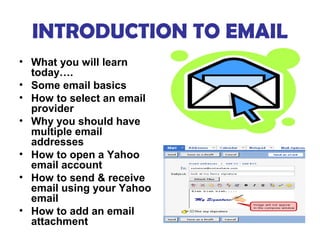
• What you will learn
  today….
• Some email basics
• How to select an email
  provider
• Why you should have
  multiple email
  addresses
• How to open a Yahoo
  email account
• How to send & receive
  email using your Yahoo
  email
• How to add an email
  attachment
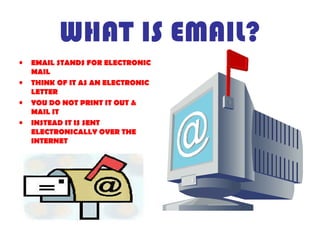
WHAT IS EMAIL?
•   EMAIL STANDS FOR ELECTRONIC
    MAIL
•   THINK OF IT AS AN ELECTRONIC
    LETTER
•   YOU DO NOT PRINT IT OUT &
    MAIL IT
•   INSTEAD IT IS SENT
    ELECTRONICALLY OVER THE
    INTERNET
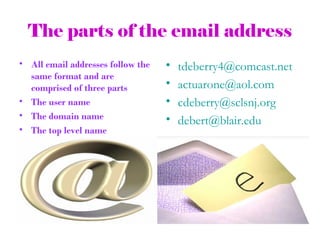
The parts of the email address
• All email addresses follow the   •   tdeberry4@comcast.net
  same format and are
  comprised of three parts         •   actuarone@aol.com
• The user name                    •   cdeberry@sclsnj.org
• The domain name                  •   debert@blair.edu
• The top level name
PART OF THE EMAIL
            ADDRESS
                 • The domain name
                                    identifies the computer
• The username is the part          where the email
  of the address to the left of     messages are sent &
  the @ symbol                      stored.
• It identifies the sender or     • For example…when
  recipient of the message          someone sends a
• When you set up an email          message to
  account, you are given the        tdeberry4@comcast.net,
  opportunity to choose a           the message goes to
  username for yourself
                                    the computer on the
• Sometimes the username            Internet, the web
  includes a first & last name      server that has been
  separated by a period
                                    given the name
                                    “comcast”
PART OF THE EMAIL
              ADDRESS
• Some examples of popular top   • The last part of the
  level domains & what they
  signify                          email address, the top
• .aero air transport industry     level domain (net, org,
• .asia Asia- Pacific region       com etc) identifies
• .com commercial                  either a country or
• .edu educational                 address type.
• .gov governmental
                                 • You can tell a little
• .museum museums
• .net networks                    something about a
                                   person by studying the
•   Popular Top Level Domains      top level domain in his
                                   email address
WHICH EMAIL TYPE TO
           CHOOSE
• There are 2 types of email software.
• STANDARD EMAIL SOFTWARE WHICH
  COMES AS PART OF THE SOFTWARE
  PACKAGE INSTALLED ON YOUR PC.
• EXAMPLES INCLUDE OUTLOOK EXPRESS &
  MICROSOFT OUTLOOK
•   The other type of email is Web based email
• DO NOT NEED EMAIL SOFTWARE BECAUSE IT IS ON THE
  INTERNET
• USUALLY FREE
• EXAMPLES INCLUDE MICROSOFT’S HOTMAIL OR GOOGLE’S
  GMAIL
• INTERNET PROVIDERS OFTEN GIVE FREE EMAIL (EXAMPLES
  ARE COMCAST & VERIZON)
DIFFERENCES BETWEEN EMAIL
          TYPES
             • HOW EMAIL IS
               HANDLED & STORED
             • EMAIL SOFTWARE-ALL
               MESSAGES KEPT ON
               YOUR COMPUTER
             • WEB BASED EMAIL-
               ALL MESSAGES KEPT
               ON COMPUTER ON
               INTERNET
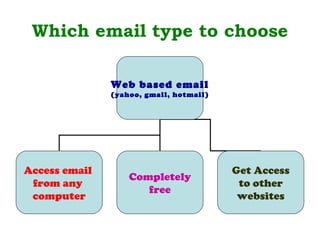
Which email type to choose

               Web based email
               (yahoo, gmail, hotmail)


Access email                             Get Access
                   Completely
 from any                                 to other
                      free
 computer                                 websites
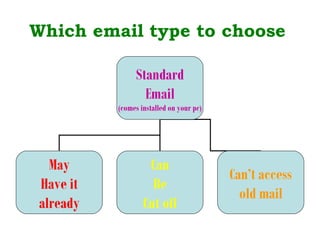
Which email type to choose

               Standard
                 Email
          (comes installed on your pc)


  May              Can
                                         Can’t access
Have it             Be
                                           old mail
already           Cut off
E-MAIL SAFETY BASICS
• Never give anyone your password.
• Keep your password hidden in a safe place and change it
  frequently.
• DO NOT open an email unless you know who it’s from because
  it could be spyware or a virus. DELETE THIS EMAIL
  IMMEDIATELY
• DO NOT open any attachments from anyone even if you know
  them unless the attachment is run through an anti-virus
  program first.
• Use common sense-keep personal information personal. Never
  give it out to anyone on the internet.
• DO NOT be caught by the spammer’s favorite trick “Remember
  me” in the subject heading
• Log off when done

• http://www.wiredsafety.org/safety/email_safety/index.html

Intro to email for seniors

  • 1.
    INTRODUCTION TO EMAIL Tuesday,May 4, 2010 @ The Warren Township Library By Catherine DeBerry
  • 2.
    INTRODUCTION TO EMAIL •What you will learn today…. • Some email basics • How to select an email provider • Why you should have multiple email addresses • How to open a Yahoo email account • How to send & receive email using your Yahoo email • How to add an email attachment
  • 3.
    WHAT IS EMAIL? • EMAIL STANDS FOR ELECTRONIC MAIL • THINK OF IT AS AN ELECTRONIC LETTER • YOU DO NOT PRINT IT OUT & MAIL IT • INSTEAD IT IS SENT ELECTRONICALLY OVER THE INTERNET
  • 4.
    The parts ofthe email address • All email addresses follow the • tdeberry4@comcast.net same format and are comprised of three parts • actuarone@aol.com • The user name • cdeberry@sclsnj.org • The domain name • debert@blair.edu • The top level name
  • 5.
    PART OF THEEMAIL ADDRESS • The domain name identifies the computer • The username is the part where the email of the address to the left of messages are sent & the @ symbol stored. • It identifies the sender or • For example…when recipient of the message someone sends a • When you set up an email message to account, you are given the tdeberry4@comcast.net, opportunity to choose a the message goes to username for yourself the computer on the • Sometimes the username Internet, the web includes a first & last name server that has been separated by a period given the name “comcast”
  • 6.
    PART OF THEEMAIL ADDRESS • Some examples of popular top • The last part of the level domains & what they signify email address, the top • .aero air transport industry level domain (net, org, • .asia Asia- Pacific region com etc) identifies • .com commercial either a country or • .edu educational address type. • .gov governmental • You can tell a little • .museum museums • .net networks something about a person by studying the • Popular Top Level Domains top level domain in his email address
  • 7.
    WHICH EMAIL TYPETO CHOOSE • There are 2 types of email software. • STANDARD EMAIL SOFTWARE WHICH COMES AS PART OF THE SOFTWARE PACKAGE INSTALLED ON YOUR PC. • EXAMPLES INCLUDE OUTLOOK EXPRESS & MICROSOFT OUTLOOK • The other type of email is Web based email • DO NOT NEED EMAIL SOFTWARE BECAUSE IT IS ON THE INTERNET • USUALLY FREE • EXAMPLES INCLUDE MICROSOFT’S HOTMAIL OR GOOGLE’S GMAIL • INTERNET PROVIDERS OFTEN GIVE FREE EMAIL (EXAMPLES ARE COMCAST & VERIZON)
  • 8.
    DIFFERENCES BETWEEN EMAIL TYPES • HOW EMAIL IS HANDLED & STORED • EMAIL SOFTWARE-ALL MESSAGES KEPT ON YOUR COMPUTER • WEB BASED EMAIL- ALL MESSAGES KEPT ON COMPUTER ON INTERNET
  • 9.
    Which email typeto choose Web based email (yahoo, gmail, hotmail) Access email Get Access Completely from any to other free computer websites
  • 10.
    Which email typeto choose Standard Email (comes installed on your pc) May Can Can’t access Have it Be old mail already Cut off
  • 11.
    E-MAIL SAFETY BASICS •Never give anyone your password. • Keep your password hidden in a safe place and change it frequently. • DO NOT open an email unless you know who it’s from because it could be spyware or a virus. DELETE THIS EMAIL IMMEDIATELY • DO NOT open any attachments from anyone even if you know them unless the attachment is run through an anti-virus program first. • Use common sense-keep personal information personal. Never give it out to anyone on the internet. • DO NOT be caught by the spammer’s favorite trick “Remember me” in the subject heading • Log off when done • http://www.wiredsafety.org/safety/email_safety/index.html

Editor's Notes

  • #5 As you can see I’ve provided some examples on the powerpoint.
  • #6 Why don’t you all think about possible user names and passwords for yourself while we go over the rest of the material. It is important that whatever you decide upon, you should write down both the username and password and keep in a safe place.
  • #12 Now we are going to go live and register you for a free yahoo account.