1
INTERNAL MAILING SYSTEM
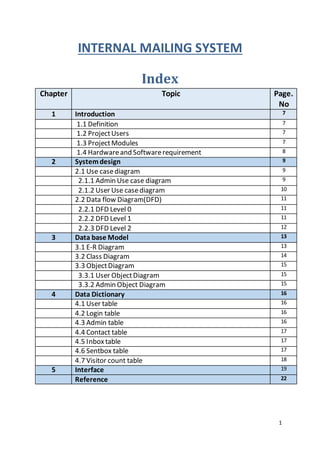
Index
Chapter Topic Page.
No
1 Introduction 7
1.1 Definition 7
1.2 ProjectUsers 7
1.3 ProjectModules 7
1.4 Hardwareand Softwarerequirement 8
2 Systemdesign 9
2.1 Use casediagram 9
2.1.1 Admin Use case diagram 9
2.1.2 User Use casediagram 10
2.2 Data flow Diagram(DFD) 11
2.2.1 DFD Level 0 11
2.2.2 DFD Level 1 11
2.2.3 DFD Level 2 12
3 Data base Model 13
3.1 E-R Diagram 13
3.2 Class Diagram 14
3.3 ObjectDiagram 15
3.3.1 User ObjectDiagram 15
3.3.2 Admin Object Diagram 15
4 Data Dictionary 16
4.1 User table 16
4.2 Login table 16
4.3 Admin table 16
4.4 Contact table 17
4.5 Inboxtable 17
4.6 Sentbox table 17
4.7 Visitor count table 18
5 Interface 19
Reference 22
2
3
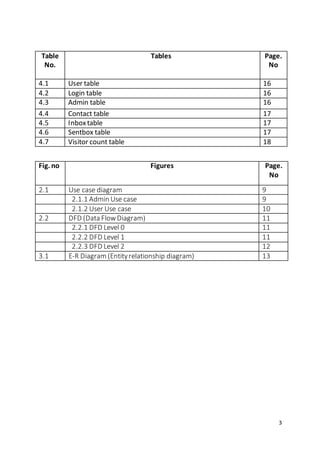
Table
No.
Tables Page.
No
4.1 User table 16
4.2 Login table 16
4.3 Admin table 16
4.4 Contact table 17
4.5 Inboxtable 17
4.6 Sentbox table 17
4.7 Visitor count table 18
Fig. no Figures Page.
No
2.1 Use case diagram 9
2.1.1 Admin Use case 9
2.1.2 User Use case 10
2.2 DFD (Data FlowDiagram) 11
2.2.1 DFD Level 0 11
2.2.2 DFD Level 1 11
2.2.3 DFD Level 2 12
3.1 E-R Diagram (Entityrelationship diagram) 13
4
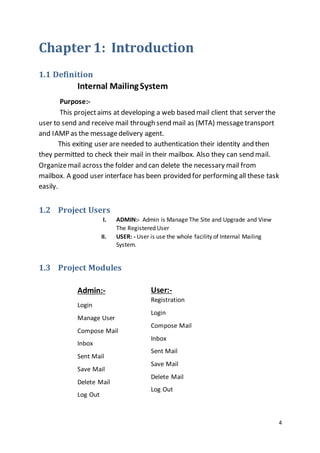
Chapter 1: Introduction
1.1 Definition
Internal MailingSystem
Purpose:-
This projectaims at developing a web based mail client that server the
user to send and receive mail through send mail as (MTA) messagetransport
and IAMP as the messagedelivery agent.
This exiting user are needed to authentication their identity and then
they permitted to check their mail in their mailbox. Also they can send mail.
Organizemail across the folder and can delete the necessary mail from
mailbox. A good user interface has been provided for performing all these task
easily.
1.2 Project Users
I. ADMIN:- Admin is Manage The Site and Upgrade and View
The Registered User
II. USER: - User is use the whole facility of Internal Mailing
System.
1.3 Project Modules
Admin:-
Login
Manage User
Compose Mail
Inbox
Sent Mail
Save Mail
Delete Mail
Log Out
User:-
Registration
Login
Compose Mail
Inbox
Sent Mail
Save Mail
Delete Mail
Log Out
5
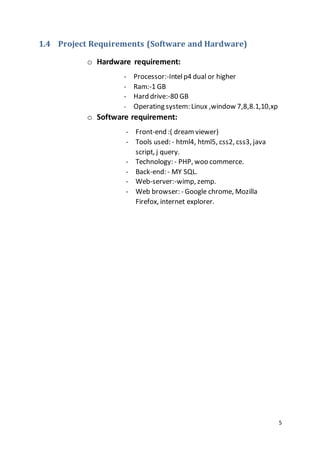
1.4 Project Requirements (Software and Hardware)
o Hardware requirement:
- Processor:-Intelp4 dual or higher
- Ram:-1 GB
- Hard drive:-80 GB
- Operating system: Linux ,window 7,8,8.1,10,xp
o Software requirement:
- Front-end :( dream viewer)
- Tools used: - html4, html5, css2, css3, java
script, j query.
- Technology: - PHP, woo commerce.
- Back-end: - MY SQL.
- Web-server:-wimp, zemp.
- Web browser: - Google chrome, Mozilla
Firefox, internet explorer.
6
Chapter 2: System Design
2.1 Use case
[Fig 2.1.1: ADMIN use case]
ADMIN
LOGIN
MANAGE USER
COMPOSE MAIL
INBOX
SENT MAIL
SAVE MAIL
DELETE MAIL
LOG OUT
7
[Fig 2.1.1: USER use case]
USER
REGESTRATION
LOGIN
COMPOSE MAIL
INBOX
SENT MAIL
SAVE MAIL
DELETE MAIL
LOG OUT
8
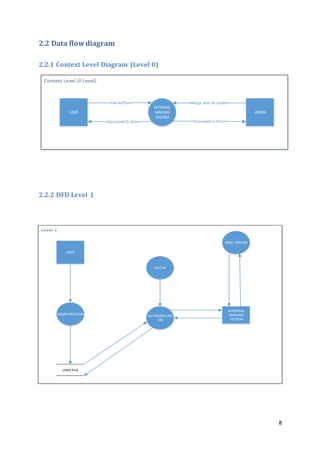
2.2 Data flow diagram
2.2.1 Context Level Diagram (Level 0)
USER
INTERNAL
MAILING
SYSTEM
ADMN
Successed Or Error
2.2.2 DFD Level 1
USER
LOG IN
AUTHENTICATI
ON
REGESTRATION
MAIL SERVER
INTERNAL
MAILING
SYSTEM
USER FILE
9
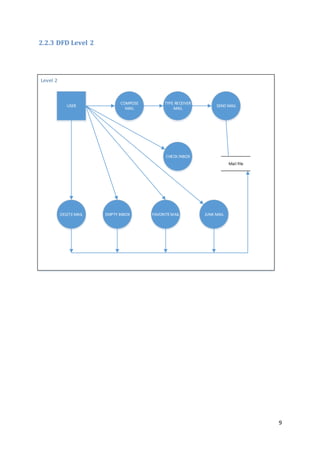
2.2.3 DFD Level 2
USER
COMPOSE
MAIL
SEND MAIL
DELETEMAIL
TYPE RECEIVER
MAIL
EMPTY INBOX JUNK MAILFAVORITEMAIL
CHECK INBOX
Mail File
10
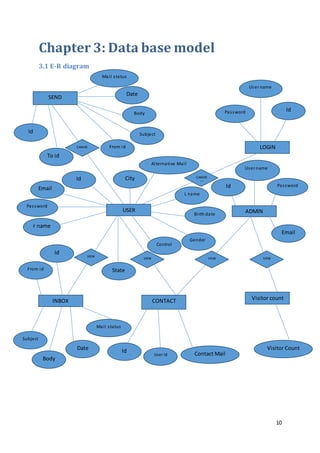
Chapter 3: Data base model
3.1 E-R diagram
LOGIN
SEND
CANVIE
W
City
User name
CANVIE
W
Password
VIEW
ADMIN
VIEW
USER
VIEWVIEW
Id
CONTACT Visitor countINBOX
Id
Id
User Id Contact Mail
Visitor CountDate
Body
Subject
Mail status
Mail status
Date
Body
From id
Id
To id
From id
Id
Email
Password
F name
State
L name
Birth date
Gender
Control
Alternative Mail
Subject
User name
PasswordId
Email
11
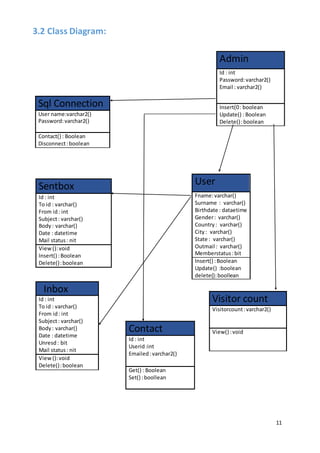
Sql Connection
User name:varchar2()
Password:varchar2()
Contact() : Boolean
Disconnect:boolean
Admin
Id : int
Password:varchar2()
Email : varchar2()
Insert(0: boolean
Update() : Boolean
Delete():boolean
Sentbox
Id : int
To id : varchar()
From id: int
Subject: varchar()
Body: varchar()
Date : datetime
Mail status: nit
View():void
Insert() :Boolean
Delete():boolean
User
Fname:varchar()
Surname : varchar()
Birthdate : dataetime
Gender: varchar()
Country: varchar()
City: varchar()
State : varchar()
Outmail : varchar()
Memberstatus:bit
Insert() :Boolean
Update() :boolean
delete():boollean
Inbox
Id : int
To id : varchar()
From id: int
Subject: varchar()
Body: varchar()
Date : datetime
Unresd: bit
Mail status: nit
View():void
Delete():boolean
Visitor count
Visitorcount:varchar2()
View() :voidContact
Id : int
Userid:int
Emailed:varchar2()
Get() : Boolean
Set() :boollean
3.2 Class Diagram:
12
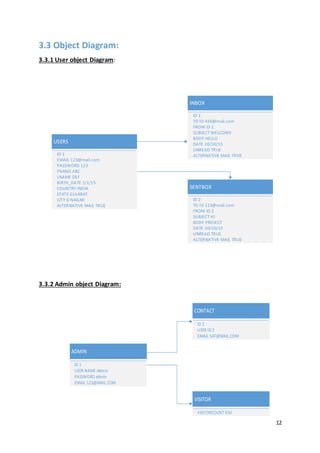
3.3 Object Diagram:
3.3.1 User object Diagram:
3.3.2 Admin object Diagram:
USERS
EMAIL 123@mail.com
PASSWORD 123
FNAME ABC
LNAME DEF
ID 1
BIRTH_DATE 1/1/15
COUNTRY INDIA
STATE GUJARAT
CITY G'NAGAR
ALTERNATIVE MAIL TRUE
INBOX
TO ID 456@mail.com
FROM ID 1
SUBJECT WELCOME
BODY HELLO
ID 1
DATE 10/10/15
UNREAD TRUE
ALTERNATIVE MAIL TRUE
SENTBOX
TO ID 123@mail.com
SUBJECT HI
FROM ID 2
BODY PROJECT
ID 2
DATE 10/10/15
UNREAD TRUE
ALTERNATIVE MAIL TRUE
ADMIN
USER NAME Admin
PASSWORD admin
EMAIL 123@MAIL.COM
ID 1
CONTACT
USER ID 2
EMAIL SAT@MAIL.COM
ID 1
VISITOR
VISITORCOUNT 650
13
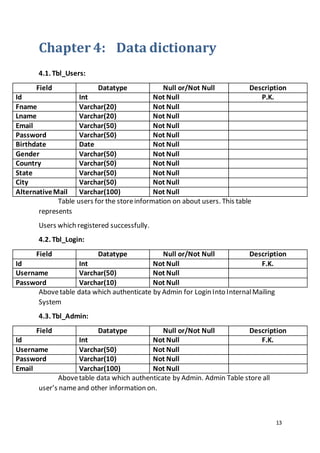
Chapter 4: Data dictionary
4.1. Tbl_Users:
Field Datatype Null or/Not Null Description
Id Int Not Null P.K.
Fname Varchar(20) Not Null
Lname Varchar(20) Not Null
Email Varchar(50) Not Null
Password Varchar(50) Not Null
Birthdate Date Not Null
Gender Varchar(50) Not Null
Country Varchar(50) Not Null
State Varchar(50) Not Null
City Varchar(50) Not Null
AlternativeMail Varchar(100) Not Null
Table users for the storeinformation on about users. This table
represents
Users which registered successfully.
4.2. Tbl_Login:
Field Datatype Null or/Not Null Description
Id Int Not Null F.K.
Username Varchar(50) Not Null
Password Varchar(10) Not Null
Abovetable data which authenticate by Admin for Login Into InternalMailing
System
4.3. Tbl_Admin:
Field Datatype Null or/Not Null Description
Id Int Not Null F.K.
Username Varchar(50) Not Null
Password Varchar(10) Not Null
Email Varchar(100) Not Null
Abovetable data which authenticate by Admin. Admin Table store all
user’s nameand other information on.
14
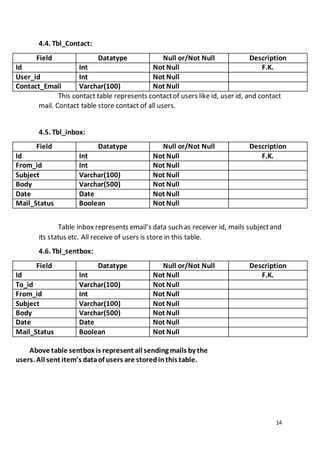
4.4. Tbl_Contact:
Field Datatype Null or/Not Null Description
Id Int Not Null F.K.
User_id Int Not Null
Contact_Email Varchar(100) Not Null
This contact table represents contactof users like id, user id, and contact
mail. Contact table store contact of all users.
4.5. Tbl_inbox:
Field Datatype Null or/Not Null Description
Id Int Not Null F.K.
From_id Int Not Null
Subject Varchar(100) Not Null
Body Varchar(500) Not Null
Date Date Not Null
Mail_Status Boolean Not Null
Table inbox represents email’s data such as receiver id, mails subjectand
its status etc. All receive of users is store in this table.
4.6. Tbl_sentbox:
Field Datatype Null or/Not Null Description
Id Int Not Null F.K.
To_id Varchar(100) Not Null
From_id Int Not Null
Subject Varchar(100) Not Null
Body Varchar(500) Not Null
Date Date Not Null
Mail_Status Boolean Not Null
Above table sentbox is represent all sending mails by the
users. All sent item’s dataof users are storedinthis table.
15
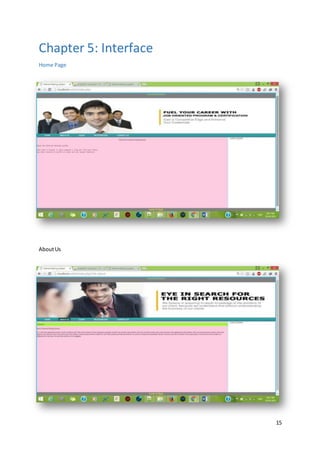
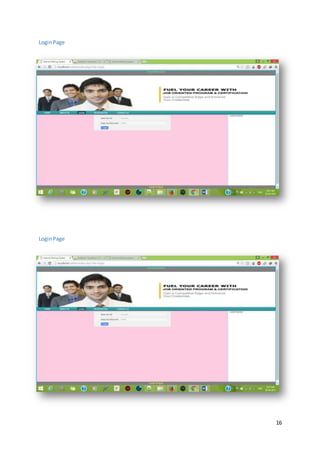
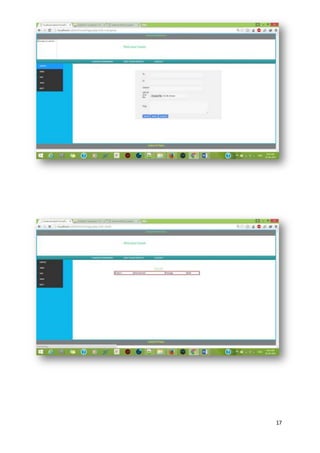
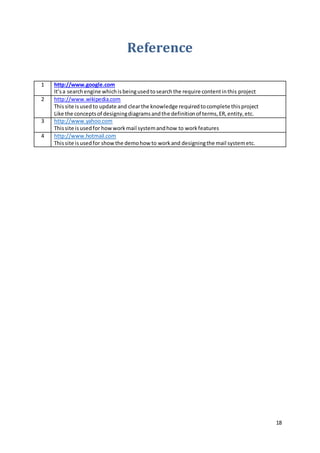
Chapter 5: Interface
Home Page
AboutUs
16
LoginPage
LoginPage
17
18
Reference
1 http://www.google.com
It’sa searchengine whichisbeingusedtosearchthe require contentinthis project
2 http://www.wikipedia.com
Thissite isusedto update and clearthe knowledge requiredtocomplete thisproject
Like the conceptsof designingdiagramsandthe definitionof terms,ER,entity,etc.
3 http://www.yahoo.com
Thissite isusedfor howworkmail systemandhow to workfeatures
4 http://www.hotmail.com
Thissite isusedfor showthe demohow to workand designingthe mail systemetc.

INTERNAL MAILING SYSTEM-Project report

  • 1.
    1 INTERNAL MAILING SYSTEM Index ChapterTopic Page. No 1 Introduction 7 1.1 Definition 7 1.2 ProjectUsers 7 1.3 ProjectModules 7 1.4 Hardwareand Softwarerequirement 8 2 Systemdesign 9 2.1 Use casediagram 9 2.1.1 Admin Use case diagram 9 2.1.2 User Use casediagram 10 2.2 Data flow Diagram(DFD) 11 2.2.1 DFD Level 0 11 2.2.2 DFD Level 1 11 2.2.3 DFD Level 2 12 3 Data base Model 13 3.1 E-R Diagram 13 3.2 Class Diagram 14 3.3 ObjectDiagram 15 3.3.1 User ObjectDiagram 15 3.3.2 Admin Object Diagram 15 4 Data Dictionary 16 4.1 User table 16 4.2 Login table 16 4.3 Admin table 16 4.4 Contact table 17 4.5 Inboxtable 17 4.6 Sentbox table 17 4.7 Visitor count table 18 5 Interface 19 Reference 22
  • 2.
  • 3.
    3 Table No. Tables Page. No 4.1 Usertable 16 4.2 Login table 16 4.3 Admin table 16 4.4 Contact table 17 4.5 Inboxtable 17 4.6 Sentbox table 17 4.7 Visitor count table 18 Fig. no Figures Page. No 2.1 Use case diagram 9 2.1.1 Admin Use case 9 2.1.2 User Use case 10 2.2 DFD (Data FlowDiagram) 11 2.2.1 DFD Level 0 11 2.2.2 DFD Level 1 11 2.2.3 DFD Level 2 12 3.1 E-R Diagram (Entityrelationship diagram) 13
  • 4.
    4 Chapter 1: Introduction 1.1Definition Internal MailingSystem Purpose:- This projectaims at developing a web based mail client that server the user to send and receive mail through send mail as (MTA) messagetransport and IAMP as the messagedelivery agent. This exiting user are needed to authentication their identity and then they permitted to check their mail in their mailbox. Also they can send mail. Organizemail across the folder and can delete the necessary mail from mailbox. A good user interface has been provided for performing all these task easily. 1.2 Project Users I. ADMIN:- Admin is Manage The Site and Upgrade and View The Registered User II. USER: - User is use the whole facility of Internal Mailing System. 1.3 Project Modules Admin:- Login Manage User Compose Mail Inbox Sent Mail Save Mail Delete Mail Log Out User:- Registration Login Compose Mail Inbox Sent Mail Save Mail Delete Mail Log Out
  • 5.
    5 1.4 Project Requirements(Software and Hardware) o Hardware requirement: - Processor:-Intelp4 dual or higher - Ram:-1 GB - Hard drive:-80 GB - Operating system: Linux ,window 7,8,8.1,10,xp o Software requirement: - Front-end :( dream viewer) - Tools used: - html4, html5, css2, css3, java script, j query. - Technology: - PHP, woo commerce. - Back-end: - MY SQL. - Web-server:-wimp, zemp. - Web browser: - Google chrome, Mozilla Firefox, internet explorer.
  • 6.
    6 Chapter 2: SystemDesign 2.1 Use case [Fig 2.1.1: ADMIN use case] ADMIN LOGIN MANAGE USER COMPOSE MAIL INBOX SENT MAIL SAVE MAIL DELETE MAIL LOG OUT
  • 7.
    7 [Fig 2.1.1: USERuse case] USER REGESTRATION LOGIN COMPOSE MAIL INBOX SENT MAIL SAVE MAIL DELETE MAIL LOG OUT
  • 8.
    8 2.2 Data flowdiagram 2.2.1 Context Level Diagram (Level 0) USER INTERNAL MAILING SYSTEM ADMN Successed Or Error 2.2.2 DFD Level 1 USER LOG IN AUTHENTICATI ON REGESTRATION MAIL SERVER INTERNAL MAILING SYSTEM USER FILE
  • 9.
    9 2.2.3 DFD Level2 USER COMPOSE MAIL SEND MAIL DELETEMAIL TYPE RECEIVER MAIL EMPTY INBOX JUNK MAILFAVORITEMAIL CHECK INBOX Mail File
  • 10.
    10 Chapter 3: Database model 3.1 E-R diagram LOGIN SEND CANVIE W City User name CANVIE W Password VIEW ADMIN VIEW USER VIEWVIEW Id CONTACT Visitor countINBOX Id Id User Id Contact Mail Visitor CountDate Body Subject Mail status Mail status Date Body From id Id To id From id Id Email Password F name State L name Birth date Gender Control Alternative Mail Subject User name PasswordId Email
  • 11.
    11 Sql Connection User name:varchar2() Password:varchar2() Contact(): Boolean Disconnect:boolean Admin Id : int Password:varchar2() Email : varchar2() Insert(0: boolean Update() : Boolean Delete():boolean Sentbox Id : int To id : varchar() From id: int Subject: varchar() Body: varchar() Date : datetime Mail status: nit View():void Insert() :Boolean Delete():boolean User Fname:varchar() Surname : varchar() Birthdate : dataetime Gender: varchar() Country: varchar() City: varchar() State : varchar() Outmail : varchar() Memberstatus:bit Insert() :Boolean Update() :boolean delete():boollean Inbox Id : int To id : varchar() From id: int Subject: varchar() Body: varchar() Date : datetime Unresd: bit Mail status: nit View():void Delete():boolean Visitor count Visitorcount:varchar2() View() :voidContact Id : int Userid:int Emailed:varchar2() Get() : Boolean Set() :boollean 3.2 Class Diagram:
  • 12.
    12 3.3 Object Diagram: 3.3.1User object Diagram: 3.3.2 Admin object Diagram: USERS EMAIL 123@mail.com PASSWORD 123 FNAME ABC LNAME DEF ID 1 BIRTH_DATE 1/1/15 COUNTRY INDIA STATE GUJARAT CITY G'NAGAR ALTERNATIVE MAIL TRUE INBOX TO ID 456@mail.com FROM ID 1 SUBJECT WELCOME BODY HELLO ID 1 DATE 10/10/15 UNREAD TRUE ALTERNATIVE MAIL TRUE SENTBOX TO ID 123@mail.com SUBJECT HI FROM ID 2 BODY PROJECT ID 2 DATE 10/10/15 UNREAD TRUE ALTERNATIVE MAIL TRUE ADMIN USER NAME Admin PASSWORD admin EMAIL 123@MAIL.COM ID 1 CONTACT USER ID 2 EMAIL SAT@MAIL.COM ID 1 VISITOR VISITORCOUNT 650
  • 13.
    13 Chapter 4: Datadictionary 4.1. Tbl_Users: Field Datatype Null or/Not Null Description Id Int Not Null P.K. Fname Varchar(20) Not Null Lname Varchar(20) Not Null Email Varchar(50) Not Null Password Varchar(50) Not Null Birthdate Date Not Null Gender Varchar(50) Not Null Country Varchar(50) Not Null State Varchar(50) Not Null City Varchar(50) Not Null AlternativeMail Varchar(100) Not Null Table users for the storeinformation on about users. This table represents Users which registered successfully. 4.2. Tbl_Login: Field Datatype Null or/Not Null Description Id Int Not Null F.K. Username Varchar(50) Not Null Password Varchar(10) Not Null Abovetable data which authenticate by Admin for Login Into InternalMailing System 4.3. Tbl_Admin: Field Datatype Null or/Not Null Description Id Int Not Null F.K. Username Varchar(50) Not Null Password Varchar(10) Not Null Email Varchar(100) Not Null Abovetable data which authenticate by Admin. Admin Table store all user’s nameand other information on.
  • 14.
    14 4.4. Tbl_Contact: Field DatatypeNull or/Not Null Description Id Int Not Null F.K. User_id Int Not Null Contact_Email Varchar(100) Not Null This contact table represents contactof users like id, user id, and contact mail. Contact table store contact of all users. 4.5. Tbl_inbox: Field Datatype Null or/Not Null Description Id Int Not Null F.K. From_id Int Not Null Subject Varchar(100) Not Null Body Varchar(500) Not Null Date Date Not Null Mail_Status Boolean Not Null Table inbox represents email’s data such as receiver id, mails subjectand its status etc. All receive of users is store in this table. 4.6. Tbl_sentbox: Field Datatype Null or/Not Null Description Id Int Not Null F.K. To_id Varchar(100) Not Null From_id Int Not Null Subject Varchar(100) Not Null Body Varchar(500) Not Null Date Date Not Null Mail_Status Boolean Not Null Above table sentbox is represent all sending mails by the users. All sent item’s dataof users are storedinthis table.
  • 15.
  • 16.
  • 17.
  • 18.
    18 Reference 1 http://www.google.com It’sa searchenginewhichisbeingusedtosearchthe require contentinthis project 2 http://www.wikipedia.com Thissite isusedto update and clearthe knowledge requiredtocomplete thisproject Like the conceptsof designingdiagramsandthe definitionof terms,ER,entity,etc. 3 http://www.yahoo.com Thissite isusedfor howworkmail systemandhow to workfeatures 4 http://www.hotmail.com Thissite isusedfor showthe demohow to workand designingthe mail systemetc.