“ EMPLOYEE MANAGEMENT SYSTEM ”
Presented By
Deepak Soni
BE|CSE
5th Sem.
PROJECT ABSTRACT
 Employee Management System is a simple console application
without graphics,developed using C++ Programming language.
 Employee Management System is a distributed application,
developed to maintain the details of employees working in any
organization. It maintains the information about the personal
details of their employees.
 This mini project utilizes various aspects of the C++ language such
as class,object,functions,array,file handling and data structure.
 It is simple to understand and can be used by anyone who is not
even familiar with simple employees system. It is user friendly and
just asks the user to follow step by step operations by giving him
few options. It is fast and can perform many operations of a
company.
FEATURES OF SYSTEM
• Login
• Create the employee table
• List of the employee table
• Update/save all records
• Previous records
• Insert new entry
• Delete an entry
• Edit an entry
• Search an records
• Sort the table
• With the use of simple File Handling (text file)
 The Key Features Of Employee Managment System Are :
SYSTEM REQUIREMENTS
 Operating System : Windows 7/8/10 etc.
 HDD : 40Gb or More
 RAM : 256Mb or above
 Processor : Intel Pentium IV, 1GHZ or above
 Video : 1024x768, 32-bit colors
HEADER FILES
• #include<iostream>
• #include<conio.h>
• #include<windows.h>
• #include<iomanip>
• #include<cstdlib>
• #include<fstream>
• #include<ctime>
#include<iostream>
• class
• cin (Standard input stream(object))
• cout ( Standard output stream(object))
• endl ( Inserts new-line character and flushes output stream)
#include<conio.h>
• Textcolor ( use to change the color of text )
• getch() ( it reads character from keyboard )
#include<windows.h>
• Sleep() ( Sleep Sometime in millisecs )
#include<cstdlib>
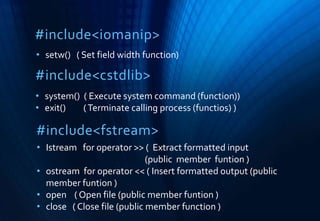
• setw() ( Set field width function)
#include<iomanip>
• system() ( Execute system command (function))
• exit() (Terminate calling process (functios) )
#include<fstream>
• Istream for operator >> ( Extract formatted input
(public member funtion )
• ostream for operator << ( Insert formatted output (public
member funtion )
• open ( Open file (public member funtion )
• close ( Close file (public member function )
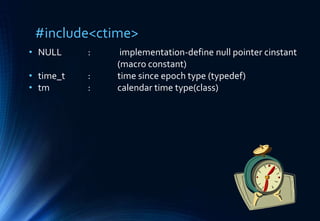
#include<ctime>
• NULL : implementation-define null pointer cinstant
(macro constant)
• time_t : time since epoch type (typedef)
• tm : calendar time type(class)
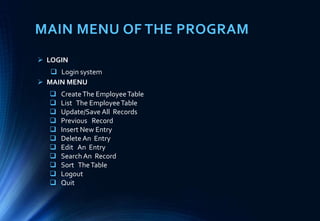
MAIN MENU OF THE PROGRAM
 CreateThe EmployeeTable
 List The EmployeeTable
 Update/Save All Records
 Previous Record
 Insert New Entry
 Delete An Entry
 Edit An Entry
 Search An Record
 Sort TheTable
 Logout
 Quit
 LOGIN
 Login system
 MAIN MENU
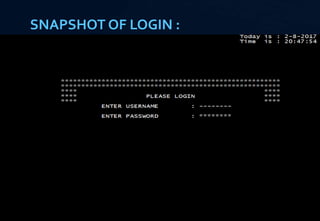
SNAPSHOT OF LOGIN :
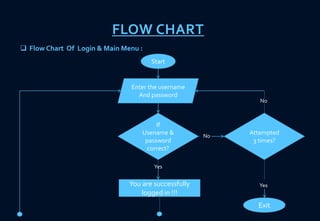
FLOW CHART
Start
Enter the username
And password
If
Usename &
password
correct?
You are successfully
logged in !!!
Yes
Attempted
3 times?
No
No
 Flow Chart Of Login & Main Menu :
Exit
Main Menu
Press[c]
Press[l]
Press[u]
Press[p]
No
No
No
Yes CreateTheTable
Yes
Update/Save All
Records
List OfTable
Yes Previous Records
Press[i]
Press[d]
Press[e]
Press[s]
Press[n]
Press[0]
Press[q]
Exit
Insert New Entry
Delete An Entry
Edit An Entry
Search An Entry
SortTheTable
Logout
Quit
save
record
y/n?
Display
Update List
Store in
memory
You
want to
save all
records
y/n?
Store in
Memory
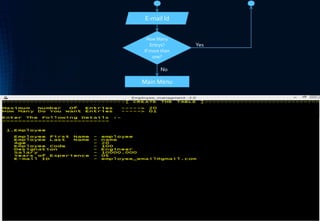
FLOW CHART OF CREATE THE TABLE
CreateTheTable
Salary
First Name
Last Name
Age
Employee Code
Designation
Experience
Main Menu
E-mail Id
How Many
Entrys?
If more then
one?
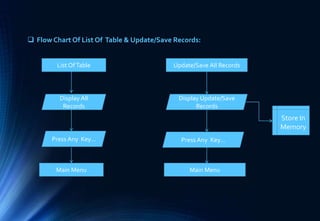
List OfTable
Display All
Records
Press Any Key…
Main Menu
Update/Save All Records
Display Update/Save
Records
Press Any Key…
Main Menu
 Flow Chart Of List Of Table & Update/Save Records:
Store In
Memory
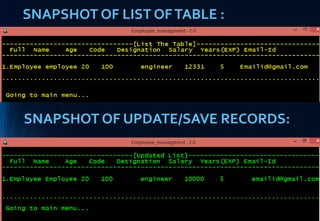
SNAPSHOT OF LIST OFTABLE :
SNAPSHOT OF UPDATE/SAVE RECORDS:
 Flow Chart Of Previous Records
:
Previous Records
Display Previous
Records
Press Any Key..
Main Menu
Insert New Entry
Salary
First Name
Last Name
Age
Employee Code
Designation
Main Menu
E-mail Id
Experience
 Flow Chart Of Insert New Entry :
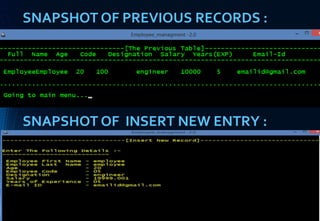
SNAPSHOT OF PREVIOUS RECORDS :
SNAPSHOT OF INSERT NEW ENTRY :
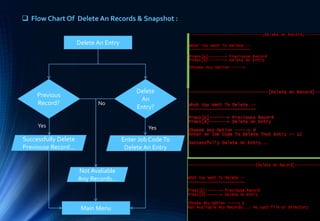
 Flow Chart Of Delete An Records & Snapshot :
Delete An Entry
Previous
Record?
Delete
An
Entry?
Successfully Delete
Previouse Record...
Enter Job CodeTo
Delete An Entry
Main Menu
Yes Yes
No
Not Avaliable
Any Records...
Edit An Entry
Enter Job CodeTo
Edit An Entry
Press[n]
Press[a]
Press[c]
Press[d]
Yes
Press[s]
Enter First name :
Enter Last name :
Enter New Age :
Enter New Code :
Enter New
Designation
Enter New Salary
Press[x]
Press[e]
Press[q]
Main Menu
Enter New
Experience :
Enter New
Email-id :
 Snapshot Of Edit An Entry :
 Flow Chart Of Search An Entry & SortTheTable :
Search An Entry
Enter Job CodeTo
Search An Entry
Display Jobcode
Of An Entry
Main Menu
Press Any Key…
Sort TheTable
Press[n]
Press[d]
Press[q]
Display Sorted
List By Name
Display sorted List
By Designation
Main Menu
Press Any Key
To Go Back..
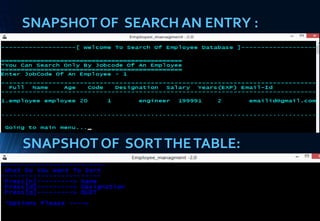
SNAPSHOT OF SEARCH AN ENTRY :
SNAPSHOT OF SORTTHETABLE:
THANKYOU : )

Employee management system

  • 1.
    “ EMPLOYEE MANAGEMENTSYSTEM ” Presented By Deepak Soni BE|CSE 5th Sem.
  • 2.
    PROJECT ABSTRACT  EmployeeManagement System is a simple console application without graphics,developed using C++ Programming language.  Employee Management System is a distributed application, developed to maintain the details of employees working in any organization. It maintains the information about the personal details of their employees.  This mini project utilizes various aspects of the C++ language such as class,object,functions,array,file handling and data structure.  It is simple to understand and can be used by anyone who is not even familiar with simple employees system. It is user friendly and just asks the user to follow step by step operations by giving him few options. It is fast and can perform many operations of a company.
  • 3.
    FEATURES OF SYSTEM •Login • Create the employee table • List of the employee table • Update/save all records • Previous records • Insert new entry • Delete an entry • Edit an entry • Search an records • Sort the table • With the use of simple File Handling (text file)  The Key Features Of Employee Managment System Are :
  • 4.
    SYSTEM REQUIREMENTS  OperatingSystem : Windows 7/8/10 etc.  HDD : 40Gb or More  RAM : 256Mb or above  Processor : Intel Pentium IV, 1GHZ or above  Video : 1024x768, 32-bit colors
  • 5.
    HEADER FILES • #include<iostream> •#include<conio.h> • #include<windows.h> • #include<iomanip> • #include<cstdlib> • #include<fstream> • #include<ctime>
  • 6.
    #include<iostream> • class • cin(Standard input stream(object)) • cout ( Standard output stream(object)) • endl ( Inserts new-line character and flushes output stream) #include<conio.h> • Textcolor ( use to change the color of text ) • getch() ( it reads character from keyboard ) #include<windows.h> • Sleep() ( Sleep Sometime in millisecs )
  • 7.
    #include<cstdlib> • setw() (Set field width function) #include<iomanip> • system() ( Execute system command (function)) • exit() (Terminate calling process (functios) ) #include<fstream> • Istream for operator >> ( Extract formatted input (public member funtion ) • ostream for operator << ( Insert formatted output (public member funtion ) • open ( Open file (public member funtion ) • close ( Close file (public member function )
  • 8.
    #include<ctime> • NULL :implementation-define null pointer cinstant (macro constant) • time_t : time since epoch type (typedef) • tm : calendar time type(class)
  • 9.
    MAIN MENU OFTHE PROGRAM  CreateThe EmployeeTable  List The EmployeeTable  Update/Save All Records  Previous Record  Insert New Entry  Delete An Entry  Edit An Entry  Search An Record  Sort TheTable  Logout  Quit  LOGIN  Login system  MAIN MENU
  • 10.
  • 11.
    FLOW CHART Start Enter theusername And password If Usename & password correct? You are successfully logged in !!! Yes Attempted 3 times? No No  Flow Chart Of Login & Main Menu : Exit
  • 12.
  • 13.
    Press[i] Press[d] Press[e] Press[s] Press[n] Press[0] Press[q] Exit Insert New Entry DeleteAn Entry Edit An Entry Search An Entry SortTheTable Logout Quit save record y/n? Display Update List Store in memory You want to save all records y/n? Store in Memory
  • 14.
    FLOW CHART OFCREATE THE TABLE CreateTheTable Salary First Name Last Name Age Employee Code Designation Experience
  • 15.
    Main Menu E-mail Id HowMany Entrys? If more then one?
  • 16.
    List OfTable Display All Records PressAny Key… Main Menu Update/Save All Records Display Update/Save Records Press Any Key… Main Menu  Flow Chart Of List Of Table & Update/Save Records: Store In Memory
  • 17.
    SNAPSHOT OF LISTOFTABLE : SNAPSHOT OF UPDATE/SAVE RECORDS:
  • 18.
     Flow ChartOf Previous Records : Previous Records Display Previous Records Press Any Key.. Main Menu Insert New Entry Salary First Name Last Name Age Employee Code Designation Main Menu E-mail Id Experience  Flow Chart Of Insert New Entry :
  • 19.
    SNAPSHOT OF PREVIOUSRECORDS : SNAPSHOT OF INSERT NEW ENTRY :
  • 20.
     Flow ChartOf Delete An Records & Snapshot : Delete An Entry Previous Record? Delete An Entry? Successfully Delete Previouse Record... Enter Job CodeTo Delete An Entry Main Menu Yes Yes No Not Avaliable Any Records...
  • 21.
    Edit An Entry EnterJob CodeTo Edit An Entry Press[n] Press[a] Press[c] Press[d] Yes Press[s] Enter First name : Enter Last name : Enter New Age : Enter New Code : Enter New Designation Enter New Salary
  • 22.
    Press[x] Press[e] Press[q] Main Menu Enter New Experience: Enter New Email-id :  Snapshot Of Edit An Entry :
  • 23.
     Flow ChartOf Search An Entry & SortTheTable : Search An Entry Enter Job CodeTo Search An Entry Display Jobcode Of An Entry Main Menu Press Any Key… Sort TheTable Press[n] Press[d] Press[q] Display Sorted List By Name Display sorted List By Designation Main Menu Press Any Key To Go Back..
  • 24.
    SNAPSHOT OF SEARCHAN ENTRY : SNAPSHOT OF SORTTHETABLE:
  • 25.