INVENTORY MANAGEMENT
SYSTEM
A Project submitted in partial fulfillment of the requirements for B.Sc.
Computer Science & Engineering
Submission Date: 28/10/2019
Bangladesh University of Business & Technology (BUBT)
Department of Computer Science & Engineering
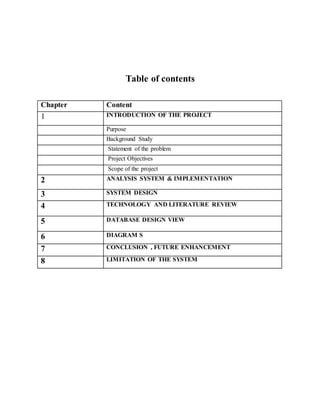
Table of contents
Chapter Content
1 INTRODUCTION OF THE PROJECT
Purpose
Background Study
Statement of the problem
Project Objectives
Scope of the project
2 ANALYSIS SYSTEM & IMPLEMENTATION
3 SYSTEM DESIGN
4 TECHNOLOGY AND LITERATURE REVIEW
5 DATABASE DESIGN VIEW
6 DIAGRAM S
7 CONCLUSION , FUTURE ENHANCEMENT
8 LIMITATION OF THE SYSTEM
CHAPTER 01:
INTRODUCTION OF THE PROJECT
● PURPOSE
This project is a web application that allows you to manage your sales and inventory with
inventory management system compliance on website. This system will be maintained only by
the admin.
● SCOPE
Inventory management system is a web-based application which allows to purchase equipment
or products from this site. The scope of our project is vast. This project is a customer-seller web
application built over a DBMS. The project, short for web logging, is an application that runs on
a portal site, in which different admin (and admin groups) can publish and revise daily the details
of the products will be made public for others to view.
Update your stock information, make purchases and view sells data from anywhere whether in
the office, at home, in the warehouse, or on the go. All you need to access this device with
internet connection
● OBJECTIVE
This site is a web based marketing site to sell the necessary goods, and the details of this
products are made public for others view. It provides the customer for knowing the details of the
products. By developing this project, one can easily know the details of his/her necessary
products and also can buy that product purchase that product from this site.
We can summarize this in some point they are:
● Admin can update and edit the existing list of products.
● Admin only can add new member as admin who can maintain the website
● All posts of products will be in public mode so that anyone can see the details of the
products.
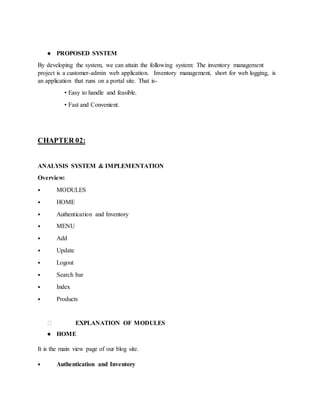
● PROPOSED SYSTEM
By developing the system, we can attain the following system: The inventory management
project is a customer-admin web application. Inventory management, short for web logging, is
an application that runs on a portal site. That is-
• Easy to handle and feasible.
• Fast and Convenient.
CHAPTER 02:
ANALYSIS SYSTEM & IMPLEMENTATION
Overview:
⦁ MODULES
⦁ HOME
⦁ Authentication and Inventory
⦁ MENU
⦁ Add
⦁ Update
⦁ Logout
⦁ Search bar
⦁ Index
⦁ Products
⮚ EXPLANATION OF MODULES
● HOME
It is the main view page of our blog site.
⦁ Authentication and Inventory
This section provides customer or viewer the category of the products.
⦁ MENU
In the Menu section different subsections are provided such as
⮚ ⦁ Add
⮚ ⦁ Update
⮚ ⦁ Logout
⮚ ⦁ Search bar
⮚ ⦁ Index
● Add
From here admin can frequently add new product that will publish in the updated product list.
Actually this is shortcut menu of adding new product.
⦁ LOGOUT
From here an admin can log out his/her account from the inventory management site.
When an admin will login to the site, he can logout from the site from this section.
⦁ SEARCH BAR
In this section, anyone can search for any product. The search bar is located in the Menu section
to search for anything in the whole site.
⦁ Update
Here the updated product will be seen. In this section a user can see some more options such as
related category, in this all the related category of that category will be seen. Related products
will be given according to the category. There will next or previous button if anyone want to see
the next or previous posts then he/she will have to press that button
● Index
In this section the category of this site will be available.
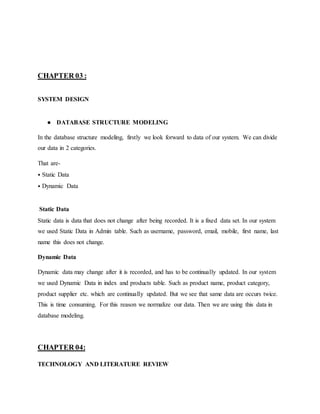
CHAPTER 03 :
SYSTEM DESIGN
● DATABASE STRUCTURE MODELING
In the database structure modeling, firstly we look forward to data of our system. We can divide
our data in 2 categories.
That are-
⦁ Static Data
⦁ Dynamic Data
Static Data
Static data is data that does not change after being recorded. It is a fixed data set. In our system
we used Static Data in Admin table. Such as username, password, email, mobile, first name, last
name this does not change.
Dynamic Data
Dynamic data may change after it is recorded, and has to be continually updated. In our system
we used Dynamic Data in index and products table. Such as product name, product category,
product supplier etc. which are continually updated. But we see that same data are occurs twice.
This is time consuming. For this reason we normalize our data. Then we are using this data in
database modeling.
CHAPTER 04:
TECHNOLOGY AND LITERATURE REVIEW
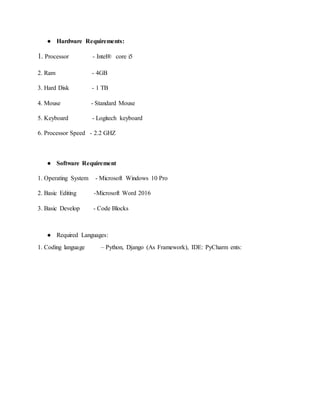
● Hardware Requirements:
1. Processor - Intel® core i5
2. Ram - 4GB
3. Hard Disk - 1 TB
4. Mouse - Standard Mouse
5. Keyboard - Logitech keyboard
6. Processor Speed - 2.2 GHZ
● Software Requirement
1. Operating System - Microsoft Windows 10 Pro
2. Basic Editing -Microsoft Word 2016
3. Basic Develop - Code Blocks
● Required Languages:
1. Coding language – Python, Django (As Framework), IDE: PyCharm ents:
CHAPTER 05:
DATABASE DESIGN VIEW
Figure 3.2.1: Admin or Author
Figure 3.2.2: Products
TABLE STRUCTURE AND LIST WITH PROPER DESCRIPTION
The next step is to lay out a visual representation of our database. To do this, we need to create
tables with the help of our lists of data. After normalize our data we understand that we need four
table for our recommended system. That are-
⦁ Admin/ Author Table
In the Admin/ Author Table, the primary key is USER NAME and other attributes are
PASSWORD, E-MAIL, MOBILE, and ADDRESS. Admin using this attributes to login to our
system.
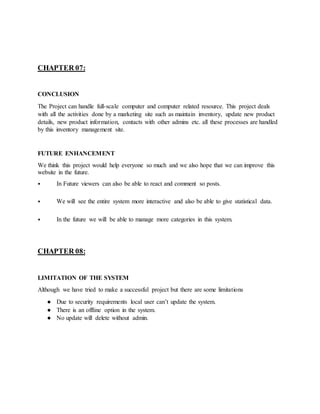
⦁ Products Table
In this table, Category Information is stored. Where the primary key is Product name and other
attributes are Category, Supplier and Unit Price.
CHAPTER 06:
DIAGRAMS
Figure 6.1: Login process
Figure 6.2: Inventory process
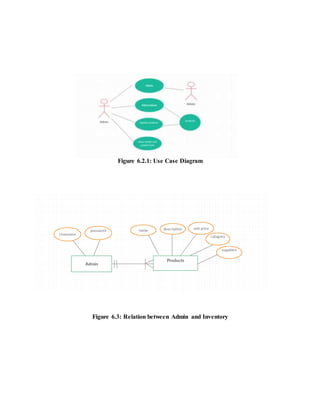
Figure 6.2.1: Use Case Diagram
Figure 6.3: Relation between Admin and Inventory
CHAPTER 07:
CONCLUSION
The Project can handle full-scale computer and computer related resource. This project deals
with all the activities done by a marketing site such as maintain inventory, update new product
details, new product information, contacts with other admins etc. all these processes are handled
by this inventory management site.
FUTURE ENHANCEMENT
We think this project would help everyone so much and we also hope that we can improve this
website in the future.
⦁ In Future viewers can also be able to react and comment so posts.
⦁ We will see the entire system more interactive and also be able to give statistical data.
⦁ In the future we will be able to manage more categories in this system.
CHAPTER 08:
LIMITATION OF THE SYSTEM
Although we have tried to make a successful project but there are some limitations
● Due to security requirements local user can’t update the system.
● There is an offline option in the system.
● No update will delete without admin.

Inventory management system

  • 1.
    INVENTORY MANAGEMENT SYSTEM A Projectsubmitted in partial fulfillment of the requirements for B.Sc. Computer Science & Engineering Submission Date: 28/10/2019 Bangladesh University of Business & Technology (BUBT) Department of Computer Science & Engineering
  • 2.
    Table of contents ChapterContent 1 INTRODUCTION OF THE PROJECT Purpose Background Study Statement of the problem Project Objectives Scope of the project 2 ANALYSIS SYSTEM & IMPLEMENTATION 3 SYSTEM DESIGN 4 TECHNOLOGY AND LITERATURE REVIEW 5 DATABASE DESIGN VIEW 6 DIAGRAM S 7 CONCLUSION , FUTURE ENHANCEMENT 8 LIMITATION OF THE SYSTEM
  • 3.
    CHAPTER 01: INTRODUCTION OFTHE PROJECT ● PURPOSE This project is a web application that allows you to manage your sales and inventory with inventory management system compliance on website. This system will be maintained only by the admin. ● SCOPE Inventory management system is a web-based application which allows to purchase equipment or products from this site. The scope of our project is vast. This project is a customer-seller web application built over a DBMS. The project, short for web logging, is an application that runs on a portal site, in which different admin (and admin groups) can publish and revise daily the details of the products will be made public for others to view. Update your stock information, make purchases and view sells data from anywhere whether in the office, at home, in the warehouse, or on the go. All you need to access this device with internet connection ● OBJECTIVE This site is a web based marketing site to sell the necessary goods, and the details of this products are made public for others view. It provides the customer for knowing the details of the products. By developing this project, one can easily know the details of his/her necessary products and also can buy that product purchase that product from this site. We can summarize this in some point they are: ● Admin can update and edit the existing list of products. ● Admin only can add new member as admin who can maintain the website ● All posts of products will be in public mode so that anyone can see the details of the products.
  • 4.
    ● PROPOSED SYSTEM Bydeveloping the system, we can attain the following system: The inventory management project is a customer-admin web application. Inventory management, short for web logging, is an application that runs on a portal site. That is- • Easy to handle and feasible. • Fast and Convenient. CHAPTER 02: ANALYSIS SYSTEM & IMPLEMENTATION Overview: ⦁ MODULES ⦁ HOME ⦁ Authentication and Inventory ⦁ MENU ⦁ Add ⦁ Update ⦁ Logout ⦁ Search bar ⦁ Index ⦁ Products ⮚ EXPLANATION OF MODULES ● HOME It is the main view page of our blog site. ⦁ Authentication and Inventory
  • 5.
    This section providescustomer or viewer the category of the products. ⦁ MENU In the Menu section different subsections are provided such as ⮚ ⦁ Add ⮚ ⦁ Update ⮚ ⦁ Logout ⮚ ⦁ Search bar ⮚ ⦁ Index ● Add From here admin can frequently add new product that will publish in the updated product list. Actually this is shortcut menu of adding new product. ⦁ LOGOUT From here an admin can log out his/her account from the inventory management site. When an admin will login to the site, he can logout from the site from this section. ⦁ SEARCH BAR In this section, anyone can search for any product. The search bar is located in the Menu section to search for anything in the whole site. ⦁ Update Here the updated product will be seen. In this section a user can see some more options such as related category, in this all the related category of that category will be seen. Related products will be given according to the category. There will next or previous button if anyone want to see the next or previous posts then he/she will have to press that button ● Index In this section the category of this site will be available.
  • 6.
    CHAPTER 03 : SYSTEMDESIGN ● DATABASE STRUCTURE MODELING In the database structure modeling, firstly we look forward to data of our system. We can divide our data in 2 categories. That are- ⦁ Static Data ⦁ Dynamic Data Static Data Static data is data that does not change after being recorded. It is a fixed data set. In our system we used Static Data in Admin table. Such as username, password, email, mobile, first name, last name this does not change. Dynamic Data Dynamic data may change after it is recorded, and has to be continually updated. In our system we used Dynamic Data in index and products table. Such as product name, product category, product supplier etc. which are continually updated. But we see that same data are occurs twice. This is time consuming. For this reason we normalize our data. Then we are using this data in database modeling. CHAPTER 04: TECHNOLOGY AND LITERATURE REVIEW
  • 7.
    ● Hardware Requirements: 1.Processor - Intel® core i5 2. Ram - 4GB 3. Hard Disk - 1 TB 4. Mouse - Standard Mouse 5. Keyboard - Logitech keyboard 6. Processor Speed - 2.2 GHZ ● Software Requirement 1. Operating System - Microsoft Windows 10 Pro 2. Basic Editing -Microsoft Word 2016 3. Basic Develop - Code Blocks ● Required Languages: 1. Coding language – Python, Django (As Framework), IDE: PyCharm ents:
  • 8.
    CHAPTER 05: DATABASE DESIGNVIEW Figure 3.2.1: Admin or Author Figure 3.2.2: Products
  • 9.
    TABLE STRUCTURE ANDLIST WITH PROPER DESCRIPTION The next step is to lay out a visual representation of our database. To do this, we need to create tables with the help of our lists of data. After normalize our data we understand that we need four table for our recommended system. That are- ⦁ Admin/ Author Table In the Admin/ Author Table, the primary key is USER NAME and other attributes are PASSWORD, E-MAIL, MOBILE, and ADDRESS. Admin using this attributes to login to our system. ⦁ Products Table In this table, Category Information is stored. Where the primary key is Product name and other attributes are Category, Supplier and Unit Price.
  • 10.
    CHAPTER 06: DIAGRAMS Figure 6.1:Login process Figure 6.2: Inventory process
  • 11.
    Figure 6.2.1: UseCase Diagram Figure 6.3: Relation between Admin and Inventory
  • 12.
    CHAPTER 07: CONCLUSION The Projectcan handle full-scale computer and computer related resource. This project deals with all the activities done by a marketing site such as maintain inventory, update new product details, new product information, contacts with other admins etc. all these processes are handled by this inventory management site. FUTURE ENHANCEMENT We think this project would help everyone so much and we also hope that we can improve this website in the future. ⦁ In Future viewers can also be able to react and comment so posts. ⦁ We will see the entire system more interactive and also be able to give statistical data. ⦁ In the future we will be able to manage more categories in this system. CHAPTER 08: LIMITATION OF THE SYSTEM Although we have tried to make a successful project but there are some limitations ● Due to security requirements local user can’t update the system. ● There is an offline option in the system. ● No update will delete without admin.