Visual C# .Net using
framework 4.5
Eng. Mahmoud Ouf
Lecture 07
mmouf@2018
Events
All the GUI classes, have their own events (they are ready made classes).
The part of the Sender is already implemented, all I have to do is to
implement the part of the Listener (attach the events of the sender with a
firing methods through the delegate, and implement these methods)
In Windows programming, you can handle the events in 1 of 2 choices:
First: to use the delegate and the events
Second: to override the appropriate base class method
To Handle events you have to know 2 things:
1) The event itself
2) The delegate associated with this event
mmouf@2018
The Form class Events
The most important event in the Form class is the Paint event which occurs
when a form is redrawn.
While this event is in the Control class and can be used with any class
inherit from it, but it is widely used with the Form class
The event: Paint
The delegate:
public delegate void PaintEventHandler(object sender,PaintEventArgs e)
object: which represents the object sending the event
PaintEventArgs: which contains some relevant information such as object to
Graphics class
mmouf@2018
The Form class Events
First:
In the constructor:
this.Paint += new PaintEventHandler(Form_Paint);
out of constructor, define the Form_Paint()
public void Form_Paint(object sender,PaintEventArgs e)
{
Graphics g = e.Graphics;
g.DrawString(“Hello”, new Font(“Times New Roman”,15,
new SolidBrush(Color.Black), 40, 10);
}
Second:
Override the OnPaint(PaintEventArgs e)
mmouf@2018
The Control class Events
The Control class also defines a number of events that can logically be
grouped into two major categories :
Mouse events (Click, DoubleClick, MouseEnter, MouseLeave, MouseDown.
MouseUp).
Keyboard events (KeyPress, KeyUp, KeyDown).
Handling Keyboard Events:
Keyboards events are generated when keys on the keyboard are pressed or
released.
There are two types of Keyboard events:
KeyPress events (or override OnKeyPress) which fires when a key
representing an ASCII character is pressed “The KeyPress event is not raised
by noncharacter keys “
KeyUp and KeyDown events (or override OnKeyUp and OnKeyDown).
mmouf@2018
Handling Keyboard events
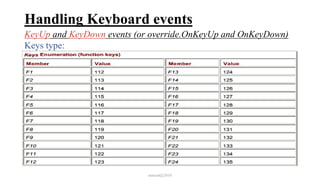
KeyUp and KeyDown events (or override.OnKeyUp and OnKeyDown)
The delegate:
public delegate void KeyEventHandler(object sender,KeyEventArgs e)
Whichever the way to handle the KeyUp and KeyDown events, you have an
object of KeyEventArgs when a key is pressed or released. This object have
the following properties:
Keycode (Keys type): property have which key is being pressed(Char, or
ShiftKey, ControlKey, Menu”Alt”).
The Modifiers (Keys type): property indicates whether the Alt, Ctrl, or Shift
keys are also pressed (Alt, Shift, Control, None)
The KeyData (Keys type): combines the KeyCode and Modifiers.
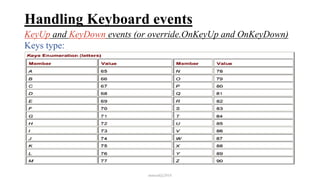
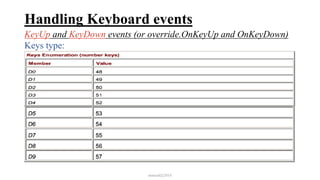
These properties are from the Keys data type, which is an enumeration.
mmouf@2018
Handling Keyboard events
KeyUp and KeyDown events (or override.OnKeyUp and OnKeyDown)
Keys type:
mmouf@2018
Handling Keyboard events
KeyUp and KeyDown events (or override.OnKeyUp and OnKeyDown)
Keys type:
mmouf@2018
Handling Keyboard events
KeyUp and KeyDown events (or override.OnKeyUp and OnKeyDown)
Keys type:
mmouf@2018
Handling Keyboard events
KeyUp and KeyDown events (or override.OnKeyUp and OnKeyDown)
Keys type:
mmouf@2018
Handling Keyboard events
KeyUp and KeyDown events (or override.OnKeyUp and OnKeyDown)
Keys type:
mmouf@2018
Handling Keyboard events
KeyUp and KeyDown events (or override.OnKeyUp and OnKeyDown)
Keys type:
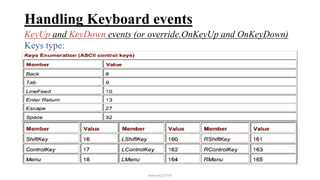
It also includes these modifiers code:
These modifiers codes indicates if the Shift Ctrl or Alt keys were pressed
(used with the Modifiers property)
mmouf@2018
Handling Keyboard events
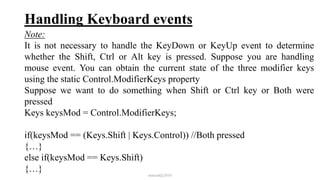
Note:
It is not necessary to handle the KeyDown or KeyUp event to determine
whether the Shift, Ctrl or Alt key is pressed. Suppose you are handling
mouse event. You can obtain the current state of the three modifier keys
using the static Control.ModifierKeys property
Suppose we want to do something when Shift or Ctrl key or Both were
pressed
Keys keysMod = Control.ModifierKeys;
if(keysMod == (Keys.Shift | Keys.Control)) //Both pressed
{…}
else if(keysMod == Keys.Shift)
{…}
mmouf@2018
Handling Keyboard events
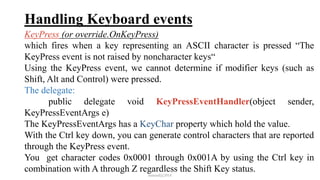
KeyPress (or override.OnKeyPress)
which fires when a key representing an ASCII character is pressed “The
KeyPress event is not raised by noncharacter keys“
Using the KeyPress event, we cannot determine if modifier keys (such as
Shift, Alt and Control) were pressed.
The delegate:
public delegate void KeyPressEventHandler(object sender,
KeyPressEventArgs e)
The KeyPressEventArgs has a KeyChar property which hold the value.
With the Ctrl key down, you can generate control characters that are reported
through the KeyPress event.
You get character codes 0x0001 through 0x001A by using the Ctrl key in
combination with A through Z regardless the Shift Key status.
mmouf@2018
Handling Keyboard events
KeyPress (or override.OnKeyPress)
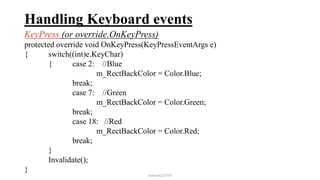
protected override void OnKeyPress(KeyPressEventArgs e)
{ switch((int)e.KeyChar)
{ case 2: //Blue
m_RectBackColor = Color.Blue;
break;
case 7: //Green
m_RectBackColor = Color.Green;
break;
case 18: //Red
m_RectBackColor = Color.Red;
break;
}
Invalidate();
}
mmouf@2018
Handling Keyboard events
Notice that KeyPress occurs in between KeyDown and KeyUp, not after
KeyUp
Example: if you press Shift+A, you'll get:
1. KeyDown: KeyCode=Keys.ShiftKey, KeyData=Keys.ShiftKey, Shift,
Modifiers=Keys.Shift
2. KeyDown: KeyCode=Keys.A, KeyData=Keys.A | Keys.Shift,
Modifiers=Keys.Shift
3. KeyPress: KeyChar='A'
4. KeyUp: KeyCode=Keys.A
5. KeyUp: KeyCode=Keys.ShiftKey
mmouf@2018
Handling Mouse events
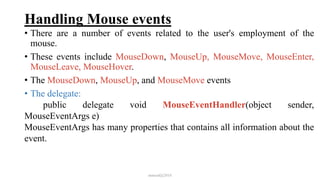
• There are a number of events related to the user's employment of the
mouse.
• These events include MouseDown, MouseUp, MouseMove, MouseEnter,
MouseLeave, MouseHover.
• The MouseDown, MouseUp, and MouseMove events
• The delegate:
public delegate void MouseEventHandler(object sender,
MouseEventArgs e)
MouseEventArgs has many properties that contains all information about the
event.
mmouf@2018
Handling Mouse events
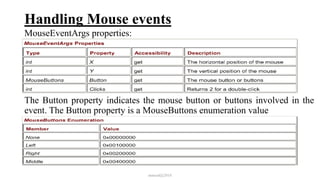
MouseEventArgs properties:
The Button property indicates the mouse button or buttons involved in the
event. The Button property is a MouseButtons enumeration value
mmouf@2018
Handling Mouse events
MouseEventArgs properties:
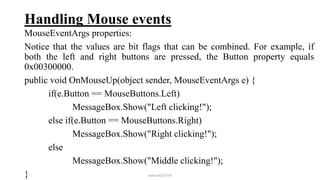
Notice that the values are bit flags that can be combined. For example, if
both the left and right buttons are pressed, the Button property equals
0x00300000.
public void OnMouseUp(object sender, MouseEventArgs e) {
if(e.Button == MouseButtons.Left)
MessageBox.Show("Left clicking!");
else if(e.Button == MouseButtons.Right)
MessageBox.Show("Right clicking!");
else
MessageBox.Show("Middle clicking!");
} mmouf@2018

Intake 38 7

  • 1.
    Visual C# .Netusing framework 4.5 Eng. Mahmoud Ouf Lecture 07 mmouf@2018
  • 2.
    Events All the GUIclasses, have their own events (they are ready made classes). The part of the Sender is already implemented, all I have to do is to implement the part of the Listener (attach the events of the sender with a firing methods through the delegate, and implement these methods) In Windows programming, you can handle the events in 1 of 2 choices: First: to use the delegate and the events Second: to override the appropriate base class method To Handle events you have to know 2 things: 1) The event itself 2) The delegate associated with this event mmouf@2018
  • 3.
    The Form classEvents The most important event in the Form class is the Paint event which occurs when a form is redrawn. While this event is in the Control class and can be used with any class inherit from it, but it is widely used with the Form class The event: Paint The delegate: public delegate void PaintEventHandler(object sender,PaintEventArgs e) object: which represents the object sending the event PaintEventArgs: which contains some relevant information such as object to Graphics class mmouf@2018
  • 4.
    The Form classEvents First: In the constructor: this.Paint += new PaintEventHandler(Form_Paint); out of constructor, define the Form_Paint() public void Form_Paint(object sender,PaintEventArgs e) { Graphics g = e.Graphics; g.DrawString(“Hello”, new Font(“Times New Roman”,15, new SolidBrush(Color.Black), 40, 10); } Second: Override the OnPaint(PaintEventArgs e) mmouf@2018
  • 5.
    The Control classEvents The Control class also defines a number of events that can logically be grouped into two major categories : Mouse events (Click, DoubleClick, MouseEnter, MouseLeave, MouseDown. MouseUp). Keyboard events (KeyPress, KeyUp, KeyDown). Handling Keyboard Events: Keyboards events are generated when keys on the keyboard are pressed or released. There are two types of Keyboard events: KeyPress events (or override OnKeyPress) which fires when a key representing an ASCII character is pressed “The KeyPress event is not raised by noncharacter keys “ KeyUp and KeyDown events (or override OnKeyUp and OnKeyDown). mmouf@2018
  • 6.
    Handling Keyboard events KeyUpand KeyDown events (or override.OnKeyUp and OnKeyDown) The delegate: public delegate void KeyEventHandler(object sender,KeyEventArgs e) Whichever the way to handle the KeyUp and KeyDown events, you have an object of KeyEventArgs when a key is pressed or released. This object have the following properties: Keycode (Keys type): property have which key is being pressed(Char, or ShiftKey, ControlKey, Menu”Alt”). The Modifiers (Keys type): property indicates whether the Alt, Ctrl, or Shift keys are also pressed (Alt, Shift, Control, None) The KeyData (Keys type): combines the KeyCode and Modifiers. These properties are from the Keys data type, which is an enumeration. mmouf@2018
  • 7.
    Handling Keyboard events KeyUpand KeyDown events (or override.OnKeyUp and OnKeyDown) Keys type: mmouf@2018
  • 8.
    Handling Keyboard events KeyUpand KeyDown events (or override.OnKeyUp and OnKeyDown) Keys type: mmouf@2018
  • 9.
    Handling Keyboard events KeyUpand KeyDown events (or override.OnKeyUp and OnKeyDown) Keys type: mmouf@2018
  • 10.
    Handling Keyboard events KeyUpand KeyDown events (or override.OnKeyUp and OnKeyDown) Keys type: mmouf@2018
  • 11.
    Handling Keyboard events KeyUpand KeyDown events (or override.OnKeyUp and OnKeyDown) Keys type: mmouf@2018
  • 12.
    Handling Keyboard events KeyUpand KeyDown events (or override.OnKeyUp and OnKeyDown) Keys type: It also includes these modifiers code: These modifiers codes indicates if the Shift Ctrl or Alt keys were pressed (used with the Modifiers property) mmouf@2018
  • 13.
    Handling Keyboard events Note: Itis not necessary to handle the KeyDown or KeyUp event to determine whether the Shift, Ctrl or Alt key is pressed. Suppose you are handling mouse event. You can obtain the current state of the three modifier keys using the static Control.ModifierKeys property Suppose we want to do something when Shift or Ctrl key or Both were pressed Keys keysMod = Control.ModifierKeys; if(keysMod == (Keys.Shift | Keys.Control)) //Both pressed {…} else if(keysMod == Keys.Shift) {…} mmouf@2018
  • 14.
    Handling Keyboard events KeyPress(or override.OnKeyPress) which fires when a key representing an ASCII character is pressed “The KeyPress event is not raised by noncharacter keys“ Using the KeyPress event, we cannot determine if modifier keys (such as Shift, Alt and Control) were pressed. The delegate: public delegate void KeyPressEventHandler(object sender, KeyPressEventArgs e) The KeyPressEventArgs has a KeyChar property which hold the value. With the Ctrl key down, you can generate control characters that are reported through the KeyPress event. You get character codes 0x0001 through 0x001A by using the Ctrl key in combination with A through Z regardless the Shift Key status. mmouf@2018
  • 15.
    Handling Keyboard events KeyPress(or override.OnKeyPress) protected override void OnKeyPress(KeyPressEventArgs e) { switch((int)e.KeyChar) { case 2: //Blue m_RectBackColor = Color.Blue; break; case 7: //Green m_RectBackColor = Color.Green; break; case 18: //Red m_RectBackColor = Color.Red; break; } Invalidate(); } mmouf@2018
  • 16.
    Handling Keyboard events Noticethat KeyPress occurs in between KeyDown and KeyUp, not after KeyUp Example: if you press Shift+A, you'll get: 1. KeyDown: KeyCode=Keys.ShiftKey, KeyData=Keys.ShiftKey, Shift, Modifiers=Keys.Shift 2. KeyDown: KeyCode=Keys.A, KeyData=Keys.A | Keys.Shift, Modifiers=Keys.Shift 3. KeyPress: KeyChar='A' 4. KeyUp: KeyCode=Keys.A 5. KeyUp: KeyCode=Keys.ShiftKey mmouf@2018
  • 17.
    Handling Mouse events •There are a number of events related to the user's employment of the mouse. • These events include MouseDown, MouseUp, MouseMove, MouseEnter, MouseLeave, MouseHover. • The MouseDown, MouseUp, and MouseMove events • The delegate: public delegate void MouseEventHandler(object sender, MouseEventArgs e) MouseEventArgs has many properties that contains all information about the event. mmouf@2018
  • 18.
    Handling Mouse events MouseEventArgsproperties: The Button property indicates the mouse button or buttons involved in the event. The Button property is a MouseButtons enumeration value mmouf@2018
  • 19.
    Handling Mouse events MouseEventArgsproperties: Notice that the values are bit flags that can be combined. For example, if both the left and right buttons are pressed, the Button property equals 0x00300000. public void OnMouseUp(object sender, MouseEventArgs e) { if(e.Button == MouseButtons.Left) MessageBox.Show("Left clicking!"); else if(e.Button == MouseButtons.Right) MessageBox.Show("Right clicking!"); else MessageBox.Show("Middle clicking!"); } mmouf@2018