Visual C# .Net using
framework 4.5
Eng. Mahmoud Ouf
Lecture 05
mmouf@2018
Collections
Collection classes are specialized classes for data storage and retrieval.
These classes provide support for stacks, queues, lists, and hash tables. Most
collection classes implement the same interfaces.
1)ArrayList:
It represents an ordered collection of an object that can be indexed
individually.
It is basically an alternative to an array. However unlike array you can add
and remove items from a list at a specified position using an index and the
array resizes itself automatically.
It also allow dynamic memory allocation, adding, searching and sorting
items in the list.
We can Store any data type and different data type in the same ArrayList.
Arraylist belongs to System.Collection namespaces
mmouf@2018
Collections
class Program
{
static void Main(string[] args)
{
ArrayList al = new ArrayList();
Console.WriteLine("Adding some numbers:");
al.Add(45);
al.Add(78);
al.Add(9);
Console.Write("Sorted Content: ");
al.Sort();
foreach (int i in al)
{
Console.Write(i + " ");
}
}
} mmouf@2018
Collections
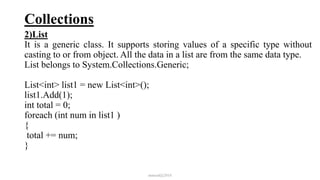
2)List
It is a generic class. It supports storing values of a specific type without
casting to or from object. All the data in a list are from the same data type.
List belongs to System.Collections.Generic;
List<int> list1 = new List<int>();
list1.Add(1);
int total = 0;
foreach (int num in list1 )
{
total += num;
}
mmouf@2018
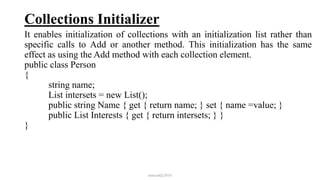
Collections Initializer
It enables initialization of collections with an initialization list rather than
specific calls to Add or another method. This initialization has the same
effect as using the Add method with each collection element.
public class Person
{
string name;
List intersets = new List();
public string Name { get { return name; } set { name =value; }
public List Interests { get { return intersets; } }
}
mmouf@2018
Collections Initializer
class Test
{
static void Main(string[] args){
List PersonList = new List();
Person p1 = new Person();
p1.Name = "Ahmed";
p1.Interests.Add("Reading");
p1.Interests.Add("Running");
PersonList.Add(p1);
Person p2 = new Person();
p2.Name = "Aly";
p2.Interests.Add("Swimming");
PersonList.Add(p2);
}
} mmouf@2018
Collections Initializer
class Test
{
static void Main(string[] args)
{
var PersonList = new List{
new Person{ Name = "Ahmed", Interests = { "Reading",
"Running" } },
new Person { Name = "Aly", Interests = { "Swimming"} }};
}
}
mmouf@2018
Exception Handling
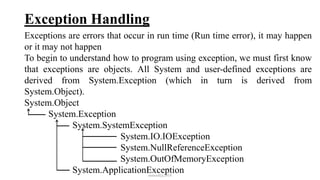
Exceptions are errors that occur in run time (Run time error), it may happen
or it may not happen
To begin to understand how to program using exception, we must first know
that exceptions are objects. All System and user-defined exceptions are
derived from System.Exception (which in turn is derived from
System.Object).
System.Object
System.Exception
System.SystemException
System.IO.IOException
System.NullReferenceException
System.OutOfMemoryException
System.ApplicationExceptionmmouf@2018
Exception Handling
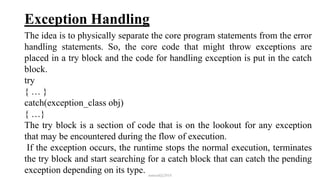
The idea is to physically separate the core program statements from the error
handling statements. So, the core code that might throw exceptions are
placed in a try block and the code for handling exception is put in the catch
block.
try
{ … }
catch(exception_class obj)
{ …}
The try block is a section of code that is on the lookout for any exception
that may be encountered during the flow of execution.
If the exception occurs, the runtime stops the normal execution, terminates
the try block and start searching for a catch block that can catch the pending
exception depending on its type. mmouf@2018
Exception Handling
If the appropriate catch object is found:
It will catch the exception
It will handle the exception (execute the block of code in catch)
Continue executing the program
If the appropriate catch object is not found:
The runtime will unwind the call stack, searching for the calling
function
Re-throw the exception from this function
Search for a catch block in
and repeat till it found an appropriate catch block or reach the Main
If it happens, the exception will be considered as uncaught and raise the
default action
mmouf@2018
Exception Handling
A try block contains more than one statement. Each could raise one or more
exception object. So, the try block can raise more than one exception.
The catch block catches only one exception depending on its parameter.
Then, the try block can have multiple catch blocks.
mmouf@2018
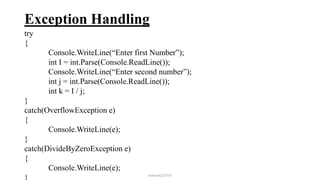
Exception Handling
try
{
Console.WriteLine(“Enter first Number”);
int I = int.Parse(Console.ReadLine());
Console.WriteLine(“Enter second number”);
int j = int.Parse(Console.ReadLine());
int k = I / j;
}
catch(OverflowException e)
{
Console.WriteLine(e);
}
catch(DivideByZeroException e)
{
Console.WriteLine(e);
} mmouf@2018
Exception Handling
The general catch block
The general catch block, is the catch block that can catch any exception
regardless of its class. There are 2 ways to define the general catch block.
•catch
{
…………
}
•catch(System.Exception e)
{
…………
}
Any try can have only one general catch block and if it exist, it must be the
last catch.
mmouf@2018
Exception Handling
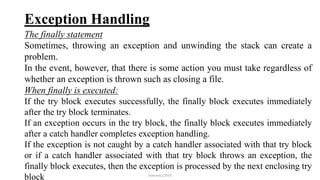
The finally statement
Sometimes, throwing an exception and unwinding the stack can create a
problem.
In the event, however, that there is some action you must take regardless of
whether an exception is thrown such as closing a file.
When finally is executed:
If the try block executes successfully, the finally block executes immediately
after the try block terminates.
If an exception occurs in the try block, the finally block executes immediately
after a catch handler completes exception handling.
If the exception is not caught by a catch handler associated with that try block
or if a catch handler associated with that try block throws an exception, the
finally block executes, then the exception is processed by the next enclosing try
block mmouf@2018
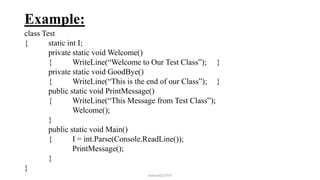
Example:
class Test
{ static int I;
private static void Welcome()
{ WriteLine(“Welcome to Our Test Class”); }
private static void GoodBye()
{ WriteLine(“This is the end of our Class”); }
public static void PrintMessage()
{ WriteLine(“This Message from Test Class”);
Welcome();
}
public static void Main()
{ I = int.Parse(Console.ReadLine());
PrintMessage();
}
}
mmouf@2018
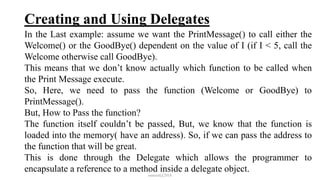
Creating and Using Delegates
In the Last example: assume we want the PrintMessage() to call either the
Welcome() or the GoodBye() dependent on the value of I (if I < 5, call the
Welcome otherwise call GoodBye).
This means that we don’t know actually which function to be called when
the Print Message execute.
So, Here, we need to pass the function (Welcome or GoodBye) to
PrintMessage().
But, How to Pass the function?
The function itself couldn’t be passed, But, we know that the function is
loaded into the memory( have an address). So, if we can pass the address to
the function that will be great.
This is done through the Delegate which allows the programmer to
encapsulate a reference to a method inside a delegate object.
mmouf@2018
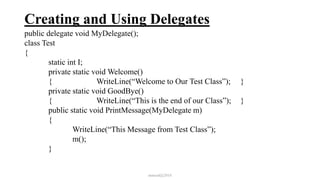
Creating and Using Delegates
public delegate void MyDelegate();
class Test
{
static int I;
private static void Welcome()
{ WriteLine(“Welcome to Our Test Class”); }
private static void GoodBye()
{ WriteLine(“This is the end of our Class”); }
public static void PrintMessage(MyDelegate m)
{
WriteLine(“This Message from Test Class”);
m();
}
mmouf@2018
Creating and Using Delegates
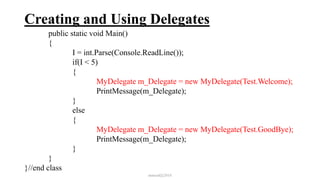
public static void Main()
{
I = int.Parse(Console.ReadLine());
if(I < 5)
{
MyDelegate m_Delegate = new MyDelegate(Test.Welcome);
PrintMessage(m_Delegate);
}
else
{
MyDelegate m_Delegate = new MyDelegate(Test.GoodBye);
PrintMessage(m_Delegate);
}
}
}//end class
mmouf@2018
Creating and Using Delegates
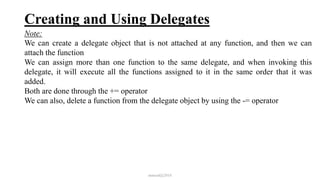
Note:
We can create a delegate object that is not attached at any function, and then we can
attach the function
We can assign more than one function to the same delegate, and when invoking this
delegate, it will execute all the functions assigned to it in the same order that it was
added.
Both are done through the += operator
We can also, delete a function from the delegate object by using the -= operator
mmouf@2018

Intake 38 5

  • 1.
    Visual C# .Netusing framework 4.5 Eng. Mahmoud Ouf Lecture 05 mmouf@2018
  • 2.
    Collections Collection classes arespecialized classes for data storage and retrieval. These classes provide support for stacks, queues, lists, and hash tables. Most collection classes implement the same interfaces. 1)ArrayList: It represents an ordered collection of an object that can be indexed individually. It is basically an alternative to an array. However unlike array you can add and remove items from a list at a specified position using an index and the array resizes itself automatically. It also allow dynamic memory allocation, adding, searching and sorting items in the list. We can Store any data type and different data type in the same ArrayList. Arraylist belongs to System.Collection namespaces mmouf@2018
  • 3.
    Collections class Program { static voidMain(string[] args) { ArrayList al = new ArrayList(); Console.WriteLine("Adding some numbers:"); al.Add(45); al.Add(78); al.Add(9); Console.Write("Sorted Content: "); al.Sort(); foreach (int i in al) { Console.Write(i + " "); } } } mmouf@2018
  • 4.
    Collections 2)List It is ageneric class. It supports storing values of a specific type without casting to or from object. All the data in a list are from the same data type. List belongs to System.Collections.Generic; List<int> list1 = new List<int>(); list1.Add(1); int total = 0; foreach (int num in list1 ) { total += num; } mmouf@2018
  • 5.
    Collections Initializer It enablesinitialization of collections with an initialization list rather than specific calls to Add or another method. This initialization has the same effect as using the Add method with each collection element. public class Person { string name; List intersets = new List(); public string Name { get { return name; } set { name =value; } public List Interests { get { return intersets; } } } mmouf@2018
  • 6.
    Collections Initializer class Test { staticvoid Main(string[] args){ List PersonList = new List(); Person p1 = new Person(); p1.Name = "Ahmed"; p1.Interests.Add("Reading"); p1.Interests.Add("Running"); PersonList.Add(p1); Person p2 = new Person(); p2.Name = "Aly"; p2.Interests.Add("Swimming"); PersonList.Add(p2); } } mmouf@2018
  • 7.
    Collections Initializer class Test { staticvoid Main(string[] args) { var PersonList = new List{ new Person{ Name = "Ahmed", Interests = { "Reading", "Running" } }, new Person { Name = "Aly", Interests = { "Swimming"} }}; } } mmouf@2018
  • 8.
    Exception Handling Exceptions areerrors that occur in run time (Run time error), it may happen or it may not happen To begin to understand how to program using exception, we must first know that exceptions are objects. All System and user-defined exceptions are derived from System.Exception (which in turn is derived from System.Object). System.Object System.Exception System.SystemException System.IO.IOException System.NullReferenceException System.OutOfMemoryException System.ApplicationExceptionmmouf@2018
  • 9.
    Exception Handling The ideais to physically separate the core program statements from the error handling statements. So, the core code that might throw exceptions are placed in a try block and the code for handling exception is put in the catch block. try { … } catch(exception_class obj) { …} The try block is a section of code that is on the lookout for any exception that may be encountered during the flow of execution. If the exception occurs, the runtime stops the normal execution, terminates the try block and start searching for a catch block that can catch the pending exception depending on its type. mmouf@2018
  • 10.
    Exception Handling If theappropriate catch object is found: It will catch the exception It will handle the exception (execute the block of code in catch) Continue executing the program If the appropriate catch object is not found: The runtime will unwind the call stack, searching for the calling function Re-throw the exception from this function Search for a catch block in and repeat till it found an appropriate catch block or reach the Main If it happens, the exception will be considered as uncaught and raise the default action mmouf@2018
  • 11.
    Exception Handling A tryblock contains more than one statement. Each could raise one or more exception object. So, the try block can raise more than one exception. The catch block catches only one exception depending on its parameter. Then, the try block can have multiple catch blocks. mmouf@2018
  • 12.
    Exception Handling try { Console.WriteLine(“Enter firstNumber”); int I = int.Parse(Console.ReadLine()); Console.WriteLine(“Enter second number”); int j = int.Parse(Console.ReadLine()); int k = I / j; } catch(OverflowException e) { Console.WriteLine(e); } catch(DivideByZeroException e) { Console.WriteLine(e); } mmouf@2018
  • 13.
    Exception Handling The generalcatch block The general catch block, is the catch block that can catch any exception regardless of its class. There are 2 ways to define the general catch block. •catch { ………… } •catch(System.Exception e) { ………… } Any try can have only one general catch block and if it exist, it must be the last catch. mmouf@2018
  • 14.
    Exception Handling The finallystatement Sometimes, throwing an exception and unwinding the stack can create a problem. In the event, however, that there is some action you must take regardless of whether an exception is thrown such as closing a file. When finally is executed: If the try block executes successfully, the finally block executes immediately after the try block terminates. If an exception occurs in the try block, the finally block executes immediately after a catch handler completes exception handling. If the exception is not caught by a catch handler associated with that try block or if a catch handler associated with that try block throws an exception, the finally block executes, then the exception is processed by the next enclosing try block mmouf@2018
  • 15.
    Example: class Test { staticint I; private static void Welcome() { WriteLine(“Welcome to Our Test Class”); } private static void GoodBye() { WriteLine(“This is the end of our Class”); } public static void PrintMessage() { WriteLine(“This Message from Test Class”); Welcome(); } public static void Main() { I = int.Parse(Console.ReadLine()); PrintMessage(); } } mmouf@2018
  • 16.
    Creating and UsingDelegates In the Last example: assume we want the PrintMessage() to call either the Welcome() or the GoodBye() dependent on the value of I (if I < 5, call the Welcome otherwise call GoodBye). This means that we don’t know actually which function to be called when the Print Message execute. So, Here, we need to pass the function (Welcome or GoodBye) to PrintMessage(). But, How to Pass the function? The function itself couldn’t be passed, But, we know that the function is loaded into the memory( have an address). So, if we can pass the address to the function that will be great. This is done through the Delegate which allows the programmer to encapsulate a reference to a method inside a delegate object. mmouf@2018
  • 17.
    Creating and UsingDelegates public delegate void MyDelegate(); class Test { static int I; private static void Welcome() { WriteLine(“Welcome to Our Test Class”); } private static void GoodBye() { WriteLine(“This is the end of our Class”); } public static void PrintMessage(MyDelegate m) { WriteLine(“This Message from Test Class”); m(); } mmouf@2018
  • 18.
    Creating and UsingDelegates public static void Main() { I = int.Parse(Console.ReadLine()); if(I < 5) { MyDelegate m_Delegate = new MyDelegate(Test.Welcome); PrintMessage(m_Delegate); } else { MyDelegate m_Delegate = new MyDelegate(Test.GoodBye); PrintMessage(m_Delegate); } } }//end class mmouf@2018
  • 19.
    Creating and UsingDelegates Note: We can create a delegate object that is not attached at any function, and then we can attach the function We can assign more than one function to the same delegate, and when invoking this delegate, it will execute all the functions assigned to it in the same order that it was added. Both are done through the += operator We can also, delete a function from the delegate object by using the -= operator mmouf@2018