Visual C# .Net using
framework 4.5
Eng. Mahmoud Ouf
Lecture 12
mmouf@2018
Asynchronous
Programming
mmouf@2018
Applications are becoming more and more complex as user expectations
rise.
To fully take advantage of multicore systems and stay responsive, you need
to create applications that use multiple threads, often called parallelism.
The .NET Framework and the C# language offer a lot of options that you
can use to create multithreaded applications as:
• Threads
• Task Parallel Library
• New async and await keywords
mmouf@2018
Threads
mmouf@2018
Introduction
The .NET Framework Class Library provides concurrency primitives.
You specify that applications contain "threads of execution," each of which
designates a portion of a program that may execute concurrently with other
threads this capability is called multithreading.
Multithreading is available to all .NET programming languages, including
C#, Visual Basic and Visual C++.
The .NET Framework Class Library includes multithreading capabilities in
namespace System.Threading.
The basic concept behind threading is to perform multiple operations
concurrently.
Each of these operations can be thought of a separate thread of logic.
Example: The Garbage Collector in .Net
mmouf@2018
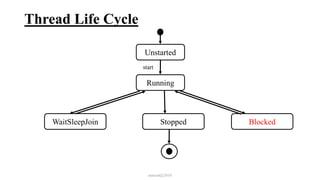
Thread Life Cycle
mmouf@2018
Unstarted
Running
Stopped
start
WaitSleepJoin Blocked
Creating and Executing Threads
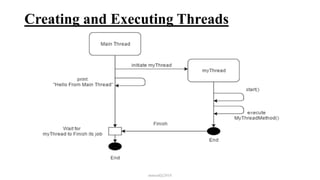
To create a thread follow the following steps:
1) Create an object from class Thread. This class has only one constructor
takes an object from ThreadStart delegate
2) So, We must define an object from ThreadStart delegate to pass it to the
Thread class constructor
3) Before creating object from the delegate, we must define the function that
will be attached to that delegate and will execute when the Thread object
runs.
This function must : return void and didn’t take any parameter
Note: the Last sequence must be: 3, then 2, then 1
4) Call the Start method of the Thread class to begin execution of the thread.
mmouf@2018
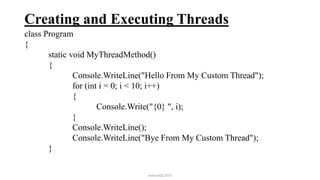
Creating and Executing Threads
class Program
{
static void MyThreadMethod()
{
Console.WriteLine("Hello From My Custom Thread");
for (int i = 0; i < 10; i++)
{
Console.Write("{0} ", i);
}
Console.WriteLine();
Console.WriteLine("Bye From My Custom Thread");
}
mmouf@2018
Creating and Executing Threads
static void Main(string[] args)
{
//Instantiate a thread
Thread myThread = new Thread(new ThreadStart(MyThreadMethod));
//Start the execution of thread
myThread.Start();
//It's the part of Main Method
Console.WriteLine("Hello From Main Thread");
}
} //Output
Hello From Main Thread
Hello From My Custom Thread
1 2 3 4 5 6 7 8 9
Bye From My Custom Thread
mmouf@2018
Creating and Executing Threads
mmouf@2018
Thread.Join method
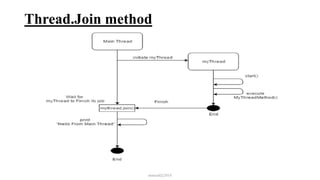
Thread.Join() method is used to keep the calling thread on wait until the called
thread has not been stopped or its execution is terminated.
Example:
class Program
{
static void MyThreadMethod()
{
Console.WriteLine("Hello From My Custom Thread");
for (int i = 0; i < 10; i++)
{
Console.Write("{0} ", i);
}
Console.WriteLine();
Console.WriteLine("Bye From My Custom Thread");
} mmouf@2018
Thread.Join method
static void Main(string[] args)
{
//Instantiate a thread
Thread myThread = new Thread(new ThreadStart(MyThreadMethod));
//Start the execution of thread
myThread.Start();
//Wait until mythread is terminated
myThread.Join();
//Everything else is part of Main Thread.
Console.WriteLine("Hello From Main Thread");
}
}//Output
Hello From My Custom Thread
1 2 3 4 5 6 7 8 9
Bye From My Custom Thread
Hello From Main Thread mmouf@2018
Thread.Join method
mmouf@2018
Foreground and Background Thread
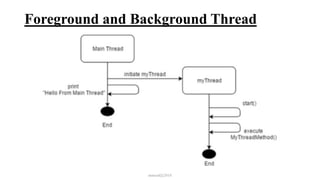
By default, in C# all threads are initialized as foreground thread.
An application cannot terminate its execution until all its foreground threads are
completed.
A background thread is almost identical to a foreground thread.
The one difference is that, if the Main Thread has completed its execution and the
background thread is the only thread remaining in the application, the Main
Thread will terminate the application and not wait for the background thread
to be completed.
mmouf@2018
Foreground and Background Thread
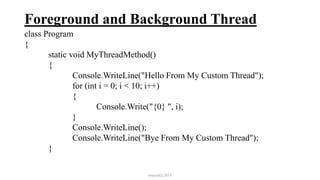
class Program
{
static void MyThreadMethod()
{
Console.WriteLine("Hello From My Custom Thread");
for (int i = 0; i < 10; i++)
{
Console.Write("{0} ", i);
}
Console.WriteLine();
Console.WriteLine("Bye From My Custom Thread");
}
mmouf@2018
Foreground and Background Thread
static void Main(string[] args)
{
//Instantiate a thread
Thread myThread = new Thread(new ThreadStart(MyThreadMethod));
//now the thread become a background thread
myThread.IsBackground = true;
//Start the execution of thread
myThread.Start();
//Everything else is part of Main Thread.
Console.WriteLine("Hello From Main Thread");
}
}
//Output
Hello From Main Thread
mmouf@2018
Foreground and Background Thread
mmouf@2018
Thread Priorities and Thread Scheduling
The Windows operating system supports a concept, called timeslicing, that
enables threads of equal priority to share a processor.
Without timeslicing, each thread in a set of equal-priority threads runs to
completion (unless the thread leaves the Running state and enters the
WaitSleepJoin, Suspended or Blocked state) before the thread's peers get a
chance to execute.
With timeslicing, each thread receives a brief burst of processor time, called
a quantum, during which the thread can execute.
At the completion of the quantum, even if the thread has not finished
executing, the processor is taken away from that thread and given to the next
thread of equal priority, if one is available.
On a single-core computer, the Windows operating system allocate “slices”
of time to each thread (typically 20 ms in Windows)
mmouf@2018
Thread Priorities and Thread Scheduling
The job of the thread scheduler is to keep the highest-priority thread running
at all times and, if there is more than one highest-priority thread, to ensure
that all such threads execute for a quantum in round-robin
Example: assuming a single-processor computer, threads A and B each
execute for a quantum in round-robin fashion until both threads complete
execution.
This means that A gets a quantum of time to run. Then B gets a quantum.
Then A gets another quantum. Then B gets another quantum.
This continues until one thread completes. The processor then devotes all its
power to the thread that remains (unless another thread of that priority is
started).
mmouf@2018
Thread Priorities and Thread Scheduling
A thread's priority can be adjusted with the Priority property, which accepts
values from the ThreadPriority enumeration
(Lowest, BelowNormal, Normal, AboveNormal and Highest. By default,
each thread has priority Normal).
mmouf@2018
[ThreadStatic]
ThreadStatic is an attribute used on top of a static field to make its value unique (local)
for each thread
class Program
{
[ThreadStatic]
static int _count = 0;
static void Main()
{
Thread threadA = new Thread(() =>
{
for (int i = 0; i < 10; i++)
{
Console.WriteLine("ThreadA _count = {0} ", _count++);
}
});
mmouf@2018
[ThreadStatic]
Thread threadB = new Thread(() =>
{
for (int i = 0; i < 10; i++)
{
Console.WriteLine("ThreadB _count = {0} ", _count++);
}
});
threadA.Start();t
threadB.Start();
}
}
mmouf@2018
[ThreadStatic]
mmouf@2018
Thread Pool
• The cost of instantiating a managed thread is higher than reusing a free
thread.
• In .NET, a thread pool is helpful to reuse the free threads.
• A thread pool is a collection of background threads created by a system
and are available to perform any task when required.
• When a program requires an extra thread, it is more efficient to use
available free threads from a thread pool because it can save the cost of
creating a thread.
• When a thread completes its execution, it can go back to the threadpool so
other programs can reuse the same thread again.
• .NET has implemented its own definition of thread pool through the
ThreadPool class. It has a method, QueueUserWorkItem, which helps to
queue the execution of available threads in a thread pool.mmouf@2018
Thread Pool
Limitation of Thread Pool
It is hard to tell when a thread of a threadpool has finished its execution.
There is no “Start” method, so we cannot tell when a thread of a thread pool
has started its execution because it is being managed by the system.
It can’t manage a thread which returns a value.
mmouf@2018
Task
mmouf@2018
Task
Task is a lightweight object which asynchronously manages the unit of
work.
Task doesn’t create new threads.
It efficiently manages the threads of a threadpool.
Tasks are executed by TaskScheduler, which queues tasks onto threads.
Task provides the following powerful features over thread and threadpool.
1. Task allows you to return a result.
2. It gives better programmatical control to run and wait for a task.
3. It reduces the switching time among multiple threads.
4. It gives the ability to chain multiple tasks together and it can execute each
task one after the other by using ContinueWith().
mmouf@2018
Task
5. It can create a parent/child relationship when one task is started from
another task.
6. Task can cancel its execution by using cancellation tokens.
7. Task leaves the CLR from the overhead of creating more threads; instead
it implicitly uses the thread from threadpool.
8. Asynchronous implementation is easy in task, by using “async” and
“await” keywords.
9. Task waits for all of the provided Task objects to complete execution.
mmouf@2018
Task
Create and Run a Task:
To create a task that doesn’t return a value, we use a Task class of
System.Threading.Tasks namespace.
Task is an important part of asynchronous programming and it executes on a
thread pool thread.
mmouf@2018
Task
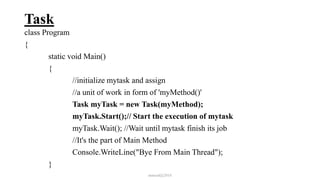
class Program
{
static void Main()
{
//initialize mytask and assign
//a unit of work in form of 'myMethod()'
Task myTask = new Task(myMethod);
myTask.Start();// Start the execution of mytask
myTask.Wait(); //Wait until mytask finish its job
//It's the part of Main Method
Console.WriteLine("Bye From Main Thread");
}
mmouf@2018
Task
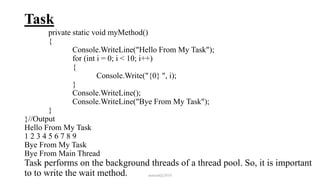
private static void myMethod()
{
Console.WriteLine("Hello From My Task");
for (int i = 0; i < 10; i++)
{
Console.Write("{0} ", i);
}
Console.WriteLine();
Console.WriteLine("Bye From My Task");
}
}//Output
Hello From My Task
1 2 3 4 5 6 7 8 9
Bye From My Task
Bye From Main Thread
Task performs on the background threads of a thread pool. So, it is important
to to write the wait method. mmouf@2018
Task
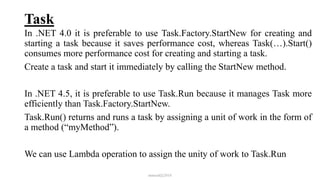
In .NET 4.0 it is preferable to use Task.Factory.StartNew for creating and
starting a task because it saves performance cost, whereas Task(…).Start()
consumes more performance cost for creating and starting a task.
Create a task and start it immediately by calling the StartNew method.
In .NET 4.5, it is preferable to use Task.Run because it manages Task more
efficiently than Task.Factory.StartNew.
Task.Run() returns and runs a task by assigning a unit of work in the form of
a method (“myMethod”).
We can use Lambda operation to assign the unity of work to Task.Run
mmouf@2018
Task
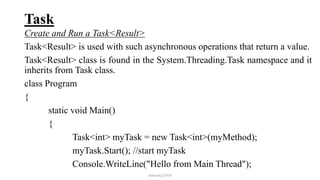
Create and Run a Task<Result>
Task<Result> is used with such asynchronous operations that return a value.
Task<Result> class is found in the System.Threading.Task namespace and it
inherits from Task class.
class Program
{
static void Main()
{
Task<int> myTask = new Task<int>(myMethod);
myTask.Start(); //start myTask
Console.WriteLine("Hello from Main Thread");
mmouf@2018
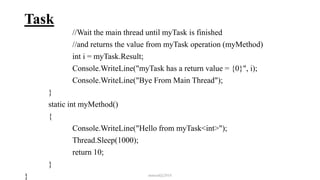
Task
//Wait the main thread until myTask is finished
//and returns the value from myTask operation (myMethod)
int i = myTask.Result;
Console.WriteLine("myTask has a return value = {0}", i);
Console.WriteLine("Bye From Main Thread");
}
static int myMethod()
{
Console.WriteLine("Hello from myTask<int>");
Thread.Sleep(1000);
return 10;
}
} mmouf@2018
Task
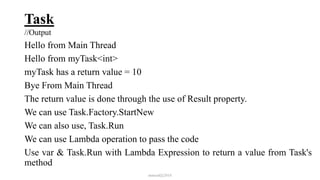
//Output
Hello from Main Thread
Hello from myTask<int>
myTask has a return value = 10
Bye From Main Thread
The return value is done through the use of Result property.
We can use Task.Factory.StartNew
We can also use, Task.Run
We can use Lambda operation to pass the code
Use var & Task.Run with Lambda Expression to return a value from Task's
method
mmouf@2018
Wait for One or More Task
Tasks asynchronously runs on a thread pool thread.
Thread pool contains background threads, so when task is running, the main thread may
terminate the application before the task is finished.
To synchronize the execution of the main thread and the asynchronous tasks, we use a
Wait method.
Wait method blocks the execution of a calling thread until the execution of a specified
task has completed.
The following are important wait methods which help synchronize a main thread with
Tasks.
1. Task.Wait(): To wait for a single task to complete. It blocks the calling thread until the
specified task completes its execution.
2. Task.Wait(milliseconds): It blocks the execution of a calling thread until the specified
task finishes or a timeout interval elapses.
mmouf@2018
Wait for One or More Task
3. Task.WaitAll(): Task.WaitAll method blocks the execution of a calling thread until all
the specified tasks complete their execution.
WaitAll is a static method of Task class.
All task objects must be referenced in a single array and WaitAll method needs that array
to block the execution of a calling thread until all tasks specified in an array get
completed.
mmouf@2018
Chain Multiple Tasks with Continuations
Task.ContinueWith() method is used to make chains of multiple tasks.
Each next task in a chain will not be scheduled for execution until the current task has
completed successfully, faulted due to an unhandled exception, or exited out early due to
being canceled.
mmouf@2018
Synchronization of Variables in Multithreading
In a multithreading environment, the same variable can be accessed by two or more
threads.
If the operation performed on a shared variable is atomic or thread-safe, then it produces
an accurate result.
If the operation is non-atomic or not thread-safe, then it produces inaccurate results.
In atomic operation, only a single thread at a time can execute a single statement and
produce accurate results.
In a non-atomic operation, more than one thread is accessing and manipulating the value
of a shared variable, which produces an inaccurate result.
mmouf@2018
Handling Synchronization of Variables
Lock: is a C# keyword; it prevents a thread from executing the same block of code that
another thread is executing.
Such a block of code is called a locked code.
Therefore, if a thread tries to enter a locked code, it will wait until the object is released.
The lock keyword calls Enter at the start of the block and Exit at the end of the block.
The best practice is to use lock keyword with a private object, or with a private static
object variable to protect data common to all instances.
Monitor: Monitor class also ensures that no other thread can execute the same section
of code or a shared memory until it is being executed by its lock owner.
mmouf@2018
The async and await keywords
mmouf@2018
The async and await keywords
In .NET 4.5, Microsoft introduced the async and await keywords that made it very easy
for developers to implement asynchronous functionality in their methods.
Adding the async keyword to the method header tells .NET's CLR to run this method in a
separate thread in the threadpool.
An async method will either return void, Task, or Task<TResult>. Also, the naming
convention is to postfix any methods that use the async keyword with Async.
mmouf@2018

Intake 38 12

  • 1.
    Visual C# .Netusing framework 4.5 Eng. Mahmoud Ouf Lecture 12 mmouf@2018
  • 2.
  • 3.
    Applications are becomingmore and more complex as user expectations rise. To fully take advantage of multicore systems and stay responsive, you need to create applications that use multiple threads, often called parallelism. The .NET Framework and the C# language offer a lot of options that you can use to create multithreaded applications as: • Threads • Task Parallel Library • New async and await keywords mmouf@2018
  • 4.
  • 5.
    Introduction The .NET FrameworkClass Library provides concurrency primitives. You specify that applications contain "threads of execution," each of which designates a portion of a program that may execute concurrently with other threads this capability is called multithreading. Multithreading is available to all .NET programming languages, including C#, Visual Basic and Visual C++. The .NET Framework Class Library includes multithreading capabilities in namespace System.Threading. The basic concept behind threading is to perform multiple operations concurrently. Each of these operations can be thought of a separate thread of logic. Example: The Garbage Collector in .Net mmouf@2018
  • 6.
  • 7.
    Creating and ExecutingThreads To create a thread follow the following steps: 1) Create an object from class Thread. This class has only one constructor takes an object from ThreadStart delegate 2) So, We must define an object from ThreadStart delegate to pass it to the Thread class constructor 3) Before creating object from the delegate, we must define the function that will be attached to that delegate and will execute when the Thread object runs. This function must : return void and didn’t take any parameter Note: the Last sequence must be: 3, then 2, then 1 4) Call the Start method of the Thread class to begin execution of the thread. mmouf@2018
  • 8.
    Creating and ExecutingThreads class Program { static void MyThreadMethod() { Console.WriteLine("Hello From My Custom Thread"); for (int i = 0; i < 10; i++) { Console.Write("{0} ", i); } Console.WriteLine(); Console.WriteLine("Bye From My Custom Thread"); } mmouf@2018
  • 9.
    Creating and ExecutingThreads static void Main(string[] args) { //Instantiate a thread Thread myThread = new Thread(new ThreadStart(MyThreadMethod)); //Start the execution of thread myThread.Start(); //It's the part of Main Method Console.WriteLine("Hello From Main Thread"); } } //Output Hello From Main Thread Hello From My Custom Thread 1 2 3 4 5 6 7 8 9 Bye From My Custom Thread mmouf@2018
  • 10.
    Creating and ExecutingThreads mmouf@2018
  • 11.
    Thread.Join method Thread.Join() methodis used to keep the calling thread on wait until the called thread has not been stopped or its execution is terminated. Example: class Program { static void MyThreadMethod() { Console.WriteLine("Hello From My Custom Thread"); for (int i = 0; i < 10; i++) { Console.Write("{0} ", i); } Console.WriteLine(); Console.WriteLine("Bye From My Custom Thread"); } mmouf@2018
  • 12.
    Thread.Join method static voidMain(string[] args) { //Instantiate a thread Thread myThread = new Thread(new ThreadStart(MyThreadMethod)); //Start the execution of thread myThread.Start(); //Wait until mythread is terminated myThread.Join(); //Everything else is part of Main Thread. Console.WriteLine("Hello From Main Thread"); } }//Output Hello From My Custom Thread 1 2 3 4 5 6 7 8 9 Bye From My Custom Thread Hello From Main Thread mmouf@2018
  • 13.
  • 14.
    Foreground and BackgroundThread By default, in C# all threads are initialized as foreground thread. An application cannot terminate its execution until all its foreground threads are completed. A background thread is almost identical to a foreground thread. The one difference is that, if the Main Thread has completed its execution and the background thread is the only thread remaining in the application, the Main Thread will terminate the application and not wait for the background thread to be completed. mmouf@2018
  • 15.
    Foreground and BackgroundThread class Program { static void MyThreadMethod() { Console.WriteLine("Hello From My Custom Thread"); for (int i = 0; i < 10; i++) { Console.Write("{0} ", i); } Console.WriteLine(); Console.WriteLine("Bye From My Custom Thread"); } mmouf@2018
  • 16.
    Foreground and BackgroundThread static void Main(string[] args) { //Instantiate a thread Thread myThread = new Thread(new ThreadStart(MyThreadMethod)); //now the thread become a background thread myThread.IsBackground = true; //Start the execution of thread myThread.Start(); //Everything else is part of Main Thread. Console.WriteLine("Hello From Main Thread"); } } //Output Hello From Main Thread mmouf@2018
  • 17.
    Foreground and BackgroundThread mmouf@2018
  • 18.
    Thread Priorities andThread Scheduling The Windows operating system supports a concept, called timeslicing, that enables threads of equal priority to share a processor. Without timeslicing, each thread in a set of equal-priority threads runs to completion (unless the thread leaves the Running state and enters the WaitSleepJoin, Suspended or Blocked state) before the thread's peers get a chance to execute. With timeslicing, each thread receives a brief burst of processor time, called a quantum, during which the thread can execute. At the completion of the quantum, even if the thread has not finished executing, the processor is taken away from that thread and given to the next thread of equal priority, if one is available. On a single-core computer, the Windows operating system allocate “slices” of time to each thread (typically 20 ms in Windows) mmouf@2018
  • 19.
    Thread Priorities andThread Scheduling The job of the thread scheduler is to keep the highest-priority thread running at all times and, if there is more than one highest-priority thread, to ensure that all such threads execute for a quantum in round-robin Example: assuming a single-processor computer, threads A and B each execute for a quantum in round-robin fashion until both threads complete execution. This means that A gets a quantum of time to run. Then B gets a quantum. Then A gets another quantum. Then B gets another quantum. This continues until one thread completes. The processor then devotes all its power to the thread that remains (unless another thread of that priority is started). mmouf@2018
  • 20.
    Thread Priorities andThread Scheduling A thread's priority can be adjusted with the Priority property, which accepts values from the ThreadPriority enumeration (Lowest, BelowNormal, Normal, AboveNormal and Highest. By default, each thread has priority Normal). mmouf@2018
  • 21.
    [ThreadStatic] ThreadStatic is anattribute used on top of a static field to make its value unique (local) for each thread class Program { [ThreadStatic] static int _count = 0; static void Main() { Thread threadA = new Thread(() => { for (int i = 0; i < 10; i++) { Console.WriteLine("ThreadA _count = {0} ", _count++); } }); mmouf@2018
  • 22.
    [ThreadStatic] Thread threadB =new Thread(() => { for (int i = 0; i < 10; i++) { Console.WriteLine("ThreadB _count = {0} ", _count++); } }); threadA.Start();t threadB.Start(); } } mmouf@2018
  • 23.
  • 24.
    Thread Pool • Thecost of instantiating a managed thread is higher than reusing a free thread. • In .NET, a thread pool is helpful to reuse the free threads. • A thread pool is a collection of background threads created by a system and are available to perform any task when required. • When a program requires an extra thread, it is more efficient to use available free threads from a thread pool because it can save the cost of creating a thread. • When a thread completes its execution, it can go back to the threadpool so other programs can reuse the same thread again. • .NET has implemented its own definition of thread pool through the ThreadPool class. It has a method, QueueUserWorkItem, which helps to queue the execution of available threads in a thread pool.mmouf@2018
  • 25.
    Thread Pool Limitation ofThread Pool It is hard to tell when a thread of a threadpool has finished its execution. There is no “Start” method, so we cannot tell when a thread of a thread pool has started its execution because it is being managed by the system. It can’t manage a thread which returns a value. mmouf@2018
  • 26.
  • 27.
    Task Task is alightweight object which asynchronously manages the unit of work. Task doesn’t create new threads. It efficiently manages the threads of a threadpool. Tasks are executed by TaskScheduler, which queues tasks onto threads. Task provides the following powerful features over thread and threadpool. 1. Task allows you to return a result. 2. It gives better programmatical control to run and wait for a task. 3. It reduces the switching time among multiple threads. 4. It gives the ability to chain multiple tasks together and it can execute each task one after the other by using ContinueWith(). mmouf@2018
  • 28.
    Task 5. It cancreate a parent/child relationship when one task is started from another task. 6. Task can cancel its execution by using cancellation tokens. 7. Task leaves the CLR from the overhead of creating more threads; instead it implicitly uses the thread from threadpool. 8. Asynchronous implementation is easy in task, by using “async” and “await” keywords. 9. Task waits for all of the provided Task objects to complete execution. mmouf@2018
  • 29.
    Task Create and Runa Task: To create a task that doesn’t return a value, we use a Task class of System.Threading.Tasks namespace. Task is an important part of asynchronous programming and it executes on a thread pool thread. mmouf@2018
  • 30.
    Task class Program { static voidMain() { //initialize mytask and assign //a unit of work in form of 'myMethod()' Task myTask = new Task(myMethod); myTask.Start();// Start the execution of mytask myTask.Wait(); //Wait until mytask finish its job //It's the part of Main Method Console.WriteLine("Bye From Main Thread"); } mmouf@2018
  • 31.
    Task private static voidmyMethod() { Console.WriteLine("Hello From My Task"); for (int i = 0; i < 10; i++) { Console.Write("{0} ", i); } Console.WriteLine(); Console.WriteLine("Bye From My Task"); } }//Output Hello From My Task 1 2 3 4 5 6 7 8 9 Bye From My Task Bye From Main Thread Task performs on the background threads of a thread pool. So, it is important to to write the wait method. mmouf@2018
  • 32.
    Task In .NET 4.0it is preferable to use Task.Factory.StartNew for creating and starting a task because it saves performance cost, whereas Task(…).Start() consumes more performance cost for creating and starting a task. Create a task and start it immediately by calling the StartNew method. In .NET 4.5, it is preferable to use Task.Run because it manages Task more efficiently than Task.Factory.StartNew. Task.Run() returns and runs a task by assigning a unit of work in the form of a method (“myMethod”). We can use Lambda operation to assign the unity of work to Task.Run mmouf@2018
  • 33.
    Task Create and Runa Task<Result> Task<Result> is used with such asynchronous operations that return a value. Task<Result> class is found in the System.Threading.Task namespace and it inherits from Task class. class Program { static void Main() { Task<int> myTask = new Task<int>(myMethod); myTask.Start(); //start myTask Console.WriteLine("Hello from Main Thread"); mmouf@2018
  • 34.
    Task //Wait the mainthread until myTask is finished //and returns the value from myTask operation (myMethod) int i = myTask.Result; Console.WriteLine("myTask has a return value = {0}", i); Console.WriteLine("Bye From Main Thread"); } static int myMethod() { Console.WriteLine("Hello from myTask<int>"); Thread.Sleep(1000); return 10; } } mmouf@2018
  • 35.
    Task //Output Hello from MainThread Hello from myTask<int> myTask has a return value = 10 Bye From Main Thread The return value is done through the use of Result property. We can use Task.Factory.StartNew We can also use, Task.Run We can use Lambda operation to pass the code Use var & Task.Run with Lambda Expression to return a value from Task's method mmouf@2018
  • 36.
    Wait for Oneor More Task Tasks asynchronously runs on a thread pool thread. Thread pool contains background threads, so when task is running, the main thread may terminate the application before the task is finished. To synchronize the execution of the main thread and the asynchronous tasks, we use a Wait method. Wait method blocks the execution of a calling thread until the execution of a specified task has completed. The following are important wait methods which help synchronize a main thread with Tasks. 1. Task.Wait(): To wait for a single task to complete. It blocks the calling thread until the specified task completes its execution. 2. Task.Wait(milliseconds): It blocks the execution of a calling thread until the specified task finishes or a timeout interval elapses. mmouf@2018
  • 37.
    Wait for Oneor More Task 3. Task.WaitAll(): Task.WaitAll method blocks the execution of a calling thread until all the specified tasks complete their execution. WaitAll is a static method of Task class. All task objects must be referenced in a single array and WaitAll method needs that array to block the execution of a calling thread until all tasks specified in an array get completed. mmouf@2018
  • 38.
    Chain Multiple Taskswith Continuations Task.ContinueWith() method is used to make chains of multiple tasks. Each next task in a chain will not be scheduled for execution until the current task has completed successfully, faulted due to an unhandled exception, or exited out early due to being canceled. mmouf@2018
  • 39.
    Synchronization of Variablesin Multithreading In a multithreading environment, the same variable can be accessed by two or more threads. If the operation performed on a shared variable is atomic or thread-safe, then it produces an accurate result. If the operation is non-atomic or not thread-safe, then it produces inaccurate results. In atomic operation, only a single thread at a time can execute a single statement and produce accurate results. In a non-atomic operation, more than one thread is accessing and manipulating the value of a shared variable, which produces an inaccurate result. mmouf@2018
  • 40.
    Handling Synchronization ofVariables Lock: is a C# keyword; it prevents a thread from executing the same block of code that another thread is executing. Such a block of code is called a locked code. Therefore, if a thread tries to enter a locked code, it will wait until the object is released. The lock keyword calls Enter at the start of the block and Exit at the end of the block. The best practice is to use lock keyword with a private object, or with a private static object variable to protect data common to all instances. Monitor: Monitor class also ensures that no other thread can execute the same section of code or a shared memory until it is being executed by its lock owner. mmouf@2018
  • 41.
    The async andawait keywords mmouf@2018
  • 42.
    The async andawait keywords In .NET 4.5, Microsoft introduced the async and await keywords that made it very easy for developers to implement asynchronous functionality in their methods. Adding the async keyword to the method header tells .NET's CLR to run this method in a separate thread in the threadpool. An async method will either return void, Task, or Task<TResult>. Also, the naming convention is to postfix any methods that use the async keyword with Async. mmouf@2018