Python for Data Science
(Introduction to Data Visualization)
Dr.M.Rajendiran
Dept. of Computer Science and Engineering
Panimalar Engineering College
Install Python 3 On Ubuntu
Prerequisites
Step 1.A system running Ubuntu
Step 2.A user account with sudo privileges
Step 3.Access to a terminal command-line (Ctrl–Alt–T)
Step 4.Make sure your environment is configured to use
Python 3.8
2
Install Python 3
Now you can start the installation of Python 3.8.
$sudo apt install python3.8
Allow the process to complete and verify the Python
version was installed successfully
$python ––version
3
Installing and using Python on Windows is very simple.
Step 1: Download the Python Installer binaries
Step 2: Run the Executable Installer
Step 3: Add Python to environmental variables
Step 4: Verify the Python Installation
4
Python Installation
Open the Python website in your web browser.
https://www.python.org/downloads/windows/
Once the installer is downloaded, run the Python installer.
Add the following path
C:Program FilesPython37-32: for 64-bit installation
Once the installation is over, you will see a Python Setup
Successful window.
You are ready to start developing Python applications in
your Windows 10 system.
5
iPython Installation
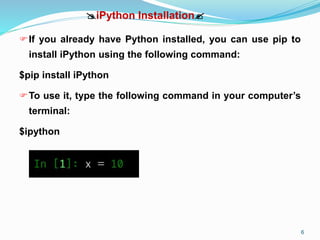
If you already have Python installed, you can use pip to
install iPython using the following command:
$pip install iPython
To use it, type the following command in your computer’s
terminal:
$ipython
6
Data Visualization
 A picture is worth a million words.
 Data visualization plays an essential role in the representation of
both small and large data.
 Data visualization is the graphical representation of data in order to
interactively and efficiently understanding to clients and customers.
 Data visualization enable us to extract information, better
understand the data, and make more effective decisions.
 One of the key role of data scientist is the ability to tell a compelling
story, visualizing data and findings in an approachable and
motivating way.
Data Visualization
 With a tiny domain knowledge, data visualizations can be used to
express and demonstrate key relationships in plots and charts.
There are five key basic data visualization.
1. Line Plot
2. Bar Chart
3. Histogram Plot
4. Box and Whisker Plot
5. Scatter Plot
Data Visualization
Matplotlib
 Matplotlib is one of the most popular python library packages used
for data visualization.
 It is numerical mathematics extension NumPy.
 It provides an object-oriented programming for embedding plots into
applications.
 It uses general-purpose graphic tools like Tkinter, wxpython, etc.,
 It can be used in Python and IPython, Jupyterlab and
Jupyternotebook.
Data Visualization
 We will learn how to create a line plot with matplotlib.
 The following example creates a sequence of floating point values
as the x-axis and a sine wave as a function of the x-axis as the
observations on the y-axis.
 The outputs are plotted as a line plot.
 The pyplot module from matplotlib package is imported with an alias
pyplot.
from matplotlib import pyplot
 We need an array of numbers to plot. NumPy library which is
imported with the sin alias.
from numpy import sin
Data Visualization
 The drawings of line plot can be shown by calling the show()
function.
pyplot.show()
 The line plot can be saved to file using savefig() function.
pyplot.savefig('my_image.png')
 Line plots are useful for presenting time series data as well as any
order data.
 A line plot is used to present observations collected at consistent
intervals.
 A line plot can be created by calling the plot() function.
 The complete program is as follows:
Data Visualization
 *
Data Visualization
Bar chart
 A bar chart or graph that presents categorical data with rectangular
bars with heights proportional to the values.
 The bars can be plotted vertically or horizontally.
 A bar graph shows comparisons among distinct categories.
 One axis represent categories and other axis represent value.
 Matplotlib provides the bar() function that can be used in the python.
Syntax: bar(x, height, width, bottom, align)
x: sequence of scalar
height: The height of the bars
width: The width of the bars
bottom: The coordinates of the bars bases.
align: Alignment of the bars to the x coordinates.
Data Visualization
Data Visualization
Histograms
 A histogram is a graphical illustration that organizes a group of data
points into user-specified ranges.
 In a histogram, it is the area of the bar that shows the frequency of
occurrences for each bin.
 A Histogram has two axes that is x axis and y axis.
 The x axis represent event whose frequency you have to count.
 The y axis represent frequency.
 The different heights of bar show different frequency of occurrence
of data.
 Histograms uses in image processing, brightness, equalize an
image and computer vision.
Data Visualization
A histogram plot can be created by calling the hist() function and
passing in a list or array.
pyplot.hist(x)
The following parameters for a histogram:
x : array or sequence of arrays
bins : integer or sequence or optional
Example:
Consider a semester examination result that we have to make a
histogram graph of your results, showing the overall frequency of
occurrence of grade in class.
marks=(45,54,65,56,74,47,87,78,98,89,100,72,58,28,44,49,71,80)
Data Visualization
Data Visualization
Box and Whisker Plot
A boxplot is generally used to summarize the distribution of a data
sample, also called box and whisker plot
A set of data containing the minimum, first quartile, median, third
quartile, and maximum.
In a box plot, we draw a box from the first quartile to the third
quartile.
Vertical line goes through the box at the median.
The whiskers go from each quartile to the minimum or maximum.
The x-axis is used to represent the data sample and y-axis
represents the observation values.
Data Visualization
Example:
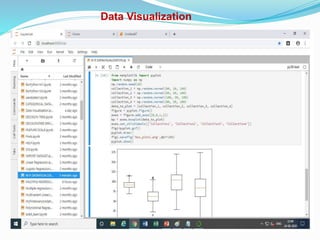
We use the numpy.random.normal() function to create the
data for boxplots.
It has three parameters such as mean and standard deviation
and number of values.
Boxplots can be drawn by calling the boxplot() function.
pyplot.boxplot(x)
Data Visualization
Data Visualization
Scatter Plot
 A scatterplot is a graphic tool used to display the relationship
between two quantitative variables.
 A scatterplot consists of an X axis, a Y axis and a series of dots.
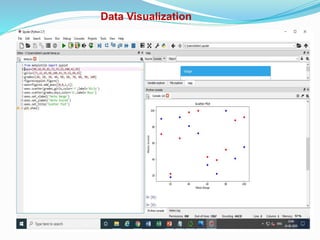
 Scatter plots can be created by calling the scatter() function.
pyplot.scatter(x, y)
Scatter plots are useful for showing the association between two
variables.
The example below creates two data samples such as marks of
boys and girls in two different colours.
Data Visualization
Conclusion
 Python is great as a programming language
 It is great for data science.
There are many visualization libraries:
Matplotlib
seaborn
bokesh
holoviews
datashader
folium
yt
 email:mrajen@rediffmail.com
.

Python for Data Science

  • 1.
    Python for DataScience (Introduction to Data Visualization) Dr.M.Rajendiran Dept. of Computer Science and Engineering Panimalar Engineering College
  • 2.
    Install Python 3On Ubuntu Prerequisites Step 1.A system running Ubuntu Step 2.A user account with sudo privileges Step 3.Access to a terminal command-line (Ctrl–Alt–T) Step 4.Make sure your environment is configured to use Python 3.8 2
  • 3.
    Install Python 3 Nowyou can start the installation of Python 3.8. $sudo apt install python3.8 Allow the process to complete and verify the Python version was installed successfully $python ––version 3
  • 4.
    Installing and usingPython on Windows is very simple. Step 1: Download the Python Installer binaries Step 2: Run the Executable Installer Step 3: Add Python to environmental variables Step 4: Verify the Python Installation 4
  • 5.
    Python Installation Open thePython website in your web browser. https://www.python.org/downloads/windows/ Once the installer is downloaded, run the Python installer. Add the following path C:Program FilesPython37-32: for 64-bit installation Once the installation is over, you will see a Python Setup Successful window. You are ready to start developing Python applications in your Windows 10 system. 5
  • 6.
    iPython Installation If youalready have Python installed, you can use pip to install iPython using the following command: $pip install iPython To use it, type the following command in your computer’s terminal: $ipython 6
  • 7.
    Data Visualization  Apicture is worth a million words.  Data visualization plays an essential role in the representation of both small and large data.  Data visualization is the graphical representation of data in order to interactively and efficiently understanding to clients and customers.  Data visualization enable us to extract information, better understand the data, and make more effective decisions.  One of the key role of data scientist is the ability to tell a compelling story, visualizing data and findings in an approachable and motivating way.
  • 8.
    Data Visualization  Witha tiny domain knowledge, data visualizations can be used to express and demonstrate key relationships in plots and charts. There are five key basic data visualization. 1. Line Plot 2. Bar Chart 3. Histogram Plot 4. Box and Whisker Plot 5. Scatter Plot
  • 9.
    Data Visualization Matplotlib  Matplotlibis one of the most popular python library packages used for data visualization.  It is numerical mathematics extension NumPy.  It provides an object-oriented programming for embedding plots into applications.  It uses general-purpose graphic tools like Tkinter, wxpython, etc.,  It can be used in Python and IPython, Jupyterlab and Jupyternotebook.
  • 10.
    Data Visualization  Wewill learn how to create a line plot with matplotlib.  The following example creates a sequence of floating point values as the x-axis and a sine wave as a function of the x-axis as the observations on the y-axis.  The outputs are plotted as a line plot.  The pyplot module from matplotlib package is imported with an alias pyplot. from matplotlib import pyplot  We need an array of numbers to plot. NumPy library which is imported with the sin alias. from numpy import sin
  • 11.
    Data Visualization  Thedrawings of line plot can be shown by calling the show() function. pyplot.show()  The line plot can be saved to file using savefig() function. pyplot.savefig('my_image.png')  Line plots are useful for presenting time series data as well as any order data.  A line plot is used to present observations collected at consistent intervals.  A line plot can be created by calling the plot() function.  The complete program is as follows:
  • 12.
  • 13.
    Data Visualization Bar chart A bar chart or graph that presents categorical data with rectangular bars with heights proportional to the values.  The bars can be plotted vertically or horizontally.  A bar graph shows comparisons among distinct categories.  One axis represent categories and other axis represent value.  Matplotlib provides the bar() function that can be used in the python. Syntax: bar(x, height, width, bottom, align) x: sequence of scalar height: The height of the bars width: The width of the bars bottom: The coordinates of the bars bases. align: Alignment of the bars to the x coordinates.
  • 14.
  • 15.
    Data Visualization Histograms  Ahistogram is a graphical illustration that organizes a group of data points into user-specified ranges.  In a histogram, it is the area of the bar that shows the frequency of occurrences for each bin.  A Histogram has two axes that is x axis and y axis.  The x axis represent event whose frequency you have to count.  The y axis represent frequency.  The different heights of bar show different frequency of occurrence of data.  Histograms uses in image processing, brightness, equalize an image and computer vision.
  • 16.
    Data Visualization A histogramplot can be created by calling the hist() function and passing in a list or array. pyplot.hist(x) The following parameters for a histogram: x : array or sequence of arrays bins : integer or sequence or optional Example: Consider a semester examination result that we have to make a histogram graph of your results, showing the overall frequency of occurrence of grade in class. marks=(45,54,65,56,74,47,87,78,98,89,100,72,58,28,44,49,71,80)
  • 17.
  • 18.
    Data Visualization Box andWhisker Plot A boxplot is generally used to summarize the distribution of a data sample, also called box and whisker plot A set of data containing the minimum, first quartile, median, third quartile, and maximum. In a box plot, we draw a box from the first quartile to the third quartile. Vertical line goes through the box at the median. The whiskers go from each quartile to the minimum or maximum. The x-axis is used to represent the data sample and y-axis represents the observation values.
  • 19.
    Data Visualization Example: We usethe numpy.random.normal() function to create the data for boxplots. It has three parameters such as mean and standard deviation and number of values. Boxplots can be drawn by calling the boxplot() function. pyplot.boxplot(x)
  • 20.
  • 21.
    Data Visualization Scatter Plot A scatterplot is a graphic tool used to display the relationship between two quantitative variables.  A scatterplot consists of an X axis, a Y axis and a series of dots.  Scatter plots can be created by calling the scatter() function. pyplot.scatter(x, y) Scatter plots are useful for showing the association between two variables. The example below creates two data samples such as marks of boys and girls in two different colours.
  • 22.
  • 23.
    Conclusion  Python isgreat as a programming language  It is great for data science. There are many visualization libraries: Matplotlib seaborn bokesh holoviews datashader folium yt  email:mrajen@rediffmail.com
  • 24.