Connecting with Computer Science 2
Objectives
• Learn what a file system does
• Understand the FAT file system and its advantages
and disadvantages
• Understand the NTFS file system and its advantages
and disadvantages
• Compare various file systems
Connecting with Computer Science 3
Objectives (continued)
• Learn how sequential and random file access work
• See how hashing is used
• Understand how hashing algorithms are created
Connecting with Computer Science 4
What Does a File System Do?
• Responsible for creating, manipulating, renaming,
copying, and removing files to and from a storage
device
• Organizes files into common storage units called
directories
• Keeps track of where files and directories are
located
• Assists users by relating files and folders to the
physical structure of the storage medium
Connecting with Computer Science 5
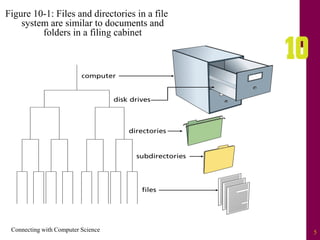
Figure 10-1: Files and directories in a file
system are similar to documents and
folders in a filing cabinet
Connecting with Computer Science 6
Storage Mediums
• A hard disk, or drive, is the most common storage
medium for a file system
– Physically organized into tracks and sectors
– Read/write heads move over specified areas of the
hard disks to store (write) or retrieve (read) data
– Random access device
• Can read or write data directly anywhere on the disk
• Faster than sequential access, which reads and writes
from beginning to end
• Makes use of the file system to organize files
Connecting with Computer Science 7
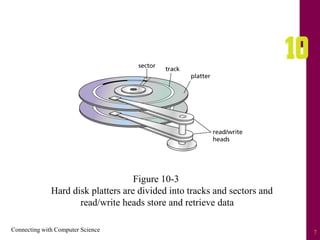
Figure 10-3
Hard disk platters are divided into tracks and sectors and
read/write heads store and retrieve data
Connecting with Computer Science 8
File Systems and Operating
Systems
• The type of file management system is dependent
on the operating system
– FAT (file allocation table)
• Used from MS-DOS to Windows ME
– NTFS (New Technology File System)
• Default for Windows NT through Windows 2003
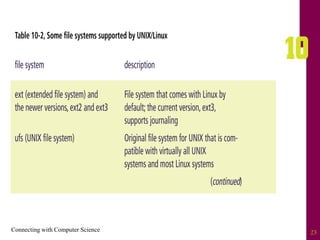
– Unix and Linux support several file systems
• XFS, JFS, ReiserFS, ext3, and others
– HFS+
• The current Mac OS X file system
Connecting with Computer Science 9
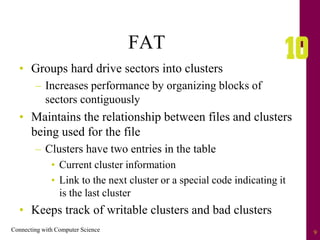
FAT
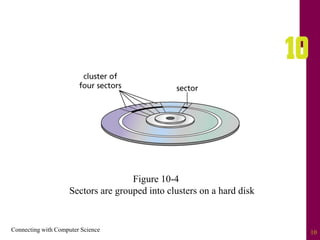
• Groups hard drive sectors into clusters
– Increases performance by organizing blocks of
sectors contiguously
• Maintains the relationship between files and clusters
being used for the file
– Clusters have two entries in the table
• Current cluster information
• Link to the next cluster or a special code indicating it
is the last cluster
• Keeps track of writable clusters and bad clusters
Connecting with Computer Science 10
Figure 10-4
Sectors are grouped into clusters on a hard disk
Connecting with Computer Science 11
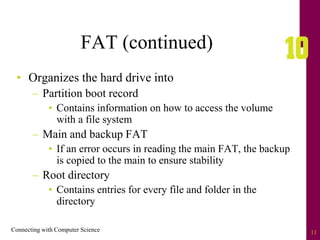
FAT (continued)
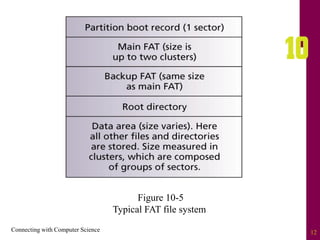
• Organizes the hard drive into
– Partition boot record
• Contains information on how to access the volume
with a file system
– Main and backup FAT
• If an error occurs in reading the main FAT, the backup
is copied to the main to ensure stability
– Root directory
• Contains entries for every file and folder in the
directory
Connecting with Computer Science 12
Figure 10-5
Typical FAT file system
Connecting with Computer Science 13
Defragmentation
• Occurs when files have clusters scattered in different
locations on the storage medium rather than in a
contiguous location
• Windows provides the Disk Defragmenter utility to
reorganize clusters contiguously
– Improves performance by minimizing movement of
the read/write heads
– Should be used regularly to ensure system runs at
peak performance
Connecting with Computer Science 14
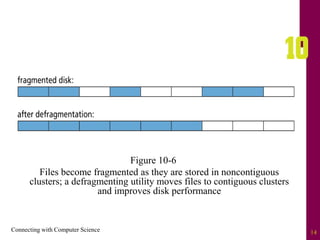
Figure 10-6
Files become fragmented as they are stored in noncontiguous
clusters; a defragmenting utility moves files to contiguous clusters
and improves disk performance
Connecting with Computer Science 15
Advantages of FAT
• Efficient use of disk space
– Does not have to use contiguous space for large files
• File names (FAT32) can have up to 255 characters
• Easy to undelete files that have been deleted
– When a file is deleted, the system places a hex value
of E5h in the first position of the file name
– File remains on drive and can be undeleted by
providing the original letter in the undelete process
Connecting with Computer Science 16
Disadvantages of FAT
• Overall performance slows down as more files are
stored on the partition
• Hard drive can quite easily become fragmented
• Lack of security
– NTFS provides access rights to files and directories
• File integrity problems
– Lost clusters
– Invalid files and directories
– Allocation errors
Connecting with Computer Science 17
NTFS
• Overcomes limitations of the FAT system
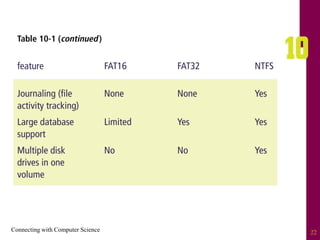
• Is a “journaling” file system
– Keeps track of transaction performed and “rolls
back” transactions if errors are found
• Uses a master file table (MFT) to store data about
every file and directory on the volume
– Similar to a database table with records for each file
and directory
• Uses clusters and reserves blocks of space to allow
the MFT to grow
Connecting with Computer Science 18
Advantages of NTFS
• File access is very fast and reliable
• With the MFT, the system can recover from
problems without losing significant amounts of data
• Security is greatly increased over FAT
• File encryption with EFS (Encrypting File System)
and file attributes
• File compression
– Process of reducing file size to save disk space
Connecting with Computer Science 19
Disadvantages of NTFS
• Large overhead
– Not recommended for volumes less than 4 GB
• Cannot access NTFS volumes from MS-DOS,
Windows 5, or Windows 98
Connecting with Computer Science 20
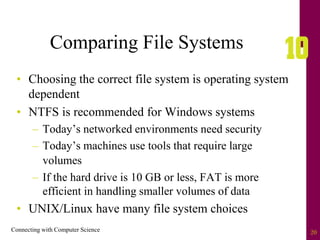
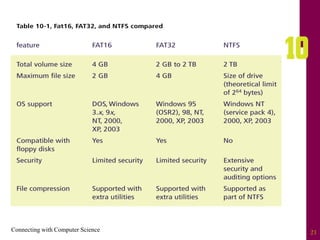
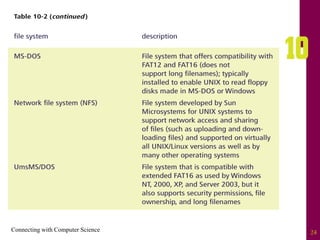
Comparing File Systems
• Choosing the correct file system is operating system
dependent
• NTFS is recommended for Windows systems
– Today’s networked environments need security
– Today’s machines use tools that require large
volumes
– If the hard drive is 10 GB or less, FAT is more
efficient in handling smaller volumes of data
• UNIX/Linux have many file system choices
Connecting with Computer Science 21
Connecting with Computer Science 22
Connecting with Computer Science 23
Connecting with Computer Science 24
Connecting with Computer Science 25
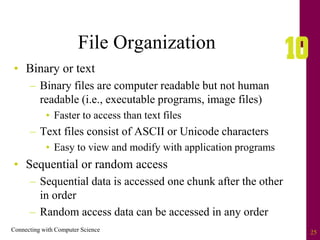
File Organization
• Binary or text
– Binary files are computer readable but not human
readable (i.e., executable programs, image files)
• Faster to access than text files
– Text files consist of ASCII or Unicode characters
• Easy to view and modify with application programs
• Sequential or random access
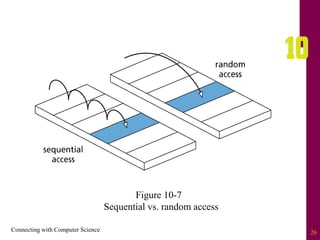
– Sequential data is accessed one chunk after the other
in order
– Random access data can be accessed in any order
Connecting with Computer Science 26
Figure 10-7
Sequential vs. random access
Connecting with Computer Science 27
Sequential Access
• Starts at the beginning of the file and processes to
the end of the file
– Writing process is very fast because new data is
added to the end of a file
– Inserting, deleting, or modifying data can be very
slow
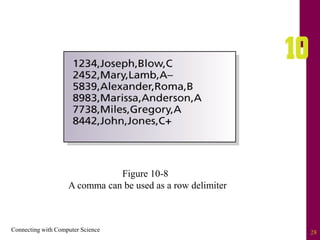
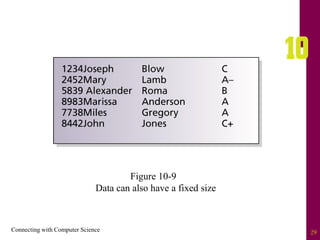
• Can store data in rows like a database record
– Rows can have field delimiters or specify fixed sizes
for each field
Connecting with Computer Science 28
Figure 10-8
A comma can be used as a row delimiter
Connecting with Computer Science 29
Figure 10-9
Data can also have a fixed size
Connecting with Computer Science 30
Random Access
• Provides faster access to large amounts of data
• Stores fixed length records (relative records)
– Can mathematically calculate the position of the
record on the disk surface
• Can update records in place
• May waste disk space if a record has partial or no
data
• Works well when a sequential record number can
easily identify records
Connecting with Computer Science 31
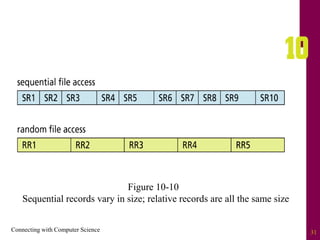
Figure 10-10
Sequential records vary in size; relative records are all the same size
Connecting with Computer Science 32
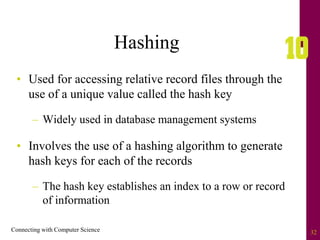
Hashing
• Used for accessing relative record files through the
use of a unique value called the hash key
– Widely used in database management systems
• Involves the use of a hashing algorithm to generate
hash keys for each of the records
– The hash key establishes an index to a row or record
of information
Connecting with Computer Science 33
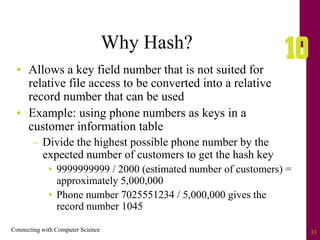
Why Hash?
• Allows a key field number that is not suited for
relative file access to be converted into a relative
record number that can be used
• Example: using phone numbers as keys in a
customer information table
– Divide the highest possible phone number by the
expected number of customers to get the hash key
• 9999999999 / 2000 (estimated number of customers) =
approximately 5,000,000
• Phone number 7025551234 / 5,000,000 gives the
record number 1045
Connecting with Computer Science 34
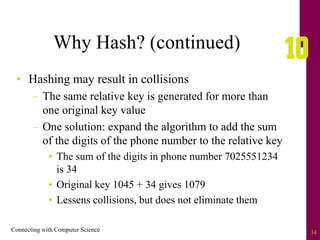
Why Hash? (continued)
• Hashing may result in collisions
– The same relative key is generated for more than
one original key value
– One solution: expand the algorithm to add the sum
of the digits of the phone number to the relative key
• The sum of the digits in phone number 7025551234
is 34
• Original key 1045 + 34 gives 1079
• Lessens collisions, but does not eliminate them
Connecting with Computer Science 35
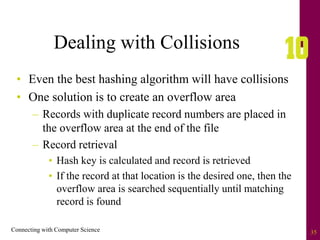
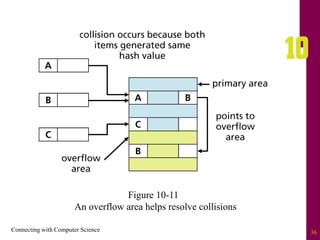
Dealing with Collisions
• Even the best hashing algorithm will have collisions
• One solution is to create an overflow area
– Records with duplicate record numbers are placed in
the overflow area at the end of the file
– Record retrieval
• Hash key is calculated and record is retrieved
• If the record at that location is the desired one, then the
overflow area is searched sequentially until matching
record is found
Connecting with Computer Science 36
Figure 10-11
An overflow area helps resolve collisions
Connecting with Computer Science 37
Hashing and Computer Science
• Having an efficient hashing algorithm is important
to companies that produce database management
systems
• Many different hashing algorithms are used in
computer science
– Encryption and decryption
– Indexing
– Many programming languages have specialized
libraries of built-in hashing routines
Connecting with Computer Science 38
Summary
• A hard drive is an example of a random access
device
– Stores information in tracks and sectors
– Accesses data through read/write heads
• File system: responsible for creating, manipulating,
renaming, copying, and removing files from a
storage device
• Windows uses either FAT or NTFS as the file
system
Connecting with Computer Science 39
Summary (continued)
• FAT keeps track of which files are using specific
clusters
– Vulnerable to disk fragmentation
• NTFS uses a master file table (MFT) to keep track
of the files and directories on a volume
– Used with Windows 2000, XP, and 2003
• NTFS has many advantages over FAT
– Better reliability and security, journaling, file
encryption, and file compression
Connecting with Computer Science 40
Summary (continued)
• Linux can be used with many file systems
– XFS, JFS, ReiserFS, and ext3
• A file contains data that is either binary or text
(ASCII)
• Data is usually stored and accessed either
sequentially or randomly (relative access)
Connecting with Computer Science 41
Summary (continued)
• Hashing is a common method for accessing a
relative file
– Involves a hashing algorithm to generate a hash
key value used to identify a record location
• Collisions occur when the hash key is duplicated
for more than one relative record location
• Goal of hashing
– To create an algorithm that allows a key field to be
converted into a relative record number with a
small number of collisions

chapter10 - File structures.pdf

  • 2.
    Connecting with ComputerScience 2 Objectives • Learn what a file system does • Understand the FAT file system and its advantages and disadvantages • Understand the NTFS file system and its advantages and disadvantages • Compare various file systems
  • 3.
    Connecting with ComputerScience 3 Objectives (continued) • Learn how sequential and random file access work • See how hashing is used • Understand how hashing algorithms are created
  • 4.
    Connecting with ComputerScience 4 What Does a File System Do? • Responsible for creating, manipulating, renaming, copying, and removing files to and from a storage device • Organizes files into common storage units called directories • Keeps track of where files and directories are located • Assists users by relating files and folders to the physical structure of the storage medium
  • 5.
    Connecting with ComputerScience 5 Figure 10-1: Files and directories in a file system are similar to documents and folders in a filing cabinet
  • 6.
    Connecting with ComputerScience 6 Storage Mediums • A hard disk, or drive, is the most common storage medium for a file system – Physically organized into tracks and sectors – Read/write heads move over specified areas of the hard disks to store (write) or retrieve (read) data – Random access device • Can read or write data directly anywhere on the disk • Faster than sequential access, which reads and writes from beginning to end • Makes use of the file system to organize files
  • 7.
    Connecting with ComputerScience 7 Figure 10-3 Hard disk platters are divided into tracks and sectors and read/write heads store and retrieve data
  • 8.
    Connecting with ComputerScience 8 File Systems and Operating Systems • The type of file management system is dependent on the operating system – FAT (file allocation table) • Used from MS-DOS to Windows ME – NTFS (New Technology File System) • Default for Windows NT through Windows 2003 – Unix and Linux support several file systems • XFS, JFS, ReiserFS, ext3, and others – HFS+ • The current Mac OS X file system
  • 9.
    Connecting with ComputerScience 9 FAT • Groups hard drive sectors into clusters – Increases performance by organizing blocks of sectors contiguously • Maintains the relationship between files and clusters being used for the file – Clusters have two entries in the table • Current cluster information • Link to the next cluster or a special code indicating it is the last cluster • Keeps track of writable clusters and bad clusters
  • 10.
    Connecting with ComputerScience 10 Figure 10-4 Sectors are grouped into clusters on a hard disk
  • 11.
    Connecting with ComputerScience 11 FAT (continued) • Organizes the hard drive into – Partition boot record • Contains information on how to access the volume with a file system – Main and backup FAT • If an error occurs in reading the main FAT, the backup is copied to the main to ensure stability – Root directory • Contains entries for every file and folder in the directory
  • 12.
    Connecting with ComputerScience 12 Figure 10-5 Typical FAT file system
  • 13.
    Connecting with ComputerScience 13 Defragmentation • Occurs when files have clusters scattered in different locations on the storage medium rather than in a contiguous location • Windows provides the Disk Defragmenter utility to reorganize clusters contiguously – Improves performance by minimizing movement of the read/write heads – Should be used regularly to ensure system runs at peak performance
  • 14.
    Connecting with ComputerScience 14 Figure 10-6 Files become fragmented as they are stored in noncontiguous clusters; a defragmenting utility moves files to contiguous clusters and improves disk performance
  • 15.
    Connecting with ComputerScience 15 Advantages of FAT • Efficient use of disk space – Does not have to use contiguous space for large files • File names (FAT32) can have up to 255 characters • Easy to undelete files that have been deleted – When a file is deleted, the system places a hex value of E5h in the first position of the file name – File remains on drive and can be undeleted by providing the original letter in the undelete process
  • 16.
    Connecting with ComputerScience 16 Disadvantages of FAT • Overall performance slows down as more files are stored on the partition • Hard drive can quite easily become fragmented • Lack of security – NTFS provides access rights to files and directories • File integrity problems – Lost clusters – Invalid files and directories – Allocation errors
  • 17.
    Connecting with ComputerScience 17 NTFS • Overcomes limitations of the FAT system • Is a “journaling” file system – Keeps track of transaction performed and “rolls back” transactions if errors are found • Uses a master file table (MFT) to store data about every file and directory on the volume – Similar to a database table with records for each file and directory • Uses clusters and reserves blocks of space to allow the MFT to grow
  • 18.
    Connecting with ComputerScience 18 Advantages of NTFS • File access is very fast and reliable • With the MFT, the system can recover from problems without losing significant amounts of data • Security is greatly increased over FAT • File encryption with EFS (Encrypting File System) and file attributes • File compression – Process of reducing file size to save disk space
  • 19.
    Connecting with ComputerScience 19 Disadvantages of NTFS • Large overhead – Not recommended for volumes less than 4 GB • Cannot access NTFS volumes from MS-DOS, Windows 5, or Windows 98
  • 20.
    Connecting with ComputerScience 20 Comparing File Systems • Choosing the correct file system is operating system dependent • NTFS is recommended for Windows systems – Today’s networked environments need security – Today’s machines use tools that require large volumes – If the hard drive is 10 GB or less, FAT is more efficient in handling smaller volumes of data • UNIX/Linux have many file system choices
  • 21.
  • 22.
  • 23.
  • 24.
  • 25.
    Connecting with ComputerScience 25 File Organization • Binary or text – Binary files are computer readable but not human readable (i.e., executable programs, image files) • Faster to access than text files – Text files consist of ASCII or Unicode characters • Easy to view and modify with application programs • Sequential or random access – Sequential data is accessed one chunk after the other in order – Random access data can be accessed in any order
  • 26.
    Connecting with ComputerScience 26 Figure 10-7 Sequential vs. random access
  • 27.
    Connecting with ComputerScience 27 Sequential Access • Starts at the beginning of the file and processes to the end of the file – Writing process is very fast because new data is added to the end of a file – Inserting, deleting, or modifying data can be very slow • Can store data in rows like a database record – Rows can have field delimiters or specify fixed sizes for each field
  • 28.
    Connecting with ComputerScience 28 Figure 10-8 A comma can be used as a row delimiter
  • 29.
    Connecting with ComputerScience 29 Figure 10-9 Data can also have a fixed size
  • 30.
    Connecting with ComputerScience 30 Random Access • Provides faster access to large amounts of data • Stores fixed length records (relative records) – Can mathematically calculate the position of the record on the disk surface • Can update records in place • May waste disk space if a record has partial or no data • Works well when a sequential record number can easily identify records
  • 31.
    Connecting with ComputerScience 31 Figure 10-10 Sequential records vary in size; relative records are all the same size
  • 32.
    Connecting with ComputerScience 32 Hashing • Used for accessing relative record files through the use of a unique value called the hash key – Widely used in database management systems • Involves the use of a hashing algorithm to generate hash keys for each of the records – The hash key establishes an index to a row or record of information
  • 33.
    Connecting with ComputerScience 33 Why Hash? • Allows a key field number that is not suited for relative file access to be converted into a relative record number that can be used • Example: using phone numbers as keys in a customer information table – Divide the highest possible phone number by the expected number of customers to get the hash key • 9999999999 / 2000 (estimated number of customers) = approximately 5,000,000 • Phone number 7025551234 / 5,000,000 gives the record number 1045
  • 34.
    Connecting with ComputerScience 34 Why Hash? (continued) • Hashing may result in collisions – The same relative key is generated for more than one original key value – One solution: expand the algorithm to add the sum of the digits of the phone number to the relative key • The sum of the digits in phone number 7025551234 is 34 • Original key 1045 + 34 gives 1079 • Lessens collisions, but does not eliminate them
  • 35.
    Connecting with ComputerScience 35 Dealing with Collisions • Even the best hashing algorithm will have collisions • One solution is to create an overflow area – Records with duplicate record numbers are placed in the overflow area at the end of the file – Record retrieval • Hash key is calculated and record is retrieved • If the record at that location is the desired one, then the overflow area is searched sequentially until matching record is found
  • 36.
    Connecting with ComputerScience 36 Figure 10-11 An overflow area helps resolve collisions
  • 37.
    Connecting with ComputerScience 37 Hashing and Computer Science • Having an efficient hashing algorithm is important to companies that produce database management systems • Many different hashing algorithms are used in computer science – Encryption and decryption – Indexing – Many programming languages have specialized libraries of built-in hashing routines
  • 38.
    Connecting with ComputerScience 38 Summary • A hard drive is an example of a random access device – Stores information in tracks and sectors – Accesses data through read/write heads • File system: responsible for creating, manipulating, renaming, copying, and removing files from a storage device • Windows uses either FAT or NTFS as the file system
  • 39.
    Connecting with ComputerScience 39 Summary (continued) • FAT keeps track of which files are using specific clusters – Vulnerable to disk fragmentation • NTFS uses a master file table (MFT) to keep track of the files and directories on a volume – Used with Windows 2000, XP, and 2003 • NTFS has many advantages over FAT – Better reliability and security, journaling, file encryption, and file compression
  • 40.
    Connecting with ComputerScience 40 Summary (continued) • Linux can be used with many file systems – XFS, JFS, ReiserFS, and ext3 • A file contains data that is either binary or text (ASCII) • Data is usually stored and accessed either sequentially or randomly (relative access)
  • 41.
    Connecting with ComputerScience 41 Summary (continued) • Hashing is a common method for accessing a relative file – Involves a hashing algorithm to generate a hash key value used to identify a record location • Collisions occur when the hash key is duplicated for more than one relative record location • Goal of hashing – To create an algorithm that allows a key field to be converted into a relative record number with a small number of collisions