Presented by
SHABEER ISMAEEL
UMAR JAN FAROOOQ
MSCIT
CENTRAL UNIVERSITY OF
KASHMIR
It is a systematic attempt to reveal the presence of errors (to
"falsify" system)
It is the process used to identify the correctness,
completeness and quality of developed computer software.
It is the process of executing a program/application under
positive and negative conditions by manual or automated
means. It checks for the :-
 Specification
 Functionality
 Performance
TESTING
OBJECTIVES
Uncover as many as errors (or bugs) as possible in a given
product.
Demonstrate a given software product matching its requirement
specifications.
Validate the quality of a software testing using the minimum cost
and efforts.
Generate high quality test cases, perform effective tests, and
issue correct and helpful problem reports.
Installation Testing
 Installation testing is also called as “Implementation
Testing”.
 Installation testing is one of the most important and
interesting part of software testing life cycle.
 Installation is the first user’s interaction with your
product.
 It is very important to make sure that user does not
face any difficulties while installing the software.
 Installation testing is like introducing a guest in your
home. The new guest should be properly introduced
to all the family members in order to feel him
comfortable.
---Few points that we need to check in the
prior to Installation testing include:
 Installation should be run at default location & it should present to
user with default location with user can able to change the default
location.
 Verify that user should able to install software from different
location like over network, online installation, installation from CD
etc.
 Verify to check working of Installer.exe is executing smoothly on
clean state.
 Verify to check is the Installer.exe is calculating the disk space
needed to successfully install the application prior to install the
application.
 Verify if the Interactive installation, GUI screen presented to user
& user needs to provide input parameters in installation.
 Verify that after successful installation of software is it working as
per mention in specification document & meet user needs.
 Upon un-installation of software application check for the all
previously installed files and registry entries are removed or not.
 Verify that is user able to uninstall or repair the software
application.
---If your installation is successful on the new system then
customer will be definitely happy but what if things are completely
opposite.
---If installation fails then our program will not work on that system
not only this but can leave user’s system badly damaged. User
might require to reinstall the full operating system.
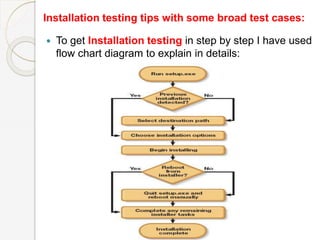
Installation testing tips with some broad test cases:
 To get Installation testing in step by step I have used
flow chart diagram to explain in details:
1) Install Full Version Of Application: In case if you upgrading
the application or previously installed a basic version now installing
the full version on same path then system should allow you to install
full version application without any error. Before installing newer
version it should display a message on GUI saying old version is
detected & do you want to continue.
2) Automate testing efforts: The flow chart is useful to create the
automated scripts, using this flow chart you can easily make out the
automated script for installation testing.
3) Required Disk Space check in installation: This is most
critical scenario in the installation testing. The Disk space checking
is done using automated and manual scripts.
If script is prompting required disk space 1MB, then make sure
exactly 1MB is used or whether more disk space utilized during
installation. If yes flag this as error.
Test disk space requirement on different file system format. Like
FAT16 , NTFS or FAT32 file systems.
4) Use of Distributed Testing Environment: To execute test cases
effectively you can use of distributed testing environment.
Distributed environment simply save your time and you can
effectively manage all the different test cases from a single machine.
The good approach for this is to create a master machine, which will
drive different slave machines on network. You can start installation
simultaneously on different machine from the master system.
5) Automate the check of files installed after installation: You
can use automated script to check that all required files got installed
successfully. So you can use this script for checking completeness of
installed application.
In manual methods you can check free disk space available on drive
before installation and disk space reported by installer script to check
whether installer is calculating and reporting disk space accurately.
6) Confirm for registry changes after installation: You have to
check for registry changes after the installation of software. This is to
check whether expected changes are reflected in registry files. In the
market many registry checking software’s are available for free.
7) Negative testing in Installation Testing: Intensely try to break
the installation process to check the behavior of application under
such condition. Such negative test cases should be executed on
every step in Installation testing.
The most important check is to confirm that whether system
recovers to its original state without any issues or not.
Also check system behavior installation in low disk space
conditions.
8) Uninstallation testing: You should also check for un-install
testing to check whether the user is able to uninstall the application
without any error & removing all folders & files relate to installation.
Also need to confirm that it does not impact the other working
features in the system which was previously working fine.
THANK YOU

Installation testing

  • 1.
    Presented by SHABEER ISMAEEL UMARJAN FAROOOQ MSCIT CENTRAL UNIVERSITY OF KASHMIR
  • 2.
    It is asystematic attempt to reveal the presence of errors (to "falsify" system) It is the process used to identify the correctness, completeness and quality of developed computer software. It is the process of executing a program/application under positive and negative conditions by manual or automated means. It checks for the :-  Specification  Functionality  Performance TESTING
  • 3.
    OBJECTIVES Uncover as manyas errors (or bugs) as possible in a given product. Demonstrate a given software product matching its requirement specifications. Validate the quality of a software testing using the minimum cost and efforts. Generate high quality test cases, perform effective tests, and issue correct and helpful problem reports.
  • 4.
    Installation Testing  Installationtesting is also called as “Implementation Testing”.  Installation testing is one of the most important and interesting part of software testing life cycle.  Installation is the first user’s interaction with your product.  It is very important to make sure that user does not face any difficulties while installing the software.  Installation testing is like introducing a guest in your home. The new guest should be properly introduced to all the family members in order to feel him comfortable.
  • 5.
    ---Few points thatwe need to check in the prior to Installation testing include:  Installation should be run at default location & it should present to user with default location with user can able to change the default location.  Verify that user should able to install software from different location like over network, online installation, installation from CD etc.  Verify to check working of Installer.exe is executing smoothly on clean state.  Verify to check is the Installer.exe is calculating the disk space needed to successfully install the application prior to install the application.  Verify if the Interactive installation, GUI screen presented to user & user needs to provide input parameters in installation.
  • 6.
     Verify thatafter successful installation of software is it working as per mention in specification document & meet user needs.  Upon un-installation of software application check for the all previously installed files and registry entries are removed or not.  Verify that is user able to uninstall or repair the software application. ---If your installation is successful on the new system then customer will be definitely happy but what if things are completely opposite. ---If installation fails then our program will not work on that system not only this but can leave user’s system badly damaged. User might require to reinstall the full operating system.
  • 7.
    Installation testing tipswith some broad test cases:  To get Installation testing in step by step I have used flow chart diagram to explain in details:
  • 8.
    1) Install FullVersion Of Application: In case if you upgrading the application or previously installed a basic version now installing the full version on same path then system should allow you to install full version application without any error. Before installing newer version it should display a message on GUI saying old version is detected & do you want to continue. 2) Automate testing efforts: The flow chart is useful to create the automated scripts, using this flow chart you can easily make out the automated script for installation testing. 3) Required Disk Space check in installation: This is most critical scenario in the installation testing. The Disk space checking is done using automated and manual scripts. If script is prompting required disk space 1MB, then make sure exactly 1MB is used or whether more disk space utilized during installation. If yes flag this as error. Test disk space requirement on different file system format. Like FAT16 , NTFS or FAT32 file systems.
  • 9.
    4) Use ofDistributed Testing Environment: To execute test cases effectively you can use of distributed testing environment. Distributed environment simply save your time and you can effectively manage all the different test cases from a single machine. The good approach for this is to create a master machine, which will drive different slave machines on network. You can start installation simultaneously on different machine from the master system. 5) Automate the check of files installed after installation: You can use automated script to check that all required files got installed successfully. So you can use this script for checking completeness of installed application. In manual methods you can check free disk space available on drive before installation and disk space reported by installer script to check whether installer is calculating and reporting disk space accurately. 6) Confirm for registry changes after installation: You have to check for registry changes after the installation of software. This is to check whether expected changes are reflected in registry files. In the market many registry checking software’s are available for free.
  • 10.
    7) Negative testingin Installation Testing: Intensely try to break the installation process to check the behavior of application under such condition. Such negative test cases should be executed on every step in Installation testing. The most important check is to confirm that whether system recovers to its original state without any issues or not. Also check system behavior installation in low disk space conditions. 8) Uninstallation testing: You should also check for un-install testing to check whether the user is able to uninstall the application without any error & removing all folders & files relate to installation. Also need to confirm that it does not impact the other working features in the system which was previously working fine.
  • 11.